> ## Documentation Index
> Fetch the complete documentation index at: https://auth0.com/ai/docs/llms.txt
> Use this file to discover all available pages before exploring further.
# Call Third-Party APIs on User's Behalf
> Enable your AI agent to call third-party APIs on the user's behalf with Token Vault.
A third-party API is owned and operated by an external organization, such as Google, Slack, or GitHub.
The user can grant your AI agent permission to access a third-party API on their behalf using [Token Vault](https://auth0.com/docs/secure/call-apis-on-users-behalf/token-vault). When a user connects with an external provider and authorizes access, Auth0 stores the provider's tokens in Token Vault. The agent then performs a token exchange to retrieve an external access token scoped to the permissions the user has granted.
## How it works
Token Vault supports the following token exchange patterns depending on your application type.
### Refresh token exchange
Use the refresh token exchange when your application can obtain Auth0 refresh tokens, such as web, mobile, or native applications. This allows the agent to call external APIs even when the user is not actively using the application.
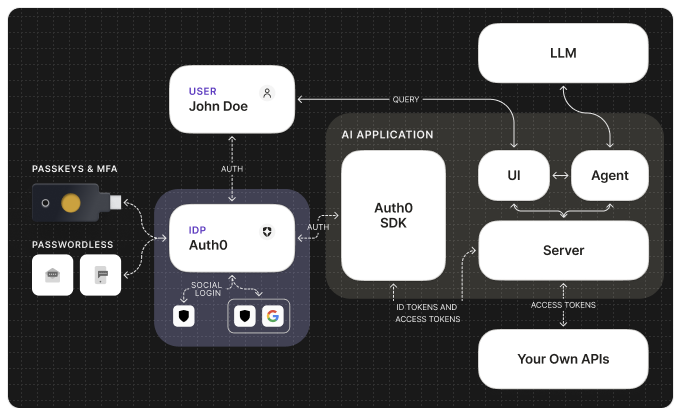
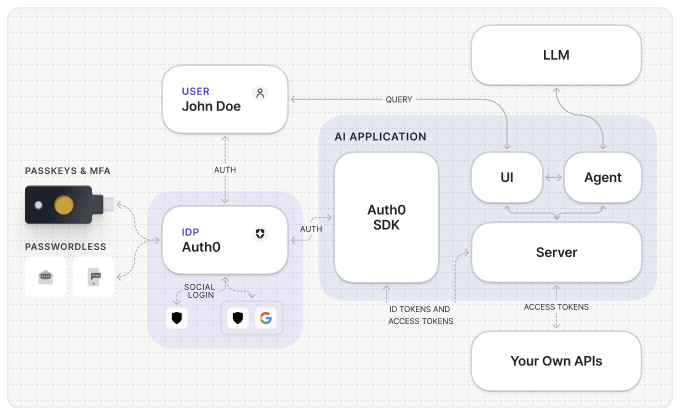 The user logs in and authorizes access to an external provider (e.g., Google) via the [Connected Accounts flow](https://auth0.com/docs/secure/call-apis-on-users-behalf/token-vault/connected-accounts-for-token-vault). Auth0 stores the provider's access and refresh tokens in Token Vault.
When the agent needs to call the external API, it performs a refresh token exchange — passing the Auth0 refresh token to the `/oauth/token` endpoint to retrieve the external provider's access token from Token Vault.
Auth0 validates the refresh token, locates the stored external token, and returns the external provider's access token to the agent.
The agent uses the external access token to call the third-party API on the user's behalf and returns the response to the user.
If your application uses [Organizations](https://auth0.com/docs/manage-users/organizations), authenticate the user with the target organization before authorizing the external provider through Connected Accounts. Organizations determine the session context, but Token Vault still exchanges tokens for the individual signed-in user.
### Access token exchange
Use the access token exchange when your application cannot obtain refresh tokens, such as Single-Page Applications (SPAs) or headless agents and CLIs. The backend API performs the token exchange using a Custom API Client linked to itself.
The user logs in and authorizes access to an external provider (e.g., Google) via the [Connected Accounts flow](https://auth0.com/docs/secure/call-apis-on-users-behalf/token-vault/connected-accounts-for-token-vault). Auth0 stores the provider's access and refresh tokens in Token Vault.
When the agent needs to call the external API, it performs a refresh token exchange — passing the Auth0 refresh token to the `/oauth/token` endpoint to retrieve the external provider's access token from Token Vault.
Auth0 validates the refresh token, locates the stored external token, and returns the external provider's access token to the agent.
The agent uses the external access token to call the third-party API on the user's behalf and returns the response to the user.
If your application uses [Organizations](https://auth0.com/docs/manage-users/organizations), authenticate the user with the target organization before authorizing the external provider through Connected Accounts. Organizations determine the session context, but Token Vault still exchanges tokens for the individual signed-in user.
### Access token exchange
Use the access token exchange when your application cannot obtain refresh tokens, such as Single-Page Applications (SPAs) or headless agents and CLIs. The backend API performs the token exchange using a Custom API Client linked to itself.
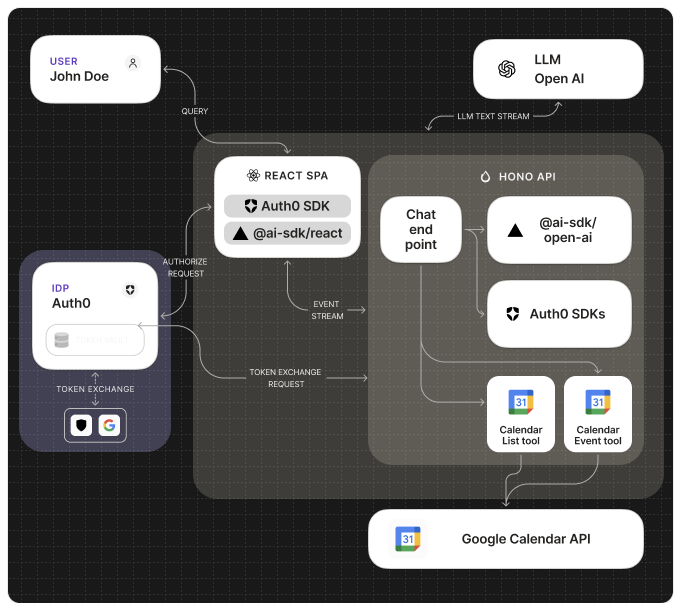
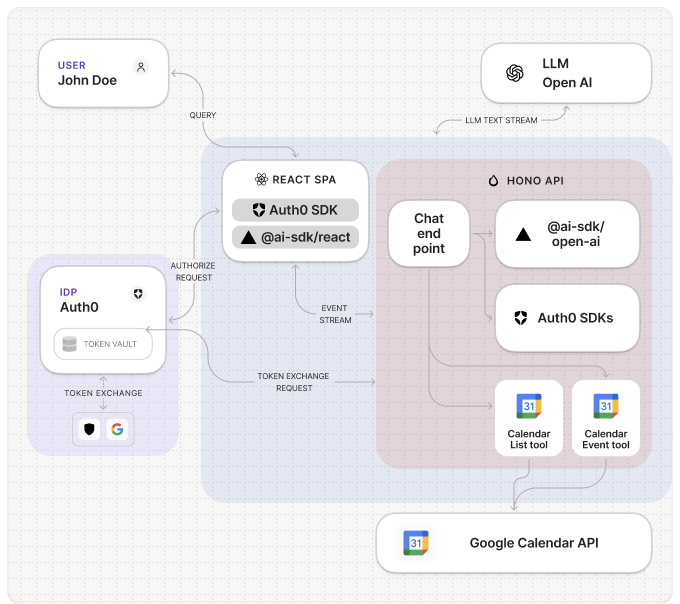 The user logs in and authorizes access to an external provider via the [Connected Accounts flow](https://auth0.com/docs/secure/call-apis-on-users-behalf/token-vault/connected-accounts-for-token-vault). Auth0 stores the provider's tokens in Token Vault.
The SPA passes the Auth0 access token in the `Authorization` header when calling the backend API. The backend validates the token's signature, issuer, audience, expiration, and scopes.
The backend uses a Custom API Client — configured with the same identifier as the backend API — to exchange the Auth0 access token for the external provider's access token via the `/oauth/token` endpoint.
Auth0 validates the request, locates the stored external token, and returns the external provider's access token to the backend.
The backend uses the external access token to call the third-party API on the user's behalf and returns the response to the user.
## Connections
Auth0 supports popular social and enterprise external providers such as Google, GitHub, Slack, and more. Once the user logs in and authorizes access to the external provider, their account is added to Auth0 as a Token Vault connection.
With Token Vault, AI agents can securely access external (third-party) APIs through authorized connections to perform tasks on the user's behalf, such as:
* Reading a user's Google calendar to schedule a meeting.
* Accessing a user's Microsoft documents to summarize them.
* Connecting to a CRM like Salesforce to retrieve customer information.
## Get started
To begin using Token Vault with your AI agents, refer to the following resources:
### Quickstarts
### Guides
### Sample Apps
}
horizontal
/>
}
horizontal
/>
}
horizontal
/>
}
horizontal
/>
}
horizontal
/>
### Learn more
The user logs in and authorizes access to an external provider via the [Connected Accounts flow](https://auth0.com/docs/secure/call-apis-on-users-behalf/token-vault/connected-accounts-for-token-vault). Auth0 stores the provider's tokens in Token Vault.
The SPA passes the Auth0 access token in the `Authorization` header when calling the backend API. The backend validates the token's signature, issuer, audience, expiration, and scopes.
The backend uses a Custom API Client — configured with the same identifier as the backend API — to exchange the Auth0 access token for the external provider's access token via the `/oauth/token` endpoint.
Auth0 validates the request, locates the stored external token, and returns the external provider's access token to the backend.
The backend uses the external access token to call the third-party API on the user's behalf and returns the response to the user.
## Connections
Auth0 supports popular social and enterprise external providers such as Google, GitHub, Slack, and more. Once the user logs in and authorizes access to the external provider, their account is added to Auth0 as a Token Vault connection.
With Token Vault, AI agents can securely access external (third-party) APIs through authorized connections to perform tasks on the user's behalf, such as:
* Reading a user's Google calendar to schedule a meeting.
* Accessing a user's Microsoft documents to summarize them.
* Connecting to a CRM like Salesforce to retrieve customer information.
## Get started
To begin using Token Vault with your AI agents, refer to the following resources:
### Quickstarts
### Guides
### Sample Apps
}
horizontal
/>
}
horizontal
/>
}
horizontal
/>
}
horizontal
/>
}
horizontal
/>
### Learn more