---
title: "SaaS App Federated with Office 365"
description: "Auth0 supports many common identity scenarios. One of them is a SaaS app being used by companies with their own identity systems."
authors:
- name: "Eugenio Pace"
url: "https://auth0.com/blog/authors/eugenio-pace/"
date: "Feb 28, 2013"
category: "Identity & Security,Identity,SSO"
tags: ["video", "microsoft"]
url: "https://auth0.com/blog/SaaS-App-Federated-with-Office-365/"
---
# SaaS App Federated with Office 365
Auth0 supports many common identity scenarios. One of them is a SaaS app being used by companies with their own identity systems. This is the classic federation scenario.
To illustrate this, lets start by introducing the characters:
- Fabrikom is a small business, using Office365
- [MDOCS](http://mdocs.io) is a document sharing app hosted in the cloud
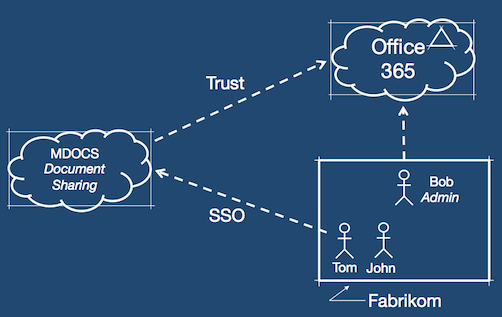
There are four challenges here for _MDOCS_:
1. How to simplify the __on-boarding__ of new customers. This involves automating the trust relationship between the app and their customers' identity systems (Office365 in this example)
2. How to do __Single-Sign-On__ so customers can use their Office365 credentials, but mdocs being a multi-tenant app, how to easily accept other platforms like Google Apps or Active Directory.
3. How to __query the user directory__ when there is one, so mdocs can implement a "people picker" that is relevant to the organization using the app.
4. How to keep track of who uses what, __for access audit__.
###1. Self-Service on-boarding:
In this first video, you will see Bob (admin @ Fabrikom), connecting _MDOCS_ to their instance of Office 365:
###2. Single-Sign-On, Directory Query:
In this second video, you will see Tom (an employee @ Fabrikom) that logs into _MDOCS_ using his Office 365 credentials. He accomplishes this through the __Auth0 Login Widget__.
Then he creates a document and shares it with a colleage John. The "people picker" UI is using __Auth0 API__ to query users in Fabrikom's user directory (Office 365 in this case).
###3 Dashboard:
In this last video, you will see an _MDOCS_ administrator using Auth0 dashboard. He explores all connections (social and enterprise). Notice the Fabrikom connection created automatically in the on-boarding phase. He then browses the __Auth0 API Explorer__ and uses it to retrieve all Fabrikom users (returned as a JSON array). This API call is in essence the same used in _MDOCS_ on the "people picker". The __Auth0 API Explorer__ allows you to explore the API capabilities without the need to write any code.
[Try Auth0 yourself!](https://auth0.com)