---
title: "Angular 9's Best Hidden Feature: Strict Template Checking"
description: "Find and report more errors than ever with Angular 9's Ivy compiler, strict template checking."
authors:
- name: "John Papa"
url: "https://auth0.com/blog/authors/john-papa/"
date: "Mar 10, 2020"
category: "Developers,Whats New,Ivy Compiler"
tags: ["angular", "compiler", "ivy", "angular9"]
url: "https://auth0.com/blog/angular-9s-best-hidden-feature-strict-template-checking/"
---
# Angular 9's Best Hidden Feature: Strict Template Checking
We have likely read about some of the benefits of the Ivy compiler and runtime. It's faster. It makes smaller bundle sizes. And it has [many other great new features that are introduced in Angular 9](https://auth0.com/blog/angular-9-whats-new/). Yet one of the most compelling and useful features is one we don't hear as often.
What if Angular could find bugs in our existing code? Hidden bugs that we may not notice. Subtle bugs that could cause problems? [Angular 9](https://angular.io) and the [Ivy](https://angular.io/guide/ivy) compiler do just that.
The new feature is known as strict template checking. Angular has been checking expressions and bindings within the templates of our applications for years. But with Angular 9, it finds and reports more errors than ever. It is pretty cool that we could have bugs in our templates right now, and this new feature reports them to us so we can fix them.
Seeing is believing, so let's see some examples. We'll kick things off using Angular 8, and we'll progress to Angular 9. We'll also adjust some compilation settings. These differences help us see where Angular 9 can detect additional errors that Angular 8 could not.
## Compiling with Angular 8
Let's start with an example that we can all relate to, using Angular 8.
We use a lot of `*ngFor` directives in our templates to iterate over arrays of objects. We reference an array and display the details of each object in the array in a template. The following component displays a list of heroes in the template.
``` html
// app.component.ts
import { Component } from "@angular/core";
interface Hero {
id: number;
name: string;
}
@Component({
selector: "app-root",
template: `
{{ title }}
{{ hero.Id }} {{ hero.name }}
`
})
export class AppComponent {
heroes: Hero[] = [
{ id: 10, name: "Landon" },
{ id: 20, name: "Ella" },
{ id: 30, name: "Madelyn" },
{ id: 40, name: "Haley" }
];
trackByHero(hero: Hero) { return hero.id; }
}
```
We're going to explore the `fullTemplateTypeCheck` setting in our `tsconfig.json` file, which, by default for our Angular 8 app, is set to `true`.
```json
{
"compileOnSave": false,
"compilerOptions": {
…
},
"angularCompilerOptions": {
"fullTemplateTypeCheck": true,
"strictInjectionParameters": true
}
}
```
When we build this application with Angular 8 using `ng build` it compiles successfully. It even serves the application in the browser when we run `ng serve --open`.
Now we can build the app with Angular 8 using AOT by running the command `ng build --prod`. Now we see Angular is reporting an error that the `title` does not exist in our component. When both AOT and the `fullTemplateTypeCheck` setting set to true, Angular can detect when we refer to a model that is missing from our component.
```text
ERROR in src/app/app.component.ts.AppComponent.html(3,12): Property' title' does not exist on type 'AppComponent'.
```
This error message is clear, but what is that filename `app.component.ts.AppComponent.html`? We can guess, correctly, that it means the `app.component.ts` file. But it would be nice if the filename was clear. We could fix this error now, but let's see what happens when we compile with Angular 9.
## Angular 9’s No Strict Templates
After upgrading to Angular 9 and its Ivy compiler, we can use a new setting in `tsconfig.json` for strict template checks. We'll open the file `tsconfig.json` and locate the `angularCompilerOptions` section. Let’s remove the `fullTemplateTypeCheck` entry and replace it with `strictTemplates: false`. Our `tsconfig.json` file should now have the following settings for the `angularCompilerOptions` with the strict templates checked disabled.
```json
{
"compileOnSave": false,
"compilerOptions": {
…
},
"angularCompilerOptions": {
"strictTemplates": false,
"strictInjectionParameters": true
}
}
```
When we build this application with Angular 9 using `ng build`, we immediately see an error for the missing `title` model. Also, the error is a little easier to read, as the Ivy compiler reports the file where the bug occurs.
```text
ERROR in src/app/app.component.ts:12:15 - error TS2339: Property 'title' does not exist on type 'AppComponent'.
```
We only had to run `ng build` to see this error with Angular 9, while in Angular 8 we did not see this error message when we ran `ng build`. This is because the AOT (Ahead of Time) compilation does not run in Angular 8 unless we explicitly tell it to run or we run `ng build --prod`. AOT compilation occurs with Angular 9 in `ng build` and `ng build --prod`. Having the AOT compilation in `ng build` is convenient because in Angular 8 we could have errors while we develop our application until we run a production build. Angular 9 tells us right away if we have this type of error.
Let's fix our error by adding a title model to our component. We'll add the following code inside of the `AppComponent`:
```javascript
title = 'Heroes';
```
Now we can build successfully with `ng build` with Angular 9. So to recap what just happened, we upgraded to Angular 9 and disabled strict template checks, and the Ivy compiler tells us errors that were missed in a standard `ng build` in Angular 8.
Now let's ramp up the stakes a bit and see if we can get Angular 9 to show us any more hidden errors.
## Strict Templates
Let's change the setting in `tsconfig.json` to enable strict template checks. We'll open the file `tsconfig.json` and locate the `angularCompilerOptions` section. Let’s remove the `fullTemplateTypeCheck` entry and replace it with `strictTemplates: true`. Our `tsconfig.json` file should now have the following settings for the `angularCompilerOptions` with the strict templates checked enabled.
```json
{
"compileOnSave": false,
"compilerOptions": {
…
},
"angularCompilerOptions": {
"strictTemplates": true,
"strictInjectionParameters": true
}
}
```
Now when we build and serve the application with `ng build` we are presented with a series of errors, as shown in the following image:
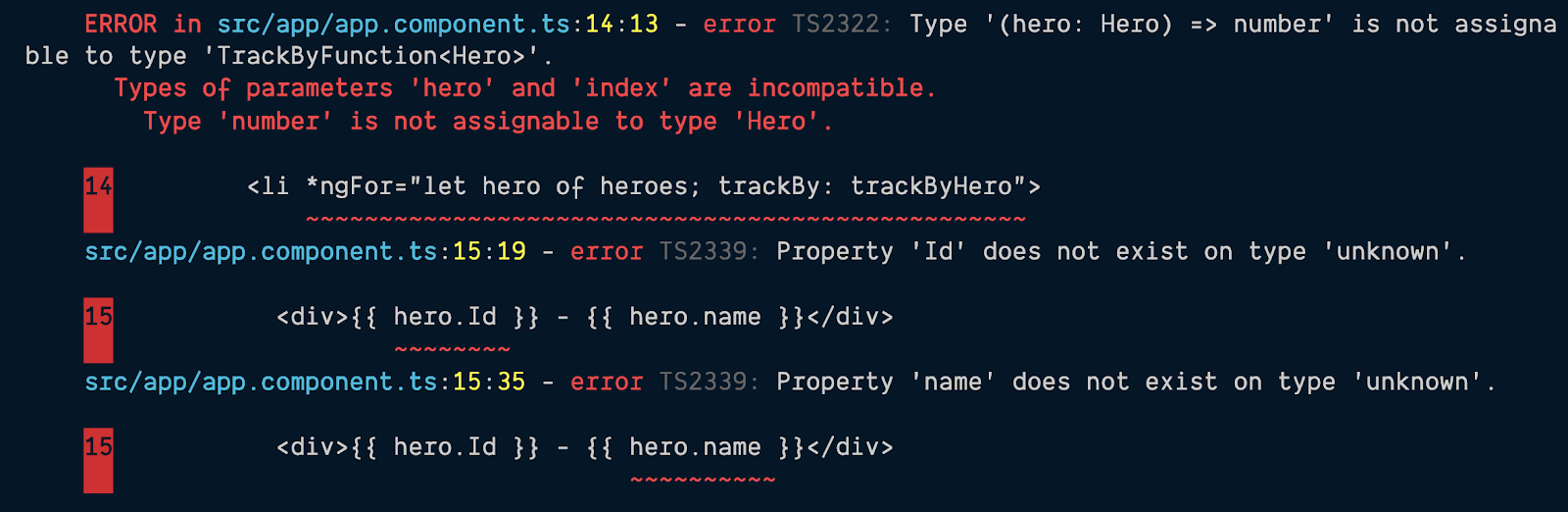
If we tackle these one-by-one, we can see that the first error is complaining that something is wrong with the `*ngFor` statement. The real hint is how it references `TrackByFunction`. Our function `trackByHero` only accepts a `hero` parameter. However, the implementation of a `TrackByFunction` states that it should accept an index and a type T. This is why it is saying that `hero` and `index` are incompatible because we did not pass the `index`.
We can fix this error by refactoring our function to look like the following code:
```javascript
// Old code
// trackByHero(hero: Hero) {
// return hero.id;
// }
// Refactored code
trackByHero(index: number, hero: Hero): number {
return hero.id;
}
```
When we run `ng build` after refactoring the `trackByHero` function, we see fewer error messages.

This last error reports that the property `Id` does not exist on the `hero` model. After closer examination in our component's code, we can see this is indeed an error. The code should be binding to `hero.id`. This minor typo was not detected in Angular 8 and can only be detected in Angular 9 with strict templates!
Now when we refactor the template to bind to `hero.id` and run `ng build` once again, we have success!
Angular 9's Ivy compiler and the strict template check found these errors that Angular 8 could not detect.
## What Happened?
Angular 8 does check the templates for errors, but it had gaps in what it could not detect. For example, when using AOT and the `fullTemplateTypeCheck` setting, Angular 8 could detect missing models from a component. But it could not detect the properties of those models. This is why the properties of the `hero` could not be verified by Angular 8.
We explored a few different scenarios, so let's break this down a bit:
* When `fullTemplateTypeCheck` was false, Angular didn't check the bindings inside the `*ngFor` template. So the `
`'s bindings did not get checked.
* When `fullTemplateTypeCheck` was true, Angular checked that the `hero` is a valid model on the component, but it assumes the model is of type `any`.
* When `strictTemplates` is true, Angular 9 and the Ivy compiler verify that `hero` is a valid model of type `Hero`, and that the properties on that model (`hero.id` and `hero.name`) are also valid.
## Should We Use Strict Templates Now?
If we upgrade from Angular 8 to Angular 9 using [this excellent upgrade guide](https://update.angular.io/), the `strictTemplates` setting isn't applied to our app. Wait, if this helps our app detect bugs, why wouldn't we want it? Imagine how we might react if our app, which seems to work fine right now, produced compilation errors after an upgrade?
By making this a manual change that we must opt into for Angular 9, we control the experience, and we control when we decide to ask Angular to look for template bugs that may exist.
> Note: The Angular team intends to set `strictTemplates` to true in the next version, Angular 10.
If we want to get to a point where we have strict templates slowly, there is a way we can do this more gradually. There are several additional checks that Angular 9's Ivy compiler can check for us. We can use [this guide in the Angular docs to gradually get to `strictTemplates`](https://angular.io/guide/template-typecheck#troubleshooting-template-errors) by turning on individual strict flags and fix newly revealed errors until none are remaining.
Whatever is decided, it is nice that Angular 9 and its Ivy compiler detect more errors than ever before, and we can gradually fix them at our own pace without disrupting our workflow.
## Other Angular Resources
If you want to learn more about these features, check out these great resources:
* [Angular 9 Template Type Checking](https://angular.io/guide/template-typecheck)
* [TypeScript configuration](https://angular.io/guide/typescript-configuration)
* [Angular Language Service for Visual Studio Code](https://marketplace.visualstudio.com/items?itemName=Angular.ng-template&wt.mc_id=auth0-blog-jopapa)
---