---
title: "Upcoming Browser Behavior Changes: What Developers Need to Know"
description: "Learn about upcoming changes to browser cookie behavior that may make your web applications incompatible."
authors:
- name: "Filip Skokan"
url: "https://auth0.com/blog/authors/filip-skokan/"
date: "Feb 27, 2020"
category: "Identity & Security,Security,Browser Changes"
tags: ["browser", "cookies", "upcoming changes"]
url: "https://auth0.com/blog/browser-behavior-changes-what-developers-need-to-know/"
---
# Upcoming Browser Behavior Changes: What Developers Need to Know
Are you operating a web application with sessions (e.g. for saving user preferences, shopping carts)? Do you allow users to sign in using identity providers such as Google and Apple, or use solutions such as Auth0?
What do those scenarios have in common? They both rely on cookies to achieve their functionality. What you need to know is that browser cookie behavior changes are rolling out now and may break your user experience. As of February 2020, Google Chrome has started rolling out a change that might not be compatible with your web application, with most other browsers following suit.
## What’s Changing?
In short: browsers are changing their default handling of third-party cookies. Specifically, the change relates to the `SameSite` property on cookies: previous browser behavior allowed cookies without a `SameSite` property to be sent in a third-party context by default, but the changes being implemented will make cookies’ default behavior more restricted.
If you’re not quite sure what this means, this article is definitely for you!
## What Might Be Affected?
Here’s a list of the scenarios that are most likely to be affected by the changes:
- Integrations with Identity Providers using protocols such as SAML 2.0 or OpenID Connect.
- Embedding web application content from a third-party domain.
- Querying APIs from a third-party domain.
_Note: this is not an exhaustive list_.
Let’s look at some of those scenarios in more detail and, in particular, what could break under the new browser behaviors.
### Web Application Sign-In Using Identity Providers
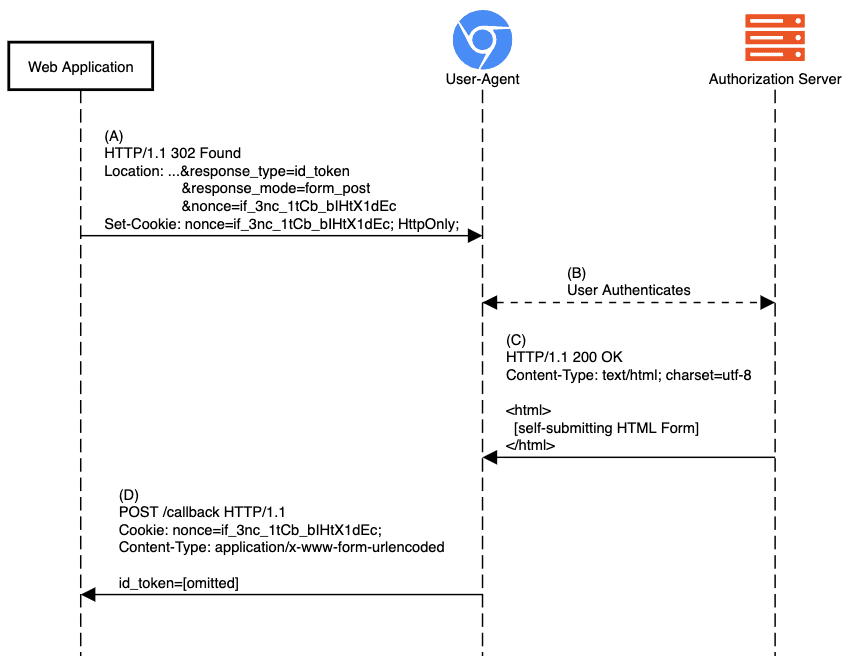
When a web application implements Sign-In using OIDC, it will engage in a series of redirects meant to send the user to authenticate with the provider and come back with proof of authentication. That proof of authentication is represented by the ID Token sent back to the app, as shown in step (D) of the diagram below.
**Before:**
**After:**
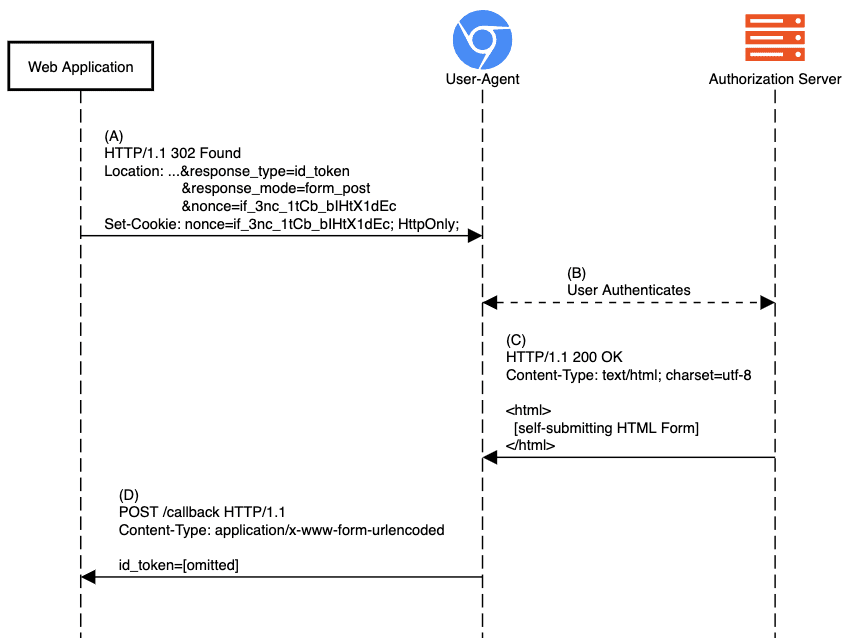
During step (D) in the image above, the web application performs ID Token validation for which it needs information stored in the session. Without any updates to today’s implementations, the cookie carrying the session or authentication request binding info (nonce in the diagram) would no longer be attached to the POST, resulting in the failure of the response validation checks and, ultimately, the inability of the end-user to sign in the app.
Obviously, there are more details, conditions, and nuances to it. We’ll dive into the technicalities as we go along.
## Why Is Google Pushing These Changes?
In short, to provide a more secure default mode of function and to open up possibilities for better privacy controls in the future.
Cookies today, in their default configuration, are the reason behind many web applications’ [_CSRF_]() vulnerabilities. Such a vulnerability is where an HTTP form is submitted from the attacker’s context to an application that uses the attached POST request cookie as a mechanism to identify the end-user’s session and executes a malicious action; e.g. executing a money transfer to the attacker.
The browser updates change the cookies’ default configuration from a less secure model to one which strikes a reasonable balance between security and usability. With the changes applied, the attack above would not work because the HTTP Form POST is done from a different origin and the cookie will, by default, not be attached and the action will fail due to missing authentication.
This change allows developers to be protected by default, but still allows applications to opt in for the less-secure mode, should they need it.
## When Are These Changes Happening?
These changes won’t take place all at once — it depends on when the changes land in your user’s browser. The specific date will depend on the browser vendor, version and release channel they use.
As of February 2020, the major browsers have adopted the changes as follows:
* **Chrome** v80 (released February 4, 2020) has begun enabling the changes to a small subset of users. The rollout will increase over time. Status updates are being tracked on [the Chromium project site](https://www.chromium.org/updates/same-site) and the original feature rollouts were tracked [here](https://www.chromestatus.com/feature/5088147346030592) and [here](https://www.chromestatus.com/feature/5633521622188032).
* **Firefox** has implemented the changes behind a [developer preference flag](https://groups.google.com/forum/#!msg/mozilla.dev.platform/nx2uP0CzA9k/BNVPWDHsAQAJ) and has enabled the feature in Firefox Nightly. Issues found through Nightly are being tracked in a [bug ticket](https://bugzilla.mozilla.org/show_bug.cgi?id=1618610). There is currently no target release version for enabling it by default.
* **Edge** has implemented the changes behind experimental feature flags, and has [announced they will start experimentation on the features in their Dev and Canary channels](https://docs.microsoft.com/en-us/microsoft-edge/web-platform/site-impacting-changes) in version 82. No ETA has been given on enabling the feature by default.
* **Safari** has not signaled adoption yet.
* Support for all other browsers can be tracked using [CanIUse](https://caniuse.com/#feat=mdn-http_headers_set-cookie_samesite_lax_default).
## What to Do?
Reach out to your technical partners, providers, and service operators and ask them if they’re ready for this change. That goes for both services you may be consuming as well as SDKs you’re using to consume them.
If you’re a customer of Auth0, then be sure we’re already executing steps necessary to facilitate this change. Some changes will happen automatically, on Auth0’s side, without requiring any action on yours. Depending on the particular SDK and underlying grant your web app is using to implement Sign-In and/or Authorization, you might need to update to a newer version of the SDK capable of handling the new browser behavior.
Check and update your SDKs periodically, and be on the lookout for any advisories in their README and CHANGELOG as well as your [_Auth0 Dashboard Notifications_](https://support.auth0.com/notifications) for any actions required.
## What Exactly Is This Change?
There’s not a web developer on earth that wouldn’t ever encounter cookies. Cookies, as an HTTP State Management Mechanism, were standardized by [_IETF_](https://www.ietf.org/) all the way back in [_1997_](https://tools.ietf.org/html/rfc2109).
Since then, this mechanism has been evolving ([_2000_](https://tools.ietf.org/html/rfc2965), [_2011_](https://tools.ietf.org/html/rfc6265)) with the latest update being in draft state since [_2016_](https://tools.ietf.org/html/draft-ietf-httpbis-rfc6265bis-03).
Developers are taught, through infinite online material, that cookies will be attached to all requests to their web service by default and that the browser takes care of that. That is only partly true when a cookie attribute called `SameSite` is involved. **Ever since this attribute was introduced through one of the draft updates in 2017, its default value was not breaking existing web services. It was still attaching cookies to all requests that are in scope. That’s what is now [_changing_](https://tools.ietf.org/html/draft-west-cookie-incrementalism-00).**
## What Is `SameSite` Anyway?
`SameSite` is a cookie attribute, defined like so:
> The `SameSite` attribute limits the scope of the cookie such that it will be attached to requests only if those requests are same-site, as defined by the algorithm in Section 5.2 of [_this document_](https://tools.ietf.org/html/draft-ietf-httpbis-rfc6265bis-03).
Other cookie attributes you may already be familiar with include:
- `HttpOnly`: makes the browser attach cookies only to HTTP requests and not be readable using javascript’s `document.cookie` interface.
- `Secure`: makes the browser attach cookies only to a secure context, meaning HTTP over TLS (https).
- `Max-Age` / `Expires`: controls whether cookies are bound to browsing session /dropped when the browser terminates the browsing session/, or are "persistent" /persists browsing session termination/.
Omitting cookies set using the browser’s javascript API, these options are provided by the server with its HTTP responses as part of the `Set-Cookie` header(s). The browser, upon receipt of the response, parses these and maintains its cookie jar.
Here’s how a regular server-side `Set-Cookie` header works.
Here’s a fresh interaction. The end-user requests a page he has not visited before.
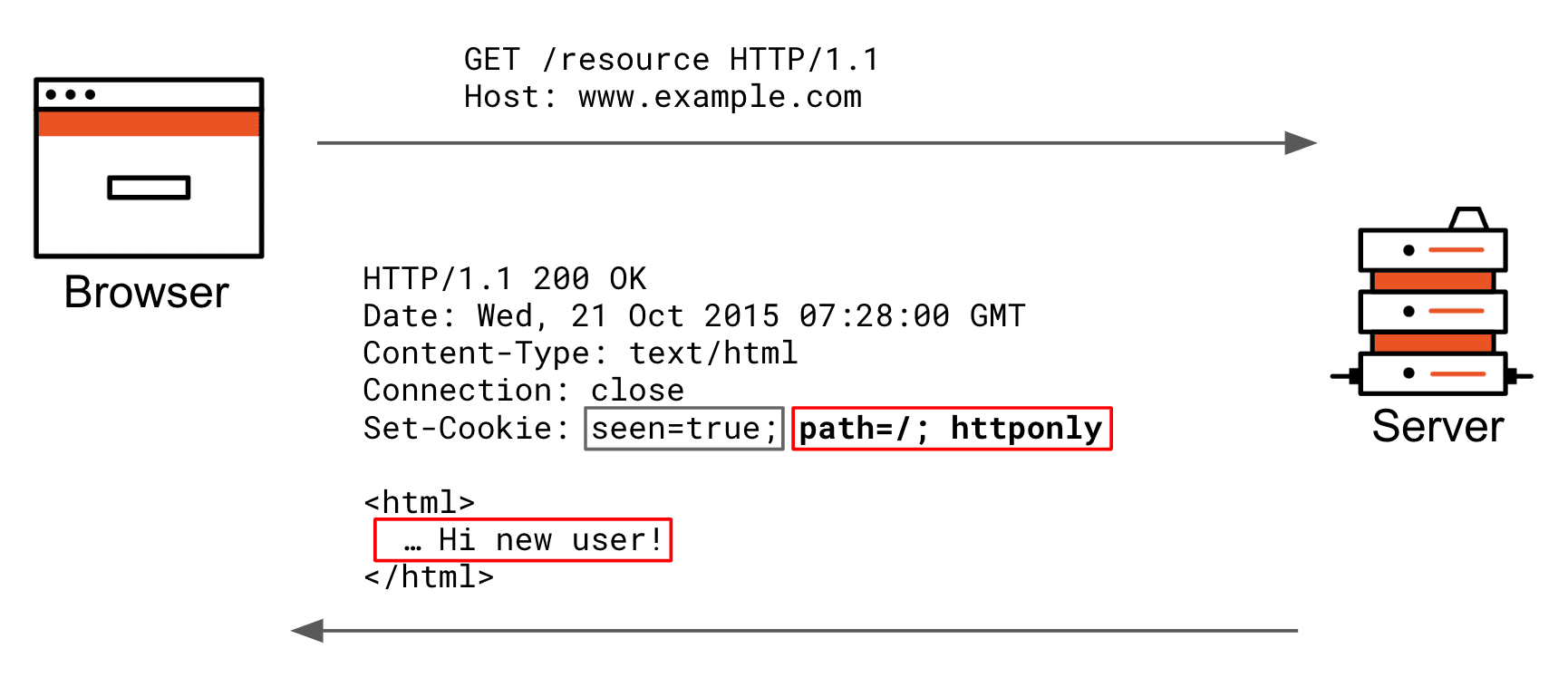
The server wishes to change the way it renders the next time, so it sets a “seen” cookie. The grey part of the set-cookie header is the actual cookie key+value; the red part is all cookie attributes the browser stores internally in its cookie jar to be able to decide later on if it includes the cookie key+value pair in its requests.
Now, let’s make that request again in the same browsing session.
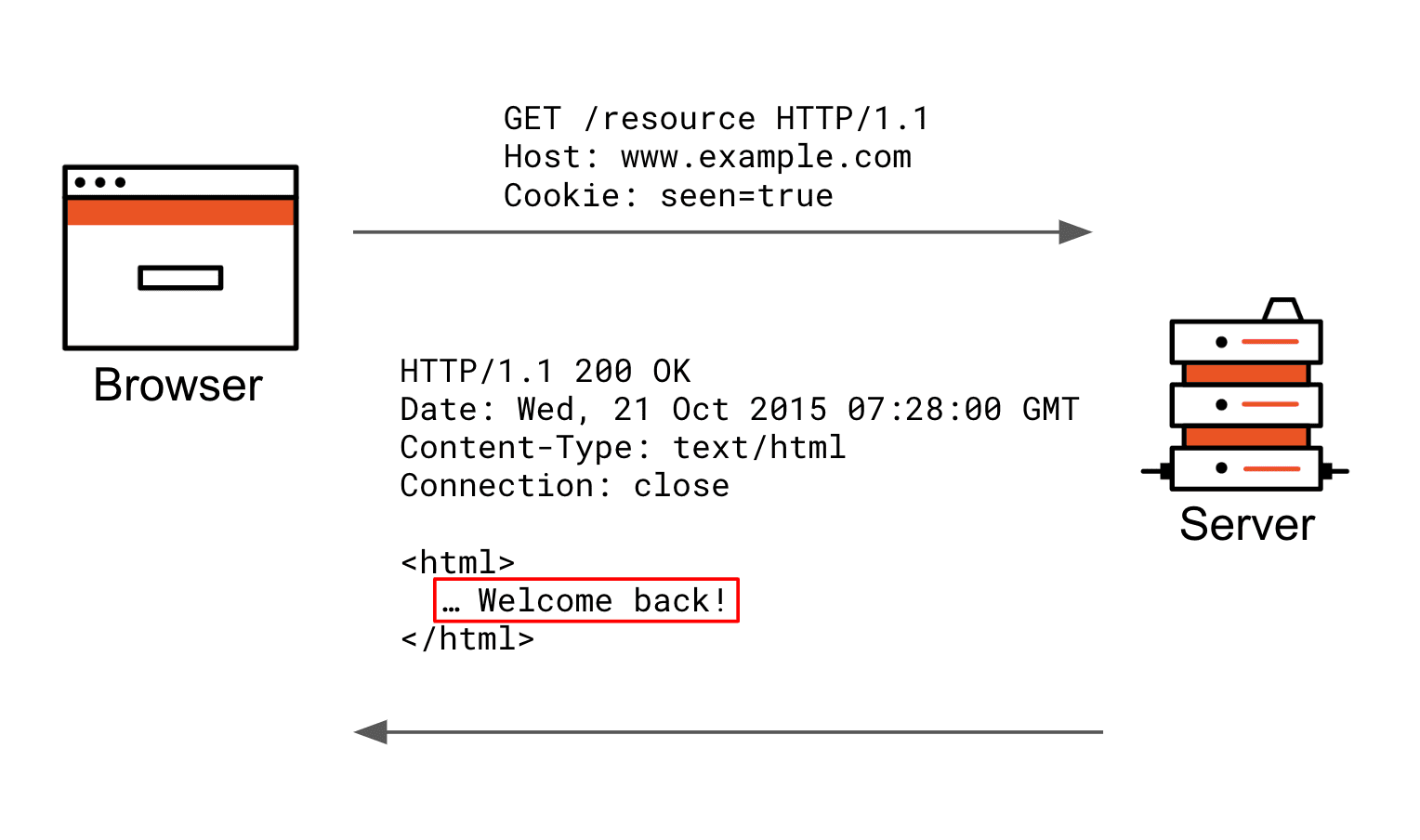
A request is being made to the same server, and since the cookie attributes do not prohibit the “seen” cookie from being sent, it is automatically included as a cookie header in the request. The server can now respond differently based on the fact that such a cookie has been received.
In the example `Set-Cookie` header above `path=/` and `httponly` are cookie attributes, just like `SameSite`, which today [today is important when it comes to incompatibility we’ll look at later] has three defined values:
### SameSite=Strict
The intent behind the `SameSite=Strict` value is CSRF mitigation/protection in strict mode; otherwise, eligible cookies are sent only when the origin (not Origin as defined by [_RFC6454_](https://tools.ietf.org/html/rfc6454)) of the requesting page is the same as one of the resources it is accessing.
This means that when the user navigates a link from another site (e.g. via a link pointing to yours), your cookies do not get attached and therefore any previously established cookie-based sessions are not going to be loaded. It won’t be until the user navigates a link within the origin of your page that the browser attaches the cookies.
Here is the scenario in which `Strict` cookies are not vetted from being attached.
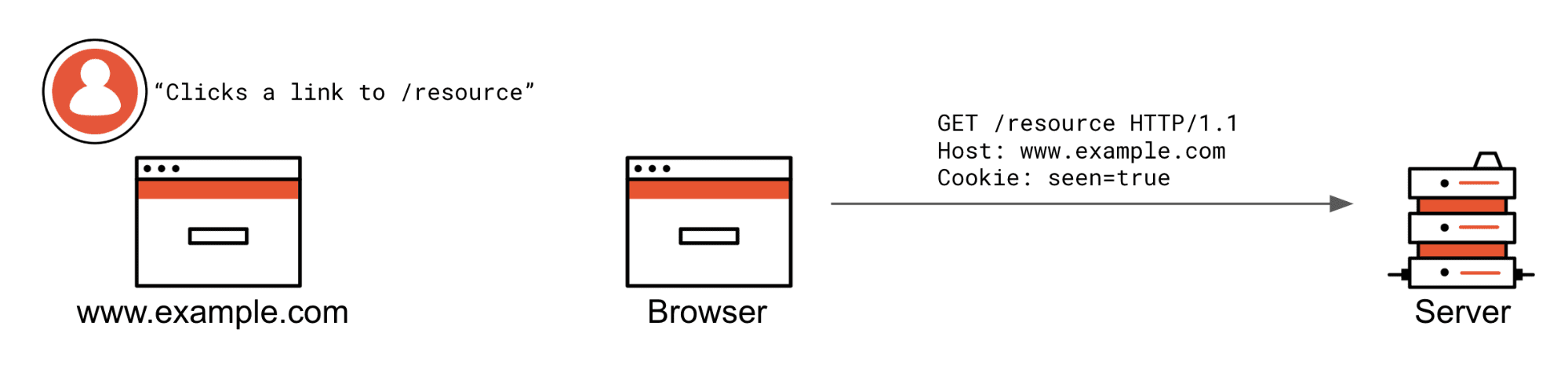
The user is already at www.example.com and clicks a /resource link. If this was an XHR request from the same origin, it would also be attached.
Here are two scenarios in which `SameSite=Strict` cookies are prevented from being attached.
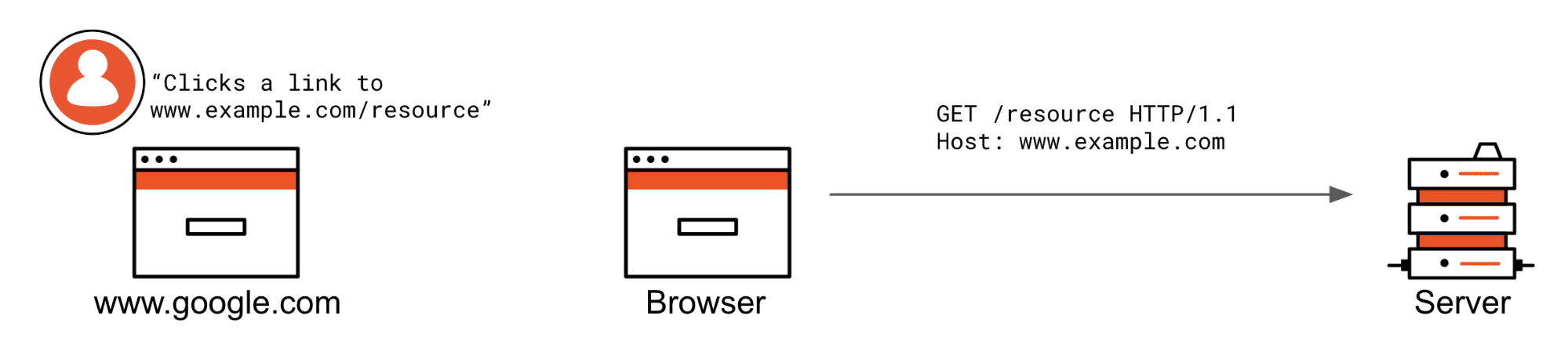
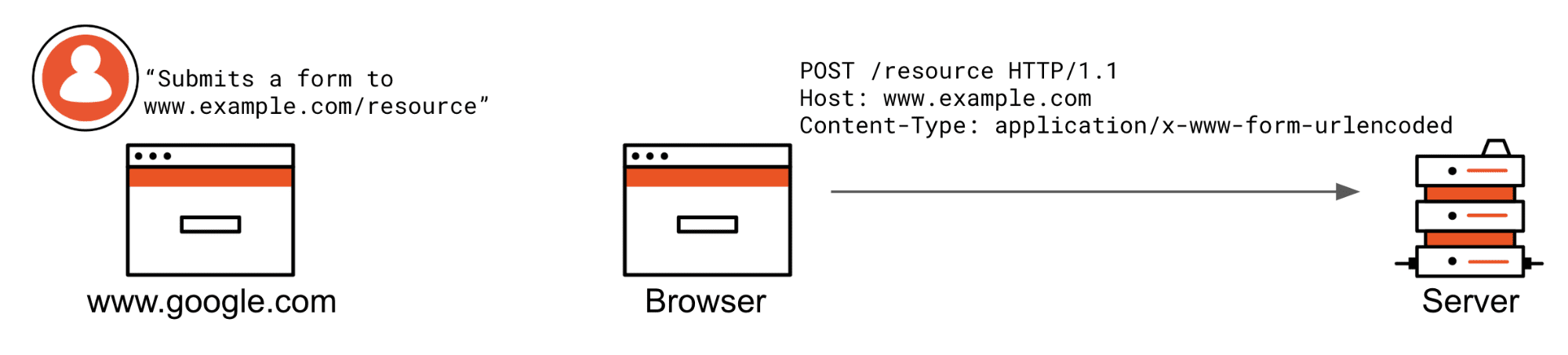
The user is not currently browsing www.example.com and clicks a www.example.com/resource link or somehow submits a form. If these were XHR requests, they would also not be attached. Notice the cookie header is not being sent by the browser because the request does not match the criteria of a `SameSite=Strict` cookie.
### SameSite=Lax
The `SameSite=Lax` setting has the exact same semantics as `Strict` but excludes top-level redirects from the restrictions to allow regular “browsing” behavior. This means a cookie still won’t be attached with iframes, XHR Request to an API or a posted HTTP form from another origin, but it will be attached when an end-user clicks a regular link, top-level web page triggers `window.location =` to redirect or a GET request is started as a result of a `3xx` (`300` range HTTP response status code).
Here are the scenarios in which `SameSite=Lax` cookies are not vetted from being attached.
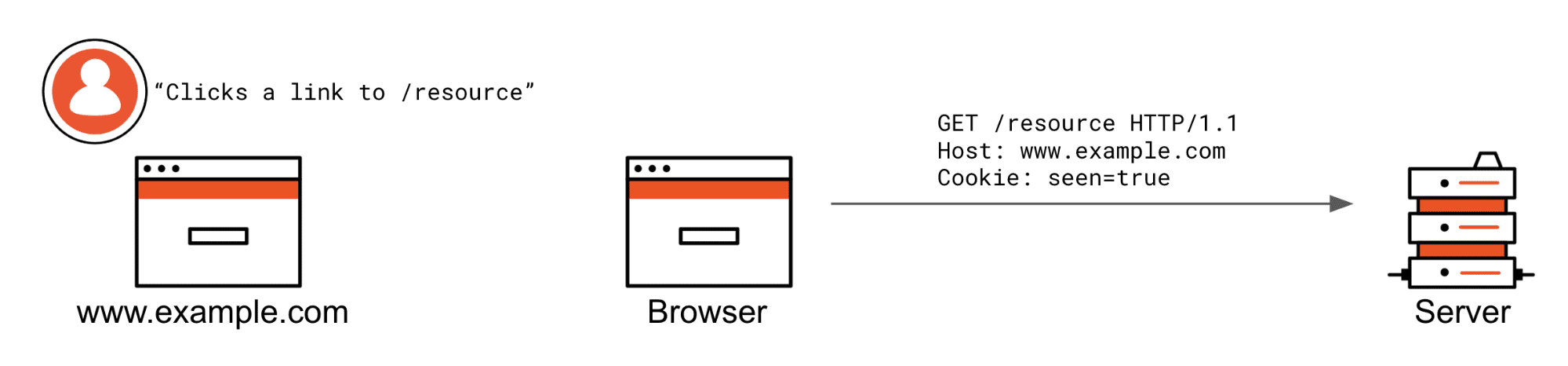
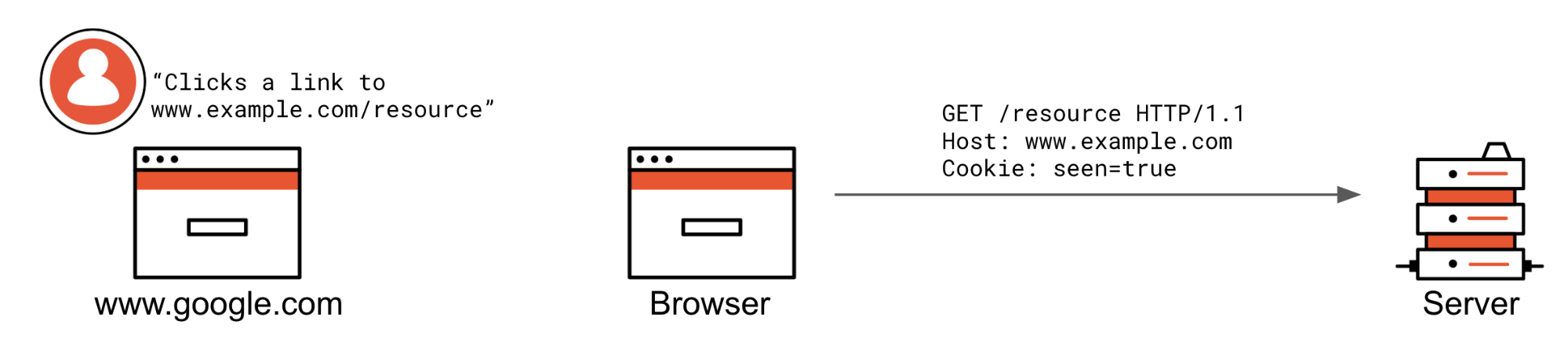
The user is already at www.example.com and clicks a /resource link, or they are at another website and click a link to [_www.example.com/resource_](http://www.example.com/resource).
Same as with `SameSite=Strict`: if the request is not from the same origin or is not a top-level redirect (allowed by lax), an HTTP form posted from another origin will not have cookies attached to the request.
### SameSite=None
The semantics of `SameSite=None` today are the same as not providing `SameSite` at all. As a matter of fact, it wasn’t even a recognized value until recently. It is the behavior developers are familiar with; in short, request goes to my web page, cookies are attached, regardless of the request’s origin or type (XHR, redirect, iframe, top-level navigation…).
Unfortunately, the value `None` was not officially defined before the RFC draft update from April 27, 2019. While it has been accepted by fast-moving browsers such as Chrome and Firefox, this value’s adoption isn’t without issues, causing headaches for developers.
## How Is SameSite Changing?
Once a browser [implements and enables the feature](#When-are-these-changes-happening-), the browser will interpret lack of an explicitly set `SameSite` attribute as if the cookie carried a `SameSite` attribute’s value `Lax,` instead of today’s behavior of value `None`. In addition, only cookies marked with the `Secure` attribute are allowed to have `SameSite` attribute’s value `None`.
If you are not setting the `SameSite` attribute today, the browser will only attach these cookies to requests originating from your own site and top-level GET requests (such as redirects). They will no longer be sent from other origins when embedded (iframe) or with AJAX (XHR) requests.
If you are setting the `SameSite` attribute’s value `None` today and it is not also marked as
`Secure`, the browser will reject this cookie completely.
If `SameSite=None` cross-origin behaviors are needed for your web service to function, keep on reading. There is a very high chance some of your end-users are using browsers that do not properly support this attribute’s value, so that setting the cookie attribute will result in various undesired behaviors.
### Incompatible Browsers
Wouldn’t it be great if you could simply set `SameSite=None` and call it a day? It would. Unfortunately, the history behind the `SameSite` attribute and, until recently, a bug in the WebKit browser engine require an intermediate solution to be deployed to make sure no end-user is affected by this change.
First, the original definition of the `SameSite` attribute included the following normative requirement:
> If the `SameSite` attribute’s value is neither of these [editor: at the time defined values `Strict` or `Lax`], the cookie will be **ignored**.
In August 2017, the behavior was changed so that only the unrecognized `SameSite` attribute’s values are to be ignored and instead the value `None` be applied.
This means that any ~2+ years old browser conforming to the specification will simply reject your `SameSite=None` cookie and won’t ever attach it to any requests.
Second, WebKit, the browser engine used by Safari on macOS, iOS, and iPadOS, but also all browsers on the iOS/iPadOS platforms (Chrome, Firefox, etc. download from the AppStore), has a bug in it, which is setting `SameSite=Strict` instead of `SameSite=None` when provided.
The WebKit bug has been fixed with iOS 13 but will, unfortunately, [_not get backported_](https://bugs.webkit.org/show_bug.cgi?id=198181#c19) to older iOS major releases. The bug fix propagation into macOS or macOS Safari versions is also not clear.
Therefore, if your cookies need the `SameSite` attribute’s value `None` related properties, you need to work around the incompatible user-agents.
### Working around incompatible browsers
There are different levels of incompatibility. Some browsers reject the cookie with `SameSite=None` completely; some apply the value `Strict` instead.
At first, it seemed like User-Agent (UA) Sniffing (reading and parsing the `User-Agent` HTTP header) could be used to detect the incompatible browsers and skip setting the `SameSite` attribute altogether for them. Well, that’s proving to be far too complex and brittle to achieve, since we’re not only targeting browser vendor versions but also engines. Let’s keep looking for a universal approach.
We could use UA Sniffing to detect Chrome 80+ and only apply `SameSite=None` for that, right? Again, not as simple. Due to the WebKit bug forever present on iOS 12, you’d also need to factor in the operating system major version and the rendering engine. Plus, other browser vendors are already signaling that they’ll be adopting these changes. In time, when this becomes an official standard, all browsers will. We’re seeking a solution with few drawbacks that works on all browsers, regardless of their age, vendor, operating system, or rendering engine.
The [recommended](https://web.dev/samesite-cookie-recipes/) workaround from Google and one we’re taking internally, does not depend on brittle UA Sniffing but rather, **setting two cookies**, one with the `SameSite` attribute’s value `None`; the other one, without any `SameSite` attribute whatsoever.
This is proven to work 100% of the time since, until Chrome 80, we had no reason to set cookies with the `SameSite` attribute to get its `None` value properties. This was the default. How does that look in practice?
The HTTP response that sets cookies via the `Set-Cookie` header would create a pair of cookies for each that is supposed to have the `SameSite=None` properties, like so
```http
HTTP/1.1 200 OK
Date: Fri, 11 Oct 2019 09:50:07 GMT
Content-Type: text/html; charset=utf-8
Set-Cookie: cookieName=value; SameSite=None; Secure
Set-Cookie: cookieName-legacy=value
Connection: Close
... content
```
When retrieving a cookie value, e.g. using the Node.js [_Koa_](https://koajs.com/) framework you would do the following
```js
app.use(async (ctx, next) => {
let cookie = ctx.cookies.get('cookieName');
if (cookie === undefined) {
cookie = ctx.cookies.get('cookieName-legacy');
}
// proceed to work with cookie
// ...
await next();
});
```
Using the Node.js [_Express_](https://expressjs.com/) framework the code is very similar
```js
app.use((req, res, next) => {
let cookie = req.cookies['cookieName'];
if (cookie === undefined) {
cookie = req.cookies['cookieName-legacy']
}
// proceed to work with cookie
// ...
return next();
});
```
Alternatively, one may choose to detect the browser vendor and/or operating system via the `User-Agent` header string at the point of setting the `Set-Cookie` header. Refer to the list of [incompatible clients](https://www.chromium.org/updates/same-site/incompatible-clients) to see what it takes to accomodate them all. Note, you may be forced to take on this approach if you’d run into cookie size and cookies per domain limits, that however depends on what is it that you store in your cookies - is it just references or arbitrary sized serialized objects?
## What’s Next?
From the nature of the change, it is already clear some SDKs, depending on the grant they execute, are not affected; namely:
- Authorization Code Grant delivered via query response mode
- Implicit and Hybrid Grants delivered via fragment response mode
- [_Machine to Machine (M2M)_](https://auth0.com/machine-to-machine)
- Recently released [_Device Authorization Grant_](https://auth0.com/device-flow/)
- All Native Applications on iOS or Android
As already mentioned, if you’re a customer of Auth0, then be sure we’ve got you covered. We already have changes in progress on the service side to get rid of those pesky Javascript console warnings.
We’re also going through our SDK libraries, reviewing their use of cookies and making sure we update those that need to be updated well before this change goes into effect for regular users. So, again, be sure to check and update your SDKs periodically and be on the lookout for any advisories in their README and CHANGELOG as well as your [_Auth0 Dashboard Notifications_](https://support.auth0.com/notifications) for any actions required.
We will do our best to update this blog post as new developments happen.