---
title: "Creating Your First Elm App: From Authentication to Calling an API (Part 1)"
description: "Explore building an app in the functional front-end language Elm. Part 1 focuses on Elm history, architecture, syntax, and calling an API."
authors:
- name: "Kim Maida"
url: "https://auth0.com/blog/authors/kim-maida/"
date: "Aug 4, 2016"
category: "Developers,Tutorial,Elm"
tags: ["elm", "jwt", "javascript", "authentication"]
url: "https://auth0.com/blog/creating-your-first-elm-app-part-1/"
---
# Creating Your First Elm App: From Authentication to Calling an API (Part 1)
Update: This article and its supporting GitHub repos have been updated to Elm v0.18!
**TL;DR:** We can write statically typed, functional SPAs on the front end with [Elm](http://www.elm-lang.org). Elm's compiler prevents runtime errors and compiles to JavaScript, making it an excellent choice for clean, speedy development. In part one of this tutorial, learn how to write your first Elm app and request data from an API. In part two, we'll add authentication using JSON Web Tokens. The full code is available at [this GitHub repository](https://github.com/auth0-blog/elm-with-jwt-api).
---
All JavaScript app developers are likely familiar with this scenario: we implement logic, deploy our code, and then in QA (or worse, production) we encounter a runtime error! Maybe it was something we forgot to write a test for, or it's an obscure edge case we didn't foresee. Either way, when it comes to business logic in production code, we often spend post-launch with the vague threat of errors hanging over our heads.
Enter [Elm](http://www.elm-lang.org): a [functional](https://www.smashingmagazine.com/2014/07/dont-be-scared-of-functional-programming/) front-end programming language that compiles to JavaScript, making it great for web applications that run in the browser. Elm's compiler presents us with friendly error messages _before_ runtime, thereby eliminating runtime errors.
## Why Elm?
Elm's creator [Evan Czaplicki](https://github.com/evancz) [positions Elm with several strong concepts](http://www.elmbark.com/2016/03/16/mainstream-elm-user-focused-design), but we'll touch on two in particular: gradual learning and usage-driven design. _Gradual learning_ is the idea that we can be productive with the language before diving deep. As we use Elm, we are able to gradually learn via development and build up our skillset, but we are not hampered in the beginner stage by a high barrier to entry. _Usage-driven design_ emphasizes starting with the minimum viable solution and iteratively building on it, but Evan points out that it's best to keep it simple, and the minimum viable solution is often enough by itself.
If we head over to the [Elm site](http://www.elm-lang.org), we're greeted with an attractive featureset highlighting "No runtime exceptions", "Blazing fast rendering", and "Smooth JavaScript interop". But what does this boil down to when writing real code? Let's take a look.
## Building an Elm Web App
In the first half of this two-part tutorial, we're going to build a small Elm application that will call an API to retrieve random Chuck Norris quotes. In doing so, we'll learn Elm basics like how to compose an app with a view and a model, how to update application state, and how to implement common real-world requirements like HTTP. In part two of the tutorial, we'll add the ability to register, log in, and access protected quotes with JSON Web Tokens.
If you're [familiar with JavaScript but new to Elm](http://elm-lang.org/docs/from-javascript) the language might look a little strange at first--but once we start building, we'll learn how the [Elm Architecture](http://guide.elm-lang.org/architecture/index.html), [types](http://guide.elm-lang.org/types), and [clean syntax](http://elm-lang.org/docs/syntax) can really streamline development. This tutorial is structured to help JavaScript developers get started with Elm without assuming previous experience with other functional or strongly typed languages.
## Setup and Installation
The full source code for our finished app can be [cloned on GitHub here](https://github.com/auth0-blog/elm-with-jwt-api).
We're going to use [Gulp](http://gulpjs.com) to build and serve our application locally and [NodeJS](https://nodejs.org/en) to serve our API and install dependencies through the Node Package Manager (npm). If you don't already have Node and Gulp installed, please visit their respective websites and follow instructions for download and installation.
> **Note:** Webpack is an alternative to Gulp. If you're interested in trying a customizable webpack build in the future for larger Elm projects, check out [elm-webpack-loader](https://github.com/rtfeldman/elm-webpack-loader).
We also need the API. Clone the [NodeJS JWT Authentication sample API](https://github.com/auth0-blog/nodejs-jwt-authentication-sample) repository and follow the README to get it running.
### Installing and Configuring Elm App
To install Elm globally, run the following command:
```bash
npm install -g elm
```
Once Elm is successfully installed, we need to set up our project's configuration. This is done with an `elm-package.json` file:
```js
// elm-package.json
{
"version": "1.0.0",
"summary": "Build an App in Elm with JWT Authentication and an API",
"repository": "https://github.com/auth0-blog/elm-with-jwt-api.git",
"license": "MIT",
"source-directories": [
"src",
"dist"
],
"exposed-modules": [],
"dependencies": {
"elm-lang/core": "5.1.1 <= v < 6.0.0",
"elm-lang/html": "2.0.0 <= v < 3.0.0",
"elm-lang/http": "1.0.0 <= v < 2.0.0",
"rgrempel/elm-http-decorators": "2.0.0 <= v < 3.0.0"
},
"elm-version": "0.18.0 <= v < 0.19.0"
}
```
We'll be using Elm v0.18 in this tutorial. The `elm-version` here is restricted to minor point releases of 0.18.
Now that we've declared our Elm dependencies, we can install them:
```bash
elm package install
```
Once everything has installed, an `/elm-stuff` folder will live at the root of your project. This folder contains all of the Elm dependencies we specified in our `elm-package.json` file.
### Build Tools
Now we have Node, Gulp, Elm, and the API installed. Let's set up our build configuration. Create and populate a `package.json` file, which should live at our project's root:
```js
// package.json
...
"dependencies": {},
"devDependencies": {
"gulp": "^3.9.0",
"gulp-connect": "^4.0.0",
"gulp-elm": "^0.6.1",
"gulp-plumber": "^1.1.0",
"gulp-util": "^3.0.7"
}
...
```
Once the `package.json` file is in place, install the Node dependencies:
```bash
npm install
```
Next, create a `gulpfile.js` file:
```js
// gulpfile.js
var gulp = require('gulp');
var elm = require('gulp-elm');
var gutil = require('gulp-util');
var plumber = require('gulp-plumber');
var connect = require('gulp-connect');
// File paths
var paths = {
dest: 'dist',
elm: 'src/*.elm',
static: 'src/*.{html,css}'
};
// Init Elm
gulp.task('elm-init', elm.init);
// Compile Elm to HTML
gulp.task('elm', ['elm-init'], function(){
return gulp.src(paths.elm)
.pipe(plumber())
.pipe(elm())
.pipe(gulp.dest(paths.dest));
});
// Move static assets to dist
gulp.task('static', function() {
return gulp.src(paths.static)
.pipe(plumber())
.pipe(gulp.dest(paths.dest));
});
// Watch for changes and compile
gulp.task('watch', function() {
gulp.watch(paths.elm, ['elm']);
gulp.watch(paths.static, ['static']);
});
// Local server
gulp.task('connect', function() {
connect.server({
root: 'dist',
port: 3000
});
});
// Main gulp tasks
gulp.task('build', ['elm', 'static']);
gulp.task('default', ['connect', 'build', 'watch']);
```
The default `gulp` task will compile Elm, watch and copy files to a `/dist` folder, and run a local server where we can view our application at [http://localhost:3000](http://localhost:3000).
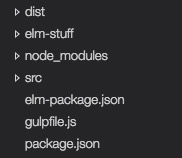
Our development files should be located in a `/src` folder. Please create the `/dist` and `/src` folders at the root of the project. Our file structure now looks like this:
### Syntax Highlighting
There's one more thing we should do before we start writing Elm, and that is to grab a plugin for our code editor to provide syntax highlighting and inline compile error messaging. There are plugins available for many popular editors. I like to use [VS Code](https://code.visualstudio.com/Download) with [vscode-elm](https://github.com/sbrink/vscode-elm), but you can [download a plugin for your editor of choice here](http://elm-lang.org/install). With syntax highlighting installed, we're ready to begin coding our Elm app.
## Chuck Norris Quoter App
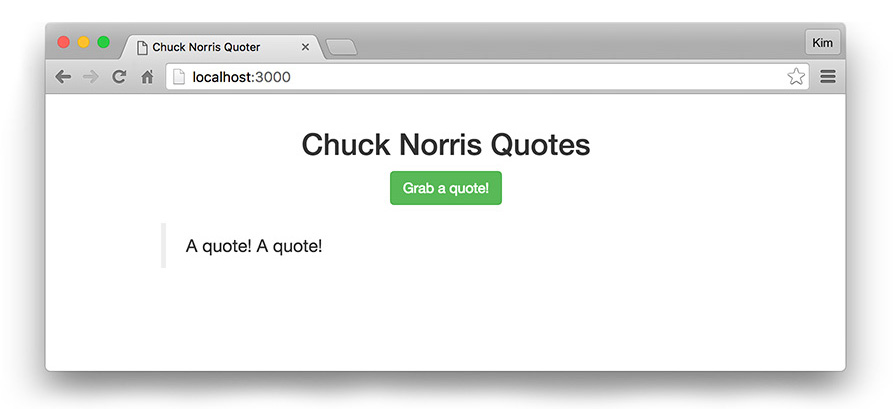
We're going to build an app that does more than echo "Hello world". We're going to connect to an API to request and display data and in part two, we'll add registration, login, and make authenticated requests--but we'll start simple. First we'll display a button that appends a string to our model each time it's clicked.
Once we've got things running, our app should look like this:
Let's fire up our Gulp task. This will start a local server and begin watching for file changes:
```bash
gulp
```
> **Note:** Since Gulp is compiling Elm for us, if we have compile errors they will show up in the command prompt / terminal window. If you have one of the Elm plugins installed in your editor, they should also show up inline in your code.
### HTML
We'll start by creating a basic `index.html` file:
``` html
Chuck Norris Quoter
```
We're loading a JavaScript file called `Main.js`. Elm compiles to JavaScript and this is the file that will be built from our compiled Elm code.
We'll also load the [Bootstrap CSS](https://www.bootstrapcdn.com) and a local `styles.css` file for a few helper overrides.
Finally we'll use JS to tell Elm to load our application. The Elm module we're going to export is called `Main` (from `Main.js`).
### CSS
Next, let's create the `styles.css` file:
```css
/* src/styles.css */
.container {
margin: 1em auto;
max-width: 600px;
}
blockquote {
margin: 1em 0;
}
.jumbotron {
margin: 2em auto;
max-width: 400px;
}
.jumbotron h2 {
margin-top: 0;
}
.jumbotron .help-block {
font-size: 14px;
}
```
### Introduction to Elm
We're ready to start writing Elm. Create a file in the `/src` folder called `Main.elm`. The full code for this step is available in the source repository on GitHub:
**[src/Main.elm - Step 1: Introduction to Elm](https://github.com/auth0-blog/elm-with-jwt-api/blob/step-1/src/Main.elm)**
Our file structure should now look like this:

If you're already familiar with Elm you can skip ahead. If Elm is brand new to you, keep reading: we'll introduce The Elm Architecture and Elm's language syntax by thoroughly breaking down this code. Make sure you have a good grasp of this section before moving on; the next sections will assume an understanding of the syntax and concepts.
```js
import Html exposing (..)
import Html.Events exposing (..)
import Html.Attributes exposing (..)
```
At the top of our app file, we need to import dependencies. We expose the `Html` package to the application for use. Because we'll be writing a view function, we will expose `Html.Events` and `Html.Attributes` to use click and input events, IDs, classes, and other element attributes.
Everything we're going to write is part of **The Elm Architecture**. In brief, this refers to the basic pattern of Elm application logic. It consists of `Model` (application state), `Update` (way to update the application state), and `View` (render the application state as HTML). You can read more about [The Elm Architecture in Elm's guide](http://guide.elm-lang.org/architecture).
```elm
main : Program Never Model Msg
main =
Html.program
{ init = init
, update = update
, subscriptions = \_ -> Sub.none
, view = view
}
```
`main : Program Never Model Msg` is a [type annotation](https://github.com/elm-guides/elm-for-js/blob/master/How%20to%20Read%20a%20Type%20Annotation.md). This annotation says "`main` has type `Program` and should `Never` expect a flags argument". If this doesn't make a ton of sense yet, hang tight—we'll be covering more type annotations throughout our app.
Every Elm project defines `main` as a program. There are a few program candidates, including `beginnerProgram`, `program`, and `programWithFlags`. Initially, we'll use `main = Html.program`.
Next we'll start our app with a record that references an `init` function, an `update` function, and a `view` function. We'll create these functions shortly.
`subscriptions` may look strange at first. [Subscriptions](http://www.elm-tutorial.org/en/03-subs-cmds/01-subs.html) listen for external input and we won't be using any in the Chuck Norris Quoter so we don't need a named function here. Elm does not have a concept of `null` or `undefined` and it's expecting functions as values in this record. This is an anonymous function that declares there are no subscriptions.
Here's a breakdown of the syntax. `\` begins an anonymous function. A backslash is used [because it resembles a lambda (λ)](https://en.wikipedia.org/wiki/Anonymous_function). `_` represents an argument that is discarded. `->` signifies the body of the function. `subscriptions = \_ -> ...` in JS might look like either of these:
```js
// JS
subscriptions = function() { ... }
subscriptions = function(anyArg) {
// do nothing with anyArg
}
```
(What would an anonymous function _requiring_ an argument look like? Answer: `\x -> ...`)
Next up are the model type alias and the `init` function:
```elm
{-
MODEL
* Model type
* Initialize model with empty values
-}
type alias Model =
{ quote : String
}
init : (Model, Cmd Msg)
init =
( Model "", Cmd.none )
```
The first block is a multi-line comment. A single-line comment is represented like this:
```elm
-- Single-line comment
```
A [type alias](http://guide.elm-lang.org/types/type_aliases.html) is a definition for use in type annotations. In future type annotations, we can now say `Something : Model` and `Model` would be replaced by the contents of the type alias.
We expect a record with a property of `quote` that has a string value. We've mentioned [records](http://elm-lang.org/docs/records) a few times, so we'll expand on them briefly: records look similar to objects in JavaScript. However, records in Elm are immutable: they hold labeled data but do not have inheritance or methods. Elm's functional paradigm uses persistent data structures so "updating the model" returns a new model with only the changed data copied.
Now we've come to the `init` function that we referenced in our `main` program. The type annotation for `init` means "`init` returns a tuple containing record defined in Model type alias and a command for an effect with an update message". That's a mouthful--and we'll be encountering additional type annotations that look similar but have more context, so they'll be easier to understand. What we should take away from this type annotation is that we're returning a [tuple](http://guide.elm-lang.org/core_language.html#tuples) (an ordered list of values of potentially varying types). So for now, let's concentrate on the `init` function.
Functions in Elm are defined with a name followed by a space and any arguments (separated by spaces), an `=`, and the body of the function indented on a newline. There are no parentheses, braces, `function` or `return` keywords. This might feel sparse at first but hopefully you'll find the clean syntax speeds development.
Returning a tuple is the easiest way to get multiple results from a function. The first element in the tuple declares the initial values of the Model record. Strings are denoted with double quotes, so we're defining `{ quote = "" }` on initialization. The second element is `Cmd.none` because we're not sending a command (yet!).
```elm
{-
UPDATE
* Messages
* Update case
-}
type Msg = GetQuote
update : Msg -> Model -> (Model, Cmd Msg)
update msg model =
case msg of
GetQuote ->
( { model | quote = model.quote ++ "A quote! " }, Cmd.none )
```
The next vital piece of the Elm Architecture is update. There are a few new things here.
First we have `type Msg = GetQuote`: this is a union type. [Union types](https://dennisreimann.de/articles/elm-data-structures-union-type.html) provide a way to represent types that have unusual structures (they aren't `String`, `Bool`, `Int`, etc). This says `type Msg` could be any of the following values. Right now we only have `GetQuote` but we'll add more later.
Now that we have a union type definition, we need a function that will handle this using a `case` expression. We're calling this function `update` because its purpose is to update the application state via the model.
The `update` function has a type annotation that says "`update` takes a message as an argument and a model argument and returns a tuple containing a model and a command for an effect with an update message".
This is the first time we've seen `->` in a type annotation. A series of items separated by `->` represent argument types until the last one, which is the return type. The reason we don't use a different notation to indicate the return has to do with currying. In a nutshell, _currying_ means if you don't pass all the arguments to a function, another function will be returned that accepts whatever arguments are still needed. You can [learn more](http://www.lambdacat.com/road-to-elm-currying-the-unknown/) [about currying](https://en.wikipedia.org/wiki/Currying) [elsewhere](http://veryfancy.net/blog/curried-form-in-elm-functions).
The `update` function accepts two arguments: a message and a model. If the `msg` is `GetQuote`, we'll return a tuple that updates the `quote` to append `"A quote! "` to the existing value. The second element in the tuple is currently `Cmd.none`. Later, we'll change this to execute the command to get a random quote from the API. The case expression models possible user interactions.
The syntax for updating properties of a record is:
```elm
{ recordName | property = updatedValue, property2 = updatedValue2 }
```
Elm uses `=` to set values. Colons `:` are reserved for type definitions. A `:` means "has type" so if we were to use them here, we would get a compiler error.
We now have the logic in place for our application. How will we display the UI? We need to render a view:
```elm
{-
VIEW
-}
view : Model -> Html Msg
view model =
div [ class "container" ] [
h2 [ class "text-center" ] [ text "Chuck Norris Quotes" ]
, p [ class "text-center" ] [
button [ class "btn btn-success", onClick GetQuote ] [ text "Grab a quote!" ]
]
-- Blockquote with quote
, blockquote [] [
p [] [text model.quote]
]
]
```
The type annotation for the `view` function reads, "`view` takes model as an argument and returns HTML with a message". We've seen `Msg` a few places and now we've defined its union type. A command `Cmd` is a request for an effect to take place outside of Elm. A message `Msg` is a function that notifies the `update` method that a command was completed. The view needs to return HTML with the message outcome to display the updated UI.
The `view` function describes the rendered view based on the model. The code for `view` resembles HTML but is actually composed of functions that correspond to virtual DOM nodes and pass lists as arguments. When the model is updated, the view function executes again. The previous virtual DOM is diffed against the next and the minimal set of updates necessary are run.
The structure of the functions somewhat resembles HTML, so it's pretty intuitive to write. The first list argument passed to each node function contains attribute functions with arguments. The second list contains the contents of the element. For example:
```elm
button [ class "btn btn-success", onClick GetQuote ] [ text "Grab a quote!" ]
```
This `button`'s first argument is the attribute list. The first item in that list is the `class` function accepting the string of classes. The second item is an `onClick` function with `GetQuote`. The next list argument is the contents of the button. We'll give the `text` function an argument of "Grab a quote!".
Last, we want to display the quote text. We'll do this with a `blockquote` and `p`, passing `model.quote` to the paragraph's `text` function.
We now have all the pieces in place for the first phase of our app! We can view it at [http://localhost:3000](http://localhost:3000). Try clicking the "Grab a quote!" button a few times.
> **Note:** If the app didn't compile, Elm provides [compiler errors for humans](http://elm-lang.org/blog/compiler-errors-for-humans) in the console and in your editor if you're using an Elm plugin. Elm will not compile if there are errors! This is to avoid runtime exceptions.
That was a lot of detail, but now we're set on basic syntax and structure. We'll move on to build the features of our Chuck Norris Quoter app.
### Calling the API
Now we're ready to fill in some of the blanks we left earlier. In several places we claimed in our type annotations that a command `Cmd` should be returned, but we returned `Cmd.none` instead. Now we'll replace those with the missing command.
When this step is done, our application should look like this:
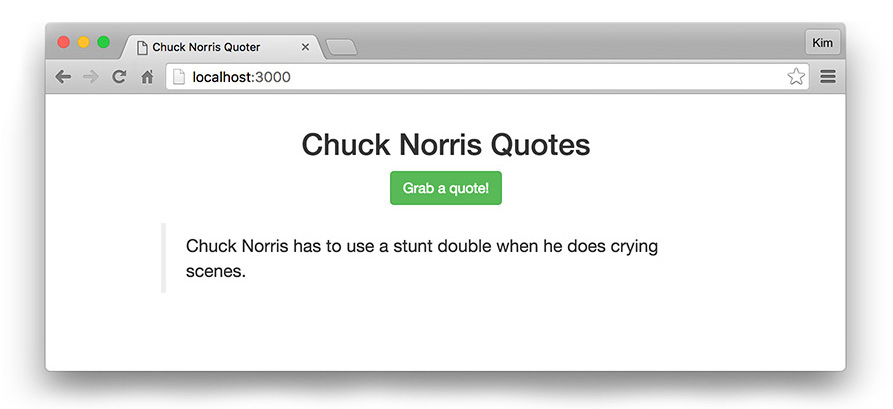
Clicking the button will call the API to get and display random Chuck Norris quotes. Make sure you have [the API](https://github.com/auth0-blog/nodejs-jwt-authentication-sample) running at [http://localhost:3001](http://localhost:3001) so it's accessible to our app.
Once we're successfully getting quotes, our source code will look like this:
**[src/Main.elm - Step 2: Calling an API](https://github.com/auth0-blog/elm-with-jwt-api/blob/step-2/src/Main.elm)**
The first thing we need to do is import the dependency necessary for making HTTP requests:
```elm
import Http
```
We'll need [Http](http://package.elm-lang.org/packages/elm-lang/http/1.0.0/Http) to make requests and handle responses.
Next we'll update our `init` function:
```elm
init : (Model, Cmd Msg)
init =
( Model "", fetchRandomQuoteCmd )
```
Now instead of `Cmd.none` we have a command called `fetchRandomQuoteCmd`. A [command](http://package.elm-lang.org/packages/elm-lang/core/latest/Platform-Cmd#Cmd) is a way to tell Elm to do some effect (like HTTP). We're commanding the application to fetch a random quote from the API on initialization. We'll define the `fetchRandomQuoteCmd` function shortly.
```elm
{-
UPDATE
* API routes
* GET
* Messages
* Update case
-}
-- API request URLs
api : String
api =
"http://localhost:3001/"
randomQuoteUrl : String
randomQuoteUrl =
api ++ "api/random-quote"
-- GET a random quote (unauthenticated)
fetchRandomQuote : Http.Request String
fetchRandomQuote =
Http.getString randomQuoteUrl
fetchRandomQuoteCmd : Cmd Msg
fetchRandomQuoteCmd =
Http.send FetchRandomQuoteCompleted fetchRandomQuote
fetchRandomQuoteCompleted : Model -> Result Http.Error String -> ( Model, Cmd Msg )
fetchRandomQuoteCompleted model result =
case result of
Ok newQuote ->
( { model | quote = newQuote }, Cmd.none )
Err _ ->
( model, Cmd.none )
```
We've added some code to our update section. First we'll store the API routes.
The Chuck Norris API returns unauthenticated random quotes as strings, not JSON. Let's create a function called `fetchRandomQuote`. We can use the [`Http.getString`](http://package.elm-lang.org/packages/elm-lang/http/1.0.0/Http#getString) method to make the HTTP request with the API route as an argument.
HTTP is something that happens outside of Elm. A command is needed to request the effect and a message is needed to notify the update that the effect was completed and to deliver its results.
We'll do this in `fetchRandomQuoteCmd`. This function's type annotation declares that it returns a command with a message. [`Http.send`](http://package.elm-lang.org/packages/elm-lang/http/1.0.0/Http#send) is a command that sends a request.
We then need to respond to the completed request with a message that handles successes and errors: `FetchRandomQuoteCompleted`. If the request returns `Ok`, we'll set the `quote` in the model with the string that is returned. In the case of an error (`Err`), we aren't going to do anything special. For the sake of brevity, we'll handle API errors when we get to authentication but not for getting unauthenticated quotes. Since we're discarding this argument, we can pass a discarded argument `_`. This will return a tuple that sends the model in its current state and no command. You may want to handle errors here on your own after completing the provided code.
Let's add `FetchRandomQuoteCompleted` to our messages and update:
```elm
-- Messages
type Msg
= GetQuote
| FetchRandomQuoteCompleted (Result Http.Error String)
-- Update
update : Msg -> Model -> ( Model, Cmd Msg )
update msg model =
case msg of
GetQuote ->
( model, fetchRandomQuoteCmd )
FetchRandomQuoteCompleted result ->
fetchRandomQuoteCompleted model result
```
We add these two new messages to the `Msg` union type and annotate the types of their arguments. `FetchRandomQuoteCompleted` accepts a result with an [`Http.Error`](http://package.elm-lang.org/packages/elm-lang/http/1.0.0/Http#Error) or the new Chuck Norris quote string from the API. These are the possible fail / success results of the HTTP request.
Next we add this case to the `update` function and declare what we want returned in the `(Model, Cmd Msg)` tuple. We also need to update the `GetQuote` tuple to fetch a quote from the API. We'll change `GetQuote` to return the current model and issue the command to fetch a random quote, `fetchRandomQuoteCmd`.
`FetchRandomQuoteCompleted`'s argument is the response result. We use this to update the model in our `Ok` case.
It's important to remember that the `update` function's type is `Msg -> Model -> (Model, Cmd Msg)`. This means that all branches of the `case` statement _must_ return the same type. If any branch does not return a tuple with a model and a command, a compiler error will occur.
Nothing changes in the `view`. We altered the `GetQuote` onClick function logic, but everything that we've written in the HTML works fine with our updated code. This concludes our basic API integration for the first half of this tutorial. Try it out! In part two, we'll tackle adding users and authentication.
#### Aside: Reading Compiler Type Errors
If you've been following along and writing your own code, you may have encountered Elm's compiler errors. Though they are very readable, type mismatch messages can sometimes seem ambiguous.
Here's a small breakdown of some things you may see:
```elm
String -> a
```
A lowercase variable `a` means "anything could go here". The above means "takes a string as an argument and returns anything".
`[1, 2, 3]` has a type of `List number`: a list that only contains numbers. `[]` is type `List a`: Elm infers that this is a list that could contain anything.
Elm always infers types. If we've declared type definitions, Elm checks its inferences against our definitions. We'll define types upfront in most places in our app. It's best practice to define the types at the top-level at a minimum. If Elm finds a type mismatch, it will tell us what type it has inferred. Resolving type mismatches can be one of the larger challenges to developers coming from a loosely typed language like JS (without Typescript), so it's worth spending time getting comfortable with this.
## Recap and Next Steps
We've covered installing and using the Elm language and learned how to create our first app. We've also integrated with an external API through HTTP. You should now be familiar with Elm's basic syntax, type annotation, and compiler errors. If you'd like, take a little more time to familiarize with [Elm's documentation](http://elm-lang.org/docs). The [Elm FAQ](http://elm-community.github.io/elm-faq/) is another great resource from the Elm developer community. In the second half of this tutorial: [Creating your First Elm App - Part 2](https://auth0.com/blog/creating-your-first-elm-app-part-2/), we'll take a deeper dive into **authenticating our Chuck Norris Quoter app using an access token**.