---
title: "Adding JSON Web Token API Keys to a DenyList"
description: "Learn how to add JWT API keys to a DenyList so they are no longer valid."
authors:
- name: "Damian Schenkelman"
url: "https://auth0.com/blog/authors/damian-schenkelman/"
date: "Mar 10, 2015"
category: "Identity & Security,Identity,JWT"
tags: ["api", "jwt", "oauth", "authentication", "denylist", "revoke", "scopes", "product"]
url: "https://auth0.com/blog/denylist-json-web-token-api-keys/"
---
# Adding JSON Web Token API Keys to a DenyList
**tl;dr**: If you understand why and how to support blacklisting JWTs, then skip to the [code](#impl).
In a [previous post](https://auth0.com/blog/2014/12/02/using-json-web-tokens-as-api-keys/), we proposed an approach to using [JSON Web Tokens](https://auth0.com/learn/json-web-tokens/) as API Keys, going over some of the benefits of doing so and also providing some examples based on our [API v2 scenarios](https://auth0.com/docs/apiv2). This post follows up by explaining an aspect that was not covered before: how to add JWT API keys to a DenyList so they are no longer valid.
If you need an in-depth introduction to **JSON Web Tokens**, check out the **free** ebook below.
## A Real World Example
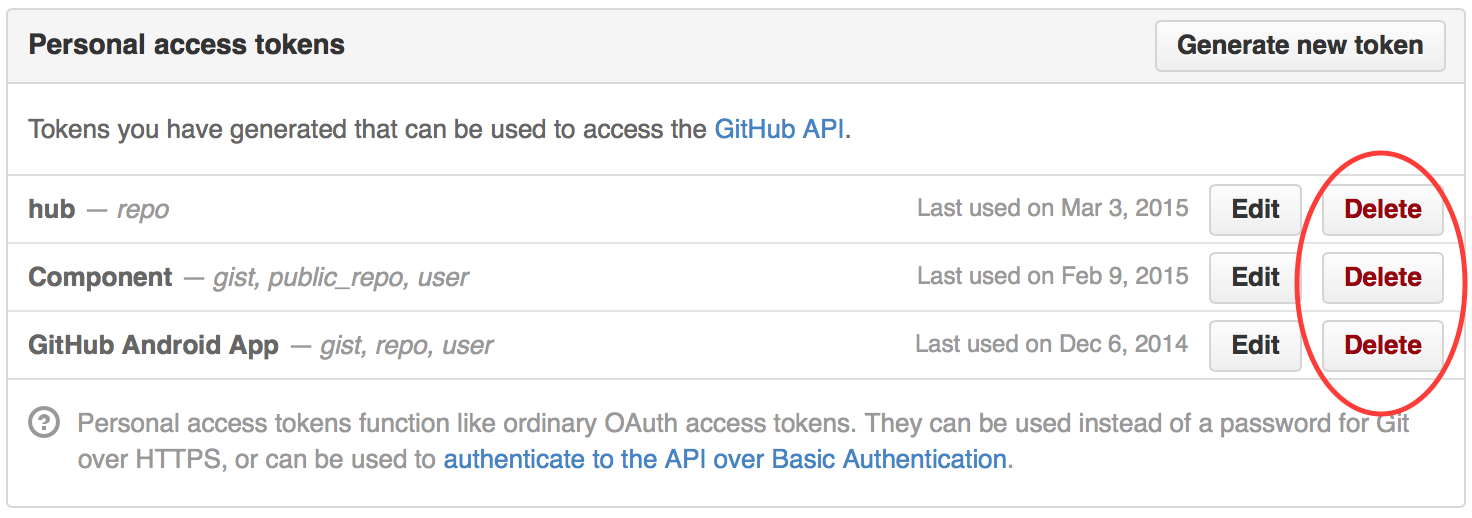
Let's for a second assume that GitHub used JSON Web Tokens as API Keys and one of them was accidentally published on the web. You would want to make sure an app can no longer access your information by revoking that token:
 ## Framing the Problem
Providing support for blacklisting JWTs poses the following questions:
1. How are JWTs individually identified?
2. Who should be able to revoke JWTs?
3. How are tokens revoked?
4. How do we avoid adding overhead?
This blog post aims to answer the previous questions by leveraging our experience from implementing this feature in our [API v2](https://docs.auth0.com/apiv2).
### 1. How are JWTs individually identified?
To revoke a JWT we need to be able to tell one token apart from another one. The JWT spec proposes the [`jti`](http://self-issued.info/docs/draft-ietf-oauth-json-web-token.html#jtiDef) (JWT ID) as a means to identify a token. From the specification:
> The jti (JWT ID) claim provides a unique identifier for the JWT. The identifier value MUST be assigned in a manner that ensures that there is a negligible probability that the same value will be accidentally assigned to a different data object; if the application uses multiple issuers, collisions MUST be prevented among values produced by different issuers as well.
As a quick reminder, this is how the claims section of one of our JWT API tokens looks like:
## Framing the Problem
Providing support for blacklisting JWTs poses the following questions:
1. How are JWTs individually identified?
2. Who should be able to revoke JWTs?
3. How are tokens revoked?
4. How do we avoid adding overhead?
This blog post aims to answer the previous questions by leveraging our experience from implementing this feature in our [API v2](https://docs.auth0.com/apiv2).
### 1. How are JWTs individually identified?
To revoke a JWT we need to be able to tell one token apart from another one. The JWT spec proposes the [`jti`](http://self-issued.info/docs/draft-ietf-oauth-json-web-token.html#jtiDef) (JWT ID) as a means to identify a token. From the specification:
> The jti (JWT ID) claim provides a unique identifier for the JWT. The identifier value MUST be assigned in a manner that ensures that there is a negligible probability that the same value will be accidentally assigned to a different data object; if the application uses multiple issuers, collisions MUST be prevented among values produced by different issuers as well.
As a quick reminder, this is how the claims section of one of our JWT API tokens looks like:
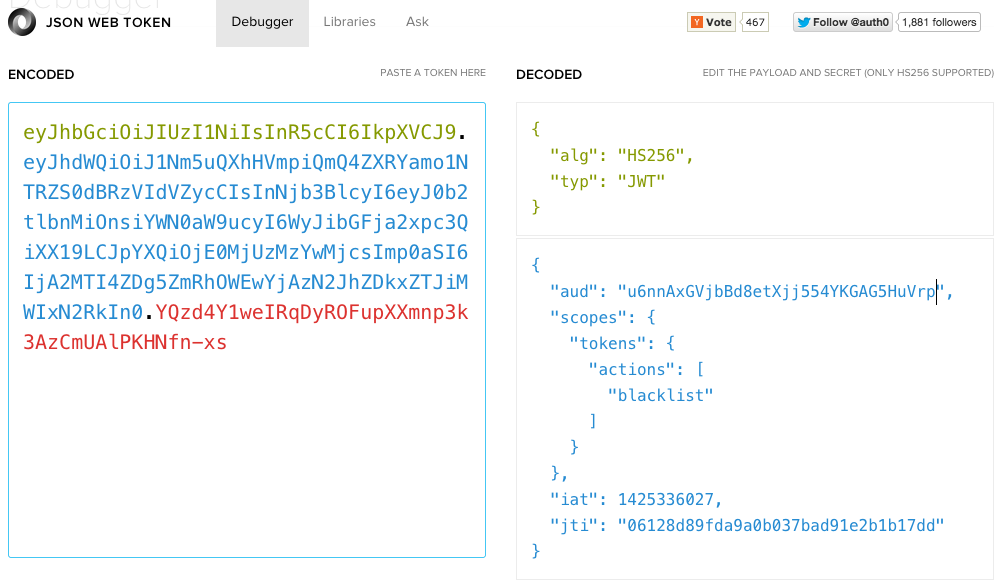 The tokens accepted by our API use the `aud` claim to determine the tenant for which the JWT is valid. If we use the `(aud, jti)` pair as the token's identifier then each tenant is in charge of guaranteeing that there's no duplication among their tokens.
Similarly, if a token does not include the `jti` claim we do not allow it to be revoked.
### 2. Who should be able to revoke JWTs?
If anyone could revoke our API keys then unfortunately they wouldn't be of much use. We need a way of restricting who can revoke a JWT.
The way we solved it in our API is by defining a specific scope (permission) that allows blacklisting tokens. If you generate a JWT like the one shown in the next figure you will be able to revoke JWTs:
The tokens accepted by our API use the `aud` claim to determine the tenant for which the JWT is valid. If we use the `(aud, jti)` pair as the token's identifier then each tenant is in charge of guaranteeing that there's no duplication among their tokens.
Similarly, if a token does not include the `jti` claim we do not allow it to be revoked.
### 2. Who should be able to revoke JWTs?
If anyone could revoke our API keys then unfortunately they wouldn't be of much use. We need a way of restricting who can revoke a JWT.
The way we solved it in our API is by defining a specific scope (permission) that allows blacklisting tokens. If you generate a JWT like the one shown in the next figure you will be able to revoke JWTs:
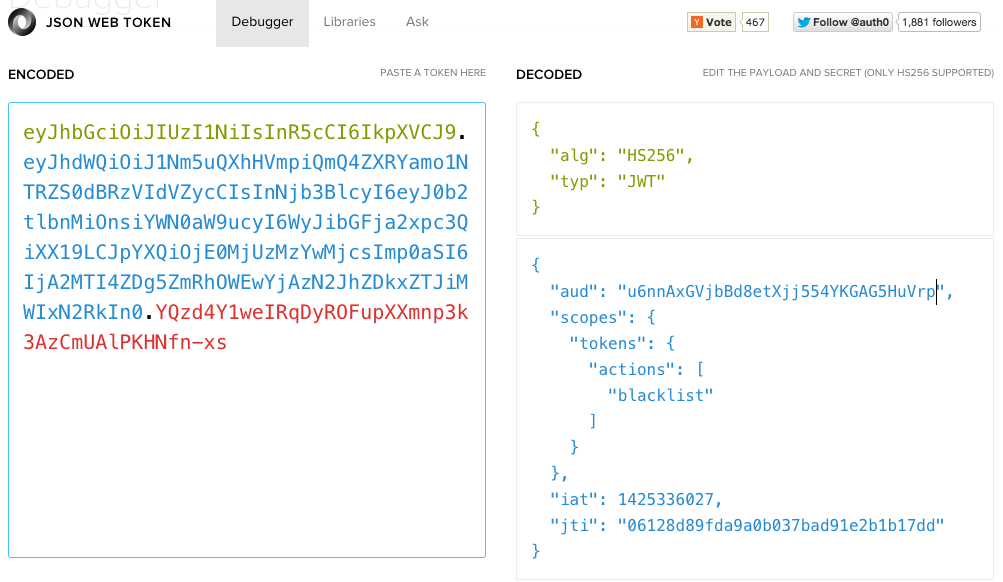 > Notice the `blacklist` action nested inside the `scopes` object.
### 3. How are tokens revoked?
To blacklist/revoke a token, you need a JWT API key (referred to as `JWT_API_KEY`) like the one described in #2. With it you can issue a `POST` request to `/api/v2/blacklists/tokens` as shown below (new lines added for clarity):
```
curl -H "Authorization: Bearer {JWT_API_KEY}"
-X POST
-H "Content-Type: application/json"
-d '{"aud":"u6nnAxGVjbBd8etXjj554YKGAG5HuVrp","jti":"test-token"}'
https://login.auth0.com/api/v2/blacklists/tokens
```
The complete documentation for the endpoint is [here](https://auth0.com/docs/apiv2#!/blacklists/post_tokens) but basically you need to:
* Send the `aud` and `jti` claims of the JWT to revoke.
* Send the JWT with the permissions necessary to blacklist tokens in the **Authorization** header.
To get the revoked tokens you can issue a `GET` to `/api/v2/blacklists/tokens`. You can use the [docs](https://auth0.com/docs/apiv2#!/blacklists/get_tokens) to figure out the how.
### 4. How do we avoid adding overhead?
You might be thinking:
> Wasn't the whole point of using JWTs avoiding a DB query?
Well, that is a benefit, though hardly the _whole point_. There is a caveat though: that question only applies if you have an application with a single issuer, not a multi-tenant system.
If there is more than one tenant, you don't want all of them to share the same secret. You still have to perform a database query to map the `aud` claim to the required `secret`.
With that in mind, these are some of the optimizations that you can implement:
* **Optimization 1**: The aforementioned operation involves I/O so it can be performed in parallel with our query to verify if a token has been revoked.
> Of course, you can also add a caching layer with a reasonable expiration time to avoid the DB trips altogether.
* **Optimization 2**: Skip the expiration check if the `jti` claim is not part of the JWT.
* **Optimization 3**: To reduce the size of the revoked tokens store you could automatically remove JWTs from it once their [`exp`](http://self-issued.info/docs/draft-ietf-oauth-json-web-token.html#expDef) is reached (assuming there is one).
## Implementation
We have shipped version 1.3.0 of the open source [express-jwt](https://github.com/auth0/express-jwt) with support for [multi-tenancy](https://github.com/auth0/express-jwt#multi-tenancy) and [blacklisted tokens](https://github.com/auth0/express-jwt#revoked-tokens). We also put together a [sample](https://github.com/auth0/multitenant-jwt-auth) that shows everything working together. The sample is based on our [API v2](https://docs.auth0.com/apiv2) implementation.
The following code snippets use show the core sample parts:
### Securing the endpoint
The first thing we have is an API that we would like to protect. The `express-jwt` middleware is configured by providing:
* `secret` - A function in charge of retrieving the secret.
* `isRevoked` - A function in charge of checking if a JWT is revoked.
```javascript
var expressJwt = require('express-jwt');
// to protect /api routes with JWTs
app.use('/api', expressJwt({
secret: secretCallback,
isRevoked: isRevokedCallback
}));
```
### Handling multi-tenancy
The implementation for the `secretCallback` function reads the backing data store to retrieve the secret for a tenant. It caches the secrets using the tenant identifier as the cache key.
If the data layer provides an encrypted tenant secret, it needs to be decrypted before calling `done`.
```javascript
var LRU = require('lru-cache');
var secretsCache = LRU({ /* options */ });
var secretCallback = function(req, payload, done){
var audience = payload.aud;
var cachedSecret = secretsCache.get(audience);
if (cachedSecret) { return done(null, cachedSecret); }
data.getTenantByIdentifier(audience, function(err, tenant){
if (err) { return done(err); }
if (!tenant) { return done(new Error('missing_secret')); }
var secret = utilities.decrypt(tenant.secret);
secretsCache.set(audience, secret);
done(null, secret);
});
};
```
### Supporting revoked JWTs
Similarly, the `isRevokedCallback` implementation caches whether a token is revoked or not using the `(aud, jti)` pair as the cache key. It also skips the check in case the `jti` claim is not present.
```javascript
var jtiCache = LRU({ /* options */ });
var isRevokedCallback = function(req, payload, done){
var tokenId = payload.jti;
if (!tokenId){
// if it does not have jti it cannot be revoked
return done(null, false);
}
var tokenIdentifier = payload.aud + ':' + payload.jti;
var blacklisted = jtiCache.get(tokenIdentifier);
if (typeof blacklisted !== 'undefined') { return done(null, blacklisted); }
data.getRevokedTokenByIdentifier(tokenIdentifier, function(err, token){
if (err) { return done(err); }
blacklisted = !!token;
jtiCache.set(tokenIdentifier,blacklisted)
return done(null, blacklisted);
});
};
```
## Conclusion
Most of the aforementioned content applies to blacklisting JWTs in general, not just JWT API keys.
Hopefully this blog post has provided some useful ideas on how to tackle this problem.
If you have any comments or questions don't hesitate to post them!
You an also get involved in [express-jwt](https://github.com/auth0/express-jwt)!
> Notice the `blacklist` action nested inside the `scopes` object.
### 3. How are tokens revoked?
To blacklist/revoke a token, you need a JWT API key (referred to as `JWT_API_KEY`) like the one described in #2. With it you can issue a `POST` request to `/api/v2/blacklists/tokens` as shown below (new lines added for clarity):
```
curl -H "Authorization: Bearer {JWT_API_KEY}"
-X POST
-H "Content-Type: application/json"
-d '{"aud":"u6nnAxGVjbBd8etXjj554YKGAG5HuVrp","jti":"test-token"}'
https://login.auth0.com/api/v2/blacklists/tokens
```
The complete documentation for the endpoint is [here](https://auth0.com/docs/apiv2#!/blacklists/post_tokens) but basically you need to:
* Send the `aud` and `jti` claims of the JWT to revoke.
* Send the JWT with the permissions necessary to blacklist tokens in the **Authorization** header.
To get the revoked tokens you can issue a `GET` to `/api/v2/blacklists/tokens`. You can use the [docs](https://auth0.com/docs/apiv2#!/blacklists/get_tokens) to figure out the how.
### 4. How do we avoid adding overhead?
You might be thinking:
> Wasn't the whole point of using JWTs avoiding a DB query?
Well, that is a benefit, though hardly the _whole point_. There is a caveat though: that question only applies if you have an application with a single issuer, not a multi-tenant system.
If there is more than one tenant, you don't want all of them to share the same secret. You still have to perform a database query to map the `aud` claim to the required `secret`.
With that in mind, these are some of the optimizations that you can implement:
* **Optimization 1**: The aforementioned operation involves I/O so it can be performed in parallel with our query to verify if a token has been revoked.
> Of course, you can also add a caching layer with a reasonable expiration time to avoid the DB trips altogether.
* **Optimization 2**: Skip the expiration check if the `jti` claim is not part of the JWT.
* **Optimization 3**: To reduce the size of the revoked tokens store you could automatically remove JWTs from it once their [`exp`](http://self-issued.info/docs/draft-ietf-oauth-json-web-token.html#expDef) is reached (assuming there is one).
## Implementation
We have shipped version 1.3.0 of the open source [express-jwt](https://github.com/auth0/express-jwt) with support for [multi-tenancy](https://github.com/auth0/express-jwt#multi-tenancy) and [blacklisted tokens](https://github.com/auth0/express-jwt#revoked-tokens). We also put together a [sample](https://github.com/auth0/multitenant-jwt-auth) that shows everything working together. The sample is based on our [API v2](https://docs.auth0.com/apiv2) implementation.
The following code snippets use show the core sample parts:
### Securing the endpoint
The first thing we have is an API that we would like to protect. The `express-jwt` middleware is configured by providing:
* `secret` - A function in charge of retrieving the secret.
* `isRevoked` - A function in charge of checking if a JWT is revoked.
```javascript
var expressJwt = require('express-jwt');
// to protect /api routes with JWTs
app.use('/api', expressJwt({
secret: secretCallback,
isRevoked: isRevokedCallback
}));
```
### Handling multi-tenancy
The implementation for the `secretCallback` function reads the backing data store to retrieve the secret for a tenant. It caches the secrets using the tenant identifier as the cache key.
If the data layer provides an encrypted tenant secret, it needs to be decrypted before calling `done`.
```javascript
var LRU = require('lru-cache');
var secretsCache = LRU({ /* options */ });
var secretCallback = function(req, payload, done){
var audience = payload.aud;
var cachedSecret = secretsCache.get(audience);
if (cachedSecret) { return done(null, cachedSecret); }
data.getTenantByIdentifier(audience, function(err, tenant){
if (err) { return done(err); }
if (!tenant) { return done(new Error('missing_secret')); }
var secret = utilities.decrypt(tenant.secret);
secretsCache.set(audience, secret);
done(null, secret);
});
};
```
### Supporting revoked JWTs
Similarly, the `isRevokedCallback` implementation caches whether a token is revoked or not using the `(aud, jti)` pair as the cache key. It also skips the check in case the `jti` claim is not present.
```javascript
var jtiCache = LRU({ /* options */ });
var isRevokedCallback = function(req, payload, done){
var tokenId = payload.jti;
if (!tokenId){
// if it does not have jti it cannot be revoked
return done(null, false);
}
var tokenIdentifier = payload.aud + ':' + payload.jti;
var blacklisted = jtiCache.get(tokenIdentifier);
if (typeof blacklisted !== 'undefined') { return done(null, blacklisted); }
data.getRevokedTokenByIdentifier(tokenIdentifier, function(err, token){
if (err) { return done(err); }
blacklisted = !!token;
jtiCache.set(tokenIdentifier,blacklisted)
return done(null, blacklisted);
});
};
```
## Conclusion
Most of the aforementioned content applies to blacklisting JWTs in general, not just JWT API keys.
Hopefully this blog post has provided some useful ideas on how to tackle this problem.
If you have any comments or questions don't hesitate to post them!
You an also get involved in [express-jwt](https://github.com/auth0/express-jwt)!