---
title: "Developing a RESTful Client with Retrofit and Spring Boot"
description: "Learn how to use Retrofit and Spring Boot to develop a RESTful HTTP client to GitHub's API."
authors:
- name: "Vladimir Fomene"
url: "https://auth0.com/blog/authors/vladimir-fomene/"
date: "Oct 4, 2018"
category: "Developers,Tutorial,Spring Boot"
tags: ["retrofit", "spring-boot", "java", "http-client", "http", "restful", "rest", "restful-api"]
url: "https://auth0.com/blog/developing-a-restful-client-with-retrofit-and-spring-boot/"
---
# Developing a RESTful Client with Retrofit and Spring Boot
**TL;DR:** In this article, you will learn how to use [Retrofit, an HTTP client library](https://square.github.io/retrofit/), and [Spring Boot](https://spring.io/projects/spring-boot) to create a client for a RESTful API. You will use Spring Boot and its `RestController` functionality alongside Retrofit to develop a facade over GitHub's API. You will also learn how to convert JSON to POJOs (Plain Old Java Objects) using [Google's Gson](https://github.com/google/gson) library and, last but not least, you will learn how to use the documentation of a RESTful API to your advantage. If you need, you can find the reference code developed throughout [this article in this GitHub repository](https://github.com/auth0-blog/retrofit-spring-boot).
## Prerequisites
To follow this article along, you will need to have the following:
* JDK 8 or greater (JDK 10 was used in this article).
* A mature IDE (Integrated Development Environment) of your choice (i.e., [IntelliJ](https://www.jetbrains.com/idea/), [Netbeans](https://netbeans.org/), or [Eclipse](https://www.eclipse.org/)).
* An external HTTP client like [`curl`](https://curl.haxx.se/), [Postman](https://www.postman.com), or whatever.
* [A GitHub account](https://github.com/).
Once you have these, all you need is:
- A basic understanding of [the client-server architecture](https://www.webopedia.com/TERM/C/client_server_architecture.html).
- Some knowledge around [the HTTP protocol](https://en.wikipedia.org/wiki/Hypertext_Transfer_Protocol).
- Some basic to intermediate knowledge of [the Java programming language](https://en.wikipedia.org/wiki/Java_(programming_language)).
- Basic knowledge around [Spring Boot](https://spring.io/projects/spring-boot).
## What is a RESTful Client?
REST, which stands for _Representational State Transfer_, is an architectural style used to design web APIs
(Application Programming Interfaces). REST is not a standard but rather a set of constraints used to design web APIs in
well-designed format. In REST, `GET` requests should be used for resource lookup and `PUT`, `POST`, `DELETE` for updating,
creating, and deleting a resource respectively.
In this article, you will develop a Spring Boot app that is a RESTful client because it follows this constraints to communicate with a RESTful API ([GitHub's API](https://api.github.com)).
The explanation above is just a quick introduction, so you know what this is all about. As you can imagine, there is much more when it comes to the RESTful architecture. If you are curious, you can check the following resources after reading this article:
- [REST Architectural Constraints](https://restfulapi.net/rest-architectural-constraints/)
- [Richardson Maturity Model](https://martinfowler.com/articles/richardsonMaturityModel.html)
## What Is Retrofit?
According to the official [website](https://square.github.io/retrofit/), Retrofit is a type-safe HTTP client for Java and Android which was developed by [Square](https://squareup.com/). With Retrofit, all you need to do is declare a Java interface to represent your API. Then, you can pass the API configuration to Retrofit, and you will get back a Java class implementation of your interface.
Retrofit allows you to make both synchronous and asynchronous request to APIs. For simplicity, this article will focus on synchronous requests only. But you can check the other one right after reading the article.
One cool feature introduced by Retrofit is that it allows you to modify your API request through annotation on methods in your interface.
## Why use the GitHub API?
To learn about Retrofit's capabilities, you could use many REST APIs out there. However, for a few reasons described below, you will use [GitHub's REST API](https://developer.github.com/v3/):
- Nearly all developers have GitHub accounts and, if you do not have one, [creating one](https://github.com/join?source=header-home) will only take a couple of seconds.
- GitHub API version 3 follows the REST architectural design and has a very good documentation.
- Last, but not least, GitHub allows you to query their API once you have an _access token_, _username and password_, or a _secret key_ without requesting that you submit an application to use their API.
## Generate token for use with GitHub API
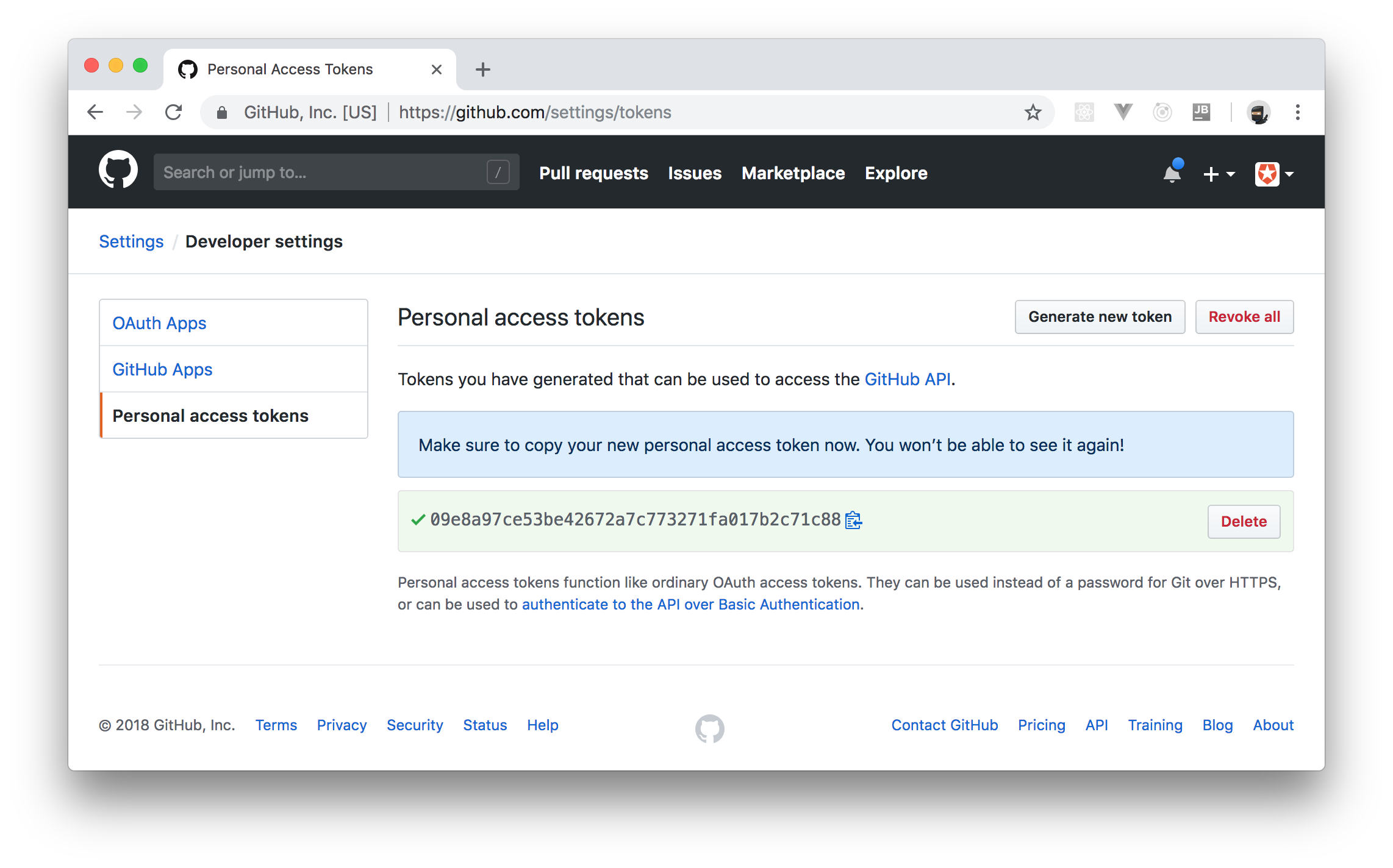
First, as already mentioned, you will need a [GitHub account](https://github.com/join?source=header-home). After creating (or signing into) your own account, click on your GitHub's profile photo (on the top right corner of the page) and choose [the _Settings_ option](https://github.com/settings/profile).
On that page, click on _Developer settings_ on the left pane of the page, then click on _Personal access tokens_ (again on the left pane) to arrive at the page where you manage access tokens. On this page, click on [_Generate new token_](https://github.com/settings/tokens/new). Now, GitHub will show you a form where it will ask you to enter a description for your token (you can insert something like "Retrofit Client") and will ask you to choose what _Scopes_ you want to give to this token.
For that, you can select `repo` and `delete_repo` scopes. Scopes determine the type of queries you will be able to do on GitHub's API with the token you will get.
To finalize, click on _Generate token_ to create the token. Store this new token somewhere safe on your laptop.
## Creating a RESTful Client with Retrofit and Spring Boot
In this section, you will create a Spring Boot application that can `GET`, `POST`, and `DELETE` GitHub repositories via the GitHub API. For starters, go to [the Spring Initializr page](https://start.spring.io/) and fill out the form like this:
- _Generate a_: At the top of the page, choose "Gradle Project".
- _Group_: You can leave this field as `com.example`.
- _Artifact_: You can type `github-client` in this one.
- _Search for dependencies_: Here, you will have to type "web" and choose the first option that appears. This will make a green label named "Web" appear on the _Selected Dependencies_ section.
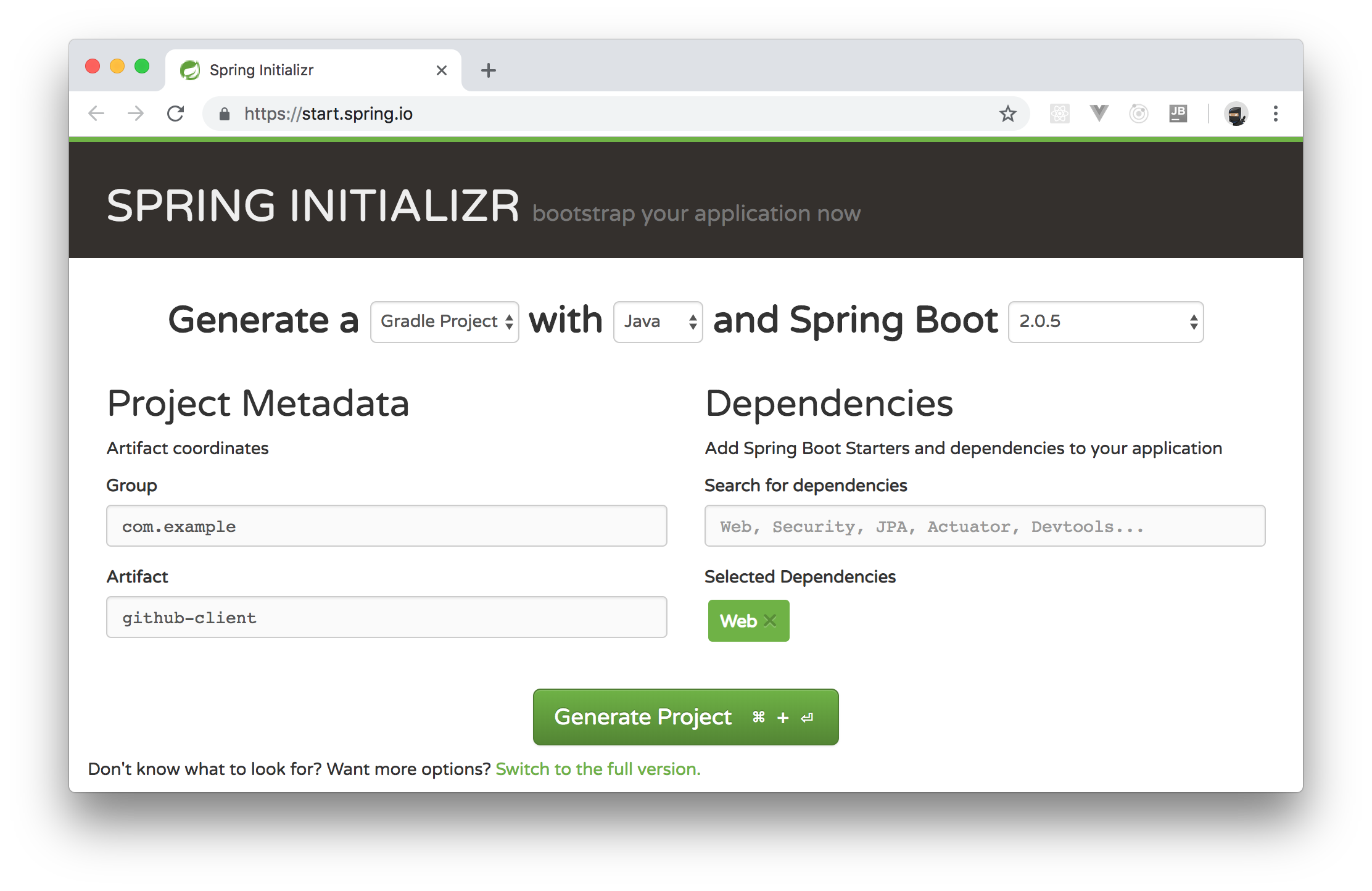
You can leave untouched the other options. After that, click on _Generate Project_. Clicking on this button will make this page send you the `github-client.zip` file with your project. Unzip this file in your preferred location (e.g., `~/Projects/`) and import it in your IDE.
For the moment, your project contains only a single class called `GithubClientApplication`. Also, it contains two dependencies in the `build.gradle` file: `spring-boot-starter-web` and `spring-boot-starter-test`. If you are using Java 10, you will have to update the `build.gradle` file as follows
```gradle
// ... leave everything else untouched ...
dependencies {
// ... don't remove the other two dependencies ...
compile('javax.xml.bind:jaxb-api:2.3.0')
}
```
Make sure you allow your IDE to import the changes after updating this file.
### Defining Domain Classes
According to the GitHub documentation, all requests to its API endpoint (i.e., to `https://api.github.com`) will receive JSON responses (at least, on the version 3 of the API). If you are going to receive JSON responses back from the GitHub API, you need Java classes to represent this data.
As you don't want to waste time creating these classes, you can use the library that Eclipse (the IDE) uses on its Git plugin. This library contains all the classes that you will need in this article.
To import it, open the `build.gradle` file, and update it as follows:
```gradle
// ... leave the other configuration untouched ...
dependencies {
// ... leave the other dependencies untouched ...
compile('org.eclipse.mylyn.github:org.eclipse.egit.github.core:2.1.5')
}
```
To know more about this library, check out [its page on GitHub](https://github.com/eclipse/egit-github).
### Using Retrofit to Consume RESTful APIs
After installing the library that provides Java classes to represent responses from GitHub, you will create a service that communicates with GitHub's API. To do so, start by creating a class called `APIConfiguration` in your main package (e.g., `com.example.githubclient`). This class will contain some references that you will need to make API requests to GitHub. Here it goes the contents of this file:
```java
package com.example.githubclient;
public interface APIConfiguration {
static final String API_BASE_URL = "https://api.github.com/";
static final String API_VERSION_SPEC = "application/vnd.github.v3+json";
static final String JSON_CONTENT_TYPE = "application/json";
}
```
As you can see, in this interface, you have a reference to the GitHub's API endpoint (`API_BASE_URL`), a reference to the current API version (`API_VERSION_SPEC`), and a reference to the content type that you will use while communicating with the API (`JSON_CONTENT_TYPE`).
With that in place, you will turn [GitHub's repository API](https://developer.github.com/v3/repos/) into a Java interface. Start by importing Retrofit in your project. To do this, open the `build.gradle` file and update it as follows:
```gradle
// ... leave the other configuration untouched ...
dependencies {
// ... leave the other dependencies untouched ...
implementation('com.squareup.retrofit2:retrofit:2.4.0')
implementation('com.squareup.retrofit2:converter-gson:2.4.0')
}
```
Then, create an interface called `RepositoryInterface` in the `com.example.githubclient` package and replace the contents of this interface with this:
```java
package com.example.githubclient;
import org.eclipse.egit.github.core.Repository;
import org.eclipse.egit.github.core.event.DeletePayload;
import retrofit2.Call;
import retrofit2.http.Body;
import retrofit2.http.DELETE;
import retrofit2.http.GET;
import retrofit2.http.Header;
import retrofit2.http.POST;
import retrofit2.http.Path;
import java.util.List;
public interface RepositoryInterface {
@GET("user/repos")
Call> listRepos(@Header("Authorization") String accessToken,
@Header("Accept") String apiVersionSpec);
@DELETE("repos/{owner}/{repo}")
Call deleteRepo(@Header("Authorization") String accessToken, @Header("Accept") String apiVersionSpec,
@Path("repo") String repo, @Path("owner") String owner);
@POST("user/repos")
Call createRepo(@Body Repository repo, @Header("Authorization") String accessToken,
@Header("Accept") String apiVersionSpec,
@Header("Content-Type") String contentType);
}
```
As you will see, you don't need to provide an implementation for these methods. Retrofit will handle the methods in this interface for you.
The annotation at the top of every method (e.g., `@POST`) defines the HTTP method that Retrofit will use when that method is called. The argument of the annotation (e.g., `"user/repos"`) defines the path which will be added to the API endpoint when performing that particular request. The `@Header` annotation is used to specify HTTP request headers that Retrofit will need while talking to GitHub, and `@Body` is used to specify the HTTP request body that Retrofit will send to GitHub.
Note that on top of the `deleteRepo` method, you defined path variables by using curly braces like `{owner}` and `{repo}`. Retrofit uses `@Path` annotations to retrieve these variables so it can define the final URL that it will call.
Now, you will need to create a service class that uses `RepositoryInterface` to query GitHub's API. So, start by creating a class called `GitHubService` in the `com.example.githubclient` package. In this file, insert the following code:
```java
package com.example.githubclient;
import org.eclipse.egit.github.core.Repository;
import org.eclipse.egit.github.core.event.DeletePayload;
import org.springframework.stereotype.Service;
import retrofit2.Call;
import retrofit2.Response;
import retrofit2.Retrofit;
import retrofit2.converter.gson.GsonConverterFactory;
import java.io.IOException;
import java.util.List;
@Service
public class GitHubService implements APIConfiguration {
private String accessToken;
private RepositoryInterface service;
public GitHubService() {
Retrofit retrofit = new Retrofit.Builder()
.baseUrl(API_BASE_URL)
.addConverterFactory(GsonConverterFactory.create())
.build();
service = retrofit.create(RepositoryInterface.class);
this.accessToken = "token " + System.getenv("ACCESS_TOKEN");
}
public List getRepositories() throws IOException {
Call> retrofitCall = service.listRepos(accessToken, API_VERSION_SPEC);
Response> response = retrofitCall.execute();
if (!response.isSuccessful()) {
throw new IOException(response.errorBody() != null
? response.errorBody().string() : "Unknown error");
}
return response.body();
}
public Repository createRepository(Repository repo) throws IOException {
Call retrofitCall = service.createRepo(repo, accessToken, API_VERSION_SPEC, JSON_CONTENT_TYPE);
Response response = retrofitCall.execute();
if (!response.isSuccessful()) {
throw new IOException(response.errorBody() != null
? response.errorBody().string() : "Unknown error");
}
return response.body();
}
public DeletePayload deleteRepository(String owner, String repoName) throws IOException {
Call retrofitCall = service.deleteRepo(accessToken, API_VERSION_SPEC, repoName, owner);
Response response = retrofitCall.execute();
if (!response.isSuccessful()) {
throw new IOException(response.errorBody() != null
? response.errorBody().string() : "Unknown error");
}
return response.body();
}
}
```
The goal of this service is to provide a wrapper around `RepositoryInterface` to handle its interactions. That is, as you can see on the code above, you use `Retrofit.Builder` to create an instance of `RepositoryInterface`, then you define a variable called `accessToken` with an access token retrieved from the OS environment variables (`System.getenv("ACCESS_TOKEN")`), then you define three methods with similar implementations:
1. `getRepositories`: This method wraps the call to `RepositoryInterface::listRepos` passing to it your `accessToken`, and the `API_VERSION_SPEC` constant.
2. `createRepository`: This method wraps the call to `RepositoryInterface::createRepo` passing to it a `repo`, your `accessToken`, the `API_VERSION_SPEC` constant, and the `JSON_CONTENT_TYPE` constant.
3. `deleteRepository`: This method wraps the call to `RepositoryInterface::deleteRepo` passing to it your `accessToken`, the `API_VERSION_SPEC` constant, a `repoName` variable, and a `owner` variable.
If it is not clear yet how to use this service, don't worry, you will learn about it in the next section.
### Expose the Retrofit Client as an Endpoint on Spring Boot
Finally, you have to expose your `GitHubService` through a Spring Boot `RestController`. You will do so by creating a class in your application that will respond to web requests. As such, create a class called `GitHubClientController` in the `com.example.githubclient` package and insert the following code into it:
```java
package com.example.githubclient;
import org.eclipse.egit.github.core.Repository;
import org.eclipse.egit.github.core.event.DeletePayload;
import org.springframework.beans.factory.annotation.Autowired;
import org.springframework.web.bind.annotation.DeleteMapping;
import org.springframework.web.bind.annotation.GetMapping;
import org.springframework.web.bind.annotation.PathVariable;
import org.springframework.web.bind.annotation.PostMapping;
import org.springframework.web.bind.annotation.RequestBody;
import org.springframework.web.bind.annotation.RestController;
import java.io.IOException;
import java.util.List;
@RestController
public class GitHubClientController {
@Autowired
private GitHubService githubService;
@GetMapping("/repos")
public List getRepos() throws IOException {
return githubService.getRepositories();
}
@PostMapping("/repos")
public Repository createRepo(@RequestBody Repository newRepo) throws IOException {
return githubService.createRepository(newRepo);
}
@DeleteMapping("/repos/{owner}/{repo}")
public DeletePayload deleteRepo(
@PathVariable("owner") String owner,
@PathVariable("repo") String repoName) throws IOException {
return githubService.deleteRepository(owner, repoName);
}
}
```
Because of the `@Autowired` annotation on this class, Spring Boot will inject an instance of the `GitHubService` class once you start your Spring Boot application. The `getRepos` method that your new class exposes uses `GitHubService::getRepositories` method to retrieve your GitHub repositories. The `createRepo` method uses `GitHubService::createRepository` to create a new GitHub repository. And, last but not least, `deleteRepo` uses `GitHubService::deleteRepository` method to delete a particular repository in your account.
## Testing Your Retrofit Application
With all these classes in place, you are now ready to test your application. To start it, you will need to execute the following commands on the terminal:
```bash
# set an OS env variable with your access token
export ACCESS_TOKEN=
# make Gradle run your Spring Boot app
./gradlew bootRun
```
> **Note:** You will have to replace `` with the _personal access tokens_ you copied from GitHub previously. Your app, as you remember, calls `System.getenv("ACCESS_TOKEN")` to get this variable.
Now, to list your repos, you can issue an HTTP `GET` request to `http://localhost:8080/repos`:
```bash
curl localhost:8080/repos
```
This will get you back an array with your GitHub repos. Then, to create a repo through your Retrofit client app, you can issue an HTTP `POST` request, as follows:
```json
curl -X POST -H 'Content-Type: application/json' -d '{
"name": "some-super-cool-repo",
"description": "This is a test repository created using my GitHub client",
"homepage": "https://github.com",
"private": false,
"has_issues": true,
"has_projects": true,
"has_wiki": true
}' http://localhost:8080/repos
```
After that, if you visit `https://github.com//some-super-cool-repo`, replacing `` accordingly, you will see your brand new GitHub repo.

> **Note:** There are a lot of different options that you can change while creating your repo. In the example above, you used just a few options available. For more information, take a look at the attributes supported in the [GitHub API documentation](https://developer.github.com/v3/repos/).
Finally, to delete your new repository, you can issue an HTTP `DELETE` request to `/repos//some-super-cool-repo` (replacing `` accordingly):
```bash
curl -X DELETE http://localhost:8080/repos/brunokrebs/some-super-cool-repo
```
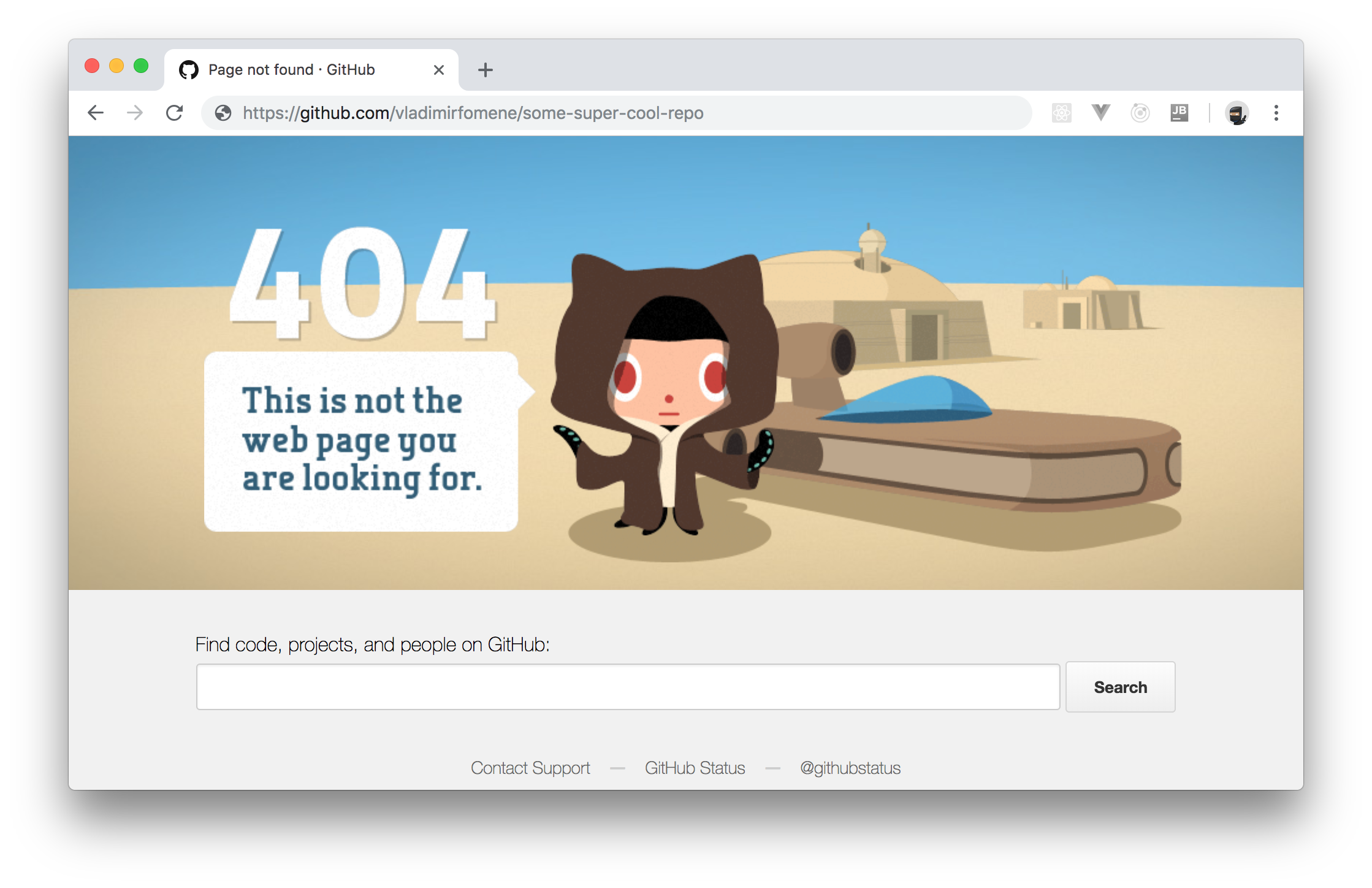
Now, if you reload the page on GitHub, you will get an HTTP `404 Not Found` response.
That's it! You just used Retrofit and Spring Boot to create a RESTful client easily. Cool, right?
## Conclusion
In this article, you saw how Square's Retrofit library makes it easy for you to communicate with an API by creating a Java interface. However, what you have to keep in mind is that Retrofit can do much more than demonstrated here. For example, you can use Retrofit to build an Android client application for a backend API. Also, instead of performing synchronous requests, you can use Retrofit to perform asynchronous (non-blocking) request.
Retrofit is so cool, and there are so many other features in it. To learn about them, you can visit the [documentation here](https://square.github.io/retrofit/).