---
title: "Developing JSF applications with Spring Boot"
description: "Spring Boot can leverage any type of applications, not only microservices. Let's build a JSF application with Spring Boot."
authors:
- name: "Bruno Krebs"
url: "https://auth0.com/blog/authors/bruno-krebs/"
date: "May 9, 2017"
category: "Developers,Tutorial,Spring Boot"
tags: ["spring-boot", "jsf", "java"]
url: "https://auth0.com/blog/developing-jsf-applications-with-spring-boot/"
---
# Developing JSF applications with Spring Boot
**TL;DR** Spring Boot was initially conceived with microservices applications in mind. But, as it excelled as a starting point for applications based on the Spring framework, many have started to wondering how to integrate JavaServer Faces (JSF) with Spring Boot. In this article we are going to put all the moving pieces together, and build a small application that enable users to list and persist products to a database.
## What is JavaServer Faces (JSF)
[JavaServer Faces (JSF)](http://www.oracle.com/technetwork/java/javaee/javaserverfaces-139869.html) is a [Java specification](https://auth0.com/blog/incrementally-changing-your-database-with-java-and-flyway/) that promotes component-based user interface development for web applications. Views, on *JSF*, are described through *XML* files called view templates and usually rely on server-side sessions to store the state of UI components. For example, let's say that we wanted to show an *HTML* table of products. To do so, we would need an *XML* file with the following content:
```xml
Name
Action
```
In this case, the view would be rendered by using the `h:dataTable` component, with the help of a **backing bean** called `productListController`, which would generate the *HTML* response for the requester. After rendering the webpage, *JSF* would retain the state of the view on the server-side to allow future interaction.
## Integrating JSF with Spring Boot
For starters, we will fork and clone the [GitHub repo](https://github.com/auth0-blog/spring-boot-faces) specially created for this article. We could also use the [Spring Initilizr](http://start.spring.io/) webpage, which is easy and intuitive. But, as the application that we will build will have some other dependencies (like *HSQLDB* and *Flyway*), it will be easier to start with the fork.
### JSF Dependencies
After forking the repository, open your preferred *IDE* (Eclipse, IntelliJ IDEA, Netbeans, etc) and import the initial project as a [Maven project](https://maven.apache.org/). Having the application properly imported on our *IDE*, the first thing we will do is to add a few dependencies. Let's open the `pom.xml` file and add the following elements nested in the `` element:
```xml
org.apache.myfaces.core
myfaces-impl
2.2.12
org.apache.myfaces.core
myfaces-api
2.2.12
org.apache.tomcat.embed
tomcat-embed-jasper
org.ocpsoft.rewrite
rewrite-servlet
3.4.1.Final
org.ocpsoft.rewrite
rewrite-integration-faces
3.4.1.Final
org.ocpsoft.rewrite
rewrite-config-prettyfaces
3.4.1.Final
org.primefaces
primefaces
6.1
```
From top to bottom, let's demystify what these dependencies are. The first two dependencies, `myfaces-api` and `myfaces-impl`, are the *JSF* interface specification (`-api`) and implementation (`-impl`). The third dependency, `tomcat-embed-jasper`, is needed so the *JVM* can parse and execute *JSF* view on runtime.
After that there are three dependencies with `org.ocpsoft.rewrite` as the value of `groupId`. These dependencies are related to [Rewrite](http://www.ocpsoft.org/rewrite/), an open-source routing and *URL* rewriting solution for *Servlet* and Java Web Frameworks. Using *JSF* without a tool like *Rewrite* would lead us to ugly and non RESTful-friendly *URLs* that heavily use query parameters to navigate. Therefore we will use *Rewrite* to achieve intuitive, bookmarkable, and pretty *URLs*.
The last dependency added, `primefaces`, is an open source *UI* framework for *JSF* that features over a hundred components, like data tables, drag & drop, overlay dialogs, and etc. This framework will help us to create beautiful user interfaces easily.
While we have the `pom.xml` file opened, let's change the build process by adding the following line to it:
```xml
src/main/webapp/WEB-INF/classes
```
This configuration is important because *Rewrite* isn't prepared to scan for configurations on non-classical web applications (i.e. on embedded applications like Spring Boot). So we need to tweak the build process a little to help *Rewrite* fulfill its purpose.
### JSF Configuration
Next, we will create two *XML* files. The first one, called `web.xml`, is quite popular among seasoned Java web developers. Usually, on a regular Spring Boot application, we wouldn't need this file. But, since we are going to use *JSF*, we need to configure the `FacesServlet` servlet and a couple of listeners. Let's create this file under a new directory called `src/main/webapp/WEB-INF/` and add the following content:
```xml
Faces Servlet
javax.faces.webapp.FacesServlet
1
Faces Servlet
*.jsf
org.springframework.web.context.ContextLoaderListener
org.springframework.web.context.request.RequestContextListener
```
The first two elements in this file are responsible for setting `FacesServlet` up and configuring it. The `servlet-mapping` element instructs this servlet to handle requests to `*.jsf` *URLs* and deal with them in the context of *JSF*. The last two elements, the `listener` elements, are responsible for integrating *JSF* into the Spring context.
The second XML file that we need is called `faces-config.xml`. Let's create this file under the `src/main/webapp/WEB-INF/` folder with the following content:
```xml
org.springframework.web.jsf.el.SpringBeanFacesELResolver
```
All this file does is to register an `ELResolver` (i.e. an Expression Language resolver) that delegates to the `WebApplicationContext` context of Spring the responsibility to resolve name references. With it we can use Spring managed beans in the *JSF* context.
As the last step to configure *JSF* with Spring Boot, we need to update the `Application` class of our project to create two more *beans*. This is done by configuring this class as follows:
```java
package com.auth0.samples.bootfaces;
import org.ocpsoft.rewrite.servlet.RewriteFilter;
import org.springframework.boot.SpringApplication;
import org.springframework.boot.autoconfigure.EnableAutoConfiguration;
import org.springframework.boot.web.servlet.FilterRegistrationBean;
import org.springframework.boot.web.servlet.ServletRegistrationBean;
import org.springframework.boot.web.support.SpringBootServletInitializer;
import org.springframework.context.annotation.Bean;
import org.springframework.context.annotation.ComponentScan;
import javax.faces.webapp.FacesServlet;
import javax.servlet.DispatcherType;
import java.util.EnumSet;
@EnableAutoConfiguration
@ComponentScan({"com.auth0.samples.bootfaces"})
public class Application extends SpringBootServletInitializer {
public static void main(String[] args) {
SpringApplication.run(Application.class, args);
}
@Bean
public ServletRegistrationBean servletRegistrationBean() {
FacesServlet servlet = new FacesServlet();
return new ServletRegistrationBean(servlet, "*.jsf");
}
@Bean
public FilterRegistrationBean rewriteFilter() {
FilterRegistrationBean rwFilter = new FilterRegistrationBean(new RewriteFilter());
rwFilter.setDispatcherTypes(EnumSet.of(DispatcherType.FORWARD, DispatcherType.REQUEST,
DispatcherType.ASYNC, DispatcherType.ERROR));
rwFilter.addUrlPatterns("/*");
return rwFilter;
}
}
```
Having both *XML* files created, the dependencies properly imported, and the `Application` class configured, we are ready to start developing *JSF* applications on Spring Boot.
## Creating a JSF App on Spring Boot
As we are going to develop a simple application that lists and persists products, we are going to start by creating the `Product` entity. For starters, create the `Product.java` file in the `com.auth0.samples.bootfaces` package. This entity will have the following code:
```java
package com.auth0.samples.bootfaces;
import lombok.Data;
import javax.persistence.Column;
import javax.persistence.Entity;
import javax.persistence.GeneratedValue;
import javax.persistence.GenerationType;
import javax.persistence.Id;
import java.math.BigDecimal;
@Data
@Entity
public class Product {
@Id
@GeneratedValue(strategy = GenerationType.AUTO)
private Long id;
@Column
private String name;
@Column
private BigDecimal price;
protected Product() {
}
public Product(String name, BigDecimal price) {
this.name = name;
this.price = price;
}
}
```
This is a very simple `Product` entity, with only three properties:
- `id`, which holds the entity's primary key
- `name`, which holds the name of the product
- and `price`, which holds its price
You probably noted that your *IDE* started complaining about the `@Data` annotation. This annotation comes from the `lombok` library, which we still need to import into our application. [Project Lombok](https://projectlombok.org/) aims on reducing the boilerplate code that is repeated in many parts of a Java application, like *getters* and *setters*. In the entity above, we used `@Data` to take out the burden of defining a lot of accessor methods for the entity's properties. There are many other features that Lombok brings to the table, [take a look at its docs](http://jnb.ociweb.com/jnb/jnbJan2010.html).
To import it, add the following element as a child of `dependecies` in the `pom.xml` file:
```xml
org.projectlombok
lombok
1.16.16
```
Now, we are going to create the `application.properties` file, that Spring Boot uses, to configure *HSQLDB* connection `String`, and *Spring Data* to disable the auto-create feature of *Hibernate*. Note that *Hibernate* is a transitive dependency of *Spring Data*, and by default it reads classes annotated with *Entity* and tries to create tables for them. But, as mentioned before, in our application we are going to use [Flyway](https://flywaydb.org/). The `application.properties` file must be created in the `src/main/webapp/` folder with the following content:
```bash
spring.datasource.url=jdbc:hsqldb:file:data/products
spring.jpa.hibernate.ddl-auto=none
```
The first property configures *HSQLDB* to persist data to the `data` folder of the root directory of our application, and the second one is the property that disables the *Hibernate* auto-create feature. Since we have disabled this feature, we now need to add a Flyway script to create the `product` table. Let's do that by creating a file called `V1__products.sql` in the `src/main/resources/db/migration/` folder. This file will contain the following script:
```sql
create table product (
id identity not null,
name varchar (255) not null,
price double not null
);
```
Now that we have finished defining the `Product` entity and a table to persist it on *HSQLDB*, we can now extend the `JpaRepository` Spring Boot interface to provide a managed bean to communicate with the database. To achieve this, let's create an interface called `ProductRepository`, in the `com.auth0.samples.bootfaces` package, with the following content:
```java
package com.auth0.samples.bootfaces;
import org.springframework.data.jpa.repository.JpaRepository;
public interface ProductRepository extends JpaRepository {
}
```
One might wonder, is the code above correct or useful? The answer is yes! `JpaRepository` interface comes with some predefined methods that allows developers to `findAll` instances of an entity (`Product` in this situation), `getOne` entity by its id, `delete` entities, and `save` new ones. All without having to define a single method on the interface that extends this one.
We are now ready to work on the front-end code. To enable users to create products through our application, we will need to create three elements:
1. A template that contains the base layout of our *JSF* application.
2. A *JSF* interface (`xhtml` file) that contains the form to create new products.
3. A Spring controller to work as a *backing bean* to the form interface.
### Building the JSF Interface to Create Products
To start, let's create the template of our application. This template will be quite simple. First, create a file called `layout.xhtml` in the `src/main/webapp/` folder, and then add the following code to it:
```xhtml
Product
```
Defining a view on *JSF* is almost like defining a regular *HTML* file, but with a few different elements, as we can see above. These elements come from *namespaces* defined on *JSF* and related frameworks (like *PrimeFaces*). The most important elements in the layout above are the `p:toolbar` element and the `ui:insert` element. The first one is a component provided by PrimeFaces, and we use it to define a navigation menu in our template. This menu will enable users to go to a view that allows them to create products, and another view that allows them to list the products already created.
The second element, `ui:insert`, defines the exact place of the template that will allow subviews to define their contents. A template can have multiple `ui:insert` elements, if they are defined with different names, but ours will have just one.
> **Note**, *JSF* uses a technology called *Facelets* to define templates. You can read all about it in the [JavaEE 7 tutorial on Oracle's website](https://docs.oracle.com/javaee/7/tutorial/jsf-facelets001.htm).
After defining our template, let's create the Spring controller that will support the interface that we will create next. Let's create a class called `ProductController` in the `com.auth0.samples.bootfaces` package and add the following code:
```java
package com.auth0.samples.bootfaces;
import org.ocpsoft.rewrite.annotation.Join;
import org.ocpsoft.rewrite.el.ELBeanName;
import org.springframework.beans.factory.annotation.Autowired;
import org.springframework.context.annotation.Scope;
import org.springframework.stereotype.Component;
@Scope(value = "session")
@Component(value = "productController")
@ELBeanName(value = "productController")
@Join(path = "/product", to = "/product-form.jsf")
public class ProductController {
@Autowired
private ProductRepository productRepository;
private Product product = new Product();
public String save() {
productRepository.save(product);
product = new Product();
return "/product-list.xhtml?faces-redirect=true";
}
public Product getProduct() {
return product;
}
}
```
This class has only two methods: `save`, which will be called by a *JSF* button to save a new product; and `getProduct`, that will be used by the interface to tie the inputs on the form to an instance of `Product`. This instance is created at the same time that `ProductController` instance is, and a new one is created right after the user saves a new product. Also note that the `save` method redirects to `product-list.xhtml`, the interface that lists products persisted in our database.
What is even more important to talk about is the four annotations that this class has:
- `@Scope` is a Spring annotation that defines that a single instance of this class will exist per user.
- `@Component` defines this class as a Spring component and names it as `productController`—name that will be used in the form's interface.
- `@ELBeanName` is an annotation provided by *Rewrite* that configures the name of the bean on its scope.
- `@Join`—another annotation provided by *Rewrite*—configures the `/product` *URL* to respond with the contents of `product-form.xhtml`.
Lastly, let's create the form that will use the controller above. We will create a file called `product-form.xhtml` in the `src/main/webapp/` folder, with the following content:
```xhtml
```
This file uses the `ui:composition` element to explicitly define `layout.xhtml` as the template for this view. After that it uses `ui:define` to inform that this view must be rendered in the `content` area of the template. And then it starts defining the form to create new products. This form is composed of one `p:inputText` where the user can define the name of the product, and a `p:inputNumber` element where the user can define the price of the new product. This last element was specifically created to handle numerical properties, as it blocks non-numerical characters and adds a mask to the input.
Lastly, the view defines a `h:commandButton` that renders an *HTML* button in the view that triggers the `save` method of the `ProductController` component. In this view we can see that we tie the new product and the behavior defined in the `ProductController` component through the `productController` name, which was defined in the `@Component` and `@ELBeanName` annotations of this component.
If we run our application now, through our *IDE* or through the `mvn spring-boot:run` command, we will be able to reach it in a browser going to `http://localhost:8080/product`. We will also be able to create new products through the form that is shown to us, but we won't be able to list the products created. Let's tackle that feature now.
### Building the JSF Interface for Products' List
To enable our users to see a list of created products, we will first define a *backing bean* that will handle the logic behind the interface. This *backing bean* will be called `ProductListController`, and we will create it in the `com.auth0.samples.bootfaces` package with the following code:
```java
package com.auth0.samples.bootfaces;
import org.ocpsoft.rewrite.annotation.Join;
import org.ocpsoft.rewrite.annotation.RequestAction;
import org.ocpsoft.rewrite.el.ELBeanName;
import org.ocpsoft.rewrite.faces.annotation.Deferred;
import org.ocpsoft.rewrite.faces.annotation.IgnorePostback;
import org.springframework.beans.factory.annotation.Autowired;
import org.springframework.context.annotation.Scope;
import org.springframework.stereotype.Component;
import java.util.List;
@Scope (value = "session")
@Component (value = "productList")
@ELBeanName(value = "productList")
@Join(path = "/", to = "/product-list.jsf")
public class ProductListController {
@Autowired
private ProductRepository productRepository;
private List products;
@Deferred
@RequestAction
@IgnorePostback
public void loadData() {
products = productRepository.findAll();
}
public List getProducts() {
return products;
}
}
```
Similar to `ProductController`, this class has four annotations:
- `@Scope (value = "session")` defines that there will be only a single instance of this class per user.
- `@Component` defines this class as a Spring component and names it as `productList`.
- `@ELBeanName` configures the name of the bean on *Rewrite* scope.
- `@Join` configures that the `/` URL will respond with the `/product-list.jsf` interface.
Note that this controller has a method called `loadData` that is annotated with `@Deferred`, `@RequestAction`, and `@IgnorePostback`. These annotations are needed to load the collection of products before rendering the interface. We could also load this collection in the `getProducts`, but this would make the process of rendering slow, as this method will be called a lot of times in the *JSF* lifecycle.
And to finish, as the companion of the *backing bean* defined above, we will create the interface that lists products. This interface will reside in the `product-list.xhtml` file, in the `src/main/webapp/` folder, and will contain the following code:
```xhtml
# Id
Name
Price
```
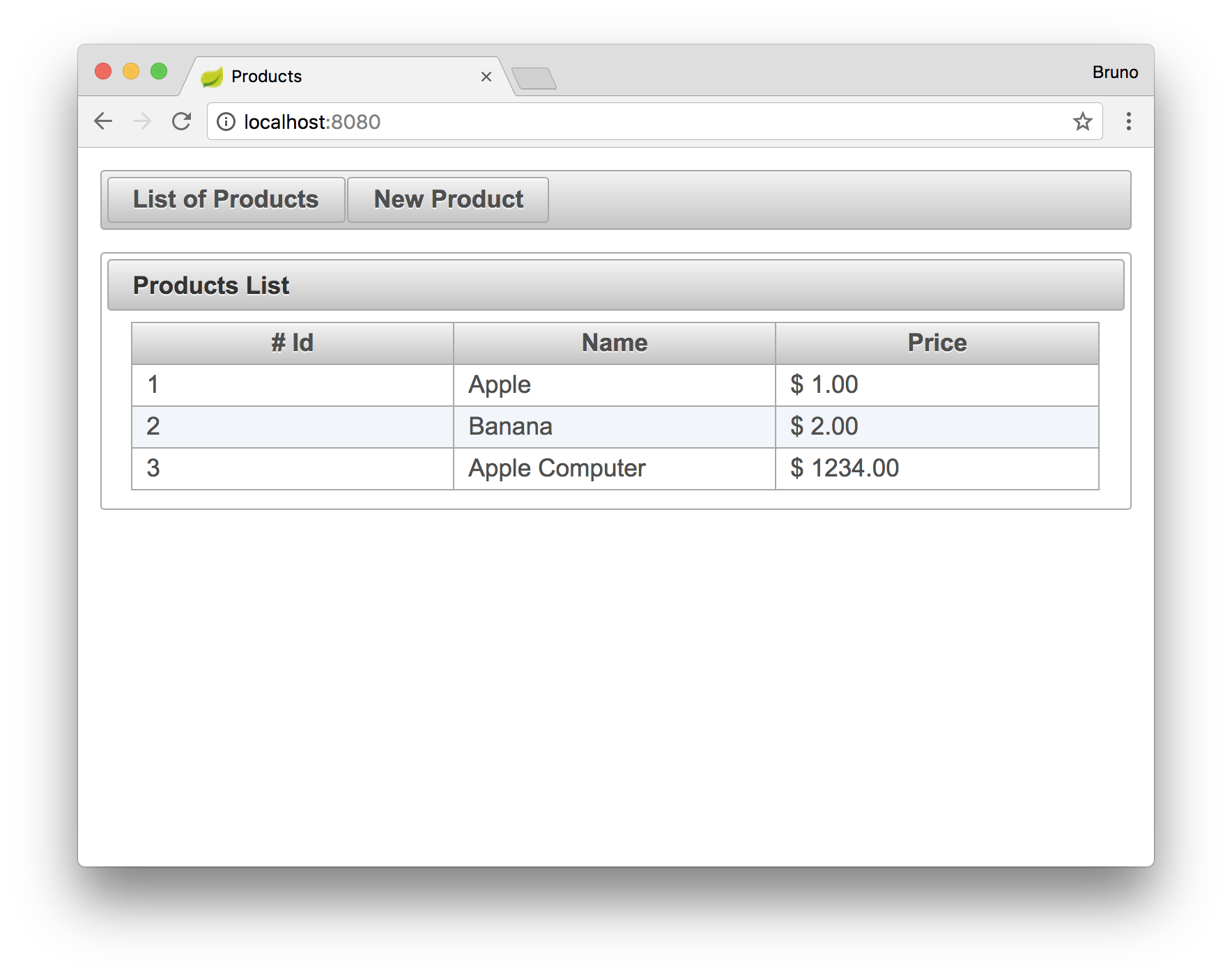
The interface created above renders the collection of product with the help of the `p:dataTable` component provided by PrimeFaces. This component receives a collection of objects, through the `value` property, from a *backing bean* (`ProductListController` in this case), and iterate over it creating the rows of an HTML table. The columns of this table are defined with the `p:column` element, also provided by PrimeFaces. Note that in this interface we used an element called `f:convertNumber` to properly format the price of the products.
Running the application, and reaching the `http://localhost:8080` URL, will show us the following screen.
## Conclusion
Spring Boot enables developers to be highly productive through convention over configuration. In this article we showed that combining this framework with *JSF* is easy and empowers developers, makes them even more productive. *JSF* has been around for many years now, and there is a very good community and a lot of content written on the web that can help on the development of enterprise applications.
But, one problem that plagues developers quite often, is scalability. As *JSF* applications usually heavily depend on server-side sessions, developers struggle to scale these applications properly. In the next article, I'm going to address this issue by using *Spring Session*, a Spring module that helps managing users' session information.