---
title: "Developing RESTful APIs with Lumen (A PHP Micro-framework)"
description: "Learn how to build a secured Lumen API server using Auth0"
authors:
- name: "Olususi Oluyemi"
url: "https://auth0.com/blog/authors/olususi-oluyemi/"
date: "Feb 4, 2022"
category: "Developers,Tutorial,PHP"
tags: ["php", "lumen", "api"]
url: "https://auth0.com/blog/developing-restful-apis-with-lumen-a-php-micro-framework/"
---
# Developing RESTful APIs with Lumen (A PHP Micro-framework)
**TL;DR:** In this tutorial, you will learn how to easily build a secured API with [Lumen](https://lumen.laravel.com/). The complete source code for this tutorial can be found here on [GitHub](https://github.com/yemiwebby/lumen-api-auth0).
Built on Laravel's [core components](https://github.com/illuminate), Lumen is able to provide speed without sacrificing any of the goodies we love about Laravel - clean and concise syntax; flexibility, and out-of-the-box support for just about anything you can think of. The scalability of an application is also not affected as Lumen is built to upgrade directly to Laravel painlessly should the application needs to outgrow Lumen's offerings.
## Features Overview
These are some of the built-in features of Lumen:
- **Routing** is provided out of the box in Lumen. This includes basic routing, routing parameters, named routes, and route groups such as middleware.
- **Authentication** does not support the session state. However, incoming requests are authenticated via stateless mechanisms such as tokens.
- **Caching** is implemented the same as in Laravel. Cache drivers such as *Database*, *Memcached*, and *Redis* are supported. For example, you can install the `illuminate/redis` package via Composer to use a Redis cache with Lumen.
- **Errors and Logging** are implemented via the [Monolog library](https://github.com/Seldaek/monolog), which provides support for various log handlers.
- **Queuing** services are similar to the ones offered by Laravel. A unified API is provided across a variety of different queue back-ends.
- **Events** provide a simple observer implementation that allows you to subscribe and listen for events in your application.
- **Bootstrapping** processes are located in a [single file](https://github.com/laravel/lumen/blob/master/bootstrap/app.php).
## Lumen Key Requirements
To use Lumen, you need to have the following tools installed on your machine:
- **PHP**: Make sure [PHP >= 7.3](http://php.net/manual/en/install.php) is installed on your machine. Furthermore, ensure that the following PHP extensions are installed. [OpenSSL](https://www.php.net/manual/en/openssl.installation.php), [PDO](https://www.php.net/manual/en/pdo.installation.php), and [Mbstring](https://www.php.net/manual/en/mbstring.installation.php).
- **Composer**: Navigate to the [Composer website](https://getcomposer.org/) and install it on your machine. A composer is needed to install Lumen's dependencies.
- **Postman**: You also need to ensure that [Postman](https://www.getpostman.com/), or a similar application, to test endpoints is installed.
> Note: You'll need MySQL for this tutorial. Navigate to the [MySQL](https://www.mysql.com/) website and install the community server edition. If you are using a Mac, I recommend following [these instructions](https://flaviocopes.com/mysql-how-to-install/). For this tutorial, you can use MySQL straight from the terminal, but if you'd prefer a MySQL GUI, check out [Sequel Pro](https://sequelpro.com/) for Mac or [HeidiSQL](https://www.heidisql.com/) for Windows.
## Building a Fast Authors API Rapidly With Lumen
At Auth0, we have many technical writers, otherwise known as authors. A directive has been given to developing an app to manage Auth0 authors. The front-end app will be built with ReactJS. However, it needs to pull data from a source and also push to it. Yes, we need an API!
An author will have the following attributes:
- Name
- Email address
- Link to Twitter profile
- Link to GitHub profile
- Location
- Title of the latest article published by the author
Additionally, we will have timestamps for each author corresponding to when the author was added or edited.
The API will provide endpoints for basic CRUD (Create, Read, Update and Delete) operations related to authors. These endpoints are as follows:
- Get all authors — `GET /api/authors`
- Get one author — `GET /api/authors/23`
- Create an author — `POST /api/authors`
- Edit an author — `PUT /api/authors/23`
- Delete an author — `DELETE /api/authors/23`
### Getting Started
Run the following command in your terminal to create a new project with [Lumen](https://lumen.laravel.com/):
```bash
composer create-project --prefer-dist laravel/lumen authors
```
Navigate into the newly created project using the `cd` command.
```bash
cd authors
```
You can run the application using the following command.
```bash
php -S localhost:8000 -t public
```
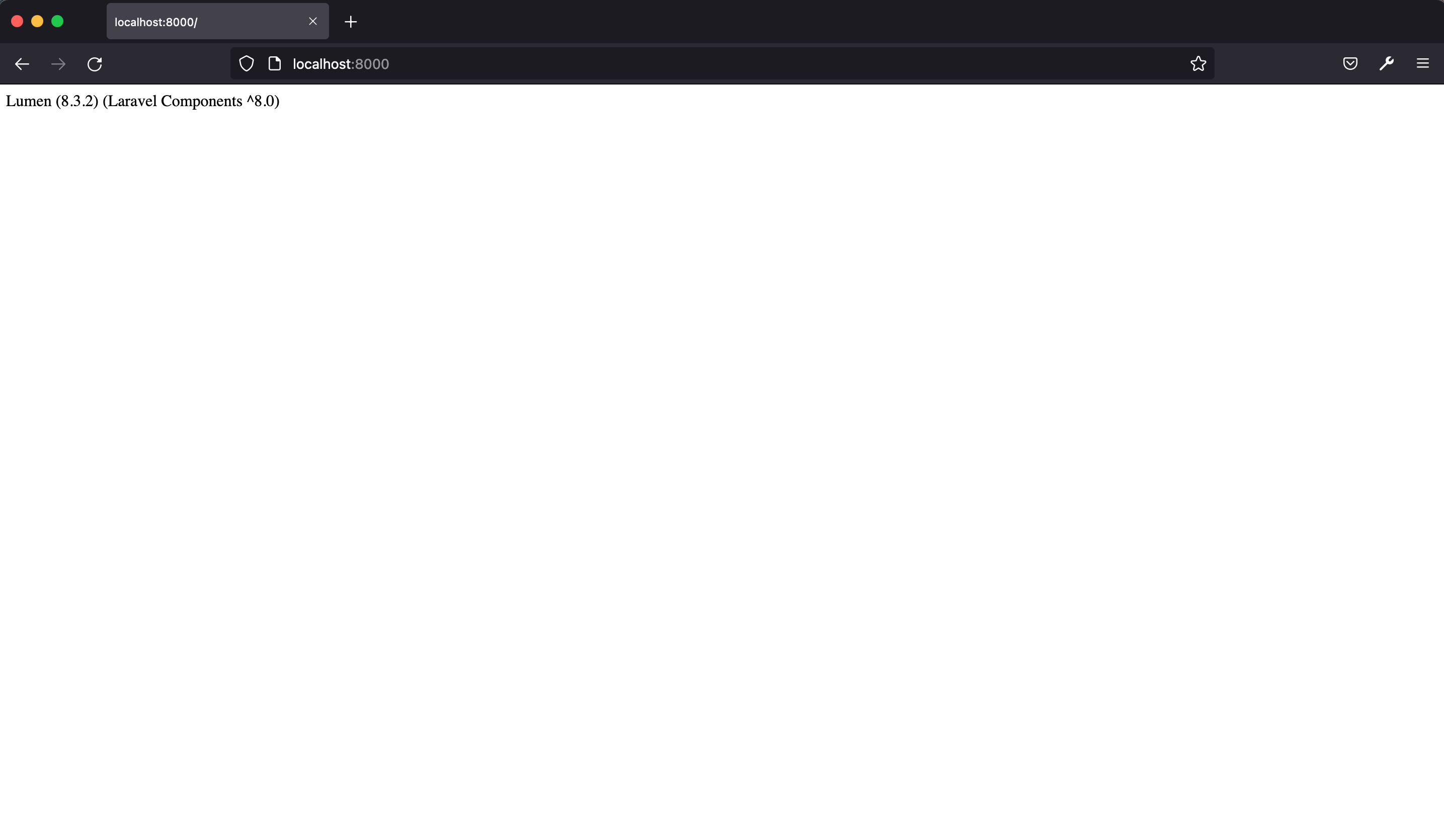
This will make the application available at [http://localhost:8000](http://localhost:8000), which will return the index page shown below.
### Activate Eloquent and Facades
As I mentioned earlier, the entire bootstrap process is located in a [single file](https://github.com/laravel/lumen/blob/master/bootstrap/app.php).
Open up the `bootstrap/app.php` and uncomment the following lines.
```php
// $app->withFacades();
// $app->withEloquent();
```
Once uncommented, the `withEloquent` function instructs Lumen to hook the [Eloquent ORM](https://github.com/illuminate/database/tree/master/Eloquent) with your database using the connections configured in the `.env` file.
> Make sure you set the right details for your database in the .env file.
In the same vein, calling the `withFacades` function call enables the use of [Facades](https://laravel.com/docs/5.5/facades) in our project.
### Setup Database, Models, and Migrations
At the time of this writing, Lumen supports four database systems: MySQL, Postgres, SQLite, and SQL Server. We are making use of MySQL in this tutorial. First, we'll create a migration for the `authors` table.
> Migrations are like version control for your database, allowing your team to modify and share the application's database schema easily.
Stop the application from running using `CTRL + C` from the terminal and hit return on your keyboard. Now, run the command below in the terminal to create the `authors` table migration:
```bash
php artisan make:migration create_authors_table
```
The new migration will be placed in your `database/migrations` directory. The migration file name is prepended with a timestamp in the format `YYYY_MM_DD_HHMMSS`. This allows Lumen to determine the order of the migrations.
Open the migration file `database/migrations/YYYY_MM_DD_HHMMSS_create_authors_table.php` update it to match the following.
```php
increments('id');
$table->string('name');
$table->string('email');
$table->string('github');
$table->string('twitter');
$table->string('location');
$table->string('latest_article_published');
$table->timestamps();
});
}
/**
* Reverse the migrations.
*
* @return void
*/
public function down() {
Schema::dropIfExists('authors');
}
}
```
In the `up` function, we specify the columns to be added to the `authors` table. A column is declared for each author attribute we highlighted earlier.
Now, go ahead and run the migration like so:
```bash
php artisan migrate
```
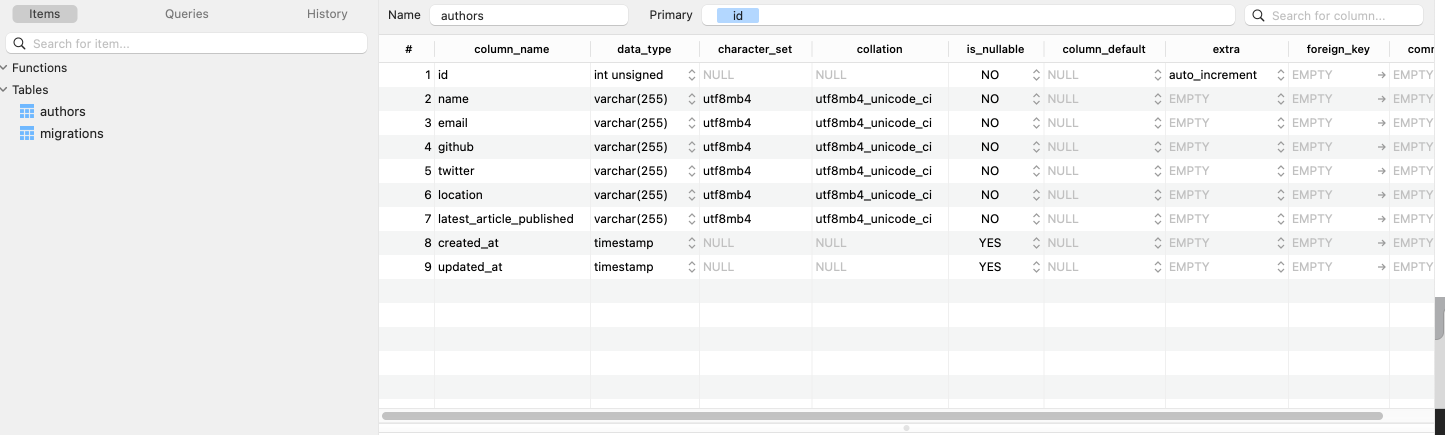
Check your database. You should now have the `authors` and `migrations` tables present.
Next, let's create the `Author` model. Create an `app/Models/Author.php` file and add the code below to it:
```php
get('/', function () use ($router) {
return $router->app->version();
});
$router->group(['prefix' => 'api'], function () use ($router) {
$router->get('authors', ['uses' => 'AuthorController@showAllAuthors']);
$router->get('authors/{id}', ['uses' => 'AuthorController@showOneAuthor']);
$router->post('authors', ['uses' => 'AuthorController@create']);
$router->delete('authors/{id}', ['uses' => 'AuthorController@delete']);
$router->put('authors/{id}', ['uses' => 'AuthorController@update']);
});
```
In the code above, we have abstracted the functionality for each route into a controller, `AuthorController`. Route groups allow you to share route attributes, such as middleware or namespaces, across a large number of routes without needing to define those attributes on each route. Therefore, every route will have a prefix of `/api`. Next, let's create the `AuthorController`.
### Set up Author Controller
Create a new file, `AuthorController.php` in `app/Http/Controllers` directory and add the following code to it:
```php
json(Author::all());
}
public function showOneAuthor($id)
: JsonResponse {
return response()->json(Author::find($id));
}
public function create(Request $request)
: JsonResponse {
$author = Author::create($request->all());
return response()->json($author, Response::HTTP_CREATED);
}
public function update($id, Request $request)
: JsonResponse {
$author = Author::findOrFail($id);
$author->update($request->all());
return response()->json($author, Response::HTTP_OK);
}
public function delete($id) {
Author::findOrFail($id)->delete();
return response('Deleted Successfully', Response::HTTP_OK);
}
}
```
Let's analyze the code above. First, we have `use App\Author`, which allowed us to require the `Author` model that we created earlier.
Next, we've created the following five methods:
- `showAllAuthors` — /GET
- `showOneAuthor` — /GET
- `create` — /POST
- `update` — /PUT
- `delete` — /DELETE
These will allow us to use that `Author` model to interact with author data. For example, if you make a POST request to `/api/authors` API endpoint, the `create` function will be invoked, and a new entry will be added to the `authors` table.
**Author controller method overview:**
- `showAllAuthors()`: checks for all the author resources
- `create()`:creates a new author resource
- `showOneAuthor()`: checks for a single author resource
- `update()`: checks if an author resource exists and allows the resource to be updated
- `delete()`: checks if an author resource exists and deletes it
**Controller responses:**
- `response()`: global helper function that obtains an instance of the response factory
- `response()->json()`: returns the response in JSON format.
- `Response::HTTP_OK`: This is a constant that represent the `200` HTTP status code. This indicates that the request was successful.
- `Response::HTTP_CREATED`: This is a constant that represent the `201` HTTP status code. This indicates that a new resource (in this case, author) was created.
- `findOrFail`: throws a `ModelNotFoundException` if no result is not found.
At this point, we can test the API routes with [Postman](https://www.getpostman.com/). To do that, restart the application with:
```bash
php -S localhost:8000 -t public
```
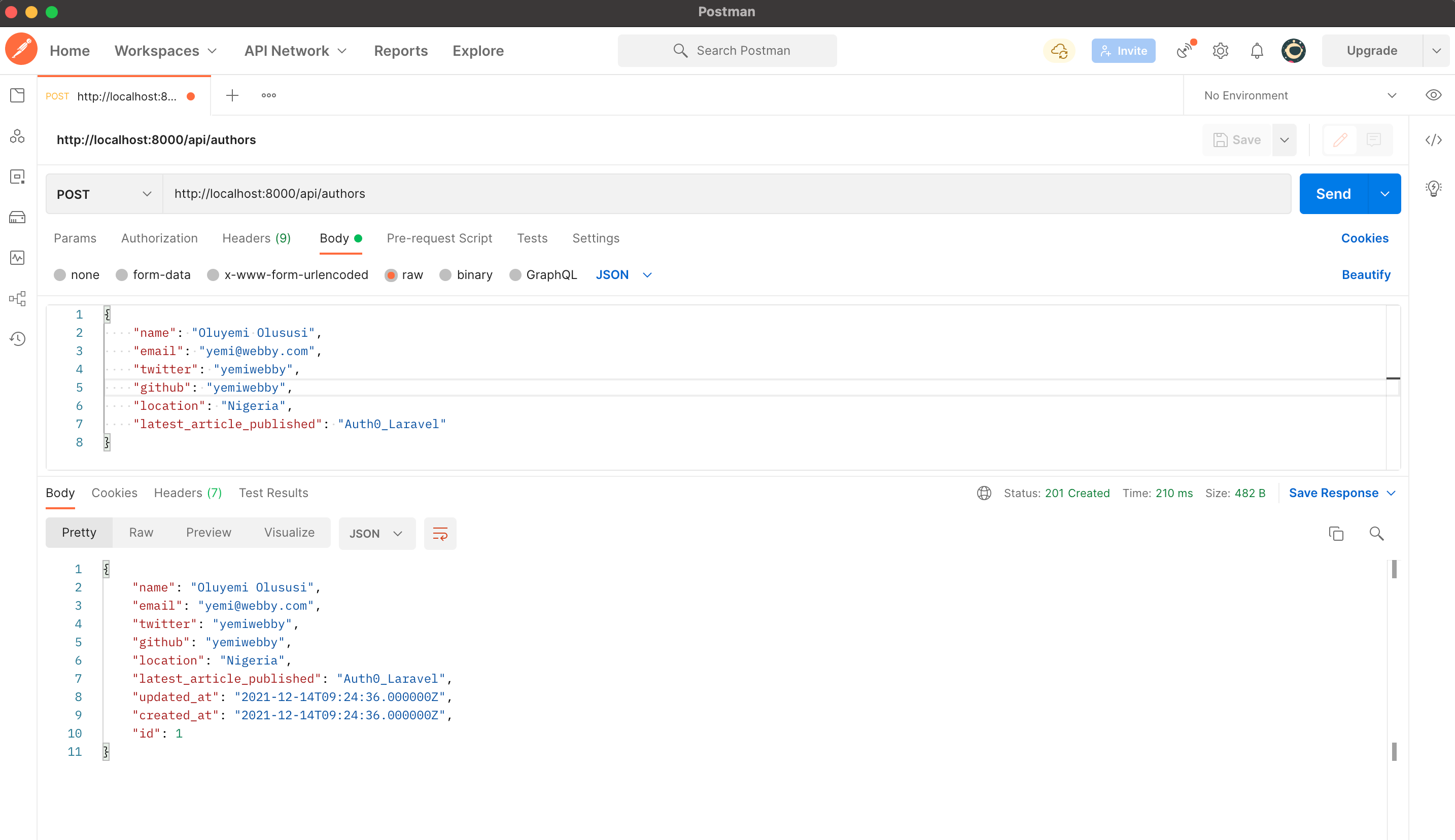
*Author POST operation* - `POST http://localhost:8000/api/authors`
Use the JSON requests below:
```json
{
"name": "John Doe",
"email": "john@john.ng",
"twitter": "yemiwebby",
"github": "yemiwebby",
"location": "Nigeria",
"latest_article_published": "Auth0_laravel"
}
```
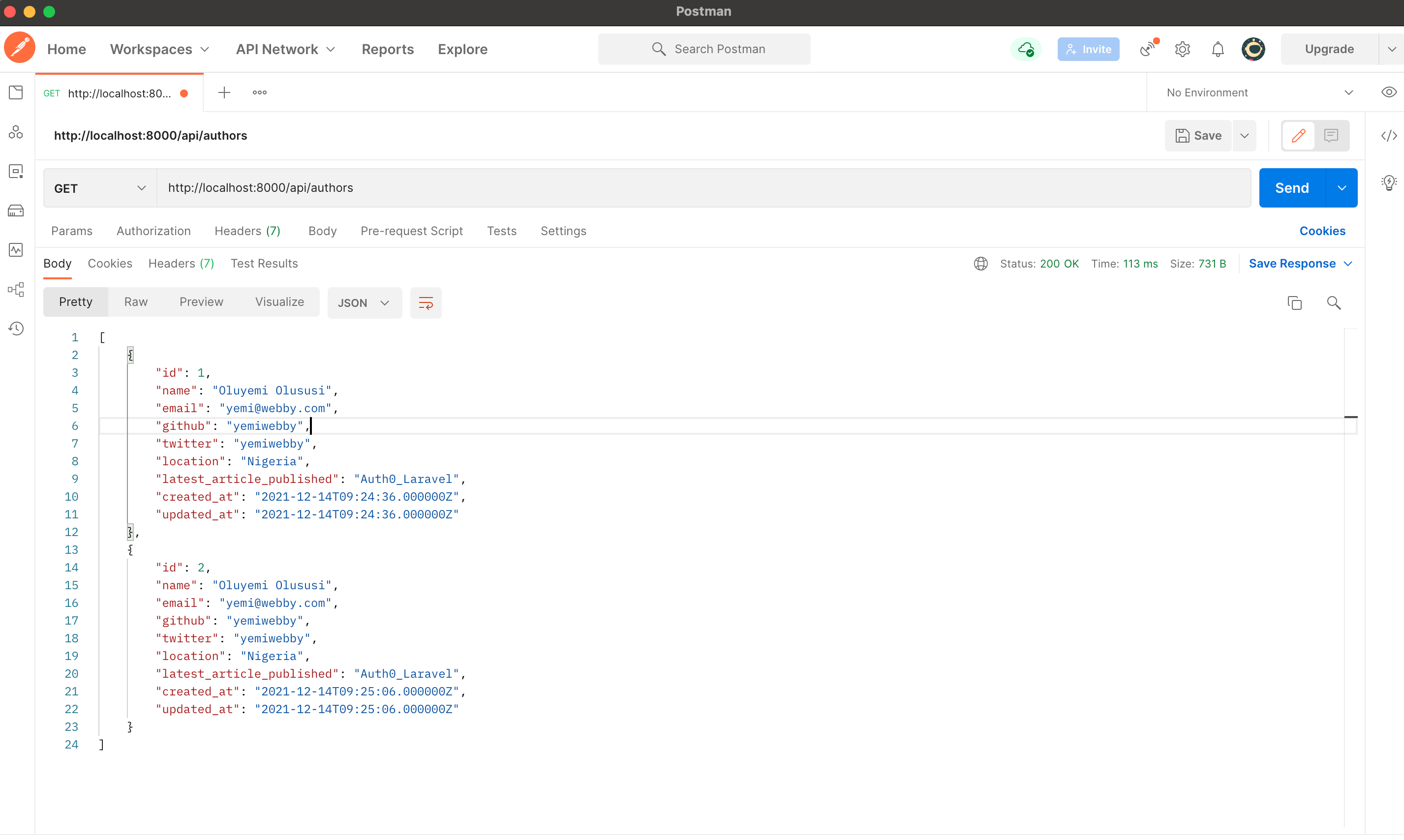
*Author GET operation* - `GET http://localhost:8000/api/authors`
You should now see an array of objects, including the author you just created, plus any others in the database.
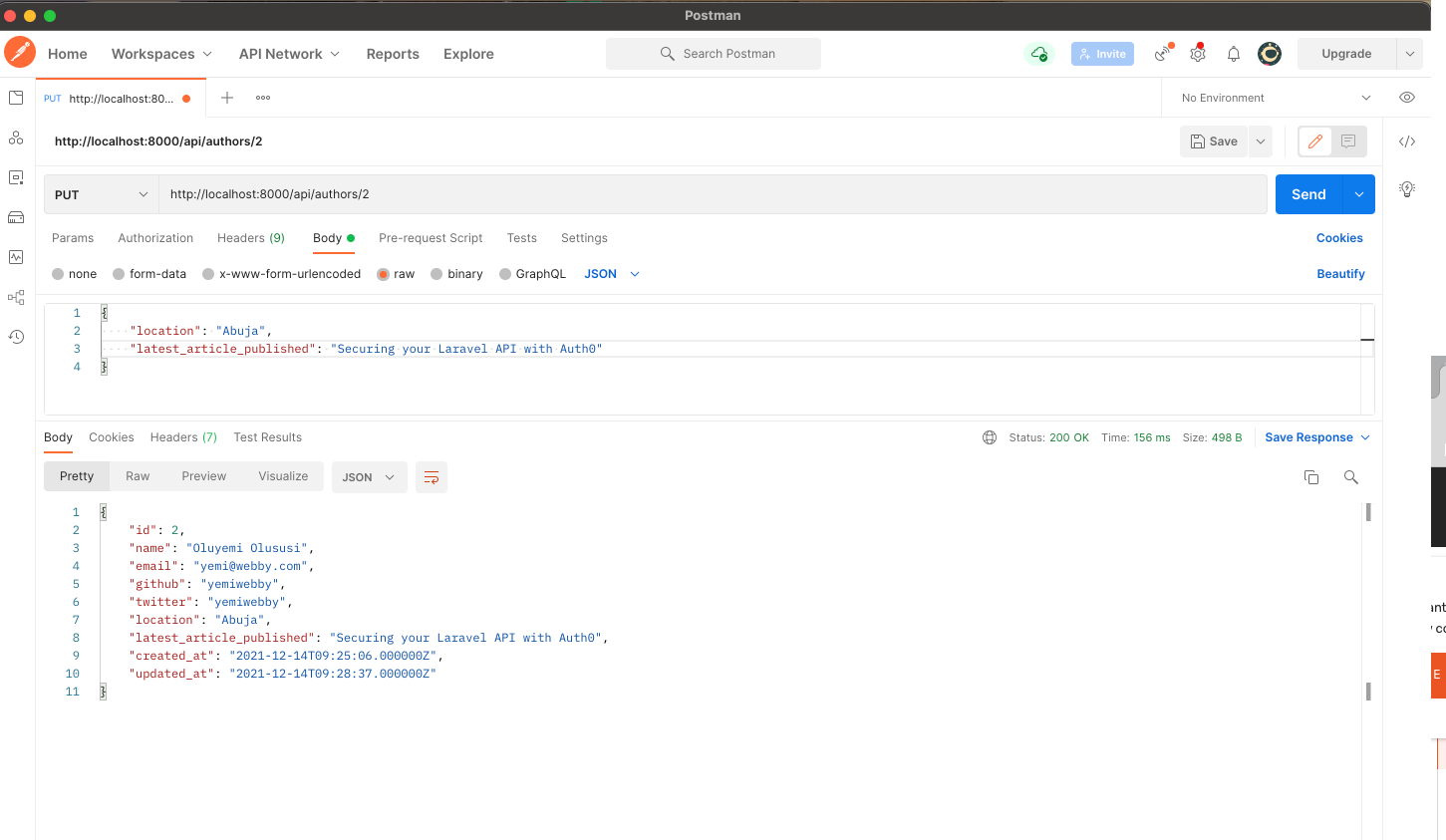
_Author PUT operation_
The `PUT` operation allows us to edit an existing author. Notice the author's `id` in the URL.
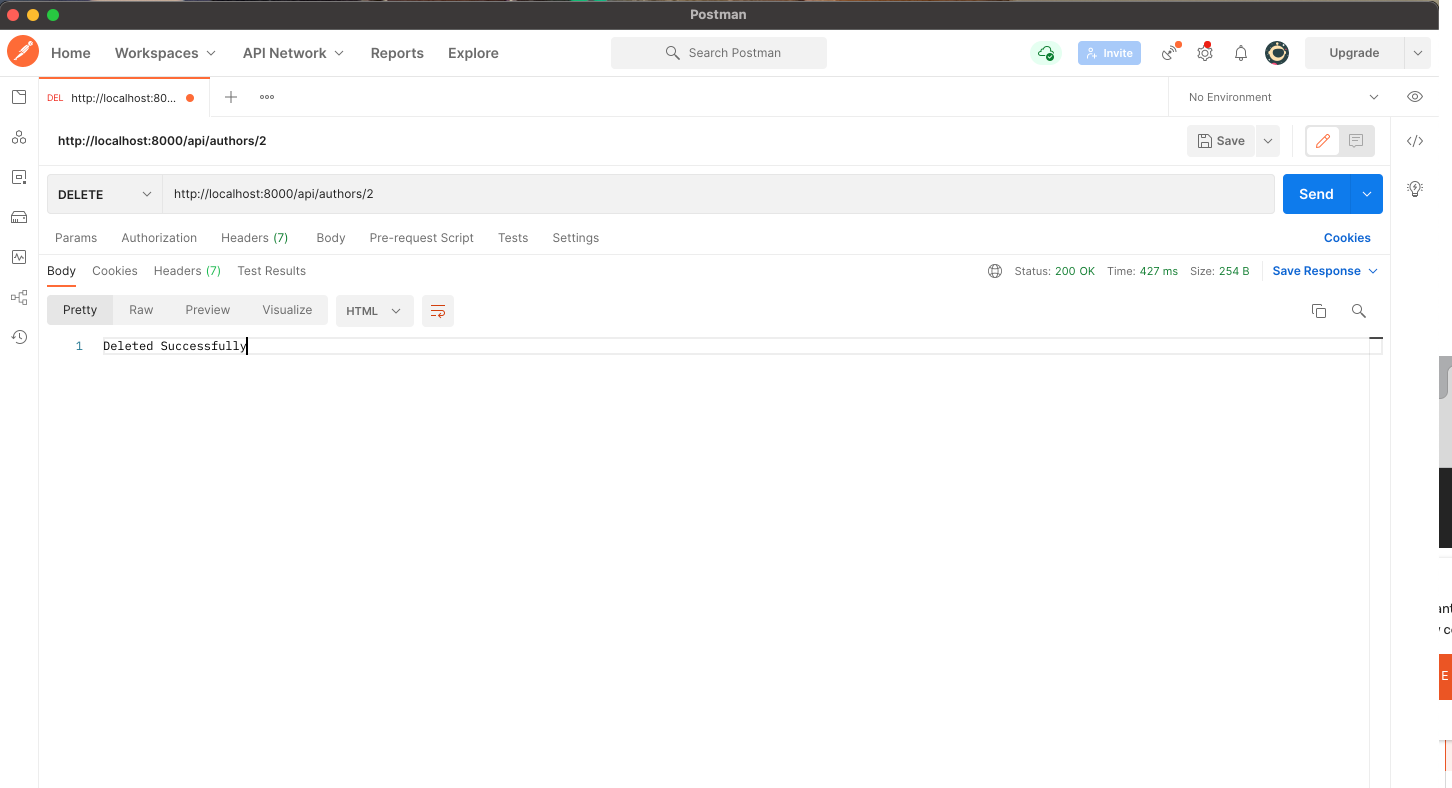
_Author DELETE operation_
Finally, we can delete a specific author as well.
Now we have a working API. Awesome!
## Lumen API Validation
In Lumen, it's very easy to validate your application's incoming data. Lumen provides access to the `$this->validate` helper method from within Route closures.
Currently, we're not checking what people are sending through to our `create` method in our API. Let's fix that now. Open up the `AuthorController` file and modify the `create` method as shown below.
```php
// ...
public function create(Request $request)
: JsonResponse {
$this->validate($request, [
'name' => 'required',
'email' => 'required|email|unique:authors',
'location' => 'required|alpha'
]);
$author = Author::create($request->all());
return response()->json($author, Response::HTTP_CREATED);
}
// ...
```
Now test the API POST route with Postman.
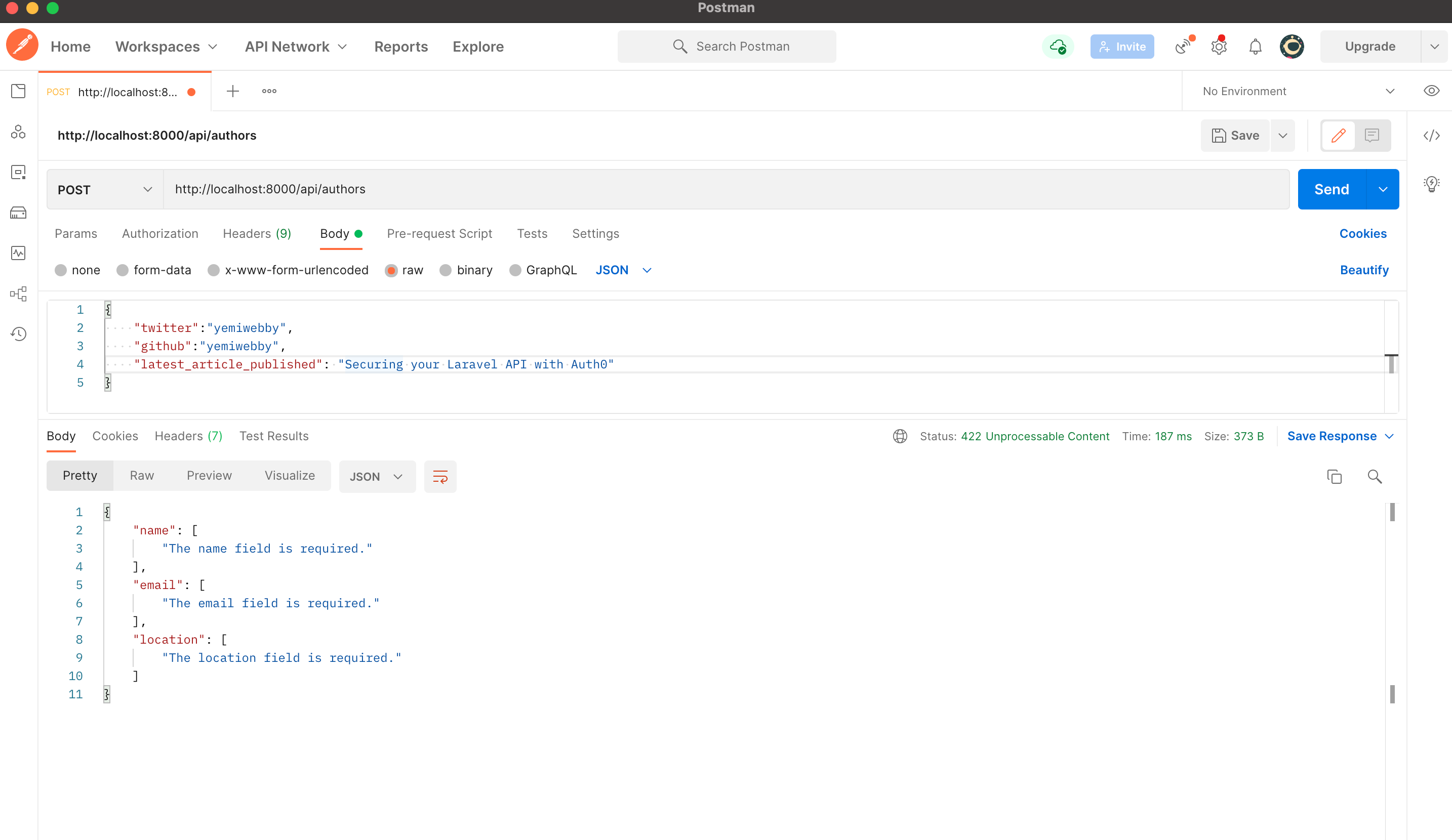
It validated the incoming requests and returned the appropriate error message.
- _name_, *email*, and *location* were required. In testing the API, *name* and *email* were not provided.
- *email* was required to be in email format.
- *location* was required to be entirely alphabetic characters, `alpha`. Nothing more. Numbers were provided as the value for *location*.
Lumen comes with [a plethora of validation rules](https://laravel.com/docs/5.8/validation#available-validation-rules) that you can use to ensure that the incoming request meets the expected quality before it can be handled.
## Securing the Authors API with Auth0
Right now, an application can make requests to any of the endpoints present in our API. In a real-world scenario, we would want to restrict our API so that only [authorized users](https://auth0.com/docs/flows/concepts/auth-code) have the ability to do this. A few things need to happen here.
1. A user signs in with their credentials (to prove who they are, i.e., **authenticate**)
2. If the user is authorized to use the API, the application is issued an API access token
3. Whenever an API request is made, the application will send that API access token along with the request
4. If the access token is valid, the API will respond with the requested data
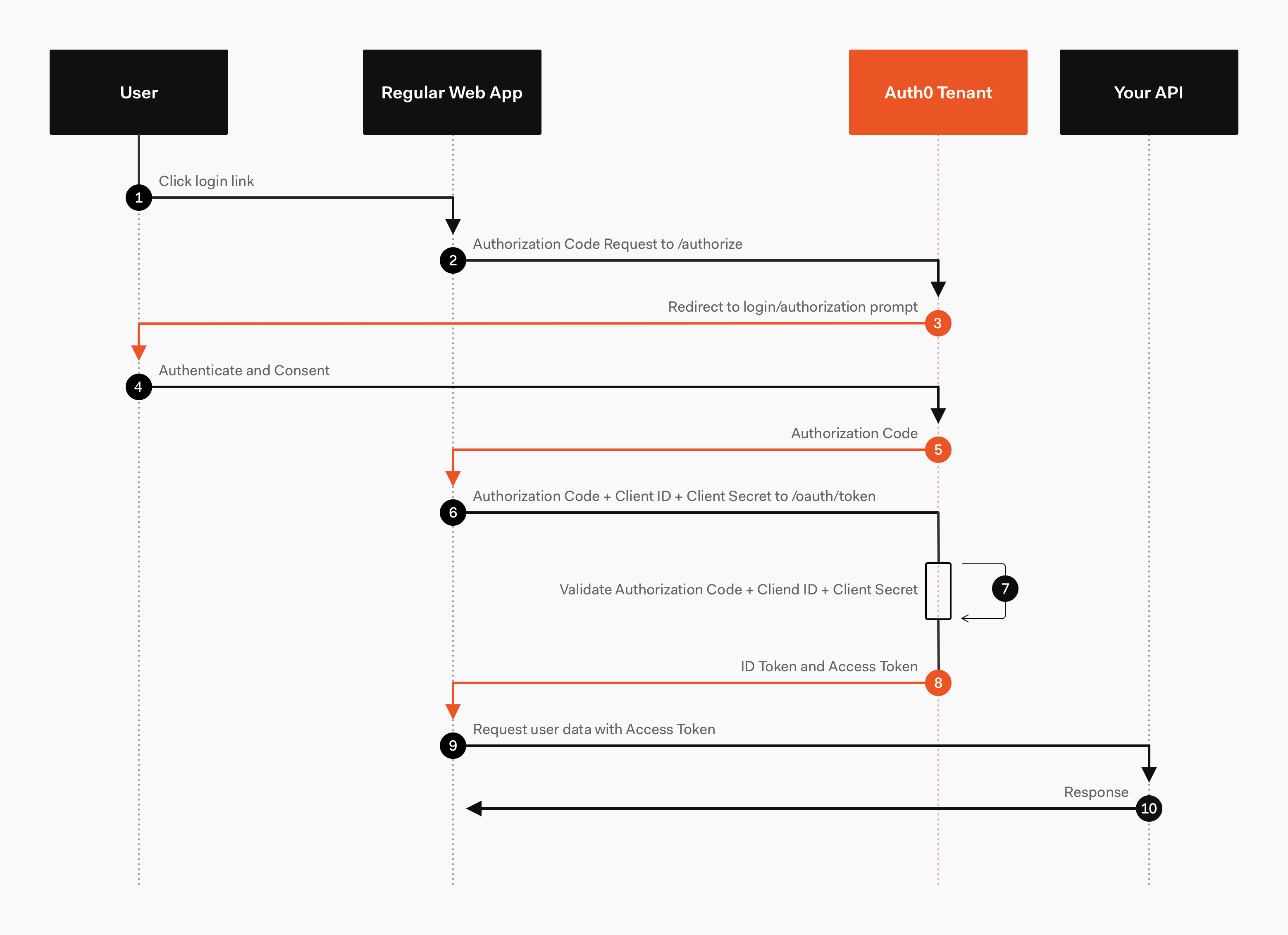
In this tutorial, we're going to focus on what happens in **step 4** of that list (step 9-10 in the diagram). Since we're only building the backend API here, you'll need to create a separate front-end to accomplish the first two steps. [Here](https://auth0.com/blog/reactjs-authentication-tutorial/) is an awesome example of how you can do that using Auth0 with React. For now, let's focus on generating access tokens using [JSON Web Tokens](https://jwt.io/).
JSON Web Token, commonly known as JWT, is an open standard for creating JSON-based access tokens that make some claim, usually [authorizing a user or exchanging information](https://jwt.io/introduction/). This technology has gained popularity over the past few years because it enables backends to accept requests simply by validating the contents of these JWTs.
JWTs can be used for authorization or information exchange. In this tutorial, we'll use JWTs to grant applications (users) authorization using our API.
Whenever the user wants to access a protected route or resource (an endpoint), the user agent must send the JWT, usually in the *Authorization* header using the [Bearer schema](http://self-issued.info/docs/draft-ietf-oauth-v2-bearer.html), along with the request.
When the API receives a request with an access token, the first thing it needs to do is **validate the token**. If the validation fails, then the request must be rejected.
For more information about **JSON Web Tokens**, check out our *free ebook* below.
We will make use of Auth0 to issue our access tokens. With Auth0, we only have to write a few lines of code to get an in-depth [identity management solution](https://auth0.com/docs/identityproviders) which includes:
- [Single sign-on](https://auth0.com/docs/sso/single-sign-on)
- [User management](https://auth0.com/docs/user-profile)
- Support for [social identity providers (like Facebook, GitHub, Twitter, etc.)](https://auth0.com/docs/identityproviders)
- [Enterprise (Active Directory, LDAP, SAML, etc.)](https://auth0.com/enterprise)
- Your [own database of users](https://auth0.com/docs/connections/database/mysql)
If you haven't done so yet, this is a good time to sign up for a [free Auth0 account](https://a0.to/blog_signup).
> Try out the most powerful authentication platform for free. **[Get started →](https://a0.to/blog_signup)**
Once you have your Auth0 account, go ahead and [create a new API in the dashboard](https://manage.auth0.com/#/apis). An API is an entity that represents an external resource, capable of accepting and responding to requests made by clients, such as the authors API we just made.
> Auth0 offers a generous free tier to get started with modern authentication.
Login to your Auth0 [management dashboard](https://manage.auth0.com/) and create a new API client.
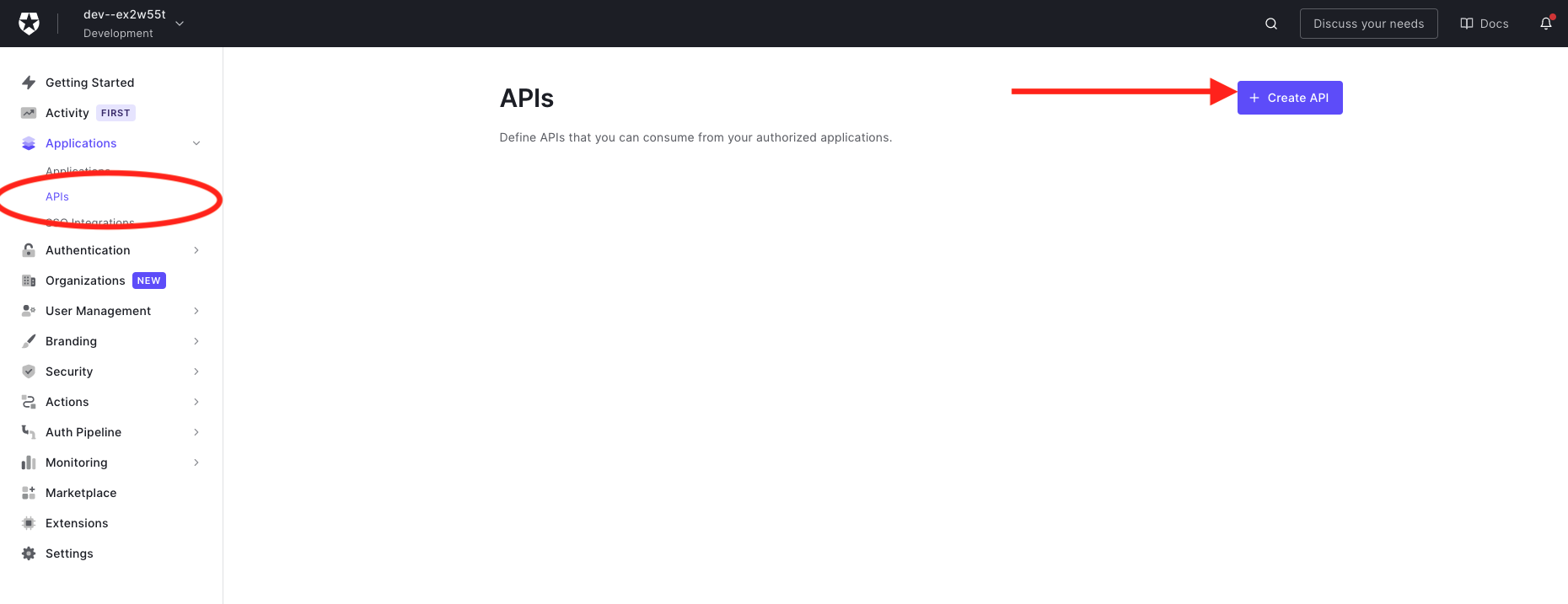
Click on the APIs menu item and then the **Create API** button.
_Create a New API_
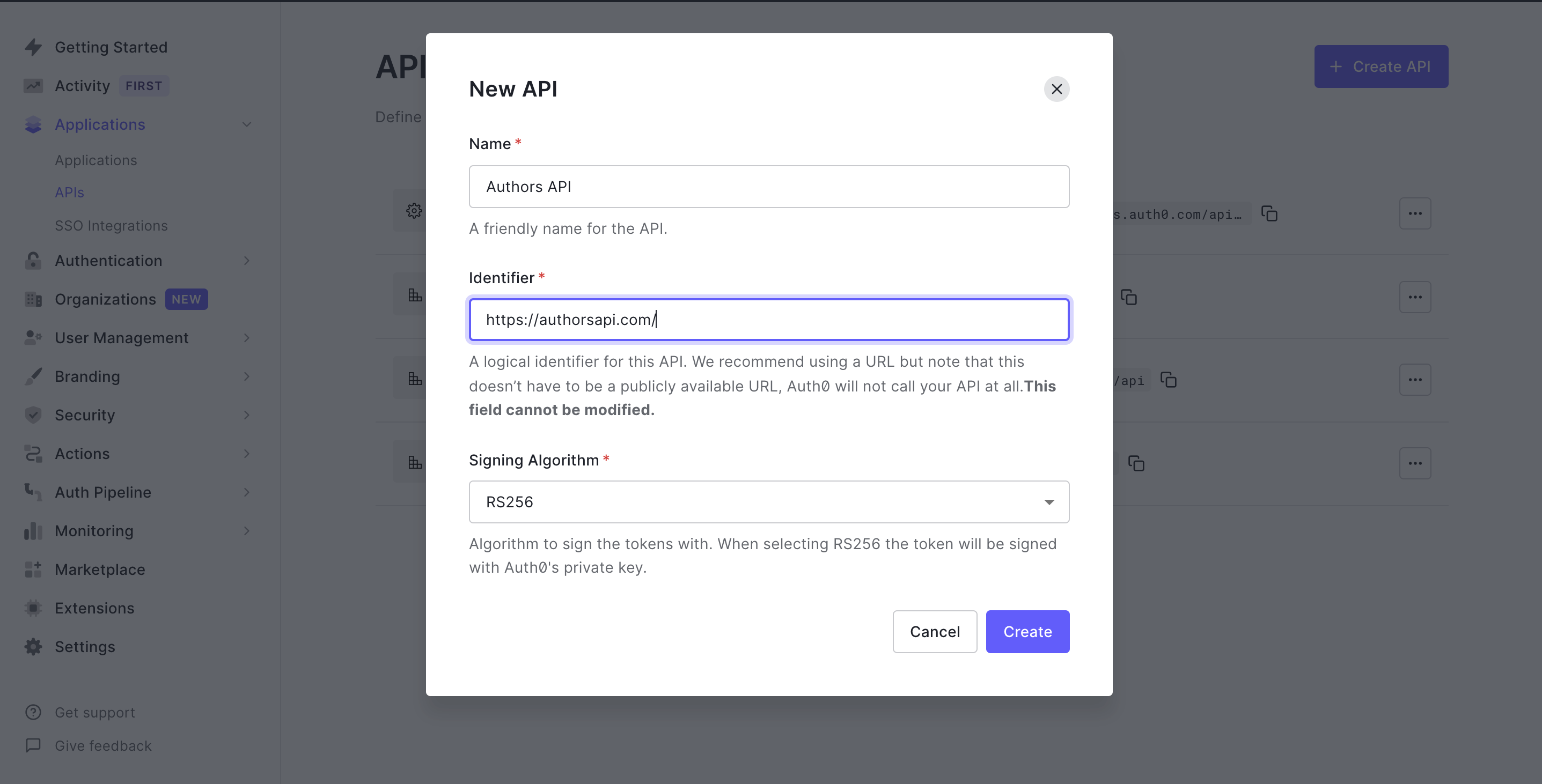
Next, you will need to give your API a `Name` and an `Identifier`. The `Name` can be anything you choose, so make it as descriptive as you want. The `Identifier` will be used to specify your API and cannot be changed once set. We'll be using it as an `audience` later when configuring the access token verification.
Here's my setup for the author's API:
- Name: **Authors API**
- Identifier: **[https://authorsapi.com](https://authorsapi.com/)**.
- Signing algorithm: **RS256**
Once you have yours filled out, click on the **Create API** button.
_Creating the Authors API_
Next, head over to your terminal and install the **[Auth0 PHP SDK](https://github.com/auth0/auth0-PHP)** in your project's root directory:
```bash
composer require auth0/auth0-php guzzlehttp/guzzle
```
> [guzzlehttp/guzzle](https://packagist.org/packages/guzzlehttp/guzzle) provides psr/http-client-implementation which the auth0 PHP SDK requires.
### Setting up environment variables
In this section, we're going to create the middleware to validate access tokens. The middleware will use some environment variables, so let's set those up first.
Open up `.env` and add the following:
```
AUTH0_DOMAIN=https://your-domain.auth0.com/
AUTH0_AUD=https://authorsapi.com
```
Replace these values with your own from the [Auth0 dashboard](https://manage.auth0.com/dashboard).
**AUTH0_DOMAIN**
Click on `APIs` > `Authors API` > `Quick Start` > `PHP` in the dashboard to find your domain. Copy the value listed for `authorized_iss` and paste it into `.env` as `AUTH0_DOMAIN`.
> When specifying the `AUTH0_DOMAIN` value, make sure you add the trailing slash: `https://xyz.auth0.com/`.
**AUTH0_AUD**
You can find this value in the Auth0 dashboard in the same place as the domain:
`APIs` > `Quick Start` > `PHP`.
Copy the value listed for `valid_audiences` and paste it in for `AUTH0_AUD`. If you followed the naming conventions of this tutorial, it would be `https://authorsapi.com`.
### Create the Auth0 Middleware
Create a new middleware file, `Auth0Middleware.php`, in the `app/Http/Middleware` directory. Add the following code to it:
```php
bearerToken();
if (!$token) {
return response()
->json('No token provided', Response::HTTP_UNAUTHORIZED);
}
try {
$this->validateToken($token);
} catch (InvalidTokenException $exception) {
return response()
->json($exception->getMessage());
}
return $next($request);
}
public function validateToken($token) {
$auth0 = new Auth0(
[
'domain' => env('AUTH0_DOMAIN'),
'strategy' => 'api',
'audience' => [
env('AUTH0_AUD'),
],
]
);
$auth0->decode($token);
}
}
```
The `handle` function is the entry point for this middleware. When a route (or group of routes) applies this middleware, the `handle` function will be called before the request can proceed to the application. For now, we only want to ensure that the request has a valid JWT token.
The first check in the `handle` function ensures that a bearer token exists for the request. A response is returned with status code `403` and an appropriate error message in the absence of one.
Next, the `handle` function tries to validate the token by calling the `validateToken` function - passing the token as an argument. Using the Auth0 SDK, we try to decode the token by calling the `decode` function. If the token cannot be decoded successfully, an `InvalidTokenException` will be thrown; hence the `validate` token is wrapped in a try-catch block. A JSON response is returned with the message and code gotten from the exception when the exception is caught.
If all of this passes, the token is decoded, and the middleware allows the HTTP request to execute.
> While the `decode` function returns an object with which we can interact, we do not need that at the moment; hence the return value is ignored.
### Assign middleware to routes
Now that the middleware is set up, we need to add it to our routes. The first step is to assign the middleware a short-hand key in `bootstrap/app.php` file's call to the `$app->routeMiddleware()` method.
Go ahead and open up `bootstrap/app.php` and uncomment this line of code:
```php
...
// $app->routeMiddleware([
// 'auth' => App\Http\Middleware\Authenticate::class,
// ]);
...
```
Once uncommented, replace the `Authenticate::class` portion with `Auth0Middleware::class` like so:
```php
$app->routeMiddleware([
'auth' => App\Http\Middleware\Auth0Middleware::class,
]);
```
This will allow us to use the `Auth0Midddleware` that we just created. And now we can use the middleware key in the route options array in the `routes/web.php` file like so:
```php
...
$router->group(
['prefix' => 'api', 'middleware' => 'auth'],
function () use ($router) {
$router->get(
'authors',
['uses' => 'AuthorController@showAllAuthors']
);
$router->get(
'authors/{id}',
['uses' => 'AuthorController@showOneAuthor']
);
$router->post(
'authors',
['uses' => 'AuthorController@create']
);
$router->delete(
'authors/{id}',
['uses' => 'AuthorController@delete']
);
$router->put(
'authors/{id}',
['uses' => 'AuthorController@update']
);
}
);
```
Now, if a request is made to any endpoint, it first runs the `Auth0Middleware`. If the request doesn't have a valid access token or no token at all, it returns an error. Let's try all of this out.
_Accessing any endpoint without an authorization header_
When accessing the endpoint without an authorization header, we receive a "no token provided" message.
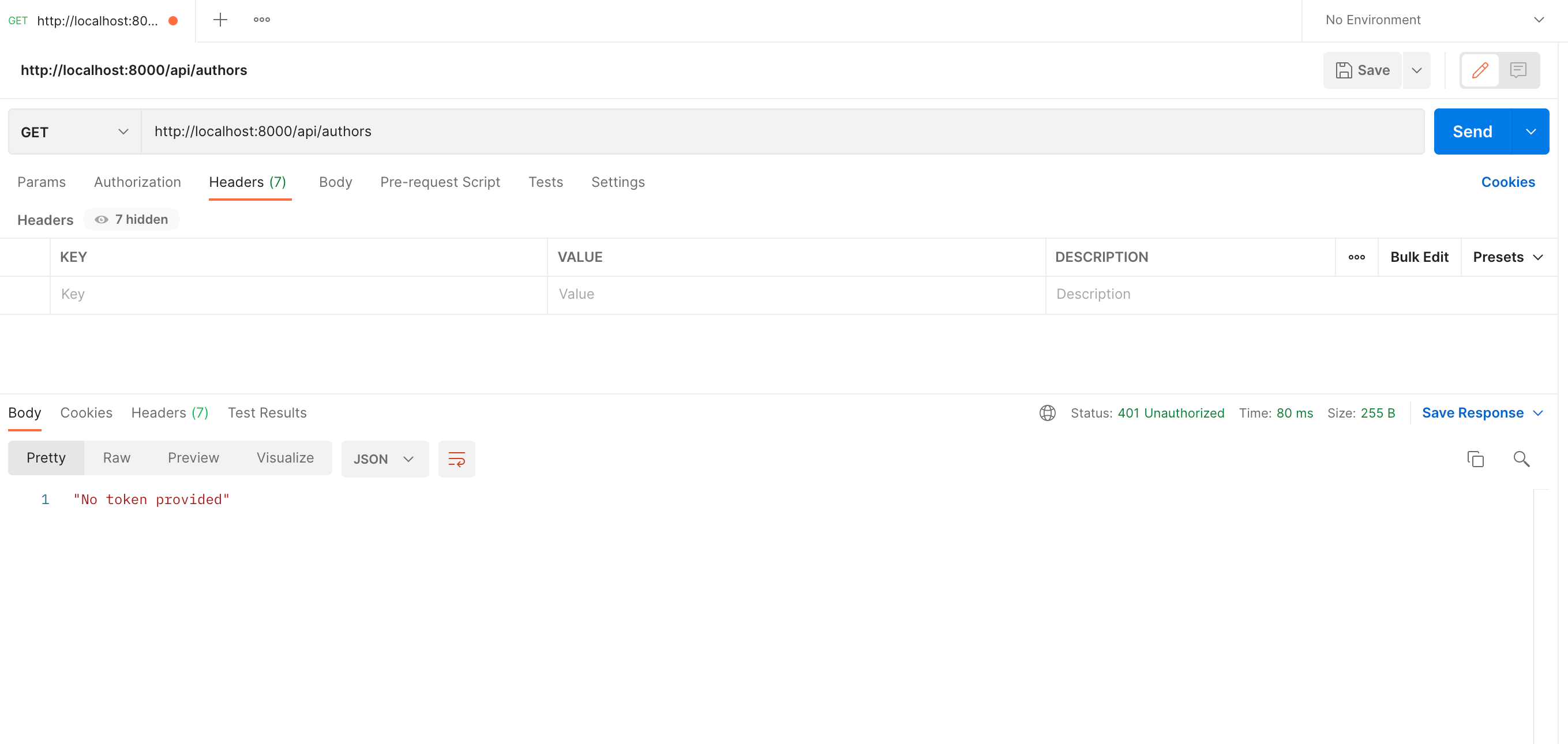
_Accessing any endpoint without any token provided_
When accessing the endpoint without a token, we receive a "no token provided" message.

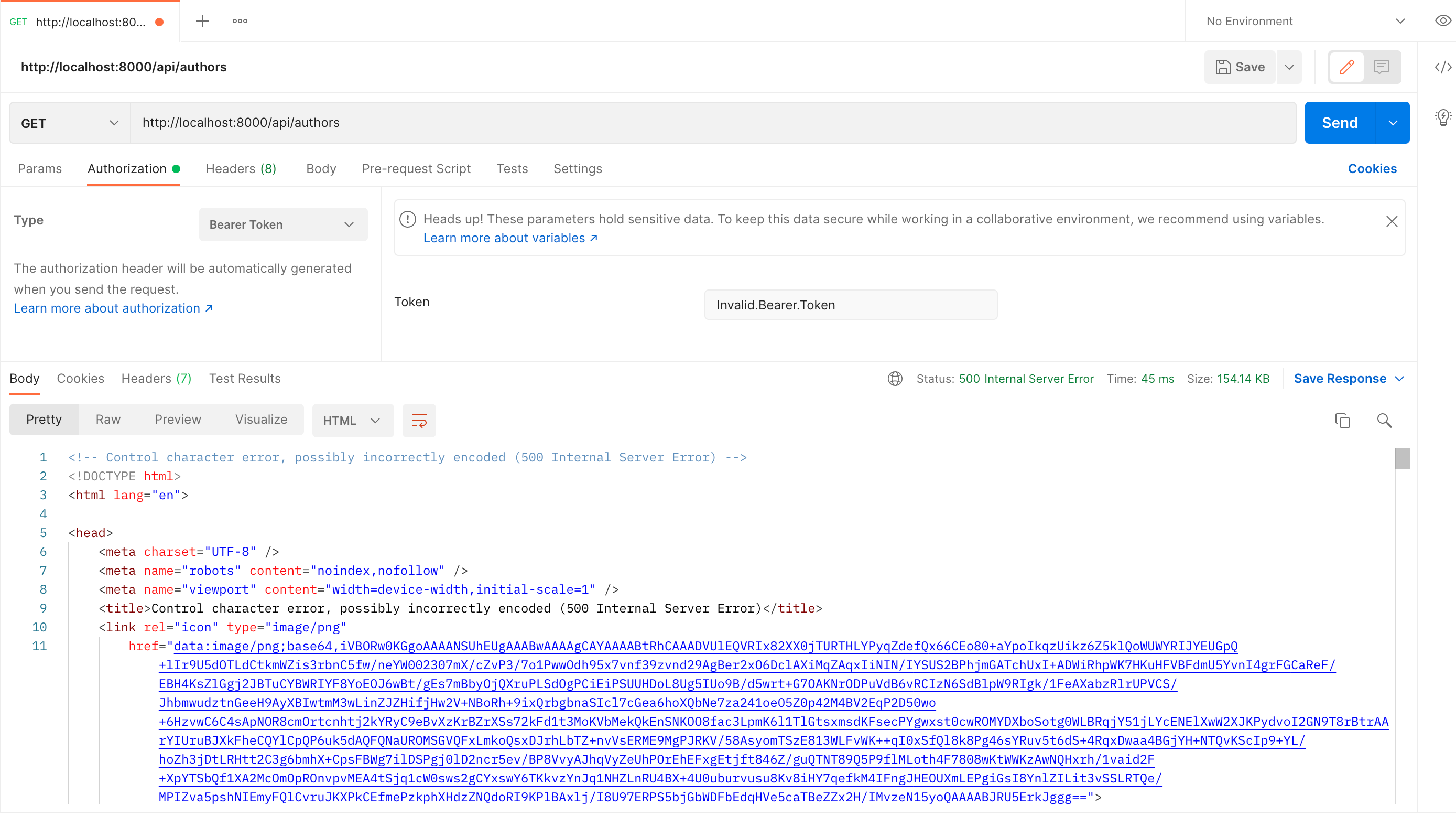
_Accessing any endpoint without a valid access token_
When accessing endpoint without a valid access token:
Now, let's test it with a valid access token. Head over to the `test` tab of your newly created API on your Auth0 dashboard.
Grab the Access token from the *Test* tab
_Grab the Access Token_
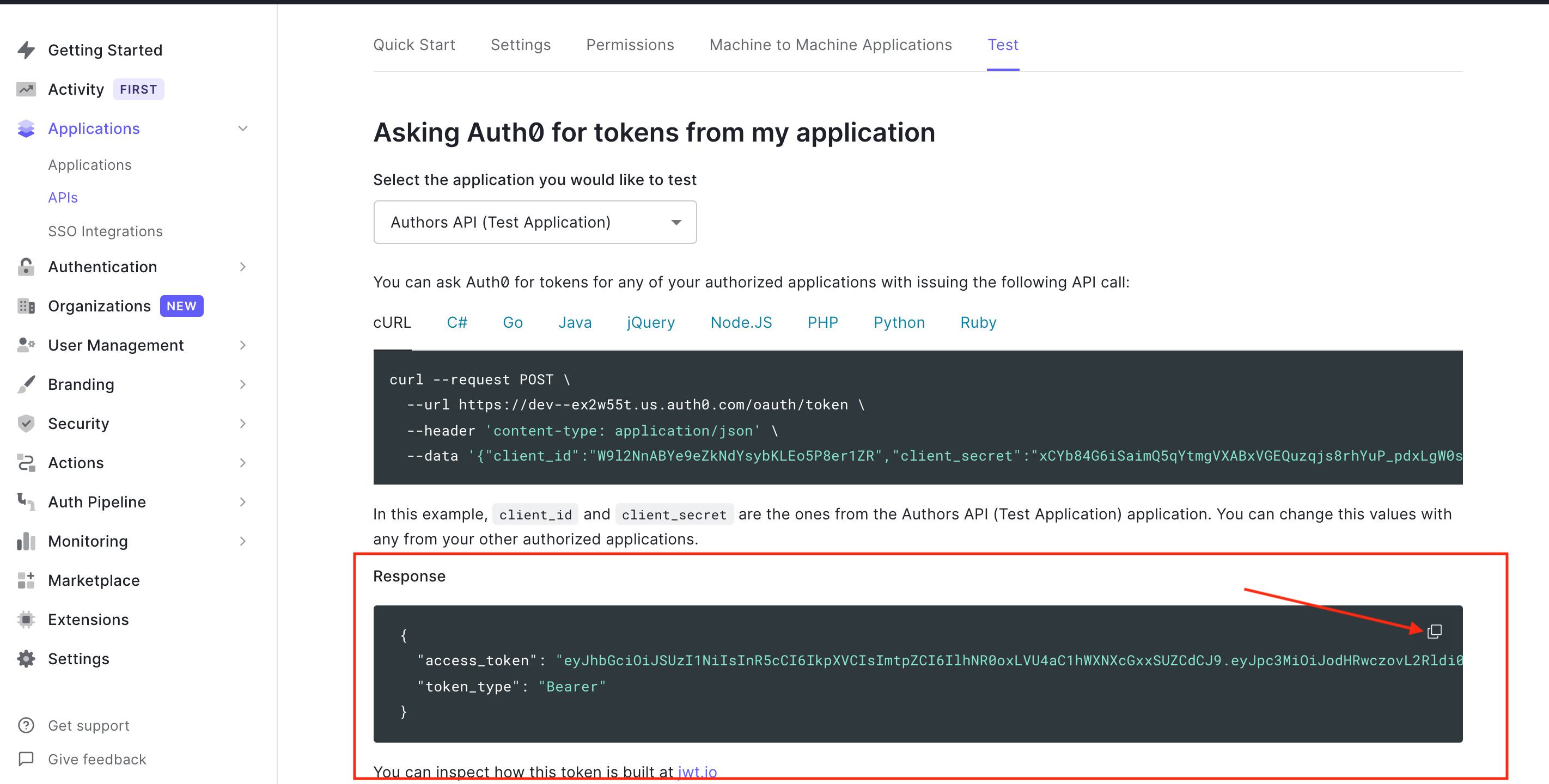
Now use this `access token` in Postman by sending it as an Authorization header to make a POST request to the `api/authors` endpoint.
_Accessing the endpoint securely_
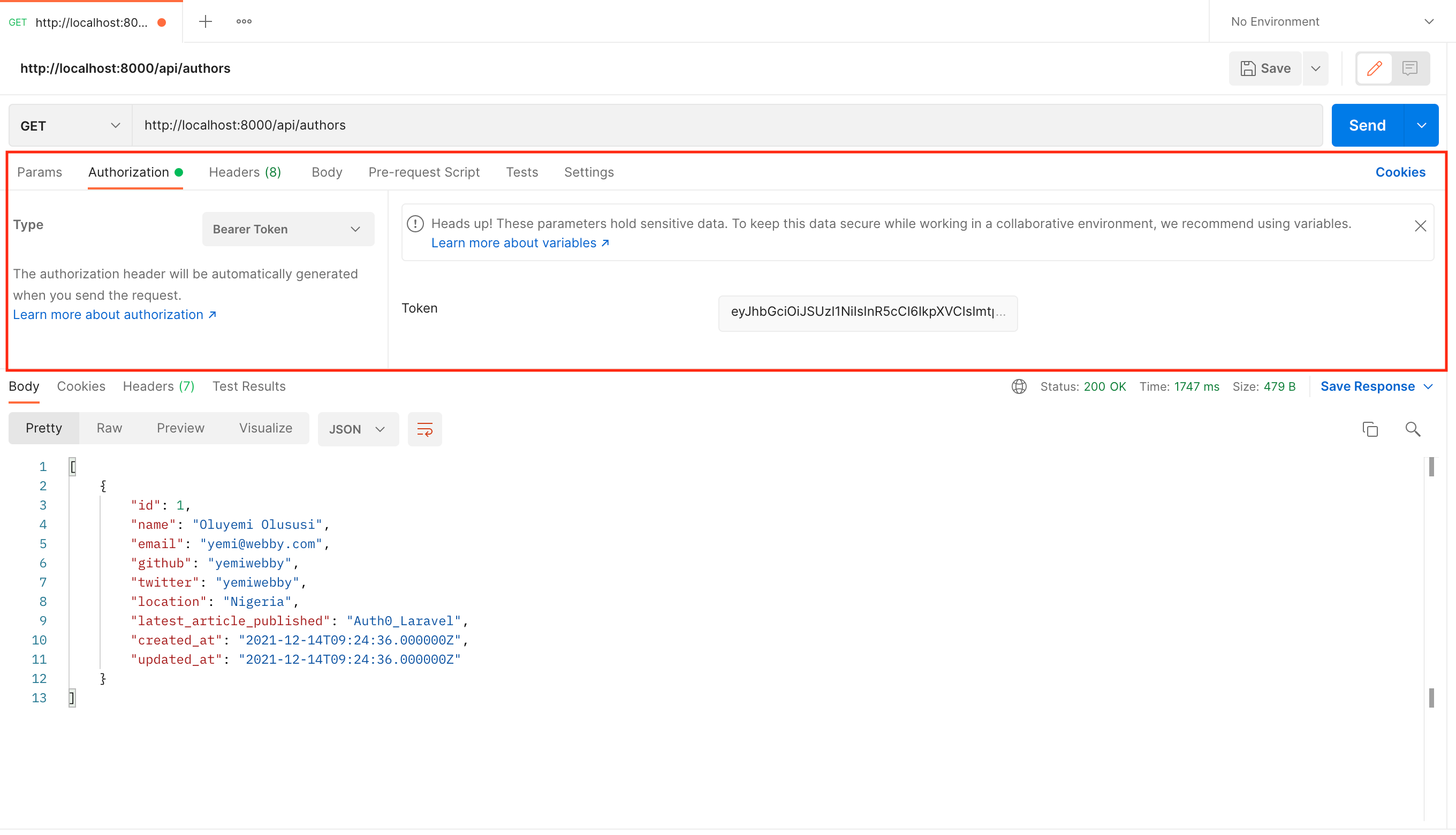
### Adding permissions
Currently, this single access token will allow an application to run any requests, as long as it has a valid token. Eventually, you may want to issue certain **permissions** with the access token. Let's try it out.
In the Auth0 dashboard, find the API we've been using and click on `Permissions`. Create a new scope that will grant permission to create a new author (e.g. `create:authors`). Then add a short description of what that scope does and click **"Add"**.
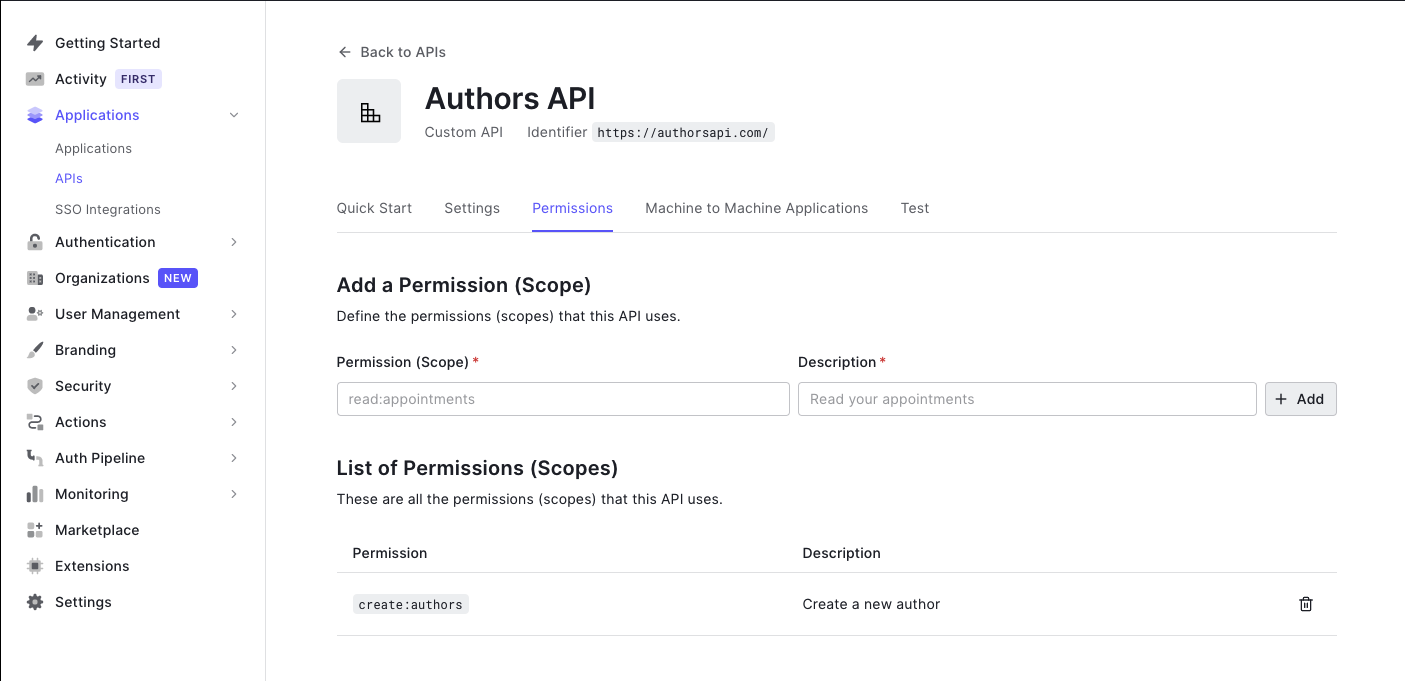
Now our API expects that when an application makes a request to create a new author, it must also send an access token that includes the `create:authors` scope. To check for this, we need to update our middleware so that it checks the scope in the access token. Open up `Auth0Middleware.php` and replace it with:
```php
bearerToken();
if (!$token) {
return response()
->json('No token provided', Response::HTTP_UNAUTHORIZED);
}
try {
$this->validateToken($token, $requiredScope);
} catch (InsufficientScopeException | InvalidTokenException $exception) {
return response()
->json($exception->getMessage(), $exception->getCode());
}
return $next($request);
}
public function validateToken($token, ?string $requiredScope) {
$auth0 = new Auth0(
[
'domain' => env('AUTH0_DOMAIN'),
'strategy' => 'api',
'audience' => [
env('AUTH0_AUD'),
],
]
);
$decodedToken = $auth0->decode($token);
if (!empty($requiredScope)) {
$this->ensureTokenHasScope($decodedToken->toArray(), $requiredScope);
}
}
private function ensureTokenHasScope(array $decodedToken, string $requiredScope) {
$tokenScope = $decodedToken['scope'] ?? '';
if (empty($tokenScope) || !$this->tokenHasScope($tokenScope, $requiredScope)) {
throw new InsufficientScopeException;
}
}
private function tokenHasScope(string $scopeString, string $requiredScope)
: bool {
$tokenScopes = explode(' ', $scopeString);
return in_array($requiredScope, $tokenScopes);
}
}
```
We've made a few changes to the middleware. First, we added a third parameter named `requiredScope` to the `handle` function. When this value is not null, our middleware should check and ensure that the provided token has that scope.
We also modified the `validateToken` function. Using the decoded token returned by the `decode` function, we check for the scopes in the token. To do this, we split the string value for `scope` in the decoded token and check if `requiredScope` is present in the array of split values. If not, we throw an `InsufficientScopeException` which is caught by the `handle` function and handled accordingly.
Next, we need to declare the `InsufficientScopeException` class. Create a new file in the `app/Exceptions` folder named `InsufficientScopeException.php`. Add the following to the newly created file.
```php
get('/', function () use ($router) {
return $router->app->version();
});
$router->group(
['prefix' => 'api', 'middleware' => 'auth'],
function () use ($router) {
$router->get(
'authors',
['uses' => 'AuthorController@showAllAuthors']
);
$router->get(
'authors/{id}',
['uses' => 'AuthorController@showOneAuthor']
);
$router->delete(
'authors/{id}',
['uses' => 'AuthorController@delete']
);
$router->put(
'authors/{id}',
['uses' => 'AuthorController@update']
);
}
);
$router->post(
'api/authors',
[
'middleware' => 'auth:create:authors',
'uses' => 'AuthorController@create',
]
);
```
> Notice we removed the `post` route from the group. We did this to allow us to pass the custom scope to the middleware.
Now, if you try to create a new author in Postman using that same token as before, you'll receive the "Insufficient scope" message.
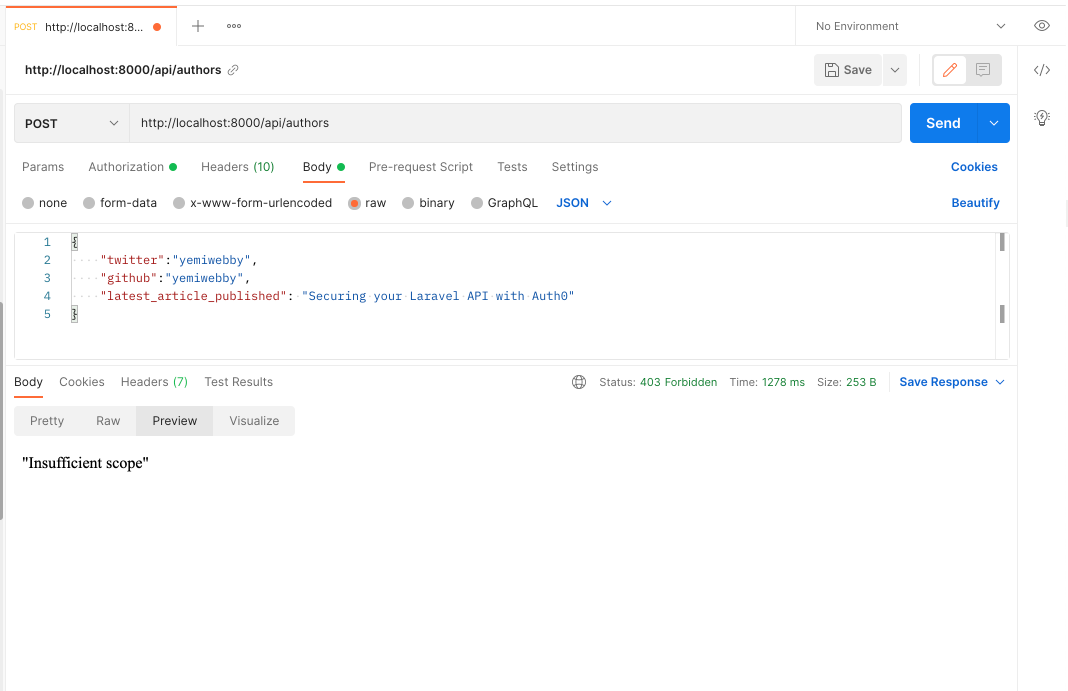
To test that it works, make sure you're on the page with your API in the [Auth0 dashboard](https://manage.auth0.com/dashboard/) and then go to the `Permissions` tab. Click on `Machine to Machine Applications` and find the API Application you've been using. Make sure the `Authorized` toggle is on, and then click on the arrow. Now select the `create:authors` scope and press "Update".
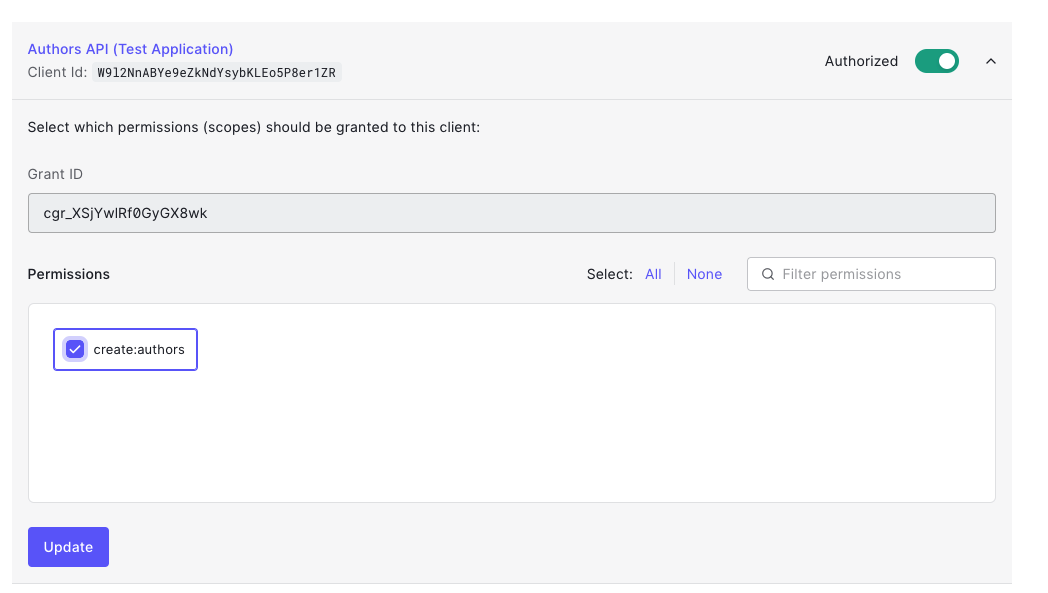
The permission for `create:authors` has been added to our test token. Head back to the "Test" tab and press "Copy token" to get the updated one.
Paste that token into the Authorization header as you did before (make sure you have `Bearer` before it), try the `POST` request again, and now it should have worked!
### Adding a front-end
This is just an example of how to create API access tokens. Once you're ready to actually **issue and use them**, you need to create a front-end. Here are some amazing [React](https://auth0.com/blog/reactjs-authentication-tutorial/) and [Vue.js authentication tutorials](https://auth0.com/blog/beginner-vuejs-tutorial-with-user-login/) that cover how you can accomplish that.
## Conclusion
Well done! You have learned how to build a rest API with the powerful PHP micro-framework Lumen and secure it using JWTs. Need to use PHP to build your API or micro-service? I'd bet on Lumen as the tool of choice for speed and ease of use.
As you've seen, Auth0 can help secure your **API** with ease. Auth0 provides more than just username-password authentication. It provides features like [multifactor auth](https://auth0.com/multifactor-authentication), [breached password detection](https://auth0.com/breached-passwords), [anomaly detection](https://auth0.com/docs/anomaly-detection), [enterprise federation](https://auth0.com/docs/identityproviders), [single sign-on (SSO)](https://auth0.com/docs/sso), and more.
[Sign up](https://a0.to/blog_signup) today so you can take the stress out of authentication and instead focus on building unique features for your app.
The code for this article is available on [GitHub](https://github.com/yemiwebby/lumen-api-auth0). Happy coding!