---
title: "Using Azure DocumentDB and ASP.NET Core for extreme NoSQL performance"
description: "Let's delve into Azure DocumentDB with ASP.NET Core and learn common-case scenarios from a performance point of view."
authors:
- name: "Matias Quaranta"
url: "https://auth0.com/blog/authors/matias-quaranta/"
date: "Oct 26, 2016"
category: "Developers,Tutorial,.NET"
tags: ["azure", "aspnetcore", "documentdb", "authentication"]
url: "https://auth0.com/blog/documentdb-with-aspnetcore/"
---
# Using Azure DocumentDB and ASP.NET Core for extreme NoSQL performance
---
**TL;DR:** This article continues the journey we [started](https://auth0.com/blog/auth0-with-azure-documentdb/) with Azure DocumentDB. In this installment, we will learn how to build common query patterns and services with ASP.NET Core. A full working application sample is available as a [GitHub repository](https://github.com/ealsur/auth0documentdb/).
---
## Integration between Auth0 and Azure DocumentDB
In our previous article: [Integration between Auth0 and Azure DocumentDB](https://auth0.com/blog/auth0-with-azure-documentdb/) we configured an **integration** between Auth0 and Azure DocumentDB as a Custom Database Provider to store our enrolled users in JSON format, as [documents](https://en.wikipedia.org/wiki/Document-oriented_database).
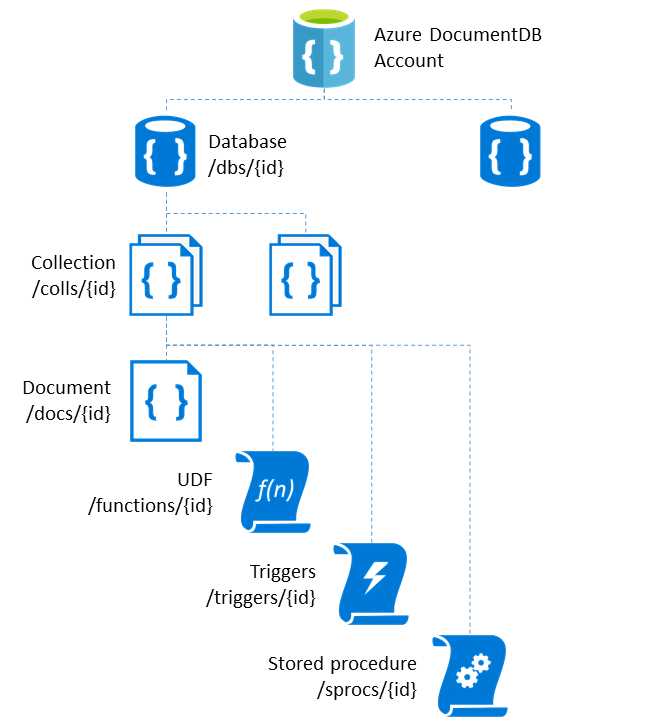
Conceptually, in Azure DocumentDB, a _database_ can be defined as a logical container of document collections; each _collection_ can hold not only documents but _stored procedures_, _triggers_, and _user-defined functions_. The collection is the [billable unit](https://azure.microsoft.com/pricing/details/documentdb/) and defines the [consistency level](https://azure.microsoft.com/en-us/documentation/articles/documentdb-consistency-levels/).
## Querying and storing data on Azure DocumentDB
Azure DocumentDB collections have [automatic attribute indexing](https://azure.microsoft.com/documentation/articles/documentdb-indexing/), which can also be [customized](https://azure.microsoft.com/documentation/articles/documentdb-indexing-policies/). This **schema-free** approach lets you store documents with different and dynamic structures that can evolve over time.
Since we are storing our users on DocumentDB, this means we can also **store other object types** in the same collection without their interfering with each other.
We will work with a practical pattern to achieve this multiple-type storage and build performance-wise querying examples; even though DocumentDB supports [Node.js](https://azure.microsoft.com/documentation/articles/documentdb-nodejs-get-started/), [Python](https://azure.microsoft.com/documentation/articles/documentdb-sdk-python/), [Java](https://azure.microsoft.com/documentation/articles/documentdb-sdk-java/), and [.Net](https://azure.microsoft.com/documentation/articles/documentdb-get-started/) SDKs, we'll be working on the latter. A [full sample on GitHub](https://github.com/ealsur/auth0documentdb/) is available running on ASP.NET Core.
### Dependencies
Using ASP.NET Core, we will use the _project.json_ to define dependencies. We will only need the [Azure DocumentDB Nuget package](https://www.nuget.org/packages/Microsoft.Azure.DocumentDB.Core/) on the latest version:
```javascript
{
...
"Microsoft.Azure.DocumentDB.Core":"0.1.0-preview"
...
}
```
### Base Type Pattern
We start by creating a base abstract class with _Type_ and _Id_ attributes. All DocumentDB objects have an id attribute that can be auto generated (as a Guid) or set upon creation:
```cs
public abstract class Entity
{
public Entity(string type)
{
this.Type = type;
}
///
/// Object unique identifier
///
[Key]
[JsonProperty("id")]
public string Id { get; set; }
///
/// Object type
///
public string Type { get; private set; }
}
```
>You might notice the [JsonProperty](http://www.newtonsoft.com/json/help/html/t_newtonsoft_json_serialization_jsonproperty.htm) decorator. This is because the "id" attribute on DocumentDB is always lowercase; the decorator will make sure the property name matches, no matter what your JSON serialization configuration is.
Now, every object type you want to store on DocumentDB can **inherit** from this class and set its own attributes:
```cs
public class NotificationPreferences : Entity
{
public NotificationPreferences():base("notificationpreferences")
{
Email = false;
Push = false;
SMS = false;
}
[JsonProperty("user")]
public string User { get; set; }
[JsonProperty("email")]
public bool Email { get; set; }
[JsonProperty("push")]
public bool Push { get; set; }
[JsonProperty("sms")]
public bool SMS { get; set; }
}
```
```cs
public class ContactAddress : Entity
{
public ContactAddress():base("address")
{
Primary = false;
}
[JsonProperty("user")]
public string User { get; set; }
[JsonProperty("address")]
public string Address { get; set; }
[JsonProperty("primary")]
public bool Primary { get; set; }
}
```
### Performant Querying
Azure DocumentDB allows for insert, update, delete, and querying capabilities on different flavors, including LINQ and SQL syntax.
>If you already have your data in another format / source, you can use the Azure DocumentDB [Data Migration tool](https://azure.microsoft.com/documentation/articles/documentdb-import-data/) to migrate it to a collection.
The following operations are available as a [full provider](https://github.com/ealsur/auth0documentdb/blob/master/Services/DocumentDbProvider.cs) on the GitHub repository; we will highlight the snippets that will enable you to understand the basic operations.
To successfully connect to a DocumentDB collection we will need the **service url endpoint** and the **password/key** (when using the MongoDB protocol-enabled version it's called _Password_ and when using a normal DocumentDB instance it's called _Key_) obtained on the Azure Portal. They will enable us to access the service through a [DocumentClient](https://msdn.microsoft.com/library/azure/microsoft.azure.documents.client.documentclient.aspx).
Like we mentioned [earlier](https://azure.microsoft.com/documentation/articles/documentdb-resources/), documents are grouped in collections within a database, each collection is accessed by a [Resource URI syntax](https://msdn.microsoft.com/en-us/library/azure/dn919266.aspx). The SDK provides helper methods to build URIs:
```cs
private Uri GetCollectionLink()
{
return UriFactory.CreateDocumentCollectionUri(_settings.DatabaseName, _settings.CollectionName);
}
```
We always start by creating an instance of a DocumentClient and using it in every access operation. A common performance tip is to maintain a single DocumentClient for all our queries and operations:
```cs
public DocumentDbProvider(DocumentDbSettings settings)
{
_settings = settings;
_collectionUri = GetCollectionLink();
_dbClient = new DocumentClient(_settings.DatabaseUri, _settings.DatabaseKey, new ConnectionPolicy(){
MaxConnectionLimit = 100
});
_dbClient.OpenAsync().Wait();
}
```
>For other performance best practices, there is an [entire article](https://azure.microsoft.com/documentation/articles/documentdb-performance-tips/) on this topic.
We will now cover the **basic operations**.
#### Inserting documents
For a generic insertion that works for any object type we can use:
```cs
public async Task AddItem(T document)
{
var result = await _dbClient.CreateDocumentAsync(_collectionUri, document);
return result.Resource.Id;
}
```
This will internally use [Newtonsoft.Json](https://www.nuget.org/packages/newtonsoft.json/) to serialize your object to JSON and store it. If you set the id property it will be maintained; if you don't, it will create a new Guid string. This also means that you can exclude attributes from serialization with the [JsonIgnore](http://www.newtonsoft.com/json/help/html/serializationattributes.htm) attribute.
#### Updating documents
The same simple procedure works on updates:
```cs
public async Task UpdateItem(T document, string id)
{
var result = await _dbClient.ReplaceDocumentAsync(GetDocumentLink(id), document);
return result.Resource.Id;
}
```
With a helper that obtains a document URI:
```cs
private Uri GetDocumentLink(string id)
{
return UriFactory.CreateDocumentUri(_settings.DatabaseName, _settings.CollectionName, id);
}
```
>Azure DocumentDB **does not support partial updates** at the time of this article's writing. If you try to do it, you will end up with a replaced document with fewer attributes than it had originally.
#### Deleting a document
Deleting a document is as simple as:
```cs
public async Task DeleteItem(string id)
{
await _dbClient.DeleteDocumentAsync(GetDocumentLink(id));
}
```
It requires a Document URI, which can be created with our previous helper method.
#### Querying documents
Queries can be performed using [SQL syntax](https://azure.microsoft.com/documentation/articles/documentdb-sql-query/) or [LINQ to DocumentDB syntax](https://azure.microsoft.com/en-us/documentation/articles/documentdb-sql-query/#linq-to-documentdb-sql). Building a generic query method is as simple as:
```cs
public IQueryable CreateQuery(FeedOptions feedOptions)
{
return _dbClient.CreateDocumentQuery(_collectionUri, feedOptions);
}
```
Or for a SQL syntax query:
```cs
public IQueryable CreateQuery(string sqlExpression, FeedOptions feedOptions)
{
return _dbClient.CreateDocumentQuery(_collectionUri, sqlExpression, feedOptions);
}
```
You might notice a [FeedOptions](https://msdn.microsoft.com/en-us/library/microsoft.azure.documents.client.feedoptions.aspx) attribute. This lets you define things like the size of result sets or pagination. If we are creating a query that will return just one result, it’s a performant good practice to set the [MaxItemCount](https://msdn.microsoft.com/en-us/library/microsoft.azure.documents.client.feedoptions.maxitemcount.aspx) property to 1:
```cs
var feedOptions = new FeedOptions() { MaxItemCount = 1 };
```
[IQueryable](https://msdn.microsoft.com/en-us/library/azure/bb351562.aspx) can be chained, meaning that following our Type object pattern, we can create queries for different object types based on the same internal function:
```cs
_provider.CreateQuery(feedOptions).Where(x => x.Type == "onetype");
_provider.CreateQuery(feedOptions).Where(x => x.Type == "othertype");
```
On the [related repository](https://github.com/ealsur/auth0documentdb/blob/master/Extensions/DocumentDbLinqExtensions.cs) there are a couple of **extensions** that might simplify your queries, like a **TakeOne**, which returns a single object (or null) from a IQuerable:
```cs
var feedOptions = new FeedOptions() { MaxItemCount = 1 };
return _provider.CreateQuery(feedOptions).Where(x => x.Type == "someclass" && x.OtherProperty == someValue).TakeOne();
```
Finally, pagination can be achieved through the [RequestContinuation](https://msdn.microsoft.com/en-us/library/microsoft.azure.documents.client.feedoptions.requestcontinuation.aspx#P:Microsoft.Azure.Documents.Client.FeedOptions.RequestContinuation) attribute on the [FeedOptions](https://msdn.microsoft.com/en-us/library/dn948725.aspx#P:Microsoft.Azure.Documents.Client.FeedResponse`1.ResponseContinuation). We obtain this value by querying first and then saving the ResponseContinuation attribute.
```cs
var documentQuery = myIQueryAble.AsDocumentQuery();
var queryResult = await documentQuery.ExecuteNextAsync();
var responseContinuationToken = queryResult.ResponseContinuation;
```
The repository includes an extension to solve this scenario by a [PagedResults](https://github.com/ealsur/auth0documentdb/blob/master/Extensions/DocumentDbLinqExtensions.cs#L28) wrapper:
```cs
public async Task> GetContactAddresses(int size = 10, string continuationToken = "")
{
var feedOptions = new FeedOptions() { MaxItemCount = size };
if (!string.IsNullOrEmpty(continuationToken))
{
feedOptions.RequestContinuation = continuationToken;
}
return await _provider.CreateQuery(feedOptions).Where(x => x.Type == "myClass").ToPagedResults();
}
```
Notice how we set the **page size** by the MaxItemCount attribute of the FeedOptions.
#### Dependency injection
When working on ASP.NET Core, one of the core features is Dependency Injection. Because of this, it’s vital that our DocumentDB provider is wrapped in a [service](https://github.com/ealsur/auth0documentdb/blob/master/Services/DocumentDbService.cs) that can be injected by an [interface](https://github.com/ealsur/auth0documentdb/blob/master/Services/IDocumentDbService.cs).
A simple way to do this is to create a service class that receives an **IConfiguration** (possibly coming from your [appsettings.json](https://github.com/ealsur/auth0documentdb/blob/master/appsettings.json) file) and creates an instance of our DocumentDbProvider:
```cs
private readonly DocumentDbProvider _provider;
public DocumentDbService(IConfiguration configuration)
{
_provider = new DocumentDbProvider(new DocumentDbSettings(configuration));
}
```
By implementing an interface, we can maintain a single copy of our service through the **IServiceCollection** available on our [Startup.cs](https://github.com/ealsur/auth0documentdb/blob/master/Startup.cs#L31) file:
```cs
public void ConfigureServices(IServiceCollection services)
{
services.AddAuthentication(
options => options.SignInScheme = CookieAuthenticationDefaults.AuthenticationScheme);
services.AddSingleton(x=>new DocumentDbService(Configuration.GetSection("DocumentDb")));
services.Configure(Configuration.GetSection("Auth0"));
services.AddMvc();
services.AddOptions();
}
```
This way, it’s easy to _inject_ it in an MVC Controller:
```cs
public class ProfileController : Controller
{
private readonly IDocumentDbService _dbService;
public ProfileController(IDocumentDbService dbService)
{
_dbService = dbService;
}
}
```
#### Partitions and parallelism in Azure DocumentDB
Collections can **scale dynamically** with Azure DocumentDB’s [partition support](https://azure.microsoft.com/documentation/articles/documentdb-partition-data/#single-partition-and-partitioned-collections). Partitioned collections have a potentially higher throughput and require a Partition Key configuration. Single-partition collections cannot be changed to Partitioned collections, so **plan ahead**: if your application data might grow beyond 10GB or you need more than 10,000 Request Units per second, you might as well evaluate Partitioned collections.
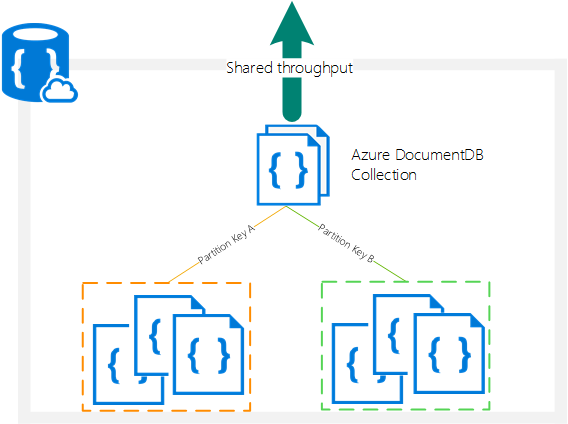
Furthermore, each of the operations we described earlier will require an additional Partition Key value as part of the [RequestOptions](https://msdn.microsoft.com/library/microsoft.azure.documents.client.requestoptions.aspx) class.
Partitions help optimize throughput by allowing us to take advantage of parallel queries on multiple collections by using .Net’s [Task Parallel Library](https://msdn.microsoft.com/library/dd460717.aspx).
>For a more detailed look at implementing Partition querying, take a look at the [official sample GitHub repository](https://github.com/Azure/azure-documentdb-dotnet/tree/master/samples/code-samples/Partitioning).
## Aside: Using Auth0 with Azure DocumentDB
Azure DocumentDB can be integrated as a [custom database provider](https://auth0.com/blog/auth0-with-azure-documentdb) by [using the MongoDB protocol](https://azure.microsoft.com/documentation/articles/documentdb-create-mongodb-account/).
Create a custom database connection by going to the _Connections > Database_ in your [Auth0 management dashboard](https://manage.auth0.com/) and build your MongoDB _connection string_ by obtaining the credentials from your Azure DocumentDB account on the [Azure Portal](https://portal.azure.com):
`mongodb://:==@.documents.azure.com:10250/auth0?ssl=true`
You can then use it on your **Database Action Scripts** sections.
For a step by step guide, you can view [Planet-scale authentication with Auth0 and Azure DocumentDB](https://auth0.com/blog/auth0-with-azure-documentdb/)
## Conclusion
Azure DocumentDB is a fast and flexible cloud storage service that will work on almost any use case scenario and can work along with Auth0 in a highly streamlined fashion.
Remember that a **full sample**, including extensions and providers, is [available on GitHub](https://github.com/ealsur/auth0documentdb).