---
title: "How to Make Your AI Agent Enterprise-Ready: Enabling Enterprise-Managed Authorization for Client Apps in Auth0
"
description: "Implement Enterprise-Managed Authorization in Auth0 using Cross App Access (XAA) and ID-JAG. Build enterprise-ready AI agents without friction."
authors:
- name: "Mira Sharma"
url: "https://auth0.com/blog/authors/mira-sharma/"
- name: "Tracy Toth"
url: "https://auth0.com/blog/authors/tracy-toth/"
date: "Sep 1, 2026"
category: "Announcements"
tags: ["xaa", "oin", "b2b"]
url: "https://auth0.com/blog/enabling-enterprise-managed-authorization-for-client-apps/"
---
# How to Make Your AI Agent Enterprise-Ready: Enabling Enterprise-Managed Authorization for Client Apps in Auth0
Every B2B SaaS team building an AI assistant, developer tool, or autonomous agent faces the same go-to-market hurdle: getting enterprise IT to approve cross-tool data access.
Traditional integrations force a bad trade-off. Either you ask users to deal with disruptive "reconnect your account" prompts, or you fall back on high-risk static API keys that security teams reject during deal reviews.
Following our recent release of [Resource App capabilities in Auth0](https://auth0.com/blog/xaa-protocol-auth0-ai-agents/), today we are launching [Early Access (EA) for Client App (Requesting App)](https://auth0.com/docs/ai-agents-mcp/cross-app-access/requesting-app) capabilities in Auth0.
In a Cross App Access (XAA) architecture, the Client App is the application or AI agent actively requesting data from external APIs or Model Context Protocol (MCP) servers. Known in the open MCP spec as the [Enterprise-Managed Authorization (EMA)](https://modelcontextprotocol.io/extensions/auth/enterprise-managed-authorization) extension, and powered by the IETF [Identity Assertion Authorization Grant (ID-JAG)](https://datatracker.ietf.org/doc/draft-ietf-oauth-identity-assertion-authz-grant/) draft spec, Auth0 now lets your client app turn an employee's corporate SSO login into authorized cross-app access without custom token-exchange engineering.
## Why Client Apps Need Cross App Access: Unlocking Enterprise AI Adoption
For B2B SaaS vendors, removing authorization friction is the key to unlocking enterprise AI adoption and expanding your paying customer base. When enterprise IT teams can centrally manage and trust how your AI agent accesses corporate data, security reviews transition from a deal-blocking hurdle into a fast-track approval.
Picture a modern enterprise: an employee signs in once through their corporate Identity Provider (IdP) like Okta, establishing trust with their company’s core software tools, such as a chat-based AI assistant and a project-tracking app.
Today, if that AI assistant wants to pull project milestones from the tracking tool on the employee's behalf, traditional OAuth forces an explicit, account-by-account re-authentication prompt.
Cross App Access removes that roadblock entirely. Because both tools already trust the same corporate identity system, the client app requests access on the employee's behalf directly using that established trust.
This addresses two critical enterprise pain points:
* **Frictionless UX:** Eliminating "reconnect your account" prompts removes the exact friction that stalls user adoption and fragments workflows, allowing employees to get immediate value from your AI tool.
* **Centralized Governance:** Routing authorization through the corporate IdP gives security teams centralized visibility and immediate revocation control across all tools, giving enterprise buyers the confidence to approve your AI agent company-wide.
## How Auth0 Makes It Easy: Admin Toggles & Token Vault Brokering
Executing multi-hop token exchanges manually requires capturing SSO logins, requesting ephemeral ID-JAG tokens from the corporate IdP, and exchanging them at downstream authorization servers. Because Resource Apps do not issue long-lived refresh tokens for ID-JAG exchanges, client apps would normally have to repeatedly initiate upstream flows.
Auth0 handles this entire sequence via Token Vault, our built-in broker:
* **Zero-Engineering Setup:** Enable client app capabilities through simple dashboard configuration toggles rather than custom token-exchange code.
* **Silent Token Brokering:** Token Vault stores the upstream enterprise refresh token from login in a more secure manner. When your client app needs external data, Token Vault silently fetches the ID-JAG, completes the downstream exchange, and delivers a valid access token to your backend.
* **Clear IT Auditability:** Enhanced logging in Auth0 gives customer IT teams clear visibility into every automated cross-app connection.
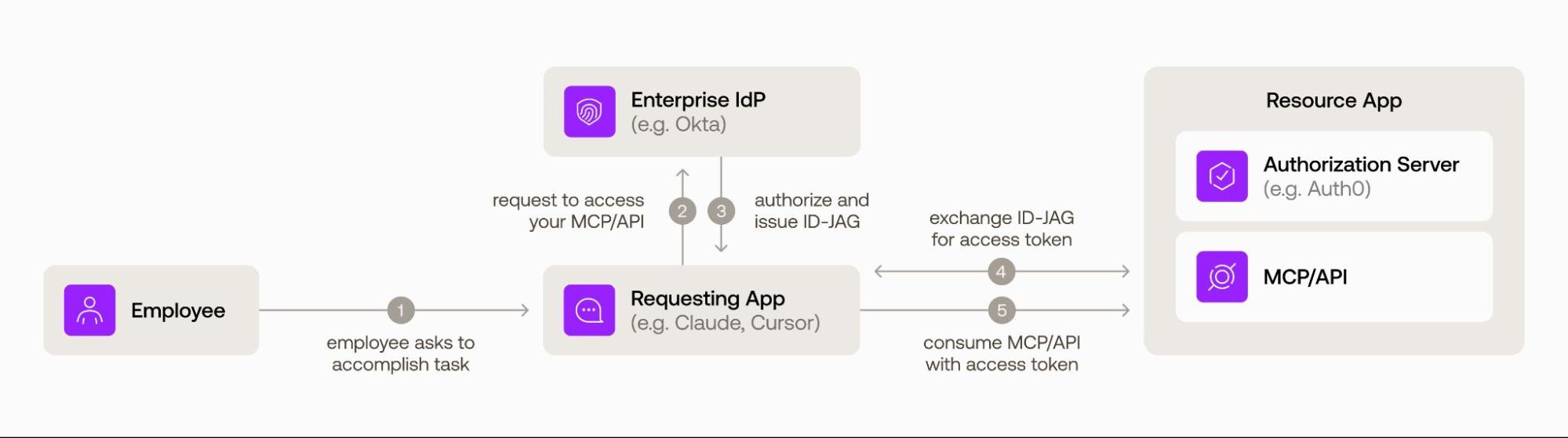 Here is how a typical token exchange operates with XAA using Auth0:
1. **User Action:** An employee asks their AI tool (for example, Claude, Cursor) to do something that requires data from your API.
2. **Access Request:** The Requesting App automatically asks the customer's own enterprise IdP (for example, Okta) to authorize this specific app-to-app access.
3. **Enterprise IdP:** Authorizes Access If the XAA policy configured by the enterprise IT admin allows it, the IdP issues a short-lived, signed assertion (an "ID-JAG") scoped specifically to your platform.
4. **Auth0:** Verifies and Issues a Token The Requesting App presents that assertion to your Auth0 tenant. Auth0 confirms it genuinely comes from the trusted enterprise IdP, checks your access rules (like roles or organization membership), and automatically issues a standard, short-lived access token.
5. **Standard API Call:** The Requesting App calls your API/MCP server with that access token. Your platform validates it the same way it already does today with no new code, no awareness of XAA required.
## Technical Quickstart: One-Time Setup to Unlock Seamless Access
Adopting Client App capabilities in Auth0 is a one-time configuration process. Once enabled in your tenant, Auth0 and Token Vault automatically manage the backend token exchanges for all your users across any configured downstream connection – no ongoing manual setups required.
### 1. Enable XAA on your upstream Enterprise Connection
Configure your enterprise identity provider connection (e.g., Okta Workforce) once under **Auth0 Dashboard > Authentication > Enterprise** to allow Cross App Access. For OIDC connections, ensure `openid` and `offline_access` scopes are included:
```json
{
"options": {
"cross_app_access": {
"active": true
}
}
}
```
### 2. Enable identity assertion grants on target resource connections
To allow your client app to connect to any external platform or MCP server in the ecosystem, whether today or as new XAA-enabled resource apps launch, enable identity assertion grants in your connection settings:
```json
{
"connected_accounts": {
"identity_assertion_grant": true
}
}
```
### 3. Fetch tokens programmatically via federated exchange
Whenever your client app needs to invoke a downstream API on a user's behalf, your backend simply calls the standard Auth0 `/oauth/token` endpoint. Token Vault silently brokers the exchange with the corporate IdP and target Resource App automatically:
```http
POST /oauth/token
Content-Type: application/x-www-form-urlencoded
grant_type=urn:auth0:params:oauth:grant-type:token-exchange:federated-connection-access-token
&subject_token=
&connection=atlassian-oauth2
&resource=https://api.atlassian.com/
```
Token Vault automatically validates the active user session, retrieves a fresh ID-JAG assertion behind the scenes, exchanges it with the target Resource App, and returns the API access token directly to your application backend—no user prompts or manual admin interventions required.
Here is how a typical token exchange operates with XAA using Auth0:
1. **User Action:** An employee asks their AI tool (for example, Claude, Cursor) to do something that requires data from your API.
2. **Access Request:** The Requesting App automatically asks the customer's own enterprise IdP (for example, Okta) to authorize this specific app-to-app access.
3. **Enterprise IdP:** Authorizes Access If the XAA policy configured by the enterprise IT admin allows it, the IdP issues a short-lived, signed assertion (an "ID-JAG") scoped specifically to your platform.
4. **Auth0:** Verifies and Issues a Token The Requesting App presents that assertion to your Auth0 tenant. Auth0 confirms it genuinely comes from the trusted enterprise IdP, checks your access rules (like roles or organization membership), and automatically issues a standard, short-lived access token.
5. **Standard API Call:** The Requesting App calls your API/MCP server with that access token. Your platform validates it the same way it already does today with no new code, no awareness of XAA required.
## Technical Quickstart: One-Time Setup to Unlock Seamless Access
Adopting Client App capabilities in Auth0 is a one-time configuration process. Once enabled in your tenant, Auth0 and Token Vault automatically manage the backend token exchanges for all your users across any configured downstream connection – no ongoing manual setups required.
### 1. Enable XAA on your upstream Enterprise Connection
Configure your enterprise identity provider connection (e.g., Okta Workforce) once under **Auth0 Dashboard > Authentication > Enterprise** to allow Cross App Access. For OIDC connections, ensure `openid` and `offline_access` scopes are included:
```json
{
"options": {
"cross_app_access": {
"active": true
}
}
}
```
### 2. Enable identity assertion grants on target resource connections
To allow your client app to connect to any external platform or MCP server in the ecosystem, whether today or as new XAA-enabled resource apps launch, enable identity assertion grants in your connection settings:
```json
{
"connected_accounts": {
"identity_assertion_grant": true
}
}
```
### 3. Fetch tokens programmatically via federated exchange
Whenever your client app needs to invoke a downstream API on a user's behalf, your backend simply calls the standard Auth0 `/oauth/token` endpoint. Token Vault silently brokers the exchange with the corporate IdP and target Resource App automatically:
```http
POST /oauth/token
Content-Type: application/x-www-form-urlencoded
grant_type=urn:auth0:params:oauth:grant-type:token-exchange:federated-connection-access-token
&subject_token=
&connection=atlassian-oauth2
&resource=https://api.atlassian.com/
```
Token Vault automatically validates the active user session, retrieves a fresh ID-JAG assertion behind the scenes, exchanges it with the target Resource App, and returns the API access token directly to your application backend—no user prompts or manual admin interventions required.
Developer Best Practice: Always cache returned downstream access tokens for their full lifespan in your application layer. Because ID-JAG exchanges are rate-limited to 50% of your tier's standard Auth API limit, caching prevents unnecessary latency and keeps your agent operating at peak performance.
## Connect to Key Enterprise Tools and Expand via the Okta Integration Network
Once you have adopted Cross App Access in your Auth0 tenant, you will need to make your integration available to your customers through their IdP.
While Cross App Access is built on open standards and works with any spec-compliant IdP, choosing to publish your XAA client app integration to the [Okta Integration Network (OIN)](https://auth0.com/blog/auth0-powered-apps-okta-integration-network/) unlocks an immediate go-to-market advantage to accelerate your enterprise pipeline:
* **Reach 20,000+ Enterprise Customers:** Become discoverable to Okta’s extensive customer base actively seeking enterprise-ready AI tools.
* **Zero-Touch Setup:** Enable IT admins to connect your client app to all other [published resource apps](https://www.okta.com/integrations/?filters=okta%3Aoin%2Ffunctionalities%2Fcross-app-access) (like Figma or Atlassian) in just a few clicks.
* **Ecosystem Visibility:** Get featured in Okta communications highlighting the XAA ecosystem to accelerate deal velocity.
## Unblock Enterprise Growth Today
By turning on Cross App Access client app capabilities in Auth0, you support enterprise compliance requirements, eliminate repetitive user prompts, unlock enterprise AI adoption for your customers, and position your product to scale across large corporate accounts.
### Ready to get started?
* Check out our developer guide on [Building Requesting Apps with Cross App Access](https://auth0.com/docs/ai-agents-mcp/cross-app-access).
* Learn how to [Submit Your XAA-Enabled App to the Okta Integration Network](https://developer.okta.com/blog/2026/07/06/submit-oin-xaa).
* Explore protocol specifications and testing sandboxes at [xaa.dev](https://xaa.dev/).
* Test your configuration step-by-step using the open-source [Auth0 XAA Inspector](https://github.com/auth0-samples/auth0-cross-app-access-inspector).