---
title: "Introduction to Redis: Installation, CLI Commands, and Data Types"
description: "In this Redis tutorial, learn how to install and setup Redis as well as commands to write, read, update, and delete data from the store using its core data structures."
authors:
- name: "Dan Arias"
url: "https://auth0.com/blog/authors/dan-arias/"
date: "Aug 8, 2018"
category: "Developers,Deep Dive,Redis"
tags: ["redis", "database", "store", "introduction", "quickstart", "backend", "data", "architecture", "caching", "session-storage", "authentication", "key-value", "in-memory", "db"]
url: "https://auth0.com/blog/introduction-to-redis-install-cli-commands-and-data-types/"
---
# Introduction to Redis: Installation, CLI Commands, and Data Types
## What's Redis?
Redis is an in-memory key-value store that can be used as a database, cache, and message broker. The project is [open source](https://github.com/antirez/redis) and it's currently licensed under the [BSD license](https://github.com/antirez/redis/blob/unstable/COPYING).
> Fun Fact: Redis means "REmote DIctionary Server."
[Redis delivers sub-millisecond response times](https://aws.amazon.com/redis/) that enable millions of requests per second to power demanding real-time applications such as games, ad brokers, financial dashboards, and many more!
It supports basic data structures such as strings, lists, sets, sorted sets with range queries, and hashes. More advanced data structures like bitmaps, hyperloglogs, and geospatial indexes with radius queries are also supported.
[Alex Stanciu](https://twitter.com/alecks), a Product Owner from the Identity Governance Team at Auth0, explains one of our use cases for Redis:
> "We use Redis as a caching layer and a session store for our Slack Bot conversation engine. Because it stores data in memory (RAM), it provides ultra-fast read and write speeds; responses are usually in the single-digit milliseconds."
In this Redis tutorial, we'll learn how to set up Redis in our systems and how to store data in Redis using its core and most frequently used data structures. With this foundation, in future posts we'll learn how to use Redis for caching, session storage, messaging, and real-time analytics. Let's get started!
## Installing Redis
The first thing that we need to do is install Redis. If you have it already running in your system, feel free to skip this part of the post.
The [Redis documentation](https://redis.io/topics/quickstart#installing-redis) recommends installing Redis by compiling it from sources as Redis has no dependencies other than a working `GCC compiler` and `libc`. We can either download the latest Redis tarball from [`redis.io`](https://redis.io/), or we can use a special URL that always points to the latest stable Redis version: [`http://download.redis.io/redis-stable.tar.gz`](http://download.redis.io/redis-stable.tar.gz).
> **Windows users**: The Redis project does not officially support Windows. But, if you are running Windows 10, you can [Install the Windows Subsystem for Linux](https://docs.microsoft.com/en-us/windows/wsl/install-win10) to install and run Redis. When you have the Windows Subsystem for Linux up and running, please follow any steps in this post that apply to Linux (when specified) from within your Linux shell.
To compile Redis follow these simple steps:
- Create a `redis` directory and make it the current working directory:
macOS/Linux:
```shell
mkdir redis && cd redis
```
- Fetch the latest redis tarball:
macOS/Linux:
```shell
curl -O http://download.redis.io/redis-stable.tar.gz
```
- Unpack the tarball:
macOS/Linux:
```shell
tar xvzf redis-stable.tar.gz
```
- Make the unpacked `redis-stable` directory the current working directory:
macOS/Linux:
```shell
cd redis-stable
```
- Compile Redis:
macOS/Linux:
```shell
make
```
> If the `make` package is not installed in your system, please follow the instructions provided by the CLI to install it. In macOS, you may need to download XCode to have access to the command line tools which include `make` and a C compiler. For a fresh installation of Ubuntu, for example, you may want to run the following commands to update the package manager and install core packages:
Ubuntu:
```shell
sudo apt update
sudo apt upgrade
sudo apt install build-essential
sudo apt-get install tcl8.5
make
```
`tcl` 8.5 or newer is needed to run the Redis test in the next step.
- Test that the build works correctly:
macOS/Linux:
```shell
make test
```
Once the compilation is done, the `src` directory within `redis-stable` is populated with different executables that are part of Redis. The Redis docs explain the [functionality of each Redis exectuble](https://redis.io/topics/quickstart):
- `redis-server`: runs the Redis Server itself.
- `redis-sentinel`: runs [Redis Sentinel](https://redis.io/topics/sentinel), a tool for monitoring and failover.
- `redis-cli`: runs a [command line interface](https://en.wikipedia.org/wiki/Command-line_interface) utility to interact with Redis.
- `redis-benchmark`: checks Redis performance.
- `redis-check-aof` and `redis-check-dump`: used for the rare cases when there are corrupted data files.
We are going to be using the `redis-server` and `redis-cli` executable frequently. For convenience, let's copy both to a location that will let us access them system-wide. This can be done manually by running:
macOS/Linux:
```shell
sudo cp src/redis-server /usr/local/bin/
sudo cp src/redis-cli /usr/local/bin/
```
While having `redis-stable` as the current working directory, this can also be done automatically by running the following command:
macOS/Linux:
```shell
sudo make install
```
We need to restart our shell for these changes to take effect. Once we do that, we are ready to start running Redis.
## Running Redis
### Starting Redis
The easiest way to start the Redis server is by running the `redis-server` command. In a fresh shell window, type:
```shell
redis-server
```
If everything is working as expected, the shell will receive as outline a giant ASCII Redis logo that shows the Redis version installed, the running mode, the `port` where the server is running and it's `PID` ([process identification number](http://www.linfo.org/pid.html)).
````shell
_._
_.-``__ ''-._
_.-`` `. `_. ''-._ Redis 4.0.10 (00000000/0) 64 bit
.-`` .-```. ```\/ _.,_ ''-._
( ' , .-` | `, ) Running in standalone mode
|`-._`-...-` __...-.``-._|'` _.-'| Port: 6379
| `-._ `._ / _.-' | PID: 22394
`-._ `-._ `-./ _.-' _.-'
|`-._`-._ `-.__.-' _.-'_.-'|
| `-._`-._ _.-'_.-' | http://redis.io
`-._ `-._`-.__.-'_.-' _.-'
|`-._`-._ `-.__.-' _.-'_.-'|
| `-._`-._ _.-'_.-' |
`-._ `-._`-.__.-'_.-' _.-'
`-._ `-.__.-' _.-'
`-._ _.-'
`-.__.-'
````
We started Redis without any explicit configuration file; therefore, we'll be using the internal default configuration. This is acceptable for the scope of this blog post: understanding and using the basic Redis data structures.
As a first step, we always need to get the Redis server running as the CLI and other services depend on it to work.
### How to Check if Redis is Working
As noted in the Redis docs, external programs talk to Redis using a [TCP socket and a Redis specific protocol](https://redis.io/topics/quickstart#check-if-redis-is-working). The Redis protocol is implemented by Redis client libraries written in many programming languages, like JavaScript. But we don't need to use a client library directly to interact with Redis. We can use the `redis-cli` to send a command to it directly. To test that Redis is working properly, let's send it the `ping` command. Open a new shell window and execute the following command:
```shell
redis-cli ping
```
If everything is working well, we should get `PONG` as a reply in the shell.
When we issued `redis-cli ping`, we invoked the `redis-cli` executable followed by a command name, `ping`. A command name and its arguments are sent to the Redis instance running on `localhost:6379` for it to be processed and send a reply.
The host and port of the instance can be changed. Use the `--help` option to check all the commands that can be used with `redis-cli`:
```shell
redis-cli --help
```
If we run `redis-cli` without any arguments, the program will start in interactive mode. Similar to the [Read–Eval–Print Loop (REPL)](https://en.wikipedia.org/wiki/Read%E2%80%93eval%E2%80%93print_loop) of programming languages like Python, we can type different Redis commands in the shell and get a reply from the Redis instance. What those commands are and what they do is the core learning objective of this post!
Let start first by learning how to manipulate data in Redis using commands!
## Write, Read, Update, and Delete Data in Redis
As we learned earlier, Redis is a key-value store that let us associate some data called a **value** with a **key**. We can later retrieve the stored data if we know the _exact_ key that was used to store it.
In case that you haven't done so already, run the Redis CLI in interactive mode by executing the following command:
```shell
redis-cli
```
We'll know the interactive CLI is working when we see the Redis instance host and port in the shell prompt:
```shell
127.0.0.1:6379>
```
Once there, we are ready to issue commands.
### Writing Data
To store a value in Redis, we can use the [`SET` command](https://redis.io/commands/set) which has the following signature:
```shell
SET key value
```
In English, it reads like "set key to hold value." It's important to note that if the key already holds a value, `SET` will overwrite it no matter what.
Let's look at an example. In the interactive shell type:
```shell
SET service "auth0"
```
> Notice how, as you type, the interactive shell suggests the required and optional arguments for the Redis command.

Press `enter` to send the command. Once Redis stores `"auth0"` as the value of `service`, it replies with `OK`, letting us know that everything went well. Thank you, Redis!
### Reading Data
We can use the [`GET` command](https://redis.io/commands/get) to ask Redis for the value of a key:
```shell
GET key
```
Let's retrieve the value of `service`:
```shell
GET service
```
Redis replies with `"auth0"`.
What if we ask for the value of a key that has never been set?
```shell
GET users
```
Redis replies with `(nil)` to let us know that the key doesn't exist in memory.
In a classic API that connects to a database, we'd like to perform [CRUD](https://en.wikipedia.org/wiki/Create,_read,_update_and_delete) operations: create, read, update, and delete. We have covered how to create (write) and read data in Redis by using the `SET` and `GET` commands respectively. Let's cover the rest.
### Updating Data
We can update the value of a key simply by overwriting its data as mentioned earlier.
Lets create a new key-value pair:
```shell
SET framework angular
```
But, we change our mind and now we want the value to be `"react"`. We can overwrite it like this:
```shell
SET framework react
```
Did Redis get it right? Let's ask for it!
```shell
GET framework
```
Redis indeed replies with `"react"`. We are being a bit indecisive and now we want to set the `framework` key to hold the value of `"vue"`:
```shell
SET framework vue
```
If we run `GET framework` again, we get `"vue"`. The update/overwrite works as excepted.
### Deleting Data
But, we don't want to actually set any framework for now and we need to delete that key. How do we do it? We use the [`DEL` command](https://redis.io/commands/del):
```shell
DEL key
```
Let's run it:
```
DEL framework
```
Redis replies with `(integer) 1` to let us know the number of keys that were removed.
With just three commands, `SET`, `GET`, and `DEL`, we are able to comply with the four CRUD operations!
### Wrapping Strings with Quotation Marks
Notice something curious: we did not have to put quotation marks around a single string value we wanted to store. `SET framework angular` and `SET framework "angular"` are both accepted by Redis as an operation to store the string `"angular"` as the value of the key `framework`.
Redis automatically wraps single string arguments in quotation marks. Since both key and value are strings, the same applies for the key name. We could have used `SET "framework" angular` and it would have worked as well. However, if we plan to use more than one string as the key or value, we do need to wrap the strings in quotation marks:
```shell
SET "the frameworks" "angular vue react"
```
Replies with `OK`.
```shell
SET the frameworks "angular vue react"
```
Replies with `(error) ERR syntax error`
```shell
SET "the frameworks" angular vue react
```
Also replies with `(error) ERR syntax error`
Finally, to retrieve the value, we must use the exact key string:
```shell
GET "the frameworks"
```
Replies with `"angular vue react"`.
### Non-Destructive Write
Redis is compassionate and lets us write data with care. Imagine that we wanted to create a `services` key to hold the value `"heroku aws"` but instead of typing `SET services "heroku aws"`, we typed `SET service "heroku aws"`. This last command would overwrite the current value of `service` without mercy. However, Redis gives us a non-destructive version of `SET` called [`SETNX`](https://redis.io/commands/setnx):
```shell
SETNX key value
```
`SETNX` creates a key in memory if and only if the key does not exist already (`SET` if `N`ot e`X`ists). If the key already exists, Redis replies with `0` to indicate a failure to store the key-value pair and with `1` to indicate success. Let's try out this previous scenario but using `SETNX` instead of `SET`:
```shell
SETNX service "heroku aws"
```
The reply is `(integer) 0` as we expected.
```shell
SETNX services "heroku aws"
```
This time, the reply is `(integer) 1`. Great!
We can use `SETNX` to prevent us from mutating data accidentally.
## Expiring Keys
When creating a key with Redis, we can specify how long that key should stay stored in memory. Using the [`EXPIRE`](https://redis.io/commands/expire) command, we can set a timeout on a key and have the key be automatically deleted once the timeout expires:
```shell
EXPIRE key seconds
```
Let's create a `notification` key that we want to delete after 30 seconds:
```
SET notification "Anomaly detected"
EXPIRE notification 30
```
This schedules the `notification` key to be deleted in 30 seconds. We could look at a clock and check after 30 seconds have elapsed if `notification` is still available but we don't have to do that! Redis offers the [`TTL`](https://redis.io/commands/ttl) command that tells us how many seconds a key has left before it expires and gets deleted:
```shell
TTL key
```
It's possible that more than 30 seconds have already passed so let's try the above example again, but this time calling `TTL` as soon as we execute `EXPIRE`:
```shell
SET notification "Anomaly detected"
EXPIRE notification 30
TTL notification
```
Redis replied with `(integer) 27` to me, indicating that `notification` is still available for 27 more seconds. Let's wait a bit and run `TTL` again:
```shell
TTL notification
```
This time, Redis replied with `(integer) -2`. Starting with Redis 2.8, `TTL` returns:
- The timeout left in seconds.
- `-2` if the key doesn't exist (either it has not been created or it was deleted).
- `-1` if the key exists but has no expiry set.
I made sure that 30 seconds had passed so `-2` was expected. Let's see the error message when the key exists but has no expiry set:
```
SET dialog "Continue?"
TTL dialog
```
As expected, with no expiry set, Redis replies with `(integer) -1`.
It's important to note that we can reset the timeout by using `SET` with the key again:
```
SET notification "Anomaly detected"
EXPIRE notification 30
TTL notification
// (integer) 27
SET notification "No anomaly detected"
TTL notification
// (integer) -1
```
We learned earlier that using `SET` is the same as creating the key again, which for Redis also involves resetting any timeouts currently assigned to it.
We have a solid foundation now on manipulating data in Redis. With this knowledge under our belt, we are ready to now explore the data types that Redis offers.
## Redis Data Types
Far from being a plain key-value store, Redis is an actual **data structure server** that supports different kinds of values. Traditionally, key-value stores allow us to map a string key to a string value and nothing else. In Redis, the string key can be mapped to more than just a simple string.
Being a data structure server, we can also refer to the data types as data structures. We can use these more complex data structures to store multiple values in a key at once. Let's look at these types at a high level. We'll explore each type in detail in subsequent sections.
- **Binary-safe Strings**
The most basic kind of Redis value. Being "binary-safe" means that the string can contain any type of data represented as a string: PNG images or serialized objects, for example.
- **Lists**
In essence, Redis Lists are linked lists. They are collections of string elements that are sorted based on the order that they were inserted.
- **Sets**
They represent collections of unique and unsorted string elements.
- **Sorted Sets**
Like Sets, they represent a collection of unique string elements; however, each string element is linked to a floating number value, referred to as the element **score**. When querying the Sorted Set, the elements are always taken sorted by their score, which enables us to consistently present a range of data from the Set.
- **Hashes**
These are maps made up of string fields linked to string values.
- **Bit arrays**
Also known as bitmaps. They let us handle string values as if they were an array of bits.
- **HyperLogLogs**
A probabilistic data structure used to estimate the [cardinality](https://en.wikipedia.org/wiki/Cardinality) of a set, which is a measure of the "number of elements of the set."
We have already covered Strings during the "Write, Read, Update, and Delete Data in Redis" section. For the rest of this tutorial, we are going to focus on all the Redis types except bitmaps and hyperloglogs. We'll visit those on a future post handling an advanced Redis use case.
## Lists
A List is a sequence of ordered elements. For example, `1 2 4 5 6 90 19 3` is a List of numbers. In Redis, it's important to note that Lists are implemented as [linked lists](https://en.wikipedia.org/wiki/Linked_list). This has some important implications regarding performance. It is fast to add elements to the head and tail of the List but it's slower to search for elements within the List as we do not have indexed access to the elements (like we do in an array).
A List is created by using a Redis command that pushes data followed by a key name. There are two commands that we can use: `RPUSH` and `LPUSH`. If the key doesn't exist, these commands will return a new List with the passed arguments as elements. If the key already exists or it is not a List, an error is returned.
### RPUSH
[`RPUSH`](https://redis.io/commands/rpush) inserts a new element at the end of the List (at the tail):
```shell
RPUSH key value [value ...]
```
Let's create an `engineers` key that represents a List:
```shell
RPUSH engineers "Alice"
// 1
RPUSH engineers "Bob"
// 2
RPUSH engineers "Carmen"
// 3
```
Each time we insert an element, Redis replies with the length of the List after that insertion. We would expect the `users` list to resemble this:
```shell
Alice Bob Carmen
```
How can we verify that? We can use the `LRANGE` command.
### LRANGE
`LRANGE` returns a subset of the List based on a specified start and stop index. Although these indexes are zero-based, they are no the same as array indexes. Given a full List, they simply indicate where to partition the List: make a slice from here (start) to here (stop):
```shell
LRANGE key start stop
```
To see the full List, we can use a neat trick: go from `0` to the element just before it, `-1`.
```shell
LRANGE engineers 0 -1
```
Redis returns:
```shell
1) "Alice"
2) "Bob"
3) "Carmen"
```
The index `-1` will always represent the last element in the List.
To get the first two elements of `engineers` we can issue the following command:
```shell
LRANGE engineers 0 1
```
### LPUSH
[`LPUSH`](https://redis.io/commands/lpush) behaves the same as `RPUSH` except that it inserts the element at the front of the List (at the header):
```shell
LPUSH key value [value ...]
```
Let's insert `Daniel` at the front of the `engineers` list:
```shell
LPUSH engineers "Daniel"
// 4
```
We now have four engineers. Let's verify that the order is correct:
```shell
LRANGE engineers 0 -1
```
Redis replies with:
```shell
1) "Daniel"
2) "Alice"
3) "Bob"
4) "Carmen"
```
It's the same List we had before but with `"Daniel"` as the first element, which is exactly what was expected.
### Multiple Element Insertions
We saw in the signatures of `RPUSH` and `LPUSH` that we can insert more than one element through each command. Let's see that in action.
Based on our existing `engineers` list, let's issue this command:
```shell
RPUSH engineers "Eve" "Francis" "Gary"
// 7
```
Since we are inserting them at the end of the List, we expect these three new elements to show up in the same order in which they are listed as arguments. Let's verify:
```shell
LRANGE engineers 0 -1
```
To what Redis returns:
```shell
1) "Daniel"
2) "Alice"
3) "Bob"
4) "Carmen"
5) "Eve"
6) "Francis"
7) "Gary"
```
What about if we do the same with `LPUSH`:
```shell
LPUSH engineers "Hugo" "Ivan" "Jess"
// 10
```
Will Redis insert these three new elements one by one or will it insert them as a bundle, all three at once?
Let's see:
```shell
LRANGE 0 -1
```
Reply:
```shell
1) "Jess"
2) "Ivan"
3) "Hugo"
4) "Daniel"
5) "Alice"
6) "Bob"
7) "Carmen"
8) "Eve"
9) "Francis"
10) "Gary"
```
When listing multiple arguments for `LPUSH` and `RPUSH`, Redis inserts the elements one by one, thus, `"Hugo"`, `"Ivan"`, and `"Jess"` appear in the reverse order from which they were listed as arguments.
### LLEN
We can find the length of a List at any time by using the [`LLEN`](https://redis.io/commands/llen) command:
```shell
LLEN key
```
Let's verify that the length of `engineers` is indeed `10`:
```shell
LLEN engineers
```
Redis replies with `(integer) 10`. Perfect.
### Removing Elements from a Redis List
Similar to how we can "pop" elements in arrays, we can pop an element from the head or the tail of a Redis List.
[`LPOP`](https://redis.io/commands/lpop) removes and returns the first element of the List:
```shell
LPOP key
```
We can use it to remove `"Jess"`, the first element, from the List:
```shell
LPOP engineers
```
Redis indeed replies with `"Jess"` to indicate it is the element that was removed.
[`RPOP`](https://redis.io/commands/rpop) removes and returns the last element of the List:
```shell
RPOP key
```
It's time to say goodbye to `"Gary"`, the last element of the List:
```shell
RPOP engineers
```
The reply from Redis is `"Gary"`.
It's very useful to be able to get the element that was removed from the List as we may want to do something special with it.
Redis Lists are implemented as linked lists because its engineering team envisioned that for a database system [it is crucial to be able to add elements to a very long list in a very fast way](https://redis.io/topics/data-types-intro#redis-lists).
## Sets
In Redis, a Set is similar to a List except that it doesn't keep any specific order for its elements and each element must be unique.
### SADD
We create a Set by using the [`SADD`](https://redis.io/commands/sadd) command that adds the specified members to the key:
```shell
SADD key member [member ...]
```
Specified members that are already part of the Set are ignored. If the key doesn't exist, a new Set is created and the unique specified members are added. If the key already exists or it is not a Set, an error is returned.
Let's create a `languages` set:
```shell
SADD languages "english"
// 1
SADD languages "spanish"
// 1
SADD languages "french"
// 1
```
In this case, on each member addition Redis returns the number of members that were added with the `SADD` command, not the size of the Set. Let's see this in action:
```shell
SADD languages "chinese" "japanese" "german"
// 3
SADD languages "english"
// 0
```
The first command returned `3` as we were adding three unique members to the Set. The second command returned `0` as `"english"` was already a member of the Set.
### SREM
We can remove members from a Set by using the [`SREM`](https://redis.io/commands/srem) command:
```shell
SREM key member [member ...]
```
We can remove one or more members at the same time:
```shell
SREM languages "english" "french"
// 2
SREM languages "german"
// 0
```
`SREM` returns the number of members that were removed.
### SISMEMBER
To verify that a member is part of a Set, we can use the [`SISMEMBER`](https://redis.io/commands/sismember) command:
```shell
SISMEMBER key member
```
If the member is part of the Set, this command returns `1`; otherwise, it returns `0`:
```shell
SISMEMBER languages "spanish"
// 1
SISMEMBER languages "german"
// 0
```
Since we removed `"german"` in the last section, we get `0`.
### SMEMBERS
To show all the members that exist in a Set, we can use the [`SMEMBERS`](https://redis.io/commands/smembers) command:
```shell
SMEMBERS key
```
Let's see what language values we currently have in the `languages` set:
```shell
SMEMBERS languages
```
Redis returns:
```shell
1) "chinese"
2) "japanese"
3) "spanish"
```
As Sets are not ordered, Redis is free to [return the elements in any order at every call](https://redis.io/topics/data-types-intro#redis-sets). They have no guarantees about element ordering.
### SUNION
Something really powerful that we can do with Sets very fast is to combine them using the [`SUNION`](https://redis.io/commands/sunion) command:
```shell
SUNION key [key ...]
```
Each argument to `SUNION` represents a Set that we can merge into a larger Set. It is important to notice that any overlapping members will be listed once.
To see this in action, let's first create an `ancient-languages` set:
```shell
SADD ancient-languages "greek"
SADD ancient-languages "latin"
SMEMBERS ancient-languages
```
Now, let's create a union of `languages` and `ancient-languages` to see all of them at once:
```shell
SUNION languages ancient-languages
```
We get the following reply:
```shell
1) "greek"
2) "spanish"
3) "japanese"
4) "chinese"
5) "latin"
```
If we pass to `SUNION` a key that doesn't exist, it considers that key to be an empty set (a set that has nothing in it).
## Hashes
In Redis, a Hash is a data structure that maps a string key with field-value pairs. Thus, Hashes are useful to represent objects. They `key` is the name of the Hash and the `value` represents a sequence of `field-name field-value` entries. We could describe a `computer` object as follows:
```shell
computer name "MacBook Pro" year 2015 disk 512 ram 16
```
The "properties" of the object are defined as sequences of "property name" and "property value" after the name of the object, `computer`. Recall that Redis is all about sequential strings so we have to be careful when creating these string objects that we use the proper string sequencing to define our objects correctly.
To manipulate Hashes, we use commands that are similar to what we used with strings, after all, they are strings.
### Writing and Reading Hash Data
### HSET
The command [`HSET`](https://redis.io/commands/hset) sets `field` in the Hash to `value`. If `key` does not exist, a new key storing a hash is created. If `field` already exists in the hash, it is overwritten.
```shell
HSET key field value
```
Let's create the `computer` hash:
```shell
HSET computer name "MacBook Pro"
// 1
HSET computer year 2015
// 1
HSET computer disk 512
// 1
HSET computer ram 16
// 1
```
For each `HSET` command, Redis replies with an integer as follows:
- `1` if `field` is a new field in the hash and value was set.
- `0` if `field` already exists in the hash and the value was updated.
Let's update the value of the `year` field to `2018`:
```shell
HSET computer year 2018
// 0
```
### HGET
[`HGET`](https://redis.io/commands/hget) returns the value associated with `field` in a Hash:
```shell
HGET key field
```
Let's verify that we are getting `2018` as the value of `year` instead of `2015`:
```shell
HGET computer year
```
Redis replies with `"2018"`. It checks out fine.
### HGETALL
A fast way to get all the fields with their values from the hash is to use [`HGETALL`](https://redis.io/commands/hgetall):
```shell
HGETALL key
```
Let's test it out:
```shell
HGETALL computer
```
Reply:
```shell
1) "name"
2) "MacBook Pro"
3) "year"
4) "2018"
5) "disk"
6) "512"
7) "ram"
8) "16"
```
`HGETALL` replies with an empty list when the provided `key` argument doesn't exist.
### HMSET
We can also set multiple fields at once using `HMSET`:
```shell
HMSET key field value [field value ...]
```
Let's create a `tablet` hash with it:
```shell
HMSET tablet name "iPad" year 2016 disk 64 ram 4
```
`HMSET` returns `OK` to let us know the `tablet` hash was created successfully.
### HMGET
What if we want to get just two fields? We use [`HMGET`](https://redis.io/commands/hmget) to specify from which fields in the hash we want to get a value:
```shell
HMGET key field [field ...]
```
Let's get the `disk` and `ram` fields of the `tablet` hash:
```shell
HMGET tablet disk ram
```
Effectively we get the values of `disk` and `ram` as replies:
```shell
1) "64"
2) "4"
```
That's pretty much the gist of using Hashes in Redis. You may explore the [full list of Hash commands](https://redis.io/commands#hash) and try them out.
## Sorted Sets
Introduced in Redis 1.2, a Sorted Set is, in essence, a Set: it contains [unique, non-repeating string members](https://redis.io/topics/data-types-intro#redis-sorted-sets). However, while members of a Set are not ordered (Redis is free to [return the elements in any order at every call](https://redis.io/topics/data-types-intro#redis-sets) of a Set), each member of a Sorted Set is linked to a floating point value called the **score** which is used by Redis to determine the order of the Sorted Set members. Since, every element of a Sorted Set is mapped to a value, it also has an architecture similar to Hash.
> In Redis, a Sorted Set could be seen as a hybrid of a Set and a Hash.
How is the order of members of a Sorted Set determined? As stated in the [Redis documentation](https://redis.io/topics/data-types-intro#redis-sorted-sets):
- If A and B are two members with a different score, then A > B if A.score is > B.score.
- If A and B have exactly the same score, then A > B if the A string is lexicographically greater than the B string. **A and B strings can't be equal since Sorted Sets only have unique elements**.
Some of the commands that we use to interact with Sorted Sets are similar to the commands we used with Sets: we replace the `S` in the Set command and replace it with a `Z`. For example, `SADD` => `ZADD`. However, we have commands that are unique to both. Let's check them out.
### ZADD
Using [`ZADD`](https://redis.io/commands/zadd) adds all the specified members with specified scores to the Sorted Set:
```shell
ZADD key [NX|XX] [CH] [INCR] score member [score member ...]
```
As with Sets, if `key` does not exist, a new Sorted Set with the specified members as only members is created. If the `key` exists but does not hold a Sorted Set, an error is returned.
Starting in Redis 3.0.2, [`ZADD` has optional arguments](https://redis.io/commands/zadd#zadd-options-redis-302-or-greater) that gives us control of insertions:
- `XX`: Only update members that already exist. Never add members.
- `NX`: Don't update already existing members. Always add new members.
- `CH`: Modify the return value from the number of new members added, to the total number of members changed (CH is an abbreviation of changed). Changed members are new members added **and** members already existing for which the score was updated. So members specified in the command line having the same score as they had in the past are not counted.
- `INCR`: When this option is specified ZADD acts like [`ZINCRBY`](https://redis.io/commands/zincrby). Only one score-members pair can be specified in this mode.
It's good to know that these optional arguments are there and what they do, but for this introduction, we are going to focus on adding members without using any of them, but feel free to explore them! In future posts, we are going to revisit them in more complex use cases!
Let's create a Sorted Set to store Help Desk Support tickets. Support tickets are meant to be unique but also need to be sorted, hence, this data structure is a great choice:
```shell
ZADD tickets 100 HELP204
// 1
ZADD tickets 90 HELP004
// 1
ZADD tickets 180 HELP330
// 1
```
`ZADD` returns a count the number of new elements added. In the commands above, we used the position of the ticket in a queue as the score value followed by the ticket number (all fictional).
### ZRANGE
We'd like now to see how our Sorted Set looks. With Sets, we used `SMEMBERS` to list the unordered members. With Sorted Sets, we use a command that is more in tune with what we used with Lists, a command that shows us a range of elements.
[`ZRANGE`](https://redis.io/commands/zrange) returns the specified range of members in the Sorted Set:
```shell
ZRANGE key start stop [WITHSCORES]
```
It behaves very similarly to `LRANGE` for Lists. We can use it to get a subset of the Sorted Set. To get the full Sorted Set, we can use the `0 -1` range again:
```shell
ZRANGE tickets 0 -1
```
Redis replies with:
```shell
1) "HELP004"
2) "HELP204"
3) "HELP330"
```
We can pass `ZRANGE` the `WITHSCORES` argument to also include the score of each member:
```shell
ZRANGE tickets 0 -1 WITHSCORES
```
Reply:
```shell
1) "HELP004"
2) "90"
3) "HELP204"
4) "100"
5) "HELP330"
6) "180"
```
Notice how the `member` and the `score` are listed in sequence and not next to each other. As we can see, the members are stored in `tickets` in ascending order based on their score.
## Using Redis as a Session Store
The most relevant use of Redis in the authentication and authorization workflows of a web application is to serve as a session store.
As recognized by [Amazon Web Services](https://aws.amazon.com/redis/), the in-memory architecture of Redis provides developers with high availability and persistence that makes it a popular choice to store and manage session data for internet-scale applications. Its lightning-fast performance provides us with the super low latency, optimal scale, and resiliency that we need to manage session data such as user profiles, user settings, session state, and credential management.
[Roshan Kumar](https://twitter.com/roshankumar), from [Redis](https://redis.com/), explains on his ["Cache vs. Session Store"](https://redis.com/blog/cache-vs-session-store/) article that a session-oriented web application starts a session when the user logs in. The session is active until the user logs out or the session times out. During the session lifecycle, the web application stores all session-related data in the main memory (RAM) or in a session store that doesn't lose the data when the application goes down. This session store can be implemented using Redis that, despite being an in-memory store, is able to persist data by [writing transaction logs sequentially in the disk](https://medium.com/@denisanikin/what-an-in-memory-database-is-and-how-it-persists-data-efficiently-f43868cff4c1).
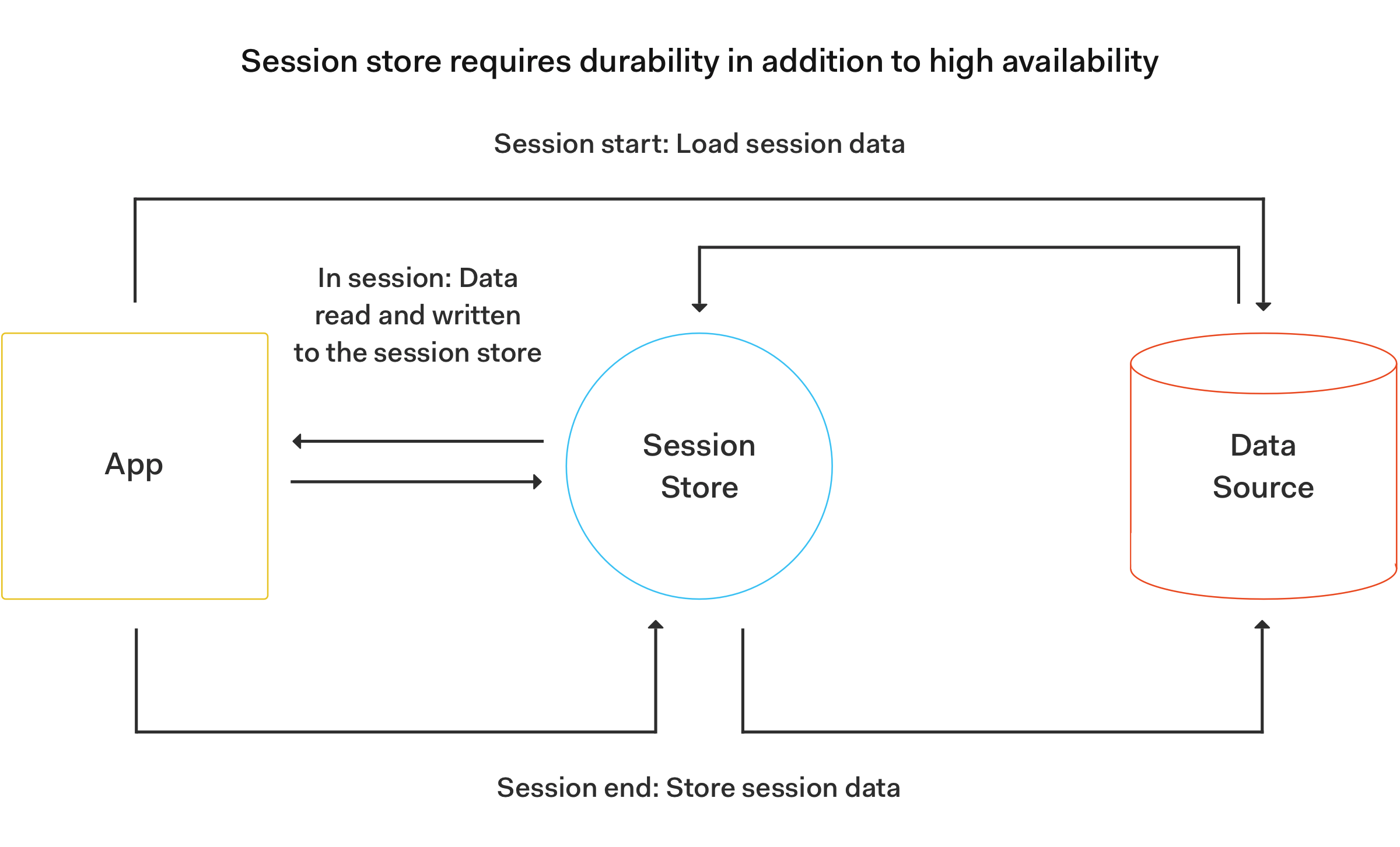
[Source: Redis: Cache vs. Session Store](https://redis.com/blog/cache-vs-session-store/)
Roshan further explains that session stores rely on reading and writing data to the in-memory database. The session store data isn’t temporary and it becomes the only source of truth when the session is live. For that reason, the session store needs to meet the "data durability requirements of a true database."
## Conclusion
Redis is a powerful, nimble, and flexible database that can speed up your architecture. It has a lot to offer including caching, data replication, pub/sub messaging systems, session storage, and much more. Redis has a [multitude of clients](https://redis.io/clients) that cover all of the popular programming languages. I hope that you try it out whenever you have a use case that fits its value propositions.