---
title: "JavaScript: What's New in ECMAScript 2020"
description: "Learn the new features introduced by ECMAScript 2020 in JavaScript."
authors:
- name: "Andrea Chiarelli"
url: "https://auth0.com/blog/authors/andrea-chiarelli/"
date: "May 18, 2020"
category: "Developers,Whats New,JavaScript"
tags: ["javascript", "ecmascript", "es2020", "whats-new"]
url: "https://auth0.com/blog/javascript-whats-new-es2020/"
---
# JavaScript: What's New in ECMAScript 2020
New exciting features are coming for JavaScript!
Even if the final approval of the new [ECMAScript 2020 (ES2020) language specification](https://tc39.es/ecma262/2020/) will be in June, you can start to take a look and try them right now!

Follow me in this article to explore what's new.
## Dealing with Modules
Some important innovations concern modules. Among these, a feature that developers have been requesting for a long time is the dynamic import. But let's go in order and see them in detail.
### Dynamic imports
The current mechanism for importing modules is based on static declarations like the following:
```javascript
import * as MyModule from "./my-module.js";
```
This statement has a couple of constraints:
- all the code of the imported module is evaluated at the load time of the current module
- the specifier of the module (`"./my-module.js"` in the example above) is a string constant, and you can not change it at runtime
These constraints prevent loading modules conditionally or on-demand. Also, evaluating each dependent module at load time affects the performance of the application.
The new `import()` statement solves these issues by allowing you to import modules dynamically. The statement accepts a module specifier as an argument and returns a promise. Also, the module specifier can be any expression returning a string. This is great news because we can now load JavaScript modules at runtime as in the following example:
```javascript
const baseModulePath = "./modules";
const btnBooks = document.getElementById("btnBooks");
let bookList = [];
btnBooks.addEventListener("click", async e => {
const bookModule = await import(`${baseModulePath}/books.js`);
bookList = bookModule.loadList();
});
```
This code shows how to load the `books.js` module right when the user clicks the `btnBooks` button. After loading the module, the click event handler will use the `loadList()` function exported by the module. Note how the module to import is specified through a string interpolation.
### Import meta data
The `import.meta` object provides metadata for the current module. The JavaScript engine creates it, and its current available property is `url`. This property's value is the URL from which the module was loaded, including any query parameter or hash.
As an example, you could use the `import.meta.url` property to build the URL of a `data.json` file stored in the same folder of the current module. The following code gets this result:
```javascript
const dataUrl = new URL("data.json", import.meta.url);
```
In this case, the `import.meta.url` provides the `URL` class with the base URL for the `data.json` file.
### New export syntax
The `import` statement introduced by the ECMAScript 2015 specifications provides you with many forms of modules importing. The following are a few examples:
```javascript
import {value} from "./my-module.js";
import * from "./my-module.js";
```
In some cases, you may need to export objects imported from another module. A handy `export` syntax may help you, as shown in the following:
```javascript
export {value} from "./my-module.js";
export * from "./my-module.js";
```
This symmetry between import and export statements is convenient from a developer experience standpoint. However, a specific case wasn't supported before these new specifications:
```javascript
import * as MyModule from "./my-module.js";
```
To export the `MyModule` namespace, you should use two statements:
```javascript
import * as MyModule from "./my-module.js";
export {MyModule};
```
Now, you can get the same result with one statement, as shown below:
```javascript
export * as MyModule from "./my-module.js";
```
This addition simplifies your code and keeps the symmetry between `import` and `export` statements.
## Data Types and Objects
The new ES2020 specifications introduce a new data type, a standardized global object, and a few methods that simplify the developer's life. Let's take a look.
### BigInt and arbitrary precision integers
As you know, JavaScript has only one data type for numbers: the `Number` type. This primitive type allows you to represent 64-bit floating-point numbers. Of course, it also represents integers, but the maximum representable value is 2^53, corresponding to the `Number.MAX_SAFE_INTEGER` constant.
Without going into the internal details of integer representation, there are situations where you may need a higher precision. Consider the following cases:
- interaction with other systems that provide data as 64-bit integers, such as GUIDs, account numbers, or object IDs
- result of complex mathematical calculations requiring more than 64 bits
The workaround for the first case is representing data as strings. Of course, this workaround doesn't work for the second case.
The new `BigInt` data type aims to solve these issues. You represent a literal `BigInt` by simply appending the letter `n` to a number, as shown in this example:
```javascript
const aBigInteger = 98765432123456789n;
```
You can also use the `BigInt()` constructor the same way you use the `Number()` constructor:
```javascript
const aBigInteger = BigInt("98765432123456789");
```
The `typeof` operator now returns the `"bigint"` string when applied to a `BigInt` value:
```javascript
typeof aBigInteger //output: "bigint"
```
Keep in mind that `Number` and `BigInt` are different types, so you cannot mix them. For example, the attempt to add a `Number` value to a `BigInt` value throws a `TypeError` exception, as shown by the following picture:
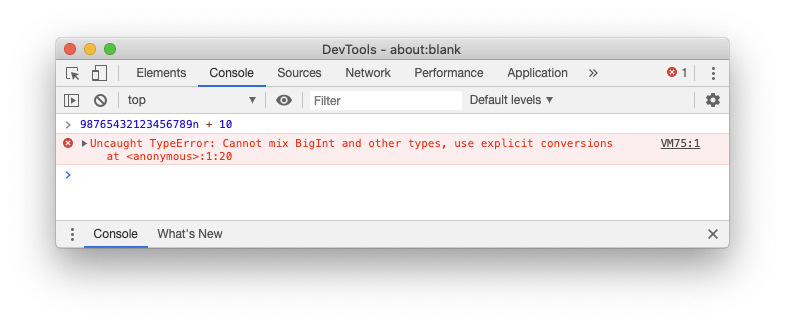
You have to explicitly convert the `Number` value to a `BigInt` value by using the `BigInt()` constructor.
### The matchAll() method for regular expressions
You have several ways to get all matches for a given regular expression. The following is one of these ways, but [you can use other approaches](https://2ality.com/2018/02/string-prototype-matchall.html#getting-all-matches-for-a-regular-expression):
```javascript
const regExp = /page (\d+)/g;
const text = 'text page 1 text text page 2';
let matches;
while ((matches = regExp.exec(text)) !== null) {
console.log(matches);
}
```
This code matches all the *page x* instances within the `text` variable through iteration. At each iteration, the `exec()` method runs over the input string, and you obtain a result like the following:
```shell
["page 1", "1", index: 5, input: "text page 1 text text page 2", groups: undefined]
["page 2", "2", index: 22, input: "text page 1 text text page 2", groups: undefined]
```
The `matchAll()` method of `String` objects allows you to get the same result but in a more compact way and with better performance. The following example rewrites the previous code by using this new method:
```javascript
const regExp = /page (\d+)/g;
const text = 'text page 1 text text page 2';
let matches = [...text.matchAll(regExp)];
for (const match of matches) {
console.log(match);
}
```
The `matchAll()` method returns an iterator. The previous example uses the spread operator to collect the result of the iterator in an array.
### The globalThis object
Accessing the global object requires different syntaxes, depending on the JavaScript environment. For example, in a browser, the global object is `window`, but you cannot use it within a Web Worker. In this case, you need to use `self`. Also, in Node.js the global object is `global`.
This leads to issues when writing code intended to run in different environments. You might use the `this` keyword, but it is `undefined` in modules and in functions running in [strict mode](https://developer.mozilla.org/en-US/docs/Web/JavaScript/Reference/Strict_mode).
The `globalThis` object provides a standard way of accessing the global object across different JavaScript environments. So, now you can write your code in a consistent way, without having to check the current running environment. Remember, however, to minimize the use of global items, since it is considered [a bad programming practice](https://wiki.c2.com/?GlobalVariablesAreBad).
### The Promise.allSettled() method
Currently, JavaScript has two ways to combine promises: `Promise.all()` and `Promise.race()`.
Both methods take an array of promises as an argument. The following is an example of using `Promise.all()`:
```javascript
const promises = [fetch("/users"), fetch("/roles")];
const allResults = await Promise.all(promises);
```
`Promise.all()` returns a promise that is fulfilled when all the promises fulfilled. If at least one promise is rejected, the returned promise is rejected. The rejection reason for the resulting promise is the same as the first rejected promise.
This behavior doesn't provide you with a direct way to get the result of all the promises when at least one of them is rejected. For example, in the code above, if `fetch("/users")` fails and the corresponding promise rejected, you don't have an easy way to know if the promise of `fetch("/roles")` is fulfilled or rejected. To have this information, you have to write some additional code.
The new `Promise.allSettled()` combinator waits for all promises to be settled, regardless of their result. So, the following code lets you know the result of every single promise:
```javascript
const promises = [fetch("/users"), fetch("/roles")];
const allResults = await Promise.allSettled(promises);
const errors = results
.filter(p => p.status === 'rejected')
.map(p => p.reason);
```
In particular, this code lets you know the reason for the failure of each rejected promise.
## New operators
A couple of new operators will make it easier to write and to read your code in very common operations. Guess which ones?
### The nullish coalescing operator
How many times you've seen and used expressions like the following?
```javascript
const size = settings.size || 42;
```
Using the `||` operator is very common to assign a default value when the one you are attempting to assign is `null` or `undefined`. However, this approach could lead to a few potentially unintended results.
For example, the `size` constant in the example above will be assigned the value `42` also when the value of `settings.size` is `0`. But the default value will also be assigned when the value of `settings.size` is `""` or `false`.
To overcome these potential issues, now you can use the *nullish coalescing operator* (`??`). The previous code becomes as follows:
```javascript
const size = settings.size ?? 42;
```
This grants that the default value `42` will be assigned to the `size` constant only if the value of `settings.size` is `null` or `undefined`.
### Optional chaining
Consider the following example:
```javascript
const txtName = document.getElementById("txtName");
const name = txtName ? txtName.value : undefined;
```
You get the textbox with `txtName` as its identifier from the current HTML document. However, if the HTML element doesn't exist in the document, the `txtName` constant will be `null`. So, before accessing its `value` property, you have to make sure that `txtName` is not `null` or `undefined`.
The optional chaining operator (`?.`) allows you to have a more compact and readable code, as shown below:
```javascript
const txtName = document.getElementById("txtName");
const name = txtName?.value;
```
As in the previous example, the `name` constant will have the the value of `txtName.value` if `txtName` is not `null` or `undefined`; `undefined` otherwise.
The benefits of this operator are much more appreciated in complex expressions like the following:
```javascript
const customerCity = invoice?.customer?.address?.city;
```
You can apply the optional chaining operator also to dynamic properties, as in the following example:
```javascript
const userName = user?.["name"];
```
In addition, it applies to function or method calls as well:
```javascript
const fullName = user.getFullName?.();
```
In this case, if the `getFullName()` method exists, it is executed. Otherwise, the expression returns `undefined`.
## Using the New Features
Throughout this article, you got an overview of ES2020's new features, and you're probably wondering when you'll be able to use them.
According to [caniuse.com](https://caniuse.com/), all recent major browsers but Internet Explorer already support the new features brought by ECMAScript 2020. However, at the time of writing, Safari is not supporting the new `BigInt` data type and the `matchAll()` method.
The [latest version of Node.js](https://auth0.com/blog/nodejs-v-14-whats-new/) supports all the features as well, including [dynamic import](https://nodejs.org/api/esm.html#esm_import_expressions) for [enabled ECMAScript modules](https://nodejs.org/api/esm.html#esm_enabling).
Finally, also the latest versions of the most popular transpilers, like [Babel](https://babeljs.io/blog/2020/01/11/7.8.0) and [TypeScript](https://www.typescriptlang.org/docs/handbook/release-notes/typescript-3-8.html#-es2020-for-target-and-module), allow you to use the latest ES2020 features.
## Summary
At the end of this quick journey, you learned the new amazing features you can use in JavaScript. Although the final specifications will be approved in June, you do not have to wait. Most popular JavaScript environments are ready. You can use them right now!