---
title: "No Phone? No Problem! Email MFA Is Here"
description: "Email MFA powered by Universal Login is here to help you improve your user's experience."
authors:
- name: "Andrew Akers"
url: "https://auth0.com/blog/authors/andrew-akers/"
date: "Aug 12, 2019"
category: "Announcements,Features,Email MFA"
tags: ["auth0", "mfa", "multi-factor-authentication", "email", "embedded", "security", "authentication"]
url: "https://auth0.com/blog/no-phone-no-problem-auth0-email-mfa-is-here/"
---
# No Phone? No Problem! Email MFA Is Here
Ever try to log into an application with multi-factor authentication, only to realize that your phone was dead? It is incredibly frustrating to realize you either need to find a phone charger or dig up your MFA recovery code just to check your email.
The problem is even worse for the app owner. When a user can't log in, they can't interact with your app. This can result in lower adoption, engagement, and money, especially for consumer-facing applications.
[With the latest release of Universal Login](https://auth0.com/blog/introducing-the-new-auth0-universal-login-experience/), Auth0 can solve this problem with email as a backup MFA factor.
## How Does it Work?
When a user tries to authenticate and is prompted for MFA, they can click try another method and select Email. Auth0 will then send an email to the user's verified email address with a one-time password, which they can use to authenticate.
There are a few prerequisites for email MFA:
- The app must be using Auth0's [New Universal Login experience](https://auth0.com/docs/universal-login/new)
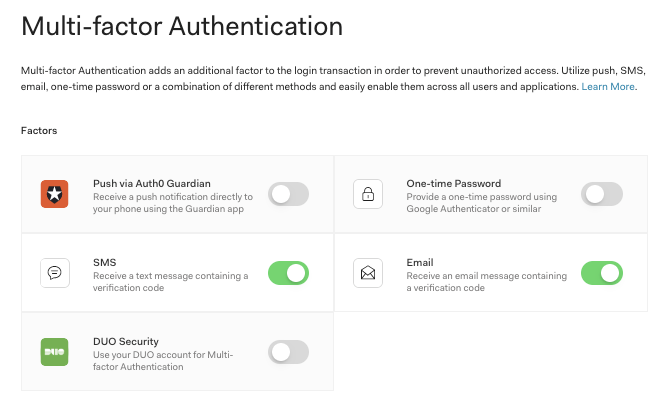
- Email must be enabled in the Auth0 [management dashboard or via the management API](https://auth0.com/docs/multifactor-authentication/api/email)
- The user's email address must be verified
- The user must have some other method of MFA enabled
## What about Email as the Only MFA Factor?
Currently, email MFA is only available as an optional backup multi-factor method. The user must have another method as the primary form of multi-factor authentication. Enabling email MFA as a standalone multi-factor method is on the Auth0 roadmap.
## How Do I Get Started?
To try email MFA with the New Universal Login experience out, sign up for Auth0 for free and click on Multifactor Auth in the management dashboard. [Follow these instructions for enabling Email MFA.](https://auth0.com/docs/multifactor-authentication/api/email)