---
title: "Node.js and TypeScript Tutorial: Secure an Express API"
description: "Learn how to use TypeScript and Auth0 to secure a feature-complete Express.js API. Tutorial on how to use Auth0 to implement authorization in Express."
authors:
- name: "Dan Arias"
url: "https://auth0.com/blog/authors/dan-arias/"
date: "Feb 24, 2022"
category: "Developers,Deep Dive,TypeScript"
tags: ["typescript", "nodejs", "node", "express", "auth0", "full-stack", "server", "backend", "api"]
url: "https://auth0.com/blog/node-js-and-typescript-tutorial-secure-an-express-api/"
---
# Node.js and TypeScript Tutorial: Secure an Express API
Starting from this chapter?
Clone the application repo and check out the `build-api` branch:
``` bash
git clone git@github.com:auth0-blog/menu-api-express-ts.git \
menu-api \
--branch build-api
```
Make the project folder your current directory:
``` bash
cd menu-api
```
Then, install the project dependencies:
``` bash
npm i
```
Finally, create a `.env` hidden file:
``` bash
touch .env
```
Populate `.env` with this:
``` bash
PORT=7000
```
Run the project by executing the following command:
``` bash
npm run dev
```
In the [Build an API with Node.js and TypeScript Tutorial](https://auth0.com/blog/node-js-and-typescript-tutorial-build-a-crud-api/), you went over how to build an API using Express, a Node.js web framework, and TypeScript, an open-source language that builds on JavaScript. You learned how to define data models, create a data service, and quickly build modular endpoints.
Now, this tutorial will show you how to **secure the API using Auth0**. To see your API in action, you'll use a production client called "WHATABYTE Dashboard," which is inspired by the [sleek web player from Spotify](https://open.spotify.com/search):
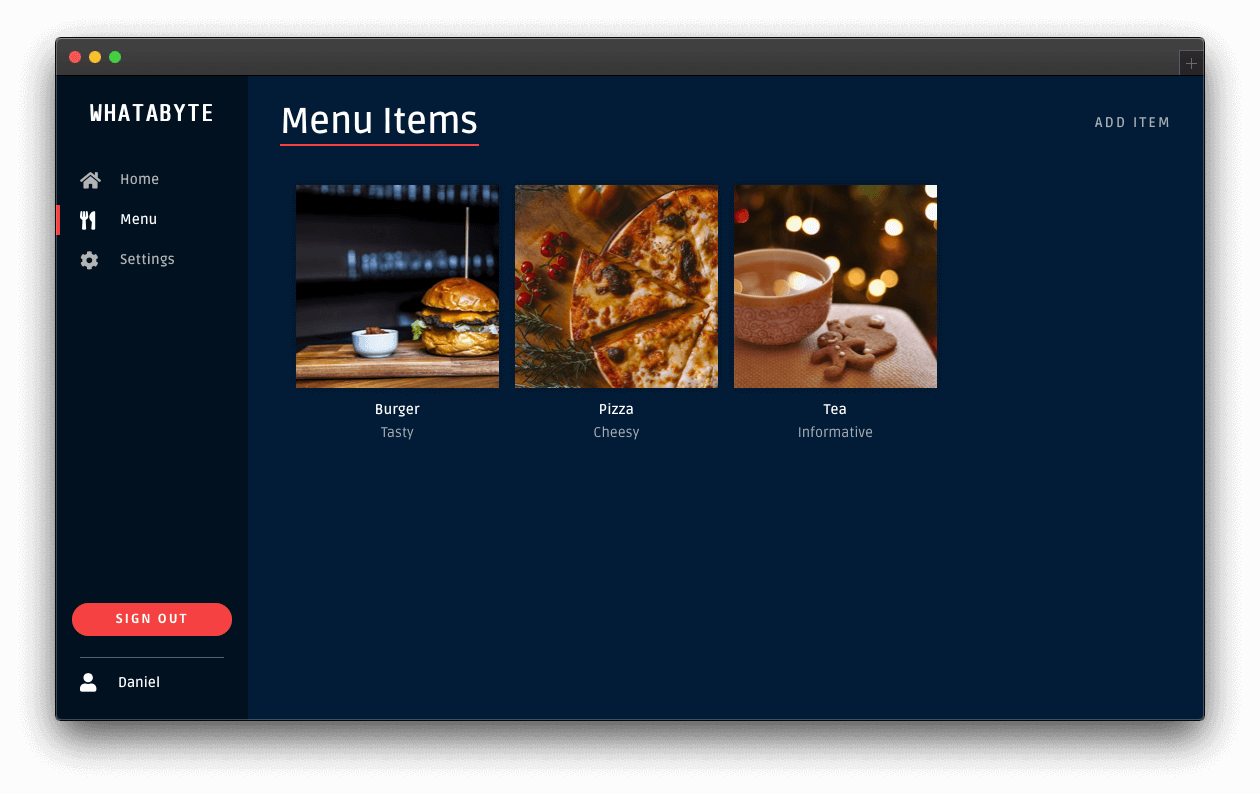
One of the requirements for this project is that **only authorized users can write records to the store**. To quickly and securely achieve that, you can use Auth0 to manage your application's user credentials.
## Create Authentication Middleware
You'll rely on a middleware function to protect an Express API endpoint. Express will execute an authorization middleware function _before_ it executes the callback function of the controller that handles the request.
You can use two patterns to integrate your endpoints with the authorization middleware function.
The first option is to "inject" an authorization middleware function in the controller as follows:
``` typescript
itemsRouter.post(
"/",
authorizationFunction,
async (req: Request, res: Response) => {
// Controller logic...
}
);
```
Here, Express calls `authorizationFunction()` before the route handler function of `itemsRouter.post`. In turn, the business logic within `authorizationFunction` can perform two tasks:
**(a)** invoke the next function in the middleware chain, the router handler function, if it can determine that the user has the authorization to access the resource or,
**(b)** close the request-response cycle by responding with a [`401 Unauthorized`](https://developer.mozilla.org/en-US/docs/Web/HTTP/Status/401) message, which prevents your API from executing the route handler.
The approach of adding authorization middleware by controller gives you granular and low-level control of the authorization flow. However, it can be tedious to inject the authorization middleware function per controller if you have many of them.
As an alternative, you can separate the public controllers from the protected controllers using the authorization middleware as a boundary between groups. For example, within an Express router, you could do the following:
``` typescript
// Public API endpoints
itemsRouter.get(...);
// Protected API endpoints
itemsRouter.use(authorizationFunction);
itemsRouter.post(...);
itemsRouter.put(...);
itemsRouter.delete(...);
```
As such, client applications can access the `GET` endpoint without presenting any "proof of authorization" — it is a _public endpoint_.
However, client requests can only access endpoints that you define after your application mounts `authorizationFunction` into `itemsRouter` if `authorizationFunction` can determine that the client making the endpoint request **has the authorization to access it**. For this API, Auth0 provides the proof of authorization mentioned in the form of a [JSON Web Token (JWT)](https://jwt.io/) called an [_access token_](https://auth0.com/docs/tokens/access-tokens).
A JWT defines a compact and self-contained way to transmit information between parties as a JSON object securely. This information can be verified and trusted because it is digitally signed, making JWTs useful to perform authorization.
Once the user logs in using a client application, Auth0 provides the client with an access token that defines the resources that the client has permission to access or manipulate with that token. The access token defines **what users can do in your API** in the JSON object it encapsulates. As such, the client must include the access token with each subsequent request it makes to a protected API endpoint.
You'll use the partition approach for this application as you need to protect all the endpoints that write data to the store.
### Install authorization dependencies
To create your authorization middleware function, you need to install these two packages:
``` bash
npm i express-jwt jwks-rsa
```
Here's what these packages do for you:
- [`express-jwt`](https://www.npmjs.com/package/express-jwt): Validates the authorization level of HTTP requests using JWT tokens in your Node.js application.
- [`jwks-rsa`](https://www.npmjs.com/package/jwks-rsa): A library to retrieve RSA signing keys from a JWKS (JSON Web Key Set) endpoint.
Since you are working on a TypeScript project, you also need the type definitions for these packages; however, only the `express-jwt` package is available in the `@types` npm namespace:
``` bash
npm i -D @types/express-jwt
```
> The helper function you need from the `jwks-rsa` package is simple and doesn't require strong typing.
Next, create a file to define your authorization middleware function:
``` bash
touch src/middleware/authz.middleware.ts
```
Populate `src/middleware/authz.middleware.ts` as follows:
``` typescript
// src/middleware/authz.middleware.ts
import jwt from "express-jwt";
import jwksRsa from "jwks-rsa";
import * as dotenv from "dotenv";
dotenv.config();
export const checkJwt = jwt({
secret: jwksRsa.expressJwtSecret({
cache: true,
rateLimit: true,
jwksRequestsPerMinute: 5,
jwksUri: `https://${process.env.AUTH0_DOMAIN}/.well-known/jwks.json`
}),
// Validate the audience and the issuer.
audience: process.env.AUTH0_AUDIENCE,
issuer: `https://${process.env.AUTH0_DOMAIN}/`,
algorithms: ["RS256"]
});
```
When you call the `checkJwt` function, it invokes the `jwt` function, verifying that any JSON Web Token (JWT) present in the request payload to authorize the request is well-formed and valid. Auth0 determines the validity of the JWT. As such, you pass the `jwt` function some variables to help it contact Auth0 and present it with all the JWT information it needs:
- The `audience` and `issuer` of the JWT. You have defined these values in your `.env` file. Express has loaded into this module using `dotenv.config()`.
- The `algorithms` used to sign the JWT.
- The `secret` used to sign the JWT.
To obtain the secret, you need to do some additional work: you use the `expressJwtSecret` helper function from the `jwks-rsa` library to query the JSON Web Key Set (JWKS) endpoint of your Auth0 tenant. This endpoint has a set of keys containing the public keys that your application can use to verify any JSON Web Token (JWT) issued by the authorization server and signed using the RS256 signing algorithm.
The `checkJwt` function implicitly receives the request, `req`, and response, `res`, object from Express, as well as the `next()` function, which it can use to invoke the next middleware function in the chain.
All that's left to do is mount the `checkJwt` middleware function before you mount your `itemsRouter` write endpoints.
Open `src/items/items.router.ts` and import `checkJwt` under the `Required External Modules and Interfaces` section:
``` typescript
/**
* Required External Modules and Interfaces
*/
import express, { Request, Response } from "express";
import * as ItemService from "./items.service";
import { BaseItem, Item } from "./item.interface";
import { checkJwt } from "../middleware/authz.middleware";
```
Then, under the `Controller Definitions` section, locate the definition of the `POST items` endpoint, and right above it, add the following code to mount the authorization middleware, `itemsRouter.use(checkJwt)`:
``` typescript
/**
* Controller Definitions
*/
// GET items
itemsRouter.get(...);
// GET items/:id
itemsRouter.get(...);
// ✨ New! Mount authorization middleware
itemsRouter.use(checkJwt); // 👈 👀
// POST items
itemsRouter.post(...);
// PUT items/:id
itemsRouter.put(...);
// DELETE items/:id
itemsRouter.delete(...);
```
To test that Express is protecting your write endpoints, issue the following requesting in the terminal:
``` bash
curl -X POST -H 'Content-Type: application/json' -d '{
"name": "Salad",
"price": 499,
"description": "Fresh",
"image": "https://cdn.auth0.com/blog/whatabyte/salad-sm.png"
}' http://localhost:7000/api/menu/items -i
```
The server replies with an `HTTP/1.1 401 Unauthorized` response status, and the message `No authorization token was found`, confirming that your write endpoints are protected. To access them, you need a JWT issued by Auth0. The fastest way to get that token is to use a client just like any of your users would.
## Configure Role-Based Access Control (RBAC)
Your API server is protecting your write endpoints, but any authenticated user can modify the menu items. This scenario is far from ideal as you don't want regular customers to change an item's price, for example. As such, you need a mechanism to limit access to your API resources and demonstrate that being authenticated is not the same as being authorized. **However, if all that you want for now is to restrict API access to logged-in users, you've achieved that, and you are done.**
A straightforward way to implement access control is to create a set of write permissions and bundle them in a `menu-admin` role, which you assign only to select users. Thus, only select users are _authorized_ to modify resources in your API. Consequently, your server must enforce role verification on each API write endpoint to prevent _unauthorized_ access.
To re-iterate: being authenticated won't be enough to being authorized to write data to the store.
The practice described above is known as [Role-Based Access Control (RBAC)](https://auth0.com/docs/authorization/rbac), which you can implement quickly for your API using the Auth0 Dashboard. You can implement RBAC and enforce it on your server as follows:
### On the Auth0 side
- Create permissions for the Menu API you created earlier.
- Create a role called `menu-admin`.
- Assign permissions from the Menu API to the `menu-admin` role.
- Assign the `menu-admin` role to a user.
- Add the `menu-admin` role permissions to the access token created for users with the role when they sign in.
### On the server side
- Define the `menu-admin` role permissions in a TypeScript `enum`.
- Define the permissions required to access an endpoint by passing permission values as arguments to an authorization middleware function, which Express calls before the endpoint route handler.
- Implement the authorization middleware function to determine authorization by comparing the permissions required by the endpoint against the permissions present in a user's access token.
As you can see, implementing authorization is a complex process that involves many steps. Any errors or omissions in the process of implementation can leave an API at risk of being compromised. Thankfully, you can delegate the creation and maintenance of permissions, roles, and users to Auth0 and focus only on enforcing authorization on your server.
With the plan clearly outlined, let's get started.
## Implement Role-Based Access Control
To implement role-based access control (RBAC) in Express, you create an RBAC middleware function that inspects the access token provided in the client request and verifies that it has the permissions required by the endpoint it needs to access. You also must call this function before your application reaches the route handler function of the protected endpoint controller.
Consequently, if the proper permissions are present in the access token, your RBAC middleware function calls the next middleware function in the chain, effectively granting the client request with access to the protected endpoint. Otherwise, your application terminates the request-response cycle and sends a response with a [`403 Forbidden`](https://developer.mozilla.org/en-US/docs/Web/HTTP/Status/403) status code to the client.
To help you inspect the access token for permissions easily, you will use the [`express-jwt-authz`](https://github.com/auth0/express-jwt-authz) package:
``` bash
npm install express-jwt-authz
```
Using this package, you will inspect the `permissions` claim of the access token to determine if the client making a request to a protected endpoint has all the permissions required.
To start, create a file to define a middleware function that checks for permissions:
``` bash
touch src/middleware/permissions.middleware.ts
```
Then, populate `src/middleware/permissions.middleware.ts` with the following code:
``` typescript
const jwtAuthz = require("express-jwt-authz");
export const checkPermissions = (permissions: string | string[]) => {
return jwtAuthz([permissions], {
customScopeKey: "permissions",
checkAllScopes: true,
failWithError: true
});
};
```
The `jwtAuthz` function takes as a first argument an array of strings representing the permissions required by an endpoint. Its second argument is an optional configuration object. You can configure [ how `jwtAuthz` should behave](https://github.com/auth0/express-jwt-authz#options) by specifying different options as follows:
- `customScopeKey`: By default, `jwtAuthz` checks permissions against the `scope` claim of the access token. You can use this option to change the claim `jwtAuthz` should use. In this case, you specify that the access token stores permission-related data in a claim called `permissions`.
- `checkAllScopes`: When set to `true`, all the expected permissions by the endpoint must be present in the `customScopeKey` claim of the access token. If any permission is missing, this middleware function throws an error, which effectively denies the client application making the request from accessing the protected endpoint.
- `failWithError`: When set to `true`, `jwtAuthz` will forward any errors to the `next()` middleware function instead of ending the response directly. In this case, `jwtAuthz` will forward the error to your `errorHandler` middleware function, where you can better customize the error response sent to the client.
`jwtAuthz` is a fully-defined and self-contained middleware function, which means it is a function that has access to the `Request` object, the `Response` object, and the `next` middleware function in the application’s request-response cycle. As such, you can technically avoid creating the `checkPermissions` helper function and invoke the `jwtAuthz` function directly on each endpoint as follows:
``` typescript
itemsRouter.post(
"/",
[
checkJwt,
jwtAuthz([ItemPermissions.CreateItems], {
customScopeKey: "permissions",
checkAllScopes: true,
failWithError: true
})
],
async (req: Request, res: Response) => {
// function body...
}
);
itemsRouter.put(
"/",
[
checkJwt,
jwtAuthz([ItemPermissions.UpdateItems], {
customScopeKey: "permissions",
checkAllScopes: true,
failWithError: true
})
],
async (req: Request, res: Response) => {
// function body...
}
);
```
However, this requires you to repeatedly configure `jwtAuthz` at each endpoint. Instead, you use a JavaScript closure to create a re-usable functional wrapper for `jwtAuthz`. The `checkPermissions` helper function takes as arguments the `permissions` required and creates a closure around that value within its body. It then returns an instance of `jwtAuthz`, which can access the value of `permissions` when Express executes it. As such, you only need to configure `jwtAuthz` in a single place, making your code much more maintainable and less error-prone. You'll apply this approach to the endpoints.
With the RBAC authorization middleware function created, you are now ready to wire it into any controller that needs role-based access control (RBAC).
### Define permissions locally
To make it easy to manage and use permissions in your code, you can define them using a TypeScript `enum`. Under the `src/items` directory, create the following file:
``` bash
touch src/items/item-permission.ts
```
Populate `src/items/item-permission.ts` as follows:
``` typescript
export enum ItemPermission {
CreateItems = "create:items",
UpdateItems = "update:items",
DeleteItems = "delete:items",
}
```
A [TypeScript `enum`](https://www.typescriptlang.org/docs/handbook/enums.html) lets you define a set of named constants, which documents what these constants do while also preventing you from introducing bugs in your application by mistyping them. Each constant represents one of the permissions that you created in the Auth0 dashboard.
### Apply permissions middleware
To protect the write endpoints with RBAC, you need to inject the `checkPermissions` middleware function into a controller definition and pass it the permissions that the endpoint requires as arguments.
Open `src/items/items.router.ts`, locate the `Required External Modules and Interfaces` section, and add the following imports:
``` typescript
/**
* Required External Modules and Interfaces
*/
import express, { Request, Response } from "express";
import * as ItemService from "./items.service";
import { BaseItem, Item } from "./item.interface";
import { checkJwt } from "../middleware/authz.middleware";
import { checkPermissions } from "../middleware/permissions.middleware";
import { ItemPermission } from "./item-permission";
```
Next, locate the `Controller Definitions` section and update the following controller definitions:
``` typescript
/**
* Controller Definitions
*/
// GET items/ ...
// GET items/:id ...
// Mount authorization middleware
itemsRouter.use(checkJwt);
// POST items
itemsRouter.post(
"/",
checkPermissions(ItemPermission.CreateItems),
async (req: Request, res: Response) => {
try {
const item: BaseItem = req.body;
const newItem = await ItemService.create(item);
res.status(201).json(newItem);
} catch (e) {
res.status(500).send(e.message);
}
}
);
// PUT items/:id
itemsRouter.put(
"/:id",
checkPermissions(ItemPermission.UpdateItems),
async (req: Request, res: Response) => {
const id: number = parseInt(req.params.id, 10);
try {
const itemUpdate: Item = req.body;
const existingItem: Item = await ItemService.find(id);
if (existingItem) {
const updatedItem = await ItemService.update(id, itemUpdate);
return res.status(200).json(updatedItem);
}
const newItem = await ItemService.create(itemUpdate);
res.status(201).json(newItem);
} catch (e) {
res.status(500).send(e.message);
}
}
);
// DELETE items/:id
itemsRouter.delete(
"/:id",
checkPermissions(ItemPermission.DeleteItems),
async (req: Request, res: Response) => {
try {
const id: number = parseInt(req.params.id, 10);
await ItemService.remove(id);
res.sendStatus(204);
} catch (e) {
res.status(500).send(e.message);
}
}
);
```
Now that the authorization guards are in place, any attempt to create a new menu item directly using a non-admin access token results in failure:
- The `checkPermissions()` function injected in the `POST api/menu/items/` endpoint detects the presence of the required permissions.
- If the required permissions are missing, it then passes a `403` exception down the middleware chain.
- As such, you successfully prevent the application from invoking the route handler of this endpoint.
Remember that by mounting the `checkJwt()` middleware function as a router-level middleware, you don't have to include it at the endpoint-level. With just one line of code, `itemsRouter.use(checkJwt)`, you are protecting all the endpoints that follow it against invalid access tokens. By subsequently applying the `checkPermissions()` middleware at the route-controller-level, you protect that route from authenticated requests that lack the required access level.
You are effectively implementing Role-Based Access Control (RBAC) using a two-layer approach powered by Express middleware functions.
## What's Next
You have implemented authorization in Express to control the resources that your users can access. You have learned how to implement different access levels:
- Access based on authentication status.
- If you have logged in, you are authorized to access the resources.
- Access based on permissions.
- If you have logged in _and_ have the required permissions, you are authorized to access the resources.
This tutorial covered the most common authorization use cases for an Express API server. However, Auth0 is an extensible and flexible platform that can help you achieve even more. If you have a more complex use case, check out the [Auth0 Architecture Scenarios](https://auth0.com/docs/architecture-scenarios) to learn more about the typical architecture scenarios we have identified when working with customers on implementing Auth0.
Let me know in the comments below what you thought of this tutorial. Thank you for reading this far, and happy engineering!