---
title: "NodeJS 10: The New, The Changed, and the Deprecated"
description: "Node.js 10 comes packed with significant performance improvements through V8 v6.6 and new experimental features such the fs promise API and time traveling."
authors:
- name: "Dan Arias"
url: "https://auth0.com/blog/authors/dan-arias/"
date: "May 2, 2018"
category: "Developers,Whats New,Node"
tags: ["backend", "node", "nodejs", "javascript", "release", "n-api", "time-travel"]
url: "https://auth0.com/blog/nodejs-10-new-changes-deprecations/"
---
# NodeJS 10: The New, The Changed, and the Deprecated
Time flies when you are having fun! It has been over seven years since Node.js v0.10.x was released and now we are welcoming the seventh major release since the formation of the Node.js Foundation: Node.js v10.0.0! Our peppy non-blocking I/O friend has changed so much since then. Let's review what new, what has changed and what has been deprecated in this new release!
## Support for Modern Cryptography
Node.js 10 gets an upgrade to OpenSSL v1.1.0. In addition, cryptographic support now includes the ChaCha20 cipher and the Poly1305 authenticator. According to [IETF](https://tools.ietf.org/html/rfc7539) documentation, ChaCha20 is a high-speed cipher (much faster than AES in software only-implementations) that is not sensitive to [timing attacks](https://en.wikipedia.org/wiki/Timing_attack). The same organization defines Poly1305 as a high-speed message authentication code with a straight-forward and easy implementation. In 2014, [Google deployed a new cipher suite](https://security.googleblog.com/2014/04/speeding-up-and-strengthening-https.html) in Chrome that runs three times faster than AES-GCM on most Android devices leading to an improvement in battery life and encryption performance. This TLS cipher suite implements ChaCha 20 for symmetric encryption and Poly1305 for authentication.
The future release of OpenSSL 1.1.1 includes support for [TLS 1.3](https://en.wikipedia.org/wiki/Transport_Layer_Security#TLS_1.3) which now includes the ChaCha20 stream cipher with the Poly1305 message authentication code to make the web much more secure. With the addition of OpenSSL 1.1.0, Chacha20 and Poly1305 makes it easy to bring TLS 1.3 support to Node.js before it reaches Long Term Support (LTS) in October 2018 bringing cutting-edge cryptography to the ecosystem.
## Experimental Promisified `fs` Functions
The experimental [`fs/promises`](https://nodejs.org/api/fs.html#fs_fs_promises_api) API gives us a set of alternative asynchronous file system methods that return a `Promise` object instead of using callbacks. We can access this API through `require('fs/promises')`.
Let's explore an example of the `fs` Promises API. To do so, we need to have Node v10.0.0 installed. I recommend that you install the current version through a Node Version Manager such as [nvm](https://github.com/creationix/nvm) so that you can switch between versions as you need to.
With Node v10.0.0 installed and selected, create a NodeJS project anywhere you'd like by using `npm init`.
On the project directory, create the following files:
- `temp.txt`: a file that we are going to read.
- `app.js`: the Node application that we are going to use for demonstration. The application reads a file and truncates its content to the first 4 characters.
Open `temp.txt` and type "Node.js" inside and save it.
Then, open `app.js` and include the following headings:
```javascript
// app.js
const fs = require("fs");
const fsPromises = require("fs/promises");
```
`fs` is the usual module we are used to working with. `fs/promises` brings the new API into our application.
Next, let's read `temp.txt` and print its current content in the console:
```javascript
const fs = require("fs");
const fsPromises = require("fs/promises");
console.log(fs.readFileSync("temp.txt", "utf8"));
// Prints: Node.js
```
Now, we are going to create a function called `doTruncate` that asynchronously opens the file using `open()` and truncates the content of the file using `ftruncate`, both methods of the `fs/promises` library. We are going to manage the promises through the [`async/await`](https://developer.mozilla.org/en-US/docs/Web/JavaScript/Reference/Statements/async_function) pattern and print the resulting truncation to the console:
```javascript
const fs = require("fs");
const fsPromises = require("fs/promises");
console.log(fs.readFileSync("temp.txt", "utf8"));
// Prints: Node.js
async function doTruncate() {
const fd = await fsPromises.open("temp.txt", "r+");
await fsPromises.ftruncate(fd, 4);
console.log(fs.readFileSync("temp.txt", "utf8"));
// Prints: Node
}
doTruncate().catch(console.error);
```
The absence of callbacks makes the code clean, elegant and readable. In just three lines of code, we are able to execute all the logic of `doTruncate` as if it was synchronous. If any error is thrown, we catch it by chaining a `catch` to `doTruncate`. No need to use a `try/catch` block within the function.
## New JavaScript Language Features
These are the highlights of the [features included in the V8 v6.6 release](https://v8project.blogspot.com/) that ships with Node v10.0.0:
- `Function.prototype.toString()`
This method now returns exact slices of source text which include whitespace and comments.
```javascript
function /* This is a comment */ f() {
const num = 10;
console.log(num);
}
console.log(f.toString());
```
The console output now includes the comment between `function` and `f` as well as the whitespace after `f`:
```text
function /* This is a comment */ f () {
const num = 10;
console.log(num);
}
```
In previous versions of Node.js, the output would have been:
```text
function f() {
const num = 10;
console.log(num);
}
```
- The `catch` clause of `try` statements no longer requires a parameter. Here's an example from the release notes:
```javascript
try {
doSomethingThatMightThrow();
} catch {
handleException();
}
```
- Non-standard methods `trimLeft()` and `trimRight()` becomes aliases for the newly implemented `String.prototype.trimStart()` and `String.prototype.trimEnd()` to ensure backward compatibility:
```javascript
const string = " Node rocks! ";
console.log(string.trimStart());
console.log(string.trimEnd());
console.log(string.trim());
```
Output:
```text
Node rocks!
Node rocks!
Node rocks!
```
Read more details on the changes in the JavaScript languages features in the [V8 project blog](http://v8project.blogspot.com/2018/03/v8-release-66.html).
## Performance Improvements
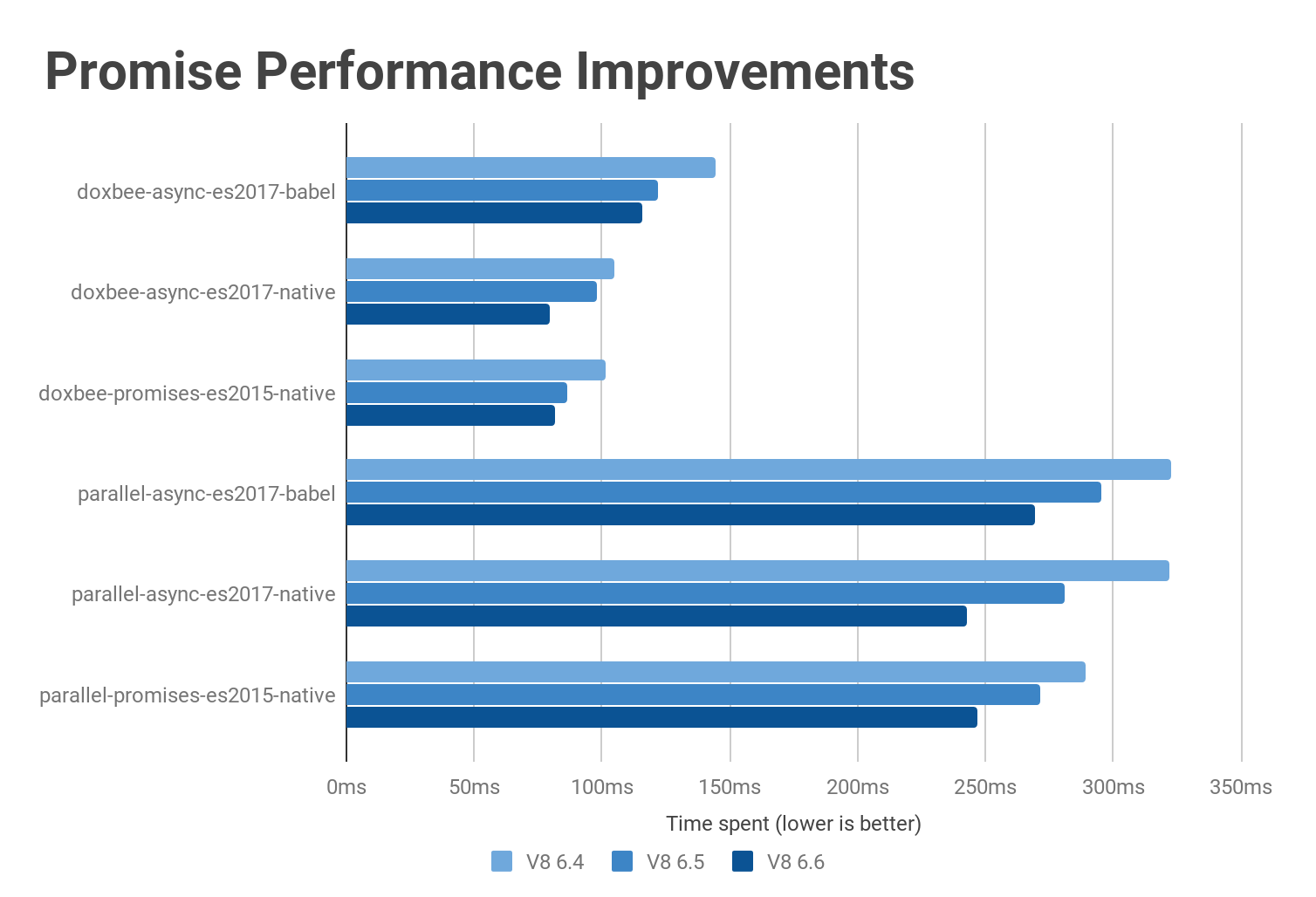
- Promises and async functions get a performance boost. The V8 Engineering team has been able to close the gap between async functions and raw promise chains.
[Source: V8 Project Blog](https://v8project.blogspot.com/2018/03/v8-release-66.html)
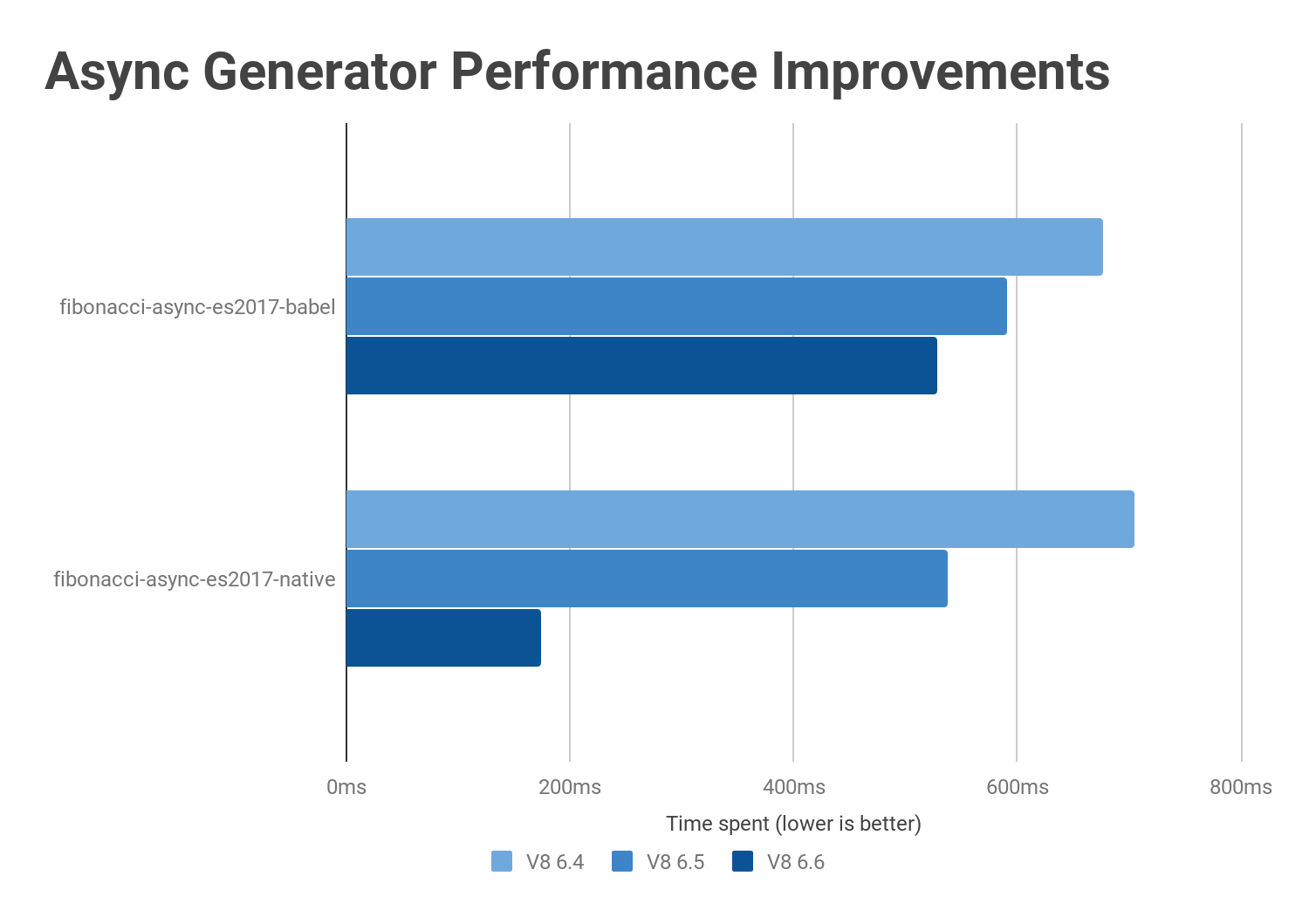
- The performance of async generators along with async iterations was largely improved.
[Source: V8 Project Blog](https://v8project.blogspot.com/2018/03/v8-release-66.html)
- For [holey double arrays](https://v8project.blogspot.com/2017/09/elements-kinds-in-v8.html), the throughput performance of `Array#reduce` increased by more than 10x.

[Source: V8 Project Blog](https://v8project.blogspot.com/2018/03/v8-release-66.html)
Read more details on the performance improvements present in V8 v6.6 in the [V8 project blog](http://v8project.blogspot.com/2018/03/v8-release-66.html).
## Better Error Handling
As [Michael Dawson](https://twitter.com/mhdawson1) explains, until recently, [Node.js only had messages associated with `Errors` thrown](https://medium.com/the-node-js-collection/node-js-errors-changes-you-need-to-know-about-dc8c82417f65). This made error management challenging and, ironically, error-prone since you needed to compare the error message string to a known value to determine what kind of error was thrown and what action your code should take. This has made it difficult to maintain error management in the codebase since any changes in the error messages thrown by the API would break the code. What this meant for the Node.js team is that any error message changes, including something small such as a typo, would need to be queued for a major release.
To solve this problem and enable the team to have the flexibility to improve error messages within minor releases, the Node.js team has been making an effort to add an error code for every error object thrown by the Node.js API. This effort continues with the latest release. Complete implementation of this initiative would not only make error management easier for developers but also error messages can be backported to previous versions and internationalization of applications is made much easier.
## NPM v6 On the Horizon
Down the road, Node.js v10 will see its integration with NPM v6 early in its life. [NPM6](https://medium.com/npm-inc/announcing-npm-6-5d0b1799a905) prioritizes security, performance enhancements, and workflow optimization. The NPM team claims that `npm@6` will be able to deliver up to 17x the speed of `npm` a year ago. Sounds promising!
## Node.js Time Travel
This version also comes with the experimental release of Node-ChakraCore that facilitates the usage of the Time-Travel innovation through the usage of the [NodeChakra Time Travel Debug VSCode extension](https://marketplace.visualstudio.com/items?itemName=ttd-trace-tools.node-chakracore-time-travel-debugger#overview). The extension allows developers to manage time traveling easily from the editor.
## Full Support of N-API
The N-API native Addons API graduates from its experimental status. But, what's N-API anyways?
[N-API](https://nodejs.org/api/n-api.html#n_api_n_api) is an API that allows developers to build native Addons. Node.js Addons are used to provide a performance boost to our codebase [when JavaScript performance isn't enough](https://blog.risingstack.com/writing-native-node-js-modules/). Node.js Addons provide us with an interface between JavaScript running in Node.js and C/C++ libraries. We can use that interface to build dynamically-linked shared objects in C++ that we can load into a Node.js application through a `require()` function.
Node.js Addons behave the same as regular Node.js modules but offer a performance boost for computationally demanding applications. By using Addons, we can also interact with lower level APIs of the operating system. All this sounds great; however, the implementation of Addons has been rather complicated, demanding knowledge of different components of Node.js including V8, libuv, C++ APIs, and other statically linked libraries such as OpenSSL.
N-API comes in place to simplify this process by offering an API to build native Addons that is independent of the underlying JavaScript runtime (V8). The goal is to insulate Addons to be stable across versions of Node.js: modules compiled for one version can run on later versions without recompilation. This is all done by making N-API Application Binary Interface (ABI) stable. We've heard API before, what's an ABI?
If an API is a contract between code modules, an ABI is a [contract between pieces of binary code](https://www.quora.com/What-exactly-is-an-Application-Binary-Interface-ABI-Who-defines-it-the-operating-system-a-programming-language) as explained by Google Engineer [Robert Love](https://twitter.com/rlove): an Application Binary Interface (ABI) "defines the mechanisms by which functions are invoked, how parameters are passed between caller and callee, how return values are provided to callers, how libraries are implemented, and how programs are loaded into memory." A stable ABI for Addons will make upgrading codebases that rely on native modules much easier.
Node Addons are a very advanced concept of the ecosystem. However, if you are looking to create some ultra-performance native modules do not hesitate to take a look and study the [C++ Addons documentation](https://nodejs.org/api/addons.html).
## Deprecations
The following are highlights of the API's that have been deprecated in this release:
- Using non-string values for `process.env` has been deprecated in documentation.
- Previously deprecated legacy async_hooks APIs have reached end-of-life and have been removed.
- Previously deprecated internal getters/setters on net.Server have reached end-of-life and have been removed.
- Using `require()` to access several of Node.js' own internal dependencies will emit a runtime deprecation.
For a full list of the deprecated APIs in this release, please visit the [v10.0.0 release notes](https://nodejs.org/en/blog/release/v10.0.0/#deprecations).
## Recap
Node.js continues to grow and evolve into a solid, flexible and diverse platform for developers to deliver reliable and scalable code. I am pretty excited about the future integration with TLS 1.3 and `@npm6`. Node.js will also continue to gain traction in the IoT area. What do you think about this release? If you have used it already, have you been able to experience any of the performance enhancements? Please let me know in the comments below!
Happy coding!