---
title: "OpenID Connect Enterprise Connection Enters Beta"
description: "This release will make it simple to federate authentication to identity providers that support OIDC."
authors:
- name: "Andrew Akers"
url: "https://auth0.com/blog/authors/andrew-akers/"
date: "Jun 26, 2019"
category: "Announcements,Features,OIDC Enterprise Connection"
tags: ["oidc", "login", "security", "authentication"]
url: "https://auth0.com/blog/openid-connect-enterprise-connection-enters-beta/"
---
# OpenID Connect Enterprise Connection Enters Beta
**TL; DR**: OpenID Connect (OIDC) support has been released as a beta Enterprise Connection in Auth0. This release will make it simple to federate authentication to identity providers that support OIDC.
## What is OpenID Connect?
OIDC is an authentication protocol, based on the OAuth 2.0 family of specifications. While OAuth 2.0 is focused on resource access and sharing, OIDC is focused on user authentication.
For example, if you sign into an application using your Google account via OIDC, Google will authenticate you and return identity information about you and the authentication performed to the application. OIDC is designed to be easy to use for federation and most modern enterprise identity providers support it, including Microsoft, Google, and Salesforce. Learn more about OpenID in this [free OIDC Handbook - eBook.](https://auth0.com/resources/ebooks/the-openid-connect-handbook?ref=blog)
## What Are We Releasing?
We released an OIDC Enterprise Connection as a beta feature for all customers with an Auth0 Developer Pro or Enterprise license. This connection will allow you to easily federate authentication to any OIDC-compliant identity providers. More specifically, any identity provider that implements [OpenID Connect Discovery](https://openid.net/specs/openid-connect-discovery-1_0.html) and supports the `id_token` response type and `form_post` response mode.
Configuration is simple. Here is an example:
Auth0 uses the issuer URL to find the OpenID Provider Configuration Document, which should be located in the /.well-known/openid-configuration endpoint. In the example above, Auth0 is connecting to Azure Active Directory (Azure AD) using the OIDC connection.
Once it is saved and enabled, a button will appear in the login page. When clicked, the button redirects to the Azure AD login page:
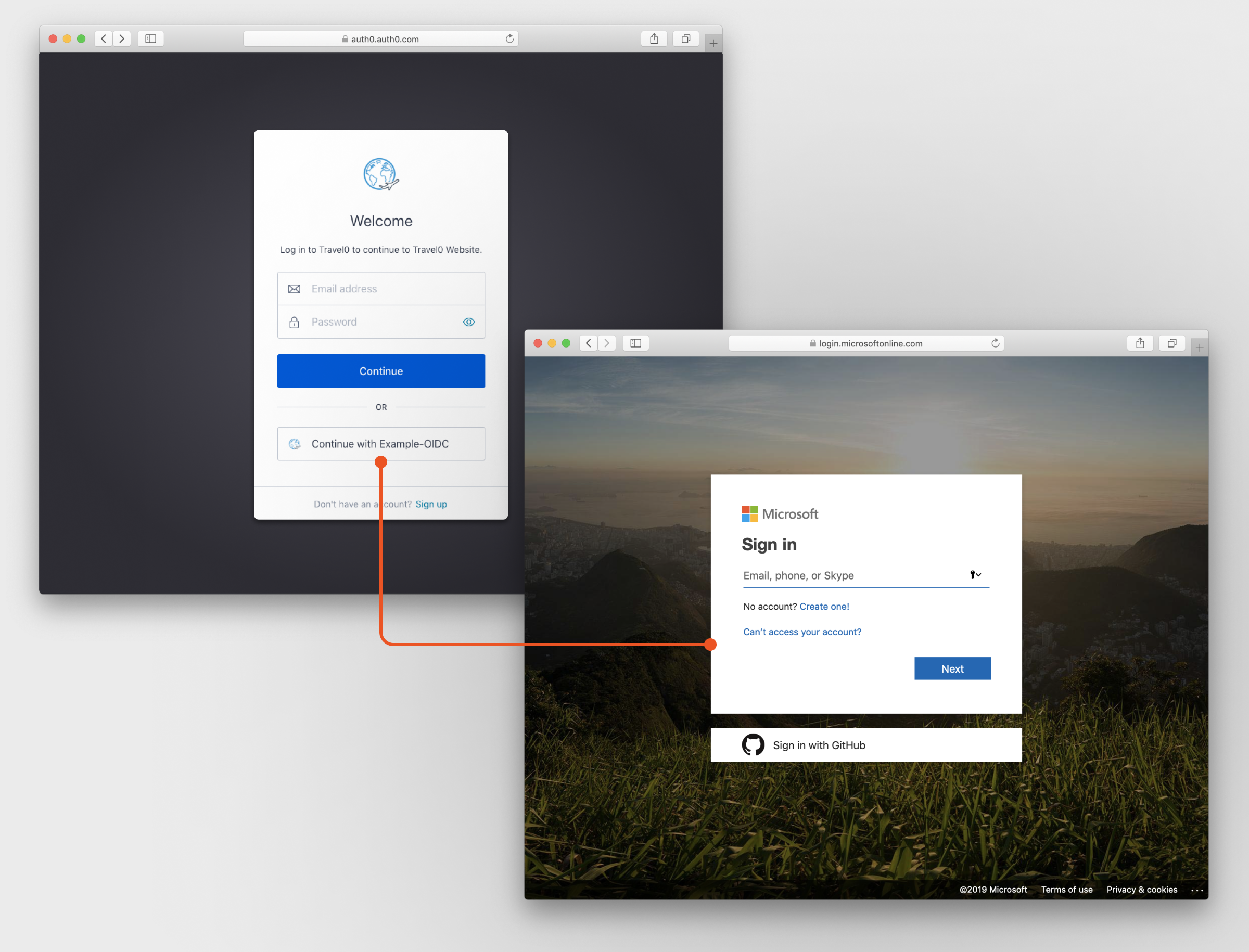
Additional settings can be configured, including:
- Connection Display name
- Custom logo on the login page
- Domains to be used for Home Realm Discovery
- Scopes
## How Do I Get Started?
Because it is an Enterprise Connection, the OIDC connection requires an Auth0 Developer Pro or Enterprise license. You can configure the connection in the Auth0 Management Dashboard by clicking Connections > Enterprise > OpenID Connect. [For more information, check out the docs](https://auth0.com/docs/connections/enterprise/oidc) and [the OpenID Connect Handbook.](https://auth0.com/resources/ebooks/the-openid-connect-handbook?ref=blog)
This is a beta feature. We welcome your feedback. [Please comment on this post in the Auth0 Community.](https://community.auth0.com/c/auth0-beta-programs/new-oidc-connection-beta)