---
title: "Proactive Auth0 Security Posture via Real-Time Audit of Management API Logs"
description: "Prevent configuration drift. Detect changes to critical security defenses like MFA and Attack Protection real-time, leveraging Auth0 Management API logs for enhanced Auth0 security posture."
authors:
- name: "Maria Vasilevskaya"
url: "https://auth0.com/blog/authors/maria-vasilevskaya/"
date: "Nov 14, 2025"
category: "Identity & Security"
tags: ["security", "security posture"]
url: "https://auth0.com/blog/proactive-auth0-security-posture/"
---
# Proactive Auth0 Security Posture via Real-Time Audit of Management API Logs
[Auth0 Logs](https://auth0.com/docs/deploy-monitor/logs) are the bedrock for proactive threat detection. In past articles, we've shown how to leverage these logs to combat dynamic threats like [signup fraud](https://auth0.com/blog/detecting-signup-fraud-3-ways-to-use-auth0-logs-to-protect-your-business/), [credential stuffing](https://auth0.com/blog/Log-Detections-Credential-Stuffing-MFA-Exploit-Prevention/), [refresh token abuse](https://auth0.com/blog/refresh-token-security-detecting-hijacking-and-misuse-with-auth0/), and emerging [MFA exploits](https://auth0.com/blog/Log-Detections-Credential-Stuffing-MFA-Exploit-Prevention/). These detections are available through the publicly available [Auth0 Detection Catalog](https://auth0.com/blog/level-up-your-security-posture-with-the-auth0-security-detection-catalog/), a collection of detection rules for security monitoring of Auth0 environments. Now, we shift our focus from warding off external attacks to maintaining internal security hygiene influencing your security posture.
Your identity security posture is only as strong as its current configuration. Simple-to-miss, unintentional misconfigurations or intentional risky changes by a compromised or unaware admin user can instantly introduce severe vulnerabilities. The key to maintaining high defenses is immediate awareness when critical modifications occur.
We can achieve this powerful, real-time monitoring by utilizing the [sapi event](https://auth0.com/docs/deploy-monitor/logs/log-event-type-codes) emitted by Auth0 Logs upon a successful [Management API](https://auth0.com/docs/api/management/v2) request focused on destructive or modifying operations.
## Combining Real-Time Visibility and Static Checks
Think of this category of log detections as the perfect complement to tools like [Checkmate for Auth0](https://auth0.com/blog/introducing-checkmate-for-auth0/), which provides a snapshot of your current configuration state. While Checkmate is excellent for security reporting and guiding tenant administrators, log detections offer a real-time security detection view for continuous Auth0 Configuration Monitoring. This approach logically shortens the time to detection when your identity security posture begins to drift.
This approach does not consume your Auth0 Management API [rate limits](https://auth0.com/docs/troubleshoot/customer-support/operational-policies/rate-limit-policy) as it relies solely on the [logs streamed](https://auth0.com/docs/customize/log-streams) from Auth0 to your Security Information and Event Management (SIEM) tooling, a security best practice.
## Key Objectives Achieved
By implementing these detections, your security team can:
* **Be Alerted in Real-Time** when critical, security-related configurations are changed.
* **Review Configuration State** during incident triaging (for example, "Was the bot detection feature active when the signup fraud was detected?").
* **Establish a Configuration Audit Trail** detailing when and by whom monitored settings were altered, which is vital for compliance and post-incident review.
* **Enforce Best Security Practices** by providing visibility into configuration alterations made by developers or administrators.
## Real-Time Detections for Critical Configurations
In this section, we provide detections covering the following areas: [Attack Protection](https://auth0.com/docs/secure/attack-protection), [MFA](https://auth0.com/docs/secure/multi-factor-authentication) settings, and usage of the [Management API](https://auth0.com/docs/api/management/v2).
## Attack Protection
[Attack Protection](http://auth0.com/docs/secure/attack-protection) features — such as **Brute-force Protection**, **Suspicious IP Throttling**, and **Breached Password Detection** — are core defenses against automated, high-volume attacks. Disabling or manipulating these features instantly compromises your security posture and makes you an easier target. We need immediate alerts when these critical defenses are either disabled or configured insecurely.
The detection [attack\_protection\_features\_turned\_off.yml](https://github.com/auth0/auth0-customer-detections/blob/main/detections/attack_protection_features_turned_off.yml) focuses on Suspicious IP Throttling, Breach Password Protection, and Brute-force Protection.
````shell
index=auth0 data.tenant_name="{your-tenant-name}"
data.type=sapi data.description IN ("Update Suspicious IP Throttling settings",
"Update Breached Password Detection settings", "Update Brute-force settings")
| eval feature_type = case(
'data.description'="Update Suspicious IP Throttling settings",
"Suspicious IP Throttling",
'data.description'="Update Breached Password Detection settings",
"Breached Password Detection",
'data.description'="Update Brute-force settings", "Brute-force"
)
```Take only the last modifications of settings for each feature```
| sort -_time
| dedup feature_type
| eval status = case ('data.details.response.body.enabled' = "false", "disabled",
'data.details.response.body.enabled' = "true", "enabled")
| fields _time, status, feature_type, data.ip
``` for reporting purposes remove the "where" clause below and it will display
the current status of all three protection features```
| where status = "disabled"
``` Display the results printing out timestamp, modifying IP, feature reference,
and its status```
| stats by _time, data.ip, feature_type, status
````
This detection provides a list of disabled features. Alternatively, it can be adjusted to provide the summary whether each feature is enabled or disabled based on the last modification record by commenting out the line | where status \= "disabled".
 Three Attack protection features — Suspicious IP throttling, Bot Detection, and Brute-force Protection — have a field where a tenant administrator can provide an IP AllowList (a list of trusted IP addresses excluded from the attack protection enforcement).
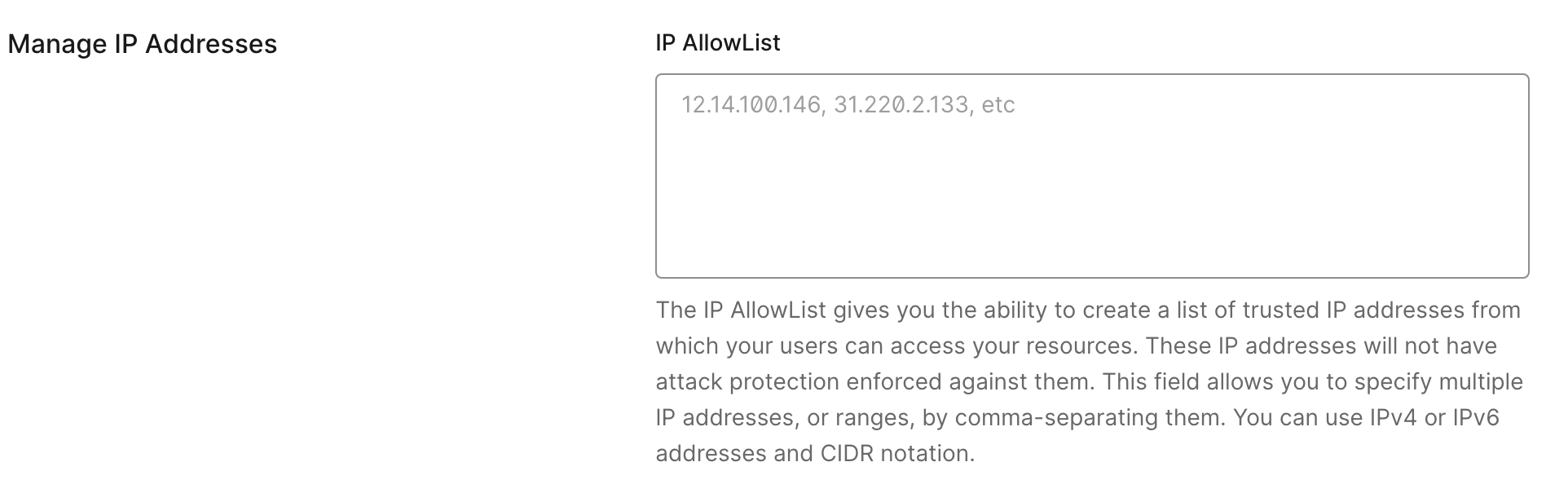 While this enables certain legitimate use cases, this list should be closely monitored for unrecognized or unauthorized IPs. This misconfiguration can lead to bypassing of attack protection features for malicious purposes.
The detection [unrecognized\_ip\_in\_allowlist.yml](https://github.com/auth0/auth0-customer-detections/blob/main/detections/unrecognized_ip_in_allowlist.yml) monitors this list of allowed IPs.
````shell
index=auth0 data.tenant_name="{your-tenant-name}"
data.type=sapi
data.description IN ("Update Brute-force settings",
"Create or update the anomaly detection captcha",
"Update Suspicious IP Throttling settings")
| fields data.details.request.body.allowlist{}
| stats values(data.details.request.body.allowlist{}) as allowed_ips
| mvexpand allowed_ips
| lookup {your-csv-file-with-recognized-ips} ip_address AS allowed_ips
OUTPUT ip_address as is_known_ip
| where isnull(is_known_ip)
| dedup allowed_ips
```Display the information in a table```
| stats values(allowed_ips) as ips_not_in_csv
````
Attack Protection isn't just on or off; it's about how it responds. Two other detections in this group are looking deeper into specifics of Bot Detection and Breach Password Protection response settings.
The bot detection rule [bot\_detection\_turned\_off.yml](https://github.com/auth0/auth0-customer-detections/blob/main/detections/bot_detection_turned_off.yml) collects the state of the available responses, that is whether the feature protects password-based or passwordless flows (both login and signup), and password reset flow.
````shell
index=auth0 data.tenant_name="{your-tenant-name}"
data.type=sapi data.details.response.statusCode=200
data.description="Create or update the anomaly detection captcha"
| fields data.ip, data.details.response.body.policy,
data.details.response.body.passwordless_policy,
data.details.response.body.password_reset_policy
```Take the last change of configurations that reflects the current settings```
| sort -_time
| head 1
| rename data.details.response.body.policy as pwd_login_signup
| rename data.details.response.body.passwordless_policy as pwdless_login_signup
| rename data.details.response.body.password_reset_policy as password_reset
| fields _time, data.ip, pwd_login_signup, pwdless_login_signup, password_reset
``` Capturing only events where bot detection features have been turned off```
| where ('pwd_login_signup'="off" or 'pwdless_login_signup'="off"
or 'password_reset'="off")
```Display the information```
| stats by _time, data.ip, pwd_login_signup, pwdless_login_signup, password_reset
````
By default, it alerts when any of these guards are disabled as coded by the condition | where ('pwd\_login\_signup'="off" OR 'pwdless\_login\_signup'="off" OR 'password\_reset'="off"). This condition should be tuned to fit the particular feature utilisation, that is if only the password flow is protected by the bot detection. Alternatively, when this filtering where condition is removed all at once, this detection turns into a reporting function and provides the latest state of configurations as long as this record is available in the log history.
While this enables certain legitimate use cases, this list should be closely monitored for unrecognized or unauthorized IPs. This misconfiguration can lead to bypassing of attack protection features for malicious purposes.
The detection [unrecognized\_ip\_in\_allowlist.yml](https://github.com/auth0/auth0-customer-detections/blob/main/detections/unrecognized_ip_in_allowlist.yml) monitors this list of allowed IPs.
````shell
index=auth0 data.tenant_name="{your-tenant-name}"
data.type=sapi
data.description IN ("Update Brute-force settings",
"Create or update the anomaly detection captcha",
"Update Suspicious IP Throttling settings")
| fields data.details.request.body.allowlist{}
| stats values(data.details.request.body.allowlist{}) as allowed_ips
| mvexpand allowed_ips
| lookup {your-csv-file-with-recognized-ips} ip_address AS allowed_ips
OUTPUT ip_address as is_known_ip
| where isnull(is_known_ip)
| dedup allowed_ips
```Display the information in a table```
| stats values(allowed_ips) as ips_not_in_csv
````
Attack Protection isn't just on or off; it's about how it responds. Two other detections in this group are looking deeper into specifics of Bot Detection and Breach Password Protection response settings.
The bot detection rule [bot\_detection\_turned\_off.yml](https://github.com/auth0/auth0-customer-detections/blob/main/detections/bot_detection_turned_off.yml) collects the state of the available responses, that is whether the feature protects password-based or passwordless flows (both login and signup), and password reset flow.
````shell
index=auth0 data.tenant_name="{your-tenant-name}"
data.type=sapi data.details.response.statusCode=200
data.description="Create or update the anomaly detection captcha"
| fields data.ip, data.details.response.body.policy,
data.details.response.body.passwordless_policy,
data.details.response.body.password_reset_policy
```Take the last change of configurations that reflects the current settings```
| sort -_time
| head 1
| rename data.details.response.body.policy as pwd_login_signup
| rename data.details.response.body.passwordless_policy as pwdless_login_signup
| rename data.details.response.body.password_reset_policy as password_reset
| fields _time, data.ip, pwd_login_signup, pwdless_login_signup, password_reset
``` Capturing only events where bot detection features have been turned off```
| where ('pwd_login_signup'="off" or 'pwdless_login_signup'="off"
or 'password_reset'="off")
```Display the information```
| stats by _time, data.ip, pwd_login_signup, pwdless_login_signup, password_reset
````
By default, it alerts when any of these guards are disabled as coded by the condition | where ('pwd\_login\_signup'="off" OR 'pwdless\_login\_signup'="off" OR 'password\_reset'="off"). This condition should be tuned to fit the particular feature utilisation, that is if only the password flow is protected by the bot detection. Alternatively, when this filtering where condition is removed all at once, this detection turns into a reporting function and provides the latest state of configurations as long as this record is available in the log history.
 The [breached\_password\_detection\_settings\_manipulated.yml](https://github.com/auth0/auth0-customer-detections/blob/main/detections/breached_password_detection_settings_manipulated.yml) detection reviews the response configurations for the Breached Password Detection.
````shell
index=auth0 data.tenant_name="{your-tenant-name}"
data.type=sapi data.description="Update Breached Password Detection settings"
``` Excluding white-listed IPs```
``` NOT data.ip IN ("{white-listed-IPs}")```
| fields _time, data.ip, data.details.response.body.shields{},
data.details.response.body.enabled,
data.details.response.body.stage.pre-user-registration.shields{}
```Take the last change of configurations that reflects the current settings```
| sort - _time
| head 1
| rename data.details.response.body.shields{} as login_shields
| rename data.details.response.body.enabled as breached_protection_enabled
| rename data.details.response.body.stage.pre-user-registration.shields{}
as signup_shields
``` Encoding the logic to define what flows' protection is on and off```
| eval user_notifications_on = if(isnotnull(mvfind(login_shields,
"user_notification")), "true", "false")
| eval login_flow_is_protected = if(isnotnull(mvfind(login_shields, "block")),
"true", "false")
| eval signup_flow_is_protected = if(isnotnull(mvfind(signup_shields, "block")),
"true", "false")
```Alert when breached password protection is completely disabled or all responses
are disabled (login, signup). Note: pwd reset is masked by now.```
| where breached_protection_enabled = "false" or
(login_flow_is_protected = "false" and signup_flow_is_protected = "false")
```Display the information in a table```
| table _time, data.ip, breached_protection_enabled, login_flow_is_protected,
signup_flow_is_protected, user_notifications_on
````
By default, this detection conservatively alerts only when the breached detection has been turned off completely or both guards (login and signups flows) are disabled as per filtering condition | where breached\_protection\_enabled \= "false" OR (login\_flow\_is\_protected \= "false" AND signup\_flow\_is\_protected \= "false"). The condition can be adapted to alert on other combinations of misconfigurations depending on the use case. Alternatively, this condition can be commented out at once to report on the current state.
The [breached\_password\_detection\_settings\_manipulated.yml](https://github.com/auth0/auth0-customer-detections/blob/main/detections/breached_password_detection_settings_manipulated.yml) detection reviews the response configurations for the Breached Password Detection.
````shell
index=auth0 data.tenant_name="{your-tenant-name}"
data.type=sapi data.description="Update Breached Password Detection settings"
``` Excluding white-listed IPs```
``` NOT data.ip IN ("{white-listed-IPs}")```
| fields _time, data.ip, data.details.response.body.shields{},
data.details.response.body.enabled,
data.details.response.body.stage.pre-user-registration.shields{}
```Take the last change of configurations that reflects the current settings```
| sort - _time
| head 1
| rename data.details.response.body.shields{} as login_shields
| rename data.details.response.body.enabled as breached_protection_enabled
| rename data.details.response.body.stage.pre-user-registration.shields{}
as signup_shields
``` Encoding the logic to define what flows' protection is on and off```
| eval user_notifications_on = if(isnotnull(mvfind(login_shields,
"user_notification")), "true", "false")
| eval login_flow_is_protected = if(isnotnull(mvfind(login_shields, "block")),
"true", "false")
| eval signup_flow_is_protected = if(isnotnull(mvfind(signup_shields, "block")),
"true", "false")
```Alert when breached password protection is completely disabled or all responses
are disabled (login, signup). Note: pwd reset is masked by now.```
| where breached_protection_enabled = "false" or
(login_flow_is_protected = "false" and signup_flow_is_protected = "false")
```Display the information in a table```
| table _time, data.ip, breached_protection_enabled, login_flow_is_protected,
signup_flow_is_protected, user_notifications_on
````
By default, this detection conservatively alerts only when the breached detection has been turned off completely or both guards (login and signups flows) are disabled as per filtering condition | where breached\_protection\_enabled \= "false" OR (login\_flow\_is\_protected \= "false" AND signup\_flow\_is\_protected \= "false"). The condition can be adapted to alert on other combinations of misconfigurations depending on the use case. Alternatively, this condition can be commented out at once to report on the current state.
 ## MFA Settings
Any change that weakens your MFA configuration is a major security downgrade. We can monitor for three specific types of MFA weakening described in this below:
- Disabling the MFA policy at once
- Disabling strong MFA factors, for example, WebAuthn
- Disabling gathering of risk assessment signals
The [mfa\_downgrade\_disable\_mfa\_policies.yml](https://github.com/auth0/auth0-customer-detections/blob/main/detections/mfa_downgrade_disable_mfa_policies.yml) detection simply monitors alterations of the MFA policy. Note that MFA can be disabled in favour of a [custom MFA](https://auth0.com/docs/secure/multi-factor-authentication/customize-mfa) setup via [Actions](https://auth0.com/docs/customize/actions#auth0-actions).
````shell
index=auth0 data.tenant_name="{your-tenant-name}"
data.type=sapi data.description="Update multi-factor authentication policies"
| fields data.details.response.body{}, data.details.request.ip, data.user_id
| rename data.details.response.body{} as mfa_mode
```Take the last change of configurations that reflects the current settings```
| sort - _time
| head 1
```Check if mfa_mode contains an empty value, that is no policies are enabled```
| where NOT match(mfa_mode, "^(all-applications|confidence-score)$")
| eval mfa_policy = case(
mfa_mode ="all-applications", "Always",
mfa_mode ="confidence-score", "Adaptive MFA",
true(), "Never"
)
``` Print output ```
| table _time, data.details.request.ip, data.user_id, mfa_policy
````
By default, the detection alerts only when MFA has been completely disabled by setting the MFA policy to Never as per condition | where NOT match(mfa\_mode, "^(all-applications|confidence-score)$"). When this clause is removed/commented out, this search query provides a state of the last MFA configurations.
## MFA Settings
Any change that weakens your MFA configuration is a major security downgrade. We can monitor for three specific types of MFA weakening described in this below:
- Disabling the MFA policy at once
- Disabling strong MFA factors, for example, WebAuthn
- Disabling gathering of risk assessment signals
The [mfa\_downgrade\_disable\_mfa\_policies.yml](https://github.com/auth0/auth0-customer-detections/blob/main/detections/mfa_downgrade_disable_mfa_policies.yml) detection simply monitors alterations of the MFA policy. Note that MFA can be disabled in favour of a [custom MFA](https://auth0.com/docs/secure/multi-factor-authentication/customize-mfa) setup via [Actions](https://auth0.com/docs/customize/actions#auth0-actions).
````shell
index=auth0 data.tenant_name="{your-tenant-name}"
data.type=sapi data.description="Update multi-factor authentication policies"
| fields data.details.response.body{}, data.details.request.ip, data.user_id
| rename data.details.response.body{} as mfa_mode
```Take the last change of configurations that reflects the current settings```
| sort - _time
| head 1
```Check if mfa_mode contains an empty value, that is no policies are enabled```
| where NOT match(mfa_mode, "^(all-applications|confidence-score)$")
| eval mfa_policy = case(
mfa_mode ="all-applications", "Always",
mfa_mode ="confidence-score", "Adaptive MFA",
true(), "Never"
)
``` Print output ```
| table _time, data.details.request.ip, data.user_id, mfa_policy
````
By default, the detection alerts only when MFA has been completely disabled by setting the MFA policy to Never as per condition | where NOT match(mfa\_mode, "^(all-applications|confidence-score)$"). When this clause is removed/commented out, this search query provides a state of the last MFA configurations.
 The detection [mfa\_downgrade\_detect\_disable\_factors.yml](https://github.com/auth0/auth0-customer-detections/blob/main/detections/mfa_downgrade_detect_disable_factors.yml) monitors availability of MFA factors for the whole tenant. This includes availability of these factors for [custom MFA](https://auth0.com/docs/secure/multi-factor-authentication/customize-mfa) use cases.
````shell
index=auth0 data.tenant_name="{your-tenant-name}"
data.type=sapi data.description="Update multi-factor authentication type"
```data.details.request.body.enabled=false```
| fields data.details.request.path, data.user_id, data.details.request.ip,
data.details.request.body.enabled
``` Excluding trusted IPs```
``` NOT data.details.request.ip IN ("{white-listed-IPs}")```
| rex field=data.details.request.path "/(?[^/]+)$"
```Take the last change of configurations that reflects the current settings```
| sort -_time, factor
| dedup factor
```Limit monitored factors, e.g. phishing-resistant ```
```| search factor IN (webauthn-roaming, webauthn-roaming)```
``` Alert when monitored factors have been disabled ```
| where 'data.details.request.body.enabled' = "false"
```Display the information in a table```
| table _time, data.user_id, data.details.request.ip, factor,
data.details.request.body.enabled
````
The Splunk query parses the path where the last part shows the type of the disabled factor, that is data.details.request.path. It takes the last modifications of the availability for each factor by default. This query can be used for reporting purposes as well (when and what factors were disabled and enabled) by commenting the dedup clause. This detection can also be adjusted to monitor only a specific factor, for example, phishing-resistant, by uncommenting the respective search clause.
Lastly, the [mfa\_downgrade\_risk\_assessment\_disabled.yml](https://github.com/auth0/auth0-customer-detections/blob/main/detections/mfa_donwgrade_risk_assessment_disabled.yml) detection looks into modifications to the MFA risk assessment configuration that disables collection of risk signals from the authentication process. These signals are leveraged to calculate customized session risk within [Actions](https://auth0.com/docs/customize/actions/explore-triggers/signup-and-login-triggers/login-trigger), for example, to trigger MFA challenge or deny access as an extra layer of defense. When recording of these risk signals has been disabled, it reduces efficiency of corresponding security controls. This activity is a security downgrade that can evade existing detections.
````shell
index=auth0 data.tenant_name="{your-tenant-name}"
data.type = sapi data.description = "Updates risk assessment configs"
data.details.response.statusCode = 200
| fields data.details.request.ip data.user_id
data.details.response.body.AfterAuthentication
``` Take the last change of configurations that reflects the current settings ```
| sort - _time
| head 1
``` Filter for the security downgrade: AfterAuthentication is set to false ```
| search data.details.response.body.AfterAuthentication=false
``` Print output ```
| table _time data.details.request.ip data.user_id
data.details.response.body.AfterAuthentication
````
## Usage of the Management API
The [Auth0 Management API](https://auth0.com/docs/api/management/v2) scopes give access to a variety of critical operations, for example, managing users and changing tenant configurations. Therefore, the usage and assignment of these scopes should be closely monitored as they are associated with high risks like widespread data exposure and unwanted alteration of security-related tenant configurations. Only trusted applications should be assigned these critical scopes. In this section, we demonstrate 3 detections from the [Auth0 Detection Catalog](https://github.com/auth0/auth0-customer-detections) related to monitoring and alerting excessive usage of the Management API.
The first detection [grant\_mgn\_api\_scopes.yml](https://github.com/auth0/auth0-customer-detections/blob/main/detections/client_with_overpermissive_granted_scopes.yml) monitors the sapi event emitted when the Auth0 Management API scopes are assigned to an application identified by the respective description of the event, that is data.description="Update client grant". To reduce the noise, the detection can be tuned to exclude known trusted applications (trusted-client\_id-\*) and focus on monitoring a limited list of the most critical scopes (mgg-api-scope-\*), e.g. those allowing altering a resource (delete:\* and update:\*).
````shell
index=auth0 data.tenant_name="{your-tenant-name}"
data.type=sapi data.description="Update client grant"
data.details.response.body.audience="https://{your-tenant-domain}/api/v2/"
```Add more monitored scopes```
data.details.request.body.scope{} IN ("{mgg-api-scope-1}", "{mgg-api-scope-2}")
```Trigger an alert when scopes are granted to applications
that are not on the list of allowed clients.```
NOT data.details.response.body.client_id IN ({trusted-client_id-1},
{trusted-client_id-2})
| fields _time, data.ip, data.details.request.body.scope{},
data.details.response.body.client_id
```Display the information in a table```
| table _time, data.ip, data.details.response.body.client_id,
data.details.request.body.scope{}
````
The second detection [client\_with\_overpermissive\_granted\_scopes.yml](https://github.com/auth0/auth0-customer-detections/blob/main/detections/client_with_overpermissive_granted_scopes.yml) complements the previous one by monitoring what the Management API scopes are actually available to applications when they are used, that is at run-time. It looks into the sapi events and reviews the scopes listed for this particular application as captured by the attribute data.details.request.auth.credentials.scopes{} of a log entry. The detection applies two filters:
- Whether an excessive number of assigned scopes (threshold\_for\_max\_number\_of\_scopes) has been seen (Option 1 in the query below).
- Whether unwanted critical scopes (list\_of\_monitored\_scopes) assigned to applications have been seen (Option 2 in the query below).
````shell
index=auth0 data.tenant_name="{your-tenant-name}"
data.type = sapi
``` Exclude the client that corresponds to the Auth0 Dashboard (Global Client ID)
found at Settings --> Advanced --> scroll to "Global Client Information" ```
NOT data.client_id = {global_client_id}
``` Collect scopes reported in log entries ```
| spath data.details.request.auth.credentials.scopes{}
| rename data.details.request.auth.credentials.scopes{} as accessible_scopes
| fields accessible_scopes data.client_id data.description
| where isNotNull(accessible_scopes)
``` Option 1 - Clients with an excessive number of granted scopes
(least privilege violation) ```
| eval count_scopes = mvcount(accessible_scopes)
| where count_scopes > {threshold_for_max_number_of_scopes} ``` e.g. 10 ```
``` Option 2 - Alert if highly sensitive or critical permissions are found
(focus on high-risk actions), for example "delete:users,create:users" ```
| eval excluded_scopes = {list_of_monitored_scopes}
| where NOT match(accessible_scopes, replace(excluded_scopes, ",", "|"))
``` Print the result ```
| table data.client_id data.description accessible_scopes count_scopes
````
Monitoring usage of Auth0 Management API scopes helps reduce the risk of exploitation by a threat actor leveraging over-privileged compromised machine-to-machine applications.
The Auth0 Dashboard provides a convenient way to generate and copy a so-called API Explorer token.
The detection [mfa\_downgrade\_detect\_disable\_factors.yml](https://github.com/auth0/auth0-customer-detections/blob/main/detections/mfa_downgrade_detect_disable_factors.yml) monitors availability of MFA factors for the whole tenant. This includes availability of these factors for [custom MFA](https://auth0.com/docs/secure/multi-factor-authentication/customize-mfa) use cases.
````shell
index=auth0 data.tenant_name="{your-tenant-name}"
data.type=sapi data.description="Update multi-factor authentication type"
```data.details.request.body.enabled=false```
| fields data.details.request.path, data.user_id, data.details.request.ip,
data.details.request.body.enabled
``` Excluding trusted IPs```
``` NOT data.details.request.ip IN ("{white-listed-IPs}")```
| rex field=data.details.request.path "/(?[^/]+)$"
```Take the last change of configurations that reflects the current settings```
| sort -_time, factor
| dedup factor
```Limit monitored factors, e.g. phishing-resistant ```
```| search factor IN (webauthn-roaming, webauthn-roaming)```
``` Alert when monitored factors have been disabled ```
| where 'data.details.request.body.enabled' = "false"
```Display the information in a table```
| table _time, data.user_id, data.details.request.ip, factor,
data.details.request.body.enabled
````
The Splunk query parses the path where the last part shows the type of the disabled factor, that is data.details.request.path. It takes the last modifications of the availability for each factor by default. This query can be used for reporting purposes as well (when and what factors were disabled and enabled) by commenting the dedup clause. This detection can also be adjusted to monitor only a specific factor, for example, phishing-resistant, by uncommenting the respective search clause.
Lastly, the [mfa\_downgrade\_risk\_assessment\_disabled.yml](https://github.com/auth0/auth0-customer-detections/blob/main/detections/mfa_donwgrade_risk_assessment_disabled.yml) detection looks into modifications to the MFA risk assessment configuration that disables collection of risk signals from the authentication process. These signals are leveraged to calculate customized session risk within [Actions](https://auth0.com/docs/customize/actions/explore-triggers/signup-and-login-triggers/login-trigger), for example, to trigger MFA challenge or deny access as an extra layer of defense. When recording of these risk signals has been disabled, it reduces efficiency of corresponding security controls. This activity is a security downgrade that can evade existing detections.
````shell
index=auth0 data.tenant_name="{your-tenant-name}"
data.type = sapi data.description = "Updates risk assessment configs"
data.details.response.statusCode = 200
| fields data.details.request.ip data.user_id
data.details.response.body.AfterAuthentication
``` Take the last change of configurations that reflects the current settings ```
| sort - _time
| head 1
``` Filter for the security downgrade: AfterAuthentication is set to false ```
| search data.details.response.body.AfterAuthentication=false
``` Print output ```
| table _time data.details.request.ip data.user_id
data.details.response.body.AfterAuthentication
````
## Usage of the Management API
The [Auth0 Management API](https://auth0.com/docs/api/management/v2) scopes give access to a variety of critical operations, for example, managing users and changing tenant configurations. Therefore, the usage and assignment of these scopes should be closely monitored as they are associated with high risks like widespread data exposure and unwanted alteration of security-related tenant configurations. Only trusted applications should be assigned these critical scopes. In this section, we demonstrate 3 detections from the [Auth0 Detection Catalog](https://github.com/auth0/auth0-customer-detections) related to monitoring and alerting excessive usage of the Management API.
The first detection [grant\_mgn\_api\_scopes.yml](https://github.com/auth0/auth0-customer-detections/blob/main/detections/client_with_overpermissive_granted_scopes.yml) monitors the sapi event emitted when the Auth0 Management API scopes are assigned to an application identified by the respective description of the event, that is data.description="Update client grant". To reduce the noise, the detection can be tuned to exclude known trusted applications (trusted-client\_id-\*) and focus on monitoring a limited list of the most critical scopes (mgg-api-scope-\*), e.g. those allowing altering a resource (delete:\* and update:\*).
````shell
index=auth0 data.tenant_name="{your-tenant-name}"
data.type=sapi data.description="Update client grant"
data.details.response.body.audience="https://{your-tenant-domain}/api/v2/"
```Add more monitored scopes```
data.details.request.body.scope{} IN ("{mgg-api-scope-1}", "{mgg-api-scope-2}")
```Trigger an alert when scopes are granted to applications
that are not on the list of allowed clients.```
NOT data.details.response.body.client_id IN ({trusted-client_id-1},
{trusted-client_id-2})
| fields _time, data.ip, data.details.request.body.scope{},
data.details.response.body.client_id
```Display the information in a table```
| table _time, data.ip, data.details.response.body.client_id,
data.details.request.body.scope{}
````
The second detection [client\_with\_overpermissive\_granted\_scopes.yml](https://github.com/auth0/auth0-customer-detections/blob/main/detections/client_with_overpermissive_granted_scopes.yml) complements the previous one by monitoring what the Management API scopes are actually available to applications when they are used, that is at run-time. It looks into the sapi events and reviews the scopes listed for this particular application as captured by the attribute data.details.request.auth.credentials.scopes{} of a log entry. The detection applies two filters:
- Whether an excessive number of assigned scopes (threshold\_for\_max\_number\_of\_scopes) has been seen (Option 1 in the query below).
- Whether unwanted critical scopes (list\_of\_monitored\_scopes) assigned to applications have been seen (Option 2 in the query below).
````shell
index=auth0 data.tenant_name="{your-tenant-name}"
data.type = sapi
``` Exclude the client that corresponds to the Auth0 Dashboard (Global Client ID)
found at Settings --> Advanced --> scroll to "Global Client Information" ```
NOT data.client_id = {global_client_id}
``` Collect scopes reported in log entries ```
| spath data.details.request.auth.credentials.scopes{}
| rename data.details.request.auth.credentials.scopes{} as accessible_scopes
| fields accessible_scopes data.client_id data.description
| where isNotNull(accessible_scopes)
``` Option 1 - Clients with an excessive number of granted scopes
(least privilege violation) ```
| eval count_scopes = mvcount(accessible_scopes)
| where count_scopes > {threshold_for_max_number_of_scopes} ``` e.g. 10 ```
``` Option 2 - Alert if highly sensitive or critical permissions are found
(focus on high-risk actions), for example "delete:users,create:users" ```
| eval excluded_scopes = {list_of_monitored_scopes}
| where NOT match(accessible_scopes, replace(excluded_scopes, ",", "|"))
``` Print the result ```
| table data.client_id data.description accessible_scopes count_scopes
````
Monitoring usage of Auth0 Management API scopes helps reduce the risk of exploitation by a threat actor leveraging over-privileged compromised machine-to-machine applications.
The Auth0 Dashboard provides a convenient way to generate and copy a so-called API Explorer token.
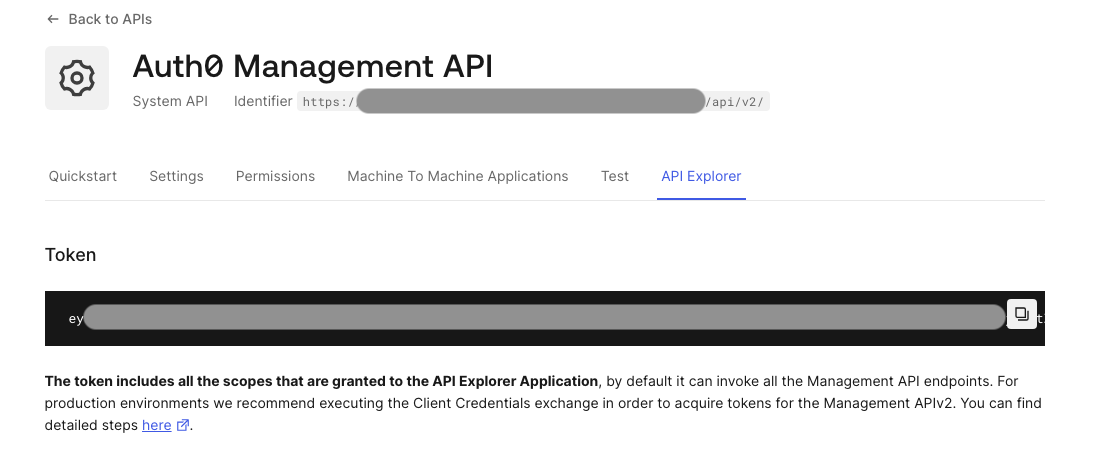 By default, this is the most powerful token as it is normally granted all Management API scopes at once (newly released permissions may not be assigned to this application automatically). This token is designed to be used for exploratory purposes directly in the web documentation. Thus, attempts to copy it should be closely monitored by the security team. For this purpose, the [Auth0 Detection Catalog](https://github.com/auth0/auth0-customer-detections) provides such a detection [risk\_of\_copying\_the\_most\_powerful\_token.yml](https://github.com/auth0/auth0-customer-detections/blob/main/detections/risk_of_copying_the_most_powerful_token.yml). Note that differently from the previous cases, this detection monitors the seccft event executed by the application called API Explorer Application by default. This event is emitted when client credentials are exchanged for an access token.
````shell
index=auth0 data.tenant_name="{your-tenant-name}"
data.type=seccft data.client_id={client_id}
OR data.client_name = "API Explorer Application"
| fields data.user_id, data.user_name, data.ip
```Display the information: user checking the secret and IP of this user```
| table _time, data.user_id, data.user_name, data.ip
````
Besides monitoring this application and token-copying events, immediate steps to reduce the risk are:
- Remove this application at once from the production environment (however, it can be easily recreated by one click of the button in the Auth0 Dashboard).
- Reduce a number of granted scopes.
- Reduce the expiration time for this token that is 24 hours by default.
## Next Steps: Contribute and Enhance
We've covered 10 critical security detections essential for maintaining a strong **Auth0 Security Posture** across Attack Protection, MFA settings, and usage of the Management API.
The Auth0 Detection Catalog contains other security configuration-focused detections like enablement of [insecure grants](https://github.com/auth0/auth0-customer-detections/blob/main/detections/insecure_grants_enabled_for_applications.yml) and [cross-origin authentication](https://github.com/auth0/auth0-customer-detections/blob/main/detections/cross_origin_authentication_enabled.yml). The catalog also provides interesting detections monitoring critical activities within the Auth0 tenant, for example, activities related to [suspicious manipulation of admin users](https://github.com/auth0/auth0-customer-detections/blob/main/detections/risk_of_tenant_takeover.yml) (suspicious patterns of inviting new admin users), attempts to [copy client credentials](https://github.com/auth0/auth0-customer-detections/blob/main/detections/risk_of_copying_client_credentials.yml), and [rapid creation of applications](https://github.com/auth0/auth0-customer-detections/blob/main/detections/rapid_creation_of_clients_with_dynamic_registration.yml) via the domain client registration feature.
We encourage you to review the full [Auth0 Customer Detections Catalog](https://github.com/auth0/auth0-customer-detections) and, better yet, contribute your own valuable use cases and detections by submitting a [pull request](https://github.com/auth0/auth0-customer-detections?tab=contributing-ov-file) to help everyone in the Auth0 community secure their environments.
By proactively monitoring every critical configuration change in real-time using Auth0 Logs, you move from a reactive security stance to a proactive one. Securing an identity platform is a continuous effort. **Let's get secure together.**
By default, this is the most powerful token as it is normally granted all Management API scopes at once (newly released permissions may not be assigned to this application automatically). This token is designed to be used for exploratory purposes directly in the web documentation. Thus, attempts to copy it should be closely monitored by the security team. For this purpose, the [Auth0 Detection Catalog](https://github.com/auth0/auth0-customer-detections) provides such a detection [risk\_of\_copying\_the\_most\_powerful\_token.yml](https://github.com/auth0/auth0-customer-detections/blob/main/detections/risk_of_copying_the_most_powerful_token.yml). Note that differently from the previous cases, this detection monitors the seccft event executed by the application called API Explorer Application by default. This event is emitted when client credentials are exchanged for an access token.
````shell
index=auth0 data.tenant_name="{your-tenant-name}"
data.type=seccft data.client_id={client_id}
OR data.client_name = "API Explorer Application"
| fields data.user_id, data.user_name, data.ip
```Display the information: user checking the secret and IP of this user```
| table _time, data.user_id, data.user_name, data.ip
````
Besides monitoring this application and token-copying events, immediate steps to reduce the risk are:
- Remove this application at once from the production environment (however, it can be easily recreated by one click of the button in the Auth0 Dashboard).
- Reduce a number of granted scopes.
- Reduce the expiration time for this token that is 24 hours by default.
## Next Steps: Contribute and Enhance
We've covered 10 critical security detections essential for maintaining a strong **Auth0 Security Posture** across Attack Protection, MFA settings, and usage of the Management API.
The Auth0 Detection Catalog contains other security configuration-focused detections like enablement of [insecure grants](https://github.com/auth0/auth0-customer-detections/blob/main/detections/insecure_grants_enabled_for_applications.yml) and [cross-origin authentication](https://github.com/auth0/auth0-customer-detections/blob/main/detections/cross_origin_authentication_enabled.yml). The catalog also provides interesting detections monitoring critical activities within the Auth0 tenant, for example, activities related to [suspicious manipulation of admin users](https://github.com/auth0/auth0-customer-detections/blob/main/detections/risk_of_tenant_takeover.yml) (suspicious patterns of inviting new admin users), attempts to [copy client credentials](https://github.com/auth0/auth0-customer-detections/blob/main/detections/risk_of_copying_client_credentials.yml), and [rapid creation of applications](https://github.com/auth0/auth0-customer-detections/blob/main/detections/rapid_creation_of_clients_with_dynamic_registration.yml) via the domain client registration feature.
We encourage you to review the full [Auth0 Customer Detections Catalog](https://github.com/auth0/auth0-customer-detections) and, better yet, contribute your own valuable use cases and detections by submitting a [pull request](https://github.com/auth0/auth0-customer-detections?tab=contributing-ov-file) to help everyone in the Auth0 community secure their environments.
By proactively monitoring every critical configuration change in real-time using Auth0 Logs, you move from a reactive security stance to a proactive one. Securing an identity platform is a continuous effort. **Let's get secure together.**