---
title: "Spring Boot Authorization Tutorial: Secure an API (Java)"
description: "Learn how to use Spring Boot, Java, and Auth0 to secure a feature-complete API. Learn how to use Auth0 to implement authorization in Spring Boot."
authors:
- name: "Tadej Slamic"
url: "https://auth0.com/blog/authors/tadej-slamic/"
date: "Oct 7, 2021"
category: "Developers,Tutorials,Spring"
tags: ["typescript", "angular", "nest", "auth0", "full-stack", "frontend", "backend"]
url: "https://auth0.com/blog/spring-boot-authorization-tutorial-secure-an-api-java/"
---
# Spring Boot Authorization Tutorial: Secure an API (Java)
Starting from this chapter?
Clone the application repo and check out the `build-api` branch:
``` bash
git clone git@github.com:auth0-blog/menu-api-spring-boot-java.git \
menu-api \
--branch build-api
```
Make the project folder your current directory:
``` bash
cd menu-api
```
Then, install the project dependencies using Gradle:
``` bash
./gradlew --refresh-dependencies
```
Finally, update the `application.properties` file in `src/main/resources` as follows:
``` bash
server.port=7000
```
Run the project by executing the following command:
``` bash
./gradlew bootRun
```
Learn how to secure an API with the world's most popular Java framework and Auth0.
So far, you've built an API that allows anyone to read and write data. It's time to tighten the security, so only users with the `menu-admin` role can create, update, and delete menu items.
## Authentication vs. Authorization
To know what a user can do, you first need to know who the user is. This is known as authentication. It is often done by asking for a set of credentials, such as username & password. Once verified, the client gets information about the identity and access of the user.
To implement these Identity and Access Management (IAM) tasks easily, you can use [OAuth 2.0](https://tools.ietf.org/html/rfc6749), an authorization framework, and [OpenID Connect (OIDC)](https://openid.net/connect/), a simple identity layer on top of it.
OAuth encapsulates access information in an **access token**. In turn, OpenID Connect encapsulates identity information in an **ID token**. The authentication server can send these two tokens to the client application initiating the process. When the user requests a protected API endpoint, it must send the access token along with the request.
You won't have to worry about implementing OAuth, OpenID Connect, or an authentication server. Instead, you'll use Auth0.
Auth0 is a flexible, drop-in solution to add authentication and authorization services to your applications. Your team and organization can avoid the cost, time, and risk that comes with building your own solution. Also, there are [tons of docs and SDKs](https://auth0.com/docs/quickstarts) for you to get started and integrate Auth0 in your stack easily.
## Set Up an Authorization Service
Auth0 is a flexible, drop-in solution to add authentication and authorization services to your applications. Your team and organization can avoid the cost, time, and risk that comes with building your own solution to authenticate and authorize users. Auth0 offers [tons of guidance and SDKs](https://auth0.com/docs/quickstarts) for you to get started and integrate Auth0 in your stack easily.
To start, you need to create a free Auth0 account if you don't have one yet.
After you create your account, you'll create an [Auth0 Tenant](https://auth0.com/docs/getting-started/create-tenant), which is a container that Auth0 uses to store your identity service configuration and your users in isolation — no other Auth0 customer can peek into or access your tenant. It's similar to you being a tenant in an apartment building. Auth0 looks after the building while the apartment is all yours to live in and customize. However, each apartment is fully isolated (no windows, soundproof walls, etc.) so that neighbors can't intrude on your privacy.
After creating your tenant, you need to create an API register with Auth0, which is an API that you define within your Auth0 tenant and that you can consume from your applications to process authentication and authorization requests.
After creating your account, head to [the APIs section in the Auth0 Dashboard](https://manage.auth0.com/#/apis) and hit the **Create API** button.
Then, in the form that Auth0 shows:
- Add a **Name** to your API: `Menu API`.
- Set its **Identifier** to `https://menu-api.example.com`.
- Leave the signing algorithm as `RS256` as it's the best option from a security standpoint.
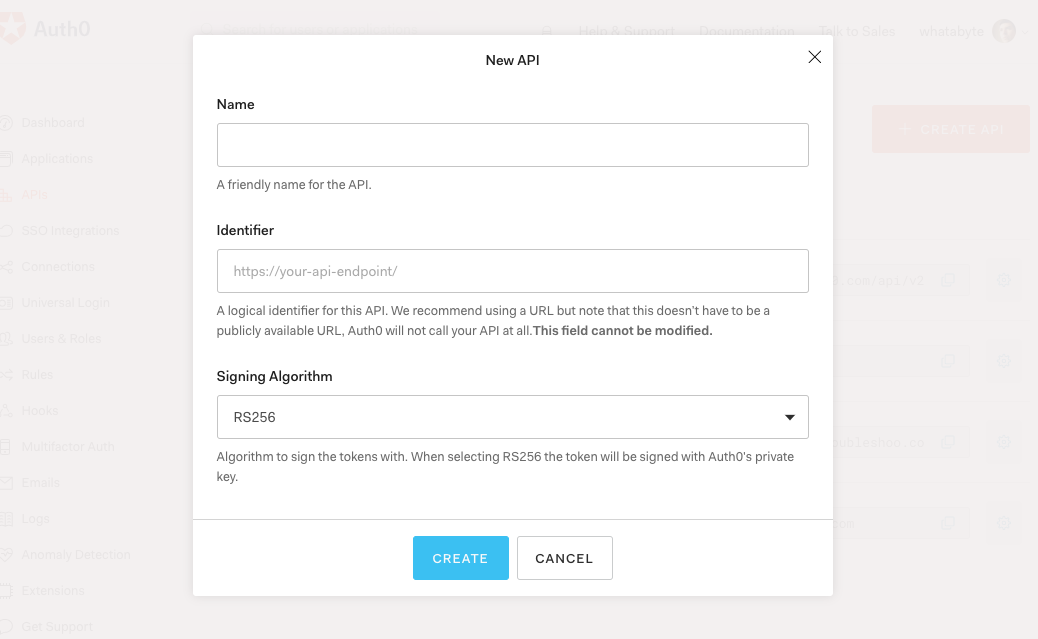
Identifiers are unique strings that help Auth0 differentiate between your different APIs. Using URLs is considered a good practice, as they are predictable and easy to read. Don't worry, Auth0 will never invoke or call them.
With these values in place, hit the **Create** button.
Your API needs some configuration variables to identity itself with Auth0: an _Audience_ and a _Domain_ value. The best place to store these values is within the `application.properties` file of your Spring Boot project.
Open the `application.properties` file in `src/main/resources` and update it:
``` bash
server.port=7000
auth0.audience=
auth0.domain=
spring.security.oauth2.resourceserver.jwt.issuer-uri=https://${auth0.domain}/
```
Head back to your Auth0 API page, and **follow these steps to get the Auth0 Audience**:
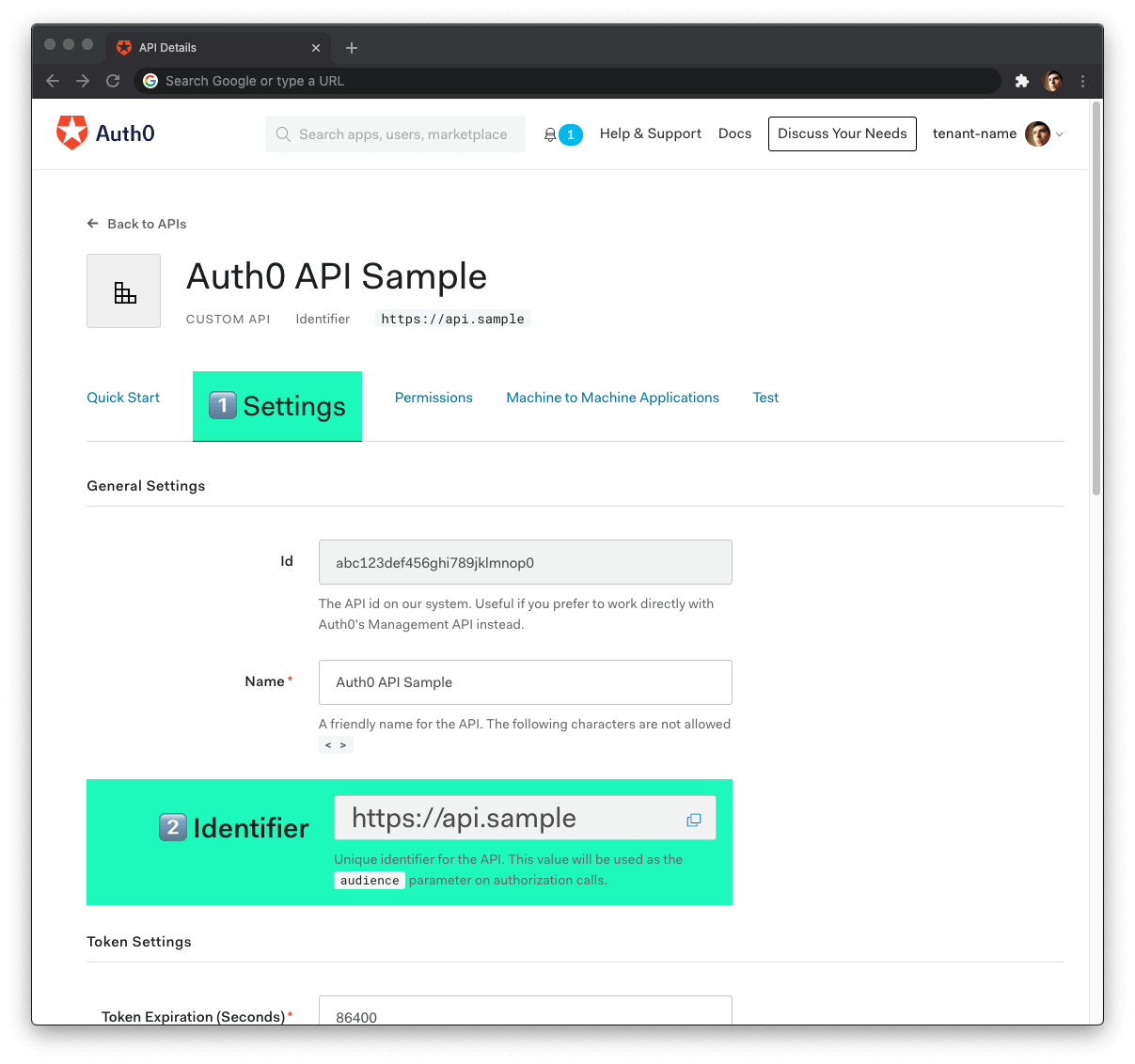
1. Click on the **"Settings"** tab.
2. Locate the **"Identifier"** field and copy its value.
3. Paste the "Identifier" value as the value of `auth0.audience` in `application.properties`.
Now, **follow these steps to get the Auth0 Domain value**:
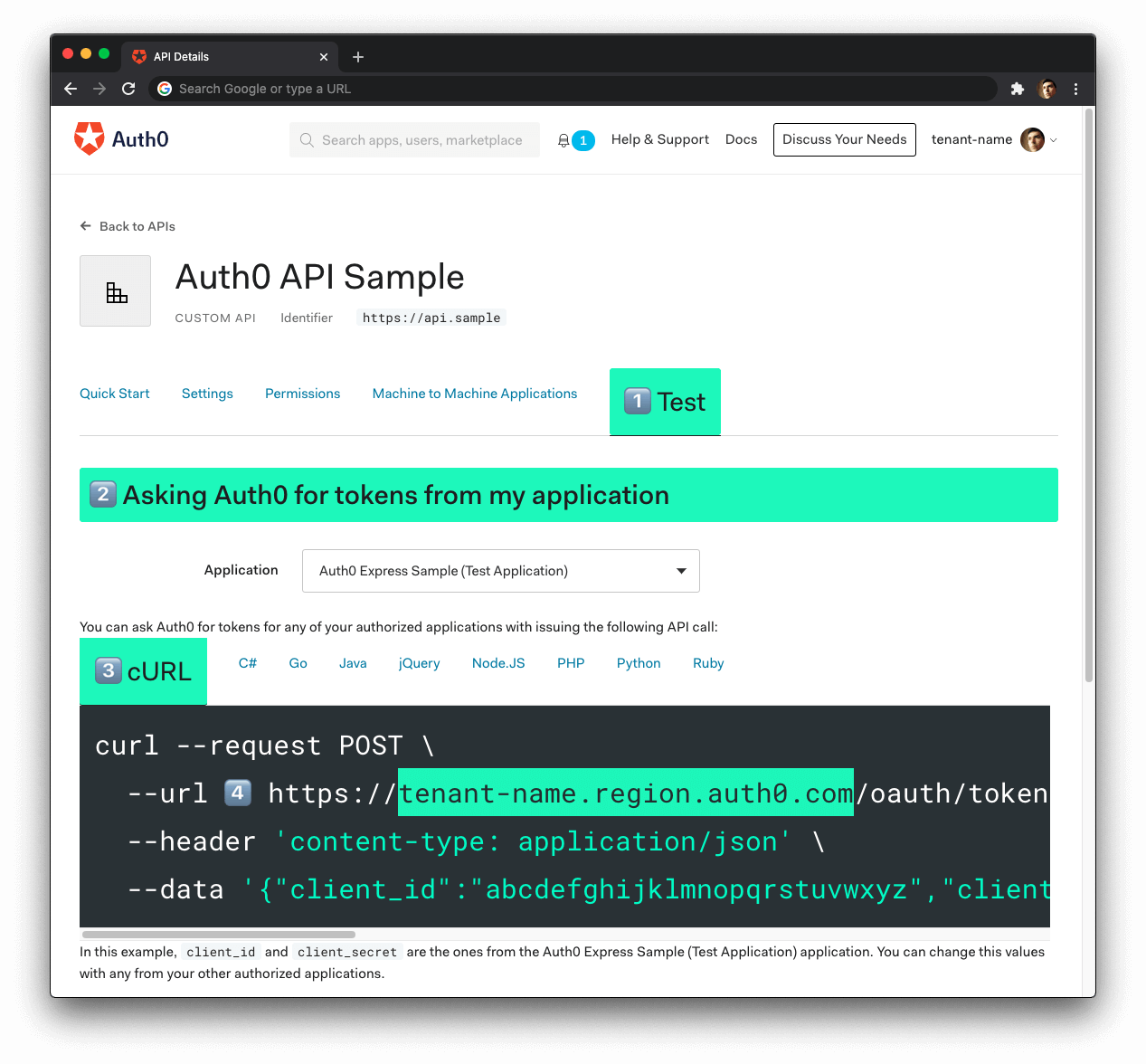
1. Click on the **"Test"** tab.
2. Locate the section called **"Asking Auth0 for tokens from my application"**.
3. Click on the **cURL** tab to show a mock `POST` request.
4. Copy your Auth0 domain, which is _part_ of the `--url` parameter value: `tenant-name.region.auth0.com`.
5. Paste the Auth0 domain value as the value of `auth0.domain` in `application.properties`.
**Tips to get the Auth0 Domain**
- The Auth0 Domain is the substring between the protocol, `https://` and the path `/oauth/token`.
- The Auth0 Domain follows this pattern: `tenant-name.region.auth0.com`.
- The `region` subdomain (`au`, `us`, or `eu`) is optional. Some Auth0 Domains don't have it.
- **Click on the image above, please, if you have any doubt on how to get the Auth0 Domain value**.
**Restart the server so that Spring Boot can recognize the changes you just made to `application.properties`**. Stop the running process and execute `./gradlew bootRun` once again.
## Spring Boot and Authorization
Recall the Identity and Access Management (IAM) flow:
1. Users will start by authenticating with a username and password managed by Auth0.
2. Once authenticated, the client will receive a [JWT](https://jwt.io/introduction/) representing an access token.
3. The client will include the access token in the authorization header of every request to a secure endpoint.
4. The server will validate the access token and determine if it has the right permissions, using the information within the token.
To secure your API, first add a few new dependencies in your `build.gradle`:
``` groovy
dependency {
implementation 'org.springframework.boot:spring-boot-starter-security'
implementation 'org.springframework.security:spring-security-oauth2-resource-server'
implementation 'org.springframework.security:spring-security-oauth2-jose'
// ...
}
```
- `spring-boot-starter-security` provides the core security entities you need to build a bulletproof app.
- `spring-security-oauth2-resource-server` contains support for OAuth 2.0 Resource Servers, mainly used to protect APIs via OAuth 2.0 Bearer Tokens.
- Finally, `spring-security-oauth2-jose` gives you the JOSE (Javascript Object Signing and Encryption) framework, built from a collection of specifications you'll need, such as JWT & JWK.
Sync Gradle and then create a `security` package under the `com.example.menu` package.
Under the new `security` package, create a class called `SecurityConfig`:
``` java
// com/example/menu/security/SecurityConfig.java
package com.example.menu.security;
import org.springframework.http.HttpMethod;
import org.springframework.security.config.annotation.web.builders.HttpSecurity;
import org.springframework.security.config.annotation.web.configuration.EnableWebSecurity;
import org.springframework.security.config.annotation.web.configuration.WebSecurityConfigurerAdapter;
@EnableWebSecurity
public class SecurityConfig extends WebSecurityConfigurerAdapter {
@Override
protected void configure(HttpSecurity http) throws Exception {
http.authorizeRequests()
.mvcMatchers(HttpMethod.GET, "/api/menu/items/**").permitAll() // GET requests don't need auth
.anyRequest()
.authenticated()
.and()
.oauth2ResourceServer()
.jwt();
}
}
```
Let's unpack. The [`@EnableWebSecurity` annotation](https://docs.spring.io/spring-security/site/docs/4.2.15.RELEASE/apidocs/org/springframework/security/config/annotation/web/configuration/EnableWebSecurity.html) tells Spring to apply the web security configuration declared by the class. The class extends [`WebSecurityConfigurerAdapter`](https://docs.spring.io/spring-security/site/docs/4.2.15.RELEASE/apidocs/org/springframework/security/config/annotation/web/configuration/WebSecurityConfigurerAdapter.html), which provides a convenient customization base.
You override the `configure` method to ensure `GET` requests can be processed without authentication. Other requests require a JWT, which will be verified using the `issuer-uri` from the `application.properties` file.
> `HttpSecurity` is a [builder class](https://en.wikipedia.org/wiki/Builder_pattern) and provides numerous convenience methods that can be chained. Under the hood, each method adds a filter the HTTP request needs to pass through.
For extra security, you also want to check the audience. To do so, you need a custom validator. In the same `security` package, create a class called `AudienceValidator`:
``` java
// com/example/menu/security/AudienceValidator.java
package com.example.menu.security;
import org.springframework.security.oauth2.core.OAuth2Error;
import org.springframework.security.oauth2.core.OAuth2ErrorCodes;
import org.springframework.security.oauth2.core.OAuth2TokenValidator;
import org.springframework.security.oauth2.core.OAuth2TokenValidatorResult;
import org.springframework.security.oauth2.jwt.Jwt;
import java.util.List;
import java.util.Objects;
class AudienceValidator implements OAuth2TokenValidator {
private final String audience;
AudienceValidator(String audience) {
Assert.hasText(audience, "audience is null or empty");
this.audience = audience;
}
public OAuth2TokenValidatorResult validate(Jwt jwt) {
List audiences = jwt.getAudience();
if (audiences.contains(this.audience)) {
return OAuth2TokenValidatorResult.success();
}
OAuth2Error err = new OAuth2Error(OAuth2ErrorCodes.INVALID_TOKEN);
return OAuth2TokenValidatorResult.failure(err);
}
}
```
`OAuth2TokenValidator` interface and its method `validate` provide means to verify custom OAuth 2.0 Token attributes. With the class above, you ensure only tokens containing the specified audience, or `aud` claim to be exact, are valid.
To apply the custom validator, you need to update the `SecurityConfig` class:
``` java
// com/example/menu/security/SecurityConfig.java
package com.example.menu.security;
import org.springframework.beans.factory.annotation.Value;
import org.springframework.http.HttpMethod;
import org.springframework.security.config.annotation.web.builders.HttpSecurity;
import org.springframework.security.config.annotation.web.configuration.EnableWebSecurity;
import org.springframework.security.config.annotation.web.configuration.WebSecurityConfigurerAdapter;
import org.springframework.security.oauth2.core.DelegatingOAuth2TokenValidator;
import org.springframework.security.oauth2.core.OAuth2TokenValidator;
import org.springframework.security.oauth2.jwt.*;
@EnableWebSecurity
public class SecurityConfig extends WebSecurityConfigurerAdapter {
@Value("${auth0.audience}")
private String audience;
@Value("${spring.security.oauth2.resourceserver.jwt.issuer-uri}")
private String issuer;
@Override
protected void configure(HttpSecurity http) throws Exception {
http.authorizeRequests()
.mvcMatchers(HttpMethod.GET, "/api/menu/items/**").permitAll() // GET requests don't need auth
.anyRequest()
.authenticated()
.and()
.oauth2ResourceServer()
.jwt()
.decoder(jwtDecoder());
}
JwtDecoder jwtDecoder() {
OAuth2TokenValidator withAudience = new AudienceValidator(audience);
OAuth2TokenValidator withIssuer = JwtValidators.createDefaultWithIssuer(issuer);
OAuth2TokenValidator validator = new DelegatingOAuth2TokenValidator<>(withAudience, withIssuer);
NimbusJwtDecoder jwtDecoder = (NimbusJwtDecoder) JwtDecoders.fromOidcIssuerLocation(issuer);
jwtDecoder.setJwtValidator(validator);
return jwtDecoder;
}
}
```
The `@Value` annotation on an instance variable is the Spring way of assigning a property value from the `application.properties` file. In the `jwtDecoder` method, you ensure both the audience claim (`aud`) and the issuer claim (`iss`) are validated.
Your authentication process is now complete. Rerun the Gradle command and try it out:
``` bash
curl -X POST -H 'Content-Type: application/json' -d '{
"name": "Salad",
"price": 499,
"description": "Fresh",
"image": "https://cdn.auth0.com/blog/whatabyte/salad-sm.png"
}' http://localhost:7000/api/menu/items -i
```
You'll get a `401 Unauthorized` response. However, the `GET /api/menu/items` endpoint works:
``` bash
curl http://localhost:7000/api/menu/items -i
```
To test the authentication feature of your application, you need a valid access token. A client, such as a Single-Page Application (SPA), would get the access token by performing a login and then passing the access token in an authorization header to your API. This is where the [WHATABYTE Dashboard](https://dashboard.whatabyte.app/) comes in.
## Enable CORS in Spring Boot
In the previous chapter, you used the `@CrossOrigin` annotation to enable CORS for the `ItemController`. In this section, you'll set up CORS in your `SecurityConfig` class.
Open your `SecurityConfig` class from the `security` package and replace its content with the following:
``` java
// com/example/menu/security/SecurityConfig.java
package com.example.menu.security;
import org.springframework.beans.factory.annotation.Value;
import org.springframework.http.HttpMethod;
import org.springframework.security.config.annotation.web.builders.HttpSecurity;
import org.springframework.security.config.annotation.web.configuration.EnableWebSecurity;
import org.springframework.security.config.annotation.web.configuration.WebSecurityConfigurerAdapter;
import org.springframework.security.oauth2.core.DelegatingOAuth2TokenValidator;
import org.springframework.security.oauth2.core.OAuth2TokenValidator;
import org.springframework.security.oauth2.jwt.*;
import org.springframework.web.cors.CorsConfiguration;
import org.springframework.web.cors.CorsConfigurationSource;
import org.springframework.web.cors.UrlBasedCorsConfigurationSource;
import java.util.List;
@EnableWebSecurity
public class SecurityConfig extends WebSecurityConfigurerAdapter {
@Value("${auth0.audience}")
private String audience;
@Value("${spring.security.oauth2.resourceserver.jwt.issuer-uri}")
private String issuer;
@Override
protected void configure(HttpSecurity http) throws Exception {
http.authorizeRequests()
.mvcMatchers(HttpMethod.GET, "/api/menu/items/**").permitAll() // GET requests don't need auth
.anyRequest()
.authenticated()
.and()
.cors()
.configurationSource(corsConfigurationSource())
.and()
.oauth2ResourceServer()
.jwt()
.decoder(jwtDecoder());
}
CorsConfigurationSource corsConfigurationSource() {
CorsConfiguration configuration = new CorsConfiguration();
configuration.setAllowedMethods(List.of(
HttpMethod.GET.name(),
HttpMethod.PUT.name(),
HttpMethod.POST.name(),
HttpMethod.DELETE.name()
));
UrlBasedCorsConfigurationSource source = new UrlBasedCorsConfigurationSource();
source.registerCorsConfiguration("/**", configuration.applyPermitDefaultValues());
return source;
}
JwtDecoder jwtDecoder() {
OAuth2TokenValidator withAudience = new AudienceValidator(audience);
OAuth2TokenValidator withIssuer = JwtValidators.createDefaultWithIssuer(issuer);
OAuth2TokenValidator validator = new DelegatingOAuth2TokenValidator<>(withAudience, withIssuer);
NimbusJwtDecoder jwtDecoder = (NimbusJwtDecoder) JwtDecoders.fromOidcIssuerLocation(issuer);
jwtDecoder.setJwtValidator(validator);
return jwtDecoder;
}
}
```
You can also delete the following line from `ItemsController`:
``` java
@CrossOrigin(origins = "https://dashboard.whatabyte.app")
```
**Stop the running server and execute `./gradlew bootRun` once again to make these changes effective.**
## Configure Role-Based Access Control (RBAC)
Any request with a valid access token can use the API to read and write data. But not all users are equal: some only need to read data, while others might want to add, delete, or change the data in the store.
You need to further develop your authorization strategy to check if a user making a request may perform a certain operation.
### Manage Access with Auth0
An easy way to implement this level of authorization is through role-based access control (RBAC). It assigns permissions to users based on their roles. A `menu-admin` role, for example, could have all the necessary permissions to create, update, and delete menu items.
When users successfully log in, the Auth0 access token has the information on any permissions the users have based on their assigned roles. Since Auth0 issues the access token as a [JSON Web Token (JWT)](https://jwt.io/), that access information is added to the token as a [claim](https://auth0.com/docs/tokens/jwt-claims) named `permissions`.
> JWT claims are essentially key-value pairs encoded as a JSON object.
Your server application can inspect the access token and compare the values present in its `permissions` claim with the permissions required by the API endpoint. If the server can fully match the permissions required by the endpoint, the client request is authorized.
Implementing RBAC is easily done through the Auth0 Dashboard. Here's the plan of what you'll do:
- Create permissions for the _Menu API_ you created earlier.
- Create a role called `menu-admin`.
- Assign permissions from the Menu API to the `menu-admin` role.
- Create a new user and assign it to the `menu-admin` role.
Let's get started.
## Implement Role-Based Access Control in Spring Boot
A JWT issued by an authorization server will typically have a `scope` attribute, listing the granted permissions. Spring calls them granted _authorities_. Instead, Auth0 uses a custom claim called `permissions` to specify them. The JWT payload looks like this:
``` json
{
// ...
"scope":"openid profile email",
"permissions":[
"create:items",
"delete:items",
"read:items",
"update:items"
]
}
```
Spring provides a default instance of `JwtAuthenticationConverter` which expects granted authorities in a `scope` or `scp` claim. To use `permissions` instead, update your `SecurityConfig` class to its final form:
``` java
// com/example/menu/security/SecurityConfig.java
package com.example.menu.security;
import org.springframework.beans.factory.annotation.Value;
import org.springframework.http.HttpMethod;
import org.springframework.security.config.annotation.method.configuration.EnableGlobalMethodSecurity;
import org.springframework.security.config.annotation.web.builders.HttpSecurity;
import org.springframework.security.config.annotation.web.configuration.EnableWebSecurity;
import org.springframework.security.config.annotation.web.configuration.WebSecurityConfigurerAdapter;
import org.springframework.security.oauth2.core.DelegatingOAuth2TokenValidator;
import org.springframework.security.oauth2.core.OAuth2TokenValidator;
import org.springframework.security.oauth2.jwt.Jwt;
import org.springframework.security.oauth2.jwt.JwtDecoder;
import org.springframework.security.oauth2.jwt.JwtDecoders;
import org.springframework.security.oauth2.jwt.JwtValidators;
import org.springframework.security.oauth2.jwt.NimbusJwtDecoder;
import org.springframework.security.oauth2.server.resource.authentication.JwtAuthenticationConverter;
import org.springframework.security.oauth2.server.resource.authentication.JwtGrantedAuthoritiesConverter;
import org.springframework.web.cors.CorsConfiguration;
import org.springframework.web.cors.CorsConfigurationSource;
import org.springframework.web.cors.UrlBasedCorsConfigurationSource;
import java.util.List;
@EnableWebSecurity
@EnableGlobalMethodSecurity(prePostEnabled = true)
public class SecurityConfig extends WebSecurityConfigurerAdapter {
@Value("${auth0.audience}")
private String audience;
@Value("${spring.security.oauth2.resourceserver.jwt.issuer-uri}")
private String issuer;
@Override
protected void configure(HttpSecurity http) throws Exception {
http.authorizeRequests()
.mvcMatchers(HttpMethod.GET, "/api/menu/items/**").permitAll() // GET requests don't need auth
.anyRequest()
.authenticated()
.and()
.cors()
.configurationSource(corsConfigurationSource())
.and()
.oauth2ResourceServer()
.jwt()
.decoder(jwtDecoder())
.jwtAuthenticationConverter(jwtAuthenticationConverter());
}
CorsConfigurationSource corsConfigurationSource() {
CorsConfiguration configuration = new CorsConfiguration();
configuration.setAllowedMethods(List.of(
HttpMethod.GET.name(),
HttpMethod.PUT.name(),
HttpMethod.POST.name(),
HttpMethod.DELETE.name()
));
UrlBasedCorsConfigurationSource source = new UrlBasedCorsConfigurationSource();
source.registerCorsConfiguration("/**", configuration.applyPermitDefaultValues());
return source;
}
JwtDecoder jwtDecoder() {
OAuth2TokenValidator withAudience = new AudienceValidator(audience);
OAuth2TokenValidator withIssuer = JwtValidators.createDefaultWithIssuer(issuer);
OAuth2TokenValidator validator = new DelegatingOAuth2TokenValidator<>(withAudience, withIssuer);
NimbusJwtDecoder jwtDecoder = (NimbusJwtDecoder) JwtDecoders.fromOidcIssuerLocation(issuer);
jwtDecoder.setJwtValidator(validator);
return jwtDecoder;
}
JwtAuthenticationConverter jwtAuthenticationConverter() {
JwtGrantedAuthoritiesConverter converter = new JwtGrantedAuthoritiesConverter();
converter.setAuthoritiesClaimName("permissions");
converter.setAuthorityPrefix("");
JwtAuthenticationConverter jwtConverter = new JwtAuthenticationConverter();
jwtConverter.setJwtGrantedAuthoritiesConverter(converter);
return jwtConverter;
}
}
```
Finally, add a `@PreAuthorize` annotation to the relevant methods in the `ItemController`, update that class to its final form:
``` java
// com/example/menu/item/ItemController.java
package com.example.menu.item;
// ✨ New! Updated imports
import org.springframework.http.ResponseEntity;
import org.springframework.security.access.prepost.PreAuthorize;
import org.springframework.validation.FieldError;
import org.springframework.validation.ObjectError;
import org.springframework.web.bind.MethodArgumentNotValidException;
import org.springframework.web.bind.annotation.*;
import org.springframework.web.servlet.support.ServletUriComponentsBuilder;
import javax.validation.Valid;
import java.net.URI;
import java.util.HashMap;
import java.util.List;
import java.util.Map;
import java.util.Optional;
@RestController
@RequestMapping("api/menu/items")
public class ItemController {
private final ItemService service;
public ItemController(ItemService service) {...}
@GetMapping
public ResponseEntity> findAll() {...}
@GetMapping("/{id}")
public ResponseEntity- find(@PathVariable("id") Long id) {...}
@PostMapping
@PreAuthorize("hasAuthority('create:items')") // ✨ 👈 New line ✨
public ResponseEntity
- create(@Valid @RequestBody Item item) {...}
@PutMapping("/{id}")
@PreAuthorize("hasAuthority('update:items')") // ✨ 👈 New line ✨
public ResponseEntity
- update(
@PathVariable("id") Long id,
@Valid @RequestBody Item updatedItem) {...}
@DeleteMapping("/{id}")
@PreAuthorize("hasAuthority('delete:items')") // ✨ 👈 New line ✨
public ResponseEntity
- delete(@PathVariable("id") Long id) {...}
@ExceptionHandler(MethodArgumentNotValidException.class)
public ResponseEntity> handleValidationExceptions(
MethodArgumentNotValidException ex) {...}
}
```
The `@PreAuthorize` annotation holds a [Spring Expression Language (SpEL)](https://docs.spring.io/spring-framework/docs/3.2.x/spring-framework-reference/html/expressions.html) expression which must be satisfied before the method is executed. `hasAuthority` will check if the permission/argument is in the list of _granted authorities_. Since you've ensured they will be read from the `permissions` claim, this is the final step of the authorization process.
Make sure you rerun the Gradle `bootRun` command to make your changes effective:
``` bash
./gradlew bootRun
```
### What's Next
This concludes the Spring Boot Authorization tutorial. You have implemented authorization to control the resources that your users can access. You have learned how to implement different access levels:
- Access based on authentication status.
- If you have logged in, you are authorized to access the resources.
- Access based on permissions.
- If you have logged in _and_ have the required permissions, you are authorized to access the resources.
This tutorial covered the most common authorization use cases for a Spring Boot API server. However, Auth0 is an extensible and flexible platform that can help you achieve even more. If you have a more complex use case, check out the [Auth0 Architecture Scenarios](https://auth0.com/docs/architecture-scenarios) to learn more about the typical architecture scenarios we have identified when working with customers on implementing Auth0.
What other chapters should be added? This is what I have in mind for the future:
- Deploying a Spring Boot application to AWS.
- Connecting a Spring Boot application to a MongoDB or PostgreSQL store.
- Using GraphQL or gRPC with Spring Boot.
Let me know what you think in the feedback section, and thanks for reading!