---
title: "Using JSON Web Tokens as API Keys"
description: "Most APIs today use an API Key to authenticate legitimate clients. API Keys are very simple to use from the consumer perspective: You get an API key from the"
authors:
- name: "Damian Schenkelman"
url: "https://auth0.com/blog/authors/damian-schenkelman/"
date: "Dec 2, 2014"
category: "Developers,Tutorial,API Keys"
tags: ["api", "jwt", "oauth", "authentication", "granular-security", "scopes"]
url: "https://auth0.com/blog/using-json-web-tokens-as-api-keys/"
---
# Using JSON Web Tokens as API Keys
Most APIs today use an **API Key** to authenticate legitimate clients. **API Keys** are very simple to use from the consumer perspective:
1. You get an **API key** from the service (in essence a shared secret).
2. Add the key to an `Authorization` header.
3. Call the API.
It can't get simpler than that, but this approach has some limitations.
The last couple of months, we've been working on our [API v2](https://docs.auth0.com/apiv2). We wanted to share what we've learnt implementing a more powerful security model using [JSON Web Tokens](http://jwt.io).
Using a JSON Web Token offers many advantages:
* **Granular Security**: API Keys provide an all-or-nothing access. JSON Web Tokens can provide much finer grained control.
* **Homogenous Auth Architecture**: Today we use cookies, API keys, home grown SSO solutions, OAuth etc. Standardizing on JSON Web Tokens gives you an homogenous token format across the board.
* **Decentralized Issuance**: API keys depend on a central storage and a service to issue them. JSON Web Tokens can be "self-issued" or be completely externalized, opening interesting scenarios as we will see below.
* **OAuth2 Compliance**: OAuth2 uses an opaque token that relies on a central storage. You can return a stateless JWT instead, with the allowed scopes and expiration.
* **Debuggability**: API keys are opaque random strings. JSON Web Tokens can be inspected.
* **Expiration Control**: API keys usually don't expire unless you revoke them. JSON Web Tokens can (and often do) have an expiration.
* **Devices**: You can't put an API key that has full access on a device, because what is on a phone or tablet can easily be stolen. But you can put a JWT with the right set of permissions.
If you'd like an in-depth introduction to **JSON Web Tokens**, check out our **free** ebook below.
## Granular Security
One of the most interesting benefits of using JWTs is the first one listed above. Back in the old days, when databases were at the center of our client-server applications, we could create users with specific permissions on the database:
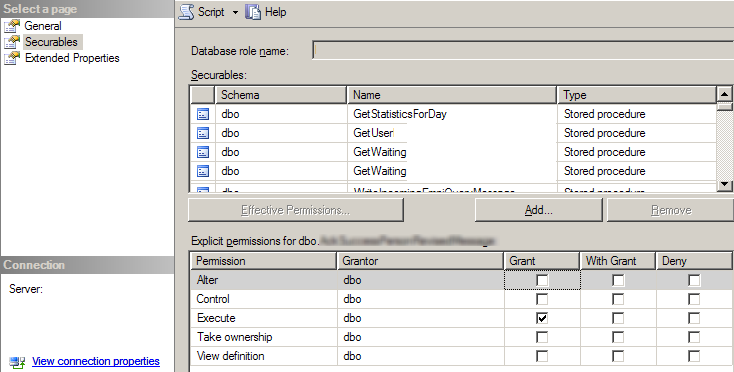 _Remember this?_
APIs are becoming central pieces of our distributed systems architecture. They are now the "gatekeepers" of our data. But in contrast with what was available in databases, virtually all API keys provide all-or-nothing access. Readers will likely be familiar with the `scope` parameter of OAuth2 based systems that offers this finer grained consent to access.
There are many situations in which you want to keep the simplicity of an **API Key** but only for a subset of all possible API operations.
[GitHub acknowledged this requirement](https://help.github.com/articles/creating-an-access-token-for-command-line-use/) and now provides a way of creating a token with the scopes you need (mimicking the OAuth2 consent):
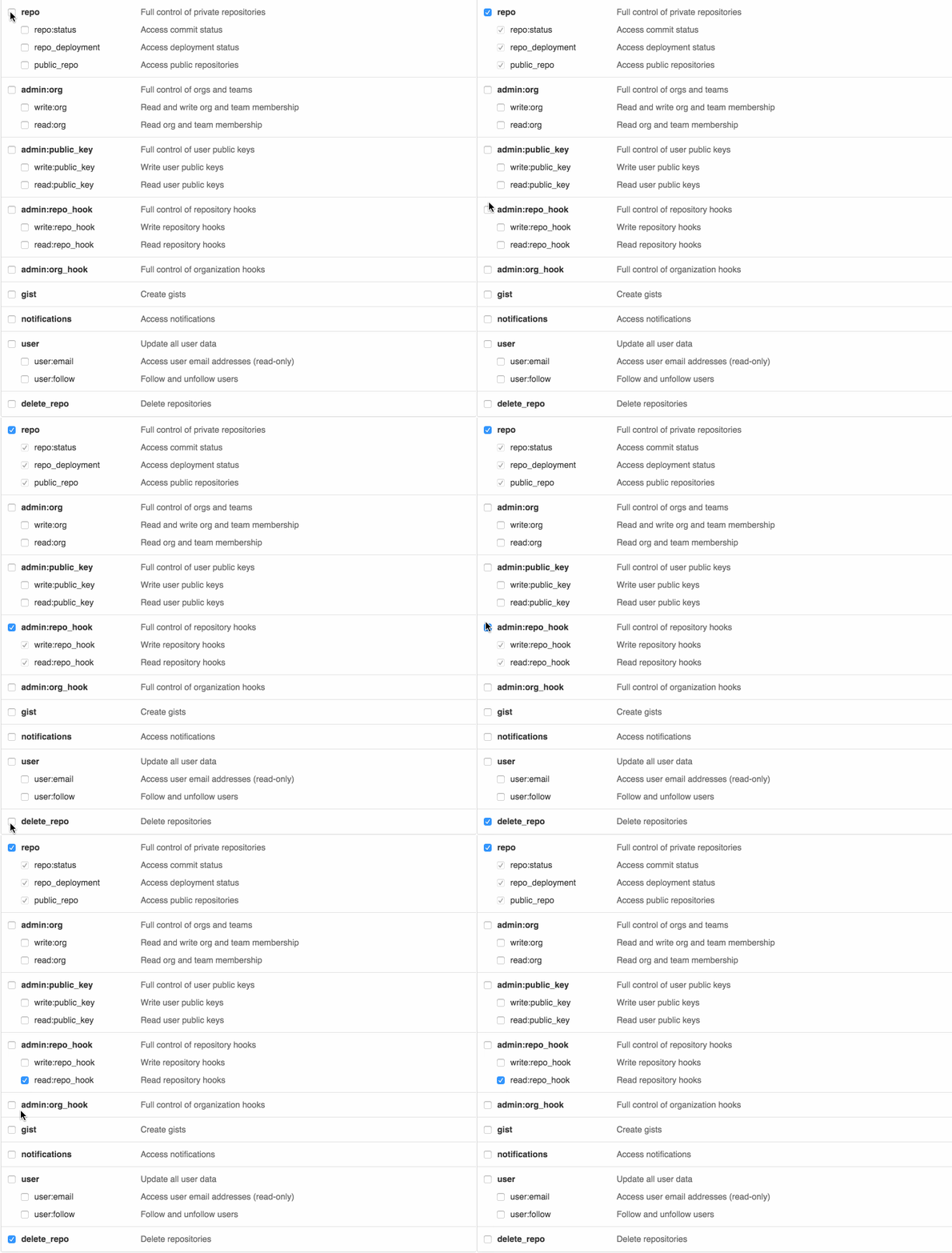
In the next section, we will go through the details of how this can be implemented.
### How to implement it?
We don't know how GitHub implemented it (they probably used Ruby), but we will use it as an example. Let's say we want to implement an endpoint in the API to **create new repos**. You could model this with the following **JSON Web Token** payload. If you provide any of those scopes, then you can create repos:
```
{
iat: 1416929109, // when the token was issued (seconds since epoch)
jti: "aa7f8d0a95c", // a unique id for this token (for revocation purposes)
scopes: ["repo", "public_repo"] // what capabilities this token has
}
```
_Look at this token in jwt.io_
The API endpoint would simply check for the presence of the right **scope** atribute (this example is written in node.js but any language would work):
```
// intercept all calls to API and validae the token
app.use('/api', express_jwt({secret: SECRET, userProperty: 'token_payload'}));
// for POST /user/repo validate that there is a scope `repo` or `public_repo`
app.post('/api/user/repo',
check_scopes(['repo', 'public_repo']),
function(req, res, next) {
// create a repo
....
});
```
Notice the `check_scopes` middleware on the `/api/user/repo` route. This is how the `check_scopes` function is implemented:
```
function check_scopes(scopes) {
return function(req, res, next) {
//
// check if any of the scopes defined in the token,
// is one of the scopes declared on check_scopes
//
var token = req.token_payload;
for (var i =0; i Notice that no one can change the scopes variables. JWTs are digitally signed, so its content cannot be tampered with.
Documenting an API is equally important. What would be a good way for surfacing this on an API explorer?
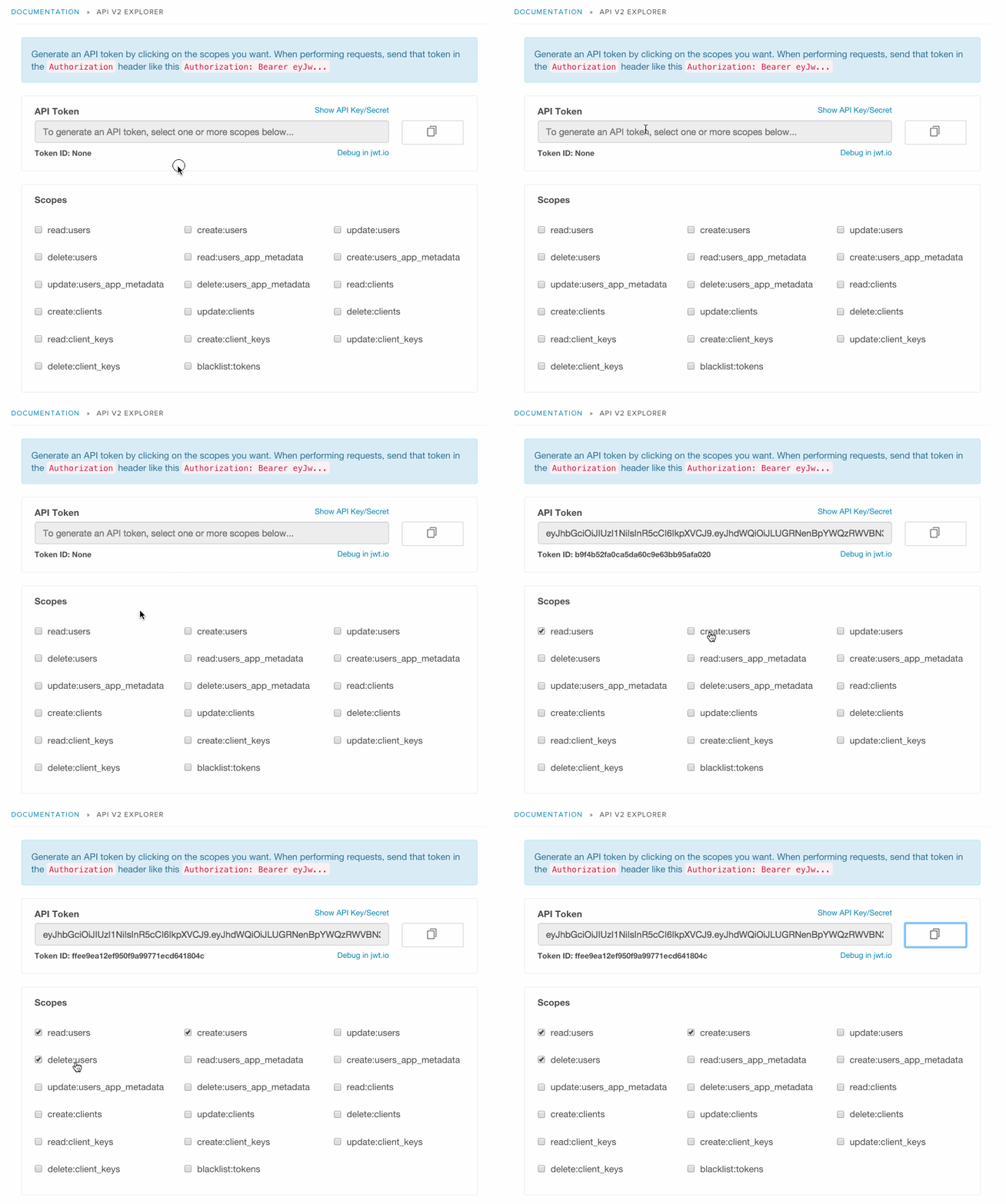
For Auth0, we decided to build our own documentation using [swagger](http://swagger.io/). Since we are a multi-tenant system, each tenant has an API Key and Secret that is used to sign the token. As a developer, you mark which scopes you need and a token will be auto-generated. You can copy and paste it to [jwt.io](http://jwt.io) to see the structure (this is the __debuggable__ piece, by the way).
_Remember this?_
APIs are becoming central pieces of our distributed systems architecture. They are now the "gatekeepers" of our data. But in contrast with what was available in databases, virtually all API keys provide all-or-nothing access. Readers will likely be familiar with the `scope` parameter of OAuth2 based systems that offers this finer grained consent to access.
There are many situations in which you want to keep the simplicity of an **API Key** but only for a subset of all possible API operations.
[GitHub acknowledged this requirement](https://help.github.com/articles/creating-an-access-token-for-command-line-use/) and now provides a way of creating a token with the scopes you need (mimicking the OAuth2 consent):

In the next section, we will go through the details of how this can be implemented.
### How to implement it?
We don't know how GitHub implemented it (they probably used Ruby), but we will use it as an example. Let's say we want to implement an endpoint in the API to **create new repos**. You could model this with the following **JSON Web Token** payload. If you provide any of those scopes, then you can create repos:
```
{
iat: 1416929109, // when the token was issued (seconds since epoch)
jti: "aa7f8d0a95c", // a unique id for this token (for revocation purposes)
scopes: ["repo", "public_repo"] // what capabilities this token has
}
```
_Look at this token in jwt.io_
The API endpoint would simply check for the presence of the right **scope** atribute (this example is written in node.js but any language would work):
```
// intercept all calls to API and validae the token
app.use('/api', express_jwt({secret: SECRET, userProperty: 'token_payload'}));
// for POST /user/repo validate that there is a scope `repo` or `public_repo`
app.post('/api/user/repo',
check_scopes(['repo', 'public_repo']),
function(req, res, next) {
// create a repo
....
});
```
Notice the `check_scopes` middleware on the `/api/user/repo` route. This is how the `check_scopes` function is implemented:
```
function check_scopes(scopes) {
return function(req, res, next) {
//
// check if any of the scopes defined in the token,
// is one of the scopes declared on check_scopes
//
var token = req.token_payload;
for (var i =0; i Notice that no one can change the scopes variables. JWTs are digitally signed, so its content cannot be tampered with.
Documenting an API is equally important. What would be a good way for surfacing this on an API explorer?
For Auth0, we decided to build our own documentation using [swagger](http://swagger.io/). Since we are a multi-tenant system, each tenant has an API Key and Secret that is used to sign the token. As a developer, you mark which scopes you need and a token will be auto-generated. You can copy and paste it to [jwt.io](http://jwt.io) to see the structure (this is the __debuggable__ piece, by the way).
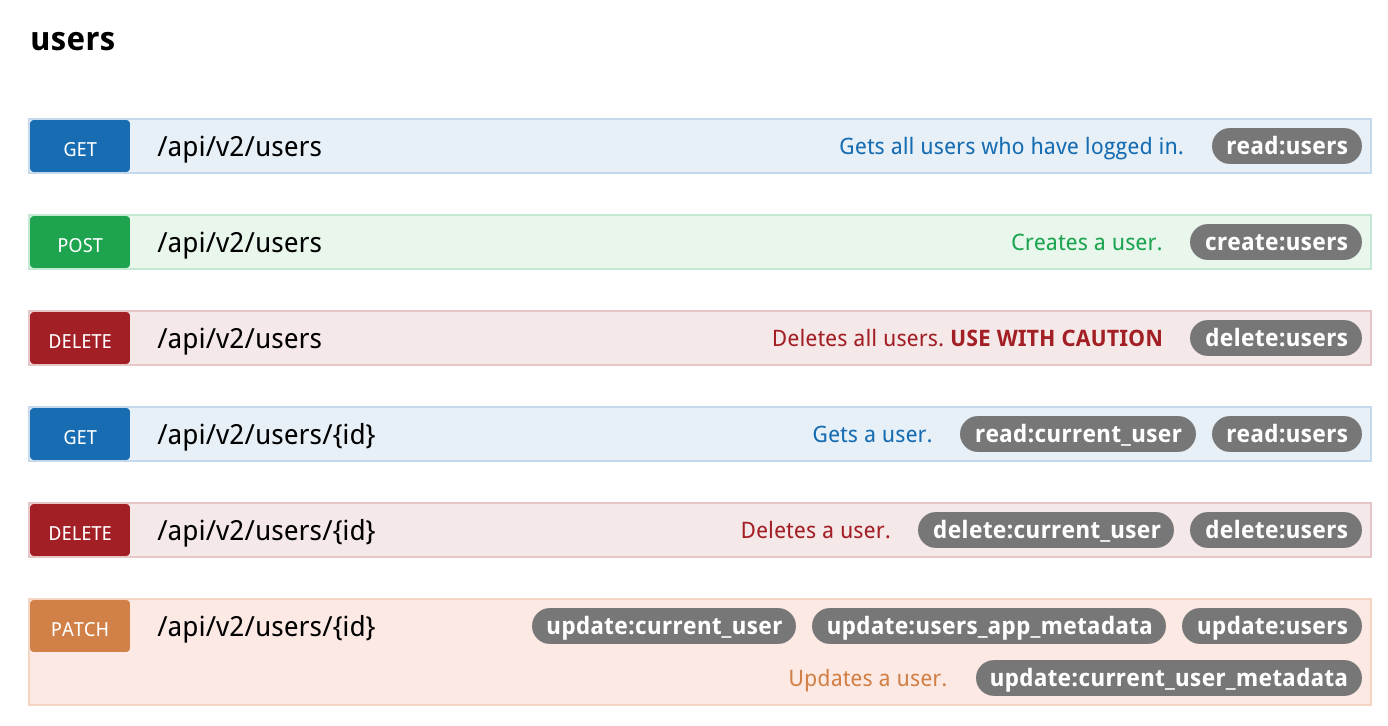
 Scopes required by each operation are clearly identified:
 Our token format is a bit different from the one in the example we showed for GitHub. The good thing about JWTs is that they can contain _any_ data structure:
```
{
iat: 1416929061,
jti: "802057ff9b5b4eb7fbb8856b6eb2cc5b",
scopes: {
users: {
actions: ['read', 'create']
},
users_app_metadata: {
actions: ['read', 'create']
}
}
}
```
The string representation of the scope is `read:users` but in the JSON Web Token, we are using a more structured representation (note the hierarchy), this allows us to be more consistent. It also allows us to have an easy way to extend it for other scenarios.
## Conclusion & Resources
We have shown a new way of securing APIs based on JSON Web Tokens. This approach has some interesting benefits, in particular around _granular security_. In future posts we will go over other aspects, starting with how to revoke tokens.
Below are some of the resources that we used in our node.js backend implementation:
* The [hapi.js](http://hapijs.com) framework to create the API.
* A [fork](https://github.com/auth0/hapi-auth-jwt) of [hapi-auth-jwt](https://github.com/ryanfitz/hapi-auth-jwt) with [support for multitenant apps](https://github.com/ryanfitz/hapi-auth-jwt/pull/10) to handle authentication with JWTs.
* The awesome [ratify](https://github.com/mac-/ratify) library to both validate API input using [JSON schemas](http://json-schema.org) and automatically generate [swagger](http://swagger.io/) from said schemas for our docs.
* Swagger's support for arbitrary [authorizations objects](https://github.com/swagger-api/swagger-spec/blob/master/versions/1.2.md#514-authorizations-object) and a slightly [customized swagger-ui template](https://github.com/swagger-api/swagger-ui#customize) to render the scopes per operation.
If you want to see an example of this working, you can check out our API v2:
We would love to hear your thoughts about this approach!
[Discuss here](https://ask.auth0.com/t/using-json-web-tokens-as-api-keys/357)
Our token format is a bit different from the one in the example we showed for GitHub. The good thing about JWTs is that they can contain _any_ data structure:
```
{
iat: 1416929061,
jti: "802057ff9b5b4eb7fbb8856b6eb2cc5b",
scopes: {
users: {
actions: ['read', 'create']
},
users_app_metadata: {
actions: ['read', 'create']
}
}
}
```
The string representation of the scope is `read:users` but in the JSON Web Token, we are using a more structured representation (note the hierarchy), this allows us to be more consistent. It also allows us to have an easy way to extend it for other scenarios.
## Conclusion & Resources
We have shown a new way of securing APIs based on JSON Web Tokens. This approach has some interesting benefits, in particular around _granular security_. In future posts we will go over other aspects, starting with how to revoke tokens.
Below are some of the resources that we used in our node.js backend implementation:
* The [hapi.js](http://hapijs.com) framework to create the API.
* A [fork](https://github.com/auth0/hapi-auth-jwt) of [hapi-auth-jwt](https://github.com/ryanfitz/hapi-auth-jwt) with [support for multitenant apps](https://github.com/ryanfitz/hapi-auth-jwt/pull/10) to handle authentication with JWTs.
* The awesome [ratify](https://github.com/mac-/ratify) library to both validate API input using [JSON schemas](http://json-schema.org) and automatically generate [swagger](http://swagger.io/) from said schemas for our docs.
* Swagger's support for arbitrary [authorizations objects](https://github.com/swagger-api/swagger-spec/blob/master/versions/1.2.md#514-authorizations-object) and a slightly [customized swagger-ui template](https://github.com/swagger-api/swagger-ui#customize) to render the scopes per operation.
If you want to see an example of this working, you can check out our API v2:
We would love to hear your thoughts about this approach!
[Discuss here](https://ask.auth0.com/t/using-json-web-tokens-as-api-keys/357)