---
title: "Adopting the Cross App Access Protocol: Get Ready for MCP Enterprise-Managed Authorization with Auth0"
description: "Explore how to expose APIs and MCP servers to trusted AI agents using Auth0 and the Cross App Access (XAA) protocol."
authors:
- name: "David Lozano"
url: "https://auth0.com/blog/authors/david-lozano/"
- name: "Tracy Toth"
url: "https://auth0.com/blog/authors/tracy-toth/"
date: "Aug 6, 2026"
category: "Announcements"
tags: ["xaa", "mcp", "cross-app-access", "ai agents", "ai"]
url: "https://auth0.com/blog/xaa-protocol-auth0-ai-agents/"
---
# Adopting the Cross App Access Protocol: Get Ready for MCP Enterprise-Managed Authorization with Auth0
Note: Mentions of ecosystem integrations in this article (such as* Anthropic, Asana, Canva, Cloudflare, Cursor, Datadog, Docker, Figma, VS Code and Zoom*) refer to capabilities expected to be available in the Okta Integration Network starting August 24, 2026.
The enterprise software landscape is undergoing a massive shift. AI assistants, autonomous agents, and Model Context Protocol (MCP) servers are becoming standard tools in the workplace. They introduce a new challenge: how do you let AI agents securely access enterprise data on employees' behalf without turning every connection into a security gap or a UX headache?
It is no longer just humans logging into interfaces. Agents are now dynamically querying APIs and MCP servers to automate complex workflows, often with little to no human intervention. For B2B SaaS platforms, this creates a real security and usability gap: your customers want to connect AI tools like Anthropic’s Claude or the Cursor IDE to your MCP server to get value from their data, but [traditional authentication was never built for this kind of delegation](https://auth0.com/blog/why-ai-agents-need-their-own-permission-model).
Relying on traditional OAuth flows means every connection requires the employee to explicitly authenticate and consent, which causes approval fatigue, breaks the automated experience agents are supposed to deliver, and still leaves IT admins out of the loop, since it is the employee, not IT, deciding what gets access.
To solve this gap between employee-driven consent and centralized IT control, Okta recently announced a major milestone for secure interoperability with its [Ecosystem Launch Announcement](https://www.okta.com/newsroom/press-releases/okta-announces-cross-app-access-partners/), bringing together over 25 industry leaders (including Anthropic, Asana, Canva, Cloudflare, Datadog, Figma and Zoom) to help secure the future of AI and app-to-app communication.
Central to this movement is the [Cross App Access (XAA) protocol](https://www.okta.com/newsroom/press-releases/okta-introduces-cross-app-access-to-help-secure-ai-agents-in-the/), a modern, standardized alternative to traditional OAuth flows, and the foundation of the [Enterprise-Managed Authorization](https://modelcontextprotocol.io/extensions/auth/enterprise-managed-authorization) extension to MCP. By enabling XAA natively within your Auth0 tenant, you can instantly turn your platform into an enterprise-ready Resource App. This allows you to expose your APIs and MCP servers to trusted external agents safely, seamlessly and with zero code changes to your application layer.
## How XAA Centralizes Access Governance
Enterprise security and IT teams are caught in a classic deadlock. They must enable rapid AI adoption to keep employees productive, but managing security across fragmented, point-to-point integrations is an administrative nightmare.
Consider a typical scenario: an employee connects an AI tool to a B2B SaaS platform through a traditional OAuth flow. If that employee leaves the company, or an AI agent starts behaving unexpectedly and needs to be cut off, IT has no central way to respond. Admins must manually track down and revoke refresh tokens app by app, across dozens of applications and MCP servers. There is no central place to manage this.
XAA gives IT admins a central control plane for governing access across every connected application. It works by routing authorization through the customer's own identity provider (IdP), turning app-to-app integrations into identity-driven relationships instead of isolated, point-to-point bridges. Because access is governed centrally by the IdP, a single policy change – disabling a user or adjusting an agent's permissions – blocks that user or agent from renewing access across every connected application at once.
By building on an open, identity-centric standard rather than a proprietary mechanism, XAA reflects Auth0's and Okta’s shared philosophy of future-proof vendor neutrality: any agent, any resource, and any ecosystem can securely interoperate without locking developers into proprietary silos.
## How XAA Unblocks Your Enterprise Sales Pipeline
For companies developing SaaS platforms for other enterprises, long and arduous security reviews can kill a deal. Enterprise buyers are rightfully terrified of how [third-party AI integrations](https://auth0.com/blog/introducing-third-party-apps-for-organizations) handle data governance.
When your platform becomes an XAA Resource App and your enterprise customers federate it with an IdP that has adopted the protocol, like Okta, you inherit the baseline trust of a unified network. You can instantly assure those customers’ enterprise compliance officers that their IT admins retain complete, centralized visibility and revocation power over all ecosystem interactions with your platform right from their existing identity provider. You shift from a security risk to an enterprise-ready, plug-and-play solution.
## What Are Requesting Apps and Resource Apps
When architecting systems for Cross App Access, your app will either be the requesting client (for example, Claude) or the resource being accessed (for example, an MCP server).
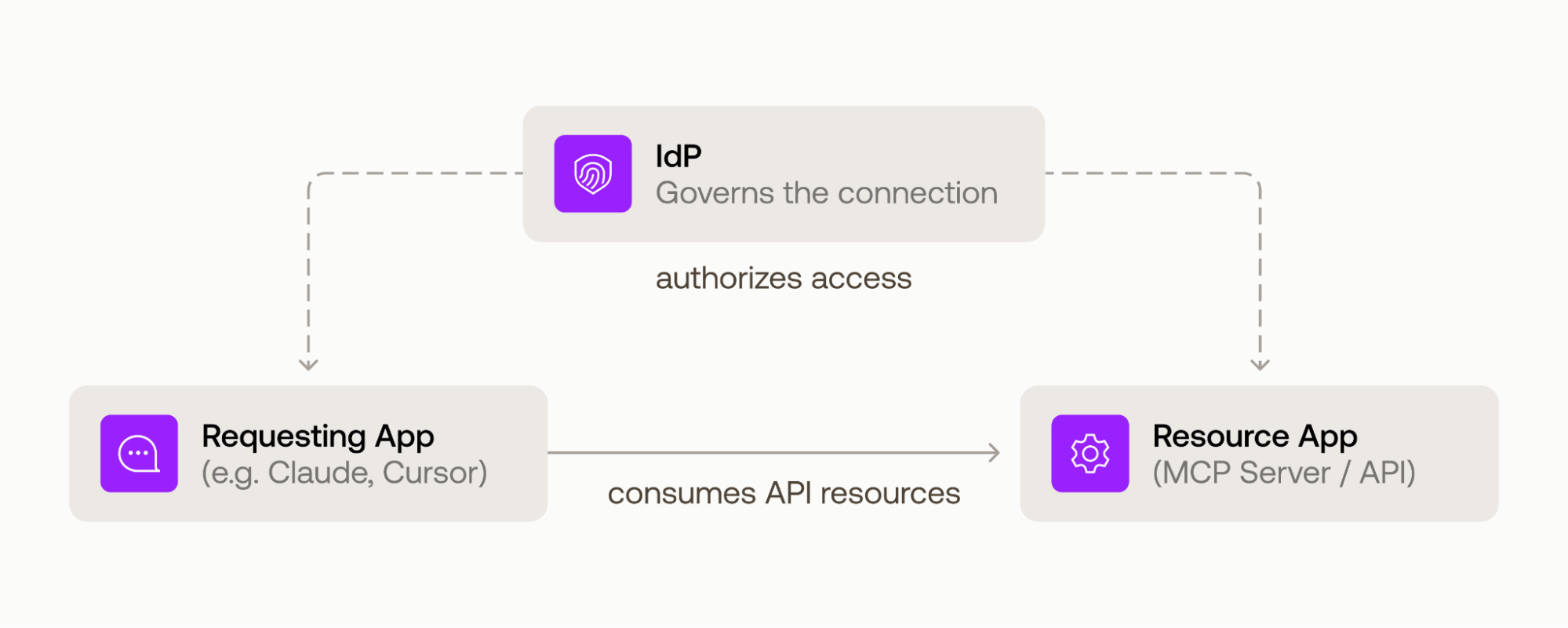 **Requesting Apps (Client AI Agents):** This is the SaaS vendor whose AI agent, client assistant, or developer tool actively initiates data requests; for example, an AI assistant pulling project summaries across external platforms like Atlassian or Slack. *Note: If you are building a Requesting App, native support will be available by August 31, 2026 through Token Vault.*
**Resource Apps (Downstream SaaS Applications & MCP Servers):** This is the focus for platforms that hold enterprise data and expose it via APIs and MCP servers. In this scenario, an external tool (like Claude or Cursor) needs to safely query your platform to pull data without triggering separate sign-in popups or manual interventions for the end user.
## The Auth0 Advantage: Zero Code, Enterprise Ready
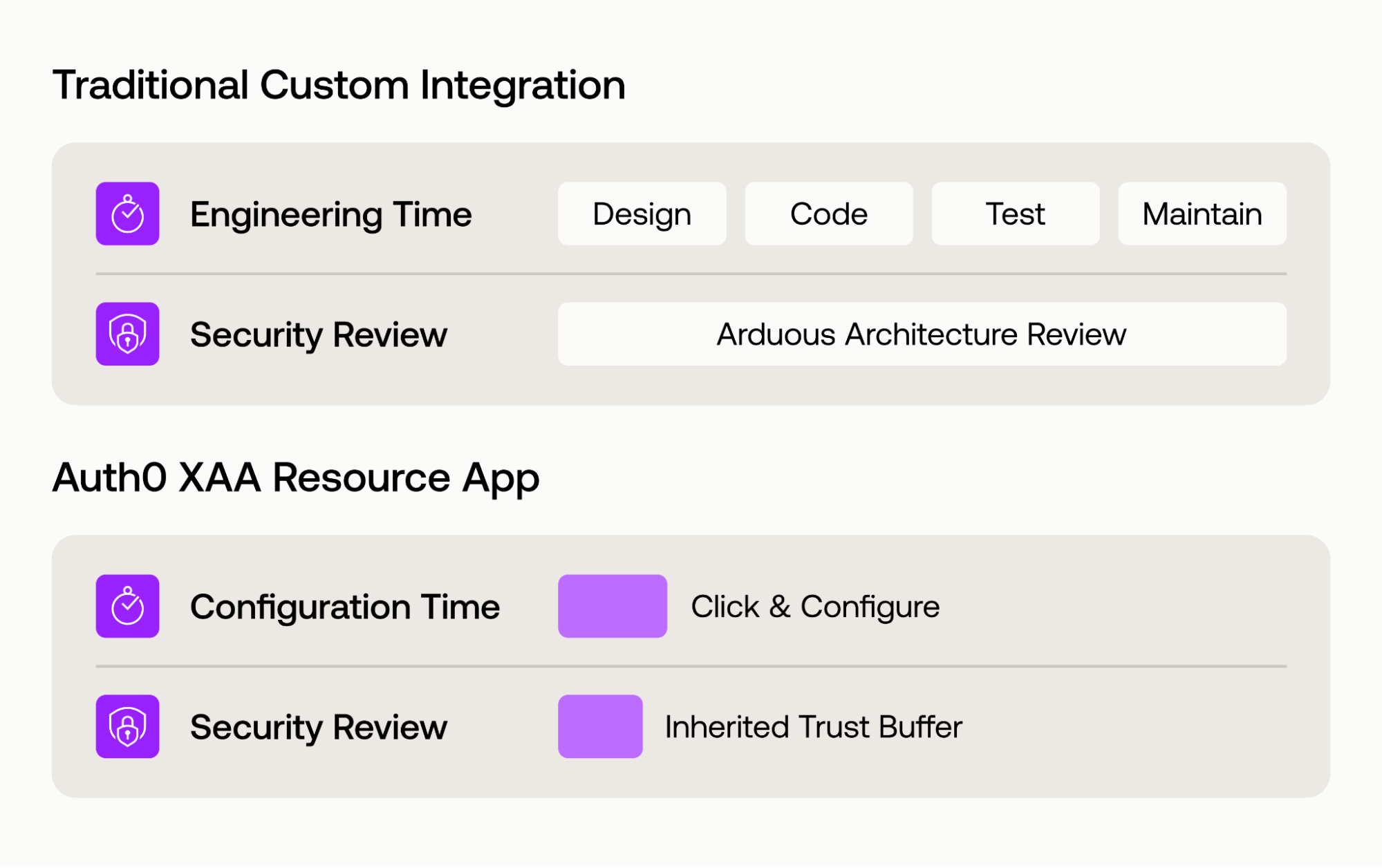
Auth0 makes building applications easier, and XAA is no exception. Adopting the XAA protocol as a Resource App replaces one-off, bespoke integration work with a single, open standard for secure delegated access. But adopting a new protocol still means real engineering investment: writing, testing, and maintaining new logic in your application.
This is where Auth0 comes to the rescue with a zero-code solution. Because XAA is handled entirely at the identity layer through quick, declarative configuration in your Auth0 dashboard, your engineering team doesn't need to touch a single line of application source code to start accepting secure, short-lived identity assertions (a.k.a. ID-JAGs).
And because XAA is an open protocol rather than a proprietary mechanism, that same configuration works with any compliant enterprise IdP and in both directions, so your platform can accept trusted requests from other apps today and initiate its own tomorrow.
**Requesting Apps (Client AI Agents):** This is the SaaS vendor whose AI agent, client assistant, or developer tool actively initiates data requests; for example, an AI assistant pulling project summaries across external platforms like Atlassian or Slack. *Note: If you are building a Requesting App, native support will be available by August 31, 2026 through Token Vault.*
**Resource Apps (Downstream SaaS Applications & MCP Servers):** This is the focus for platforms that hold enterprise data and expose it via APIs and MCP servers. In this scenario, an external tool (like Claude or Cursor) needs to safely query your platform to pull data without triggering separate sign-in popups or manual interventions for the end user.
## The Auth0 Advantage: Zero Code, Enterprise Ready
Auth0 makes building applications easier, and XAA is no exception. Adopting the XAA protocol as a Resource App replaces one-off, bespoke integration work with a single, open standard for secure delegated access. But adopting a new protocol still means real engineering investment: writing, testing, and maintaining new logic in your application.
This is where Auth0 comes to the rescue with a zero-code solution. Because XAA is handled entirely at the identity layer through quick, declarative configuration in your Auth0 dashboard, your engineering team doesn't need to touch a single line of application source code to start accepting secure, short-lived identity assertions (a.k.a. ID-JAGs).
And because XAA is an open protocol rather than a proprietary mechanism, that same configuration works with any compliant enterprise IdP and in both directions, so your platform can accept trusted requests from other apps today and initiate its own tomorrow.
 ## How XAA Works Under the Hood
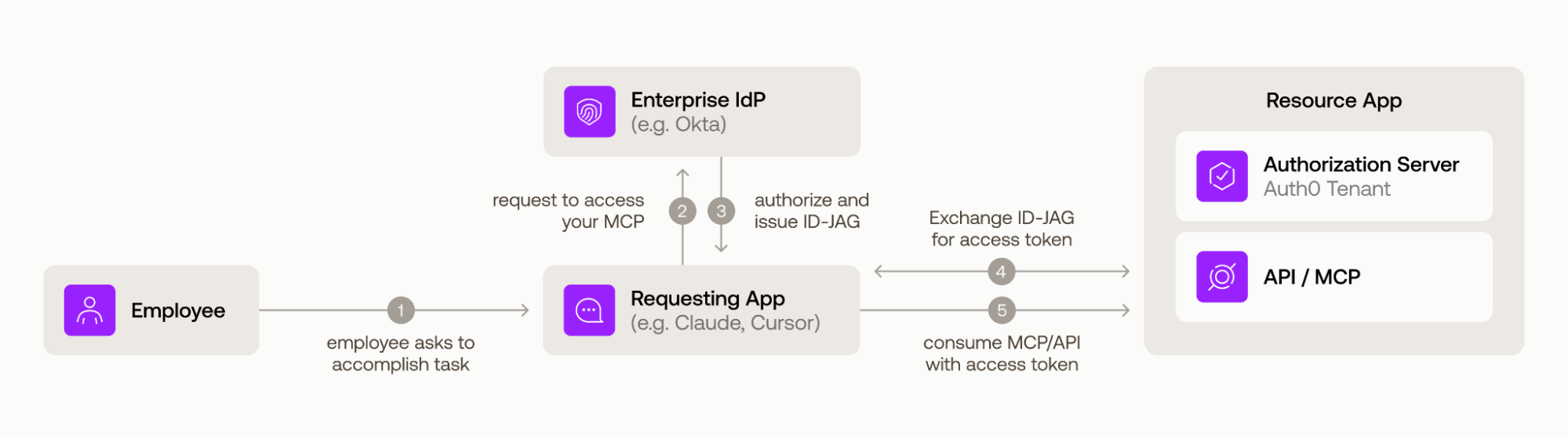
When an external Requesting App (like an AI agent) needs to fetch data from your Resource App, the underlying authentication architecture dictates exactly how secure and seamless the interaction will be.
Here is how a typical token exchange operates with XAA using Auth0, compared to the fragmented alternative without XAA:
| With XAA (Identity-Driven) | Without XAA (Traditional OAuth) |
| :---- | :---- |
| **1. User Action** An employee asks their AI tool (for example, Claude, Cursor) to do something that requires data from your API. | **1. User Action** An employee asks their AI tool (for example, Claude, Cursor) to do something that requires data from your API. |
| **2. Access Request** The Requesting App automatically asks the customer's own enterprise IdP (for example, Okta) to authorize this specific app-to-app access. | **2. User is redirected to the Resource App** Instead of a smooth handoff, the employee is pulled out of the AI tool and redirected to your platform's authorization server to start an OAuth flow. |
| **3. Enterprise IdP Authorizes Access** If the XAA policy configured by the enterprise IT admin allows it, the IdP issues a short-lived, signed assertion (an "ID-JAG") scoped specifically to your platform. | **3. Enterprise IdP Authenticates the User** The employee is then redirected again to their company's identity provider to log in. Nothing in the context of this login makes clear that it's for connecting an AI tool to your platform, so the enterprise IT admin has no idea this connection is happening. |
| **4. Auth0 Verifies and Issues a Token** The Requesting App presents that assertion to your Auth0 tenant. Auth0 confirms it genuinely comes from the trusted enterprise IdP, checks your access rules (like roles or organization membership), and automatically issues a standard, short-lived access token. | **4. Employee provides direct consent** After logging in, the employee sees a consent prompt and must personally approve the connection. This is a decision that really should belong to the IT department, not the individual employee. Once approved, an access token is issued. |
| **5. Standard API Call** The Requesting App calls your API/MCP server with that access token. Your platform validates it the same way it already does today with no new code, no awareness of XAA required. | **5. Standard API call** The AI tool can now call your API using that token, just like any other request. But the employee has to repeat this entire process for every AI tool they use, and again whenever the consent expires. Meanwhile, IT still has no visibility into any of these connections and no way to shut them off centrally. |
**With XAA:**
## How XAA Works Under the Hood
When an external Requesting App (like an AI agent) needs to fetch data from your Resource App, the underlying authentication architecture dictates exactly how secure and seamless the interaction will be.
Here is how a typical token exchange operates with XAA using Auth0, compared to the fragmented alternative without XAA:
| With XAA (Identity-Driven) | Without XAA (Traditional OAuth) |
| :---- | :---- |
| **1. User Action** An employee asks their AI tool (for example, Claude, Cursor) to do something that requires data from your API. | **1. User Action** An employee asks their AI tool (for example, Claude, Cursor) to do something that requires data from your API. |
| **2. Access Request** The Requesting App automatically asks the customer's own enterprise IdP (for example, Okta) to authorize this specific app-to-app access. | **2. User is redirected to the Resource App** Instead of a smooth handoff, the employee is pulled out of the AI tool and redirected to your platform's authorization server to start an OAuth flow. |
| **3. Enterprise IdP Authorizes Access** If the XAA policy configured by the enterprise IT admin allows it, the IdP issues a short-lived, signed assertion (an "ID-JAG") scoped specifically to your platform. | **3. Enterprise IdP Authenticates the User** The employee is then redirected again to their company's identity provider to log in. Nothing in the context of this login makes clear that it's for connecting an AI tool to your platform, so the enterprise IT admin has no idea this connection is happening. |
| **4. Auth0 Verifies and Issues a Token** The Requesting App presents that assertion to your Auth0 tenant. Auth0 confirms it genuinely comes from the trusted enterprise IdP, checks your access rules (like roles or organization membership), and automatically issues a standard, short-lived access token. | **4. Employee provides direct consent** After logging in, the employee sees a consent prompt and must personally approve the connection. This is a decision that really should belong to the IT department, not the individual employee. Once approved, an access token is issued. |
| **5. Standard API Call** The Requesting App calls your API/MCP server with that access token. Your platform validates it the same way it already does today with no new code, no awareness of XAA required. | **5. Standard API call** The AI tool can now call your API using that token, just like any other request. But the employee has to repeat this entire process for every AI tool they use, and again whenever the consent expires. Meanwhile, IT still has no visibility into any of these connections and no way to shut them off centrally. |
**With XAA:**
 ## How to Get Started Adopting XAA as a Resource App in Auth0
Turn on Cross App Access in your tenant, and make your platform instantly ready for the future of enterprise automation. Securing your APIs and MCP servers for the agentic era doesn't require shifting your roadmaps or burning engineering sprints on custom authentication protocols. You can plug your platform directly into a rapidly expanding network of enterprise resources today.
## How to Get Started Adopting XAA as a Resource App in Auth0
Turn on Cross App Access in your tenant, and make your platform instantly ready for the future of enterprise automation. Securing your APIs and MCP servers for the agentic era doesn't require shifting your roadmaps or burning engineering sprints on custom authentication protocols. You can plug your platform directly into a rapidly expanding network of enterprise resources today.
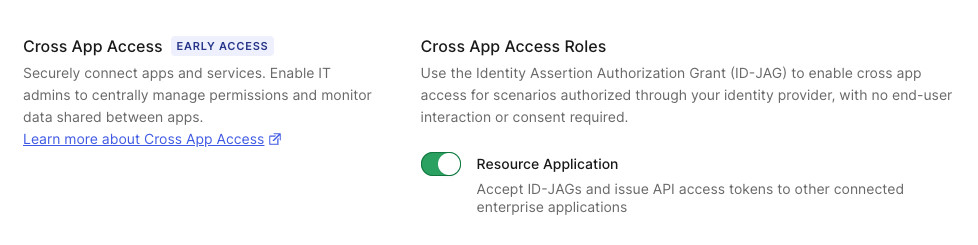 When you are ready to configure your environment, review the detailed walk-throughs, configuration schemas, and step-by-step implementation instructions by visiting the official [Auth0 XAA Product Documentation](https://auth0.com/docs/ai-agents-mcp/cross-app-access).
To explore the broader network landscape and see how other industry leaders are aligning, visit the [Okta Cross App Access ISV Landing Page](https://www.okta.com/solutions/cross-app-access/).
## Amplify Your Reach via the Okta Integration Network (OIN)
While your Resource App can process identity assertions from any compliant IdP that adopts the protocol, connecting to Okta provides a massive advantage with its pre-built ecosystem of enterprise platforms and AI tools that are already connected and ready to go.
By taking the extra step to publish your completed integration to the [Okta Integration Network (OIN)](https://www.okta.com/integrations/), you gain immediate market distribution and a direct line to these joint customers. Listing your app in the OIN unlocks clear commercial and operational advantages:
* **Amplified Discovery:** Place your platform directly in front of thousands of enterprise organizations and IT buyers actively searching for verified, ecosystem-ready software.
* **Instant Interoperability:** Instantly bridge your platform into a trusted web of highly adopted requesting applications.
Your APIs and MCP servers become immediately reachable by external tools like Anthropic’s Claude, Cursor, VS Code, Docker, and Zoom, making your product a naturally connected node in your users’ workflows.
## How to Get Started Publishing to the OIN
Once you have configured XAA natively within your Auth0 tenant, moving from a successful implementation to a live OIN listing is straightforward:
1. Follow the step-by-step instructions in the [OIN Submission Guide for XAA](https://developer.okta.com/blog/2026/07/06/submit-oin-xaa#getting-listed-in-the-okta-integration-network-oin) to prepare your metadata.
2. Configure your Okta preview tenant.
3. Submit your integration.
Once your integration goes live in the OIN, your platform becomes instantly discoverable to Okta's enterprise customer base and eligible for exclusive co-marketing opportunities.
Interested to hear from Anthropic and Asana on why they adopted the XAA protocol? [Register for the Unlocking AI Adoption and Secure Connections at Scale](https://pages.okta.com/2026-08-WBN-Okta-CrossAppAccess-LP.html) streamcast playing Sept. 2, 8AM PDT.
When you are ready to configure your environment, review the detailed walk-throughs, configuration schemas, and step-by-step implementation instructions by visiting the official [Auth0 XAA Product Documentation](https://auth0.com/docs/ai-agents-mcp/cross-app-access).
To explore the broader network landscape and see how other industry leaders are aligning, visit the [Okta Cross App Access ISV Landing Page](https://www.okta.com/solutions/cross-app-access/).
## Amplify Your Reach via the Okta Integration Network (OIN)
While your Resource App can process identity assertions from any compliant IdP that adopts the protocol, connecting to Okta provides a massive advantage with its pre-built ecosystem of enterprise platforms and AI tools that are already connected and ready to go.
By taking the extra step to publish your completed integration to the [Okta Integration Network (OIN)](https://www.okta.com/integrations/), you gain immediate market distribution and a direct line to these joint customers. Listing your app in the OIN unlocks clear commercial and operational advantages:
* **Amplified Discovery:** Place your platform directly in front of thousands of enterprise organizations and IT buyers actively searching for verified, ecosystem-ready software.
* **Instant Interoperability:** Instantly bridge your platform into a trusted web of highly adopted requesting applications.
Your APIs and MCP servers become immediately reachable by external tools like Anthropic’s Claude, Cursor, VS Code, Docker, and Zoom, making your product a naturally connected node in your users’ workflows.
## How to Get Started Publishing to the OIN
Once you have configured XAA natively within your Auth0 tenant, moving from a successful implementation to a live OIN listing is straightforward:
1. Follow the step-by-step instructions in the [OIN Submission Guide for XAA](https://developer.okta.com/blog/2026/07/06/submit-oin-xaa#getting-listed-in-the-okta-integration-network-oin) to prepare your metadata.
2. Configure your Okta preview tenant.
3. Submit your integration.
Once your integration goes live in the OIN, your platform becomes instantly discoverable to Okta's enterprise customer base and eligible for exclusive co-marketing opportunities.
Interested to hear from Anthropic and Asana on why they adopted the XAA protocol? [Register for the Unlocking AI Adoption and Secure Connections at Scale](https://pages.okta.com/2026-08-WBN-Okta-CrossAppAccess-LP.html) streamcast playing Sept. 2, 8AM PDT.