---
title: "Your Agent Can Better Drive the Auth0 CLI with Agent Mode"
description: "Explore Auth0 CLI agent mode: structured JSON, schema checks, predictable error recovery, and more built specifically for AI coding agents."
authors:
- name: "Bharath Natarajan"
url: "https://auth0.com/blog/authors/bharath-natarajan/"
- name: "Kunal Dawar"
url: "https://auth0.com/blog/authors/kunal-dawar/"
- name: "Ramya Anusri Ankisetty"
url: "https://auth0.com/blog/authors/ramya-anusri-ankisetty/"
date: "Oct 20, 2026"
category: "Announcements"
tags: ["cli"]
url: "https://auth0.com/blog/your-agent-can-better-drive-auth0-cli-with-agent-mode/"
---
# Your Agent Can Better Drive the Auth0 CLI with Agent Mode
Picture an agent setting up a new application. It has no idea what the CLI can do, so it starts guessing: `--help`, then `--help` again one level deeper, then again. Five lookups later, it finds the command it needed. Then it sends a payload with a field name it invented, because nothing told it the real one. The API rejects it with a 400 error and a sentence of prose. The agent reads that sentence, guesses again.
That is the old Auth0 CLI with an agent at the wheel. Every step cost round trips, and every failure cost guesswork.
The CLI was built assuming a person sat at the keyboard: trying commands by hand, reading errors, adjusting. More of the traffic hitting it today comes from an agent instead: [Claude Code, Cursor, a CI job](https://auth0.com/blog/integrating-claude-code-with-auth0-apis/). Those old assumptions turned every unfamiliar command into trial and error.
On top of the guesswork, a misspelled command used to print help text and exit `0`, as if nothing had gone wrong. A script checking that exit code built its next step on one that never ran.
Agent mode fixes the guesswork and the false signal. Here is what is live.
## One Switch, Not Five Flags
Since agents have different needs than human coders, have your agent use the `--agent-mode` so it starts to understand the Auth0 CLI in one go:
```bash
auth0 apps list --agent-mode
```
`--agent-mode` (or `AUTH0_AGENT_MODE=true` as an environment variable) turns on structured JSON output, disables interactive prompts and color, and guarantees a non-zero exit code on any real failure.
*You do not always have to ask for it.* Agent mode turns on from the flag, from `AUTH0_AGENT_MODE=true`, or when the CLI recognizes it is being driven by a known coding agent. Agents and harnesses typically run the Auth0 CLI in a sandbox environment that has identifiers like `AGENT_NAME = CLAUDE_CODE`. The CLI automatically reads these identifiers and detects the agent. When a human runs a CLI command, or when it is run in a script or a pipe, it still prints a normal table.
**Try it in your agent:** *"Using the Auth0 CLI, list my applications, then list a resource that does not exist and tell me what exit code you got."*
## A Map of the Whole CLI in One Call
Now your agent can get all the commands available in the CLI with a single command:
```bash
auth0 commands --flat
# or
auth0 commands --detailed
```
With `auth0 commands --flat` the agent gets a list of every runnable command on its own line. This is best for scanning or intent matching.
Every command with `**--detailed**` gives your agent the full invocation shape: flags, arguments, defaults, whether auth is required.
These two flags allow an agent to build its entire plan for a session from one call instead of spending several round trips just finding out what is possible.
**Try it in your agent:** *"Figure out what it can do and set up a new application for me."*
## Know the Shape Before You Send It
Three new flags: `--schema`, `--data`, and `--query`, let an agent create and inspect resources without guessing. They work across applications, APIs, users, roles, connections, logs, custom domains, email templates, Universal Login, [ACUL](https://auth0.com/docs/customize/login-pages/advanced-customizations), client grants, action modules, sessions, and refresh tokens. See their functionality below:
```bash
auth0 apps create --schema
```
`--schema` prints the exact payload a command expects, sourced live from the OpenAPI spec. It also works before you log in, so an agent can check the shape of a call before it ever has credentials.
```bash
auth0 apps create --data '{"name":"My App","app_type":"spa"}'
```
`--data` sends the whole payload as one JSON object: inline, from a file, or piped through standard input. It validates the data locally before the request reaches the API, so a malformed payload fails fast, with field-level detail pointing at exactly what is wrong.
```bash
auth0 logs list --query '{"per_page":5}'
```
`--query` filters list commands with a JSON object of API query parameters, instead of memorizing per-command flags.
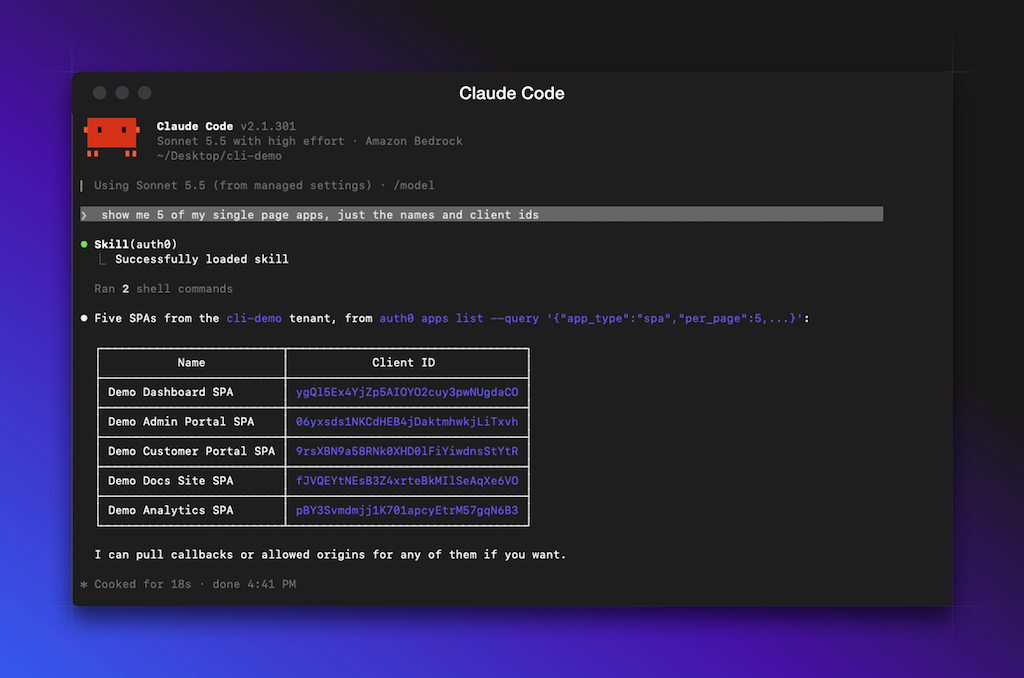
**Try it in your agent:** *"Create an Auth0 role called `beta-tester` using the CLI. Make sure the payload actually matches what the API expects."*
## Failures with a Code, Not Just a Sentence
Better errors so your agent can figure out the next step. Once something goes wrong it receives something similar to the block below:
```bash
{"error":{"code":"validation","reason":"local_validation","message":"...","details":[{"field":"name","reason":"property "name" is missing"}]}}
```
Every failure carries a stable `code` your code can inspect and recover from: `usage`, `auth`, `validation`, `not_found`, `rate_limit`, and more. A finer `reason` sits underneath it: `local_validation` above means the CLI caught the problem itself, before the request ever left your machine. `details` is an array of the specific fields that failed, not a single object, since a payload can fail in more than one place at once. When the error comes back from the API instead of local validation, the envelope also carries a `status` field with the HTTP status code. An agent branches on all of that structure. It does not need to parse English to guess what happened.
**Try it in your agent:** *"Set up a new Auth0 API for me called `billing-service`."*
## Keep It Light When It Counts
Agent mode defaults to readable, indented JSON.
```bash
auth0 apps list --agent-mode --json-compact
```
For high-volume or token-sensitive runs, `--json-compact` strips the whitespace and returns the same data, denser. Streaming commands, like `auth0 logs tail`, switch to the compact form automatically in agent mode.
**Try it in your agent:** *"I am running you in a loop that lists my Auth0 apps a lot. Find a way to cut down the tokens that response costs."*
## Documentation Without Leaving the Terminal
`auth0 docs search` queries Auth0's public documentation straight from the CLI.
```bash
auth0 docs search "organizations"
```
No login required. In agent mode, results come back with raw-markdown URLs an agent can fetch and read directly. This saves you tokens and time since there is no HTML to parse and no browser tab to open.
**Try it in your agent:** *"Quick question, how do Auth0 Organizations actually work? Look it up and give me the short version."*
## A Couple More Things Worth Knowing
**Credentials that don't need a keychain.** Set `AUTH0_CLI_AUTH_MODE` along with `AUTH0_DOMAIN` and either a Management API token or client credentials, and the CLI runs without touching the OS keychain or writing anything to disk. It's built for CI runners and sandboxes that don't have one.
```bash
export AUTH0_CLI_AUTH_MODE=env
export AUTH0_DOMAIN=
export AUTH0_API_TOKEN=
auth0 apps list
```
**Teach your agent the CLI before it starts:** After installing or upgrading the CLI run the skill installation command to add the Auth0 skill to your coding assistant, so it already knows these conventions on its first command instead of discovering them live.
```bash
auth0 agent skills install
```
## Try It Today
Upgrade to the latest CLI version and point your own agent at it. The agent mode is available on the Auth0 CLI with version greater than v1.38.0.
```bash
brew upgrade auth0
```
If you have any feedback, [open an issue](https://github.com/auth0/auth0-cli/issues) and our team will be happy to look into it.
If you do not have an Auth0 account yet, [create one for free](https://a0.to/blog_signup).