> ## Documentation Index
> Fetch the complete documentation index at: https://auth0.com/llms.txt
> Use this file to discover all available pages before exploring further.
> Learn how to connect to SAML Identity Providers using an enterprise connection.
# Connect Your App to SAML Identity Providers
export const AuthCodeGroup = ({children, dropdown}) => {
const [processedChildren, setProcessedChildren] = useState(children);
useEffect(() => {
let unsubscribe = null;
function init() {
unsubscribe = window.autorun(() => {
const processChildren = node => {
if (typeof node === "string") {
let processedNode = node;
for (const [key, value] of window.rootStore.variableStore.values.entries()) {
const escapedKey = key.replaceAll(/[.*+?^${}()|[\]\\]/g, (String.raw)`\$&`);
processedNode = processedNode.replaceAll(new RegExp(escapedKey, "g"), value);
}
return processedNode;
} else if (Array.isArray(node)) {
return node.map(processChildren);
} else if (node && node.props && node.props.children) {
return {
...node,
props: {
...node.props,
children: processChildren(node.props.children)
}
};
}
return node;
};
setProcessedChildren(processChildren(children));
});
}
if (window.rootStore) {
init();
} else {
window.addEventListener("adu:storeReady", init);
}
return () => {
window.removeEventListener("adu:storeReady", init);
unsubscribe?.();
};
}, [children]);
return {processedChildren};
};
export const AuthCodeBlock = ({filename, icon, language, highlight, children}) => {
const [displayText, setDisplayText] = useState(children);
const [copyText, setCopyText] = useState(children);
const wrapperRef = React.useRef(null);
useEffect(() => {
let unsubscribe = null;
function init() {
if (!window.autorun || !window.rootStore) {
return;
}
unsubscribe = window.autorun(() => {
let processedChildrenForDisplay = children;
let processedChildrenForCopy = children;
for (const [key, value] of window.rootStore.variableStore.values.entries()) {
const escapedKey = key.replaceAll(/[.*+?^${}()|[\]\\]/g, (String.raw)`\$&`);
let displayValue = value;
if (key === "{yourClientSecret}" && value !== "{yourClientSecret}") {
displayValue = value.substring(0, 3) + "*****MASKED*****";
}
processedChildrenForDisplay = processedChildrenForDisplay.replaceAll(new RegExp(escapedKey, "g"), displayValue);
processedChildrenForCopy = processedChildrenForCopy.replaceAll(new RegExp(escapedKey, "g"), value);
}
setDisplayText(processedChildrenForDisplay);
setCopyText(processedChildrenForCopy);
});
}
if (window.rootStore) {
init();
} else {
window.addEventListener("adu:storeReady", init);
}
return () => {
window.removeEventListener("adu:storeReady", init);
unsubscribe?.();
};
}, [children]);
useEffect(() => {
if (!wrapperRef.current) return;
const originalWriteText = navigator.clipboard.writeText.bind(navigator.clipboard);
let isOverriding = false;
const handleClick = e => {
const button = e.target.closest('[data-testid="copy-code-button"]');
if (!button || !wrapperRef.current.contains(button)) return;
isOverriding = true;
navigator.clipboard.writeText = text => {
if (isOverriding) {
isOverriding = false;
navigator.clipboard.writeText = originalWriteText;
return originalWriteText(copyText);
}
return originalWriteText(text);
};
setTimeout(() => {
if (isOverriding) {
isOverriding = false;
navigator.clipboard.writeText = originalWriteText;
}
}, 100);
};
const wrapper = wrapperRef.current;
wrapper.addEventListener('click', handleClick, true);
return () => {
wrapper.removeEventListener('click', handleClick, true);
if (navigator.clipboard.writeText !== originalWriteText) {
navigator.clipboard.writeText = originalWriteText;
}
};
}, [copyText]);
return
{displayText}
;
};
Auth0 lets you create SAML Identity Provider (IdP) connections.
## Prerequisites
Before beginning:
* [Register your Application with Auth0](/docs/get-started/auth0-overview/create-applications).
* Select an appropriate **Application Type**.
* Add an **Allowed Callback URL** of **`{https://yourApp/callback}`**.
* Make sure your Application's [Grant Types](/docs/get-started/applications/update-grant-types) include the appropriate flows.
* Decide on the name of this enterprise connection
* The Post-back URL (also called Assertion Consumer Service URL) becomes: `https://{yourDomain}/login/callback?connection={yourConnectionName}`
* The Entity ID becomes: `urn:auth0:{yourTenant}:{yourConnectionName}`
## Steps
To connect your application to a SAML Identity Provider, you must:
1. Enter the Post-back URL and Entity ID at the IdP (to learn how, read about [SAML Identity Provider Configuration Settings](/docs/authenticate/protocols/saml/saml-identity-provider-configuration-settings)).
2. [Get the signing certificate from the IdP](#get-the-signing-certificate-from-the-idp) and [convert it to Base64](#convert-signing-certificate-to-base64).
3. [Create an enterprise connection in Auth0](#create-an-enterprise-connection-in-auth0).
4. [Enable the enterprise connection for your Auth0 Application](#enable-the-enterprise-connection-for-your-auth0-application).
5. [Set up mappings](#set-up-mappings) (unnecessary for most cases).
6. [Test the connection](#test-the-connection).
## Get the signing certificate from the IdP
With SAML Login, Auth0 acts as the service provider, so you will need to retrieve an X.509 signing certificate from the SAML IdP (in PEM or CER format); later, you will upload this to Auth0. The methods for retrieving this certificate vary, so please see your IdP's documentation if you need additional assistance.
### Convert signing certificate to Base64
You can use the Management API or the Auth0 Dashboard to upload the X.509 signing certificate. If you use the Management API, you must convert the file to Base64. To do this, either use a [simple online tool](https://www.base64decode.org/) or run the following command in Bash: `cat signing-cert.crt | base64`.
## Assertion encryption
If your SAML assertions are encrypted, you must [set additional values](/docs/authenticate/protocols/saml/saml-sso-integrations/algorithm-profiles) for your connection to tell Auth0 how to handle decryption.
## Create an enterprise connection in Auth0
Next, you will need to create and configure a SAML Enterprise Connection in Auth0 and upload your X.509 signing certificate. This task can be performed using either Auth0's Dashboard or Management API.
### Create an enterprise connection using the Dashboard
1. Navigate to [Auth0 Dashboard > Authentication > Enterprise](https://manage.auth0.com/#/connections/enterprise), locate **SAML**, and select its `+`.
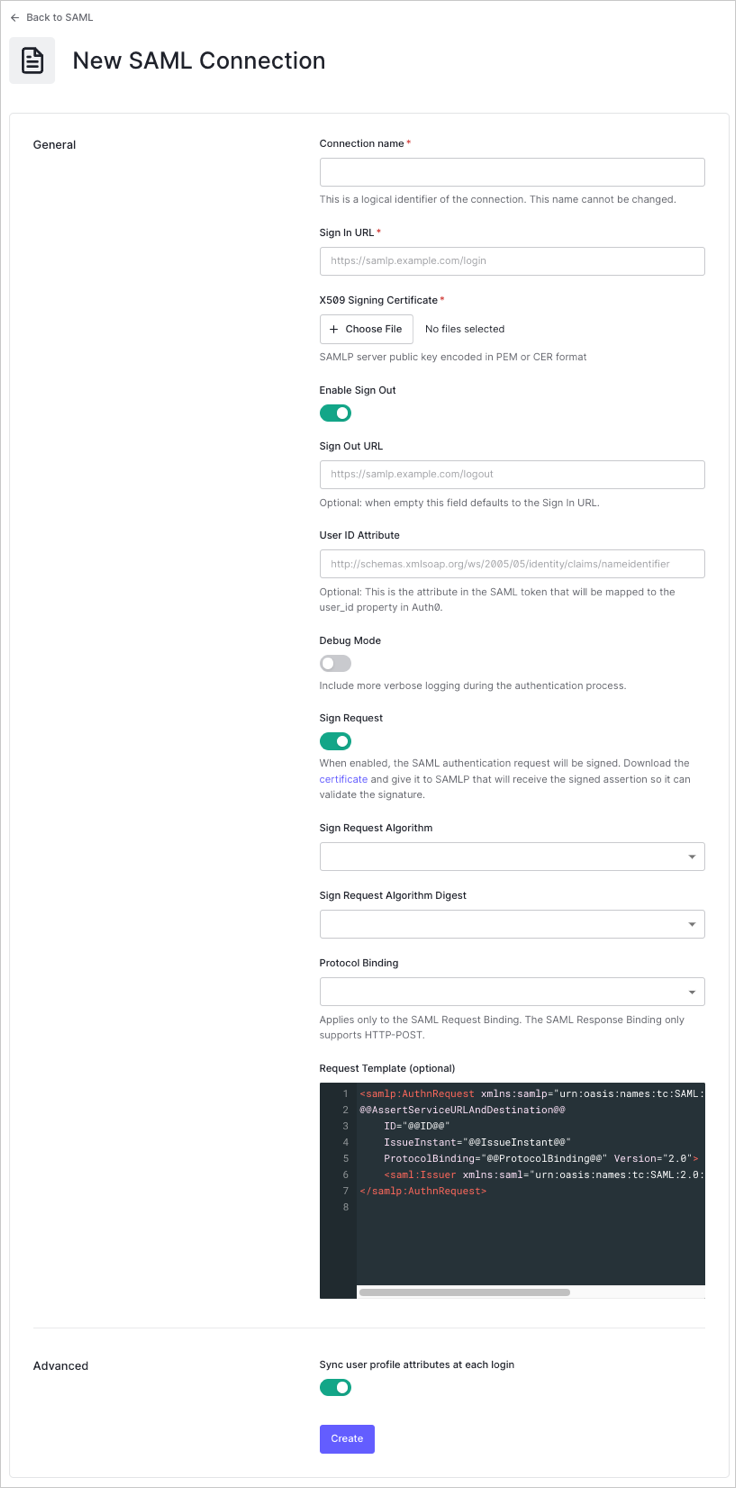
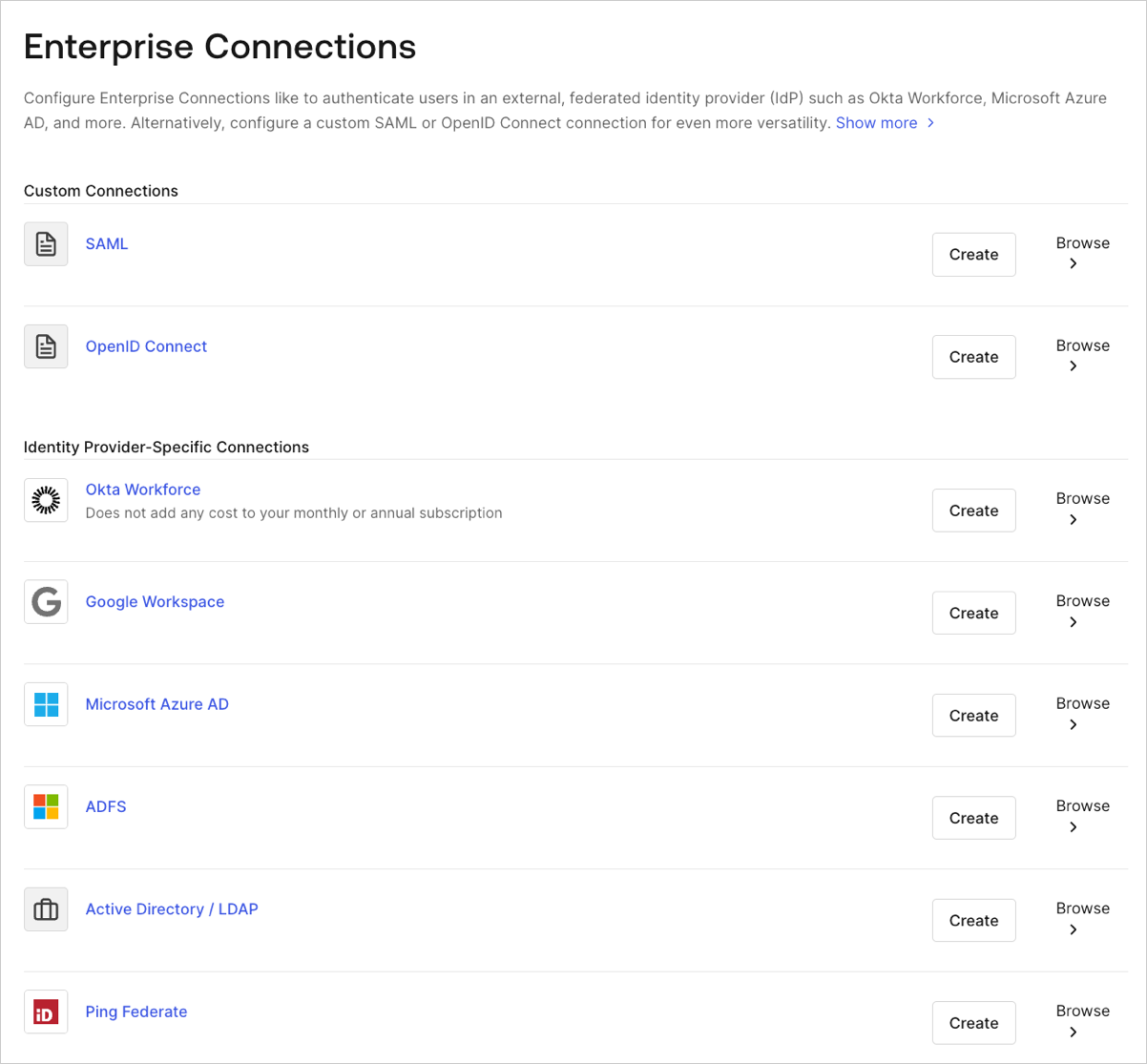 2. Enter details for your connection, and select **Create:**
| Field | Description |
| --------------------------------- | ----------------------------------------------------------------------------------------------------------------------------------------------------------------------------------------------- |
| **Connection name** | Logical identifier for your connection; it must be unique for your tenant and the same name used when setting the Post-back URL and Entity ID at the IdP. Once set, this name can't be changed. |
| **Sign In URL** | SAML single login URL. |
| **X.509 Signing Certificate** | Signing certificate (encoded in PEM or CER) you retrieved from the IdP earlier in this process. |
| **Enable Sign Out** | When enabled, a specific Sign Out URL can be set. Otherwise, the Sign In URL is used by default. |
| **Sign Out URL** (optional) | SAML single logout URL. |
| **User ID Attribute** (optional) | Attribute in the SAML token that will be mapped to the `user_id` property in Auth0. |
| **Debug Mode** | When enabled, more verbose logging will be performed during the authentication process. |
| **Sign Request** | When enabled, the SAML authentication request will be signed. (Be sure to download and provide the accompanying certificate so the SAML IdP can validate the assertions' signature.) |
| **Sign Request Algorithm** | Algorithm Auth0 will use to sign the SAML assertions. |
| **Sign Request Digest Algorithm** | Algorithm Auth0 will use for the sign request digest. |
| **Protocol Binding** | HTTP binding supported by the IdP. |
| **Request Template** (optional) | Template that formats the SAML request. |
2. Enter details for your connection, and select **Create:**
| Field | Description |
| --------------------------------- | ----------------------------------------------------------------------------------------------------------------------------------------------------------------------------------------------- |
| **Connection name** | Logical identifier for your connection; it must be unique for your tenant and the same name used when setting the Post-back URL and Entity ID at the IdP. Once set, this name can't be changed. |
| **Sign In URL** | SAML single login URL. |
| **X.509 Signing Certificate** | Signing certificate (encoded in PEM or CER) you retrieved from the IdP earlier in this process. |
| **Enable Sign Out** | When enabled, a specific Sign Out URL can be set. Otherwise, the Sign In URL is used by default. |
| **Sign Out URL** (optional) | SAML single logout URL. |
| **User ID Attribute** (optional) | Attribute in the SAML token that will be mapped to the `user_id` property in Auth0. |
| **Debug Mode** | When enabled, more verbose logging will be performed during the authentication process. |
| **Sign Request** | When enabled, the SAML authentication request will be signed. (Be sure to download and provide the accompanying certificate so the SAML IdP can validate the assertions' signature.) |
| **Sign Request Algorithm** | Algorithm Auth0 will use to sign the SAML assertions. |
| **Sign Request Digest Algorithm** | Algorithm Auth0 will use for the sign request digest. |
| **Protocol Binding** | HTTP binding supported by the IdP. |
| **Request Template** (optional) | Template that formats the SAML request. |
 3\. In the **Provisioning** view, configure how user profiles get created and updated in Auth0.
| Field | Description |
| ---------------------------------------------- | ----------------------------------------------------------------------------------------------------------------------------------------------------------------------------------- |
| **Sync user profile attributes at each login** | When enabled, Auth0 automatically syncs user profile data with each user login, thereby ensuring that changes made in the connection source are automatically updated in Auth0. |
| **Sync user profiles using SCIM** | When enabled, Auth0 allows user profile data to be synced using SCIM. For more information, see [Configure Inbound SCIM](/docs/authenticate/protocols/scim/configure-inbound-scim). |
4. In the **Login Experience** view, configure how users log in with this connection.
| Field | Description |
| ---------------------------------- | ------------------------------------------------------------------------------------------------------------------------------------------------------------------------------------------------------------------- |
| **Home Realm Discovery** | Compares a user's email domain with the provided identity provider domains. For more information, read [Configure Identifier First Authentication](/docs/authenticate/login/auth0-universal-login/identifier-first) |
| **Display connection button** | This option displays the following choices to customize your application's connection button. |
| **Button display name** (Optional) | Text used to customize the login button for Universal Login. When set the button reads: "Continue with \{Button display name}". |
| **Button logo URL** (Optional) | URL of image used to customize the login button for Universal Login. When set, the Universal Login login button displays the image as a 20px by 20px square. |
Optional fields are available with Universal Login only. Customers using Classic Login will not see the Add button, Button display name, or Button logo URL.
5. If you have appropriate administrative permissions to complete the integration, click **Continue** to learn about the custom parameters needed to configure your IdP. Otherwise, provide the given URL to your administrator so that they can adjust the required settings.
### Create an enterprise connection using the Management API
You can also use the [Management API](https://auth0.com/docs/api/management/v2) to create your SAML Connection. When doing so, you may choose to specify each SAML configuration field manually or else specify a SAML metadata document that contains the configuration values.
#### Create a connection using specified values
Make a `POST` call to the [Create a Connection endpoint](https://auth0.com/docs/api/management/v2#!/Connections/patch_connections_by_id). Be sure to replace `MGMT_API_ACCESS_TOKEN`, `CONNECTION_NAME`, `SIGN_IN_ENDPOINT_URL`, `SIGN_OUT_ENDPOINT_URL`, and `BASE64_SIGNING_CERT` placeholder values with your Management API Access Token, connection name, sign in URL, sign out URL, and Base64-encoded signing certificate (in PEM or CER format), respectively.
```bash cURL theme={null}
curl --request POST \
--url 'https://{yourDomain}/api/v2/connections' \
--header 'authorization: Bearer MGMT_API_ACCESS_TOKEN' \
--header 'cache-control: no-cache' \
--header 'content-type: application/json' \
--data '{ "strategy": "samlp", "name": "CONNECTION_NAME", "options": { "signInEndpoint": "SIGN_IN_ENDPOINT_URL", "signOutEndpoint": "SIGN_OUT_ENDPOINT_URL", "signatureAlgorithm": "rsa-sha256", "digestAlgorithm": "sha256", "fieldsMap": {}, "signingCert": "BASE64_SIGNING_CERT" } }'
```
```csharp C# theme={null}
var client = new RestClient("https://{yourDomain}/api/v2/connections");
var request = new RestRequest(Method.POST);
request.AddHeader("content-type", "application/json");
request.AddHeader("authorization", "Bearer MGMT_API_ACCESS_TOKEN");
request.AddHeader("cache-control", "no-cache");
request.AddParameter("application/json", "{ "strategy": "samlp", "name": "CONNECTION_NAME", "options": { "signInEndpoint": "SIGN_IN_ENDPOINT_URL", "signOutEndpoint": "SIGN_OUT_ENDPOINT_URL", "signatureAlgorithm": "rsa-sha256", "digestAlgorithm": "sha256", "fieldsMap": {}, "signingCert": "BASE64_SIGNING_CERT" } }", ParameterType.RequestBody);
IRestResponse response = client.Execute(request);
```
```go Go theme={null}
package main
import (
"fmt"
"strings"
"net/http"
"io/ioutil"
)
func main() {
url := "https://{yourDomain}/api/v2/connections"
payload := strings.NewReader("{ "strategy": "samlp", "name": "CONNECTION_NAME", "options": { "signInEndpoint": "SIGN_IN_ENDPOINT_URL", "signOutEndpoint": "SIGN_OUT_ENDPOINT_URL", "signatureAlgorithm": "rsa-sha256", "digestAlgorithm": "sha256", "fieldsMap": {}, "signingCert": "BASE64_SIGNING_CERT" } }")
req, _ := http.NewRequest("POST", url, payload)
req.Header.Add("content-type", "application/json")
req.Header.Add("authorization", "Bearer MGMT_API_ACCESS_TOKEN")
req.Header.Add("cache-control", "no-cache")
res, _ := http.DefaultClient.Do(req)
defer res.Body.Close()
body, _ := ioutil.ReadAll(res.Body)
fmt.Println(res)
fmt.Println(string(body))
}
```
```java Java theme={null}
HttpResponse response = Unirest.post("https://{yourDomain}/api/v2/connections")
.header("content-type", "application/json")
.header("authorization", "Bearer MGMT_API_ACCESS_TOKEN")
.header("cache-control", "no-cache")
.body("{ "strategy": "samlp", "name": "CONNECTION_NAME", "options": { "signInEndpoint": "SIGN_IN_ENDPOINT_URL", "signOutEndpoint": "SIGN_OUT_ENDPOINT_URL", "signatureAlgorithm": "rsa-sha256", "digestAlgorithm": "sha256", "fieldsMap": {}, "signingCert": "BASE64_SIGNING_CERT" } }")
.asString();
```
```javascript Node.JS theme={null}
var axios = require("axios").default;
var options = {
method: 'POST',
url: 'https://{yourDomain}/api/v2/connections',
headers: {
'content-type': 'application/json',
authorization: 'Bearer MGMT_API_ACCESS_TOKEN',
'cache-control': 'no-cache'
},
data: {
strategy: 'samlp',
name: 'CONNECTION_NAME',
options: {
signInEndpoint: 'SIGN_IN_ENDPOINT_URL',
signOutEndpoint: 'SIGN_OUT_ENDPOINT_URL',
signatureAlgorithm: 'rsa-sha256',
digestAlgorithm: 'sha256',
fieldsMap: {},
signingCert: 'BASE64_SIGNING_CERT'
}
}
};
axios.request(options).then(function (response) {
console.log(response.data);
}).catch(function (error) {
console.error(error);
});
```
```php PHP theme={null}
$curl = curl_init();
curl_setopt_array($curl, [
CURLOPT_URL => "https://{yourDomain}/api/v2/connections",
CURLOPT_RETURNTRANSFER => true,
CURLOPT_ENCODING => "",
CURLOPT_MAXREDIRS => 10,
CURLOPT_TIMEOUT => 30,
CURLOPT_HTTP_VERSION => CURL_HTTP_VERSION_1_1,
CURLOPT_CUSTOMREQUEST => "POST",
CURLOPT_POSTFIELDS => "{ "strategy": "samlp", "name": "CONNECTION_NAME", "options": { "signInEndpoint": "SIGN_IN_ENDPOINT_URL", "signOutEndpoint": "SIGN_OUT_ENDPOINT_URL", "signatureAlgorithm": "rsa-sha256", "digestAlgorithm": "sha256", "fieldsMap": {}, "signingCert": "BASE64_SIGNING_CERT" } }",
CURLOPT_HTTPHEADER => [
"authorization: Bearer MGMT_API_ACCESS_TOKEN",
"cache-control: no-cache",
"content-type: application/json"
],
]);
$response = curl_exec($curl);
$err = curl_error($curl);
curl_close($curl);
if ($err) {
echo "cURL Error #:" . $err;
} else {
echo $response;
}
```
```python Python theme={null}
import http.client
conn = http.client.HTTPSConnection("")
payload = "{ "strategy": "samlp", "name": "CONNECTION_NAME", "options": { "signInEndpoint": "SIGN_IN_ENDPOINT_URL", "signOutEndpoint": "SIGN_OUT_ENDPOINT_URL", "signatureAlgorithm": "rsa-sha256", "digestAlgorithm": "sha256", "fieldsMap": {}, "signingCert": "BASE64_SIGNING_CERT" } }"
headers = {
'content-type': "application/json",
'authorization': "Bearer MGMT_API_ACCESS_TOKEN",
'cache-control': "no-cache"
}
conn.request("POST", "/{yourDomain}/api/v2/connections", payload, headers)
res = conn.getresponse()
data = res.read()
print(data.decode("utf-8"))
```
```ruby Ruby theme={null}
require 'uri'
require 'net/http'
require 'openssl'
url = URI("https://{yourDomain}/api/v2/connections")
http = Net::HTTP.new(url.host, url.port)
http.use_ssl = true
http.verify_mode = OpenSSL::SSL::VERIFY_NONE
request = Net::HTTP::Post.new(url)
request["content-type"] = 'application/json'
request["authorization"] = 'Bearer MGMT_API_ACCESS_TOKEN'
request["cache-control"] = 'no-cache'
request.body = "{ "strategy": "samlp", "name": "CONNECTION_NAME", "options": { "signInEndpoint": "SIGN_IN_ENDPOINT_URL", "signOutEndpoint": "SIGN_OUT_ENDPOINT_URL", "signatureAlgorithm": "rsa-sha256", "digestAlgorithm": "sha256", "fieldsMap": {}, "signingCert": "BASE64_SIGNING_CERT" } }"
response = http.request(request)
puts response.read_body
```
| Value | Description |
| ----------------------- | --------------------------------------------------------------------------------------------------------------------------- |
| `MGMT_API_ACCESS_TOKEN` | [Access Token for the Management API](https://auth0.com/docs/api/management/v2/tokens) with the scope `create:connections`. |
| `CONNECTION_NAME` | Τhe name of the connection to be created. |
| `SIGN_IN_ENDPONT_URL` | SAML single login URL for the connection to be created. |
| `SIGN_OUT_ENDPOINT_URL` | SAML single logout URL for the connection to be created. |
| `BASE64_SIGNING_CERT` | X.509 signing certificate (encoded in PEM or CER) you retrieved from the IdP. |
Or, in JSON:
```json lines theme={null}
{
"strategy": "samlp",
"name": "CONNECTION_NAME",
"options": {
"signInEndpoint": "SIGN_IN_ENDPOINT_URL",
"signOutEndpoint": "SIGN_OUT_ENDPOINT_URL",
"signatureAlgorithm": "rsa-sha256",
"digestAlgorithm": "sha256",
"fieldsMap": {
...
},
"signingCert": "BASE64_SIGNING_CERT"
}
}
```
#### Create a connection using SAML metadata
Rather than specifying each SAML configuration field, you can specify a SAML metadata document that contains the configuration values. When specifying a SAML metadata document, you may provide either the XML content of the document (`metadataXml`) or the URL of the document (`metadataUrl`). When providing the URL, content is downloaded only once; the connection will not automatically reconfigure if the content of the URL changes in the future.
##### Provide metadata document content
Use the `metadataXml` option to provide content of the document:
```bash cURL theme={null}
curl --request POST \
--url 'https://{yourDomain}/api/v2/connections' \
--header 'authorization: Bearer MGMT_API_ACCESS_TOKEN' \
--header 'cache-control: no-cache' \
--header 'content-type: application/json' \
--data '{ "strategy": "samlp", "name": "CONNECTION_NAME", "options": { "metadataXml": "..." } }'
```
```csharp C# theme={null}
var client = new RestClient("https://{yourDomain}/api/v2/connections");
var request = new RestRequest(Method.POST);
request.AddHeader("content-type", "application/json");
request.AddHeader("authorization", "Bearer MGMT_API_ACCESS_TOKEN");
request.AddHeader("cache-control", "no-cache");
request.AddParameter("application/json", "{ "strategy": "samlp", "name": "CONNECTION_NAME", "options": { "metadataXml": "..." } }", ParameterType.RequestBody);
IRestResponse response = client.Execute(request);
```
```go Go theme={null}
package main
import (
"fmt"
"strings"
"net/http"
"io/ioutil"
)
func main() {
url := "https://{yourDomain}/api/v2/connections"
payload := strings.NewReader("{ "strategy": "samlp", "name": "CONNECTION_NAME", "options": { "metadataXml": "..." } }")
req, _ := http.NewRequest("POST", url, payload)
req.Header.Add("content-type", "application/json")
req.Header.Add("authorization", "Bearer MGMT_API_ACCESS_TOKEN")
req.Header.Add("cache-control", "no-cache")
res, _ := http.DefaultClient.Do(req)
defer res.Body.Close()
body, _ := ioutil.ReadAll(res.Body)
fmt.Println(res)
fmt.Println(string(body))
}
```
```java Java theme={null}
HttpResponse response = Unirest.post("https://{yourDomain}/api/v2/connections")
.header("content-type", "application/json")
.header("authorization", "Bearer MGMT_API_ACCESS_TOKEN")
.header("cache-control", "no-cache")
.body("{ "strategy": "samlp", "name": "CONNECTION_NAME", "options": { "metadataXml": "..." } }")
.asString();
```
```javascript Node.JS theme={null}
var axios = require("axios").default;
var options = {
method: 'POST',
url: 'https://{yourDomain}/api/v2/connections',
headers: {
'content-type': 'application/json',
authorization: 'Bearer MGMT_API_ACCESS_TOKEN',
'cache-control': 'no-cache'
},
data: {
strategy: 'samlp',
name: 'CONNECTION_NAME',
options: {
metadataXml: '...'
}
}
};
axios.request(options).then(function (response) {
console.log(response.data);
}).catch(function (error) {
console.error(error);
});
```
```php PHP theme={null}
$curl = curl_init();
curl_setopt_array($curl, [
CURLOPT_URL => "https://{yourDomain}/api/v2/connections",
CURLOPT_RETURNTRANSFER => true,
CURLOPT_ENCODING => "",
CURLOPT_MAXREDIRS => 10,
CURLOPT_TIMEOUT => 30,
CURLOPT_HTTP_VERSION => CURL_HTTP_VERSION_1_1,
CURLOPT_CUSTOMREQUEST => "POST",
CURLOPT_POSTFIELDS => "{ "strategy": "samlp", "name": "CONNECTION_NAME", "options": { "metadataXml": "..." } }",
CURLOPT_HTTPHEADER => [
"authorization: Bearer MGMT_API_ACCESS_TOKEN",
"cache-control: no-cache",
"content-type: application/json"
],
]);
$response = curl_exec($curl);
$err = curl_error($curl);
curl_close($curl);
if ($err) {
echo "cURL Error #:" . $err;
} else {
echo $response;
}
```
```python Python theme={null}
iimport http.client
conn = http.client.HTTPSConnection("")
payload = "{ "strategy": "samlp", "name": "CONNECTION_NAME", "options": { "metadataXml": "..." } }"
headers = {
'content-type': "application/json",
'authorization': "Bearer MGMT_API_ACCESS_TOKEN",
'cache-control': "no-cache"
}
conn.request("POST", "/{yourDomain}/api/v2/connections", payload, headers)
res = conn.getresponse()
data = res.read()
print(data.decode("utf-8"))
```
```ruby Ruby theme={null}
require 'uri'
require 'net/http'
require 'openssl'
url = URI("https://{yourDomain}/api/v2/connections")
http = Net::HTTP.new(url.host, url.port)
http.use_ssl = true
http.verify_mode = OpenSSL::SSL::VERIFY_NONE
request = Net::HTTP::Post.new(url)
request["content-type"] = 'application/json'
request["authorization"] = 'Bearer MGMT_API_ACCESS_TOKEN'
request["cache-control"] = 'no-cache'
request.body = "{ "strategy": "samlp", "name": "CONNECTION_NAME", "options": { "metadataXml": "..." } }"
response = http.request(request)
puts response.read_body
```
##### Provide a metadata document URL
Use the `metadataUrl` option to provide the URL of the document:
```bash cURL theme={null}
curl --request POST \
--url 'https://{yourDomain}/api/v2/connections' \
--header 'authorization: Bearer MGMT_API_ACCESS_TOKEN' \
--header 'cache-control: no-cache' \
--header 'content-type: application/json' \
--data '{ "strategy": "samlp", "name": "CONNECTION_NAME", "options": { "metadataUrl": "https://saml-idp/samlp/metadata/uarlU13n63e0feZNJxOCNZ1To3a9H7jX" } }'
```
```csharp C# theme={null}
var client = new RestClient("https://{yourDomain}/api/v2/connections");
var request = new RestRequest(Method.POST);
request.AddHeader("content-type", "application/json");
request.AddHeader("authorization", "Bearer MGMT_API_ACCESS_TOKEN");
request.AddHeader("cache-control", "no-cache");
request.AddParameter("application/json", "{ "strategy": "samlp", "name": "CONNECTION_NAME", "options": { "metadataUrl": "https://saml-idp/samlp/metadata/uarlU13n63e0feZNJxOCNZ1To3a9H7jX" } }", ParameterType.RequestBody);
IRestResponse response = client.Execute(request);
```
```go Go theme={null}
package main
import (
"fmt"
"strings"
"net/http"
"io/ioutil"
)
func main() {
url := "https://{yourDomain}/api/v2/connections"
payload := strings.NewReader("{ "strategy": "samlp", "name": "CONNECTION_NAME", "options": { "metadataUrl": "https://saml-idp/samlp/metadata/uarlU13n63e0feZNJxOCNZ1To3a9H7jX" } }")
req, _ := http.NewRequest("POST", url, payload)
req.Header.Add("content-type", "application/json")
req.Header.Add("authorization", "Bearer MGMT_API_ACCESS_TOKEN")
req.Header.Add("cache-control", "no-cache")
res, _ := http.DefaultClient.Do(req)
defer res.Body.Close()
body, _ := ioutil.ReadAll(res.Body)
fmt.Println(res)
fmt.Println(string(body))
}
```
```java Java theme={null}
HttpResponse response = Unirest.post("https://{yourDomain}/api/v2/connections")
.header("content-type", "application/json")
.header("authorization", "Bearer MGMT_API_ACCESS_TOKEN")
.header("cache-control", "no-cache")
.body("{ "strategy": "samlp", "name": "CONNECTION_NAME", "options": { "metadataUrl": "https://saml-idp/samlp/metadata/uarlU13n63e0feZNJxOCNZ1To3a9H7jX" } }")
.asString();
```
```javascript Node.JS theme={null}
var axios = require("axios").default;
var options = {
method: 'POST',
url: 'https://{yourDomain}/api/v2/connections',
headers: {
'content-type': 'application/json',
authorization: 'Bearer MGMT_API_ACCESS_TOKEN',
'cache-control': 'no-cache'
},
data: {
strategy: 'samlp',
name: 'CONNECTION_NAME',
options: {
metadataUrl: 'https://saml-idp/samlp/metadata/uarlU13n63e0feZNJxOCNZ1To3a9H7jX'
}
}
};
axios.request(options).then(function (response) {
console.log(response.data);
}).catch(function (error) {
console.error(error);
});
```
```php PHP theme={null}
$curl = curl_init();
curl_setopt_array($curl, [
CURLOPT_URL => "https://{yourDomain}/api/v2/connections",
CURLOPT_RETURNTRANSFER => true,
CURLOPT_ENCODING => "",
CURLOPT_MAXREDIRS => 10,
CURLOPT_TIMEOUT => 30,
CURLOPT_HTTP_VERSION => CURL_HTTP_VERSION_1_1,
CURLOPT_CUSTOMREQUEST => "POST",
CURLOPT_POSTFIELDS => "{ "strategy": "samlp", "name": "CONNECTION_NAME", "options": { "metadataUrl": "https://saml-idp/samlp/metadata/uarlU13n63e0feZNJxOCNZ1To3a9H7jX" } }",
CURLOPT_HTTPHEADER => [
"authorization: Bearer MGMT_API_ACCESS_TOKEN",
"cache-control: no-cache",
"content-type: application/json"
],
]);
$response = curl_exec($curl);
$err = curl_error($curl);
curl_close($curl);
if ($err) {
echo "cURL Error #:" . $err;
} else {
echo $response;
}
```
```python Python theme={null}
import http.client
conn = http.client.HTTPSConnection("")
payload = "{ "strategy": "samlp", "name": "CONNECTION_NAME", "options": { "metadataUrl": "https://saml-idp/samlp/metadata/uarlU13n63e0feZNJxOCNZ1To3a9H7jX" } }"
headers = {
'content-type': "application/json",
'authorization': "Bearer MGMT_API_ACCESS_TOKEN",
'cache-control': "no-cache"
}
conn.request("POST", "/{yourDomain}/api/v2/connections", payload, headers)
res = conn.getresponse()
data = res.read()
print(data.decode("utf-8"))
```
```ruby Ruby theme={null}
require 'uri'
require 'net/http'
require 'openssl'
url = URI("https://{yourDomain}/api/v2/connections")
http = Net::HTTP.new(url.host, url.port)
http.use_ssl = true
http.verify_mode = OpenSSL::SSL::VERIFY_NONE
request = Net::HTTP::Post.new(url)
request["content-type"] = 'application/json'
request["authorization"] = 'Bearer MGMT_API_ACCESS_TOKEN'
request["cache-control"] = 'no-cache'
request.body = "{ "strategy": "samlp", "name": "CONNECTION_NAME", "options": { "metadataUrl": "https://saml-idp/samlp/metadata/uarlU13n63e0feZNJxOCNZ1To3a9H7jX" } }"
response = http.request(request)
puts response.read_body
```
When providing the URL, content is downloaded only once; the connection will not automatically reconfigure if the content of the URL changes in the future.
##### Refresh existing connection information with metadata URL
This process will only work if the connection was created with `metadataUrl` manually.
If you have a B2B implementation and federate to Auth0 with your own SAML identity provider, you may need to refresh connection information stored in Auth0, such as signing certificate changes, endpoint URL changes, or new assertion fields. Auth0 does this automatically for ADFS connections, but not for SAML connections.
You can create a batch process (cron job) to do a periodic refresh. The process can run every few weeks and perform a PATCH call to `/api/v2/connections/CONNECTION_ID` endpoint, passing a body containing `{options: {metadataUrl: '$URL'}}` where `$URL` is the same metadata URL with which you created the connection. You use the metadata URL to create a new temporary connection, then compare the properties of the old and new connections. If anything is different, update the new connection and then delete the temporary connection.
1. Create SAML connection with `options.metadataUrl`. The connection object will be populated with information from the metadata.
2. Update metadata content in the URL.
3. Send a PATCH to the `/api/v2/connections/CONNECTION_ID` endpoint with `{options: {metadataUrl: '$URL'}}`. Now the connection object is updated with the new metadata content.
If you use the `options` parameter, you override the entire `options` object. Be sure all parameters are present.
## Specify a custom Entity ID
To specify a custom Entity ID, use the Management API to override the default `urn:auth0:YOUR_TENANT:YOUR_CONNECTION_NAME`. Set the `connection.options.entityID` property when the connection is first created or by updating an existing connection.
The JSON example below can be used to create a new SAML connection using the SAML IdP’s metadata URL while also specifying a custom Entity ID. The Entity ID is still unique since it is created using the name of the connection.
```json lines theme={null}
{
"strategy": "samlp",
"name": "{yourConnectionName}",
"options": {
"metadataUrl": "https://saml-idp/samlp/metadata/uarlU13n63e0feZNJxOCNZ1To3a9H7jX",
"entityId": "urn:your-custom-sp-name:{yourConnectionName}"
}
}
```
## Enable the enterprise connection for your Auth0 application
To use your new SAML enterprise connection, you must first [enable the connection](/docs/authenticate/identity-providers/enterprise-identity-providers/enable-enterprise-connections) for your Auth0 Applications.
## Set up mappings
If you're configuring a SAML enterprise connection for a non-standard PingFederate Server, you **must** update the attribute mappings.
Select the **Mappings** view, enter mappings between the `{}`, and select **Save**.
3\. In the **Provisioning** view, configure how user profiles get created and updated in Auth0.
| Field | Description |
| ---------------------------------------------- | ----------------------------------------------------------------------------------------------------------------------------------------------------------------------------------- |
| **Sync user profile attributes at each login** | When enabled, Auth0 automatically syncs user profile data with each user login, thereby ensuring that changes made in the connection source are automatically updated in Auth0. |
| **Sync user profiles using SCIM** | When enabled, Auth0 allows user profile data to be synced using SCIM. For more information, see [Configure Inbound SCIM](/docs/authenticate/protocols/scim/configure-inbound-scim). |
4. In the **Login Experience** view, configure how users log in with this connection.
| Field | Description |
| ---------------------------------- | ------------------------------------------------------------------------------------------------------------------------------------------------------------------------------------------------------------------- |
| **Home Realm Discovery** | Compares a user's email domain with the provided identity provider domains. For more information, read [Configure Identifier First Authentication](/docs/authenticate/login/auth0-universal-login/identifier-first) |
| **Display connection button** | This option displays the following choices to customize your application's connection button. |
| **Button display name** (Optional) | Text used to customize the login button for Universal Login. When set the button reads: "Continue with \{Button display name}". |
| **Button logo URL** (Optional) | URL of image used to customize the login button for Universal Login. When set, the Universal Login login button displays the image as a 20px by 20px square. |
Optional fields are available with Universal Login only. Customers using Classic Login will not see the Add button, Button display name, or Button logo URL.
5. If you have appropriate administrative permissions to complete the integration, click **Continue** to learn about the custom parameters needed to configure your IdP. Otherwise, provide the given URL to your administrator so that they can adjust the required settings.
### Create an enterprise connection using the Management API
You can also use the [Management API](https://auth0.com/docs/api/management/v2) to create your SAML Connection. When doing so, you may choose to specify each SAML configuration field manually or else specify a SAML metadata document that contains the configuration values.
#### Create a connection using specified values
Make a `POST` call to the [Create a Connection endpoint](https://auth0.com/docs/api/management/v2#!/Connections/patch_connections_by_id). Be sure to replace `MGMT_API_ACCESS_TOKEN`, `CONNECTION_NAME`, `SIGN_IN_ENDPOINT_URL`, `SIGN_OUT_ENDPOINT_URL`, and `BASE64_SIGNING_CERT` placeholder values with your Management API Access Token, connection name, sign in URL, sign out URL, and Base64-encoded signing certificate (in PEM or CER format), respectively.
```bash cURL theme={null}
curl --request POST \
--url 'https://{yourDomain}/api/v2/connections' \
--header 'authorization: Bearer MGMT_API_ACCESS_TOKEN' \
--header 'cache-control: no-cache' \
--header 'content-type: application/json' \
--data '{ "strategy": "samlp", "name": "CONNECTION_NAME", "options": { "signInEndpoint": "SIGN_IN_ENDPOINT_URL", "signOutEndpoint": "SIGN_OUT_ENDPOINT_URL", "signatureAlgorithm": "rsa-sha256", "digestAlgorithm": "sha256", "fieldsMap": {}, "signingCert": "BASE64_SIGNING_CERT" } }'
```
```csharp C# theme={null}
var client = new RestClient("https://{yourDomain}/api/v2/connections");
var request = new RestRequest(Method.POST);
request.AddHeader("content-type", "application/json");
request.AddHeader("authorization", "Bearer MGMT_API_ACCESS_TOKEN");
request.AddHeader("cache-control", "no-cache");
request.AddParameter("application/json", "{ "strategy": "samlp", "name": "CONNECTION_NAME", "options": { "signInEndpoint": "SIGN_IN_ENDPOINT_URL", "signOutEndpoint": "SIGN_OUT_ENDPOINT_URL", "signatureAlgorithm": "rsa-sha256", "digestAlgorithm": "sha256", "fieldsMap": {}, "signingCert": "BASE64_SIGNING_CERT" } }", ParameterType.RequestBody);
IRestResponse response = client.Execute(request);
```
```go Go theme={null}
package main
import (
"fmt"
"strings"
"net/http"
"io/ioutil"
)
func main() {
url := "https://{yourDomain}/api/v2/connections"
payload := strings.NewReader("{ "strategy": "samlp", "name": "CONNECTION_NAME", "options": { "signInEndpoint": "SIGN_IN_ENDPOINT_URL", "signOutEndpoint": "SIGN_OUT_ENDPOINT_URL", "signatureAlgorithm": "rsa-sha256", "digestAlgorithm": "sha256", "fieldsMap": {}, "signingCert": "BASE64_SIGNING_CERT" } }")
req, _ := http.NewRequest("POST", url, payload)
req.Header.Add("content-type", "application/json")
req.Header.Add("authorization", "Bearer MGMT_API_ACCESS_TOKEN")
req.Header.Add("cache-control", "no-cache")
res, _ := http.DefaultClient.Do(req)
defer res.Body.Close()
body, _ := ioutil.ReadAll(res.Body)
fmt.Println(res)
fmt.Println(string(body))
}
```
```java Java theme={null}
HttpResponse response = Unirest.post("https://{yourDomain}/api/v2/connections")
.header("content-type", "application/json")
.header("authorization", "Bearer MGMT_API_ACCESS_TOKEN")
.header("cache-control", "no-cache")
.body("{ "strategy": "samlp", "name": "CONNECTION_NAME", "options": { "signInEndpoint": "SIGN_IN_ENDPOINT_URL", "signOutEndpoint": "SIGN_OUT_ENDPOINT_URL", "signatureAlgorithm": "rsa-sha256", "digestAlgorithm": "sha256", "fieldsMap": {}, "signingCert": "BASE64_SIGNING_CERT" } }")
.asString();
```
```javascript Node.JS theme={null}
var axios = require("axios").default;
var options = {
method: 'POST',
url: 'https://{yourDomain}/api/v2/connections',
headers: {
'content-type': 'application/json',
authorization: 'Bearer MGMT_API_ACCESS_TOKEN',
'cache-control': 'no-cache'
},
data: {
strategy: 'samlp',
name: 'CONNECTION_NAME',
options: {
signInEndpoint: 'SIGN_IN_ENDPOINT_URL',
signOutEndpoint: 'SIGN_OUT_ENDPOINT_URL',
signatureAlgorithm: 'rsa-sha256',
digestAlgorithm: 'sha256',
fieldsMap: {},
signingCert: 'BASE64_SIGNING_CERT'
}
}
};
axios.request(options).then(function (response) {
console.log(response.data);
}).catch(function (error) {
console.error(error);
});
```
```php PHP theme={null}
$curl = curl_init();
curl_setopt_array($curl, [
CURLOPT_URL => "https://{yourDomain}/api/v2/connections",
CURLOPT_RETURNTRANSFER => true,
CURLOPT_ENCODING => "",
CURLOPT_MAXREDIRS => 10,
CURLOPT_TIMEOUT => 30,
CURLOPT_HTTP_VERSION => CURL_HTTP_VERSION_1_1,
CURLOPT_CUSTOMREQUEST => "POST",
CURLOPT_POSTFIELDS => "{ "strategy": "samlp", "name": "CONNECTION_NAME", "options": { "signInEndpoint": "SIGN_IN_ENDPOINT_URL", "signOutEndpoint": "SIGN_OUT_ENDPOINT_URL", "signatureAlgorithm": "rsa-sha256", "digestAlgorithm": "sha256", "fieldsMap": {}, "signingCert": "BASE64_SIGNING_CERT" } }",
CURLOPT_HTTPHEADER => [
"authorization: Bearer MGMT_API_ACCESS_TOKEN",
"cache-control: no-cache",
"content-type: application/json"
],
]);
$response = curl_exec($curl);
$err = curl_error($curl);
curl_close($curl);
if ($err) {
echo "cURL Error #:" . $err;
} else {
echo $response;
}
```
```python Python theme={null}
import http.client
conn = http.client.HTTPSConnection("")
payload = "{ "strategy": "samlp", "name": "CONNECTION_NAME", "options": { "signInEndpoint": "SIGN_IN_ENDPOINT_URL", "signOutEndpoint": "SIGN_OUT_ENDPOINT_URL", "signatureAlgorithm": "rsa-sha256", "digestAlgorithm": "sha256", "fieldsMap": {}, "signingCert": "BASE64_SIGNING_CERT" } }"
headers = {
'content-type': "application/json",
'authorization': "Bearer MGMT_API_ACCESS_TOKEN",
'cache-control': "no-cache"
}
conn.request("POST", "/{yourDomain}/api/v2/connections", payload, headers)
res = conn.getresponse()
data = res.read()
print(data.decode("utf-8"))
```
```ruby Ruby theme={null}
require 'uri'
require 'net/http'
require 'openssl'
url = URI("https://{yourDomain}/api/v2/connections")
http = Net::HTTP.new(url.host, url.port)
http.use_ssl = true
http.verify_mode = OpenSSL::SSL::VERIFY_NONE
request = Net::HTTP::Post.new(url)
request["content-type"] = 'application/json'
request["authorization"] = 'Bearer MGMT_API_ACCESS_TOKEN'
request["cache-control"] = 'no-cache'
request.body = "{ "strategy": "samlp", "name": "CONNECTION_NAME", "options": { "signInEndpoint": "SIGN_IN_ENDPOINT_URL", "signOutEndpoint": "SIGN_OUT_ENDPOINT_URL", "signatureAlgorithm": "rsa-sha256", "digestAlgorithm": "sha256", "fieldsMap": {}, "signingCert": "BASE64_SIGNING_CERT" } }"
response = http.request(request)
puts response.read_body
```
| Value | Description |
| ----------------------- | --------------------------------------------------------------------------------------------------------------------------- |
| `MGMT_API_ACCESS_TOKEN` | [Access Token for the Management API](https://auth0.com/docs/api/management/v2/tokens) with the scope `create:connections`. |
| `CONNECTION_NAME` | Τhe name of the connection to be created. |
| `SIGN_IN_ENDPONT_URL` | SAML single login URL for the connection to be created. |
| `SIGN_OUT_ENDPOINT_URL` | SAML single logout URL for the connection to be created. |
| `BASE64_SIGNING_CERT` | X.509 signing certificate (encoded in PEM or CER) you retrieved from the IdP. |
Or, in JSON:
```json lines theme={null}
{
"strategy": "samlp",
"name": "CONNECTION_NAME",
"options": {
"signInEndpoint": "SIGN_IN_ENDPOINT_URL",
"signOutEndpoint": "SIGN_OUT_ENDPOINT_URL",
"signatureAlgorithm": "rsa-sha256",
"digestAlgorithm": "sha256",
"fieldsMap": {
...
},
"signingCert": "BASE64_SIGNING_CERT"
}
}
```
#### Create a connection using SAML metadata
Rather than specifying each SAML configuration field, you can specify a SAML metadata document that contains the configuration values. When specifying a SAML metadata document, you may provide either the XML content of the document (`metadataXml`) or the URL of the document (`metadataUrl`). When providing the URL, content is downloaded only once; the connection will not automatically reconfigure if the content of the URL changes in the future.
##### Provide metadata document content
Use the `metadataXml` option to provide content of the document:
```bash cURL theme={null}
curl --request POST \
--url 'https://{yourDomain}/api/v2/connections' \
--header 'authorization: Bearer MGMT_API_ACCESS_TOKEN' \
--header 'cache-control: no-cache' \
--header 'content-type: application/json' \
--data '{ "strategy": "samlp", "name": "CONNECTION_NAME", "options": { "metadataXml": "..." } }'
```
```csharp C# theme={null}
var client = new RestClient("https://{yourDomain}/api/v2/connections");
var request = new RestRequest(Method.POST);
request.AddHeader("content-type", "application/json");
request.AddHeader("authorization", "Bearer MGMT_API_ACCESS_TOKEN");
request.AddHeader("cache-control", "no-cache");
request.AddParameter("application/json", "{ "strategy": "samlp", "name": "CONNECTION_NAME", "options": { "metadataXml": "..." } }", ParameterType.RequestBody);
IRestResponse response = client.Execute(request);
```
```go Go theme={null}
package main
import (
"fmt"
"strings"
"net/http"
"io/ioutil"
)
func main() {
url := "https://{yourDomain}/api/v2/connections"
payload := strings.NewReader("{ "strategy": "samlp", "name": "CONNECTION_NAME", "options": { "metadataXml": "..." } }")
req, _ := http.NewRequest("POST", url, payload)
req.Header.Add("content-type", "application/json")
req.Header.Add("authorization", "Bearer MGMT_API_ACCESS_TOKEN")
req.Header.Add("cache-control", "no-cache")
res, _ := http.DefaultClient.Do(req)
defer res.Body.Close()
body, _ := ioutil.ReadAll(res.Body)
fmt.Println(res)
fmt.Println(string(body))
}
```
```java Java theme={null}
HttpResponse response = Unirest.post("https://{yourDomain}/api/v2/connections")
.header("content-type", "application/json")
.header("authorization", "Bearer MGMT_API_ACCESS_TOKEN")
.header("cache-control", "no-cache")
.body("{ "strategy": "samlp", "name": "CONNECTION_NAME", "options": { "metadataXml": "..." } }")
.asString();
```
```javascript Node.JS theme={null}
var axios = require("axios").default;
var options = {
method: 'POST',
url: 'https://{yourDomain}/api/v2/connections',
headers: {
'content-type': 'application/json',
authorization: 'Bearer MGMT_API_ACCESS_TOKEN',
'cache-control': 'no-cache'
},
data: {
strategy: 'samlp',
name: 'CONNECTION_NAME',
options: {
metadataXml: '...'
}
}
};
axios.request(options).then(function (response) {
console.log(response.data);
}).catch(function (error) {
console.error(error);
});
```
```php PHP theme={null}
$curl = curl_init();
curl_setopt_array($curl, [
CURLOPT_URL => "https://{yourDomain}/api/v2/connections",
CURLOPT_RETURNTRANSFER => true,
CURLOPT_ENCODING => "",
CURLOPT_MAXREDIRS => 10,
CURLOPT_TIMEOUT => 30,
CURLOPT_HTTP_VERSION => CURL_HTTP_VERSION_1_1,
CURLOPT_CUSTOMREQUEST => "POST",
CURLOPT_POSTFIELDS => "{ "strategy": "samlp", "name": "CONNECTION_NAME", "options": { "metadataXml": "..." } }",
CURLOPT_HTTPHEADER => [
"authorization: Bearer MGMT_API_ACCESS_TOKEN",
"cache-control: no-cache",
"content-type: application/json"
],
]);
$response = curl_exec($curl);
$err = curl_error($curl);
curl_close($curl);
if ($err) {
echo "cURL Error #:" . $err;
} else {
echo $response;
}
```
```python Python theme={null}
iimport http.client
conn = http.client.HTTPSConnection("")
payload = "{ "strategy": "samlp", "name": "CONNECTION_NAME", "options": { "metadataXml": "..." } }"
headers = {
'content-type': "application/json",
'authorization': "Bearer MGMT_API_ACCESS_TOKEN",
'cache-control': "no-cache"
}
conn.request("POST", "/{yourDomain}/api/v2/connections", payload, headers)
res = conn.getresponse()
data = res.read()
print(data.decode("utf-8"))
```
```ruby Ruby theme={null}
require 'uri'
require 'net/http'
require 'openssl'
url = URI("https://{yourDomain}/api/v2/connections")
http = Net::HTTP.new(url.host, url.port)
http.use_ssl = true
http.verify_mode = OpenSSL::SSL::VERIFY_NONE
request = Net::HTTP::Post.new(url)
request["content-type"] = 'application/json'
request["authorization"] = 'Bearer MGMT_API_ACCESS_TOKEN'
request["cache-control"] = 'no-cache'
request.body = "{ "strategy": "samlp", "name": "CONNECTION_NAME", "options": { "metadataXml": "..." } }"
response = http.request(request)
puts response.read_body
```
##### Provide a metadata document URL
Use the `metadataUrl` option to provide the URL of the document:
```bash cURL theme={null}
curl --request POST \
--url 'https://{yourDomain}/api/v2/connections' \
--header 'authorization: Bearer MGMT_API_ACCESS_TOKEN' \
--header 'cache-control: no-cache' \
--header 'content-type: application/json' \
--data '{ "strategy": "samlp", "name": "CONNECTION_NAME", "options": { "metadataUrl": "https://saml-idp/samlp/metadata/uarlU13n63e0feZNJxOCNZ1To3a9H7jX" } }'
```
```csharp C# theme={null}
var client = new RestClient("https://{yourDomain}/api/v2/connections");
var request = new RestRequest(Method.POST);
request.AddHeader("content-type", "application/json");
request.AddHeader("authorization", "Bearer MGMT_API_ACCESS_TOKEN");
request.AddHeader("cache-control", "no-cache");
request.AddParameter("application/json", "{ "strategy": "samlp", "name": "CONNECTION_NAME", "options": { "metadataUrl": "https://saml-idp/samlp/metadata/uarlU13n63e0feZNJxOCNZ1To3a9H7jX" } }", ParameterType.RequestBody);
IRestResponse response = client.Execute(request);
```
```go Go theme={null}
package main
import (
"fmt"
"strings"
"net/http"
"io/ioutil"
)
func main() {
url := "https://{yourDomain}/api/v2/connections"
payload := strings.NewReader("{ "strategy": "samlp", "name": "CONNECTION_NAME", "options": { "metadataUrl": "https://saml-idp/samlp/metadata/uarlU13n63e0feZNJxOCNZ1To3a9H7jX" } }")
req, _ := http.NewRequest("POST", url, payload)
req.Header.Add("content-type", "application/json")
req.Header.Add("authorization", "Bearer MGMT_API_ACCESS_TOKEN")
req.Header.Add("cache-control", "no-cache")
res, _ := http.DefaultClient.Do(req)
defer res.Body.Close()
body, _ := ioutil.ReadAll(res.Body)
fmt.Println(res)
fmt.Println(string(body))
}
```
```java Java theme={null}
HttpResponse response = Unirest.post("https://{yourDomain}/api/v2/connections")
.header("content-type", "application/json")
.header("authorization", "Bearer MGMT_API_ACCESS_TOKEN")
.header("cache-control", "no-cache")
.body("{ "strategy": "samlp", "name": "CONNECTION_NAME", "options": { "metadataUrl": "https://saml-idp/samlp/metadata/uarlU13n63e0feZNJxOCNZ1To3a9H7jX" } }")
.asString();
```
```javascript Node.JS theme={null}
var axios = require("axios").default;
var options = {
method: 'POST',
url: 'https://{yourDomain}/api/v2/connections',
headers: {
'content-type': 'application/json',
authorization: 'Bearer MGMT_API_ACCESS_TOKEN',
'cache-control': 'no-cache'
},
data: {
strategy: 'samlp',
name: 'CONNECTION_NAME',
options: {
metadataUrl: 'https://saml-idp/samlp/metadata/uarlU13n63e0feZNJxOCNZ1To3a9H7jX'
}
}
};
axios.request(options).then(function (response) {
console.log(response.data);
}).catch(function (error) {
console.error(error);
});
```
```php PHP theme={null}
$curl = curl_init();
curl_setopt_array($curl, [
CURLOPT_URL => "https://{yourDomain}/api/v2/connections",
CURLOPT_RETURNTRANSFER => true,
CURLOPT_ENCODING => "",
CURLOPT_MAXREDIRS => 10,
CURLOPT_TIMEOUT => 30,
CURLOPT_HTTP_VERSION => CURL_HTTP_VERSION_1_1,
CURLOPT_CUSTOMREQUEST => "POST",
CURLOPT_POSTFIELDS => "{ "strategy": "samlp", "name": "CONNECTION_NAME", "options": { "metadataUrl": "https://saml-idp/samlp/metadata/uarlU13n63e0feZNJxOCNZ1To3a9H7jX" } }",
CURLOPT_HTTPHEADER => [
"authorization: Bearer MGMT_API_ACCESS_TOKEN",
"cache-control: no-cache",
"content-type: application/json"
],
]);
$response = curl_exec($curl);
$err = curl_error($curl);
curl_close($curl);
if ($err) {
echo "cURL Error #:" . $err;
} else {
echo $response;
}
```
```python Python theme={null}
import http.client
conn = http.client.HTTPSConnection("")
payload = "{ "strategy": "samlp", "name": "CONNECTION_NAME", "options": { "metadataUrl": "https://saml-idp/samlp/metadata/uarlU13n63e0feZNJxOCNZ1To3a9H7jX" } }"
headers = {
'content-type': "application/json",
'authorization': "Bearer MGMT_API_ACCESS_TOKEN",
'cache-control': "no-cache"
}
conn.request("POST", "/{yourDomain}/api/v2/connections", payload, headers)
res = conn.getresponse()
data = res.read()
print(data.decode("utf-8"))
```
```ruby Ruby theme={null}
require 'uri'
require 'net/http'
require 'openssl'
url = URI("https://{yourDomain}/api/v2/connections")
http = Net::HTTP.new(url.host, url.port)
http.use_ssl = true
http.verify_mode = OpenSSL::SSL::VERIFY_NONE
request = Net::HTTP::Post.new(url)
request["content-type"] = 'application/json'
request["authorization"] = 'Bearer MGMT_API_ACCESS_TOKEN'
request["cache-control"] = 'no-cache'
request.body = "{ "strategy": "samlp", "name": "CONNECTION_NAME", "options": { "metadataUrl": "https://saml-idp/samlp/metadata/uarlU13n63e0feZNJxOCNZ1To3a9H7jX" } }"
response = http.request(request)
puts response.read_body
```
When providing the URL, content is downloaded only once; the connection will not automatically reconfigure if the content of the URL changes in the future.
##### Refresh existing connection information with metadata URL
This process will only work if the connection was created with `metadataUrl` manually.
If you have a B2B implementation and federate to Auth0 with your own SAML identity provider, you may need to refresh connection information stored in Auth0, such as signing certificate changes, endpoint URL changes, or new assertion fields. Auth0 does this automatically for ADFS connections, but not for SAML connections.
You can create a batch process (cron job) to do a periodic refresh. The process can run every few weeks and perform a PATCH call to `/api/v2/connections/CONNECTION_ID` endpoint, passing a body containing `{options: {metadataUrl: '$URL'}}` where `$URL` is the same metadata URL with which you created the connection. You use the metadata URL to create a new temporary connection, then compare the properties of the old and new connections. If anything is different, update the new connection and then delete the temporary connection.
1. Create SAML connection with `options.metadataUrl`. The connection object will be populated with information from the metadata.
2. Update metadata content in the URL.
3. Send a PATCH to the `/api/v2/connections/CONNECTION_ID` endpoint with `{options: {metadataUrl: '$URL'}}`. Now the connection object is updated with the new metadata content.
If you use the `options` parameter, you override the entire `options` object. Be sure all parameters are present.
## Specify a custom Entity ID
To specify a custom Entity ID, use the Management API to override the default `urn:auth0:YOUR_TENANT:YOUR_CONNECTION_NAME`. Set the `connection.options.entityID` property when the connection is first created or by updating an existing connection.
The JSON example below can be used to create a new SAML connection using the SAML IdP’s metadata URL while also specifying a custom Entity ID. The Entity ID is still unique since it is created using the name of the connection.
```json lines theme={null}
{
"strategy": "samlp",
"name": "{yourConnectionName}",
"options": {
"metadataUrl": "https://saml-idp/samlp/metadata/uarlU13n63e0feZNJxOCNZ1To3a9H7jX",
"entityId": "urn:your-custom-sp-name:{yourConnectionName}"
}
}
```
## Enable the enterprise connection for your Auth0 application
To use your new SAML enterprise connection, you must first [enable the connection](/docs/authenticate/identity-providers/enterprise-identity-providers/enable-enterprise-connections) for your Auth0 Applications.
## Set up mappings
If you're configuring a SAML enterprise connection for a non-standard PingFederate Server, you **must** update the attribute mappings.
Select the **Mappings** view, enter mappings between the `{}`, and select **Save**.
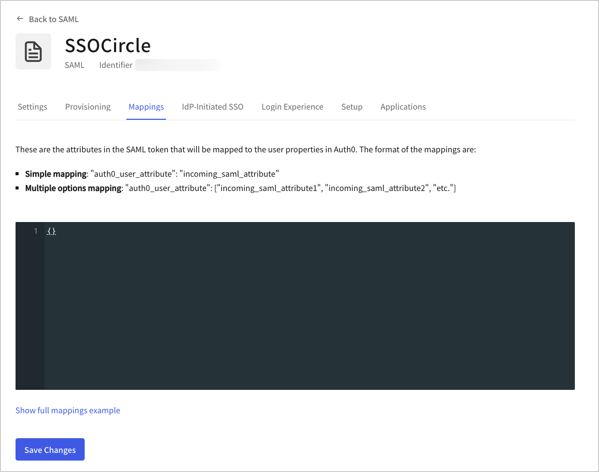 **Mappings for non-standard PingFederate Servers:**
```json lines theme={null}
{
"user_id": "http://schemas.xmlsoap.org/ws/2005/05/identity/claims/nameidentifier",
"email": "http://schemas.xmlsoap.org/ws/2005/05/identity/claims/nameidentifier"
}
```
**Mappings for SSO Circle**
```json lines theme={null}
{
"email": "EmailAddress",
"given_name": "FirstName",
"family_name": "LastName"
}
```
**Map either of two claims to one user attribute**
```json lines theme={null}
{
"given_name": [
"http://schemas.xmlsoap.org/ws/2005/05/identity/claims/givenname",
"http://schemas.xmlsoap.org/ws/2005/05/identity/claims/name"
]
}
```
**How to map name identifier to a user attribute**
```json lines theme={null}
{
"user_id": [
"http://schemas.xmlsoap.org/ws/2005/05/identity/claims/nameidentifier",
"http://schemas.xmlsoap.org/ws/2005/05/identity/claims/upn",
"http://schemas.xmlsoap.org/ws/2005/05/identity/claims/name"
]
}
```
## Test the connection
Now you're ready to [test your connection](/docs/authenticate/identity-providers/enterprise-identity-providers/test-enterprise-connections).
## Configure Global Token Revocation
This connection type supports a Global Token Revocation endpoint, which allows a compliant identity provider to revoke Auth0 user sessions, revoke refresh tokens, and trigger back-channel logout for applications using a secure back-channel.
This feature can be used with Universal Logout in Okta Workforce Identity.
For more information and configuration instructions, see [Universal Logout](/docs/authenticate/login/logout/universal-logout).
## Learn more
* [Universal Logout](/docs/authenticate/login/logout/universal-logout)
**Mappings for non-standard PingFederate Servers:**
```json lines theme={null}
{
"user_id": "http://schemas.xmlsoap.org/ws/2005/05/identity/claims/nameidentifier",
"email": "http://schemas.xmlsoap.org/ws/2005/05/identity/claims/nameidentifier"
}
```
**Mappings for SSO Circle**
```json lines theme={null}
{
"email": "EmailAddress",
"given_name": "FirstName",
"family_name": "LastName"
}
```
**Map either of two claims to one user attribute**
```json lines theme={null}
{
"given_name": [
"http://schemas.xmlsoap.org/ws/2005/05/identity/claims/givenname",
"http://schemas.xmlsoap.org/ws/2005/05/identity/claims/name"
]
}
```
**How to map name identifier to a user attribute**
```json lines theme={null}
{
"user_id": [
"http://schemas.xmlsoap.org/ws/2005/05/identity/claims/nameidentifier",
"http://schemas.xmlsoap.org/ws/2005/05/identity/claims/upn",
"http://schemas.xmlsoap.org/ws/2005/05/identity/claims/name"
]
}
```
## Test the connection
Now you're ready to [test your connection](/docs/authenticate/identity-providers/enterprise-identity-providers/test-enterprise-connections).
## Configure Global Token Revocation
This connection type supports a Global Token Revocation endpoint, which allows a compliant identity provider to revoke Auth0 user sessions, revoke refresh tokens, and trigger back-channel logout for applications using a secure back-channel.
This feature can be used with Universal Logout in Okta Workforce Identity.
For more information and configuration instructions, see [Universal Logout](/docs/authenticate/login/logout/universal-logout).
## Learn more
* [Universal Logout](/docs/authenticate/login/logout/universal-logout)