> ## Documentation Index
> Fetch the complete documentation index at: https://auth0.com/llms.txt
> Use this file to discover all available pages before exploring further.
> Learn how to log user out with the OIDC Logout Endpoint.
# Log Users Out of Auth0 with OIDC Endpoint
export const AuthCodeGroup = ({children, dropdown}) => {
const [processedChildren, setProcessedChildren] = useState(children);
useEffect(() => {
let unsubscribe = null;
function init() {
unsubscribe = window.autorun(() => {
const processChildren = node => {
if (typeof node === "string") {
let processedNode = node;
for (const [key, value] of window.rootStore.variableStore.values.entries()) {
const escapedKey = key.replaceAll(/[.*+?^${}()|[\]\\]/g, (String.raw)`\$&`);
processedNode = processedNode.replaceAll(new RegExp(escapedKey, "g"), value);
}
return processedNode;
} else if (Array.isArray(node)) {
return node.map(processChildren);
} else if (node && node.props && node.props.children) {
return {
...node,
props: {
...node.props,
children: processChildren(node.props.children)
}
};
}
return node;
};
setProcessedChildren(processChildren(children));
});
}
if (window.rootStore) {
init();
} else {
window.addEventListener("adu:storeReady", init);
}
return () => {
window.removeEventListener("adu:storeReady", init);
unsubscribe?.();
};
}, [children]);
return {processedChildren};
};
export const AuthCodeBlock = ({filename, icon, language, highlight, children}) => {
const [displayText, setDisplayText] = useState(children);
const [copyText, setCopyText] = useState(children);
const wrapperRef = React.useRef(null);
useEffect(() => {
let unsubscribe = null;
function init() {
if (!window.autorun || !window.rootStore) {
return;
}
unsubscribe = window.autorun(() => {
let processedChildrenForDisplay = children;
let processedChildrenForCopy = children;
for (const [key, value] of window.rootStore.variableStore.values.entries()) {
const escapedKey = key.replaceAll(/[.*+?^${}()|[\]\\]/g, (String.raw)`\$&`);
let displayValue = value;
if (key === "{yourClientSecret}" && value !== "{yourClientSecret}") {
displayValue = value.substring(0, 3) + "*****MASKED*****";
}
processedChildrenForDisplay = processedChildrenForDisplay.replaceAll(new RegExp(escapedKey, "g"), displayValue);
processedChildrenForCopy = processedChildrenForCopy.replaceAll(new RegExp(escapedKey, "g"), value);
}
setDisplayText(processedChildrenForDisplay);
setCopyText(processedChildrenForCopy);
});
}
if (window.rootStore) {
init();
} else {
window.addEventListener("adu:storeReady", init);
}
return () => {
window.removeEventListener("adu:storeReady", init);
unsubscribe?.();
};
}, [children]);
useEffect(() => {
if (!wrapperRef.current) return;
const originalWriteText = navigator.clipboard.writeText.bind(navigator.clipboard);
let isOverriding = false;
const handleClick = e => {
const button = e.target.closest('[data-testid="copy-code-button"]');
if (!button || !wrapperRef.current.contains(button)) return;
isOverriding = true;
navigator.clipboard.writeText = text => {
if (isOverriding) {
isOverriding = false;
navigator.clipboard.writeText = originalWriteText;
return originalWriteText(copyText);
}
return originalWriteText(text);
};
setTimeout(() => {
if (isOverriding) {
isOverriding = false;
navigator.clipboard.writeText = originalWriteText;
}
}, 100);
};
const wrapper = wrapperRef.current;
wrapper.addEventListener('click', handleClick, true);
return () => {
wrapper.removeEventListener('click', handleClick, true);
if (navigator.clipboard.writeText !== originalWriteText) {
navigator.clipboard.writeText = originalWriteText;
}
};
}, [copyText]);
return
{displayText}
;
};
export const codeExample3 = `https://{yourDomain}/oidc/logout?{clientId}={yourClientId}&logout_hint={sessionId}`;
export const codeExample4 = `https://{yourDomain}/oidc/logout?post_logout_redirect_uri=http%3A%2F%2Fwww.example.com`;
export const codeExample5 = `PATCH https://{yourDomain}/api/v2/clients/{clientId}
Authorization: Bearer {yourMgmtApiAccessToken}
Content-Type: application/json
{
"allowed_logout_urls": [
"https://www.example.com",
"https://www.example.com/logout"
]
}
`;
export const codeExample6 = `PATCH https://{yourDomain}/api/v2/tenants/settings
Authorization: Bearer {yourMgmtApiAccessToken}
Content-Type: application/json
{
"allowed_logout_urls": [
"https://www.example.com",
"https://www.example.com/logout"
]
}
`;
Auth0 implements OpenID Connect’s [RP-Initiated Logout 1.0](https://openid.net/specs/openid-connect-rpinitiated-1_0.html) for end-user logout. This standard is part of the OpenID Connect collection of [final specifications](https://openid.net/developers/specs/).
## How it works
RP-Initiated Logout is a scenario in which a relying party (user) requests the OpenID provider (Auth0) to log them out.
1. The user initiates a logout request in your application.
2. Your application directs the user to the Auth0 Authentication API [OIDC Logout](https://auth0.com/docs/api/authentication#oidc-logout) endpoint.
3. Auth0 redirects the user to the appropriate destination based on the provided [OIDC Logout endpoint parameters](#oidc-logout-endpoint-parameters).
## Configure RP-Initiated Logout
To configure RP-Initiated Logout, you must ensure that your application can find the `end_session_endpoint` parameter in your Auth0 tenant’s [discovery metadata document](https://openid.net/specs/openid-connect-discovery-1_0.html#ProviderConfig), and that it calls the OIDC Logout endpoint with the necessary parameters.
### Enable endpoint discovery
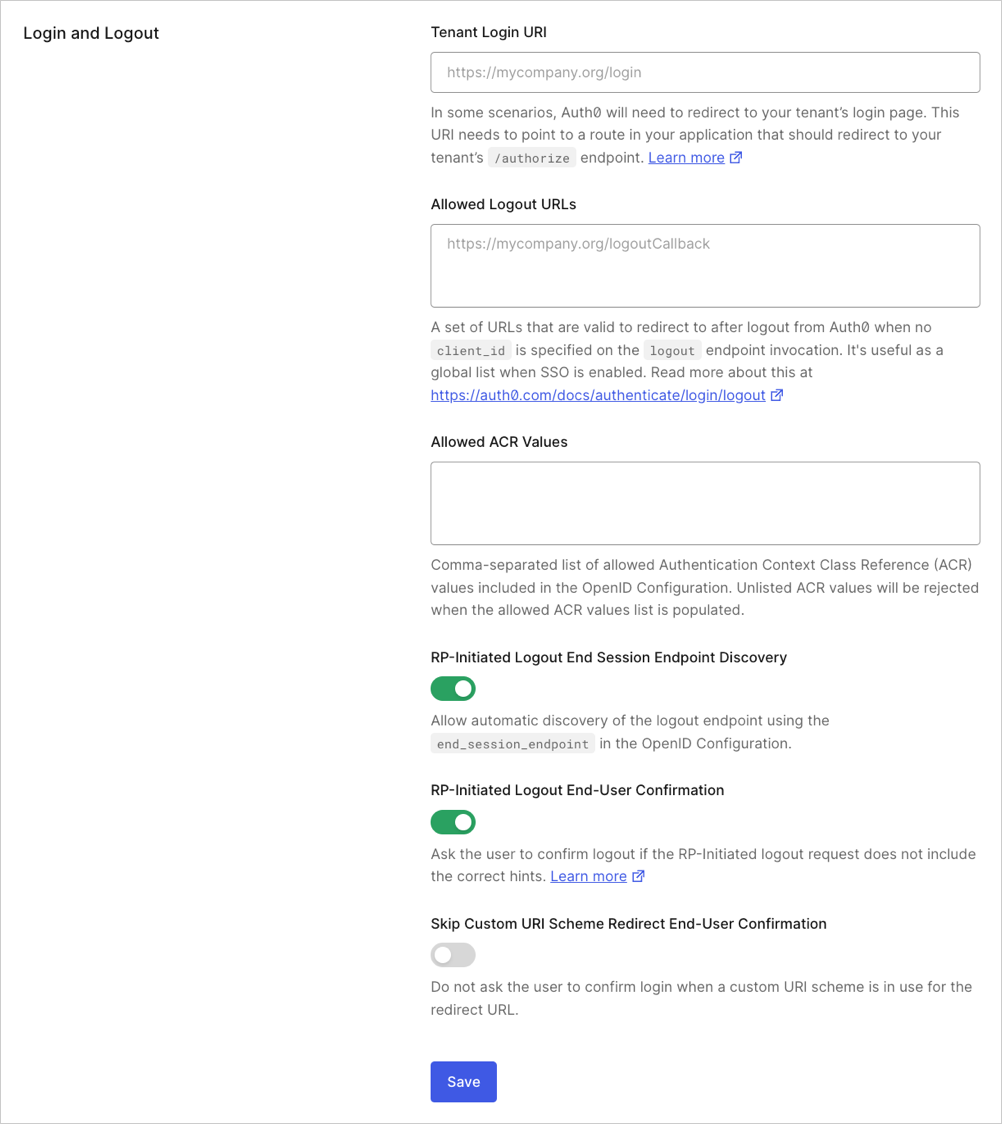
For Auth0 tenants created on or after 14 November 2023, **RP-Initiated Logout End Session Endpoint Discovery** is enabled by default.
You can enable **RP-Initiated Logout End Session Endpoint Discovery** in the Auth0 Dashboard or with the Auth0 Management API.
To enable **RP-Initiated Logout End Session Endpoint Discovery** in the Dashboard:
1. Go to [Dashboard > Settings > Advanced](https://manage.auth0.com/#/tenant/advanced).
2. Locate the **Login and Logout** section.
3. Enable the **RP-Initiated Logout End Session Endpoint Discovery** toggle.
To enable **RP-Initiated Logout End Session Endpoint Discovery** with the Management API:
1. [Get a Management API access token](/docs/secure/tokens/access-tokens/management-api-access-tokens/get-management-api-access-tokens-for-production) that includes the `update:tenant_settings` scope.
2. Call the Management API [Update tenant settings](https://auth0.com/docs/api/management/v2/tenants/patch-settings) endpoint with the following payload:
```json JSON lines theme={null}
{
"oidc_logout": {
"rp_logout_end_session_endpoint_discovery": true
}
}
```
### Call the OIDC Logout endpoint
Most of Auth0’s [SDK libraries](/docs/libraries) are OIDC-compliant and support RP-Initiated Logout by design.
When you call the OIDC Logout endpoint, Auth0 recommends that you provide the `id_token_hint` parameter.
If your application cannot securely store ID tokens, you may provide the `logout_hint` and `client_id` parameters instead.
You may call the OIDC Logout endpoint with redundant information.
For example, you may send the `id_token_hint` and `logout_hint` parameters, or the `id_token_hint` and `client_id` parameters.
In all cases, Auth0 checks for consistent user and session data, and returns an error if there are any discrepancies.
#### OIDC Logout endpoint parameters
The Authentication API [OIDC Logout](https://auth0.com/docs/api/authentication#oidc-logout) endpoint supports the following parameters:
| Parameter | Required? | Description |
| -------------------------- | ----------- | --------------------------------------------------------------------------------------------------------------------------------------------------------------- |
| `id_token_hint` | Recommended | ID token previously issued for the user. That indicates which user to log out. |
| `logout_hint` | Optional | Session ID (`sid`) value that indicates which user to log out. |
| `post_logout_redirect_uri` | Optional | Redirect URL value that indicates where to redirect the user after logout. |
| `client_id` | Optional | Client ID of your application. |
| `federated` | Optional | Directs Auth0 to log the user out of their identity provider. |
| `state` | Optional | Opaque value that the application adds to the initial logout request, and that Auth0 includes when redirecting the back to the `post_logout_redirect_uri`. |
| `ui_locales` | Optional | Space-delimited list of locales used to constrain the language list for the request. The first locale on the list must match the enabled locale in your tenant. |
#### id\_token\_hint parameter
Auth0 recommends that you use the `id_token_hint` parameter when you call the OIDC Logout endpoint.
The value of the `id_token_hint` parameter must be the ID token that Auth0 issued to the user after they authenticated.
The ID token contains the registered claims issuer (`iss`), audience (`aud`), and the Auth0 session ID (`sid`) for verification. To learn more about ID token claims, read [ID Token Structure](/docs/secure/tokens/id-tokens/id-token-structure).
##### Examples
```http HTTP theme={null}
https://{yourDomain}/oidc/logout?id_token_hint={yourIdToken}&post_logout_redirect_uri={yourCallbackUrl}
```
```bash cURL theme={null}
curl --request GET \
--url 'https://{yourDomain}/oidc/logout' \
--header 'content-type: application/x-www-form-urlencoded' \
--data 'id_token_hint={yourIdToken}' \
--data 'post_logout_redirect_uri={yourCallbackUrl}'
```
#### logout\_hint parameter
The value of the `logout_hint` parameter must be the session ID (`sid`) of the user’s current Auth0 session.
The session ID (`sid`) is provided as a registered claim within the ID token that Auth0 issued to the user after they authenticated.
You must use the session ID (`sid`) associated with the ID token issued by Auth0 at the time the current session began. Auth0 disregards requests with values that are random or do not reflect current session data.
##### Example
#### post\_logout\_redirect\_uri parameter
The value of the `post_logout_redirect_uri` parameter must be a valid, encoded URL that has been registered in the list of **Allowed Logout URLs** in your:
1. [Application settings](/docs/get-started/applications/application-settings#application-uris): If you provide the `id_token_hint` parameter, or the `logout_hint` and `client_id` parameters.
2. [Tenant settings](/docs/get-started/tenant-settings#login-and-logout): If you provide only the `logout_hint` parameter.
##### Example
##### Update application Allowed Logout URLs
You can register a URL with your application’s list of **Allowed Logout URLs** in the Auth0 Dashboard or with the Auth0 Management API.
To register a URL with your application’s list of **Allowed Logout URLs** in the Dashboard:
1. Go to [Dashboard > Applications > Applications](https://manage.auth0.com/#/applications).
2. Select your application.
3. Locate the **Application URIs** section.
4. Update **Allowed Logout URLs** following the [provided guidelines](#allowed-logout-urls-guidelines).
When you call the Management API [Update a client](https://auth0.com/docs/api/management/v2/clients/patch-clients-by-id) endpoint, it overwrites all existing configuration data for the fields provided in the request body.
To avoid accidental loss of data, call the Management API [Get a client](https://auth0.com/docs/api/management/v2/clients/get-clients-by-id) endpoint first to retrieve your application’s current configuration data.
To register a URL with your application’s list of **Allowed Logout URLs** with the Management API:
1. [Get a Management API access token](/docs/secure/tokens/access-tokens/management-api-access-tokens/get-management-api-access-tokens-for-production) that includes the `update:clients` scopes.
2. Call the Management API [Update a client](https://auth0.com/docs/api/management/v2/clients/patch-clients-by-id) endpoint, and ensure that you include the URL in the value of the `allowed_logout_urls` field within the request body.
##### Update tenant Allowed Logout URLs
You can register a URL with your tenant’s list of **Allowed Logout URLs** in the Auth0 Dashboard or with the Auth0 Management API.
To register a URL with your tenant’s list of **Allowed Logout URLs** in the Dashboard:
1. Go to [Dashboard > Settings > Advanced](https://manage.auth0.com/#/tenant/advanced).
2. Locate the **Login and Logout** section.
3. Update **Allowed Logout URLs** following the [provided guidelines](#allowed-logout-urls-guidelines).
When you call the Management API [Update tenant settings](https://auth0.com/docs/api/management/v2/tenants/patch-settings) endpoint, it overwrites all existing configuration data for the fields provided in the request body.
To avoid accidental loss of data, call the Management API [Get tenant settings](https://auth0.com/docs/api/management/v2/tenants/tenant-settings-route) endpoint to retrieve your tenant’s current configuration data first.
To register a URL with your tenant’s list of **Allowed Logout URLs** with the Management API:
1. [Get a Management API access token](/docs/secure/tokens/access-tokens/management-api-access-tokens/get-management-api-access-tokens-for-production) that includes the `update:tenant_settings` scopes.
2. Call the Management API [Update tenant settings](https://auth0.com/docs/api/management/v2/tenants/patch-settings) endpoint, and ensure that you include the URL in the value of the `allowed_logout_urls` field within the request body.
##### Allowed Logout URLs guidelines
When you update **Allowed Logout URLs**, follow the guidelines below to avoid validation errors:
* Separate multiple URL values with a comma (`,`).
* Include the URL scheme part (for example, `https://`).
You may use an asterisk (`*`) as a wildcard for subdomains (such as `https://*.example.com`), but we recommend that you do not use wildcards in production environments. For more information, read [Subdomain URL Placeholders](/docs/get-started/applications/wildcards-for-subdomains#wildcard-url-placeholders).
##### Add query string parameters to post\_logout\_redirect\_uri
The OIDC Logout endpoint parses query string parameters in the URL provided to the `post_logout_redirect_uri` parameter.
You must include the **exact URL with query string parameters** in your **Allowed Logout URLs**, or the logout request will be denied. The URL must match exactly, including all query parameter names and values.
For example, if you pass `https://example.com/logout?myParam=1234` to the `post_logout_redirect_uri` parameter (encoded as `https%3A%2F%2Fexample.com%2Flogout%3FmyParam%3D1234`), you must include the complete URL `https://example.com/logout?myParam=1234` in your **Allowed Logout URLs**.
Dynamic query parameter values are not supported. Each unique combination of query parameter names and values must be registered as a separate entry in your **Allowed Logout URLs**.
#### ui\_locales parameter
The value of the `ui_locales` parameter must be a space-delimited list of [supported locales](/docs/customize/internationalization-and-localization/universal-login-internationalization#new-universal-login-experience-localization).
The first value provided in the list must match your [tenant’s Default Language setting](/docs/get-started/tenant-settings#languages).
#### federated parameter
The `federated` parameter does not require a value.
If you include the `federated` parameter when you call the OIDC Logout endpoint, Auth0 attempts to [log the user out of their identity provider](/docs/authenticate/login/logout/log-users-out-of-idps).
## Logout consent prompt
The OIDC standard defines that the logout flow should be interrupted to prompt the user for consent if the OpenID provider cannot verify that the request was made by the user.
Auth0 enforces this behavior by displaying a logout consent prompt if it detects any of the following conditions:
* Neither the `id_token_hint` nor `logout_hint` parameters are provided.
* The ID token's `sid` claim does not correspond to the browser session in the request.
* The value of the `logout_hint` parameter does not match current session data.
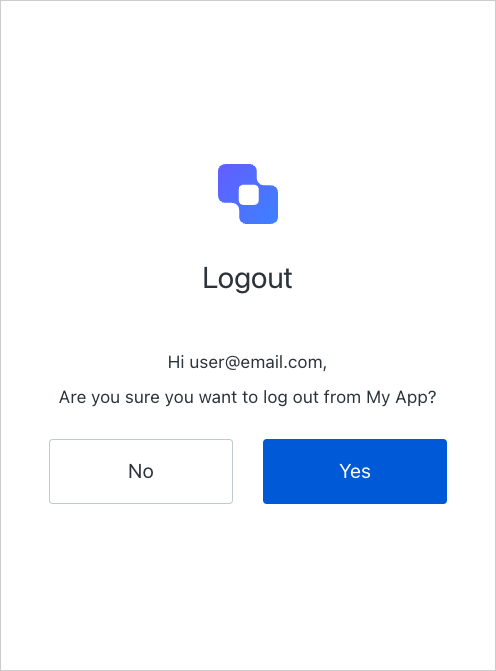 If the user confirms the logout request, Auth0 continues the logout flow.
### Disable the logout consent prompt
You may disable the logout consent prompt. If you do, Auth0 does not attempt to detect anomalous behavior and accepts logout requests automatically.
To disable the logout consent prompt in the Dashboard:
1. Go to [Dashboard > Settings > Advanced](https://manage.auth0.com/#/tenant/advanced).
2. Disable the **Show RP-Initiated Logout End-User Confirmation** toggle.
If the user confirms the logout request, Auth0 continues the logout flow.
### Disable the logout consent prompt
You may disable the logout consent prompt. If you do, Auth0 does not attempt to detect anomalous behavior and accepts logout requests automatically.
To disable the logout consent prompt in the Dashboard:
1. Go to [Dashboard > Settings > Advanced](https://manage.auth0.com/#/tenant/advanced).
2. Disable the **Show RP-Initiated Logout End-User Confirmation** toggle.
 ## Learn more
* [Log Users Out of Applications](/docs/authenticate/login/logout/log-users-out-of-applications)
* [Log Users Out of Identity Providers](/docs/authenticate/login/logout/log-users-out-of-idps)
* [Log Users Out of SAML Identity Providers](/docs/authenticate/login/logout/log-users-out-of-saml-idps)
* [Redirect Users with Alternative Logout](/docs/authenticate/login/logout/redirect-users-after-logout)
## Learn more
* [Log Users Out of Applications](/docs/authenticate/login/logout/log-users-out-of-applications)
* [Log Users Out of Identity Providers](/docs/authenticate/login/logout/log-users-out-of-idps)
* [Log Users Out of SAML Identity Providers](/docs/authenticate/login/logout/log-users-out-of-saml-idps)
* [Redirect Users with Alternative Logout](/docs/authenticate/login/logout/redirect-users-after-logout)