> ## Documentation Index
> Fetch the complete documentation index at: https://auth0.com/llms.txt
> Use this file to discover all available pages before exploring further.

# Universal Portals Quickstart

> Learn how to set up your first Universal Portal using the Auth0 CLI or the Dashboard.

export const id_0 = undefined

export const ReleaseStageNotice = ({feature, stage, plans, contact, terms}) => {
  const stageTextMap = {
    "beta": "Beta",
    "ea": "Early Access"
  };
  const stageText = stageTextMap[stage] || "a product release stage";
  const prsLink = "/docs/troubleshoot/product-lifecycle/product-release-stages";
  const linkify = (text, url) => {
    return <a href={url} target="_blank" rel="noreferrer" class="link">{text}</a>;
  };
  const includeDetails = (plans, contact, terms) => {
    const hasDetails = terms || plans || contact;
    if (!hasDetails) return null;
    return <span data-as="p">
            {plans && <>This feature is available for {linkify(`${plans} plans`, "https://auth0.com/pricing")}. </>}
            {contact && "To participate, contact " + contact + ". "}
            {terms && <>By using this feature, you agree to the applicable Free Trial terms in Okta's {linkify("Master Subscription Agreement", "https://www.okta.com/legal")}.</>}
        </span>;
  };
  return <Warning>
            <span data-as="p">
                <strong>The {feature} feature is in {linkify(stageText, prsLink)}.</strong>
            </span>

            {includeDetails(plans, contact, terms)}
        </Warning>;
};

<ReleaseStageNotice feature="Auth0 Universal Portals" stage="beta" terms="true" contact="Auth0 Support" />

You can create a Universal Portal using the [Auth0 CLI](/docs/deploy-monitor/auth0-cli#auth0-cli) or the [Dashboard](/docs/get-started/auth0-overview/dashboard#auth0-dashboard).

* The Auth0 CLI will provision and configure an application and a portal using a single command.
* The Dashboard includes step by step instructions to build an application and a portal.

<Accordion title="AI Skill" defaultOpen="false" icon="microchip-ai" iconType="sharp-solid">
  **Using AI to build a Universal Portal?** Add this Skill to Cursor, Windsurf, Copilot, Claude Code or your favorite AI-powered IDE to speed up development.

  # Auth0 Universal Portals — API reference

  > **Beta**: Universal Portals is currently in beta. Non-production tenants only.

  Auth0 Universal Portals is a hosted identity experience platform. It lets you deploy pre-built, fully managed portals for profile management, organization settings, MFA enrollment, and more — without writing code, hosting infrastructure, or maintaining custom UI.

  ## Use cases

  * **Consumer portals (B2C)** — give end-users self-service access to their account: profile, MFA enrollment, passkeys, password changes, and security settings. Replaces the "My Account" page every application builds from scratch.
  * **Business portals (B2B)** — give organization members self-service control over their organization's configuration, domain verification, and team management. Replaces the "My Organization" page every B2B application builds from scratch.

  ## How a portal works

  Every portal is backed by a Regular Web App in your Auth0 tenant (`client_id` + `client_secret`). The portal server authenticates users via SSO, stores tokens server-side, and issues session cookies to the browser. Access tokens are scoped per-section and refreshed transparently using a multi-resource refresh token.

  ## Prerequisites

  * Non-production tenant with Universal Portals enabled (contact Auth0 Support to request access)
  * A Regular Web App configured with the correct callback/logout URLs, grant types, and API access (My Account API, My Organization API, Management API)

  The fastest way to provision everything is the Auth0 Beta CLI setup command:

  ```bash theme={null}
  auth0-beta universal-portals setup
  # alias: auth0-beta up setup
  ```

  This creates the resource servers, app, client grants, and a default portal in one step.

  ## How to call the API

  Regardless of how you call the API, the following Management API scopes must be **pre-authorized** on the application before requesting a token. With `client_credentials`, scopes are granted at the application level in the Auth0 Dashboard (Application → API Access → Auth0 Management API) — they are not requested at token request time.

  | Scope            | Description    |
  | ---------------- | -------------- |
  | `create:portals` | Create portals |
  | `read:portals`   | Read portals   |
  | `update:portals` | Update portals |
  | `delete:portals` | Delete portals |

  ### Option 1: Management API directly

  All endpoints live under the Auth0 Management API v2: [https://auth0.com/docs/api/management/v2](https://auth0.com/docs/api/management/v2)

  ```bash theme={null}
  curl -X POST https://{domain}/api/v2/portals \
    -H "Authorization: Bearer {token}" \
    -H "Content-Type: application/json" \
    -d '{...}'
  ```

  ### Option 2: Auth0 CLI (`auth0 api`)

  If the Auth0 CLI is already authenticated, use `auth0 api` to call the same endpoints without managing tokens manually. Docs: [https://auth0.github.io/auth0-cli/auth0\_api.html](https://auth0.github.io/auth0-cli/auth0_api.html)

  ```bash theme={null}
  auth0 api post   /api/v2/portals        --data '{...}'
  auth0 api get    /api/v2/portals
  auth0 api get    /api/v2/portals/{id}
  auth0 api patch  /api/v2/portals/{id}   --data '{...}'
  auth0 api delete /api/v2/portals/{id}
  ```

  Prefer the CLI when available — it reuses the active login session.

  ## Endpoints

  | Method | Path                   | Scope            | Success code | Notes                                              |
  | ------ | ---------------------- | ---------------- | ------------ | -------------------------------------------------- |
  | POST   | `/api/v2/portals`      | `create:portals` | 201          | Returns full Portal object                         |
  | GET    | `/api/v2/portals`      | `read:portals`   | 200          | Returns array of PortalSummary. Hard-capped at 50. |
  | GET    | `/api/v2/portals/{id}` | `read:portals`   | 200          | Returns full Portal object                         |
  | PATCH  | `/api/v2/portals/{id}` | `update:portals` | 200          | Returns full Portal object                         |
  | DELETE | `/api/v2/portals/{id}` | `delete:portals` | 204          | No response body                                   |

  **PortalSummary** (returned by list): `id`, `name`, `slug`, `created_at`, `updated_at`

  **Portal** (returned by get/create/update): same as PortalSummary plus `client` (without `client_secret`), `navigation`, `pages`

  ## POST /api/v2/portals — request body

  Required: `slug`, `name`, `client`. Optional: `navigation`, `pages`.

  ```json theme={null}
  {
    "slug": "my-account",
    "name": "My Account",
    "client": {
      "token_endpoint_auth_method": "client_secret_post",
      "client_id": "<CLIENT_ID>",
      "client_secret": "<CLIENT_SECRET>"
    },
    "navigation": { ... },
    "pages": { ... }
  }
  ```

  ### `slug`

  String with format `portal-slug` (URL-safe, kebab-case). Must be unique per tenant — duplicate returns **409 Conflict**.

  ### `name`

  String, 1–150 chars.

  ### `client`

  Currently only `client_secret_post` is supported. All three fields are required:

  | Field                        | Type                           | Notes                                        |
  | ---------------------------- | ------------------------------ | -------------------------------------------- |
  | `token_endpoint_auth_method` | `"client_secret_post"` (const) |                                              |
  | `client_id`                  | string (format: `client-id`)   |                                              |
  | `client_secret`              | string, 1–256 chars            | **Write-only** — never returned in responses |

  ### `navigation` (optional)

  ```json theme={null}
  {
    "sidebar": {
      "components": [ ...SidebarComponent ]
    }
  }
  ```

  ### `pages` (optional)

  ```json theme={null}
  {
    "default": "<page-slug>",
    "content": [ ...PortalPage ]
  }
  ```

  Both `default` and `content` are optional. A portal with no pages is valid.

  **PortalPage**:

  ```json theme={null}
  {
    "title": "Profile",
    "slug": "profile",
    "components": [ ...PageComponent ]
  }
  ```

  `title` (1–150) and `slug` are required. `components` is optional.

  ## PATCH /api/v2/portals/{id_0} — request body

  All fields are optional (true PATCH semantics). Only include the fields you want to change.

  ```json theme={null}
  {
    "name": "Updated Name",
    "navigation": null,
    "pages": null
  }
  ```

  * **Omitting** `navigation` or `pages` leaves them unchanged.
  * **Sending `null`** for `navigation` or `pages` **clears the field entirely**.

  ## Sidebar component types

  | `type`                                  | Config required? | Required config fields | Optional config fields         |
  | --------------------------------------- | ---------------- | ---------------------- | ------------------------------ |
  | `sidebar:component:auth0:internal_link` | yes              | `label` (1–50)         | `to` (page slug, 1–50), `icon` |
  | `sidebar:component:auth0:external_link` | yes              | `label` (1–50)         | `url` (URL, 1–200), `icon`     |

  `icon` accepts any icon name from the Lucide library ([https://lucide.dev/icons/](https://lucide.dev/icons/)) in kebab-case, e.g. `user`, `shield`, `file-text`, `building-2`, `lock-keyhole`.

  ## Page component types

  | `type`                                               | Config required? | Required config fields                                     | Optional config fields                                     |
  | ---------------------------------------------------- | ---------------- | ---------------------------------------------------------- | ---------------------------------------------------------- |
  | `page:component:auth0:form`                          | yes              | `form_id` (1–50), `completion_message` (1–200)             | —                                                          |
  | `page:component:auth0:typography:heading`            | yes              | `title` (1–50)                                             | `description` (1–200, supports `<a>`, `<b>`, `<i>`, `<u>`) |
  | `page:component:auth0:typography:rich_text`          | yes              | `content` (1–10000, HTML)                                  | —                                                          |
  | `page:component:auth0:structure:section`             | yes              | `variant` (`"card"` or `"none"`), `children` (array, 0–20) | `title` (1–50), `description` (1–200)                      |
  | `page:component:auth0:structure:separator`           | no               | —                                                          | `variant` (`"dashed"`, `"none"`, `"solid"`), `text` (1–50) |
  | `page:component:auth0:my_account:passkey_management` | no               | —                                                          | —                                                          |
  | `page:component:auth0:my_account:mfa_management`     | no               | —                                                          | —                                                          |
  | `page:component:auth0:my_organization:details_edit`  | no               | —                                                          | —                                                          |
  | `page:component:auth0:my_organization:domain_table`  | no               | —                                                          | —                                                          |

  ### Nesting rule

  `structure:section` `children` accept any page component **except another `structure:section`**. Sections cannot be nested — max 1 level deep.

  ### `form_id`

  Must reference a pre-existing Auth0 Forms resource in the tenant. The form renders inline inside the section. Use Auth0 Forms to collect profile updates, policy acceptance, and marketing communication preferences.

  ### `rich_text` HTML support

  Supports headings, `<b>`, `<i>`, `<u>`, `<a>`, text alignment, and lists. Use `<em>` for italic in placeholder text.

  ## Complete example

  A realistic "My Account" consumer portal with four pages. Use this as a reference when composing a portal from scratch.

  ```json theme={null}
  {
    "slug": "my-account",
    "name": "My Account",
    "client": {
      "token_endpoint_auth_method": "client_secret_post",
      "client_id": "<CLIENT_ID>",
      "client_secret": "<CLIENT_SECRET>"
    },
    "navigation": {
      "sidebar": {
        "components": [
          {
            "type": "sidebar:component:auth0:internal_link",
            "config": {
              "label": "Profile",
              "to": "profile",
              "icon": "user"
            }
          },
          {
            "type": "sidebar:component:auth0:internal_link",
            "config": {
              "label": "Security",
              "to": "security",
              "icon": "shield"
            }
          },
          {
            "type": "sidebar:component:auth0:internal_link",
            "config": {
              "label": "Organization",
              "to": "organization",
              "icon": "building"
            }
          },
          {
            "type": "sidebar:component:auth0:internal_link",
            "config": {
              "label": "Legal & privacy",
              "to": "legal-privacy",
              "icon": "file-text"
            }
          }
        ]
      }
    },
    "pages": {
      "default": "profile",
      "content": [
        {
          "title": "Profile",
          "slug": "profile",
          "components": [
            {
              "type": "page:component:auth0:structure:section",
              "config": {
                "title": "Personal information",
                "description": "Basic info about you, like your name and contact details, that you use across services.",
                "variant": "card",
                "children": [
                  {
                    "type": "page:component:auth0:form",
                    "config": {
                      "form_id": "<PERSONAL_INFO_FORM_ID>",
                      "completion_message": "Your personal information has been updated."
                    }
                  }
                ]
              }
            },
            {
              "type": "page:component:auth0:structure:section",
              "config": {
                "title": "Passkeys",
                "description": "Use your fingerprint, face, or screen lock instead of a password to sign in quickly and more securely.",
                "variant": "card",
                "children": [
                  {
                    "type": "page:component:auth0:my_account:passkey_management"
                  }
                ]
              }
            }
          ]
        },
        {
          "title": "Security",
          "slug": "security",
          "components": [
            {
              "type": "page:component:auth0:structure:section",
              "config": {
                "title": "Multi-factor authentication",
                "description": "Add an extra layer of protection to your account by requiring a second verification step each time you sign in.",
                "variant": "card",
                "children": [
                  {
                    "type": "page:component:auth0:my_account:mfa_management"
                  }
                ]
              }
            },
            {
              "type": "page:component:auth0:structure:section",
              "config": {
                "title": "Sessions & devices",
                "description": "Review the devices and sessions that are currently signed in to your account.",
                "variant": "card",
                "children": [
                  {
                    "type": "page:component:auth0:typography:rich_text",
                    "config": {
                      "content": "<p><em>Sessions & devices management coming soon.</em></p>"
                    }
                  }
                ]
              }
            }
          ]
        },
        {
          "title": "Organization",
          "slug": "organization",
          "components": [
            {
              "type": "page:component:auth0:structure:section",
              "config": {
                "title": "Organization details",
                "description": "Update your organization's name and other details visible to its members.",
                "variant": "card",
                "children": [
                  {
                    "type": "page:component:auth0:my_organization:details_edit"
                  }
                ]
              }
            }
          ]
        },
        {
          "title": "Legal & privacy",
          "slug": "legal-privacy",
          "components": [
            {
              "type": "page:component:auth0:structure:section",
              "config": {
                "title": "Privacy & data consent",
                "description": "Control how your personal data is collected and used across our services.",
                "variant": "card",
                "children": [
                  {
                    "type": "page:component:auth0:form",
                    "config": {
                      "form_id": "<PRIVACY_CONSENT_FORM_ID>",
                      "completion_message": "Your privacy preferences have been saved."
                    }
                  }
                ]
              }
            },
            {
              "type": "page:component:auth0:structure:section",
              "config": {
                "title": "Communication preferences",
                "description": "Choose which emails and notifications you'd like to receive from us.",
                "variant": "card",
                "children": [
                  {
                    "type": "page:component:auth0:form",
                    "config": {
                      "form_id": "<COMMUNICATION_PREFERENCES_FORM_ID>",
                      "completion_message": "Your communication preferences have been updated."
                    }
                  }
                ]
              }
            }
          ]
        }
      ]
    }
  }
  ```
</Accordion>

## Prerequisites

* A [Development](/docs/get-started/tenant-settings#environment-tag) Auth0 tenant provisioned with Universal Portals beta access

<Tabs>
  <Tab title="Auth0 CLI">
    ## Step 1: Install the Auth0 CLI Beta

    Follow the [installation instructions](https://github.com/auth0/auth0-cli/#linux-and-macos-1) for your platform, then authenticate with your tenant:

    ```bash theme={null}
    auth0-beta login
    ```

    ## Step 2: Run the setup command

    ```bash theme={null}
    auth0-beta universal-portals setup
    ```

    You can also use the alias `auth0-beta up setup`. The command creates:

    * **My Account API**: resource server for user account operations
    * **My Organization API**: resource server for organization management operations
    * **A Regular Web App**: the application linked to your portal
    * **Three client grants**: scoped access for My Account, My Organization, and Management API operations
    * **A portal**: pre-configured with a default template so you can start testing immediately

    When the command completes, it outputs your portal URL. Open it in the browser to test the portal.
  </Tab>

  <Tab title="Dashboard">
    ## Step 1: Create a Regular Web Application

    1. Navigate to [**Auth0 Dashboard > Applications > Applications**](https://manage.auth0.com/#/applications) and select **Create Application**.
    2. Choose **Regular Web Applications** and give it a name.
    3. Select **Create**.

    ## Step 2: Configure the application

    In the application **Settings** tab:

    1. Set **Allowed Callback URLs** to `https://YOUR_AUTH0_DOMAIN/portals/auth/callback` and **Allowed Logout URLs** to `https://YOUR_AUTH0_DOMAIN/portals/YOUR_PORTAL_SLUG`.

    2. Scroll to **Advanced Settings > Grant Types** and enable:
       * Authorization Code
       * Refresh Token
       * Client Credentials
       * MFA

    3. Select **Save Changes**.

    ## Step 3: Configure API access

    In the application **API Access** tab, enable the following APIs and their scopes:

    **My Account API** (`https://YOUR_AUTH0_DOMAIN/me/`) - User-Delegated Access:

    | **Scope**                          | **Description**               |
    | ---------------------------------- | ----------------------------- |
    | `create:me:authentication_methods` | Enroll authentication methods |
    | `read:me:authentication_methods`   | List authentication methods   |
    | `update:me:authentication_methods` | Update authentication methods |
    | `delete:me:authentication_methods` | Remove authentication methods |
    | `read:me:factors`                  | Read available MFA factors    |

    **My Organization API** (`https://YOUR_AUTH0_DOMAIN/my-org/`) - User-Delegated Access:

    | **Scope**                   | **Description**                 |
    | --------------------------- | ------------------------------- |
    | `read:my_org:configuration` | Read organization configuration |
    | `read:my_org:details`       | Read organization details       |
    | `update:my_org:details`     | Update organization details     |

    **Auth0 Management API** - Client Access:

    | **Scope**            | **Description**                          |
    | -------------------- | ---------------------------------------- |
    | `read:branding`      | Read tenant branding settings and themes |
    | `read:organizations` | Read organization branding settings      |

    Select **Save** after enabling each API.

    ## Step 4: Enable Multi-Resource Refresh Token

    Back in the **Settings** tab, scroll to **Multi-Resource Refresh Token** and enable it for the same user-delegated APIs and scopes configured in Step 3 - My Account API and My Organization API.

    Select **Save Changes**.

    ## Step 5: Create a portal

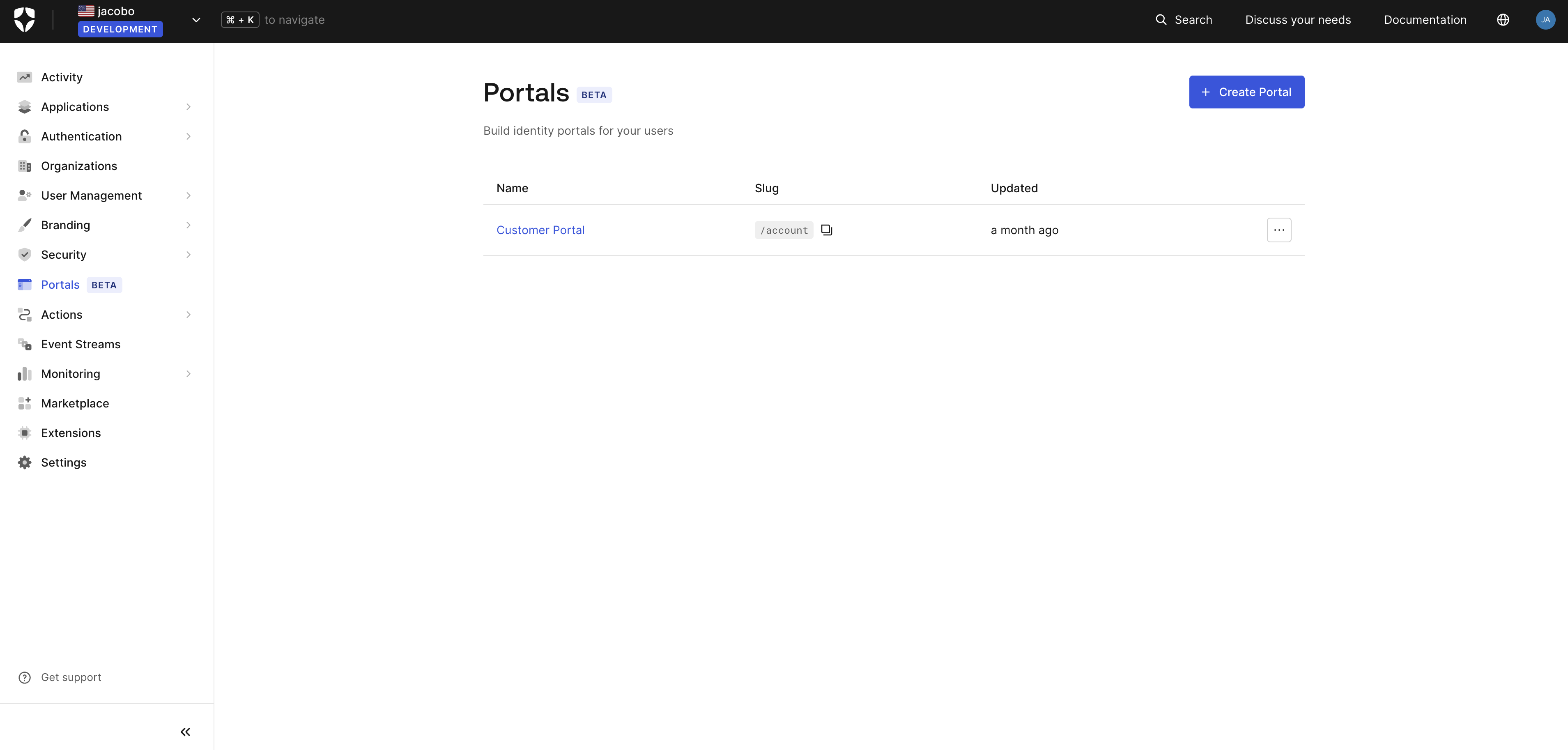
    1. Select **Portals** from the Dashboard sidebar.

    <Frame>
      <img src="https://mintlify.s3.us-west-1.amazonaws.com/auth0/docs/images/customize/portals/portal-list.png" alt="Dashboard Portals section" />
    </Frame>

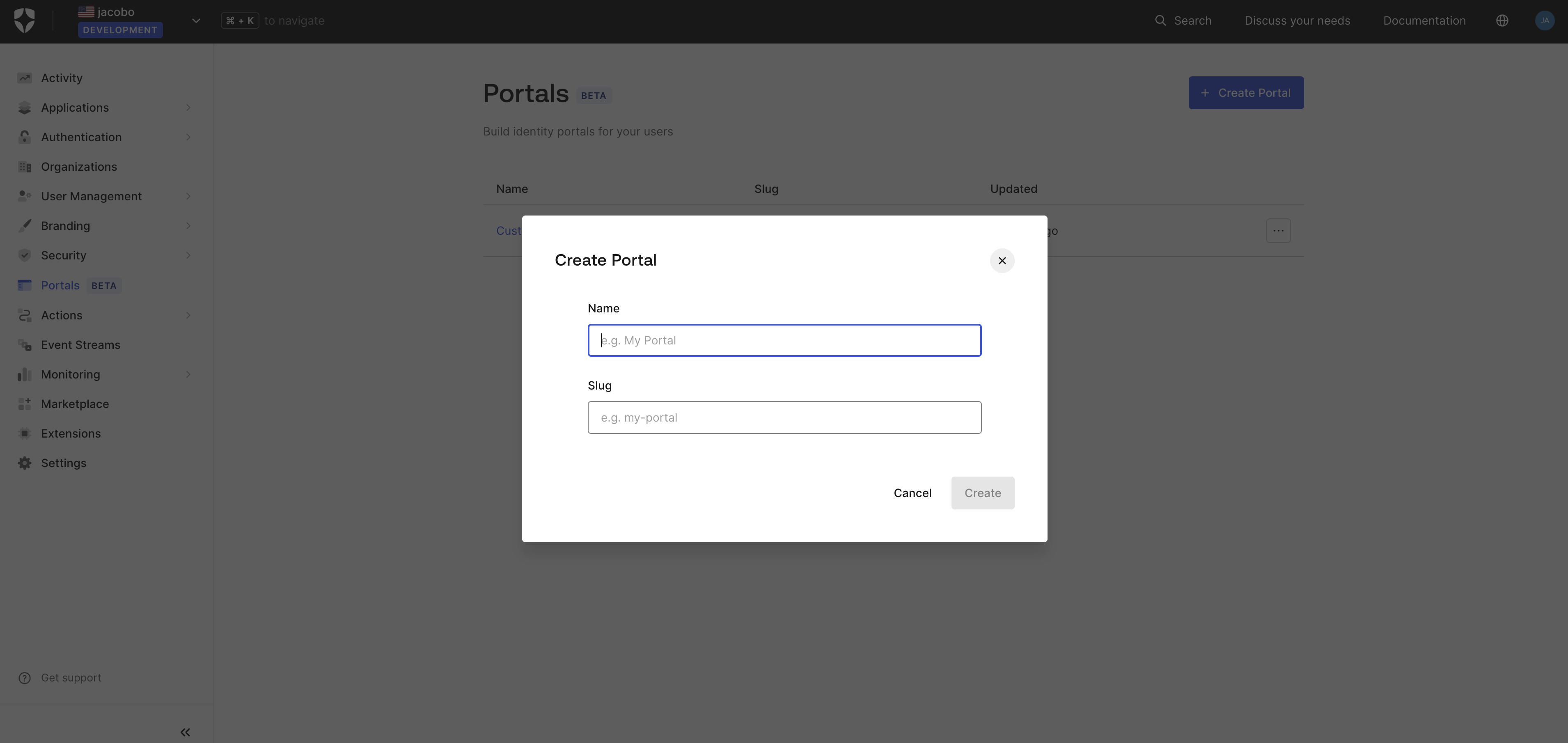
    2. Select **Create Portal**.
    3. Enter a **Name** and a **Slug** for your portal. The slug becomes part of the portal URL.
    <Frame>
      <img src="https://mintlify.s3.us-west-1.amazonaws.com/auth0/docs/images/customize/portals/portal-create.png" alt="Create Portal dialog" />
    </Frame>

    4. Select **Create**.
    5. In the portal settings, link the application you created in Step 1.

    If you have not yet set the callback and logout URLs in Step 2, copy them from the portal settings now and update the application.

    ## Step 6: Build a page

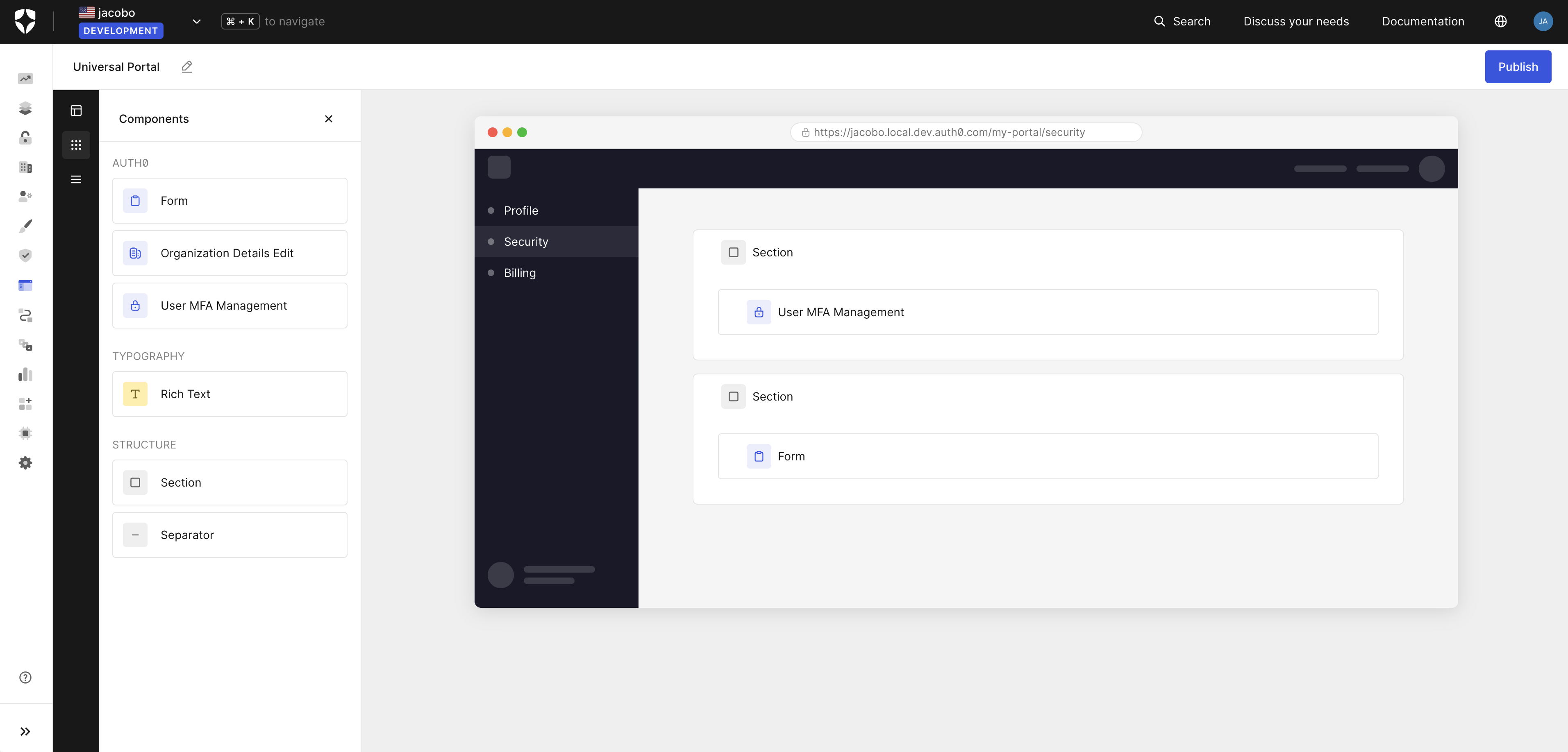
    The visual editor opens after the portal is created. Drag components from the left panel onto the canvas to compose pages.
    <Frame>
      <img src="https://mintlify.s3.us-west-1.amazonaws.com/auth0/docs/images/customize/portals/portal-editor.png" alt="Universal Portals visual editor" />
    </Frame>

    ## Step 7: Preview and publish

    Select **Preview** to open the portal in a new tab. When ready, select **Publish**.
  </Tab>
</Tabs>

## Learn more

<CardGroup cols={3}>
  <Card title="Universal Portals overview" icon="key" href="/docs/customize/portals/overview">
    Learn about Universal Portals, use cases, how it works, and key features.
  </Card>

  <Card title="Universal Components" icon="key" href="/docs/get-started/universal-components/universal-components-overview">
    Learn about Universal Components library used in portals.
  </Card>

  <Card title="Auth0 Forms" icon="key" href="/docs/customize/forms">
    Learn about Forms to collect information from end-users, such as profile updates, policy acceptance, and marketing communication preferences in portals.
  </Card>
</CardGroup>

***

name: universal-portals-api
description: Reference guide for Auth0 Universal Portals — what they are, Management API endpoints, scopes, request/response schemas, component types, and a complete example. Use when creating, reading, updating, or deleting portals via the Management API or Auth0 CLI.
allowed-tools: Read, Grep, Glob
-------------------------------

# Auth0 Universal Portals — API reference

> **Beta**: Universal Portals is currently in beta. Non-production tenants only.

Auth0 Universal Portals is a hosted identity experience platform. It lets you deploy pre-built, fully managed portals for profile management, organization settings, MFA enrollment, and more — without writing code, hosting infrastructure, or maintaining custom UI.

## Use cases

* **Consumer portals (B2C)** — give end-users self-service access to their account: profile, MFA enrollment, passkeys, password changes, and security settings. Replaces the "My Account" page every application builds from scratch.
* **Business portals (B2B)** — give organization members self-service control over their organization's configuration, domain verification, and team management. Replaces the "My Organization" page every B2B application builds from scratch.

## How a portal works

Every portal is backed by a Regular Web App in your Auth0 tenant (`client_id` + `client_secret`). The portal server authenticates users via SSO, stores tokens server-side, and issues session cookies to the browser. Access tokens are scoped per-section and refreshed transparently using a multi-resource refresh token.

## Prerequisites

* Non-production tenant with Universal Portals enabled (contact Auth0 Support to request access)
* A Regular Web App configured with the correct callback/logout URLs, grant types, and API access (My Account API, My Organization API, Management API)

The fastest way to provision everything is the Auth0 Beta CLI setup command:

```bash theme={null}
auth0-beta universal-portals setup
# alias: auth0-beta up setup
```

This creates the resource servers, app, client grants, and a default portal in one step.

## How to call the API

Regardless of how you call the API, the following Management API scopes must be **pre-authorized** on the application before requesting a token. With `client_credentials`, scopes are granted at the application level in the Auth0 Dashboard (Application → API Access → Auth0 Management API) — they are not requested at token request time.

| Scope            | Description    |
| ---------------- | -------------- |
| `create:portals` | Create portals |
| `read:portals`   | Read portals   |
| `update:portals` | Update portals |
| `delete:portals` | Delete portals |

### Option 1: Management API directly

All endpoints live under the Auth0 Management API v2: [https://auth0.com/docs/api/management/v2](https://auth0.com/docs/api/management/v2)

```bash theme={null}
curl -X POST https://{domain}/api/v2/portals \
  -H "Authorization: Bearer {token}" \
  -H "Content-Type: application/json" \
  -d '{...}'
```

### Option 2: Auth0 CLI (`auth0 api`)

If the Auth0 CLI is already authenticated, use `auth0 api` to call the same endpoints without managing tokens manually. Docs: [https://auth0.github.io/auth0-cli/auth0\_api.html](https://auth0.github.io/auth0-cli/auth0_api.html)

```bash theme={null}
auth0 api post   /api/v2/portals        --data '{...}'
auth0 api get    /api/v2/portals
auth0 api get    /api/v2/portals/{id}
auth0 api patch  /api/v2/portals/{id}   --data '{...}'
auth0 api delete /api/v2/portals/{id}
```

Prefer the CLI when available — it reuses the active login session.

## Endpoints

| Method | Path                   | Scope            | Success code | Notes                                              |
| ------ | ---------------------- | ---------------- | ------------ | -------------------------------------------------- |
| POST   | `/api/v2/portals`      | `create:portals` | 201          | Returns full Portal object                         |
| GET    | `/api/v2/portals`      | `read:portals`   | 200          | Returns array of PortalSummary. Hard-capped at 50. |
| GET    | `/api/v2/portals/{id}` | `read:portals`   | 200          | Returns full Portal object                         |
| PATCH  | `/api/v2/portals/{id}` | `update:portals` | 200          | Returns full Portal object                         |
| DELETE | `/api/v2/portals/{id}` | `delete:portals` | 204          | No response body                                   |

**PortalSummary** (returned by list): `id`, `name`, `slug`, `created_at`, `updated_at`

**Portal** (returned by get/create/update): same as PortalSummary plus `client` (without `client_secret`), `navigation`, `pages`

## POST /api/v2/portals — request body

Required: `slug`, `name`, `client`. Optional: `navigation`, `pages`.

```json theme={null}
{
  "slug": "my-account",
  "name": "My Account",
  "client": {
    "token_endpoint_auth_method": "client_secret_post",
    "client_id": "<CLIENT_ID>",
    "client_secret": "<CLIENT_SECRET>"
  },
  "navigation": { ... },
  "pages": { ... }
}
```

### `slug`

String with format `portal-slug` (URL-safe, kebab-case). Must be unique per tenant — duplicate returns **409 Conflict**.

### `name`

String, 1–150 chars.

### `client`

Currently only `client_secret_post` is supported. All three fields are required:

| Field                        | Type                           | Notes                                        |
| ---------------------------- | ------------------------------ | -------------------------------------------- |
| `token_endpoint_auth_method` | `"client_secret_post"` (const) |                                              |
| `client_id`                  | string (format: `client-id`)   |                                              |
| `client_secret`              | string, 1–256 chars            | **Write-only** — never returned in responses |

### `navigation` (optional)

```json theme={null}
{
  "sidebar": {
    "components": [ ...SidebarComponent ]
  }
}
```

### `pages` (optional)

```json theme={null}
{
  "default": "<page-slug>",
  "content": [ ...PortalPage ]
}
```

Both `default` and `content` are optional. A portal with no pages is valid.

**PortalPage**:

```json theme={null}
{
  "title": "Profile",
  "slug": "profile",
  "components": [ ...PageComponent ]
}
```

`title` (1–150) and `slug` are required. `components` is optional.

## PATCH /api/v2/portals/{id} — request body

All fields are optional (true PATCH semantics). Only include the fields you want to change.

```json theme={null}
{
  "name": "Updated Name",
  "navigation": null,
  "pages": null
}
```

* **Omitting** `navigation` or `pages` leaves them unchanged.
* **Sending `null`** for `navigation` or `pages` **clears the field entirely**.

## Sidebar component types

| `type`                                  | Config required? | Required config fields | Optional config fields         |
| --------------------------------------- | ---------------- | ---------------------- | ------------------------------ |
| `sidebar:component:auth0:internal_link` | yes              | `label` (1–50)         | `to` (page slug, 1–50), `icon` |
| `sidebar:component:auth0:external_link` | yes              | `label` (1–50)         | `url` (URL, 1–200), `icon`     |

`icon` accepts any icon name from the Lucide library ([https://lucide.dev/icons/](https://lucide.dev/icons/)) in kebab-case, e.g. `user`, `shield`, `file-text`, `building-2`, `lock-keyhole`.

## Page component types

| `type`                                               | Config required? | Required config fields                                     | Optional config fields                                     |
| ---------------------------------------------------- | ---------------- | ---------------------------------------------------------- | ---------------------------------------------------------- |
| `page:component:auth0:form`                          | yes              | `form_id` (1–50), `completion_message` (1–200)             | —                                                          |
| `page:component:auth0:typography:heading`            | yes              | `title` (1–50)                                             | `description` (1–200, supports `<a>`, `<b>`, `<i>`, `<u>`) |
| `page:component:auth0:typography:rich_text`          | yes              | `content` (1–10000, HTML)                                  | —                                                          |
| `page:component:auth0:structure:section`             | yes              | `variant` (`"card"` or `"none"`), `children` (array, 0–20) | `title` (1–50), `description` (1–200)                      |
| `page:component:auth0:structure:separator`           | no               | —                                                          | `variant` (`"dashed"`, `"none"`, `"solid"`), `text` (1–50) |
| `page:component:auth0:my_account:passkey_management` | no               | —                                                          | —                                                          |
| `page:component:auth0:my_account:mfa_management`     | no               | —                                                          | —                                                          |
| `page:component:auth0:my_organization:details_edit`  | no               | —                                                          | —                                                          |
| `page:component:auth0:my_organization:domain_table`  | no               | —                                                          | —                                                          |

### Nesting rule

`structure:section` `children` accept any page component **except another `structure:section`**. Sections cannot be nested — max 1 level deep.

### `form_id`

Must reference a pre-existing Auth0 Forms resource in the tenant. The form renders inline inside the section. Use Auth0 Forms to collect profile updates, policy acceptance, and marketing communication preferences.

### `rich_text` HTML support

Supports headings, `<b>`, `<i>`, `<u>`, `<a>`, text alignment, and lists. Use `<em>` for italic in placeholder text.

## Complete example

A realistic "My Account" consumer portal with four pages. Use this as a reference when composing a portal from scratch.

```json theme={null}
{
  "slug": "my-account",
  "name": "My Account",
  "client": {
    "token_endpoint_auth_method": "client_secret_post",
    "client_id": "<CLIENT_ID>",
    "client_secret": "<CLIENT_SECRET>"
  },
  "navigation": {
    "sidebar": {
      "components": [
        {
          "type": "sidebar:component:auth0:internal_link",
          "config": {
            "label": "Profile",
            "to": "profile",
            "icon": "user"
          }
        },
        {
          "type": "sidebar:component:auth0:internal_link",
          "config": {
            "label": "Security",
            "to": "security",
            "icon": "shield"
          }
        },
        {
          "type": "sidebar:component:auth0:internal_link",
          "config": {
            "label": "Organization",
            "to": "organization",
            "icon": "building"
          }
        },
        {
          "type": "sidebar:component:auth0:internal_link",
          "config": {
            "label": "Legal & privacy",
            "to": "legal-privacy",
            "icon": "file-text"
          }
        }
      ]
    }
  },
  "pages": {
    "default": "profile",
    "content": [
      {
        "title": "Profile",
        "slug": "profile",
        "components": [
          {
            "type": "page:component:auth0:structure:section",
            "config": {
              "title": "Personal information",
              "description": "Basic info about you, like your name and contact details, that you use across services.",
              "variant": "card",
              "children": [
                {
                  "type": "page:component:auth0:form",
                  "config": {
                    "form_id": "<PERSONAL_INFO_FORM_ID>",
                    "completion_message": "Your personal information has been updated."
                  }
                }
              ]
            }
          },
          {
            "type": "page:component:auth0:structure:section",
            "config": {
              "title": "Passkeys",
              "description": "Use your fingerprint, face, or screen lock instead of a password to sign in quickly and more securely.",
              "variant": "card",
              "children": [
                {
                  "type": "page:component:auth0:my_account:passkey_management"
                }
              ]
            }
          }
        ]
      },
      {
        "title": "Security",
        "slug": "security",
        "components": [
          {
            "type": "page:component:auth0:structure:section",
            "config": {
              "title": "Multi-factor authentication",
              "description": "Add an extra layer of protection to your account by requiring a second verification step each time you sign in.",
              "variant": "card",
              "children": [
                {
                  "type": "page:component:auth0:my_account:mfa_management"
                }
              ]
            }
          },
          {
            "type": "page:component:auth0:structure:section",
            "config": {
              "title": "Sessions & devices",
              "description": "Review the devices and sessions that are currently signed in to your account.",
              "variant": "card",
              "children": [
                {
                  "type": "page:component:auth0:typography:rich_text",
                  "config": {
                    "content": "<p><em>Sessions & devices management coming soon.</em></p>"
                  }
                }
              ]
            }
          }
        ]
      },
      {
        "title": "Organization",
        "slug": "organization",
        "components": [
          {
            "type": "page:component:auth0:structure:section",
            "config": {
              "title": "Organization details",
              "description": "Update your organization's name and other details visible to its members.",
              "variant": "card",
              "children": [
                {
                  "type": "page:component:auth0:my_organization:details_edit"
                }
              ]
            }
          }
        ]
      },
      {
        "title": "Legal & privacy",
        "slug": "legal-privacy",
        "components": [
          {
            "type": "page:component:auth0:structure:section",
            "config": {
              "title": "Privacy & data consent",
              "description": "Control how your personal data is collected and used across our services.",
              "variant": "card",
              "children": [
                {
                  "type": "page:component:auth0:form",
                  "config": {
                    "form_id": "<PRIVACY_CONSENT_FORM_ID>",
                    "completion_message": "Your privacy preferences have been saved."
                  }
                }
              ]
            }
          },
          {
            "type": "page:component:auth0:structure:section",
            "config": {
              "title": "Communication preferences",
              "description": "Choose which emails and notifications you'd like to receive from us.",
              "variant": "card",
              "children": [
                {
                  "type": "page:component:auth0:form",
                  "config": {
                    "form_id": "<COMMUNICATION_PREFERENCES_FORM_ID>",
                    "completion_message": "Your communication preferences have been updated."
                  }
                }
              ]
            }
          }
        ]
      }
    ]
  }
}
```
