> ## Documentation Index
> Fetch the complete documentation index at: https://auth0.com/llms.txt
> Use this file to discover all available pages before exploring further.
# Se connecter au Fournisseur d’identité OpenID Connect
> Apprenez comment vous connecter aux Fournisseurs d’identité OpenID Connect (OIDC) à l’aide de la connexion entreprise.
export const AuthCodeGroup = ({children, dropdown}) => {
const [processedChildren, setProcessedChildren] = useState(children);
useEffect(() => {
let unsubscribe = null;
function init() {
unsubscribe = window.autorun(() => {
const processChildren = node => {
if (typeof node === "string") {
let processedNode = node;
for (const [key, value] of window.rootStore.variableStore.values.entries()) {
const escapedKey = key.replaceAll(/[.*+?^${}()|[\]\\]/g, (String.raw)`\$&`);
processedNode = processedNode.replaceAll(new RegExp(escapedKey, "g"), value);
}
return processedNode;
} else if (Array.isArray(node)) {
return node.map(processChildren);
} else if (node && node.props && node.props.children) {
return {
...node,
props: {
...node.props,
children: processChildren(node.props.children)
}
};
}
return node;
};
setProcessedChildren(processChildren(children));
});
}
if (window.rootStore) {
init();
} else {
window.addEventListener("adu:storeReady", init);
}
return () => {
window.removeEventListener("adu:storeReady", init);
unsubscribe?.();
};
}, [children]);
return {processedChildren};
};
export const AuthCodeBlock = ({filename, icon, language, highlight, children}) => {
const [displayText, setDisplayText] = useState(children);
const [copyText, setCopyText] = useState(children);
const wrapperRef = React.useRef(null);
useEffect(() => {
let unsubscribe = null;
function init() {
if (!window.autorun || !window.rootStore) {
return;
}
unsubscribe = window.autorun(() => {
let processedChildrenForDisplay = children;
let processedChildrenForCopy = children;
for (const [key, value] of window.rootStore.variableStore.values.entries()) {
const escapedKey = key.replaceAll(/[.*+?^${}()|[\]\\]/g, (String.raw)`\$&`);
let displayValue = value;
if (key === "{yourClientSecret}" && value !== "{yourClientSecret}") {
displayValue = value.substring(0, 3) + "*****MASKED*****";
}
processedChildrenForDisplay = processedChildrenForDisplay.replaceAll(new RegExp(escapedKey, "g"), displayValue);
processedChildrenForCopy = processedChildrenForCopy.replaceAll(new RegExp(escapedKey, "g"), value);
}
setDisplayText(processedChildrenForDisplay);
setCopyText(processedChildrenForCopy);
});
}
if (window.rootStore) {
init();
} else {
window.addEventListener("adu:storeReady", init);
}
return () => {
window.removeEventListener("adu:storeReady", init);
unsubscribe?.();
};
}, [children]);
useEffect(() => {
if (!wrapperRef.current) return;
const originalWriteText = navigator.clipboard.writeText.bind(navigator.clipboard);
let isOverriding = false;
const handleClick = e => {
const button = e.target.closest('[data-testid="copy-code-button"]');
if (!button || !wrapperRef.current.contains(button)) return;
isOverriding = true;
navigator.clipboard.writeText = text => {
if (isOverriding) {
isOverriding = false;
navigator.clipboard.writeText = originalWriteText;
return originalWriteText(copyText);
}
return originalWriteText(text);
};
setTimeout(() => {
if (isOverriding) {
isOverriding = false;
navigator.clipboard.writeText = originalWriteText;
}
}, 100);
};
const wrapper = wrapperRef.current;
wrapper.addEventListener('click', handleClick, true);
return () => {
wrapper.removeEventListener('click', handleClick, true);
if (navigator.clipboard.writeText !== originalWriteText) {
navigator.clipboard.writeText = originalWriteText;
}
};
}, [copyText]);
return
{displayText}
;
};
## Prérequis
* [Enregistrez votre application avec Auth0](/docs/fr-ca/get-started/auth0-overview/create-applications).
* Sélectionnez un **Type d’application** approprié.
* Ajouter une **URL de rappel autorisée** de **`{https://yourApp/callback}`**.
* Assurez-vous que les [Types d’autorisation](/docs/fr-ca/get-started/applications/update-grant-types) de votre application comprennent les flux appropriés.
## Étapes
Pour connecter votre application vers un Fournisseur d’identité OIDC, vous devez :
1. [Configurer votre application dans le Fournisseur d’identité OpenID Connect](#set-up-your-app-in-the-openid-connect-identity-provider)
2. [Créer une connexion d’entreprise dans Auth0](#create-an-enterprise-connection-in-auth0)
3. [Activer la connexion entreprise de l’Application Auth0](#enable-the-enterprise-connection-for-your-auth0-application)
4. [Tester la connexion](#test-the-connection)
## Configurer votre application dans le Fournisseur d’identité OpenID Connect
Pour permettre aux utilisateurs de se connecter avec un Fournisseur d’identité OIDC, vous devez enregistrer votre application avec l’IdP. Ces processus change selon le Fournisseur d’identité OIDC; vous aurez alors besoin de fournir la documentation de votre IdP pour compléter la tâche.
Généralement, vous souhaiterez vous assurer d’avoir entré votre URL de rappel : `https://{yourDomain}/login/callback`.
Si votre nom de domaine Auth0 n’est pas affiché ci-dessus et que vous n’utilisez pas notre fonctionnalité de [domaines personnalisés](/docs/fr-ca/customize/custom-domains), votre nom de domaine est une concaténation de votre nom de locataire, de votre sous-domaine régional et de `auth0.com`, séparés par le symbole point (`.`).
Par exemple, si votre nom de locataire est `exampleco-enterprises` et que votre locataire est dans la région des États-Unis, votre nom de domaine Auth0 serait `exampleco-enterprises.us.auth0.com` et votre **URI de redirection** serait `https://exampleco-enterprises.us.auth0.com/login/callback`.
Cependant, si votre locataire est dans la région des États-Unis et a été créé avant juin 2020, votre nom de domaine Auth0 serait `exampleco-enterprises.auth0.com` et votre **URI de redirection** serait`https://exampleco-enterprises.auth0.com/login/callback`.
Si vous utilisez des [domaines personnalisés](/docs/fr-ca/customize/custom-domains), votre **URI de redirection** serait `https:///login/callback`.
Pendant ce processus, votre Fournisseur d’identité OIDC va générer un identifiant unique pour l’API enregistré, ce qu’on appelle un **ID Client** ou un **ID de l’application**. Prenez note de cette valeur; vous en aurez besoin plus tard.
## Créer une connexion d’entreprise dans Auth0
Ensuite, vous devrez créer et configurer la Connexion entreprise OIDC dans Auth0. Assurez-vous que **Identifiant d’application client** et **Secret client** ont été générés lorsque vous configurez votre application dans le fournisseur OIDC.
### Créer une connexion entreprise à l’aide du Tableau de bord
Pour être configurable à partir d’Auth0 Dashboard, le fournisseur d’identité (IdP) OpenID Connect (OIDC) doit prendre en charge la [Découverte OIDC](https://openid.net/specs/openid-connect-discovery-1_0.html). Sinon, vous pouvez [configurer la connexion avec Management API](#configure-the-connection-using-the-management-api).
1. Naviguez vers [Auth0 Dashboard > Authentification > Entreprise](https://manage.auth0.com/#/connections/enterprise), trouvez **Open ID Connect**, et cliquez sur `+`.
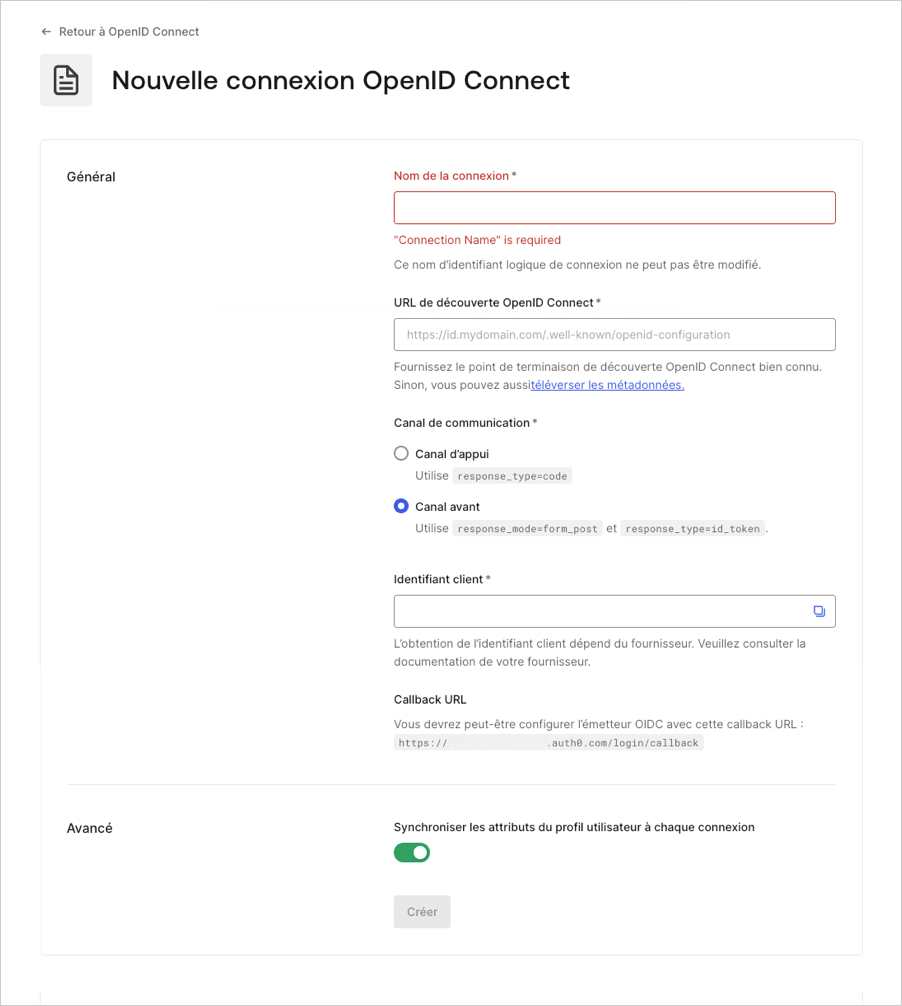
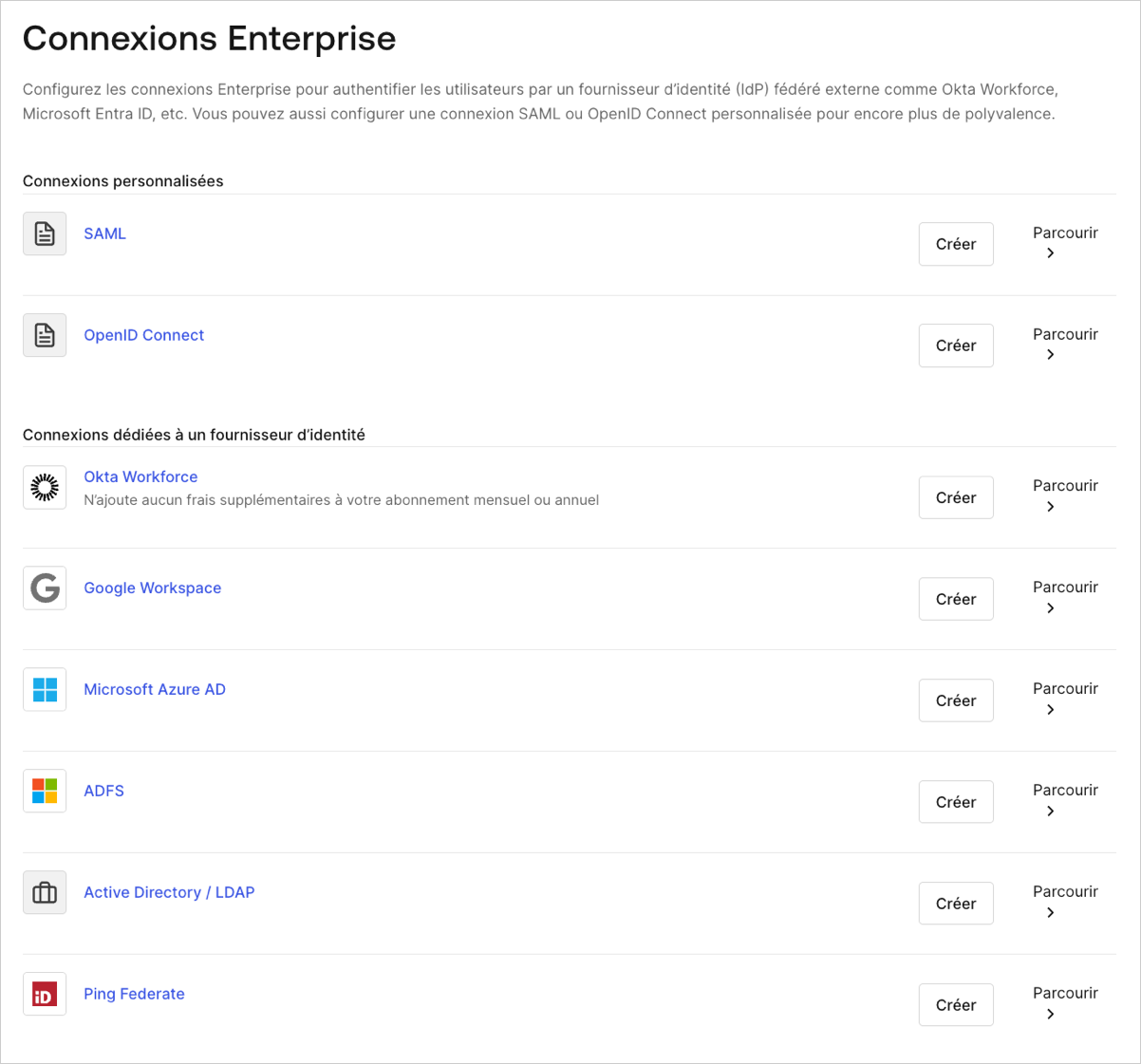 2. Saisissez les détails de votre connexion et sélectionnez **Créer :**
| Champ | Description |
| ----------------------------------------------------------------------- | ------------------------------------------------------------------------------------------------------------------------------------------------------------------------------------------------------------------------------------------------------------------------------------------------------------------------------------------------------------------------------------------------------------------------------------------------------------------------------------------------------------------------------------------------------------------------------------------------------------------------------------------------------------------------------------------------------------------------------------- |
| **Nom de la connexion** | Identifiant logique pour votre connexion; il doit être unique pour votre locataire. Une fois défini, ce nom ne peut pas être modifié. |
| **URL OpenID Connect Discovery** | URL où Auth0 trouvera le **[point de terminaison OpenID Connect Discovery connu](https://openid.net/specs/openid-connect-discovery-1_0.html)**, habituellement indiqué dans le point de terminaison `/.well-known/openid-configuration`. Vous pouvez saisir l’URL de base ou l’URL complète. Vous verrez un crochet vert si elle se trouve à cet emplacement, un crochet rouge si elle est introuvable ou un message d’erreur si le fichier est trouvé, mais que les renseignements requis ne sont pas présents dans le fichier de configuration. Pour en savoir plus, consultez [Configurer les applications avec OIDC Discovery](https://auth0.com/docs/fr-ca/get-started/applications/configure-applications-with-oidc-discovery). |
| **Canal de communication** | À définir sur **canal avant** ou **canal arrière**. Le canal avant utilise le protocole OIDC avec `response_mode=form_post` et `response_type=id_token`. Le canal arrière utilise `response_type=code`. |
| **ID client** | L’identifiant que votre fournisseur vous a fourni. Identifiant unique pour votre application inscrite. Saisissez la valeur enregistrée de l’ID client pour l’application que vous avez inscrite auprès du fournisseur d’identité OIDC. Chaque fournisseur gère cette étape différemment. |
| **Secret client** | Disponible si **Canal arrière** est choisi plus tôt. Le secret que votre fournisseur vous a fourni. Chaque fournisseur gère cette étape différemment. |
| **URL de rappel** | URL vers laquelle Auth0 redirige les utilisateurs après leur authentification. Veillez à ce que cette valeur soit configurée pour l’application que vous avez inscrite auprès du fournisseur d’identité OIDC. |
| **Synchroniser les attributs du profil utilisateur à chaque connexion** | Si cette option est sélectionnée, votre locataire met à jour les attributs racine `name`, `nickname`, `given_name`, `family_name`, or `picture`chaque fois qu’un utilisateur se connecte. |
3.
2. Saisissez les détails de votre connexion et sélectionnez **Créer :**
| Champ | Description |
| ----------------------------------------------------------------------- | ------------------------------------------------------------------------------------------------------------------------------------------------------------------------------------------------------------------------------------------------------------------------------------------------------------------------------------------------------------------------------------------------------------------------------------------------------------------------------------------------------------------------------------------------------------------------------------------------------------------------------------------------------------------------------------------------------------------------------------- |
| **Nom de la connexion** | Identifiant logique pour votre connexion; il doit être unique pour votre locataire. Une fois défini, ce nom ne peut pas être modifié. |
| **URL OpenID Connect Discovery** | URL où Auth0 trouvera le **[point de terminaison OpenID Connect Discovery connu](https://openid.net/specs/openid-connect-discovery-1_0.html)**, habituellement indiqué dans le point de terminaison `/.well-known/openid-configuration`. Vous pouvez saisir l’URL de base ou l’URL complète. Vous verrez un crochet vert si elle se trouve à cet emplacement, un crochet rouge si elle est introuvable ou un message d’erreur si le fichier est trouvé, mais que les renseignements requis ne sont pas présents dans le fichier de configuration. Pour en savoir plus, consultez [Configurer les applications avec OIDC Discovery](https://auth0.com/docs/fr-ca/get-started/applications/configure-applications-with-oidc-discovery). |
| **Canal de communication** | À définir sur **canal avant** ou **canal arrière**. Le canal avant utilise le protocole OIDC avec `response_mode=form_post` et `response_type=id_token`. Le canal arrière utilise `response_type=code`. |
| **ID client** | L’identifiant que votre fournisseur vous a fourni. Identifiant unique pour votre application inscrite. Saisissez la valeur enregistrée de l’ID client pour l’application que vous avez inscrite auprès du fournisseur d’identité OIDC. Chaque fournisseur gère cette étape différemment. |
| **Secret client** | Disponible si **Canal arrière** est choisi plus tôt. Le secret que votre fournisseur vous a fourni. Chaque fournisseur gère cette étape différemment. |
| **URL de rappel** | URL vers laquelle Auth0 redirige les utilisateurs après leur authentification. Veillez à ce que cette valeur soit configurée pour l’application que vous avez inscrite auprès du fournisseur d’identité OIDC. |
| **Synchroniser les attributs du profil utilisateur à chaque connexion** | Si cette option est sélectionnée, votre locataire met à jour les attributs racine `name`, `nickname`, `given_name`, `family_name`, or `picture`chaque fois qu’un utilisateur se connecte. |
3.
 Dans l’affichage **Paramètres**, effectuez les ajustements nécessaire, si besoin.
| Champ | Description |
| ---------------------------- | ------------------------------------------------------------------------------------------------------------------------------------------------------------------------------------------------------------------------------------------------------------------------------------------------------------------------------------------------------------------------------------------------------------------------ |
| **Nom de la connexion** | Le nom que vous avez fourni lorsque vous avez créé cette connexion. Il ne peut pas être modifié. ) |
| Canal de communication\*\* | Définissez **Canal frontal** ou **Canal d’appui**. Le canal frontal utilise le protocole OIDC avec `response_mode=form_post` et `response_type=id_token`. Le canal d’appui utilise `response_type=code`. |
| **ID client** | L’identifiant qui vous est donné par votre fournisseur. Chaque fournisseur gère cette étape différemment. |
| \*\*Secret du client \*\* | Le secret qui vous est donné par votre fournisseur. Chaque fournisseur gère cette étape différemment. |
| **Permissions** | Une liste séparée par virgule des permissions Auth0 à demander lors de la connexion à votre fournisseur d’identité. Cela aura une incidence sur les données stockées dans le profil utilisateur. Vous devez inclure au minimum la permission `openid`. Remarque : la connexion n’appelle pas le point de terminaison `/userinfo` et s’attend à ce que les demandes de l’utilisateur soient présentes dans le `id_token`. |
| \*\*URL de rappel \*\* | Certaines fournisseurs ont besoin de cette connexion. |
| **Mappage des utilisateurs** | Fournit un modèle pour mapper des attributs particuliers de l’utilisateur à des variables de connexion. |
| **Profil de connexion** | Pour découvrir comment modifier votre profil de connexion, consultez [Configurer PKCE et le mappage de demandes pour les connexions OIDC.](https://auth0.com/docs/fr-ca/authenticate/identity-providers/enterprise-identity-providers/configure-pkce-claim-mapping-for-oidc) |
4. Dans l’affichage **Fourniture**, configurez comment les profils utilisateurs sont créés et mis à jour dans Auth0.
| Champ | Description |
| ----------------------------------------------------------------------- | ------------------------------------------------------------------------------------------------------------------------------------------------------------------------------------------------------------------------------------------------------------------- |
| **Synchroniser les attributs du profil utilisateur à chaque connexion** | Lorsqu’il est activé, Auth0 synchronise automatiquement les données du profil utilisateur avec chaque connexion utilisateur, garantissant ainsi que les modifications apportées à la source de connexion sont automatiquement mises à jour dans Auth0. |
| **Synchroniser les profils utilisateur à l’aide du SCIM** | Lorsqu’il est activé, Auth0 permet de synchroniser les données du profil utilisateur à l’aide de SCIM. Pour plus d’informations, veuillez consultez [Configurer le SCIM entrant)](https://auth0.com/docs/fr-ca/authenticate/protocols/scim/configure-inbound-scim). |
5. Dans l’affichage **Expérience de connexion**, configurez la façon dont les utilisateurs se connectent avec cette connexion.
| Champ | Description |
| ------------------------------------------ | --------------------------------------------------------------------------------------------------------------------------------------------------------------------------------------------------------------------------------------------------------------------------------------- |
| **Découverte du domaine d’origine** | Compare le domaine de l’adresse courriel de l’utilisateur avec les domaines du fournisseur d’identité fourni. Pour plus d’informations, lisez [Configurer l’authentification Identifier First ](https://auth0.com/docs/fr-ca/authenticate/login/auth0-universal-login/identifier-first) |
| **Afficher le bouton de connexion** | Cette option affiche les choix suivants pour personnaliser le bouton de connexion de votre application. |
| **Nom d’affichage du bouton** (Facultatif) | Texte utilisé pour personnaliser le bouton de connexion pour la connexion universelle. Lorsque défini, le bouton affiche : Continuer avec \{Nom d’affichage du bouton}. |
| **Logo du bouton URL** (Facultatif) | URL de l’image utilisée pour personnaliser le bouton de connexion pour la connexion universelle. Lorsque défini, le bouton de connexion de la connexion universelle affiche l’image sous la forme d’un carré de 20 px sur 20 px. |
Les champs optionnels ne sont disponibles qu’avec connexion universelle. Les clients utilisant la connexion classique ne verront pas le bouton Ajouter, le nom d’affichage du bouton ou l’URL du logo du bouton.
6. Sélectionnez **Sauvegarder les changements**
### Créer une connexion d’entreprise à l’aide de Management API
Ces exemples vous montreront l’ensemble des manières par lesquelles vous pouvez créer une [connexion](/docs/connections) avec Management API Auth0. Vous pouvez configurer la connexion en fournissant un URI de métadonnées ou en configurant explicitement les URL OIDC.
#### Utiliser un canal de façade avec point de terminaison de découverte
```bash cURL theme={null}
curl --request POST \
--url 'https://{yourDomain}/api/v2/connections' \
--header 'authorization: Bearer MGMT_API_ACCESS_TOKEN' \
--data '{ "strategy": "oidc", "name": "CONNECTION_NAME", "options": { "type": "front_channel", "discovery_url": "https://IDP_DOMAIN/.well-known/openid-configuration", "client_id" : "IDP_CLIENT_ID", "scopes": "openid profile" } }'
```
```csharp C# theme={null}
var client = new RestClient("https://{yourDomain}/api/v2/connections");
var request = new RestRequest(Method.POST);
request.AddHeader("authorization", "Bearer MGMT_API_ACCESS_TOKEN");
request.AddParameter("undefined", "{ "strategy": "oidc", "name": "CONNECTION_NAME", "options": { "type": "front_channel", "discovery_url": "https://IDP_DOMAIN/.well-known/openid-configuration", "client_id" : "IDP_CLIENT_ID", "scopes": "openid profile" } }", ParameterType.RequestBody);
IRestResponse response = client.Execute(request);
```
```go Go theme={null}
package main
import (
"fmt"
"strings"
"net/http"
"io/ioutil"
)
func main() {
url := "https://{yourDomain}/api/v2/connections"
payload := strings.NewReader("{ "strategy": "oidc", "name": "CONNECTION_NAME", "options": { "type": "front_channel", "discovery_url": "https://IDP_DOMAIN/.well-known/openid-configuration", "client_id" : "IDP_CLIENT_ID", "scopes": "openid profile" } }")
req, _ := http.NewRequest("POST", url, payload)
req.Header.Add("authorization", "Bearer MGMT_API_ACCESS_TOKEN")
res, _ := http.DefaultClient.Do(req)
defer res.Body.Close()
body, _ := ioutil.ReadAll(res.Body)
fmt.Println(res)
fmt.Println(string(body))
}
```
```java Java theme={null}
HttpResponse response = Unirest.post("https://{yourDomain}/api/v2/connections")
.header("authorization", "Bearer MGMT_API_ACCESS_TOKEN")
.body("{ "strategy": "oidc", "name": "CONNECTION_NAME", "options": { "type": "front_channel", "discovery_url": "https://IDP_DOMAIN/.well-known/openid-configuration", "client_id" : "IDP_CLIENT_ID", "scopes": "openid profile" } }")
.asString();
```
```javascript Node.JS theme={null}
var axios = require("axios").default;
var options = {
method: 'POST',
url: 'https://{yourDomain}/api/v2/connections',
headers: {authorization: 'Bearer MGMT_API_ACCESS_TOKEN'},
data: {
strategy: 'oidc',
name: 'CONNECTION_NAME',
options: {
type: 'front_channel',
discovery_url: 'https://IDP_DOMAIN/.well-known/openid-configuration',
client_id: 'IDP_CLIENT_ID',
scopes: 'openid profile'
}
}
};
axios.request(options).then(function (response) {
console.log(response.data);
}).catch(function (error) {
console.error(error);
});
```
```objc Obj-C theme={null}
#import
NSDictionary *headers = @{ @"authorization": @"Bearer MGMT_API_ACCESS_TOKEN" };
NSDictionary *parameters = @{ @"strategy": @"oidc",
@"name": @"CONNECTION_NAME",
@"options": @{ @"type": @"front_channel", @"discovery_url": @"https://IDP_DOMAIN/.well-known/openid-configuration", @"client_id": @"IDP_CLIENT_ID", @"scopes": @"openid profile" } };
NSData *postData = [NSJSONSerialization dataWithJSONObject:parameters options:0 error:nil];
NSMutableURLRequest *request = [NSMutableURLRequest requestWithURL:[NSURL URLWithString:@"https://{yourDomain}/api/v2/connections"]
cachePolicy:NSURLRequestUseProtocolCachePolicy
timeoutInterval:10.0];
[request setHTTPMethod:@"POST"];
[request setAllHTTPHeaderFields:headers];
[request setHTTPBody:postData];
NSURLSession *session = [NSURLSession sharedSession];
NSURLSessionDataTask *dataTask = [session dataTaskWithRequest:request
completionHandler:^(NSData *data, NSURLResponse *response, NSError *error) {
if (error) {
NSLog(@"%@", error);
} else {
NSHTTPURLResponse *httpResponse = (NSHTTPURLResponse *) response;
NSLog(@"%@", httpResponse);
}
}];
[dataTask resume];
```
```php PHP theme={null}
$curl = curl_init();
curl_setopt_array($curl, [
CURLOPT_URL => "https://{yourDomain}/api/v2/connections",
CURLOPT_RETURNTRANSFER => true,
CURLOPT_ENCODING => "",
CURLOPT_MAXREDIRS => 10,
CURLOPT_TIMEOUT => 30,
CURLOPT_HTTP_VERSION => CURL_HTTP_VERSION_1_1,
CURLOPT_CUSTOMREQUEST => "POST",
CURLOPT_POSTFIELDS => "{ "strategy": "oidc", "name": "CONNECTION_NAME", "options": { "type": "front_channel", "discovery_url": "https://IDP_DOMAIN/.well-known/openid-configuration", "client_id" : "IDP_CLIENT_ID", "scopes": "openid profile" } }",
CURLOPT_HTTPHEADER => [
"authorization: Bearer MGMT_API_ACCESS_TOKEN"
],
]);
$response = curl_exec($curl);
$err = curl_error($curl);
curl_close($curl);
if ($err) {
echo "cURL Error #:" . $err;
} else {
echo $response;
}
```
```python Python theme={null}
import http.client
conn = http.client.HTTPSConnection("")
payload = "{ "strategy": "oidc", "name": "CONNECTION_NAME", "options": { "type": "front_channel", "discovery_url": "https://IDP_DOMAIN/.well-known/openid-configuration", "client_id" : "IDP_CLIENT_ID", "scopes": "openid profile" } }"
headers = { 'authorization': "Bearer MGMT_API_ACCESS_TOKEN" }
conn.request("POST", "/{yourDomain}/api/v2/connections", payload, headers)
res = conn.getresponse()
data = res.read()
print(data.decode("utf-8"))
```
```ruby Ruby theme={null}
require 'uri'
require 'net/http'
require 'openssl'
url = URI("https://{yourDomain}/api/v2/connections")
http = Net::HTTP.new(url.host, url.port)
http.use_ssl = true
http.verify_mode = OpenSSL::SSL::VERIFY_NONE
request = Net::HTTP::Post.new(url)
request["authorization"] = 'Bearer MGMT_API_ACCESS_TOKEN'
request.body = "{ "strategy": "oidc", "name": "CONNECTION_NAME", "options": { "type": "front_channel", "discovery_url": "https://IDP_DOMAIN/.well-known/openid-configuration", "client_id" : "IDP_CLIENT_ID", "scopes": "openid profile" } }"
response = http.request(request)
puts response.read_body
```
```swift Swift theme={null}
import Foundation
let headers = ["authorization": "Bearer MGMT_API_ACCESS_TOKEN"]
let parameters = [
"strategy": "oidc",
"name": "CONNECTION_NAME",
"options": [
"type": "front_channel",
"discovery_url": "https://IDP_DOMAIN/.well-known/openid-configuration",
"client_id": "IDP_CLIENT_ID",
"scopes": "openid profile"
]
] as [String : Any]
let postData = JSONSerialization.data(withJSONObject: parameters, options: [])
let request = NSMutableURLRequest(url: NSURL(string: "https://{yourDomain}/api/v2/connections")! as URL,
cachePolicy: .useProtocolCachePolicy,
timeoutInterval: 10.0)
request.httpMethod = "POST"
request.allHTTPHeaderFields = headers
request.httpBody = postData as Data
let session = URLSession.shared
let dataTask = session.dataTask(with: request as URLRequest, completionHandler: { (data, response, error) -> Void in
if (error != nil) {
print(error)
} else {
let httpResponse = response as? HTTPURLResponse
print(httpResponse)
}
})
dataTask.resume()
```
#### Utiliser un canal d'appui avec point de terminaison de découverte
```bash cURL theme={null}
curl --request POST \
--url 'https://{yourDomain}/api/v2/connections' \
--header 'authorization: Bearer MGMT_API_ACCESS_TOKEN' \
--data '{ "strategy": "oidc", "name": "CONNECTION_NAME", "options": { "type": "back_channel", "discovery_url": "https://IDP_DOMAIN/.well-known/openid-configuration", "client_id" : "IDP_CLIENT_ID", "client_secret" : "IDP_CLIENT_SECRET", "scopes": "openid profile" } }'
```
```csharp C# theme={null}
var client = new RestClient("https://{yourDomain}/api/v2/connections");
var request = new RestRequest(Method.POST);
request.AddHeader("authorization", "Bearer MGMT_API_ACCESS_TOKEN");
request.AddParameter("undefined", "{ "strategy": "oidc", "name": "CONNECTION_NAME", "options": { "type": "back_channel", "discovery_url": "https://IDP_DOMAIN/.well-known/openid-configuration", "client_id" : "IDP_CLIENT_ID", "client_secret" : "IDP_CLIENT_SECRET", "scopes": "openid profile" } }", ParameterType.RequestBody);
IRestResponse response = client.Execute(request);
```
```go Go theme={null}
package main
import (
"fmt"
"strings"
"net/http"
"io/ioutil"
)
func main() {
url := "https://{yourDomain}/api/v2/connections"
payload := strings.NewReader("{ "strategy": "oidc", "name": "CONNECTION_NAME", "options": { "type": "back_channel", "discovery_url": "https://IDP_DOMAIN/.well-known/openid-configuration", "client_id" : "IDP_CLIENT_ID", "client_secret" : "IDP_CLIENT_SECRET", "scopes": "openid profile" } }")
req, _ := http.NewRequest("POST", url, payload)
req.Header.Add("authorization", "Bearer MGMT_API_ACCESS_TOKEN")
res, _ := http.DefaultClient.Do(req)
defer res.Body.Close()
body, _ := ioutil.ReadAll(res.Body)
fmt.Println(res)
fmt.Println(string(body))
}
```
```java Java theme={null}
HttpResponse response = Unirest.post("https://{yourDomain}/api/v2/connections")
.header("authorization", "Bearer MGMT_API_ACCESS_TOKEN")
.body("{ "strategy": "oidc", "name": "CONNECTION_NAME", "options": { "type": "back_channel", "discovery_url": "https://IDP_DOMAIN/.well-known/openid-configuration", "client_id" : "IDP_CLIENT_ID", "client_secret" : "IDP_CLIENT_SECRET", "scopes": "openid profile" } }")
.asString();
```
```javascript Node.JS theme={null}
var axios = require("axios").default;
var options = {
method: 'POST',
url: 'https://{yourDomain}/api/v2/connections',
headers: {authorization: 'Bearer MGMT_API_ACCESS_TOKEN'},
data: {
strategy: 'oidc',
name: 'CONNECTION_NAME',
options: {
type: 'back_channel',
discovery_url: 'https://IDP_DOMAIN/.well-known/openid-configuration',
client_id: 'IDP_CLIENT_ID',
client_secret: 'IDP_CLIENT_SECRET',
scopes: 'openid profile'
}
}
};
axios.request(options).then(function (response) {
console.log(response.data);
}).catch(function (error) {
console.error(error);
});
```
```objc Obj-C theme={null}
#import
NSDictionary *headers = @{ @"authorization": @"Bearer MGMT_API_ACCESS_TOKEN" };
NSDictionary *parameters = @{ @"strategy": @"oidc",
@"name": @"CONNECTION_NAME",
@"options": @{ @"type": @"back_channel", @"discovery_url": @"https://IDP_DOMAIN/.well-known/openid-configuration", @"client_id": @"IDP_CLIENT_ID", @"client_secret": @"IDP_CLIENT_SECRET", @"scopes": @"openid profile" } };
NSData *postData = [NSJSONSerialization dataWithJSONObject:parameters options:0 error:nil];
NSMutableURLRequest *request = [NSMutableURLRequest requestWithURL:[NSURL URLWithString:@"https://{yourDomain}/api/v2/connections"]
cachePolicy:NSURLRequestUseProtocolCachePolicy
timeoutInterval:10.0];
[request setHTTPMethod:@"POST"];
[request setAllHTTPHeaderFields:headers];
[request setHTTPBody:postData];
NSURLSession *session = [NSURLSession sharedSession];
NSURLSessionDataTask *dataTask = [session dataTaskWithRequest:request
completionHandler:^(NSData *data, NSURLResponse *response, NSError *error) {
if (error) {
NSLog(@"%@", error);
} else {
NSHTTPURLResponse *httpResponse = (NSHTTPURLResponse *) response;
NSLog(@"%@", httpResponse);
}
}];
[dataTask resume];
```
```php PHP theme={null}
$curl = curl_init();
curl_setopt_array($curl, [
CURLOPT_URL => "https://{yourDomain}/api/v2/connections",
CURLOPT_RETURNTRANSFER => true,
CURLOPT_ENCODING => "",
CURLOPT_MAXREDIRS => 10,
CURLOPT_TIMEOUT => 30,
CURLOPT_HTTP_VERSION => CURL_HTTP_VERSION_1_1,
CURLOPT_CUSTOMREQUEST => "POST",
CURLOPT_POSTFIELDS => "{ "strategy": "oidc", "name": "CONNECTION_NAME", "options": { "type": "back_channel", "discovery_url": "https://IDP_DOMAIN/.well-known/openid-configuration", "client_id" : "IDP_CLIENT_ID", "client_secret" : "IDP_CLIENT_SECRET", "scopes": "openid profile" } }",
CURLOPT_HTTPHEADER => [
"authorization: Bearer MGMT_API_ACCESS_TOKEN"
],
]);
$response = curl_exec($curl);
$err = curl_error($curl);
curl_close($curl);
if ($err) {
echo "cURL Error #:" . $err;
} else {
echo $response;
}
```
```python Python theme={null}
import http.client
conn = http.client.HTTPSConnection("")
payload = "{ "strategy": "oidc", "name": "CONNECTION_NAME", "options": { "type": "back_channel", "discovery_url": "https://IDP_DOMAIN/.well-known/openid-configuration", "client_id" : "IDP_CLIENT_ID", "client_secret" : "IDP_CLIENT_SECRET", "scopes": "openid profile" } }"
headers = { 'authorization': "Bearer MGMT_API_ACCESS_TOKEN" }
conn.request("POST", "/{yourDomain}/api/v2/connections", payload, headers)
res = conn.getresponse()
data = res.read()
print(data.decode("utf-8"))
```
```ruby Ruby theme={null}
require 'uri'
require 'net/http'
require 'openssl'
url = URI("https://{yourDomain}/api/v2/connections")
http = Net::HTTP.new(url.host, url.port)
http.use_ssl = true
http.verify_mode = OpenSSL::SSL::VERIFY_NONE
request = Net::HTTP::Post.new(url)
request["authorization"] = 'Bearer MGMT_API_ACCESS_TOKEN'
request.body = "{ "strategy": "oidc", "name": "CONNECTION_NAME", "options": { "type": "back_channel", "discovery_url": "https://IDP_DOMAIN/.well-known/openid-configuration", "client_id" : "IDP_CLIENT_ID", "client_secret" : "IDP_CLIENT_SECRET", "scopes": "openid profile" } }"
response = http.request(request)
puts response.read_body
```
```swift Swift theme={null}
import Foundation
let headers = ["authorization": "Bearer MGMT_API_ACCESS_TOKEN"]
let parameters = [
"strategy": "oidc",
"name": "CONNECTION_NAME",
"options": [
"type": "back_channel",
"discovery_url": "https://IDP_DOMAIN/.well-known/openid-configuration",
"client_id": "IDP_CLIENT_ID",
"client_secret": "IDP_CLIENT_SECRET",
"scopes": "openid profile"
]
] as [String : Any]
let postData = JSONSerialization.data(withJSONObject: parameters, options: [])
let request = NSMutableURLRequest(url: NSURL(string: "https://{yourDomain}/api/v2/connections")! as URL,
cachePolicy: .useProtocolCachePolicy,
timeoutInterval: 10.0)
request.httpMethod = "POST"
request.allHTTPHeaderFields = headers
request.httpBody = postData as Data
let session = URLSession.shared
let dataTask = session.dataTask(with: request as URLRequest, completionHandler: { (data, response, error) -> Void in
if (error != nil) {
print(error)
} else {
let httpResponse = response as? HTTPURLResponse
print(httpResponse)
}
})
dataTask.resume()
```
#### Utiliser un canal d'appui spécifiant les configurations de l’émetteur
```bash cURL theme={null}
curl --request POST \
--url 'https://{yourDomain}/api/v2/connections' \
--header 'authorization: Bearer MGMT_API_ACCESS_TOKEN' \
--data '{ "strategy": "oidc", "name": "CONNECTION_NAME", "options": { "type": "back_channel", "issuer": "https://IDP_DOMAIN", "authorization_endpoint": "https://IDP_DOMAIN/authorize", "client_secret" : "IDP_CLIENT_SECRET", "client_id" : "IDP_CLIENT_ID", "scopes": "openid profile" } }'
```
```csharp C# theme={null}
var client = new RestClient("https://{yourDomain}/api/v2/connections");
var request = new RestRequest(Method.POST);
request.AddHeader("authorization", "Bearer MGMT_API_ACCESS_TOKEN");
request.AddParameter("undefined", "{ "strategy": "oidc", "name": "CONNECTION_NAME", "options": { "type": "back_channel", "issuer": "https://IDP_DOMAIN", "authorization_endpoint": "https://IDP_DOMAIN/authorize", "client_secret" : "IDP_CLIENT_SECRET", "client_id" : "IDP_CLIENT_ID", "scopes": "openid profile" } }", ParameterType.RequestBody);
IRestResponse response = client.Execute(request);
```
```go Go theme={null}
package main
import (
"fmt"
"strings"
"net/http"
"io/ioutil"
)
func main() {
url := "https://{yourDomain}/api/v2/connections"
payload := strings.NewReader("{ "strategy": "oidc", "name": "CONNECTION_NAME", "options": { "type": "back_channel", "issuer": "https://IDP_DOMAIN", "authorization_endpoint": "https://IDP_DOMAIN/authorize", "client_secret" : "IDP_CLIENT_SECRET", "client_id" : "IDP_CLIENT_ID", "scopes": "openid profile" } }")
req, _ := http.NewRequest("POST", url, payload)
req.Header.Add("authorization", "Bearer MGMT_API_ACCESS_TOKEN")
res, _ := http.DefaultClient.Do(req)
defer res.Body.Close()
body, _ := ioutil.ReadAll(res.Body)
fmt.Println(res)
fmt.Println(string(body))
}
```
```java Java theme={null}
HttpResponse response = Unirest.post("https://{yourDomain}/api/v2/connections")
.header("authorization", "Bearer MGMT_API_ACCESS_TOKEN")
.body("{ "strategy": "oidc", "name": "CONNECTION_NAME", "options": { "type": "back_channel", "issuer": "https://IDP_DOMAIN", "authorization_endpoint": "https://IDP_DOMAIN/authorize", "client_secret" : "IDP_CLIENT_SECRET", "client_id" : "IDP_CLIENT_ID", "scopes": "openid profile" } }")
.asString();
```
```javascript Node.JS theme={null}
var axios = require("axios").default;
var options = {
method: 'POST',
url: 'https://{yourDomain}/api/v2/connections',
headers: {authorization: 'Bearer MGMT_API_ACCESS_TOKEN'},
data: {
strategy: 'oidc',
name: 'CONNECTION_NAME',
options: {
type: 'back_channel',
issuer: 'https://IDP_DOMAIN',
authorization_endpoint: 'https://IDP_DOMAIN/authorize',
client_secret: 'IDP_CLIENT_SECRET',
client_id: 'IDP_CLIENT_ID',
scopes: 'openid profile'
}
}
};
axios.request(options).then(function (response) {
console.log(response.data);
}).catch(function (error) {
console.error(error);
});
```
```objc Obj-C theme={null}
#import
NSDictionary *headers = @{ @"authorization": @"Bearer MGMT_API_ACCESS_TOKEN" };
NSDictionary *parameters = @{ @"strategy": @"oidc",
@"name": @"CONNECTION_NAME",
@"options": @{ @"type": @"back_channel", @"issuer": @"https://IDP_DOMAIN", @"authorization_endpoint": @"https://IDP_DOMAIN/authorize", @"client_secret": @"IDP_CLIENT_SECRET", @"client_id": @"IDP_CLIENT_ID", @"scopes": @"openid profile" } };
NSData *postData = [NSJSONSerialization dataWithJSONObject:parameters options:0 error:nil];
NSMutableURLRequest *request = [NSMutableURLRequest requestWithURL:[NSURL URLWithString:@"https://{yourDomain}/api/v2/connections"]
cachePolicy:NSURLRequestUseProtocolCachePolicy
timeoutInterval:10.0];
[request setHTTPMethod:@"POST"];
[request setAllHTTPHeaderFields:headers];
[request setHTTPBody:postData];
NSURLSession *session = [NSURLSession sharedSession];
NSURLSessionDataTask *dataTask = [session dataTaskWithRequest:request
completionHandler:^(NSData *data, NSURLResponse *response, NSError *error) {
if (error) {
NSLog(@"%@", error);
} else {
NSHTTPURLResponse *httpResponse = (NSHTTPURLResponse *) response;
NSLog(@"%@", httpResponse);
}
}];
[dataTask resume];
```
```php PHP theme={null}
$curl = curl_init();
curl_setopt_array($curl, [
CURLOPT_URL => "https://{yourDomain}/api/v2/connections",
CURLOPT_RETURNTRANSFER => true,
CURLOPT_ENCODING => "",
CURLOPT_MAXREDIRS => 10,
CURLOPT_TIMEOUT => 30,
CURLOPT_HTTP_VERSION => CURL_HTTP_VERSION_1_1,
CURLOPT_CUSTOMREQUEST => "POST",
CURLOPT_POSTFIELDS => "{ "strategy": "oidc", "name": "CONNECTION_NAME", "options": { "type": "back_channel", "issuer": "https://IDP_DOMAIN", "authorization_endpoint": "https://IDP_DOMAIN/authorize", "client_secret" : "IDP_CLIENT_SECRET", "client_id" : "IDP_CLIENT_ID", "scopes": "openid profile" } }",
CURLOPT_HTTPHEADER => [
"authorization: Bearer MGMT_API_ACCESS_TOKEN"
],
]);
$response = curl_exec($curl);
$err = curl_error($curl);
curl_close($curl);
if ($err) {
echo "cURL Error #:" . $err;
} else {
echo $response;
}
```
```python Python theme={null}
import http.client
conn = http.client.HTTPSConnection("")
payload = "{ "strategy": "oidc", "name": "CONNECTION_NAME", "options": { "type": "back_channel", "issuer": "https://IDP_DOMAIN", "authorization_endpoint": "https://IDP_DOMAIN/authorize", "client_secret" : "IDP_CLIENT_SECRET", "client_id" : "IDP_CLIENT_ID", "scopes": "openid profile" } }"
headers = { 'authorization': "Bearer MGMT_API_ACCESS_TOKEN" }
conn.request("POST", "/{yourDomain}/api/v2/connections", payload, headers)
res = conn.getresponse()
data = res.read()
print(data.decode("utf-8"))
```
```ruby Ruby theme={null}
require 'uri'
require 'net/http'
require 'openssl'
url = URI("https://{yourDomain}/api/v2/connections")
http = Net::HTTP.new(url.host, url.port)
http.use_ssl = true
http.verify_mode = OpenSSL::SSL::VERIFY_NONE
request = Net::HTTP::Post.new(url)
request["authorization"] = 'Bearer MGMT_API_ACCESS_TOKEN'
request.body = "{ "strategy": "oidc", "name": "CONNECTION_NAME", "options": { "type": "back_channel", "issuer": "https://IDP_DOMAIN", "authorization_endpoint": "https://IDP_DOMAIN/authorize", "client_secret" : "IDP_CLIENT_SECRET", "client_id" : "IDP_CLIENT_ID", "scopes": "openid profile" } }"
response = http.request(request)
puts response.read_body
```
```swift Swift theme={null}
imimport Foundation
let headers = ["authorization": "Bearer MGMT_API_ACCESS_TOKEN"]
let parameters = [
"strategy": "oidc",
"name": "CONNECTION_NAME",
"options": [
"type": "back_channel",
"issuer": "https://IDP_DOMAIN",
"authorization_endpoint": "https://IDP_DOMAIN/authorize",
"client_secret": "IDP_CLIENT_SECRET",
"client_id": "IDP_CLIENT_ID",
"scopes": "openid profile"
]
] as [String : Any]
let postData = JSONSerialization.data(withJSONObject: parameters, options: [])
let request = NSMutableURLRequest(url: NSURL(string: "https://{yourDomain}/api/v2/connections")! as URL,
cachePolicy: .useProtocolCachePolicy,
timeoutInterval: 10.0)
request.httpMethod = "POST"
request.allHTTPHeaderFields = headers
request.httpBody = postData as Data
let session = URLSession.shared
let dataTask = session.dataTask(with: request as URLRequest, completionHandler: { (data, response, error) -> Void in
if (error != nil) {
print(error)
} else {
let httpResponse = response as? HTTPURLResponse
print(httpResponse)
}
})
dataTask.resume()
```
#### Utiliser un canal de façade spécifiant les configurations de l’émetteur
```bash cURL theme={null}
curl --request POST \
--url 'https://{yourDomain}/api/v2/connections' \
--header 'authorization: Bearer MGMT_API_ACCESS_TOKEN' \
--data '{ "strategy": "oidc", "name": "CONNECTION_NAME", "options": { "type": "front_channel", "issuer": "https://IDP_DOMAIN", "authorization_endpoint": "https://IDP_DOMAIN/authorize", "token_endpoint": "https://IDP_DOMAIN/oauth/token", "client_id" : "IDP_CLIENT_ID", "scopes": "openid profile" } }'
```
```csharp C# theme={null}
var client = new RestClient("https://{yourDomain}/api/v2/connections");
var request = new RestRequest(Method.POST);
request.AddHeader("authorization", "Bearer MGMT_API_ACCESS_TOKEN");
request.AddParameter("undefined", "{ "strategy": "oidc", "name": "CONNECTION_NAME", "options": { "type": "front_channel", "issuer": "https://IDP_DOMAIN", "authorization_endpoint": "https://IDP_DOMAIN/authorize", "token_endpoint": "https://IDP_DOMAIN/oauth/token", "client_id" : "IDP_CLIENT_ID", "scopes": "openid profile" } }", ParameterType.RequestBody);
IRestResponse response = client.Execute(request);
```
```go Go theme={null}
package main
import (
"fmt"
"strings"
"net/http"
"io/ioutil"
)
func main() {
url := "https://{yourDomain}/api/v2/connections"
payload := strings.NewReader("{ "strategy": "oidc", "name": "CONNECTION_NAME", "options": { "type": "front_channel", "issuer": "https://IDP_DOMAIN", "authorization_endpoint": "https://IDP_DOMAIN/authorize", "token_endpoint": "https://IDP_DOMAIN/oauth/token", "client_id" : "IDP_CLIENT_ID", "scopes": "openid profile" } }")
req, _ := http.NewRequest("POST", url, payload)
req.Header.Add("authorization", "Bearer MGMT_API_ACCESS_TOKEN")
res, _ := http.DefaultClient.Do(req)
defer res.Body.Close()
body, _ := ioutil.ReadAll(res.Body)
fmt.Println(res)
fmt.Println(string(body))
}
```
```java Java theme={null}
HttpResponse response = Unirest.post("https://{yourDomain}/api/v2/connections")
.header("authorization", "Bearer MGMT_API_ACCESS_TOKEN")
.body("{ "strategy": "oidc", "name": "CONNECTION_NAME", "options": { "type": "front_channel", "issuer": "https://IDP_DOMAIN", "authorization_endpoint": "https://IDP_DOMAIN/authorize", "token_endpoint": "https://IDP_DOMAIN/oauth/token", "client_id" : "IDP_CLIENT_ID", "scopes": "openid profile" } }")
.asString();
```
```javascript Node.JS theme={null}
var axios = require("axios").default;
var options = {
method: 'POST',
url: 'https://{yourDomain}/api/v2/connections',
headers: {authorization: 'Bearer MGMT_API_ACCESS_TOKEN'},
data: {
strategy: 'oidc',
name: 'CONNECTION_NAME',
options: {
type: 'front_channel',
issuer: 'https://IDP_DOMAIN',
authorization_endpoint: 'https://IDP_DOMAIN/authorize',
token_endpoint: 'https://IDP_DOMAIN/oauth/token',
client_id: 'IDP_CLIENT_ID',
scopes: 'openid profile'
}
}
};
axios.request(options).then(function (response) {
console.log(response.data);
}).catch(function (error) {
console.error(error);
});
```
```objc Obj-C theme={null}
#import
NSDictionary *headers = @{ @"authorization": @"Bearer MGMT_API_ACCESS_TOKEN" };
NSDictionary *parameters = @{ @"strategy": @"oidc",
@"name": @"CONNECTION_NAME",
@"options": @{ @"type": @"front_channel", @"issuer": @"https://IDP_DOMAIN", @"authorization_endpoint": @"https://IDP_DOMAIN/authorize", @"token_endpoint": @"https://IDP_DOMAIN/oauth/token", @"client_id": @"IDP_CLIENT_ID", @"scopes": @"openid profile" } };
NSData *postData = [NSJSONSerialization dataWithJSONObject:parameters options:0 error:nil];
NSMutableURLRequest *request = [NSMutableURLRequest requestWithURL:[NSURL URLWithString:@"https://{yourDomain}/api/v2/connections"]
cachePolicy:NSURLRequestUseProtocolCachePolicy
timeoutInterval:10.0];
[request setHTTPMethod:@"POST"];
[request setAllHTTPHeaderFields:headers];
[request setHTTPBody:postData];
NSURLSession *session = [NSURLSession sharedSession];
NSURLSessionDataTask *dataTask = [session dataTaskWithRequest:request
completionHandler:^(NSData *data, NSURLResponse *response, NSError *error) {
if (error) {
NSLog(@"%@", error);
} else {
NSHTTPURLResponse *httpResponse = (NSHTTPURLResponse *) response;
NSLog(@"%@", httpResponse);
}
}];
[dataTask resume];
```
```php PHP theme={null}
$curl = curl_init();
curl_setopt_array($curl, [
CURLOPT_URL => "https://{yourDomain}/api/v2/connections",
CURLOPT_RETURNTRANSFER => true,
CURLOPT_ENCODING => "",
CURLOPT_MAXREDIRS => 10,
CURLOPT_TIMEOUT => 30,
CURLOPT_HTTP_VERSION => CURL_HTTP_VERSION_1_1,
CURLOPT_CUSTOMREQUEST => "POST",
CURLOPT_POSTFIELDS => "{ "strategy": "oidc", "name": "CONNECTION_NAME", "options": { "type": "front_channel", "issuer": "https://IDP_DOMAIN", "authorization_endpoint": "https://IDP_DOMAIN/authorize", "token_endpoint": "https://IDP_DOMAIN/oauth/token", "client_id" : "IDP_CLIENT_ID", "scopes": "openid profile" } }",
CURLOPT_HTTPHEADER => [
"authorization: Bearer MGMT_API_ACCESS_TOKEN"
],
]);
$response = curl_exec($curl);
$err = curl_error($curl);
curl_close($curl);
if ($err) {
echo "cURL Error #:" . $err;
} else {
echo $response;
}
```
```python Python theme={null}
import http.client
conn = http.client.HTTPSConnection("")
payload = "{ "strategy": "oidc", "name": "CONNECTION_NAME", "options": { "type": "front_channel", "issuer": "https://IDP_DOMAIN", "authorization_endpoint": "https://IDP_DOMAIN/authorize", "token_endpoint": "https://IDP_DOMAIN/oauth/token", "client_id" : "IDP_CLIENT_ID", "scopes": "openid profile" } }"
headers = { 'authorization': "Bearer MGMT_API_ACCESS_TOKEN" }
conn.request("POST", "/{yourDomain}/api/v2/connections", payload, headers)
res = conn.getresponse()
data = res.read()
print(data.decode("utf-8"))
```
```ruby Ruby theme={null}
require 'uri'
require 'net/http'
require 'openssl'
url = URI("https://{yourDomain}/api/v2/connections")
http = Net::HTTP.new(url.host, url.port)
http.use_ssl = true
http.verify_mode = OpenSSL::SSL::VERIFY_NONE
request = Net::HTTP::Post.new(url)
request["authorization"] = 'Bearer MGMT_API_ACCESS_TOKEN'
request.body = "{ "strategy": "oidc", "name": "CONNECTION_NAME", "options": { "type": "front_channel", "issuer": "https://IDP_DOMAIN", "authorization_endpoint": "https://IDP_DOMAIN/authorize", "token_endpoint": "https://IDP_DOMAIN/oauth/token", "client_id" : "IDP_CLIENT_ID", "scopes": "openid profile" } }"
response = http.request(request)
puts response.read_body
```
```swift Swift theme={null}
import Foundation
let headers = ["authorization": "Bearer MGMT_API_ACCESS_TOKEN"]
let parameters = [
"strategy": "oidc",
"name": "CONNECTION_NAME",
"options": [
"type": "front_channel",
"issuer": "https://IDP_DOMAIN",
"authorization_endpoint": "https://IDP_DOMAIN/authorize",
"token_endpoint": "https://IDP_DOMAIN/oauth/token",
"client_id": "IDP_CLIENT_ID",
"scopes": "openid profile"
]
] as [String : Any]
let postData = JSONSerialization.data(withJSONObject: parameters, options: [])
let request = NSMutableURLRequest(url: NSURL(string: "https://{yourDomain}/api/v2/connections")! as URL,
cachePolicy: .useProtocolCachePolicy,
timeoutInterval: 10.0)
request.httpMethod = "POST"
request.allHTTPHeaderFields = headers
request.httpBody = postData as Data
let session = URLSession.shared
let dataTask = session.dataTask(with: request as URLRequest, completionHandler: { (data, response, error) -> Void in
if (error != nil) {
print(error)
} else {
let httpResponse = response as? HTTPURLResponse
print(httpResponse)
}
})
dataTask.resume()
```
## Configurer la PKCE et le mappage des demandes
Cette connexion d’entreprise prend en charge la Proof Key for Code Exchange (PKCE), ainsi que le mappage des attributs et des jetons.Pour de plus amples renseignements, consultez [Configure PKCE and Claim Mapping for OIDC Connections (Configurer la PKCE et le mappage des demandes pour les connexions OIDC)](/docs/fr-ca/authenticate/identity-providers/enterprise-identity-providers/configure-pkce-claim-mapping-for-oidc).
## Permettre une connexion entreprise pour votre application Auth0
Pour utiliser votre nouvelle connexion d’entreprise, vous devez premièrement [activer la connexion](/docs/fr-ca/authenticate/identity-providers/enterprise-identity-providers/enable-enterprise-connections) pour vos applications Auth0.
## Tester la connexion
Vous êtes maintenant prêt à [tester votre connexion](/docs/fr-ca/authenticate/identity-providers/enterprise-identity-providers/test-enterprise-connections).
## Configurer manuellement les métadonnées de l’émetteur
Si vous cliquez sur **Afficher les détails de l’émetteur** sur le point de terminaison de URL de l’émetteur, vous pouvez voir les données et les ajuster si nécessaire.
## Fédérer avec Auth0
La connexion entreprise Open ID Connect est extrêmement utile pour fédérer avec un autre client Auth0. Entrez simplement l’URL de votre locataire Auth0 (par exemple, `https://.us.auth0.com`) dans le champ **Émetteur** et entrez l’ID Client de toute application du locataire à laquelle vous souhaitez fédérer dans le champ **ID Client**.
Les nouveaux locataires auront `« US »` comme partie de l’URL. Les locataires créés avant l’ajout du domaine régional continueront à fonctionner. Par exemple, `https://{VOTRE COMPTE}.auth0.com`.
## Configurer la révocation globale des jetons
Ce type de connexion prend en charge un point de terminaison de révocation globale des jetons, qui permet à un fournisseur d’identité conforme de révoquer les sessions utilisateur Auth0, de révoquer les jetons d’actualisation et de déclencher la déconnexion par canal d’appui pour les applications utilisant un canal d’appui sécurisé.
Cette fonctionnalité peut être utilisée avec Universal Logout dans Okta Workforce Identity Cloud.
Pour plus d’informations et d’instructions de configuration, consultez[Universal Logout](/docs/fr-ca/authenticate/login/logout/universal-logout).
Dans l’affichage **Paramètres**, effectuez les ajustements nécessaire, si besoin.
| Champ | Description |
| ---------------------------- | ------------------------------------------------------------------------------------------------------------------------------------------------------------------------------------------------------------------------------------------------------------------------------------------------------------------------------------------------------------------------------------------------------------------------ |
| **Nom de la connexion** | Le nom que vous avez fourni lorsque vous avez créé cette connexion. Il ne peut pas être modifié. ) |
| Canal de communication\*\* | Définissez **Canal frontal** ou **Canal d’appui**. Le canal frontal utilise le protocole OIDC avec `response_mode=form_post` et `response_type=id_token`. Le canal d’appui utilise `response_type=code`. |
| **ID client** | L’identifiant qui vous est donné par votre fournisseur. Chaque fournisseur gère cette étape différemment. |
| \*\*Secret du client \*\* | Le secret qui vous est donné par votre fournisseur. Chaque fournisseur gère cette étape différemment. |
| **Permissions** | Une liste séparée par virgule des permissions Auth0 à demander lors de la connexion à votre fournisseur d’identité. Cela aura une incidence sur les données stockées dans le profil utilisateur. Vous devez inclure au minimum la permission `openid`. Remarque : la connexion n’appelle pas le point de terminaison `/userinfo` et s’attend à ce que les demandes de l’utilisateur soient présentes dans le `id_token`. |
| \*\*URL de rappel \*\* | Certaines fournisseurs ont besoin de cette connexion. |
| **Mappage des utilisateurs** | Fournit un modèle pour mapper des attributs particuliers de l’utilisateur à des variables de connexion. |
| **Profil de connexion** | Pour découvrir comment modifier votre profil de connexion, consultez [Configurer PKCE et le mappage de demandes pour les connexions OIDC.](https://auth0.com/docs/fr-ca/authenticate/identity-providers/enterprise-identity-providers/configure-pkce-claim-mapping-for-oidc) |
4. Dans l’affichage **Fourniture**, configurez comment les profils utilisateurs sont créés et mis à jour dans Auth0.
| Champ | Description |
| ----------------------------------------------------------------------- | ------------------------------------------------------------------------------------------------------------------------------------------------------------------------------------------------------------------------------------------------------------------- |
| **Synchroniser les attributs du profil utilisateur à chaque connexion** | Lorsqu’il est activé, Auth0 synchronise automatiquement les données du profil utilisateur avec chaque connexion utilisateur, garantissant ainsi que les modifications apportées à la source de connexion sont automatiquement mises à jour dans Auth0. |
| **Synchroniser les profils utilisateur à l’aide du SCIM** | Lorsqu’il est activé, Auth0 permet de synchroniser les données du profil utilisateur à l’aide de SCIM. Pour plus d’informations, veuillez consultez [Configurer le SCIM entrant)](https://auth0.com/docs/fr-ca/authenticate/protocols/scim/configure-inbound-scim). |
5. Dans l’affichage **Expérience de connexion**, configurez la façon dont les utilisateurs se connectent avec cette connexion.
| Champ | Description |
| ------------------------------------------ | --------------------------------------------------------------------------------------------------------------------------------------------------------------------------------------------------------------------------------------------------------------------------------------- |
| **Découverte du domaine d’origine** | Compare le domaine de l’adresse courriel de l’utilisateur avec les domaines du fournisseur d’identité fourni. Pour plus d’informations, lisez [Configurer l’authentification Identifier First ](https://auth0.com/docs/fr-ca/authenticate/login/auth0-universal-login/identifier-first) |
| **Afficher le bouton de connexion** | Cette option affiche les choix suivants pour personnaliser le bouton de connexion de votre application. |
| **Nom d’affichage du bouton** (Facultatif) | Texte utilisé pour personnaliser le bouton de connexion pour la connexion universelle. Lorsque défini, le bouton affiche : Continuer avec \{Nom d’affichage du bouton}. |
| **Logo du bouton URL** (Facultatif) | URL de l’image utilisée pour personnaliser le bouton de connexion pour la connexion universelle. Lorsque défini, le bouton de connexion de la connexion universelle affiche l’image sous la forme d’un carré de 20 px sur 20 px. |
Les champs optionnels ne sont disponibles qu’avec connexion universelle. Les clients utilisant la connexion classique ne verront pas le bouton Ajouter, le nom d’affichage du bouton ou l’URL du logo du bouton.
6. Sélectionnez **Sauvegarder les changements**
### Créer une connexion d’entreprise à l’aide de Management API
Ces exemples vous montreront l’ensemble des manières par lesquelles vous pouvez créer une [connexion](/docs/connections) avec Management API Auth0. Vous pouvez configurer la connexion en fournissant un URI de métadonnées ou en configurant explicitement les URL OIDC.
#### Utiliser un canal de façade avec point de terminaison de découverte
```bash cURL theme={null}
curl --request POST \
--url 'https://{yourDomain}/api/v2/connections' \
--header 'authorization: Bearer MGMT_API_ACCESS_TOKEN' \
--data '{ "strategy": "oidc", "name": "CONNECTION_NAME", "options": { "type": "front_channel", "discovery_url": "https://IDP_DOMAIN/.well-known/openid-configuration", "client_id" : "IDP_CLIENT_ID", "scopes": "openid profile" } }'
```
```csharp C# theme={null}
var client = new RestClient("https://{yourDomain}/api/v2/connections");
var request = new RestRequest(Method.POST);
request.AddHeader("authorization", "Bearer MGMT_API_ACCESS_TOKEN");
request.AddParameter("undefined", "{ "strategy": "oidc", "name": "CONNECTION_NAME", "options": { "type": "front_channel", "discovery_url": "https://IDP_DOMAIN/.well-known/openid-configuration", "client_id" : "IDP_CLIENT_ID", "scopes": "openid profile" } }", ParameterType.RequestBody);
IRestResponse response = client.Execute(request);
```
```go Go theme={null}
package main
import (
"fmt"
"strings"
"net/http"
"io/ioutil"
)
func main() {
url := "https://{yourDomain}/api/v2/connections"
payload := strings.NewReader("{ "strategy": "oidc", "name": "CONNECTION_NAME", "options": { "type": "front_channel", "discovery_url": "https://IDP_DOMAIN/.well-known/openid-configuration", "client_id" : "IDP_CLIENT_ID", "scopes": "openid profile" } }")
req, _ := http.NewRequest("POST", url, payload)
req.Header.Add("authorization", "Bearer MGMT_API_ACCESS_TOKEN")
res, _ := http.DefaultClient.Do(req)
defer res.Body.Close()
body, _ := ioutil.ReadAll(res.Body)
fmt.Println(res)
fmt.Println(string(body))
}
```
```java Java theme={null}
HttpResponse response = Unirest.post("https://{yourDomain}/api/v2/connections")
.header("authorization", "Bearer MGMT_API_ACCESS_TOKEN")
.body("{ "strategy": "oidc", "name": "CONNECTION_NAME", "options": { "type": "front_channel", "discovery_url": "https://IDP_DOMAIN/.well-known/openid-configuration", "client_id" : "IDP_CLIENT_ID", "scopes": "openid profile" } }")
.asString();
```
```javascript Node.JS theme={null}
var axios = require("axios").default;
var options = {
method: 'POST',
url: 'https://{yourDomain}/api/v2/connections',
headers: {authorization: 'Bearer MGMT_API_ACCESS_TOKEN'},
data: {
strategy: 'oidc',
name: 'CONNECTION_NAME',
options: {
type: 'front_channel',
discovery_url: 'https://IDP_DOMAIN/.well-known/openid-configuration',
client_id: 'IDP_CLIENT_ID',
scopes: 'openid profile'
}
}
};
axios.request(options).then(function (response) {
console.log(response.data);
}).catch(function (error) {
console.error(error);
});
```
```objc Obj-C theme={null}
#import
NSDictionary *headers = @{ @"authorization": @"Bearer MGMT_API_ACCESS_TOKEN" };
NSDictionary *parameters = @{ @"strategy": @"oidc",
@"name": @"CONNECTION_NAME",
@"options": @{ @"type": @"front_channel", @"discovery_url": @"https://IDP_DOMAIN/.well-known/openid-configuration", @"client_id": @"IDP_CLIENT_ID", @"scopes": @"openid profile" } };
NSData *postData = [NSJSONSerialization dataWithJSONObject:parameters options:0 error:nil];
NSMutableURLRequest *request = [NSMutableURLRequest requestWithURL:[NSURL URLWithString:@"https://{yourDomain}/api/v2/connections"]
cachePolicy:NSURLRequestUseProtocolCachePolicy
timeoutInterval:10.0];
[request setHTTPMethod:@"POST"];
[request setAllHTTPHeaderFields:headers];
[request setHTTPBody:postData];
NSURLSession *session = [NSURLSession sharedSession];
NSURLSessionDataTask *dataTask = [session dataTaskWithRequest:request
completionHandler:^(NSData *data, NSURLResponse *response, NSError *error) {
if (error) {
NSLog(@"%@", error);
} else {
NSHTTPURLResponse *httpResponse = (NSHTTPURLResponse *) response;
NSLog(@"%@", httpResponse);
}
}];
[dataTask resume];
```
```php PHP theme={null}
$curl = curl_init();
curl_setopt_array($curl, [
CURLOPT_URL => "https://{yourDomain}/api/v2/connections",
CURLOPT_RETURNTRANSFER => true,
CURLOPT_ENCODING => "",
CURLOPT_MAXREDIRS => 10,
CURLOPT_TIMEOUT => 30,
CURLOPT_HTTP_VERSION => CURL_HTTP_VERSION_1_1,
CURLOPT_CUSTOMREQUEST => "POST",
CURLOPT_POSTFIELDS => "{ "strategy": "oidc", "name": "CONNECTION_NAME", "options": { "type": "front_channel", "discovery_url": "https://IDP_DOMAIN/.well-known/openid-configuration", "client_id" : "IDP_CLIENT_ID", "scopes": "openid profile" } }",
CURLOPT_HTTPHEADER => [
"authorization: Bearer MGMT_API_ACCESS_TOKEN"
],
]);
$response = curl_exec($curl);
$err = curl_error($curl);
curl_close($curl);
if ($err) {
echo "cURL Error #:" . $err;
} else {
echo $response;
}
```
```python Python theme={null}
import http.client
conn = http.client.HTTPSConnection("")
payload = "{ "strategy": "oidc", "name": "CONNECTION_NAME", "options": { "type": "front_channel", "discovery_url": "https://IDP_DOMAIN/.well-known/openid-configuration", "client_id" : "IDP_CLIENT_ID", "scopes": "openid profile" } }"
headers = { 'authorization': "Bearer MGMT_API_ACCESS_TOKEN" }
conn.request("POST", "/{yourDomain}/api/v2/connections", payload, headers)
res = conn.getresponse()
data = res.read()
print(data.decode("utf-8"))
```
```ruby Ruby theme={null}
require 'uri'
require 'net/http'
require 'openssl'
url = URI("https://{yourDomain}/api/v2/connections")
http = Net::HTTP.new(url.host, url.port)
http.use_ssl = true
http.verify_mode = OpenSSL::SSL::VERIFY_NONE
request = Net::HTTP::Post.new(url)
request["authorization"] = 'Bearer MGMT_API_ACCESS_TOKEN'
request.body = "{ "strategy": "oidc", "name": "CONNECTION_NAME", "options": { "type": "front_channel", "discovery_url": "https://IDP_DOMAIN/.well-known/openid-configuration", "client_id" : "IDP_CLIENT_ID", "scopes": "openid profile" } }"
response = http.request(request)
puts response.read_body
```
```swift Swift theme={null}
import Foundation
let headers = ["authorization": "Bearer MGMT_API_ACCESS_TOKEN"]
let parameters = [
"strategy": "oidc",
"name": "CONNECTION_NAME",
"options": [
"type": "front_channel",
"discovery_url": "https://IDP_DOMAIN/.well-known/openid-configuration",
"client_id": "IDP_CLIENT_ID",
"scopes": "openid profile"
]
] as [String : Any]
let postData = JSONSerialization.data(withJSONObject: parameters, options: [])
let request = NSMutableURLRequest(url: NSURL(string: "https://{yourDomain}/api/v2/connections")! as URL,
cachePolicy: .useProtocolCachePolicy,
timeoutInterval: 10.0)
request.httpMethod = "POST"
request.allHTTPHeaderFields = headers
request.httpBody = postData as Data
let session = URLSession.shared
let dataTask = session.dataTask(with: request as URLRequest, completionHandler: { (data, response, error) -> Void in
if (error != nil) {
print(error)
} else {
let httpResponse = response as? HTTPURLResponse
print(httpResponse)
}
})
dataTask.resume()
```
#### Utiliser un canal d'appui avec point de terminaison de découverte
```bash cURL theme={null}
curl --request POST \
--url 'https://{yourDomain}/api/v2/connections' \
--header 'authorization: Bearer MGMT_API_ACCESS_TOKEN' \
--data '{ "strategy": "oidc", "name": "CONNECTION_NAME", "options": { "type": "back_channel", "discovery_url": "https://IDP_DOMAIN/.well-known/openid-configuration", "client_id" : "IDP_CLIENT_ID", "client_secret" : "IDP_CLIENT_SECRET", "scopes": "openid profile" } }'
```
```csharp C# theme={null}
var client = new RestClient("https://{yourDomain}/api/v2/connections");
var request = new RestRequest(Method.POST);
request.AddHeader("authorization", "Bearer MGMT_API_ACCESS_TOKEN");
request.AddParameter("undefined", "{ "strategy": "oidc", "name": "CONNECTION_NAME", "options": { "type": "back_channel", "discovery_url": "https://IDP_DOMAIN/.well-known/openid-configuration", "client_id" : "IDP_CLIENT_ID", "client_secret" : "IDP_CLIENT_SECRET", "scopes": "openid profile" } }", ParameterType.RequestBody);
IRestResponse response = client.Execute(request);
```
```go Go theme={null}
package main
import (
"fmt"
"strings"
"net/http"
"io/ioutil"
)
func main() {
url := "https://{yourDomain}/api/v2/connections"
payload := strings.NewReader("{ "strategy": "oidc", "name": "CONNECTION_NAME", "options": { "type": "back_channel", "discovery_url": "https://IDP_DOMAIN/.well-known/openid-configuration", "client_id" : "IDP_CLIENT_ID", "client_secret" : "IDP_CLIENT_SECRET", "scopes": "openid profile" } }")
req, _ := http.NewRequest("POST", url, payload)
req.Header.Add("authorization", "Bearer MGMT_API_ACCESS_TOKEN")
res, _ := http.DefaultClient.Do(req)
defer res.Body.Close()
body, _ := ioutil.ReadAll(res.Body)
fmt.Println(res)
fmt.Println(string(body))
}
```
```java Java theme={null}
HttpResponse response = Unirest.post("https://{yourDomain}/api/v2/connections")
.header("authorization", "Bearer MGMT_API_ACCESS_TOKEN")
.body("{ "strategy": "oidc", "name": "CONNECTION_NAME", "options": { "type": "back_channel", "discovery_url": "https://IDP_DOMAIN/.well-known/openid-configuration", "client_id" : "IDP_CLIENT_ID", "client_secret" : "IDP_CLIENT_SECRET", "scopes": "openid profile" } }")
.asString();
```
```javascript Node.JS theme={null}
var axios = require("axios").default;
var options = {
method: 'POST',
url: 'https://{yourDomain}/api/v2/connections',
headers: {authorization: 'Bearer MGMT_API_ACCESS_TOKEN'},
data: {
strategy: 'oidc',
name: 'CONNECTION_NAME',
options: {
type: 'back_channel',
discovery_url: 'https://IDP_DOMAIN/.well-known/openid-configuration',
client_id: 'IDP_CLIENT_ID',
client_secret: 'IDP_CLIENT_SECRET',
scopes: 'openid profile'
}
}
};
axios.request(options).then(function (response) {
console.log(response.data);
}).catch(function (error) {
console.error(error);
});
```
```objc Obj-C theme={null}
#import
NSDictionary *headers = @{ @"authorization": @"Bearer MGMT_API_ACCESS_TOKEN" };
NSDictionary *parameters = @{ @"strategy": @"oidc",
@"name": @"CONNECTION_NAME",
@"options": @{ @"type": @"back_channel", @"discovery_url": @"https://IDP_DOMAIN/.well-known/openid-configuration", @"client_id": @"IDP_CLIENT_ID", @"client_secret": @"IDP_CLIENT_SECRET", @"scopes": @"openid profile" } };
NSData *postData = [NSJSONSerialization dataWithJSONObject:parameters options:0 error:nil];
NSMutableURLRequest *request = [NSMutableURLRequest requestWithURL:[NSURL URLWithString:@"https://{yourDomain}/api/v2/connections"]
cachePolicy:NSURLRequestUseProtocolCachePolicy
timeoutInterval:10.0];
[request setHTTPMethod:@"POST"];
[request setAllHTTPHeaderFields:headers];
[request setHTTPBody:postData];
NSURLSession *session = [NSURLSession sharedSession];
NSURLSessionDataTask *dataTask = [session dataTaskWithRequest:request
completionHandler:^(NSData *data, NSURLResponse *response, NSError *error) {
if (error) {
NSLog(@"%@", error);
} else {
NSHTTPURLResponse *httpResponse = (NSHTTPURLResponse *) response;
NSLog(@"%@", httpResponse);
}
}];
[dataTask resume];
```
```php PHP theme={null}
$curl = curl_init();
curl_setopt_array($curl, [
CURLOPT_URL => "https://{yourDomain}/api/v2/connections",
CURLOPT_RETURNTRANSFER => true,
CURLOPT_ENCODING => "",
CURLOPT_MAXREDIRS => 10,
CURLOPT_TIMEOUT => 30,
CURLOPT_HTTP_VERSION => CURL_HTTP_VERSION_1_1,
CURLOPT_CUSTOMREQUEST => "POST",
CURLOPT_POSTFIELDS => "{ "strategy": "oidc", "name": "CONNECTION_NAME", "options": { "type": "back_channel", "discovery_url": "https://IDP_DOMAIN/.well-known/openid-configuration", "client_id" : "IDP_CLIENT_ID", "client_secret" : "IDP_CLIENT_SECRET", "scopes": "openid profile" } }",
CURLOPT_HTTPHEADER => [
"authorization: Bearer MGMT_API_ACCESS_TOKEN"
],
]);
$response = curl_exec($curl);
$err = curl_error($curl);
curl_close($curl);
if ($err) {
echo "cURL Error #:" . $err;
} else {
echo $response;
}
```
```python Python theme={null}
import http.client
conn = http.client.HTTPSConnection("")
payload = "{ "strategy": "oidc", "name": "CONNECTION_NAME", "options": { "type": "back_channel", "discovery_url": "https://IDP_DOMAIN/.well-known/openid-configuration", "client_id" : "IDP_CLIENT_ID", "client_secret" : "IDP_CLIENT_SECRET", "scopes": "openid profile" } }"
headers = { 'authorization': "Bearer MGMT_API_ACCESS_TOKEN" }
conn.request("POST", "/{yourDomain}/api/v2/connections", payload, headers)
res = conn.getresponse()
data = res.read()
print(data.decode("utf-8"))
```
```ruby Ruby theme={null}
require 'uri'
require 'net/http'
require 'openssl'
url = URI("https://{yourDomain}/api/v2/connections")
http = Net::HTTP.new(url.host, url.port)
http.use_ssl = true
http.verify_mode = OpenSSL::SSL::VERIFY_NONE
request = Net::HTTP::Post.new(url)
request["authorization"] = 'Bearer MGMT_API_ACCESS_TOKEN'
request.body = "{ "strategy": "oidc", "name": "CONNECTION_NAME", "options": { "type": "back_channel", "discovery_url": "https://IDP_DOMAIN/.well-known/openid-configuration", "client_id" : "IDP_CLIENT_ID", "client_secret" : "IDP_CLIENT_SECRET", "scopes": "openid profile" } }"
response = http.request(request)
puts response.read_body
```
```swift Swift theme={null}
import Foundation
let headers = ["authorization": "Bearer MGMT_API_ACCESS_TOKEN"]
let parameters = [
"strategy": "oidc",
"name": "CONNECTION_NAME",
"options": [
"type": "back_channel",
"discovery_url": "https://IDP_DOMAIN/.well-known/openid-configuration",
"client_id": "IDP_CLIENT_ID",
"client_secret": "IDP_CLIENT_SECRET",
"scopes": "openid profile"
]
] as [String : Any]
let postData = JSONSerialization.data(withJSONObject: parameters, options: [])
let request = NSMutableURLRequest(url: NSURL(string: "https://{yourDomain}/api/v2/connections")! as URL,
cachePolicy: .useProtocolCachePolicy,
timeoutInterval: 10.0)
request.httpMethod = "POST"
request.allHTTPHeaderFields = headers
request.httpBody = postData as Data
let session = URLSession.shared
let dataTask = session.dataTask(with: request as URLRequest, completionHandler: { (data, response, error) -> Void in
if (error != nil) {
print(error)
} else {
let httpResponse = response as? HTTPURLResponse
print(httpResponse)
}
})
dataTask.resume()
```
#### Utiliser un canal d'appui spécifiant les configurations de l’émetteur
```bash cURL theme={null}
curl --request POST \
--url 'https://{yourDomain}/api/v2/connections' \
--header 'authorization: Bearer MGMT_API_ACCESS_TOKEN' \
--data '{ "strategy": "oidc", "name": "CONNECTION_NAME", "options": { "type": "back_channel", "issuer": "https://IDP_DOMAIN", "authorization_endpoint": "https://IDP_DOMAIN/authorize", "client_secret" : "IDP_CLIENT_SECRET", "client_id" : "IDP_CLIENT_ID", "scopes": "openid profile" } }'
```
```csharp C# theme={null}
var client = new RestClient("https://{yourDomain}/api/v2/connections");
var request = new RestRequest(Method.POST);
request.AddHeader("authorization", "Bearer MGMT_API_ACCESS_TOKEN");
request.AddParameter("undefined", "{ "strategy": "oidc", "name": "CONNECTION_NAME", "options": { "type": "back_channel", "issuer": "https://IDP_DOMAIN", "authorization_endpoint": "https://IDP_DOMAIN/authorize", "client_secret" : "IDP_CLIENT_SECRET", "client_id" : "IDP_CLIENT_ID", "scopes": "openid profile" } }", ParameterType.RequestBody);
IRestResponse response = client.Execute(request);
```
```go Go theme={null}
package main
import (
"fmt"
"strings"
"net/http"
"io/ioutil"
)
func main() {
url := "https://{yourDomain}/api/v2/connections"
payload := strings.NewReader("{ "strategy": "oidc", "name": "CONNECTION_NAME", "options": { "type": "back_channel", "issuer": "https://IDP_DOMAIN", "authorization_endpoint": "https://IDP_DOMAIN/authorize", "client_secret" : "IDP_CLIENT_SECRET", "client_id" : "IDP_CLIENT_ID", "scopes": "openid profile" } }")
req, _ := http.NewRequest("POST", url, payload)
req.Header.Add("authorization", "Bearer MGMT_API_ACCESS_TOKEN")
res, _ := http.DefaultClient.Do(req)
defer res.Body.Close()
body, _ := ioutil.ReadAll(res.Body)
fmt.Println(res)
fmt.Println(string(body))
}
```
```java Java theme={null}
HttpResponse response = Unirest.post("https://{yourDomain}/api/v2/connections")
.header("authorization", "Bearer MGMT_API_ACCESS_TOKEN")
.body("{ "strategy": "oidc", "name": "CONNECTION_NAME", "options": { "type": "back_channel", "issuer": "https://IDP_DOMAIN", "authorization_endpoint": "https://IDP_DOMAIN/authorize", "client_secret" : "IDP_CLIENT_SECRET", "client_id" : "IDP_CLIENT_ID", "scopes": "openid profile" } }")
.asString();
```
```javascript Node.JS theme={null}
var axios = require("axios").default;
var options = {
method: 'POST',
url: 'https://{yourDomain}/api/v2/connections',
headers: {authorization: 'Bearer MGMT_API_ACCESS_TOKEN'},
data: {
strategy: 'oidc',
name: 'CONNECTION_NAME',
options: {
type: 'back_channel',
issuer: 'https://IDP_DOMAIN',
authorization_endpoint: 'https://IDP_DOMAIN/authorize',
client_secret: 'IDP_CLIENT_SECRET',
client_id: 'IDP_CLIENT_ID',
scopes: 'openid profile'
}
}
};
axios.request(options).then(function (response) {
console.log(response.data);
}).catch(function (error) {
console.error(error);
});
```
```objc Obj-C theme={null}
#import
NSDictionary *headers = @{ @"authorization": @"Bearer MGMT_API_ACCESS_TOKEN" };
NSDictionary *parameters = @{ @"strategy": @"oidc",
@"name": @"CONNECTION_NAME",
@"options": @{ @"type": @"back_channel", @"issuer": @"https://IDP_DOMAIN", @"authorization_endpoint": @"https://IDP_DOMAIN/authorize", @"client_secret": @"IDP_CLIENT_SECRET", @"client_id": @"IDP_CLIENT_ID", @"scopes": @"openid profile" } };
NSData *postData = [NSJSONSerialization dataWithJSONObject:parameters options:0 error:nil];
NSMutableURLRequest *request = [NSMutableURLRequest requestWithURL:[NSURL URLWithString:@"https://{yourDomain}/api/v2/connections"]
cachePolicy:NSURLRequestUseProtocolCachePolicy
timeoutInterval:10.0];
[request setHTTPMethod:@"POST"];
[request setAllHTTPHeaderFields:headers];
[request setHTTPBody:postData];
NSURLSession *session = [NSURLSession sharedSession];
NSURLSessionDataTask *dataTask = [session dataTaskWithRequest:request
completionHandler:^(NSData *data, NSURLResponse *response, NSError *error) {
if (error) {
NSLog(@"%@", error);
} else {
NSHTTPURLResponse *httpResponse = (NSHTTPURLResponse *) response;
NSLog(@"%@", httpResponse);
}
}];
[dataTask resume];
```
```php PHP theme={null}
$curl = curl_init();
curl_setopt_array($curl, [
CURLOPT_URL => "https://{yourDomain}/api/v2/connections",
CURLOPT_RETURNTRANSFER => true,
CURLOPT_ENCODING => "",
CURLOPT_MAXREDIRS => 10,
CURLOPT_TIMEOUT => 30,
CURLOPT_HTTP_VERSION => CURL_HTTP_VERSION_1_1,
CURLOPT_CUSTOMREQUEST => "POST",
CURLOPT_POSTFIELDS => "{ "strategy": "oidc", "name": "CONNECTION_NAME", "options": { "type": "back_channel", "issuer": "https://IDP_DOMAIN", "authorization_endpoint": "https://IDP_DOMAIN/authorize", "client_secret" : "IDP_CLIENT_SECRET", "client_id" : "IDP_CLIENT_ID", "scopes": "openid profile" } }",
CURLOPT_HTTPHEADER => [
"authorization: Bearer MGMT_API_ACCESS_TOKEN"
],
]);
$response = curl_exec($curl);
$err = curl_error($curl);
curl_close($curl);
if ($err) {
echo "cURL Error #:" . $err;
} else {
echo $response;
}
```
```python Python theme={null}
import http.client
conn = http.client.HTTPSConnection("")
payload = "{ "strategy": "oidc", "name": "CONNECTION_NAME", "options": { "type": "back_channel", "issuer": "https://IDP_DOMAIN", "authorization_endpoint": "https://IDP_DOMAIN/authorize", "client_secret" : "IDP_CLIENT_SECRET", "client_id" : "IDP_CLIENT_ID", "scopes": "openid profile" } }"
headers = { 'authorization': "Bearer MGMT_API_ACCESS_TOKEN" }
conn.request("POST", "/{yourDomain}/api/v2/connections", payload, headers)
res = conn.getresponse()
data = res.read()
print(data.decode("utf-8"))
```
```ruby Ruby theme={null}
require 'uri'
require 'net/http'
require 'openssl'
url = URI("https://{yourDomain}/api/v2/connections")
http = Net::HTTP.new(url.host, url.port)
http.use_ssl = true
http.verify_mode = OpenSSL::SSL::VERIFY_NONE
request = Net::HTTP::Post.new(url)
request["authorization"] = 'Bearer MGMT_API_ACCESS_TOKEN'
request.body = "{ "strategy": "oidc", "name": "CONNECTION_NAME", "options": { "type": "back_channel", "issuer": "https://IDP_DOMAIN", "authorization_endpoint": "https://IDP_DOMAIN/authorize", "client_secret" : "IDP_CLIENT_SECRET", "client_id" : "IDP_CLIENT_ID", "scopes": "openid profile" } }"
response = http.request(request)
puts response.read_body
```
```swift Swift theme={null}
imimport Foundation
let headers = ["authorization": "Bearer MGMT_API_ACCESS_TOKEN"]
let parameters = [
"strategy": "oidc",
"name": "CONNECTION_NAME",
"options": [
"type": "back_channel",
"issuer": "https://IDP_DOMAIN",
"authorization_endpoint": "https://IDP_DOMAIN/authorize",
"client_secret": "IDP_CLIENT_SECRET",
"client_id": "IDP_CLIENT_ID",
"scopes": "openid profile"
]
] as [String : Any]
let postData = JSONSerialization.data(withJSONObject: parameters, options: [])
let request = NSMutableURLRequest(url: NSURL(string: "https://{yourDomain}/api/v2/connections")! as URL,
cachePolicy: .useProtocolCachePolicy,
timeoutInterval: 10.0)
request.httpMethod = "POST"
request.allHTTPHeaderFields = headers
request.httpBody = postData as Data
let session = URLSession.shared
let dataTask = session.dataTask(with: request as URLRequest, completionHandler: { (data, response, error) -> Void in
if (error != nil) {
print(error)
} else {
let httpResponse = response as? HTTPURLResponse
print(httpResponse)
}
})
dataTask.resume()
```
#### Utiliser un canal de façade spécifiant les configurations de l’émetteur
```bash cURL theme={null}
curl --request POST \
--url 'https://{yourDomain}/api/v2/connections' \
--header 'authorization: Bearer MGMT_API_ACCESS_TOKEN' \
--data '{ "strategy": "oidc", "name": "CONNECTION_NAME", "options": { "type": "front_channel", "issuer": "https://IDP_DOMAIN", "authorization_endpoint": "https://IDP_DOMAIN/authorize", "token_endpoint": "https://IDP_DOMAIN/oauth/token", "client_id" : "IDP_CLIENT_ID", "scopes": "openid profile" } }'
```
```csharp C# theme={null}
var client = new RestClient("https://{yourDomain}/api/v2/connections");
var request = new RestRequest(Method.POST);
request.AddHeader("authorization", "Bearer MGMT_API_ACCESS_TOKEN");
request.AddParameter("undefined", "{ "strategy": "oidc", "name": "CONNECTION_NAME", "options": { "type": "front_channel", "issuer": "https://IDP_DOMAIN", "authorization_endpoint": "https://IDP_DOMAIN/authorize", "token_endpoint": "https://IDP_DOMAIN/oauth/token", "client_id" : "IDP_CLIENT_ID", "scopes": "openid profile" } }", ParameterType.RequestBody);
IRestResponse response = client.Execute(request);
```
```go Go theme={null}
package main
import (
"fmt"
"strings"
"net/http"
"io/ioutil"
)
func main() {
url := "https://{yourDomain}/api/v2/connections"
payload := strings.NewReader("{ "strategy": "oidc", "name": "CONNECTION_NAME", "options": { "type": "front_channel", "issuer": "https://IDP_DOMAIN", "authorization_endpoint": "https://IDP_DOMAIN/authorize", "token_endpoint": "https://IDP_DOMAIN/oauth/token", "client_id" : "IDP_CLIENT_ID", "scopes": "openid profile" } }")
req, _ := http.NewRequest("POST", url, payload)
req.Header.Add("authorization", "Bearer MGMT_API_ACCESS_TOKEN")
res, _ := http.DefaultClient.Do(req)
defer res.Body.Close()
body, _ := ioutil.ReadAll(res.Body)
fmt.Println(res)
fmt.Println(string(body))
}
```
```java Java theme={null}
HttpResponse response = Unirest.post("https://{yourDomain}/api/v2/connections")
.header("authorization", "Bearer MGMT_API_ACCESS_TOKEN")
.body("{ "strategy": "oidc", "name": "CONNECTION_NAME", "options": { "type": "front_channel", "issuer": "https://IDP_DOMAIN", "authorization_endpoint": "https://IDP_DOMAIN/authorize", "token_endpoint": "https://IDP_DOMAIN/oauth/token", "client_id" : "IDP_CLIENT_ID", "scopes": "openid profile" } }")
.asString();
```
```javascript Node.JS theme={null}
var axios = require("axios").default;
var options = {
method: 'POST',
url: 'https://{yourDomain}/api/v2/connections',
headers: {authorization: 'Bearer MGMT_API_ACCESS_TOKEN'},
data: {
strategy: 'oidc',
name: 'CONNECTION_NAME',
options: {
type: 'front_channel',
issuer: 'https://IDP_DOMAIN',
authorization_endpoint: 'https://IDP_DOMAIN/authorize',
token_endpoint: 'https://IDP_DOMAIN/oauth/token',
client_id: 'IDP_CLIENT_ID',
scopes: 'openid profile'
}
}
};
axios.request(options).then(function (response) {
console.log(response.data);
}).catch(function (error) {
console.error(error);
});
```
```objc Obj-C theme={null}
#import
NSDictionary *headers = @{ @"authorization": @"Bearer MGMT_API_ACCESS_TOKEN" };
NSDictionary *parameters = @{ @"strategy": @"oidc",
@"name": @"CONNECTION_NAME",
@"options": @{ @"type": @"front_channel", @"issuer": @"https://IDP_DOMAIN", @"authorization_endpoint": @"https://IDP_DOMAIN/authorize", @"token_endpoint": @"https://IDP_DOMAIN/oauth/token", @"client_id": @"IDP_CLIENT_ID", @"scopes": @"openid profile" } };
NSData *postData = [NSJSONSerialization dataWithJSONObject:parameters options:0 error:nil];
NSMutableURLRequest *request = [NSMutableURLRequest requestWithURL:[NSURL URLWithString:@"https://{yourDomain}/api/v2/connections"]
cachePolicy:NSURLRequestUseProtocolCachePolicy
timeoutInterval:10.0];
[request setHTTPMethod:@"POST"];
[request setAllHTTPHeaderFields:headers];
[request setHTTPBody:postData];
NSURLSession *session = [NSURLSession sharedSession];
NSURLSessionDataTask *dataTask = [session dataTaskWithRequest:request
completionHandler:^(NSData *data, NSURLResponse *response, NSError *error) {
if (error) {
NSLog(@"%@", error);
} else {
NSHTTPURLResponse *httpResponse = (NSHTTPURLResponse *) response;
NSLog(@"%@", httpResponse);
}
}];
[dataTask resume];
```
```php PHP theme={null}
$curl = curl_init();
curl_setopt_array($curl, [
CURLOPT_URL => "https://{yourDomain}/api/v2/connections",
CURLOPT_RETURNTRANSFER => true,
CURLOPT_ENCODING => "",
CURLOPT_MAXREDIRS => 10,
CURLOPT_TIMEOUT => 30,
CURLOPT_HTTP_VERSION => CURL_HTTP_VERSION_1_1,
CURLOPT_CUSTOMREQUEST => "POST",
CURLOPT_POSTFIELDS => "{ "strategy": "oidc", "name": "CONNECTION_NAME", "options": { "type": "front_channel", "issuer": "https://IDP_DOMAIN", "authorization_endpoint": "https://IDP_DOMAIN/authorize", "token_endpoint": "https://IDP_DOMAIN/oauth/token", "client_id" : "IDP_CLIENT_ID", "scopes": "openid profile" } }",
CURLOPT_HTTPHEADER => [
"authorization: Bearer MGMT_API_ACCESS_TOKEN"
],
]);
$response = curl_exec($curl);
$err = curl_error($curl);
curl_close($curl);
if ($err) {
echo "cURL Error #:" . $err;
} else {
echo $response;
}
```
```python Python theme={null}
import http.client
conn = http.client.HTTPSConnection("")
payload = "{ "strategy": "oidc", "name": "CONNECTION_NAME", "options": { "type": "front_channel", "issuer": "https://IDP_DOMAIN", "authorization_endpoint": "https://IDP_DOMAIN/authorize", "token_endpoint": "https://IDP_DOMAIN/oauth/token", "client_id" : "IDP_CLIENT_ID", "scopes": "openid profile" } }"
headers = { 'authorization': "Bearer MGMT_API_ACCESS_TOKEN" }
conn.request("POST", "/{yourDomain}/api/v2/connections", payload, headers)
res = conn.getresponse()
data = res.read()
print(data.decode("utf-8"))
```
```ruby Ruby theme={null}
require 'uri'
require 'net/http'
require 'openssl'
url = URI("https://{yourDomain}/api/v2/connections")
http = Net::HTTP.new(url.host, url.port)
http.use_ssl = true
http.verify_mode = OpenSSL::SSL::VERIFY_NONE
request = Net::HTTP::Post.new(url)
request["authorization"] = 'Bearer MGMT_API_ACCESS_TOKEN'
request.body = "{ "strategy": "oidc", "name": "CONNECTION_NAME", "options": { "type": "front_channel", "issuer": "https://IDP_DOMAIN", "authorization_endpoint": "https://IDP_DOMAIN/authorize", "token_endpoint": "https://IDP_DOMAIN/oauth/token", "client_id" : "IDP_CLIENT_ID", "scopes": "openid profile" } }"
response = http.request(request)
puts response.read_body
```
```swift Swift theme={null}
import Foundation
let headers = ["authorization": "Bearer MGMT_API_ACCESS_TOKEN"]
let parameters = [
"strategy": "oidc",
"name": "CONNECTION_NAME",
"options": [
"type": "front_channel",
"issuer": "https://IDP_DOMAIN",
"authorization_endpoint": "https://IDP_DOMAIN/authorize",
"token_endpoint": "https://IDP_DOMAIN/oauth/token",
"client_id": "IDP_CLIENT_ID",
"scopes": "openid profile"
]
] as [String : Any]
let postData = JSONSerialization.data(withJSONObject: parameters, options: [])
let request = NSMutableURLRequest(url: NSURL(string: "https://{yourDomain}/api/v2/connections")! as URL,
cachePolicy: .useProtocolCachePolicy,
timeoutInterval: 10.0)
request.httpMethod = "POST"
request.allHTTPHeaderFields = headers
request.httpBody = postData as Data
let session = URLSession.shared
let dataTask = session.dataTask(with: request as URLRequest, completionHandler: { (data, response, error) -> Void in
if (error != nil) {
print(error)
} else {
let httpResponse = response as? HTTPURLResponse
print(httpResponse)
}
})
dataTask.resume()
```
## Configurer la PKCE et le mappage des demandes
Cette connexion d’entreprise prend en charge la Proof Key for Code Exchange (PKCE), ainsi que le mappage des attributs et des jetons.Pour de plus amples renseignements, consultez [Configure PKCE and Claim Mapping for OIDC Connections (Configurer la PKCE et le mappage des demandes pour les connexions OIDC)](/docs/fr-ca/authenticate/identity-providers/enterprise-identity-providers/configure-pkce-claim-mapping-for-oidc).
## Permettre une connexion entreprise pour votre application Auth0
Pour utiliser votre nouvelle connexion d’entreprise, vous devez premièrement [activer la connexion](/docs/fr-ca/authenticate/identity-providers/enterprise-identity-providers/enable-enterprise-connections) pour vos applications Auth0.
## Tester la connexion
Vous êtes maintenant prêt à [tester votre connexion](/docs/fr-ca/authenticate/identity-providers/enterprise-identity-providers/test-enterprise-connections).
## Configurer manuellement les métadonnées de l’émetteur
Si vous cliquez sur **Afficher les détails de l’émetteur** sur le point de terminaison de URL de l’émetteur, vous pouvez voir les données et les ajuster si nécessaire.
## Fédérer avec Auth0
La connexion entreprise Open ID Connect est extrêmement utile pour fédérer avec un autre client Auth0. Entrez simplement l’URL de votre locataire Auth0 (par exemple, `https://.us.auth0.com`) dans le champ **Émetteur** et entrez l’ID Client de toute application du locataire à laquelle vous souhaitez fédérer dans le champ **ID Client**.
Les nouveaux locataires auront `« US »` comme partie de l’URL. Les locataires créés avant l’ajout du domaine régional continueront à fonctionner. Par exemple, `https://{VOTRE COMPTE}.auth0.com`.
## Configurer la révocation globale des jetons
Ce type de connexion prend en charge un point de terminaison de révocation globale des jetons, qui permet à un fournisseur d’identité conforme de révoquer les sessions utilisateur Auth0, de révoquer les jetons d’actualisation et de déclencher la déconnexion par canal d’appui pour les applications utilisant un canal d’appui sécurisé.
Cette fonctionnalité peut être utilisée avec Universal Logout dans Okta Workforce Identity Cloud.
Pour plus d’informations et d’instructions de configuration, consultez[Universal Logout](/docs/fr-ca/authenticate/login/logout/universal-logout).