> ## Documentation Index
> Fetch the complete documentation index at: https://auth0.com/llms.txt
> Use this file to discover all available pages before exploring further.
# Révoquer l’accès M2M
> Découvrez comment révoquer l’accès M2M pour une application.
export const AuthCodeBlock = ({filename, icon, language, highlight, children}) => {
const [displayText, setDisplayText] = useState(children);
const [copyText, setCopyText] = useState(children);
const wrapperRef = React.useRef(null);
useEffect(() => {
let unsubscribe = null;
function init() {
if (!window.autorun || !window.rootStore) {
return;
}
unsubscribe = window.autorun(() => {
let processedChildrenForDisplay = children;
let processedChildrenForCopy = children;
for (const [key, value] of window.rootStore.variableStore.values.entries()) {
const escapedKey = key.replaceAll(/[.*+?^${}()|[\]\\]/g, (String.raw)`\$&`);
let displayValue = value;
if (key === "{yourClientSecret}" && value !== "{yourClientSecret}") {
displayValue = value.substring(0, 3) + "*****MASKED*****";
}
processedChildrenForDisplay = processedChildrenForDisplay.replaceAll(new RegExp(escapedKey, "g"), displayValue);
processedChildrenForCopy = processedChildrenForCopy.replaceAll(new RegExp(escapedKey, "g"), value);
}
setDisplayText(processedChildrenForDisplay);
setCopyText(processedChildrenForCopy);
});
}
if (window.rootStore) {
init();
} else {
window.addEventListener("adu:storeReady", init);
}
return () => {
window.removeEventListener("adu:storeReady", init);
unsubscribe?.();
};
}, [children]);
useEffect(() => {
if (!wrapperRef.current) return;
const originalWriteText = navigator.clipboard.writeText.bind(navigator.clipboard);
let isOverriding = false;
const handleClick = e => {
const button = e.target.closest('[data-testid="copy-code-button"]');
if (!button || !wrapperRef.current.contains(button)) return;
isOverriding = true;
navigator.clipboard.writeText = text => {
if (isOverriding) {
isOverriding = false;
navigator.clipboard.writeText = originalWriteText;
return originalWriteText(copyText);
}
return originalWriteText(text);
};
setTimeout(() => {
if (isOverriding) {
isOverriding = false;
navigator.clipboard.writeText = originalWriteText;
}
}, 100);
};
const wrapper = wrapperRef.current;
wrapper.addEventListener('click', handleClick, true);
return () => {
wrapper.removeEventListener('click', handleClick, true);
if (navigator.clipboard.writeText !== originalWriteText) {
navigator.clipboard.writeText = originalWriteText;
}
};
}, [copyText]);
return
{displayText}
;
};
Pour révoquer l’accès M2M ou supprimer l’accès d’une organisation à votre application, vous devez supprimer l’association entre ses autorisations client et l’organisation. Une fois cette association supprimée, l’application ne sera plus autorisée à utiliser l’organisation lorsqu’elle demandera de nouveaux jetons pour l’API définie dans l’autorisation.
La révocation de l’accès M2M n’a aucune incidence sur les applications auxquelles l’accès a été accordé. Pour en savoir plus, lisez [Définir le comportement organisationnel](/docs/fr-ca/manage-users/organizations/organizations-for-m2m-applications/configure-your-application-for-m2m-access#define-organization-behavior).
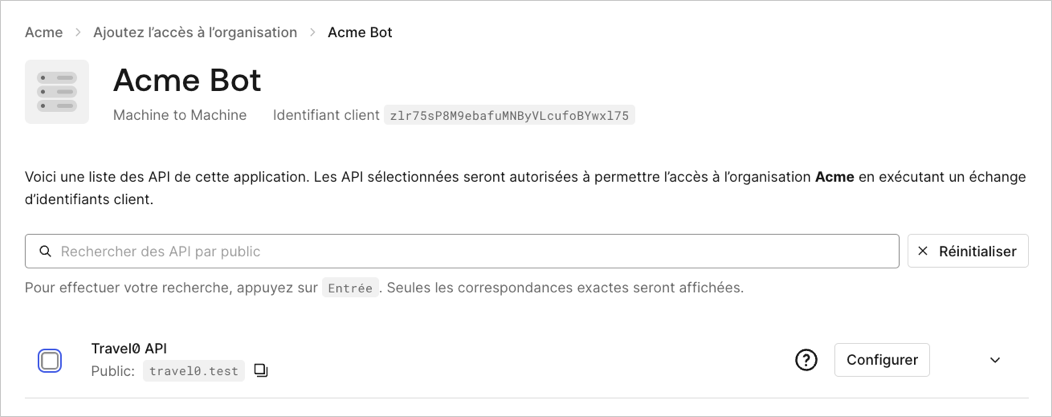
Pour supprimer l’association entre l’autorisation client d’une application et une organisation via [Auth0 Dashboard](https://manage.auth0.com/) :
1. Naviguez vers **Organizations** et choisissez l’organisation pour laquelle vous souhaitez supprimer l’association.
2. Sélectionnez l’onglet **Machine-to-Machine Access (Accès de communication entre machines)**.
3. Choisissez une application.
4. Décochez la ou les case(s) pour les API que vous souhaitez dissocier de l’organisation.
5. Clique **Enregistrer**.
 Les associations entre les autorisations de client d’application et les organisations peuvent être supprimées via le point de terminaison [Disassociate client grants from organisations (Dissocier les autorisations client des organisations)](/docs/fr-ca/api/management/v2/organizations/delete-client-grants-by-grant-id):
```bash theme={null}
export const codeExample = `curl -X DELETE --location "https://{yourDomain}/api/v2/organizations/{ORG_id}/client-grants/{GRANT_ID}" \
--header 'authorization: Bearer MGMT_API_ACCESS_TOKEN' `;
```
Les associations entre les autorisations de client d’application et les organisations peuvent être supprimées via le point de terminaison [Disassociate client grants from organisations (Dissocier les autorisations client des organisations)](/docs/fr-ca/api/management/v2/organizations/delete-client-grants-by-grant-id):
```bash theme={null}
export const codeExample = `curl -X DELETE --location "https://{yourDomain}/api/v2/organizations/{ORG_id}/client-grants/{GRANT_ID}" \
--header 'authorization: Bearer MGMT_API_ACCESS_TOKEN' `;
```