> ## Documentation Index
> Fetch the complete documentation index at: https://auth0.com/llms.txt
> Use this file to discover all available pages before exploring further.
# Configurer les notifications OTP pour l’authentification multifacteur (MFA)
> Décrit comment configurer les notifications de mots de passe à usage unique (OTP) basées sur le temps pour la MFA.
Pour utiliser des mots de passe à usage unique (OTP) comme facteur d’authentification, les utilisateurs ont besoin d’une application d’authentification telle que :
* Authy ([Google Play](https://play.google.com/store/apps/details?id=com.authy.authy) / [App Store](https://itunes.apple.com/us/app/authy/id494168017)).
* Google Authenticator ([Google Play](https://play.google.com/store/apps/details?id=com.google.android.apps.authenticator2) / [App Store](https://itunes.apple.com/us/app/google-authenticator/id388497605)).
* Gardien Auth0 ([Google Play](https://play.google.com/store/apps/details?id=com.auth0.guardian) / [App Store](https://itunes.apple.com/us/app/auth0-guardian/id1093447833)).
* Microsoft Authenticator ([Google Play](https://play.google.com/store/apps/details?id=com.azure.authenticator) / [App Store](https://itunes.apple.com/us/app/microsoft-authenticator/id983156458))
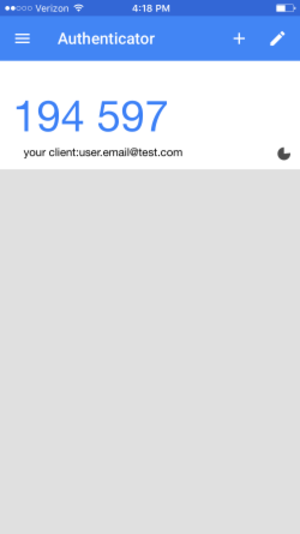
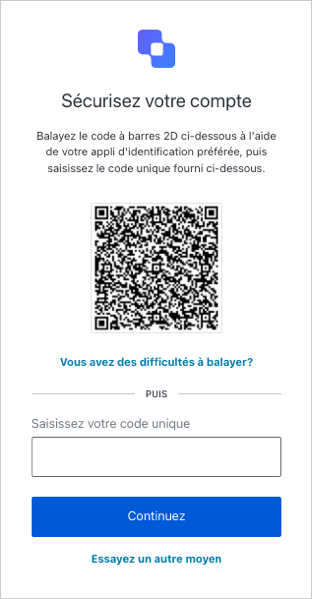 Dès l’inscription, ils peuvent numériser un code et configurer l’application, qui commencera alors à générer des codes à usage unique. Par la suite, en se connectant à l’application, l’utilisateur peut simplement vérifier l’application d’authentification pour obtenir le code à usage unique actuel :
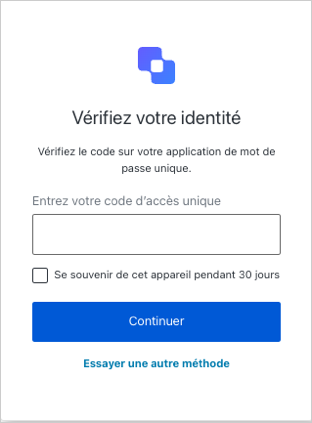
 Votre utilisateur saisit le code à l’invite :
 vos utilisateurs doivent avoir une application d’authentification OTP installée sur leurs appareils mobiles.
## En savoir plus
* [Inscription et défi des authentificateurs OTP](/docs/fr-ca/secure/multi-factor-authentication/authenticate-using-ropg-flow-with-mfa/enroll-and-challenge-otp-authenticators)
vos utilisateurs doivent avoir une application d’authentification OTP installée sur leurs appareils mobiles.
## En savoir plus
* [Inscription et défi des authentificateurs OTP](/docs/fr-ca/secure/multi-factor-authentication/authenticate-using-ropg-flow-with-mfa/enroll-and-challenge-otp-authenticators)