> ## Documentation Index
> Fetch the complete documentation index at: https://auth0.com/llms.txt
> Use this file to discover all available pages before exploring further.
> Describes how to check whether an application is registered with Auth0 as a confidential or public app using the Auth0 Management Dashboard.
# Check if Application is Confidential or Public
You can check whether an application is registered with Auth0 as a confidential or public application. To learn more, read [Confidential and Public Application](/docs/get-started/applications/confidential-and-public-applications).
Auth0 determines if an application is confidential or public based on the **Authentication Method** setting, which defines how an application authenticates against the Auth0 Authentication API [Get Token](https://auth0.com/docs/api/authentication/authorization-code-flow/get-token) endpoint.
1. In the Auth0 Dashboard, go to [Applications > Applications](https://manage.auth0.com/#/applications), and then select the name of the application to view.
2. If the **Credentials** view is not available, the application is a public application.
3. If the **Credentials** view is available, then select it and locate the **Authentication Method** field.
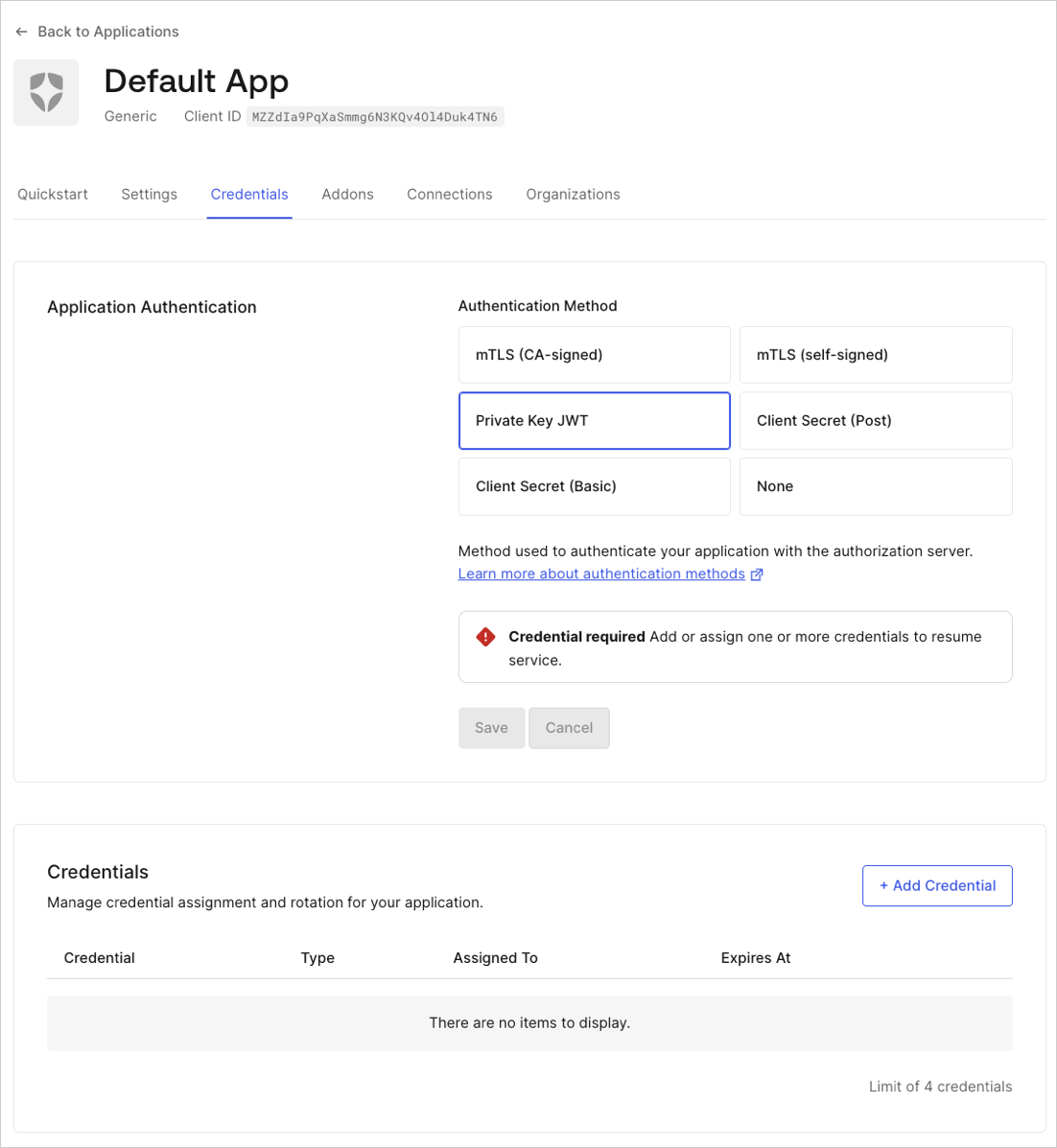 Use the applicable method:
* **None**: Public application without a client secret.
* **Client Secret Post**: Application using POST request body parameters to send a client secret.
* **Client Secret Basic**: Application using the HTTP BASIC authentication scheme to send a client secret.
* **Private Key JWT**: Application using asymmetric authentication.
These values map to confidential and public applications as follows:
| Application Type | Example | Token Endpoint Authentication Method |
| ---------------- | --------------------------------- | --------------------------------------------------------- |
| **Public** | Single-page or native | **None** |
| **Confidential** | Regular web or machine-to-machine | **Basic**, **Post**, **Private Key JWT**, **Unspecified** |
Public applications cannot maintain the confidentiality of the credentials required for Token endpoint authentication methods like **Post** and **Basic**.
Use the applicable method:
* **None**: Public application without a client secret.
* **Client Secret Post**: Application using POST request body parameters to send a client secret.
* **Client Secret Basic**: Application using the HTTP BASIC authentication scheme to send a client secret.
* **Private Key JWT**: Application using asymmetric authentication.
These values map to confidential and public applications as follows:
| Application Type | Example | Token Endpoint Authentication Method |
| ---------------- | --------------------------------- | --------------------------------------------------------- |
| **Public** | Single-page or native | **None** |
| **Confidential** | Regular web or machine-to-machine | **Basic**, **Post**, **Private Key JWT**, **Unspecified** |
Public applications cannot maintain the confidentiality of the credentials required for Token endpoint authentication methods like **Post** and **Basic**.