> ## Documentation Index
> Fetch the complete documentation index at: https://auth0.com/llms.txt
> Use this file to discover all available pages before exploring further.
> Learn how the Resource Owner Password flow works and why you should use it for highly-trusted applications.
# Resource Owner Password Flow
Because the Resource Owner Password (ROP) Flow involves the application handling the user's password, it must not be used by third-party clients.
Though we do not recommend it, highly-trusted applications can use the Resource Owner Password Flow (defined in [OAuth 2.0 RFC 6749, section 4.3](https://tools.ietf.org/html/rfc6749#section-4.3) and sometimes called Resource Owner Password Grant or ROPG), which requests that users provide credentials (username/email/phone and password), typically using an interactive form. Because credentials are sent to the backend and can be stored for future use before being exchanged for an Access Token, it is imperative that the application is absolutely trusted with this information.
Even if this condition is met, the Resource Owner Password Flow should only be used when redirect-based flows (like the [Authorization Code Flow](/docs/get-started/authentication-and-authorization-flow/authorization-code-flow)) cannot be used.
## How it works
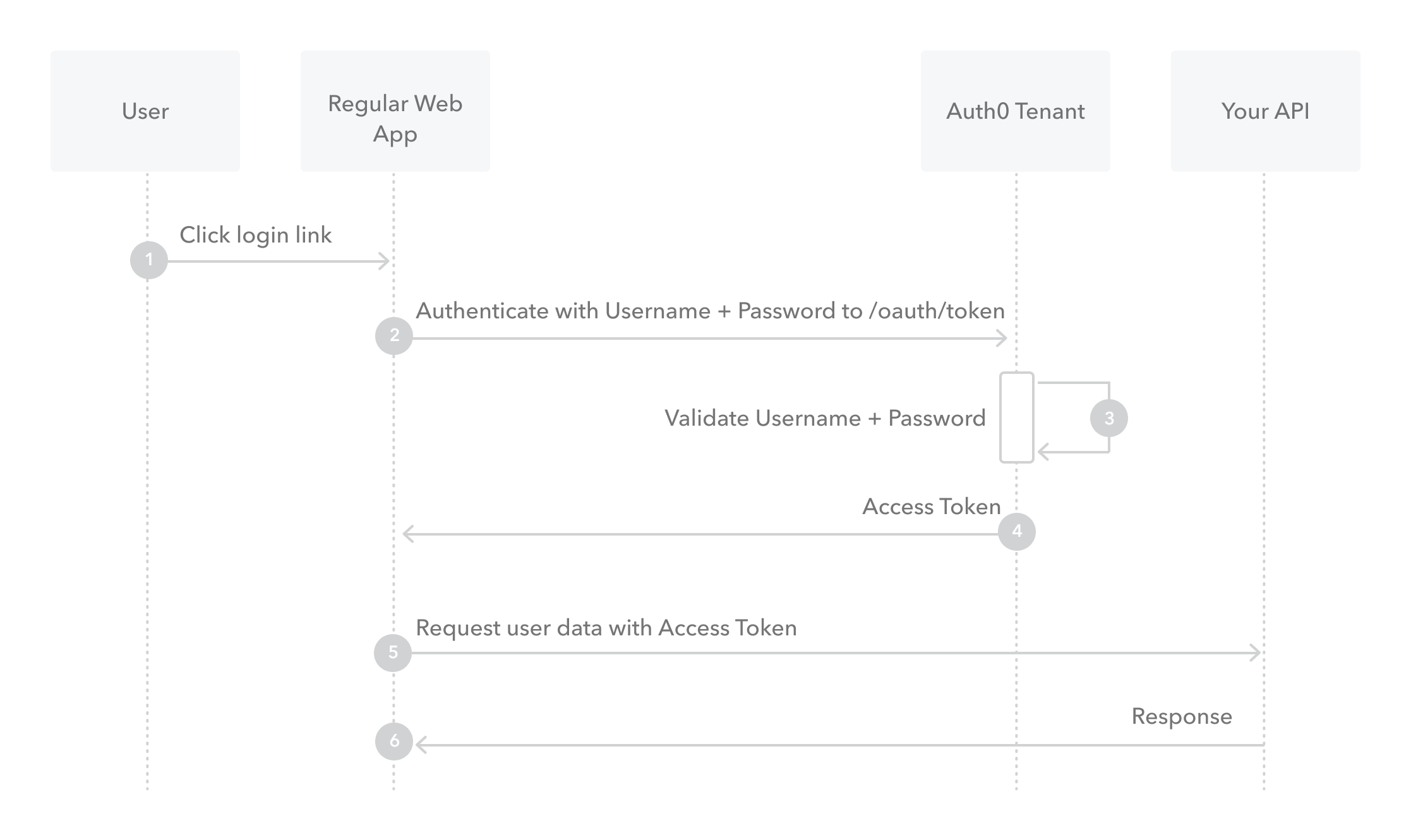 1. The user clicks **Login** within the application and enters their credentials.
2. Your application forwards the user's credentials to your Auth0 Authorization Server ([`/oauth/token` endpoint](https://auth0.com/docs/api/authentication#resource-owner-password)).
3. Your Auth0 Authorization Server validates the credentials.
4. Your Auth0 Authorization Server responds with an Access Token (and optionally, a Refresh Token).
5. Your application can use the Access Token to call an API to access information about the user.
6. The API responds with requested data.
## How to implement it
The easiest way to implement the Resource Owner Password Flow is to follow our tutorial to use our API endpoints to [Call Your API Using the Resource Owner Password Flow](/docs/get-started/authentication-and-authorization-flow/resource-owner-password-flow/call-your-api-using-resource-owner-password-flow).
## Realm support
Auth0 provides an extension grant that offers similar functionality to the Resource Owner Password grant, but allows you to keep separate user directories (which map to separate connections) and specify which one to use during the flow.
For example, let's say you want to present a dropdown on your application's login user interface that allows users to choose their user type: `Employees` or `Customers`. In this case, you would configure `Employees` and `Customers` as realms (and set up a corresponding connection for each), which allows employee and customer credentials to be kept in separate user directories. When you request a token, you will submit the realm value along with the user's credentials and the submitted realm will be used to verify the password.
To learn more about implementing this extension grant, read [Call Your API Using Resource Owner Password Flow: Configure Realm Support](/docs/get-started/authentication-and-authorization-flow/resource-owner-password-flow/call-your-api-using-resource-owner-password-flow).
## Rules
Rules will run for the Resource Owner Password Flow (including the Realm extension grant). However, redirect rules won't work. If you try to perform a redirect by specifying `context.redirect` in your rule, the authentication flow will return an error. To learn more about rules, read [Auth0 Rules](/docs/customize/rules). To learn more about redirect rules, read [Redirect Users from Within Rules](/docs/customize/rules/redirect-users).
## MFA support
If you need to use the Resource Owner Password Flow, but require stronger authentication, you can add multi-factor authentication (MFA). To learn how, read [Authenticate Using the Resource Owner Password Flow with MFA](/docs/secure/multi-factor-authentication/authenticate-using-ropg-flow-with-mfa).
## Attack protection
When using the Resource Owner Password Flow with brute-force protection, some attack protection features may fail. Some common issues, however, can be avoided. To learn more, read [Avoid Common Issues with Resource Owner Password Flow and Attack Protection](/docs/get-started/authentication-and-authorization-flow/resource-owner-password-flow/avoid-common-issues-with-resource-owner-password-flow-and-attack-protection).
## Learn more
* [Auth0 Rules](/docs/customize/rules)
* [Auth0 Hooks](/docs/customize/hooks)
* [Tokens](/docs/secure/tokens)
* [Token Best Practices](/docs/secure/tokens/token-best-practices)
* [Which OAuth 2.0 Flow Should I Use?](/docs/get-started/authentication-and-authorization-flow/which-oauth-2-0-flow-should-i-use)
1. The user clicks **Login** within the application and enters their credentials.
2. Your application forwards the user's credentials to your Auth0 Authorization Server ([`/oauth/token` endpoint](https://auth0.com/docs/api/authentication#resource-owner-password)).
3. Your Auth0 Authorization Server validates the credentials.
4. Your Auth0 Authorization Server responds with an Access Token (and optionally, a Refresh Token).
5. Your application can use the Access Token to call an API to access information about the user.
6. The API responds with requested data.
## How to implement it
The easiest way to implement the Resource Owner Password Flow is to follow our tutorial to use our API endpoints to [Call Your API Using the Resource Owner Password Flow](/docs/get-started/authentication-and-authorization-flow/resource-owner-password-flow/call-your-api-using-resource-owner-password-flow).
## Realm support
Auth0 provides an extension grant that offers similar functionality to the Resource Owner Password grant, but allows you to keep separate user directories (which map to separate connections) and specify which one to use during the flow.
For example, let's say you want to present a dropdown on your application's login user interface that allows users to choose their user type: `Employees` or `Customers`. In this case, you would configure `Employees` and `Customers` as realms (and set up a corresponding connection for each), which allows employee and customer credentials to be kept in separate user directories. When you request a token, you will submit the realm value along with the user's credentials and the submitted realm will be used to verify the password.
To learn more about implementing this extension grant, read [Call Your API Using Resource Owner Password Flow: Configure Realm Support](/docs/get-started/authentication-and-authorization-flow/resource-owner-password-flow/call-your-api-using-resource-owner-password-flow).
## Rules
Rules will run for the Resource Owner Password Flow (including the Realm extension grant). However, redirect rules won't work. If you try to perform a redirect by specifying `context.redirect` in your rule, the authentication flow will return an error. To learn more about rules, read [Auth0 Rules](/docs/customize/rules). To learn more about redirect rules, read [Redirect Users from Within Rules](/docs/customize/rules/redirect-users).
## MFA support
If you need to use the Resource Owner Password Flow, but require stronger authentication, you can add multi-factor authentication (MFA). To learn how, read [Authenticate Using the Resource Owner Password Flow with MFA](/docs/secure/multi-factor-authentication/authenticate-using-ropg-flow-with-mfa).
## Attack protection
When using the Resource Owner Password Flow with brute-force protection, some attack protection features may fail. Some common issues, however, can be avoided. To learn more, read [Avoid Common Issues with Resource Owner Password Flow and Attack Protection](/docs/get-started/authentication-and-authorization-flow/resource-owner-password-flow/avoid-common-issues-with-resource-owner-password-flow-and-attack-protection).
## Learn more
* [Auth0 Rules](/docs/customize/rules)
* [Auth0 Hooks](/docs/customize/hooks)
* [Tokens](/docs/secure/tokens)
* [Token Best Practices](/docs/secure/tokens/token-best-practices)
* [Which OAuth 2.0 Flow Should I Use?](/docs/get-started/authentication-and-authorization-flow/which-oauth-2-0-flow-should-i-use)