> ## Documentation Index
> Fetch the complete documentation index at: https://auth0.com/llms.txt
> Use this file to discover all available pages before exploring further.
> Describes how Auth0 Dashboard Admins can view and revoke login sessions.
# Auth0 Dashboard Login Session Management
With Login Sessions, Auth0 Dashboard administrators can track active sessions from different Dashboard applications across multiple devices and browsers. You can review and revoke sessions created by users accessing the Teams Dashboard, Support Center, and Auth0 Dashboard respectively.
You can see a list of all active sessions within your Auth0 Dashboard [profile page](https://manage.auth0.com/#/profile/sessions).
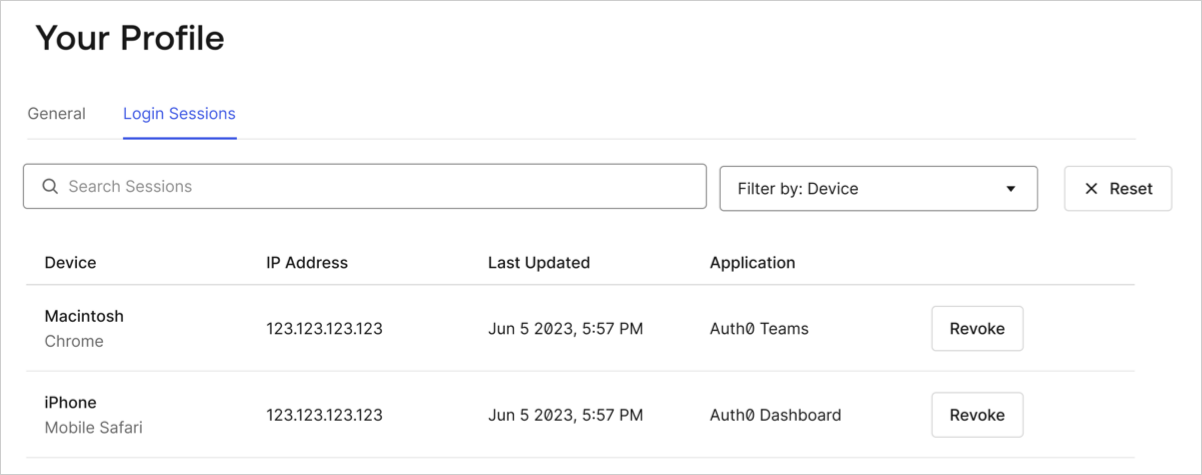 To log out or revoke a session, locate the session of interest and select **Revoke**.
Revoking a session does not automatically remove sessions belonging to extensions. However, sessions belonging to extensions are short-lived and do not renew when a login session is revoked or expires.
To log out or revoke a session, locate the session of interest and select **Revoke**.
Revoking a session does not automatically remove sessions belonging to extensions. However, sessions belonging to extensions are short-lived and do not renew when a login session is revoked or expires.