> ## Documentation Index
> Fetch the complete documentation index at: https://auth0.com/llms.txt
> Use this file to discover all available pages before exploring further.
# Amazon Web ServicesをSAMLサービスプロバイダーとして構成する
> Amazon Web Services(AWS)用のSAML2 Webアプリアドオンを使用して、Auth0をIDプロバイダーとして構成する方法を説明します。
Amazon Web Services(AWS)用のSAML2 Webアプリアドオンをアプリケーション向けに構成します。
1. [[Dashboard]>[Applications(アプリケーション)]>[Applications(アプリケーション)]](https://manage.auth0.com/#/applications)の順に移動し、新しいアプリケーションを作成するか、更新するアプリケーションの名前をクリックします。
2. **[Addons(アドオン)]** タブに移動し、 **[SAML2 Web App(SAML2 Webアプリ)]** トグルを有効にします。
3. **[Settings(設定)]** タブで、 **[Application CallbackURL(アプリケーションのコールバックURL)]** を`https://signin.aws.amazon.com/saml`.
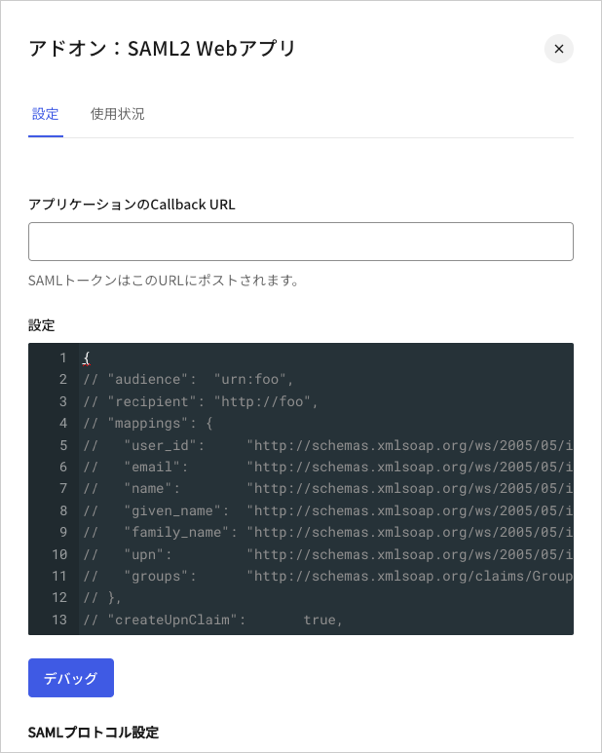 4. 以下のコードを **[Settings(設定)]** テキストボックスに貼り付け、 **[Debug(デバッグ)]** をクリックします。必ず`AWS_SSO_ISSUER_URL`と`AWS_SSO_ACS_URL`のプレースホルダーをAWSからコピーした値で置き換えてください。
```json lines theme={null}
{
"audience": "AWS_SSO_ISSUER_URL",
"destination": "AWS_SSO_ACS_URL",
"mappings": {
"email": "http://schemas.xmlsoap.org/ws/2005/05/identity/claims/emailaddress",
"name": "http://schemas.xmlsoap.org/ws/2005/05/identity/claims/name"
},
"createUpnClaim": false,
"passthroughClaimsWithNoMapping": false,
"mapUnknownClaimsAsIs": false,
"mapIdentities": false,
"nameIdentifierFormat": "urn:oasis:names:tc:SAML:1.1:nameid-format:emailAddress",
"nameIdentifierProbes": [
"http://schemas.xmlsoap.org/ws/2005/05/identity/claims/emailaddress"
]
}
```
5. ページの最後までスクロールし、 **[Enable(有効)]** をクリックします。
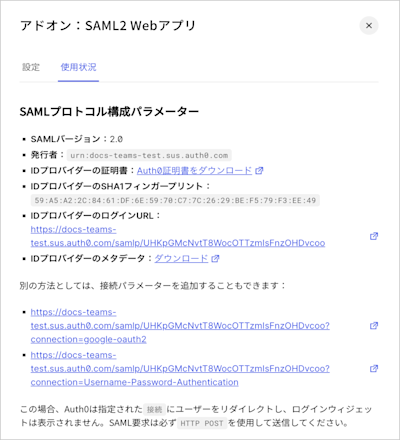
6. **[Usage(使用状況)]** タブで **[Identity Provider Metadata(IDプロバイダーのメタデータ)]** を見つけ、 **[Download(ダウンロード)]** をクリックしてメタデータファイルをダウンロードします。これは、Auth0をIDプロバイダーとして構成する際に必要になります。
4. 以下のコードを **[Settings(設定)]** テキストボックスに貼り付け、 **[Debug(デバッグ)]** をクリックします。必ず`AWS_SSO_ISSUER_URL`と`AWS_SSO_ACS_URL`のプレースホルダーをAWSからコピーした値で置き換えてください。
```json lines theme={null}
{
"audience": "AWS_SSO_ISSUER_URL",
"destination": "AWS_SSO_ACS_URL",
"mappings": {
"email": "http://schemas.xmlsoap.org/ws/2005/05/identity/claims/emailaddress",
"name": "http://schemas.xmlsoap.org/ws/2005/05/identity/claims/name"
},
"createUpnClaim": false,
"passthroughClaimsWithNoMapping": false,
"mapUnknownClaimsAsIs": false,
"mapIdentities": false,
"nameIdentifierFormat": "urn:oasis:names:tc:SAML:1.1:nameid-format:emailAddress",
"nameIdentifierProbes": [
"http://schemas.xmlsoap.org/ws/2005/05/identity/claims/emailaddress"
]
}
```
5. ページの最後までスクロールし、 **[Enable(有効)]** をクリックします。
6. **[Usage(使用状況)]** タブで **[Identity Provider Metadata(IDプロバイダーのメタデータ)]** を見つけ、 **[Download(ダウンロード)]** をクリックしてメタデータファイルをダウンロードします。これは、Auth0をIDプロバイダーとして構成する際に必要になります。
 AWSをSSO用に構成する方法については、「[Amazon Web Servicesをシングルサインオン用に構成する](/docs/ja-jp/customize/integrations/aws/configure-amazon-web-services-for-sso)」をお読みください。
## もっと詳しく
* [ロールベースのアクセス制御にAmazon Web Servicesセッションタグを使用する](/docs/ja-jp/customize/integrations/aws/session-tags)
* [シングルサインオンにAmazon Web Servicesを構成する](/docs/ja-jp/customize/integrations/aws/configure-amazon-web-services-for-sso)
AWSをSSO用に構成する方法については、「[Amazon Web Servicesをシングルサインオン用に構成する](/docs/ja-jp/customize/integrations/aws/configure-amazon-web-services-for-sso)」をお読みください。
## もっと詳しく
* [ロールベースのアクセス制御にAmazon Web Servicesセッションタグを使用する](/docs/ja-jp/customize/integrations/aws/session-tags)
* [シングルサインオンにAmazon Web Servicesを構成する](/docs/ja-jp/customize/integrations/aws/configure-amazon-web-services-for-sso)