> ## Documentation Index
> Fetch the complete documentation index at: https://auth0.com/llms.txt
> Use this file to discover all available pages before exploring further.
# GitHub Enterprise ServerをSAMLサービスプロバイダーとして構成する
> GitHub Enterprise Serverのプライベートインスタンス用のSAML2 Webアプリアドオンを使用して、Auth0をIDプロバイダーとして構成する方法を説明します。
[GitHub Enterprise Server](https://help.github.com/en/enterprise/2.16/admin/user-management/using-saml)(使用しているプライベートのGitHubアプライアンス)にSAML2 Webアプリアドオンを使用すると、Auth0をIDプロバイダーとして構成することができます。Auth0をGitHub Enterprise Cloud(github.com)のIDプロバイダーとして構成したい場合には、「[Auth0をGitHub Enterprise CloudのIDプロバイダーとして構成する](/docs/ja-jp/authenticate/single-sign-on/outbound-single-sign-on/configure-auth0-saml-identity-provider/configure-saml2-web-app-addon-for-github-enterprise-cloud)」をお読みください。
## Auth0でSAML SSOを構成する
1. [[Auth0 Dashboard]>[Applications(アプリケーション)]>[APIs(API)]](https://manage.auth0.com/#/applications)に移動して、新しいAPIを作成します。 **GitHub** など、分かりやすい名前を入力します。アプリケーションの種類は任意ですが、 **[Regular Web App(通常のWebアプリ)]** が推奨されます。
2. [[Addons(アドオン)]](https://manage.auth0.com/#/applications/\{yourClientId}/addons)タブに移動し、 **[SAML2 Web App(SAML2 Webアプリ)]** トグルを有効にします。
3. **[Settings(設定)]** タブで、 **[Application Callback URL(アプリケーションのCallback URL)]** を次に設定します:`https://github.com/orgs/{yourGitHubOrgName}/saml/consume`
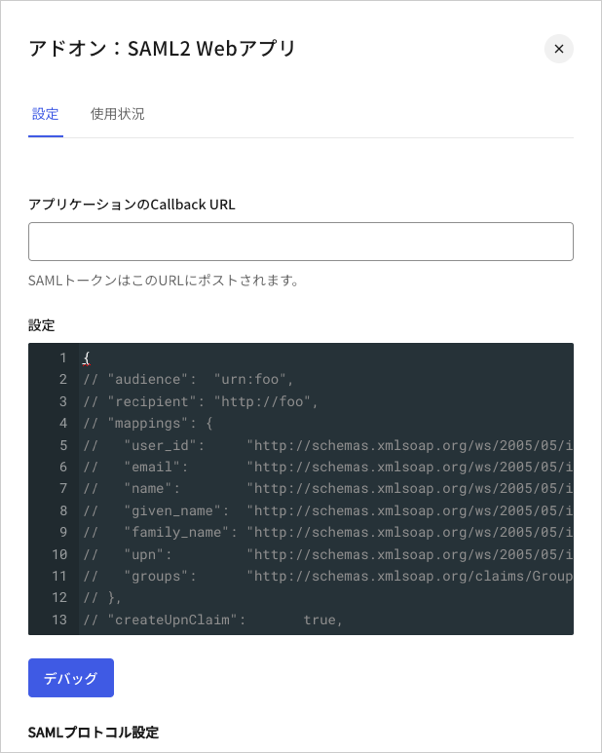 4. 以下のコードを **[Settings(設定)]** テキストボックスに貼り付け、 **[Debug(デバッグ)]** をクリックします。
```json lines theme={null}
{
"audience": "{yourGitHubServerUrl}",
"mappings": {
"user_id": "http://schemas.xmlsoap.org/ws/2005/05/identity/claims/nameidentifier",
"email": "emails",
"name": "full_name"
},
"passthroughClaimsWithNoMapping": false,
"mapIdentities": false,
"signatureAlgorithm": "rsa-sha256",
"digestAlgorithm": "sha256",
"nameIdentifierProbes": [
"http://schemas.xmlsoap.org/ws/2005/05/identity/claims/nameidentifier"
]
}
```
`{yourGitHubOrgName}`をGitHubサブスクリプションに対応するGitHubの組織名で置き換えます。例:`https://github.yourname.com`
1. 上にあるマッピングは、`user_id`を **[Name Identifier(名前識別子)]** としてGitHubに送信します。GitHubアプリケーションに1つ以上の接続を有効化する場合には、このオプションを使用して、確実に一意になるようにします(ユーザーがそれぞれ異なるIDを持つようになります)。
2. 使用する接続が1つだけの場合には、`nickname`(ニックネーム)などの一意の識別子を分かりやすい **[Name Identifier(名前識別子)]** として使用しても構いませんが、そのプロパティが一意であることを必ず確認してください。
5. タブの最後までスクロールし、 **[Enable(有効)]** をクリックします。
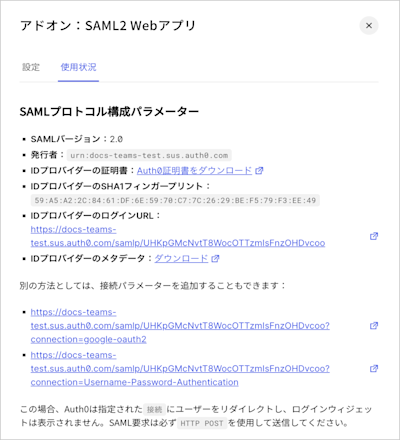
6. **[Usage(使用状況)]** タブで **[Identity Provider Metadata(IDプロバイダーのメタデータ)]** を見つけ、 **[Download(ダウンロード)]** をクリックしてメタデータファイルをダウンロードします。これは、Auth0をIDプロバイダーとして構成する際に必要になります。
4. 以下のコードを **[Settings(設定)]** テキストボックスに貼り付け、 **[Debug(デバッグ)]** をクリックします。
```json lines theme={null}
{
"audience": "{yourGitHubServerUrl}",
"mappings": {
"user_id": "http://schemas.xmlsoap.org/ws/2005/05/identity/claims/nameidentifier",
"email": "emails",
"name": "full_name"
},
"passthroughClaimsWithNoMapping": false,
"mapIdentities": false,
"signatureAlgorithm": "rsa-sha256",
"digestAlgorithm": "sha256",
"nameIdentifierProbes": [
"http://schemas.xmlsoap.org/ws/2005/05/identity/claims/nameidentifier"
]
}
```
`{yourGitHubOrgName}`をGitHubサブスクリプションに対応するGitHubの組織名で置き換えます。例:`https://github.yourname.com`
1. 上にあるマッピングは、`user_id`を **[Name Identifier(名前識別子)]** としてGitHubに送信します。GitHubアプリケーションに1つ以上の接続を有効化する場合には、このオプションを使用して、確実に一意になるようにします(ユーザーがそれぞれ異なるIDを持つようになります)。
2. 使用する接続が1つだけの場合には、`nickname`(ニックネーム)などの一意の識別子を分かりやすい **[Name Identifier(名前識別子)]** として使用しても構いませんが、そのプロパティが一意であることを必ず確認してください。
5. タブの最後までスクロールし、 **[Enable(有効)]** をクリックします。
6. **[Usage(使用状況)]** タブで **[Identity Provider Metadata(IDプロバイダーのメタデータ)]** を見つけ、 **[Download(ダウンロード)]** をクリックしてメタデータファイルをダウンロードします。これは、Auth0をIDプロバイダーとして構成する際に必要になります。
 ## GitHubでSAML SSOを構成する
[Enterprise ServerでのSAML使用に関するGitHubドキュメント](https://help.github.com/en/enterprise/admin/user-management/using-saml#configuring-saml-settings)を参考にしながら、GitHub Enterprise Cloudで構成を完了させます。以下の情報が必要になります。
| フィールド | エントリ |
| ----------------------------------- | --------------------------------------------------------------------------------------------------------- |
| **Sign On URL(サインオンURL)** | Auth0で作成した直後のGitHubアプリケーションの`client_id`は`https://{yourDomain}/samlp/{CLIENT_ID}`
## GitHubでSAML SSOを構成する
[Enterprise ServerでのSAML使用に関するGitHubドキュメント](https://help.github.com/en/enterprise/admin/user-management/using-saml#configuring-saml-settings)を参考にしながら、GitHub Enterprise Cloudで構成を完了させます。以下の情報が必要になります。
| フィールド | エントリ |
| ----------------------------------- | --------------------------------------------------------------------------------------------------------- |
| **Sign On URL(サインオンURL)** | Auth0で作成した直後のGitHubアプリケーションの`client_id`は`https://{yourDomain}/samlp/{CLIENT_ID}`
`{CLIENT_ID}`になります。 |
| **Issuer(発行者)** | `urn:auth0:{yourTenant}` |
| **Verification Certificate(検証証明書)** | `https://{yourDomain}/pem`からダウンロードします。ダウンロードしたファイルをテキストエディターで開き、中身をコピーしてからGitHubのテキスト領域に貼り付けます。 |
| **User Attributes(ユーザー属性)** | デフォルトのままにしておきます。SAML Webアプリアドオンで構成したマッピングでは、GitHubが指定するデフォルトの属性名が使用されます。 |
| **Signature method(署名メソッド)** | `RSA256-SHA256` |
| **Digest method(ダイジェストメソッド)** | `SHA256` |