> ## Documentation Index
> Fetch the complete documentation index at: https://auth0.com/llms.txt
> Use this file to discover all available pages before exploring further.
# 動的変数でカスタムフォームの要素を国際化する
> 動的変数がどのようにして多言語のログイン画面を作成できるのかについて説明します。
[サインアップ画面のカスタマイズ](/docs/ja-jp/customize/login-pages/universal-login/customize-signup-and-login-prompts)はコンテキストデータに合わせて異なるように表示できます。`locale`変数を使用して、特定の条件が満たされた場合にフォームの入力を表示し、検証動作を定義します。
以下のユースケースでは、`locale`を使用して、利用規約とチェックボックスを表示します。[ページテンプレート](/docs/ja-jp/customize/universal-login-pages/universal-login-page-templates#available-variables)に公開されている変数であれば何でも置き換えられます。
### 前提条件
* テナントに検証済みの[カスタムドメイン](/docs/ja-jp/customize/custom-domains)がある
* テナントにページテンプレートが設定されている
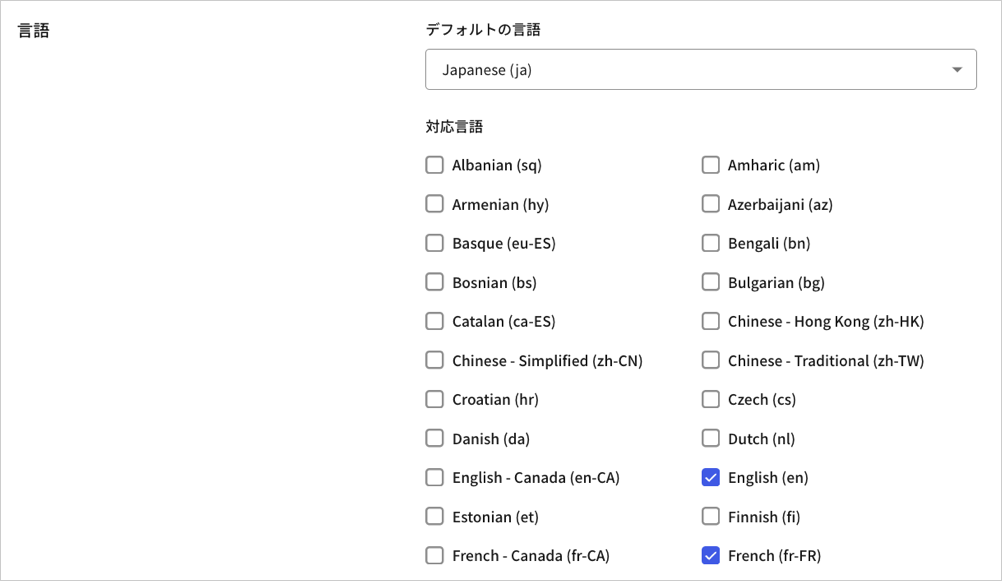
### ロケールとしてfrとesを有効化する
ロケールを有効にします。
 ### 条件が満たされた場合にカスタムフィールドを表示する
Management APIを使用して、テンプレート部分を`form-content-end`サインアップ画面のユニバーサルログイン画面コンテナーに追加します。ロケールが`es`または`fr`の場合には、利用規約とチェックボックスを表示します。
```json lines theme={null}
{% if locale == 'fr' %}
{% endif %}
{% if locale == 'es' %}
{% endif %}
```
以下の要求を[Management API](https://auth0.com/docs/api/management/v2/prompts/put-custom-text-by-language)の**特定プロンプトのカスタムテキスト設定** に送信します。
```javascript lines theme={null}
// PUT prompts/signup/partials
{
"signup": {
"form-content-end": "{% if locale..."
}
}
```
ロケールが`fr`または`es`に設定されると、サインアップ画面に利用規約とチェックボックスのみが表示されるようになります。
### 条件が満たされた場合にカスタムフィールドを表示する
Management APIを使用して、テンプレート部分を`form-content-end`サインアップ画面のユニバーサルログイン画面コンテナーに追加します。ロケールが`es`または`fr`の場合には、利用規約とチェックボックスを表示します。
```json lines theme={null}
{% if locale == 'fr' %}
{% endif %}
{% if locale == 'es' %}
{% endif %}
```
以下の要求を[Management API](https://auth0.com/docs/api/management/v2/prompts/put-custom-text-by-language)の**特定プロンプトのカスタムテキスト設定** に送信します。
```javascript lines theme={null}
// PUT prompts/signup/partials
{
"signup": {
"form-content-end": "{% if locale..."
}
}
```
ロケールが`fr`または`es`に設定されると、サインアップ画面に利用規約とチェックボックスのみが表示されるようになります。
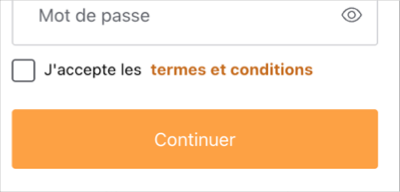
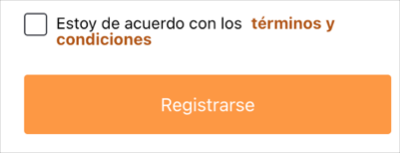
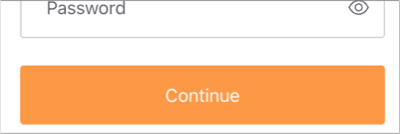 出力をテストするには、**[Manage Dashboard(管理ダッシュボード)]** を表示して、[[Branding(ブランディング)]>[Universal Login(ユニバーサルログイン)]>[Customization Options(カスタマイズのオプション)]](https://manage.auth0.com/dashboard/us/dev-6endizjt/universal-login/customizations/colors)に移動し、**[Try(試す)]** ボタンを右クリックしてリンクのアドレスをコピーします。コピーしたURLに次のクエリパラメーターを追加して、新しいURLにアクセスします:`&screen_hint=signup&ui_locales=fr`(または`es`)
### 確認を追加する
ロケールが`fr`の場合には、続行する前にチェックボックスの選択を確認することができます。以下の確認コードでテンプレート部分を更新します。
```json lines theme={null}
{% if locale == 'fr' %}
{% endif %}
{% if locale == 'es' %}
{% endif %}
```
`fr`
出力をテストするには、**[Manage Dashboard(管理ダッシュボード)]** を表示して、[[Branding(ブランディング)]>[Universal Login(ユニバーサルログイン)]>[Customization Options(カスタマイズのオプション)]](https://manage.auth0.com/dashboard/us/dev-6endizjt/universal-login/customizations/colors)に移動し、**[Try(試す)]** ボタンを右クリックしてリンクのアドレスをコピーします。コピーしたURLに次のクエリパラメーターを追加して、新しいURLにアクセスします:`&screen_hint=signup&ui_locales=fr`(または`es`)
### 確認を追加する
ロケールが`fr`の場合には、続行する前にチェックボックスの選択を確認することができます。以下の確認コードでテンプレート部分を更新します。
```json lines theme={null}
{% if locale == 'fr' %}
{% endif %}
{% if locale == 'es' %}
{% endif %}
```
`fr`
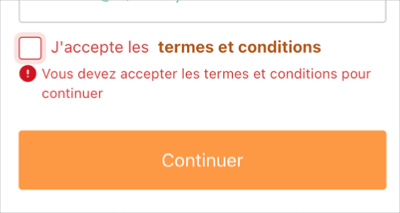 このユースケースでは、ユーザーの利便性を考えて検証がクライアント側で行われます。検証は確実に実行されるわけではなく、たとえば、ユーザーのブラウザーでJavascriptが無効化されている場合には実行されません。また、好奇心や悪意のある行為者によって検証が変更される可能性もあります。検証ロジックの整合性を保証するために、クライアント側の検証には必ずサーバー側の検証を組み合わせてください。