> ## Documentation Index
> Fetch the complete documentation index at: https://auth0.com/llms.txt
> Use this file to discover all available pages before exploring further.
# 自分のテナント名またはテナントIDを探す
> Auth0テナントの名前の探し方
すべてのAuth0テナントには名前があります。この名前は、コードでテナントを特定するために頻繁に使用します。Auth0ドキュメントに`{yourTenantId}`、`{yourTenantName}`、`{yourTenant}`、またはこれらに似た変数が出てきたら、変数を実際のテナント名に置き換えてください。
1. [[Auth0 Dashboard]](https://manage.auth0.com/#)に移動します。
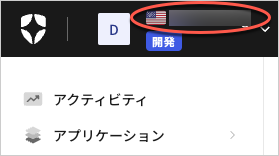
2. 左上隅にあるAuth0のロゴの隣にテナント名が表示されます。
 ## もっと詳しく
* [テナント設定](/docs/ja-jp/get-started/tenant-settings)
* [マルチテナントアプリケーションのベストプラクティス](/docs/ja-jp/get-started/auth0-overview/create-tenants/multi-tenant-apps-best-practices)
## もっと詳しく
* [テナント設定](/docs/ja-jp/get-started/tenant-settings)
* [マルチテナントアプリケーションのベストプラクティス](/docs/ja-jp/get-started/auth0-overview/create-tenants/multi-tenant-apps-best-practices)