> ## Documentation Index
> Fetch the complete documentation index at: https://auth0.com/llms.txt
> Use this file to discover all available pages before exploring further.
# 組織を検索する
> Auth0 Dashboardを使って組織を検索する方法について説明します。
[組織](/docs/ja-jp/manage-users/organizations/organizations-overview)を扱う際に、名前や表示名で組織を検索しなければならないことがあるかもしれません。これには、Auth0 Dashboardを使うことができます。
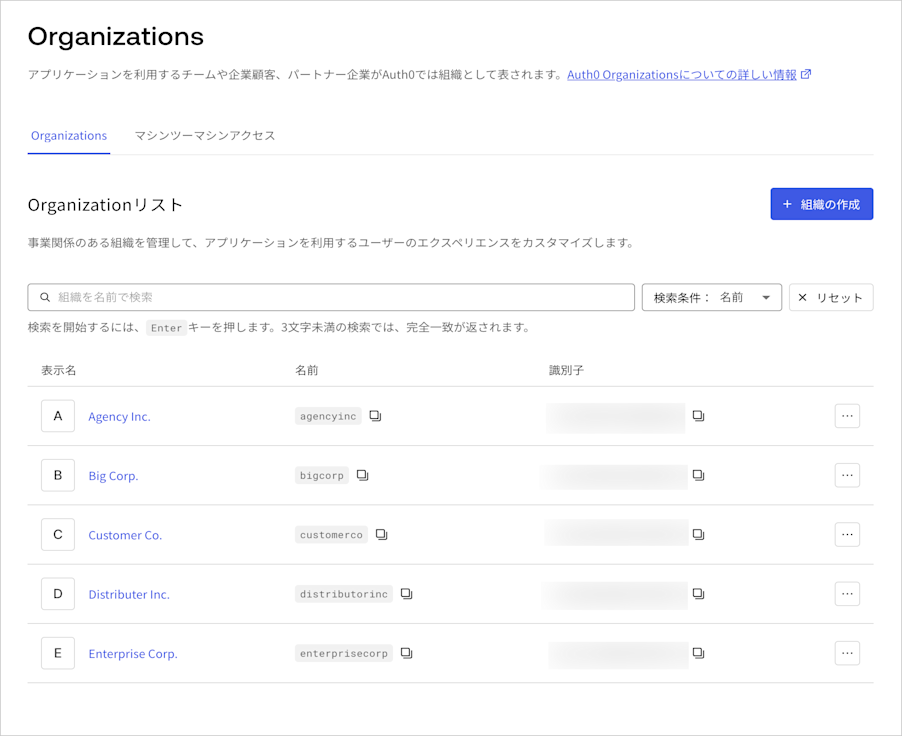 入力したテキストが検索されたフィールドの中に見つかった場合には、結果が返されます。たとえば、「Big Holdings Co」という名前の組織があり、検索文字列が「`hold`」や「`ings`」であった場合には、Big Holdingsの組織が返されます。
組織の検索では、最大50件の結果が返されます。望み通りの結果が得られない場合には、より具体的な検索文字列を指定してください。
組織の検索は結果整合性のある機能です。最近作成や変更を行った組織は検索結果に含まれない可能性がありますが、いずれは反映されます。
入力したテキストが検索されたフィールドの中に見つかった場合には、結果が返されます。たとえば、「Big Holdings Co」という名前の組織があり、検索文字列が「`hold`」や「`ings`」であった場合には、Big Holdingsの組織が返されます。
組織の検索では、最大50件の結果が返されます。望み通りの結果が得られない場合には、より具体的な検索文字列を指定してください。
組織の検索は結果整合性のある機能です。最近作成や変更を行った組織は検索結果に含まれない可能性がありますが、いずれは反映されます。