> ## Documentation Index
> Fetch the complete documentation index at: https://auth0.com/llms.txt
> Use this file to discover all available pages before exploring further.
# ユーザーアカウントのリンク:サーバー側実装
> サンプルのシナリオを使って、サーバー側コードを使用してユーザーアカウントと通常のWebアプリをリンクする方法を説明します。
Auth0は、様々なIDプロバイダーのユーザーアカウントのリンクをサポートします。サーバー側コードを使用して、通常のWebアプリケーションのアカウントをリンクし、続行する前にユーザーに許可を求めることができます。コードは、ユーザーを認証し、メールアドレスを使用してユーザーを検索・特定します。その後、アプリケーションは、ターゲットアカウントの資格情報で認証することで、アカウントをリンクすることをユーザーに促し、アカウントとリンクします。
このサンプルアプリケーションの全ソースは [GitHub](https://github.com/auth0-samples/auth0-link-accounts-sample/tree/master/RegularWebApp)でご覧いただけます。
1. ユーザーをアプリケーションにログインさせる。
ユーザーは [ユニバーサルログイン](/docs/ja-jp/authenticate/login/auth0-universal-login)を使用して、アプリケーションに対して認証を受けます。詳細については、Auth0 Management APIオーディエンスのトークンを要求する(オーディエンス=`https://{yourDomain}/api/v2/`)、[Regular Web App Quickstart(通常のWebアプリクイックスタート)](/docs/ja-jp/quickstart/webapp)をお読みください。
2. 同じメールアドレスを持つユーザーを検索する。
同じ検証済みメール持っているユーザーのユーザープロファイルおよびリストを取得できます。
```lines theme={null}
router.get("/", async (req, res) => {
const { sub, email_verified } = req.openid.user;
//fetch user profile containing the user_metadata and app_metadata properties
try {
let getUsersWithSameVerifiedEmail = [];
const getUserProfile = auth0Client.getUser(sub);
if (email_verified)
// account linking is only offered verified email
getUsersWithSameVerifiedEmail = auth0Client.getUsersWithSameVerifiedEmail(
req.openid.user
);
const [user, suggestedUsers] = await Promise.all([
getUserProfile,
getUsersWithSameVerifiedEmail,
]);
const flashError = clear(req);
res.render("user", {
user,
suggestedUsers,
wrongAccountError: flashError && flashError === Errors.WrongAccount,
});
} catch (err) {
debug("GET /user[s] failed: %o", err);
res.render("error", err);
}
});
```
同じ検証済みメール持っているユーザーレコードの全リストを取得するには、アプリケーションは、`read:users`スコープを持つ[Management APIアクセストークン](/docs/ja-jp/secure/tokens/access-tokens/management-api-access-tokens)を使用してAuth0 Management APIの[Get Users By Emailエンドポイント](/docs/ja-jp/api/v2#!/users-by-email/get_users_by_email)を呼び出します。
```javascript lines theme={null}
const request = require('request');
class Auth0Client {
...
async getUsersWithSameVerifiedEmail({ sub, email }) {
return await this.request({
url: `${process.env.ISSUER_BASE_URL}/api/v2/users-by-email?email=${email}`,
});
}
```
3. アカウントのリンクをユーザーに促す。
1. Auth0が、一致するメールアドレスを持つ1件以上のレコードを返すと、ユーザーには、アカウントのリンクを促す以下のメッセージと共に、リストが表示されます。
2. ユーザーがアカウントをリンクしたい場合は、アカウントの隣にある\*\*[Link(リンク)]\*\* をクリックします。
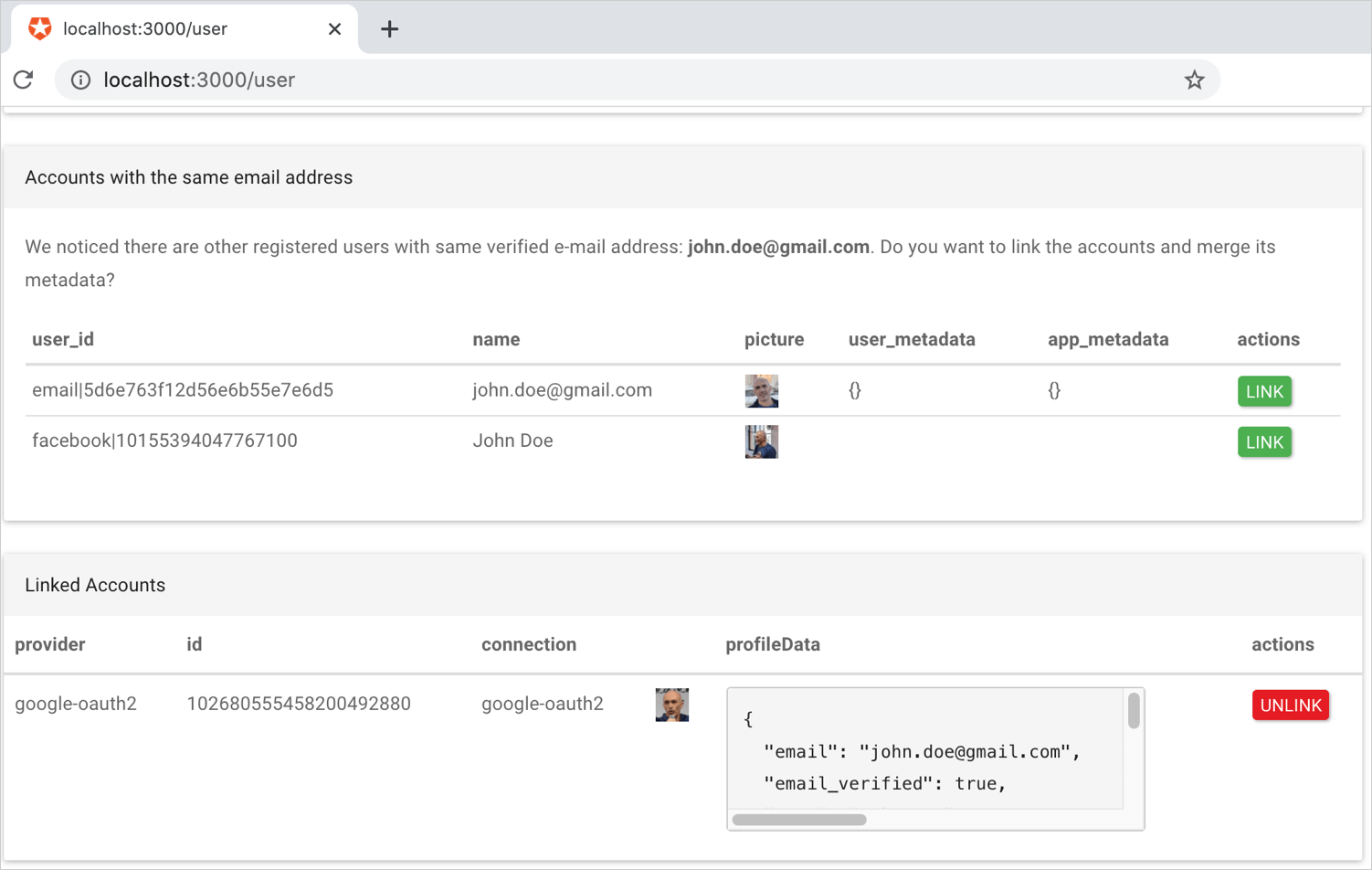 4. ユーザーが **[Link(リンク)]** をクリックすると、アプリケーションは、ターゲットアカウントで認証を受けることをユーザーに求め、その後アカウントのリンクを実行します。
セカンダリアカウントから`user_metadata`を保持・マージするには、APIエンドポイントを呼び出す前に取得し、プライマリアカウントのメタデータにマージしなければなりません。アカウントがリンクされた時点で、セカンダリアカウントのメタデータは破棄されます。
アカウントのリンクを始めるときに、プライマリアカウントとして使用するIDと、セカンダリアカウントとして使用するIDを選択できます。プライマリプロファイルでどの属性を保持したいかに応じて、選択してください。
以下のコードスニペットは、メタデータの検証およびマージの方法を示しています。
```javascript lines theme={null}
async function accountLink(req, res, next) {
const {
linking: { targetUserId },
} = req.appSession;
const { sub: authenticatedTargetUserId } = req.openidTokens.claims();
if (authenticatedTargetUserId !== targetUserId) {
debug(
"Skipping account linking as the authenticated user(%s) is different than target linking user (%s)",
authenticatedTargetUserId,
targetUserId
);
set(req, Errors.WrongAccount);
return next();
}
debug(
"User %s succesfully authenticated. Account linking with %s... ",
authenticatedTargetUserId,
targetUserId
);
const { id_token: targetIdToken } = req.openidTokens;
const { sub: primaryUserId } = req.appSession.claims;
try {
await mergeMetadata(primaryUserId, authenticatedTargetUserId);
await auth0Client.linkAccounts(primaryUserId, targetIdToken);
debug("Accounts linked.");
} catch (err) {
debug("Linking failed %o", err);
} finally {
next();
}
}
```
5. アプリケーションは、`update:users`スコープを持つ[Management APIアクセストークン](/docs/ja-jp/secure/tokens/access-tokens/management-api-access-tokens)を使用してAuth0 Management APIの[Link a User Accountエンドポイント](/docs/ja-jp/api/v2#!/Users/post_identities)を呼び出します。
## メタデータマージの例
以下の例は、[Node.js Auth0 SDK for API V2](https://github.com/auth0/node-auth0)を使用して、セカンダリアカウントの `user_metadata`および`app_metadata`をプライマリアカウントにマージする方法を明確に示しています。
```javascript lines theme={null}
/*
* Recursively merges user_metadata and app_metadata from secondary into primary user.
* Data of primary user takes preponderance.
* Array fields are joined.
*/
async function mergeMetadata(primaryUserId, secondaryUserId) {
// load both users with metedata.
const [primaryUser, secondaryUser] = await Promise.all(
[primaryUserId, secondaryUserId].map((uid) => auth0Client.getUser(uid))
);
const customizerCallback = function (objectValue, sourceValue) {
if (_.isArray(objectValue)) {
return sourceValue.concat(objectValue);
}
};
const mergedUserMetadata = _.merge(
{},
secondaryUser.user_metadata,
primaryUser.user_metadata,
customizerCallback
);
const mergedAppMetadata = _.merge(
{},
secondaryUser.app_metadata,
primaryUser.app_metadata,
customizerCallback
);
await auth0Client.updateUser(primaryUserId, {
user_metadata: mergedUserMetadata,
app_metadata: mergedAppMetadata,
});
}
```
## もっと詳しく
* [APIの呼び出しをチェックする](/docs/ja-jp/troubleshoot/authentication-issues/check-api-calls)
* [無効なトークンエラーのトラブルシューティング](/docs/ja-jp/troubleshoot/basic-issues/invalid-token-errors)
4. ユーザーが **[Link(リンク)]** をクリックすると、アプリケーションは、ターゲットアカウントで認証を受けることをユーザーに求め、その後アカウントのリンクを実行します。
セカンダリアカウントから`user_metadata`を保持・マージするには、APIエンドポイントを呼び出す前に取得し、プライマリアカウントのメタデータにマージしなければなりません。アカウントがリンクされた時点で、セカンダリアカウントのメタデータは破棄されます。
アカウントのリンクを始めるときに、プライマリアカウントとして使用するIDと、セカンダリアカウントとして使用するIDを選択できます。プライマリプロファイルでどの属性を保持したいかに応じて、選択してください。
以下のコードスニペットは、メタデータの検証およびマージの方法を示しています。
```javascript lines theme={null}
async function accountLink(req, res, next) {
const {
linking: { targetUserId },
} = req.appSession;
const { sub: authenticatedTargetUserId } = req.openidTokens.claims();
if (authenticatedTargetUserId !== targetUserId) {
debug(
"Skipping account linking as the authenticated user(%s) is different than target linking user (%s)",
authenticatedTargetUserId,
targetUserId
);
set(req, Errors.WrongAccount);
return next();
}
debug(
"User %s succesfully authenticated. Account linking with %s... ",
authenticatedTargetUserId,
targetUserId
);
const { id_token: targetIdToken } = req.openidTokens;
const { sub: primaryUserId } = req.appSession.claims;
try {
await mergeMetadata(primaryUserId, authenticatedTargetUserId);
await auth0Client.linkAccounts(primaryUserId, targetIdToken);
debug("Accounts linked.");
} catch (err) {
debug("Linking failed %o", err);
} finally {
next();
}
}
```
5. アプリケーションは、`update:users`スコープを持つ[Management APIアクセストークン](/docs/ja-jp/secure/tokens/access-tokens/management-api-access-tokens)を使用してAuth0 Management APIの[Link a User Accountエンドポイント](/docs/ja-jp/api/v2#!/Users/post_identities)を呼び出します。
## メタデータマージの例
以下の例は、[Node.js Auth0 SDK for API V2](https://github.com/auth0/node-auth0)を使用して、セカンダリアカウントの `user_metadata`および`app_metadata`をプライマリアカウントにマージする方法を明確に示しています。
```javascript lines theme={null}
/*
* Recursively merges user_metadata and app_metadata from secondary into primary user.
* Data of primary user takes preponderance.
* Array fields are joined.
*/
async function mergeMetadata(primaryUserId, secondaryUserId) {
// load both users with metedata.
const [primaryUser, secondaryUser] = await Promise.all(
[primaryUserId, secondaryUserId].map((uid) => auth0Client.getUser(uid))
);
const customizerCallback = function (objectValue, sourceValue) {
if (_.isArray(objectValue)) {
return sourceValue.concat(objectValue);
}
};
const mergedUserMetadata = _.merge(
{},
secondaryUser.user_metadata,
primaryUser.user_metadata,
customizerCallback
);
const mergedAppMetadata = _.merge(
{},
secondaryUser.app_metadata,
primaryUser.app_metadata,
customizerCallback
);
await auth0Client.updateUser(primaryUserId, {
user_metadata: mergedUserMetadata,
app_metadata: mergedAppMetadata,
});
}
```
## もっと詳しく
* [APIの呼び出しをチェックする](/docs/ja-jp/troubleshoot/authentication-issues/check-api-calls)
* [無効なトークンエラーのトラブルシューティング](/docs/ja-jp/troubleshoot/basic-issues/invalid-token-errors)