> ## Documentation Index
> Fetch the complete documentation index at: https://auth0.com/llms.txt
> Use this file to discover all available pages before exploring further.
# Online Refresh Tokens の設定と使用
> Online Refresh Tokens の設定と使用方法。
export const ReleaseStageNotice = ({feature, stage, plans, contact, terms}) => {
const stageTextMap = {
"beta": "Beta",
"ea": "早期アクセス"
};
const stageText = stageTextMap[stage] || "製品リリース段階";
const prsLink = "/docs/troubleshoot/product-lifecycle/product-release-stages";
const linkify = (text, url) => {
return {text};
};
const includeDetails = (plans, contact, terms) => {
const hasDetails = terms || plans || contact;
if (!hasDetails) return null;
return
{plans && <>この機能は{linkify(`${plans}プラン`, "https://auth0.com/pricing")}でご利用いただけます。 }
{contact && "参加をご希望の場合は、" + contact + "までお問い合わせください。 "}
{terms && <>この機能を使用することにより、Oktaの該当する無料トライアル規約および{linkify("Master Subscription Agreement", "https://www.okta.com/legal")}に同意したものとみなされます。}
;
};
return
{feature}機能は現在、{linkify(stageText, prsLink)}です。
{includeDetails(plans, contact, terms)}
;
};
Online Refresh Tokens (ORTs) は、Auth0 Dashboard または Management API を使用して、[API (Resource Server) ](/docs/ja-jp/get-started/apis/api-settings) レベルで有効化する必要があります。
1. [Auth0 Dashboard > アプリケーション > API](https://manage.auth0.com/#/apis) に移動します。
2. 設定する API を選択します。
3. **設定** タブで、**オンラインアクセスを許可** トグルを有効にします。
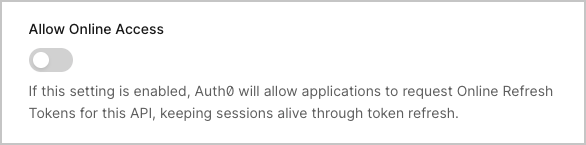 4. **保存** を選択します。
セッションのアイドルタイムアウトと絶対有効期間の値を確認して設定するには、[テナントのセッション有効期限](https://manage.auth0.com/#/tenant/advanced) の設定を確認してください。詳細については、[セッションの有効期間を設定する](/docs/ja-jp/manage-users/sessions/configure-session-lifetime) をご覧ください。
ORTs を有効にするには、[リソースサーバーを更新](/docs/ja-jp/api/management/v2/resource-servers/patch-resource-servers-by-id)するendpointに対して `PATCH` 呼び出しを行います。
Auth0 CLI を使用する場合は、このコマンドを実行する前に、まだ済んでいなければ[CLI セッションをセットアップして認証](/docs/ja-jp/deploy-monitor/auth0-cli)してください。
```bash theme={null}
auth0 api patch "resource-servers/" \
--data '{"allow_online_access": true}'
```
```bash theme={null}
curl --request PATCH \
--url 'https:///api/v2/resource-servers/' \
--header 'authorization: Bearer ' \
--header 'content-type: application/json' \
--data '{"allow_online_access": true}'
```
設定を確認するには、リソースサーバーに対して `GET` 呼び出しを行います。
```bash theme={null}
auth0 api get "resource-servers/"
```
```bash theme={null}
curl --request GET \
--url 'https:///api/v2/resource-servers/' \
--header 'authorization: Bearer '
```
レスポンスには、`allow_online_access` プロパティが含まれます。
```json theme={null}
{
"id": "resource-server-id",
"name": "My API",
"identifier": "https://my-api.example.com",
"allow_online_access": true,
...
}
```
4. **保存** を選択します。
セッションのアイドルタイムアウトと絶対有効期間の値を確認して設定するには、[テナントのセッション有効期限](https://manage.auth0.com/#/tenant/advanced) の設定を確認してください。詳細については、[セッションの有効期間を設定する](/docs/ja-jp/manage-users/sessions/configure-session-lifetime) をご覧ください。
ORTs を有効にするには、[リソースサーバーを更新](/docs/ja-jp/api/management/v2/resource-servers/patch-resource-servers-by-id)するendpointに対して `PATCH` 呼び出しを行います。
Auth0 CLI を使用する場合は、このコマンドを実行する前に、まだ済んでいなければ[CLI セッションをセットアップして認証](/docs/ja-jp/deploy-monitor/auth0-cli)してください。
```bash theme={null}
auth0 api patch "resource-servers/" \
--data '{"allow_online_access": true}'
```
```bash theme={null}
curl --request PATCH \
--url 'https:///api/v2/resource-servers/' \
--header 'authorization: Bearer ' \
--header 'content-type: application/json' \
--data '{"allow_online_access": true}'
```
設定を確認するには、リソースサーバーに対して `GET` 呼び出しを行います。
```bash theme={null}
auth0 api get "resource-servers/"
```
```bash theme={null}
curl --request GET \
--url 'https:///api/v2/resource-servers/' \
--header 'authorization: Bearer '
```
レスポンスには、`allow_online_access` プロパティが含まれます。
```json theme={null}
{
"id": "resource-server-id",
"name": "My API",
"identifier": "https://my-api.example.com",
"allow_online_access": true,
...
}
```
ORT を取得する
ORT を取得するには、[認可コードフロー](/docs/ja-jp/get-started/authentication-and-authorization-flow/authorization-code-flow) または [PKCE を使用した Authorization Code フロー](/docs/ja-jp/get-started/authentication-and-authorization-flow/authorization-code-flow-with-pkce) で送信する認可リクエストに `online_access` [スコープ](/docs/ja-jp/get-started/apis/scopes) を含めます。
```bash theme={null}
https:///authorize \
audience= \
scope=openid profile online_access \
response_type=code \
client_id= \
redirect_uri= \
state=
```
ユーザーの認証後、認可コードをトークンに交換します:
```bash theme={null}
curl --request POST \
--url 'https:///oauth/token' \
--header 'content-type: application/x-www-form-urlencoded' \
--data grant_type=authorization_code \
--data 'client_id=' \
--data 'code=' \
--data 'redirect_uri=' \
--data 'code_verifier='
```
トークン応答には ORT が含まれます。
```json theme={null}
{
"access_token": "eyJ...",
"id_token": "eyJ...",
"refresh_token": "ORT...",
"token_type": "Bearer",
"expires_in": 86400
}
```
ORT には、リフレッシュトークンと区別するために `ORT` という接頭辞が付いています。ただし、トークンは中身を意識しない不透明なものとして扱い、その内部構造に依存しないでください。
ORT を使用する
現在の[アクセストークン](/docs/ja-jp/secure/tokens/access-tokens)の有効期限が切れた場合、またはまもなく切れる場合は、ORT を新しい[アクセストークン](/docs/ja-jp/secure/tokens/access-tokens)に交換します:
```bash theme={null}
curl --request POST \
--url 'https:///oauth/token' \
--header 'content-type: application/x-www-form-urlencoded' \
--data grant_type=refresh_token \
--data 'client_id=' \
--data 'refresh_token='
```
レスポンスには、新しいアクセストークンが含まれます。
リクエストに `openid` スコープが含まれている場合、レスポンスには新しい [ID トークン](/docs/ja-jp/secure/tokens/id-tokens) が含まれます。
```json theme={null}
{
"access_token": "eyJ...",
"id_token": "eyJ...",
"token_type": "Bearer",
"expires_in": 86400
}
```
Auth0 は新しい `refresh_token` を発行せず、ORT はローテーションされないため、その後のやり取りでも同じ ORT を使い続けます。
セッション延長の動作
トークン交換が成功するたびに、次のようになります。
* **セッションのアイドルタイムアウトがリセットされます:** アイドルタイムアウトは最大時間まで戻ります。
* **絶対有効期間は延長されません:** セッションの絶対的な有効期限は変わりません。
* **SSO は維持されます:** セッションが有効な限り、他のアプリケーションも SSO を通じてトークンを取得できます。
ORTを失効させる
ORTを失効させると、token だけでなく Auth0 のセッション全体が終了します。これにより、そのセッションに紐付いたすべてのORTが無効になり、ユーザーのSSOも終了します。
```bash theme={null}
curl --request POST \
--url 'https:///oauth/revoke' \
--header 'content-type: application/x-www-form-urlencoded' \
--data 'client_id=' \
--data 'token='
```
ActionsでORTsを使用する
ORTsは、Auth0の[Actions](/docs/ja-jp/customize/actions/actions-overview)および[post-loginトリガー](/docs/ja-jp/customize/actions/explore-triggers/signup-and-login-triggers/login-trigger)で使用できます。
Actionsを使用すると、次のことが可能です。
* `event.refresh_token`オブジェクトを使用して、トークンがORTかどうかを判断する。
* `event.session`オブジェクトを使用してセッション固有のデータにアクセスし、現在のセッションの状態に基づいて判断する
```javascript theme={null}
exports.onExecutePostLogin = async (event, api) => {
// トークンがオンラインリフレッシュトークンかどうかを確認する
if (event.refresh_token?.access == 'online') {
// トークンはORTです。event.session および api.session を参照できます
console.log('Exchanging Online Refresh Token bound to Session ID: ', event.session?.id);
// セッションのメタデータを取得してトークンに追加する
// セッションのメタデータが事前に保存済みであることを前提とする
const importantInformation = event.session?.metadata?.importantInformation;
api.accessToken.setCustomClaim('info', importantInformation);
api.idToken.setCustomClaim('info', importantInformation);
}
};
```
ORT で `api.refreshToken.revoke()` メソッドを使用すると、Auth0 はトークンだけでなくユーザーセッション全体を無効化します。
さらに詳しく
* [Online Refresh Tokens](/docs/ja-jp/secure/tokens/refresh-tokens/online-refresh-tokens/online-refresh-tokens)
* [リフレッシュトークン ローテーション](/docs/ja-jp/secure/tokens/refresh-tokens/refresh-token-rotation)
* [リフレッシュトークンを取得する](/docs/ja-jp/secure/tokens/refresh-tokens/get-refresh-tokens)
* [リフレッシュトークンを使用する](/docs/ja-jp/secure/tokens/refresh-tokens/use-refresh-tokens)
* [セッションのライフサイクル](/docs/ja-jp/manage-users/sessions/session-lifecycle)
* [サイレント認証を設定する](/docs/ja-jp/authenticate/login/configure-silent-authentication)
* [トークンのベストプラクティス](/docs/ja-jp/secure/tokens/token-best-practices)