> ## Documentation Index
> Fetch the complete documentation index at: https://auth0.com/llms.txt
> Use this file to discover all available pages before exploring further.
> Describes how browser changes, such as the SameSite cookie attribute, affects your web applications that embed content from third-party domains.
# SameSite Cookie Attribute Changes
Cookies, which are used for authentication and the maintenance of sessions, can be secured by setting attributes. Auth0 uses cookies for the following:
* OIDC Enterprise with `form_post`
* SAML HTTP-POST Binding
* Web message (aka `checkSession`)
## SameSite attributes
You can add [SameSite cookie](https://developer.mozilla.org/en-US/docs/Web/HTTP/Headers/Set-Cookie/SameSite) attributes in the `set-cookie` HTTP response header to restricts browser behavior. It may prevent the browser from sending the cookie's `key=value` pair based on the type of interaction that triggered the HTTP request.
Accepted attribute values are as follows:
| Attribute | Description |
| --------- | ---------------------------------------------------------------------------------------------------------------------------------------------------------------------- |
| `strict` | Send the cookie if the user is navigating within the website origin bounds |
| `lax` | Send the cookie if the user is navigating between domains but not for 3rd party contexts (iframes or posts) |
| `none` | Send the cookie with requests crossing the website origin bounds. Unless other conditions are present (i.e., third-party cookies are blocked), do not send the cookie. |
Some of the cookie attributes you may be familiar with include:
| Attribute | Description |
| ------------------- | ------------------------------------------------------------------------------------------------------------------------------------------------------------------------------------- |
| `httpOnly` | Allows a cookie to be sent only with HTTP requests; not readable using Javascript's `document.cookie` |
| `secure` | Allows the browser to send the cookie only to a secure context; whether the context is considered secure or not is browser-dependent, but this typically requires the use of HTTPS |
| `max-age / expires` | Controls whether the cookie is a **session** cookie (e.g., dropped when your browser terminates its session) or **persistent** (e.g., the cookie persists beyond the browser session) |
The browser, upon receipt, parses the headers and updates its cookie jar accordingly.
## Browser cookie changes
As of February 2020, Google Chrome v80 changed the way it handles cookies. Auth0 implemented the following changes in the way it handles cookies:
* Cookies without the `SameSite` attribute set will be set to `lax`
* Cookies with `SameSite=none` must be secured; otherwise they cannot be saved in the browser's cookie jar
The goal of these changes is to improve security and help mitigate CSRF attacks.
These changes affect the following cookies:
* `auth0` (handles user sessions)
* `auth0-mf` (handles information relevant to multi-factor authentication)
* `did` (the identifier for a device/user agent)
For these cookies, Auth0 will:
* Set the `SameSite` attribute to `none`, with the cookie requiring the use of HTTPS (regardless of environment)
* Set fallback cookies in the event that a legacy browser does not support `SameSite` being set to `None`. These fallback cookies are `auth0_compat`, `auth0-mf_compat` and `did_compat`
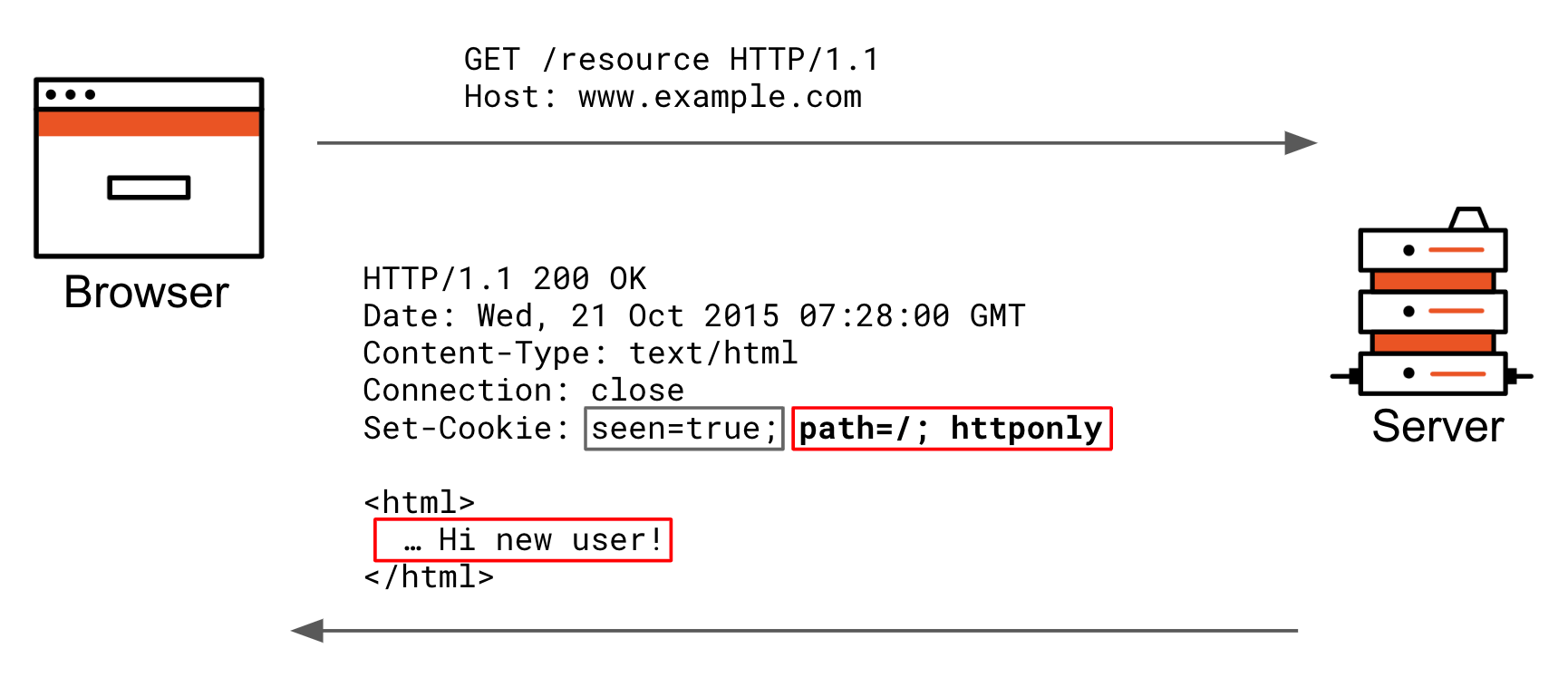
The diagram below shows what happens during a fresh interaction. The end user requests a page not previously visited. The server changes the way it renders when the visitor returns and sets a seen cookie. The grey part of the `set-cookie` header is the actual cookie `key=value.` The red portion are the cookie attributes the browser stores in the cookie jar to decide later if it should include the cookie `key+value` pair in requests.
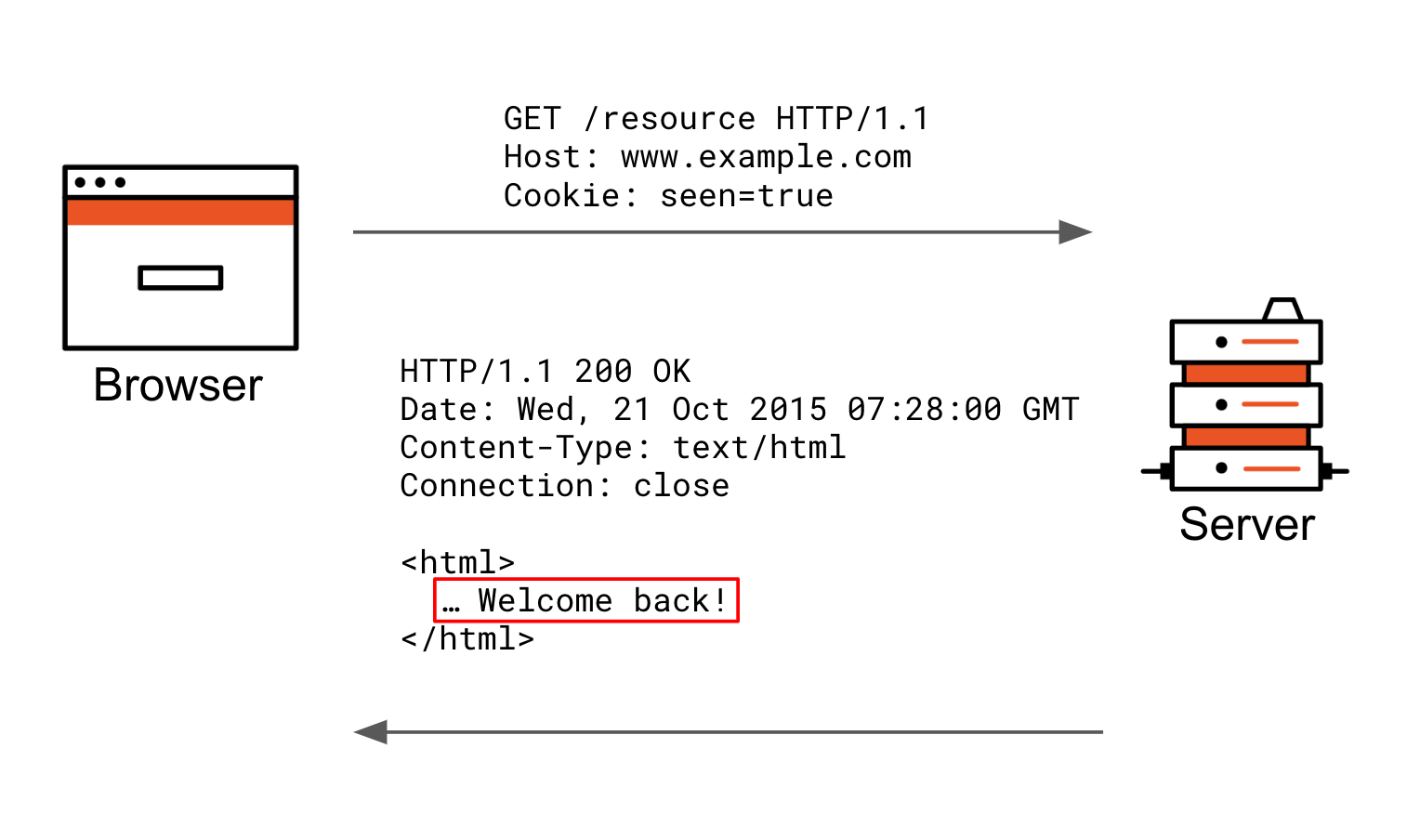
 The following diagram shows what happens if you make the same request using the same browsing session. The request goes to the same server, and because the cookie attributes don't prohibit the seen cookie to be sent, it is automatically included as a cookie header in the request. The server will now respond differently based on the fact that it received this cookie.
 ## Features affected
The table below shows how the `SameSite` attribute changes may affect your apps.
| App Behavior | Affected by Change |
| ---------------------------------------------------------------------------------------------------------------------------------------------------- | ------------------ |
| Cookies set as `sameSite=none` when the website is not `https://` | Yes |
| Cookies don't have explicit `sameSite` attribute value set and are required in a cross-origin context (such as HTTP form\_post, embedding an iframe) | Yes |
| Native apps (everything not cookies + web based) | No (M2M) |
| Already setting an explicit `sameSite` cookie attribute value | No |
| Different subdomain on the same eTLD+1 (app is on the same eTLD+1 as the custom domain Auth0 tenant) | Potentially |
If you are using a web app with sessions (e.g. for saving user preferences, shopping carts, etc.), and you allow users to sign in using identity providers such as Google, Github, or Auth0, then you rely on cookies to achieve that functionality. There are browser cookie behavior changes that may break the user experience. Google Chrome, for example, is the first browser vendor to roll out a change that might not be compatible with your web application.
You may notice that the Google Chrome and Microsoft Edge specs for setting `SameSite` to undefined has changed from `SameSite` defaulting to `none` to `lax` instead.
For example, let's say you build a new UI and have several services that you proxy to via an Auth0 gateway. At this gateway, you create a cookie session. If you make a cross-origin request, you may see this warning in the Javascript console:
`A cookie associated with a cross-site resource (URL) was set without the SameSite attribute. A future release of Chrome will only deliver cookies with cross-site requests if they are set with SameSite=None and Secure. You can review cookies in developer tools under Application>Storage>Cookies and see more details at https://www.chromestatus.com/feature/5088147346030592 and https://www.chromestatus.com/feature/5633521622188032`
## Actions you need to take
To prepare for this change, you should:
* Review the list of [unsupported browsers](https://www.chromium.org/updates/same-site/incompatible-clients).
* Set your application to use `SameSite=none` if it uses `response_mode=form_post` when interacting with Auth0 (note that Chrome makes no exceptions, even for `localhost`)
* Set your cookie as secure if its `SameSite` attribute equals `None.` Otherwise, it will be rejected by the browser. If you use HTTP for your Callback URLs, these will break if you use such cookies for binding the authorization request state/nonce. Therefore, you must either use HTTPS or set `SameSite=lax`
## Features affected
The table below shows how the `SameSite` attribute changes may affect your apps.
| App Behavior | Affected by Change |
| ---------------------------------------------------------------------------------------------------------------------------------------------------- | ------------------ |
| Cookies set as `sameSite=none` when the website is not `https://` | Yes |
| Cookies don't have explicit `sameSite` attribute value set and are required in a cross-origin context (such as HTTP form\_post, embedding an iframe) | Yes |
| Native apps (everything not cookies + web based) | No (M2M) |
| Already setting an explicit `sameSite` cookie attribute value | No |
| Different subdomain on the same eTLD+1 (app is on the same eTLD+1 as the custom domain Auth0 tenant) | Potentially |
If you are using a web app with sessions (e.g. for saving user preferences, shopping carts, etc.), and you allow users to sign in using identity providers such as Google, Github, or Auth0, then you rely on cookies to achieve that functionality. There are browser cookie behavior changes that may break the user experience. Google Chrome, for example, is the first browser vendor to roll out a change that might not be compatible with your web application.
You may notice that the Google Chrome and Microsoft Edge specs for setting `SameSite` to undefined has changed from `SameSite` defaulting to `none` to `lax` instead.
For example, let's say you build a new UI and have several services that you proxy to via an Auth0 gateway. At this gateway, you create a cookie session. If you make a cross-origin request, you may see this warning in the Javascript console:
`A cookie associated with a cross-site resource (URL) was set without the SameSite attribute. A future release of Chrome will only deliver cookies with cross-site requests if they are set with SameSite=None and Secure. You can review cookies in developer tools under Application>Storage>Cookies and see more details at https://www.chromestatus.com/feature/5088147346030592 and https://www.chromestatus.com/feature/5633521622188032`
## Actions you need to take
To prepare for this change, you should:
* Review the list of [unsupported browsers](https://www.chromium.org/updates/same-site/incompatible-clients).
* Set your application to use `SameSite=none` if it uses `response_mode=form_post` when interacting with Auth0 (note that Chrome makes no exceptions, even for `localhost`)
* Set your cookie as secure if its `SameSite` attribute equals `None.` Otherwise, it will be rejected by the browser. If you use HTTP for your Callback URLs, these will break if you use such cookies for binding the authorization request state/nonce. Therefore, you must either use HTTPS or set `SameSite=lax`