> ## Documentation Index
> Fetch the complete documentation index at: https://auth0.com/llms.txt
> Use this file to discover all available pages before exploring further.
> Learn how to allow third-party applications to authenticate users in your Organization.
# Enable Third-Party Application Access for an Organization
export const AuthCodeGroup = ({children, dropdown}) => {
const [processedChildren, setProcessedChildren] = useState(children);
useEffect(() => {
let unsubscribe = null;
function init() {
unsubscribe = window.autorun(() => {
const processChildren = node => {
if (typeof node === "string") {
let processedNode = node;
for (const [key, value] of window.rootStore.variableStore.values.entries()) {
const escapedKey = key.replaceAll(/[.*+?^${}()|[\]\\]/g, (String.raw)`\$&`);
processedNode = processedNode.replaceAll(new RegExp(escapedKey, "g"), value);
}
return processedNode;
} else if (Array.isArray(node)) {
return node.map(processChildren);
} else if (node && node.props && node.props.children) {
return {
...node,
props: {
...node.props,
children: processChildren(node.props.children)
}
};
}
return node;
};
setProcessedChildren(processChildren(children));
});
}
if (window.rootStore) {
init();
} else {
window.addEventListener("adu:storeReady", init);
}
return () => {
window.removeEventListener("adu:storeReady", init);
unsubscribe?.();
};
}, [children]);
return {processedChildren};
};
By default, Organizations deny user authentication from [third-party applications](/docs/get-started/applications/third-party-applications). To allow a third-party application to authenticate users in an Organization, the Organization must be explicitly configured to allow it.
## Before you begin
* At least one third-party application is configured in your tenant. To learn more, read [Configure Third-Party Applications](/docs/get-started/applications/third-party-applications/configure-third-party-applications).
* The third-party application has a [client grant](/docs/get-started/applications/application-access-to-apis-client-grants) for the APIs it needs to access.
* The connection used for login is promoted to the [domain level](/docs/authenticate/identity-providers/promote-connections-to-domain-level) (`is_domain_connection: true`). Both this and the Organization opt-in below are required.
## Enable third-party application access on the Organization
You can enable third-party application access using the Auth0 Dashboard or the Management API.
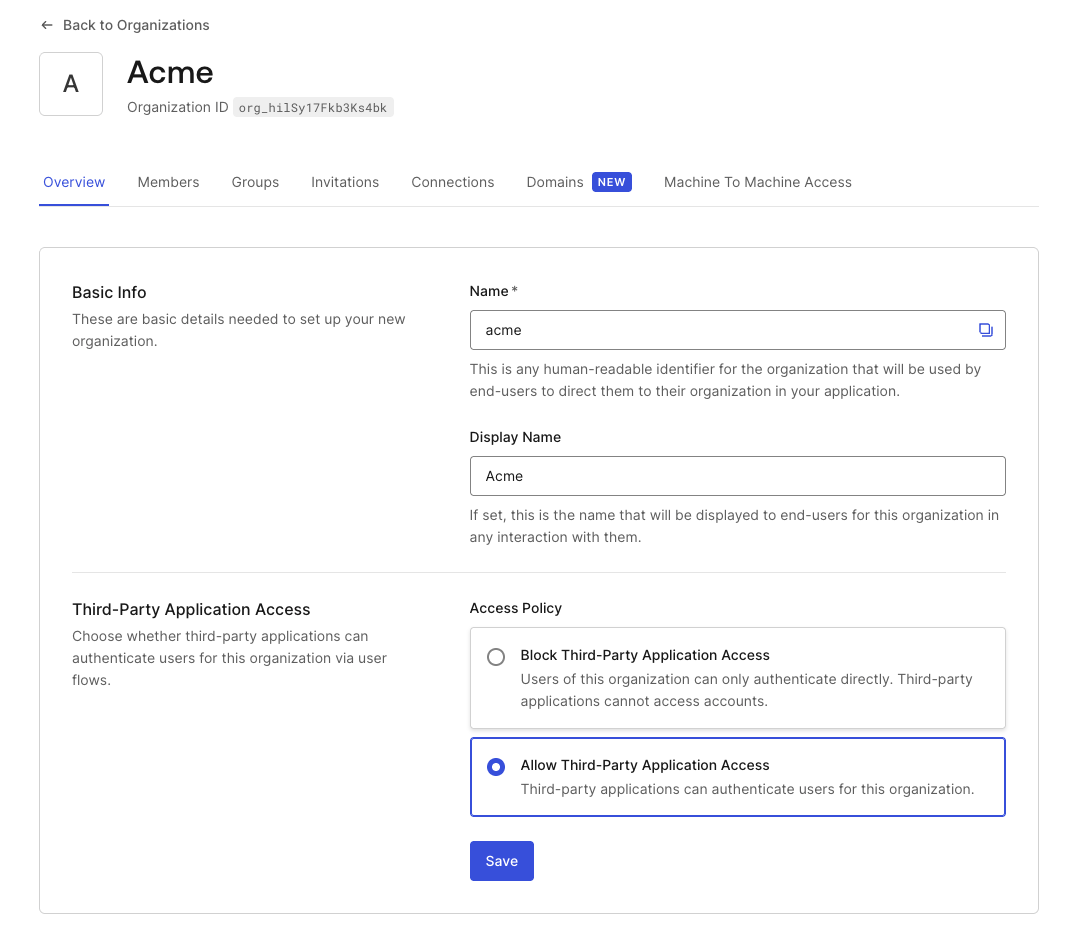
1. Navigate to [Auth0 Dashboard > Organizations](https://manage.auth0.com/#/organizations) and select the Organization.
2. Go to the **Overview** tab.
3. Under **Third-Party Application Access**, select **Allow Third-Party Application Access**.
4. Select **Save**.
 Make a `PATCH` request to the [Update an Organization](https://auth0.com/docs/api/management/v2/organizations/patch-organizations-by-id) endpoint with the `third_party_client_access` property.
```bash cURL wrap lines theme={null}
curl --request PATCH \
--url 'https://YOUR_DOMAIN/api/v2/organizations/ORG_ID' \
--header 'Authorization: Bearer YOUR_MANAGEMENT_API_TOKEN' \
--header 'Content-Type: application/json' \
--data '{
"third_party_client_access": "allow"
}'
```
| **Parameter** | **Description** |
| --------------------------- | ------------------------------------------------------------------------------------------------------------------------------------------------------- |
| `third_party_client_access` | Controls whether third-party applications can authenticate users in this Organization. Set to `allow` to enable access. `deny` (default) blocks access. |
To verify the change, make a `GET` request to the [Get an Organization](https://auth0.com/docs/api/management/v2/organizations/get-organizations-by-id) endpoint and confirm `third_party_client_access` is `allow`:
```bash cURL wrap lines theme={null}
curl --request GET \
--url 'https://YOUR_DOMAIN/api/v2/organizations/ORG_ID' \
--header 'Authorization: Bearer YOUR_MANAGEMENT_API_TOKEN'
```
```json theme={null}
{
"id": "org_hilSy17Fkb3Ks4bk",
"name": "acme",
"display_name": "Acme",
"third_party_client_access": "allow"
}
```
## Connection requirements
For a third-party application to authenticate users in an Organization, two connection conditions must both be met:
1. The connection must be promoted to the [domain level](/docs/authenticate/identity-providers/promote-connections-to-domain-level) (`is_domain_connection: true`). Third-party applications can only authenticate users through domain-level connections, whether or not an Organization is involved.
2. The connection must be [enabled for the Organization](/docs/manage-users/organizations/configure-organizations/enable-connections).
Meeting only one of these conditions is not sufficient.
## Organization login flows for third-party applications
Since third-party applications are controlled by external developers, you cannot rely on them passing the `organization` parameter in their authorization requests. Authentication flows that require the application to send `organization` directly (the **No Prompt** login flow) are not reliable for third-party applications.
To ensure users are routed to the correct Organization context, configure one of the following on your application:
* **Prompt for Credentials**: Users authenticate first, then Auth0 prompts the user to select their Organization after login.
* **Prompt for Organization**: Users identify their Organization before authentication. This works regardless of what the external application sends. You can optionally enable **Organization Domain Discovery** to automatically detect the user's Organization from their email domain or Organization name. Requires [verified Organization domains](/docs/manage-users/organizations/configure-organizations/create-org-domains).
To learn more, read [Login Flows for Organizations](/docs/manage-users/organizations/login-flows-for-organizations).
## Machine-to-machine access
The `third_party_client_access` setting applies to user authentication flows (authorization code) only. For machine-to-machine access using the Client Credentials Flow, this setting is not evaluated. M2M access is controlled exclusively through [organization client grants](/docs/manage-users/organizations/organizations-for-m2m-applications).
For third-party applications, `allow_any_organization` is not available. Each Organization must be explicitly authorized through an `organization_client_grant`. To learn more, read [Authorize M2M Access](/docs/manage-users/organizations/organizations-for-m2m-applications/authorize-m2m-access).
## User consent
User consent for third-party applications is scoped to the Organization context. A user who consents in one Organization must consent again if they access the same application through a different Organization. To learn more, read [Consent with Organizations](/docs/get-started/applications/third-party-applications/user-consent-and-third-party-applications#consent-with-organizations).
## Learn more
* [Third-Party Applications](/docs/get-started/applications/third-party-applications)
* [Security Controls for Third-Party Applications](/docs/get-started/applications/third-party-applications/security-controls)
* [Configure Third-Party Applications](/docs/get-started/applications/third-party-applications/configure-third-party-applications)
* [User Consent and Third-Party Applications](/docs/get-started/applications/third-party-applications/user-consent-and-third-party-applications)
* [Login Flows for Organizations](/docs/manage-users/organizations/login-flows-for-organizations)
* [Enable Organization Connections](/docs/manage-users/organizations/configure-organizations/enable-connections)
Make a `PATCH` request to the [Update an Organization](https://auth0.com/docs/api/management/v2/organizations/patch-organizations-by-id) endpoint with the `third_party_client_access` property.
```bash cURL wrap lines theme={null}
curl --request PATCH \
--url 'https://YOUR_DOMAIN/api/v2/organizations/ORG_ID' \
--header 'Authorization: Bearer YOUR_MANAGEMENT_API_TOKEN' \
--header 'Content-Type: application/json' \
--data '{
"third_party_client_access": "allow"
}'
```
| **Parameter** | **Description** |
| --------------------------- | ------------------------------------------------------------------------------------------------------------------------------------------------------- |
| `third_party_client_access` | Controls whether third-party applications can authenticate users in this Organization. Set to `allow` to enable access. `deny` (default) blocks access. |
To verify the change, make a `GET` request to the [Get an Organization](https://auth0.com/docs/api/management/v2/organizations/get-organizations-by-id) endpoint and confirm `third_party_client_access` is `allow`:
```bash cURL wrap lines theme={null}
curl --request GET \
--url 'https://YOUR_DOMAIN/api/v2/organizations/ORG_ID' \
--header 'Authorization: Bearer YOUR_MANAGEMENT_API_TOKEN'
```
```json theme={null}
{
"id": "org_hilSy17Fkb3Ks4bk",
"name": "acme",
"display_name": "Acme",
"third_party_client_access": "allow"
}
```
## Connection requirements
For a third-party application to authenticate users in an Organization, two connection conditions must both be met:
1. The connection must be promoted to the [domain level](/docs/authenticate/identity-providers/promote-connections-to-domain-level) (`is_domain_connection: true`). Third-party applications can only authenticate users through domain-level connections, whether or not an Organization is involved.
2. The connection must be [enabled for the Organization](/docs/manage-users/organizations/configure-organizations/enable-connections).
Meeting only one of these conditions is not sufficient.
## Organization login flows for third-party applications
Since third-party applications are controlled by external developers, you cannot rely on them passing the `organization` parameter in their authorization requests. Authentication flows that require the application to send `organization` directly (the **No Prompt** login flow) are not reliable for third-party applications.
To ensure users are routed to the correct Organization context, configure one of the following on your application:
* **Prompt for Credentials**: Users authenticate first, then Auth0 prompts the user to select their Organization after login.
* **Prompt for Organization**: Users identify their Organization before authentication. This works regardless of what the external application sends. You can optionally enable **Organization Domain Discovery** to automatically detect the user's Organization from their email domain or Organization name. Requires [verified Organization domains](/docs/manage-users/organizations/configure-organizations/create-org-domains).
To learn more, read [Login Flows for Organizations](/docs/manage-users/organizations/login-flows-for-organizations).
## Machine-to-machine access
The `third_party_client_access` setting applies to user authentication flows (authorization code) only. For machine-to-machine access using the Client Credentials Flow, this setting is not evaluated. M2M access is controlled exclusively through [organization client grants](/docs/manage-users/organizations/organizations-for-m2m-applications).
For third-party applications, `allow_any_organization` is not available. Each Organization must be explicitly authorized through an `organization_client_grant`. To learn more, read [Authorize M2M Access](/docs/manage-users/organizations/organizations-for-m2m-applications/authorize-m2m-access).
## User consent
User consent for third-party applications is scoped to the Organization context. A user who consents in one Organization must consent again if they access the same application through a different Organization. To learn more, read [Consent with Organizations](/docs/get-started/applications/third-party-applications/user-consent-and-third-party-applications#consent-with-organizations).
## Learn more
* [Third-Party Applications](/docs/get-started/applications/third-party-applications)
* [Security Controls for Third-Party Applications](/docs/get-started/applications/third-party-applications/security-controls)
* [Configure Third-Party Applications](/docs/get-started/applications/third-party-applications/configure-third-party-applications)
* [User Consent and Third-Party Applications](/docs/get-started/applications/third-party-applications/user-consent-and-third-party-applications)
* [Login Flows for Organizations](/docs/manage-users/organizations/login-flows-for-organizations)
* [Enable Organization Connections](/docs/manage-users/organizations/configure-organizations/enable-connections)