> ## Documentation Index
> Fetch the complete documentation index at: https://auth0.com/llms.txt
> Use this file to discover all available pages before exploring further.
# Configure M2M Access with Auth0 Organizations
> Authorize, revoke, and audit machine-to-machine access for Auth0 Organizations through client grant associations via the Dashboard or Management API.
export const AuthCodeBlock = ({filename, icon, language, highlight, children}) => {
const [displayText, setDisplayText] = useState(children);
const [copyText, setCopyText] = useState(children);
const wrapperRef = React.useRef(null);
useEffect(() => {
let unsubscribe = null;
function init() {
if (!window.autorun || !window.rootStore) {
return;
}
unsubscribe = window.autorun(() => {
let processedChildrenForDisplay = children;
let processedChildrenForCopy = children;
for (const [key, value] of window.rootStore.variableStore.values.entries()) {
const escapedKey = key.replaceAll(/[.*+?^${}()|[\]\\]/g, (String.raw)`\$&`);
let displayValue = value;
if (key === "{yourClientSecret}" && value !== "{yourClientSecret}") {
displayValue = value.substring(0, 3) + "*****MASKED*****";
}
processedChildrenForDisplay = processedChildrenForDisplay.replaceAll(new RegExp(escapedKey, "g"), displayValue);
processedChildrenForCopy = processedChildrenForCopy.replaceAll(new RegExp(escapedKey, "g"), value);
}
setDisplayText(processedChildrenForDisplay);
setCopyText(processedChildrenForCopy);
});
}
if (window.rootStore) {
init();
} else {
window.addEventListener("adu:storeReady", init);
}
return () => {
window.removeEventListener("adu:storeReady", init);
unsubscribe?.();
};
}, [children]);
useEffect(() => {
if (!wrapperRef.current) return;
const originalWriteText = navigator.clipboard.writeText.bind(navigator.clipboard);
let isOverriding = false;
const handleClick = e => {
const button = e.target.closest('[data-testid="copy-code-button"]');
if (!button || !wrapperRef.current.contains(button)) return;
isOverriding = true;
navigator.clipboard.writeText = text => {
if (isOverriding) {
isOverriding = false;
navigator.clipboard.writeText = originalWriteText;
return originalWriteText(copyText);
}
return originalWriteText(text);
};
setTimeout(() => {
if (isOverriding) {
isOverriding = false;
navigator.clipboard.writeText = originalWriteText;
}
}, 100);
};
const wrapper = wrapperRef.current;
wrapper.addEventListener('click', handleClick, true);
return () => {
wrapper.removeEventListener('click', handleClick, true);
if (navigator.clipboard.writeText !== originalWriteText) {
navigator.clipboard.writeText = originalWriteText;
}
};
}, [copyText]);
return
{displayText}
;
};
export const codeExampleAuthorize = `curl -X POST --location "https://{yourDomain}/api/v2/organizations/{ORG_id}/client-grants" \\
--header 'authorization: Bearer MGMT_API_ACCESS_TOKEN' \\
--header 'content-type: application/json' \\
--data '{
"grant_id": "GRANT_ID"
}'
`;
export const codeExampleAudit1 = `curl -X GET --location "https://{yourDomain}/api/v2/organizations/{ORG_id}/client-grants/" \\
--header 'authorization: Bearer MGMT_API_ACCESS_TOKEN'`;
export const codeExampleAudit2 = `curl -X GET --location "https://{yourDomain}/api/v2/clients?q=client_grant.organization_id%3Aorganization_id" \\
--header 'authorization: Bearer MGMT_API_ACCESS_TOKEN'`;
export const codeExampleAudit3 = `curl -X GET --location "https://{yourDomain}/api/v2/client-grants?allow_any_organization=true" \\
--header 'authorization: Bearer MGMT_API_ACCESS_TOKEN'`;
export const codeExampleAudit4 = `curl -X GET --location "https://{yourDomain}/api/v2/clients?q=client_grant.allow_any_organization%3Atrue" \\
--header 'authorization: Bearer MGMT_API_ACCESS_TOKEN'`;
Machine-to-Machine Access for Organizations enables you to define the Auth0 Organization a given application can access for each API using the Client Credentials Flow.
## Authorize M2M access
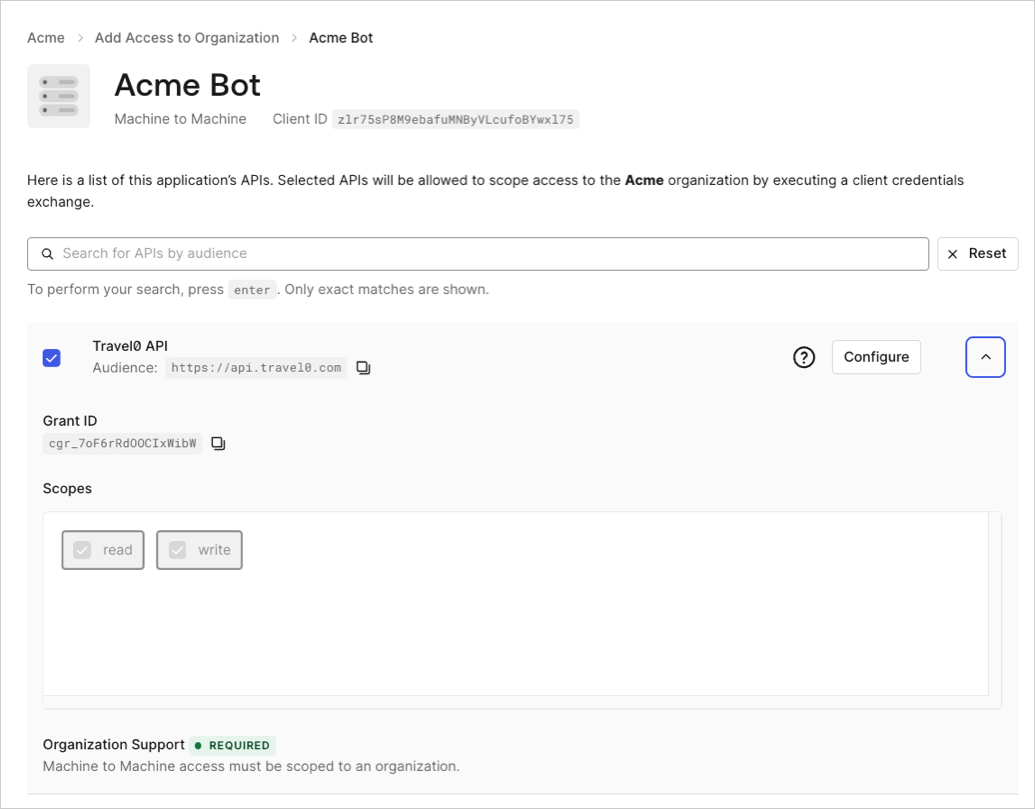
To authorize machine-to-machine access for an application, you must enable it to use an Organization for a specific API. To do so, you must associate the application's client grant to the corresponding API with the Organization. Once associated, the application can use the Organization when requesting tokens for the API and scopes defined in the client grant. Define this association for each API your application needs to access for the Organization.
This flow is supported for [third-party applications](/docs/get-started/applications/third-party-applications). Third-party applications cannot use `allow_any_organization`, so each Organization must be explicitly authorized using the following steps.
You can authorize M2M access for an application using the [Auth0 Dashboard](https://manage.auth0.com/) or [Management API](https://auth0.com/docs/api/management/v2).
To associate an application's client grant to an Organization via the Auth0 Dashboard:
1. Navigate to [**Organizations**](https://manage.auth0.com/dashboard/*/organizations/list) and choose the Organization you want to associate with.
2. Select the **Machine-to-Machine Access** tab.
3. Select **Add Access.**
4. Select the application you want to associate with the Organization.
5. Select an API.
6. Select **Save**.
 Associate application client grants with an Organization via the [Associate client grant to organization](https://auth0.com/docs/api/management/v2/organizations/create-organization-client-grants) endpoint:
## Revoke M2M access
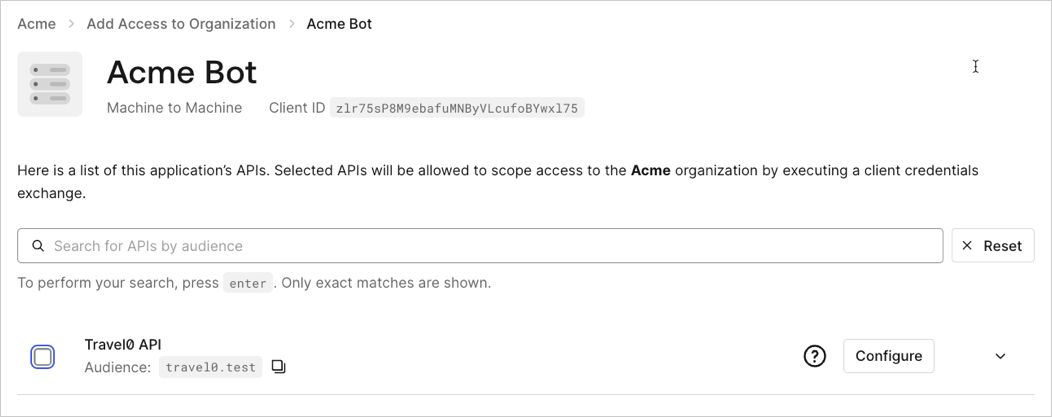
To revoke M2M access, or remove access to an Organization for your application, you must delete the association between its client grant(s) and the Organization. Once this association is deleted, the application is no longer permitted to use the Organization when requesting new tokens for the API defined in the grant. Revoking M2M access works the same way for [third-party applications](/docs/get-started/applications/third-party-applications).
Revoking M2M access does not impact applications that have been granted access to any Organization. To learn more, read [Define Organization Behavior](/docs/manage-users/organizations/organizations-for-m2m-applications/configure-your-application-for-m2m-access#define-organization-behavior).
To remove the association between an application's client grant and an Organization via the [Auth0 Dashboard](https://manage.auth0.com/):
1. Navigate to [**Organizations**](https://manage.auth0.com/dashboard/*/organizations/list) and choose the Organization you wish to remove the association from.
2. Select the **Machine-to-Machine Access** tab.
3. Choose an application.
4. Uncheck the box next to the APIs you wish to disassociate with the Organization.
5. Select **Save**.
Associate application client grants with an Organization via the [Associate client grant to organization](https://auth0.com/docs/api/management/v2/organizations/create-organization-client-grants) endpoint:
## Revoke M2M access
To revoke M2M access, or remove access to an Organization for your application, you must delete the association between its client grant(s) and the Organization. Once this association is deleted, the application is no longer permitted to use the Organization when requesting new tokens for the API defined in the grant. Revoking M2M access works the same way for [third-party applications](/docs/get-started/applications/third-party-applications).
Revoking M2M access does not impact applications that have been granted access to any Organization. To learn more, read [Define Organization Behavior](/docs/manage-users/organizations/organizations-for-m2m-applications/configure-your-application-for-m2m-access#define-organization-behavior).
To remove the association between an application's client grant and an Organization via the [Auth0 Dashboard](https://manage.auth0.com/):
1. Navigate to [**Organizations**](https://manage.auth0.com/dashboard/*/organizations/list) and choose the Organization you wish to remove the association from.
2. Select the **Machine-to-Machine Access** tab.
3. Choose an application.
4. Uncheck the box next to the APIs you wish to disassociate with the Organization.
5. Select **Save**.
 Delete the association between an application's client grant and an Organization via the [Disassociate client grants from organizations](https://auth0.com/docs/api/management/v2/organizations/delete-client-grants-by-grant-id) endpoint:
```bash lines theme={null}
curl -X DELETE --location "https://{yourDomain}/api/v2/organizations/{ORG_id}/client-grants/{GRANT_ID}" \
--header 'authorization: Bearer MGMT_API_ACCESS_TOKEN' ;
```
## Audit M2M access
Machine-to-Machine Access to Organizations can be granted by directly associating a client grant to an Organization or allowing access to any Organization in the client grant settings. Both scenarios can be audited via the Auth0 Dashboard or the Management API, where you can view or retrieve a list of client grants associated with an Organization for an application. To learn more about how M2M access to Organizations permissions work, read [Configure Your Application for M2M Access](/docs/manage-users/organizations/organizations-for-m2m-applications/configure-your-application-for-m2m-access) and [Authorize M2M Access](#authorize-m2m-access). Auditing works the same way for [third-party applications](/docs/get-started/applications/third-party-applications).
### Access granted via direct association
Use the [Auth0 Dashboard](https://manage.auth0.com/) and [Management API](https://auth0.com/docs/api/management/v2) to audit M2M access for client grants that are directly associated with an Organization.
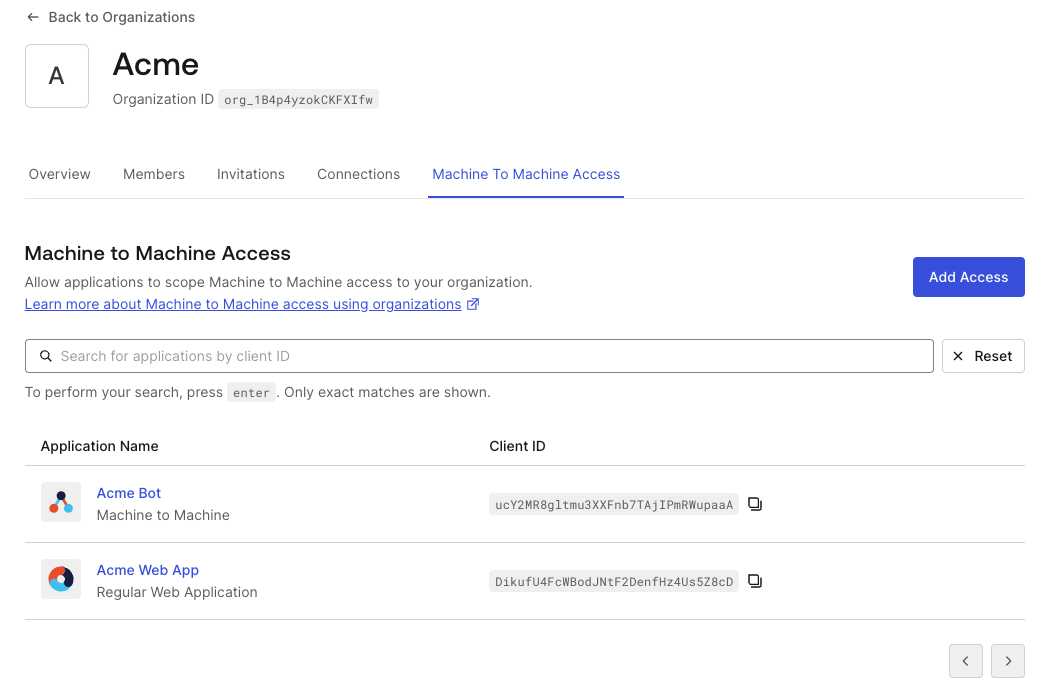
To view the application client grants that have been authorized for a specific Organization on the Auth0 Dashboard:
1. Navigate to [**Organizations**](https://manage.auth0.com/dashboard/*/organizations/list) and choose the Organization you wish to inspect.
2. Select the **Machine-to-Machine Access** tab. You get a paginated list of all the applications that can access an API for this Organization via direct association.
3. Choose an application to review the authorized APIs listed for that application.
Delete the association between an application's client grant and an Organization via the [Disassociate client grants from organizations](https://auth0.com/docs/api/management/v2/organizations/delete-client-grants-by-grant-id) endpoint:
```bash lines theme={null}
curl -X DELETE --location "https://{yourDomain}/api/v2/organizations/{ORG_id}/client-grants/{GRANT_ID}" \
--header 'authorization: Bearer MGMT_API_ACCESS_TOKEN' ;
```
## Audit M2M access
Machine-to-Machine Access to Organizations can be granted by directly associating a client grant to an Organization or allowing access to any Organization in the client grant settings. Both scenarios can be audited via the Auth0 Dashboard or the Management API, where you can view or retrieve a list of client grants associated with an Organization for an application. To learn more about how M2M access to Organizations permissions work, read [Configure Your Application for M2M Access](/docs/manage-users/organizations/organizations-for-m2m-applications/configure-your-application-for-m2m-access) and [Authorize M2M Access](#authorize-m2m-access). Auditing works the same way for [third-party applications](/docs/get-started/applications/third-party-applications).
### Access granted via direct association
Use the [Auth0 Dashboard](https://manage.auth0.com/) and [Management API](https://auth0.com/docs/api/management/v2) to audit M2M access for client grants that are directly associated with an Organization.
To view the application client grants that have been authorized for a specific Organization on the Auth0 Dashboard:
1. Navigate to [**Organizations**](https://manage.auth0.com/dashboard/*/organizations/list) and choose the Organization you wish to inspect.
2. Select the **Machine-to-Machine Access** tab. You get a paginated list of all the applications that can access an API for this Organization via direct association.
3. Choose an application to review the authorized APIs listed for that application.
 Retrieve client grants associated with an Organization via the [Organization Client Grants](https://auth0.com/docs/api/management/v2/organizations/get-organization-client-grants) API endpoint:
Alternatively, if you want to retrieve information on applications that can access at least one of the APIs for an Organization, you can use the `q` query parameter on the [Get Clients API endpoint](https://auth0.com/docs/api/management/v2/clients/get-clients) with the search term `client_grant.organization_id:{organization_id}`. Use the Lucene syntax, which is similar to the [User Search Query Syntax](/docs/manage-users/user-search/user-search-query-syntax).
### Access granted to any organization
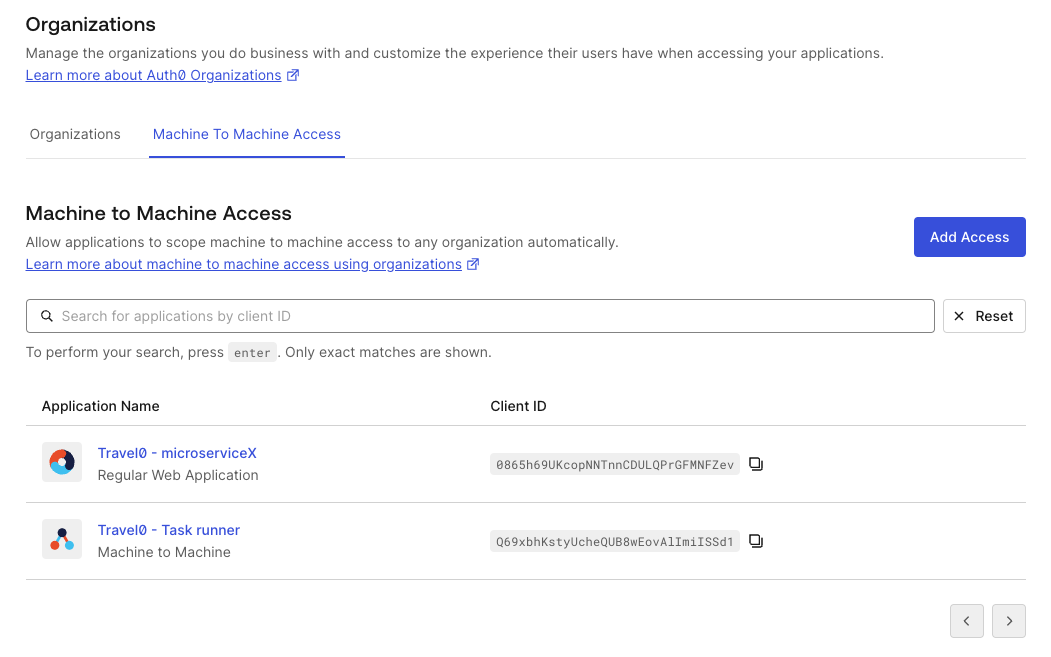
Use the [Auth0 Dashboard](https://manage.auth0.com/) and [Management API](https://auth0.com/docs/api/management/v2) to audit M2M access for applications that have access granted to any Organization.
This section does not apply to [third-party applications](/docs/get-started/applications/third-party-applications). Third-party applications cannot use `allow_any_organization` and will not appear in this audit query. Use the direct association queries above instead.
1. Navigate to [**Organizations**](https://manage.auth0.com/dashboard/*/organizations/list).
2. Select the **Machine-to-Machine Access** tab. You get a paginated list of all the applications that can access at least one of the APIs for an Organization.
3. Choose an application to review the authorized APIs listed for that application.
Retrieve client grants associated with an Organization via the [Organization Client Grants](https://auth0.com/docs/api/management/v2/organizations/get-organization-client-grants) API endpoint:
Alternatively, if you want to retrieve information on applications that can access at least one of the APIs for an Organization, you can use the `q` query parameter on the [Get Clients API endpoint](https://auth0.com/docs/api/management/v2/clients/get-clients) with the search term `client_grant.organization_id:{organization_id}`. Use the Lucene syntax, which is similar to the [User Search Query Syntax](/docs/manage-users/user-search/user-search-query-syntax).
### Access granted to any organization
Use the [Auth0 Dashboard](https://manage.auth0.com/) and [Management API](https://auth0.com/docs/api/management/v2) to audit M2M access for applications that have access granted to any Organization.
This section does not apply to [third-party applications](/docs/get-started/applications/third-party-applications). Third-party applications cannot use `allow_any_organization` and will not appear in this audit query. Use the direct association queries above instead.
1. Navigate to [**Organizations**](https://manage.auth0.com/dashboard/*/organizations/list).
2. Select the **Machine-to-Machine Access** tab. You get a paginated list of all the applications that can access at least one of the APIs for an Organization.
3. Choose an application to review the authorized APIs listed for that application.
 Retrieve client grants with the `allow_any_organization` parameter via the [Get Client Grants](https://auth0.com/docs/api/management/v2/client-grants/get-client-grants) API endpoint:
Alternatively, if you want to retrieve information on applications that can access at least one of the APIs for any Organization, you can use the `q` query parameter on the [Get Client Grants](https://auth0.com/docs/api/management/v2/client-grants/get-client-grants) API endpoint with the search term `client_grant.allow_any_organization:true`. Use the Lucene syntax, which is similar to the [User Search Query Syntax](/docs/manage-users/user-search/user-search-query-syntax).
### Search applications based on organization access
Search results are eventually consistent.
The following table shows the search terms supported to query applications with the `q` parameter on the `/clients` endpoint:
| **Field** | **Description** |
| ------------------------------------------------ | --------------------------------------------------------------------------------------------- |
| `client_grant.organization_id:{organization_id}` | Use to search for applications that can access at least one of the APIs for an Organization. |
| `client_grant.allow_any_organization:true` | Use to search for applications that can access at least one of the APIs for any Organization. |
### Tenant logs
Machine-to-Machine Access for Organizations is also reflected in tenant logs. You can check the `organization` associated to the request in the corresponding `seccft` tenant log.
The following code sample is an example `seccft` tenant log with organization information:
```json lines theme={null}
{
"date": "2024-10-24T19:06:17.460Z",
"type": "seccft",
"description": "Client Credentials for Access Token",
"connection_id": "",
"client_id": "qoQKtXuhdSibs1jUeXk3mmCwXoAafGnO",
"client_name": "jwt.io (Test Application)",
"ip": "130.41.219.72",
"user_agent": "Other 0.0.0 / Other 0.0.0",
"hostname": "david-test.test-aws-abundant-lobster-6004.auth0c.com",
"user_id": "",
"user_name": "",
"organization_id": "org_mPdwToiiHHOtz0SH",
"organization_name": "cc_test",
"audience": "https://jwt.io.com",
"scope": "read:data",
"$event_schema": {
"version": "1.0.0"
},
"log_id": "90020241024190617517817000000000000001223372036854775862",
"tenant_name": "david-test",
"_id": "90020241024190617517817000000000000001223372036854775862",
"isMobile": false,
"id": "90020241024190617517817000000000000001223372036854775862"
}
```
Retrieve client grants with the `allow_any_organization` parameter via the [Get Client Grants](https://auth0.com/docs/api/management/v2/client-grants/get-client-grants) API endpoint:
Alternatively, if you want to retrieve information on applications that can access at least one of the APIs for any Organization, you can use the `q` query parameter on the [Get Client Grants](https://auth0.com/docs/api/management/v2/client-grants/get-client-grants) API endpoint with the search term `client_grant.allow_any_organization:true`. Use the Lucene syntax, which is similar to the [User Search Query Syntax](/docs/manage-users/user-search/user-search-query-syntax).
### Search applications based on organization access
Search results are eventually consistent.
The following table shows the search terms supported to query applications with the `q` parameter on the `/clients` endpoint:
| **Field** | **Description** |
| ------------------------------------------------ | --------------------------------------------------------------------------------------------- |
| `client_grant.organization_id:{organization_id}` | Use to search for applications that can access at least one of the APIs for an Organization. |
| `client_grant.allow_any_organization:true` | Use to search for applications that can access at least one of the APIs for any Organization. |
### Tenant logs
Machine-to-Machine Access for Organizations is also reflected in tenant logs. You can check the `organization` associated to the request in the corresponding `seccft` tenant log.
The following code sample is an example `seccft` tenant log with organization information:
```json lines theme={null}
{
"date": "2024-10-24T19:06:17.460Z",
"type": "seccft",
"description": "Client Credentials for Access Token",
"connection_id": "",
"client_id": "qoQKtXuhdSibs1jUeXk3mmCwXoAafGnO",
"client_name": "jwt.io (Test Application)",
"ip": "130.41.219.72",
"user_agent": "Other 0.0.0 / Other 0.0.0",
"hostname": "david-test.test-aws-abundant-lobster-6004.auth0c.com",
"user_id": "",
"user_name": "",
"organization_id": "org_mPdwToiiHHOtz0SH",
"organization_name": "cc_test",
"audience": "https://jwt.io.com",
"scope": "read:data",
"$event_schema": {
"version": "1.0.0"
},
"log_id": "90020241024190617517817000000000000001223372036854775862",
"tenant_name": "david-test",
"_id": "90020241024190617517817000000000000001223372036854775862",
"isMobile": false,
"id": "90020241024190617517817000000000000001223372036854775862"
}
```