> ## Documentation Index
> Fetch the complete documentation index at: https://auth0.com/llms.txt
> Use this file to discover all available pages before exploring further.
# Django API: Authorization
export const AuthCodeBlock = ({filename, icon, language, highlight, children}) => {
const [displayText, setDisplayText] = useState(children);
const [copyText, setCopyText] = useState(children);
const wrapperRef = React.useRef(null);
useEffect(() => {
let unsubscribe = null;
function init() {
if (!window.autorun || !window.rootStore) {
return;
}
unsubscribe = window.autorun(() => {
let processedChildrenForDisplay = children;
let processedChildrenForCopy = children;
for (const [key, value] of window.rootStore.variableStore.values.entries()) {
const escapedKey = key.replaceAll(/[.*+?^${}()|[\]\\]/g, (String.raw)`\$&`);
let displayValue = value;
if (key === "{yourClientSecret}" && value !== "{yourClientSecret}") {
displayValue = value.substring(0, 3) + "*****MASKED*****";
}
processedChildrenForDisplay = processedChildrenForDisplay.replaceAll(new RegExp(escapedKey, "g"), displayValue);
processedChildrenForCopy = processedChildrenForCopy.replaceAll(new RegExp(escapedKey, "g"), value);
}
setDisplayText(processedChildrenForDisplay);
setCopyText(processedChildrenForCopy);
});
}
if (window.rootStore) {
init();
} else {
window.addEventListener("adu:storeReady", init);
}
return () => {
window.removeEventListener("adu:storeReady", init);
unsubscribe?.();
};
}, [children]);
useEffect(() => {
if (!wrapperRef.current) return;
const originalWriteText = navigator.clipboard.writeText.bind(navigator.clipboard);
let isOverriding = false;
const handleClick = e => {
const button = e.target.closest('[data-testid="copy-code-button"]');
if (!button || !wrapperRef.current.contains(button)) return;
isOverriding = true;
navigator.clipboard.writeText = text => {
if (isOverriding) {
isOverriding = false;
navigator.clipboard.writeText = originalWriteText;
return originalWriteText(copyText);
}
return originalWriteText(text);
};
setTimeout(() => {
if (isOverriding) {
isOverriding = false;
navigator.clipboard.writeText = originalWriteText;
}
}, 100);
};
const wrapper = wrapperRef.current;
wrapper.addEventListener('click', handleClick, true);
return () => {
wrapper.removeEventListener('click', handleClick, true);
if (navigator.clipboard.writeText !== originalWriteText) {
navigator.clipboard.writeText = originalWriteText;
}
};
}, [copyText]);
return
{displayText}
;
};
##### By Luciano Balmaceda
This tutorial demonstrates how to add authorization to a Django REST Framework API.We recommend that you log in to follow this quickstart with examples configured for your account.
**New to Auth0?** Learn [how Auth0 works](/docs/get-started/auth0-overview) and read about [implementing API authentication and authorization](/docs/get-started/authentication-and-authorization-flow) using the OAuth 2.0 framework.
## Configure Auth0 APIs
### Create an API
In the [APIs](https://manage.auth0.com/#/apis) section of the Auth0 dashboard, click **Create API**. Provide a name and an identifier for your API, for example, `https://quickstarts/api`. You will use the identifier as an `audience` later, when you are configuring the Access Token verification. Leave the **Signing Algorithm** as **RS256**.
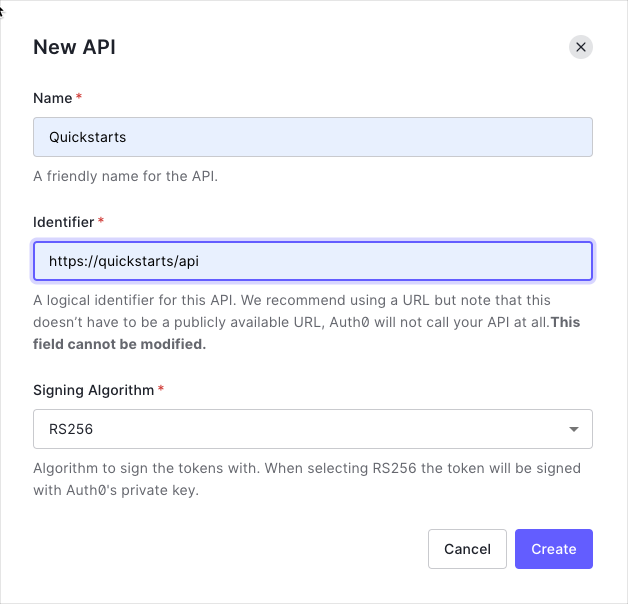
By default, your API uses RS256 as the algorithm for signing tokens. Since RS256 uses a private/public keypair, it verifies the tokens against the public key for your Auth0 account. The public key is in the [JSON Web Key Set (JWKS)](/docs/secure/tokens/json-web-tokens/json-web-key-sets) format, and can be accessed [here](https://\{yourDomain}/.well-known/jwks.json).
### Define permissions
Permissions let you define how resources can be accessed on behalf of the user with a given access token. For example, you might choose to grant read access to the `messages` resource if users have the manager access level, and a write access to that resource if they have the administrator access level.
You can define allowed permissions in the **Permissions** view of the Auth0 Dashboard's [APIs](https://manage.auth0.com/#/apis) section.
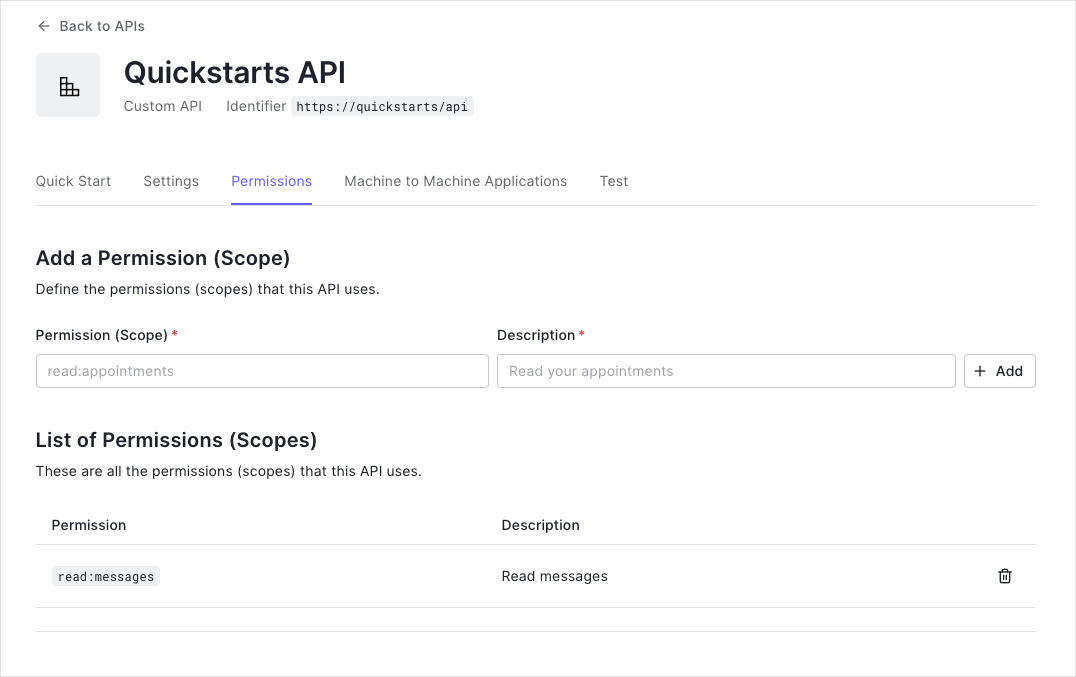
This example uses the `read:messages` scope.
This example demonstrates:
* How to check for a JSON Web Token (JWT) in the `Authorization` header of an incoming HTTP request.
* How to check if the token is valid, using the [JSON Web Key Set (JWKS)](/docs/secure/tokens/json-web-tokens/json-web-key-sets) for your Auth0 account. To learn more about validating Access Tokens, see [Validate Access Tokens](/docs/secure/tokens/access-tokens/validate-access-tokens).
## Setup the Django Application
### Install dependencies
Add the following dependencies to your `requirements.txt` and run `pip install -r requirements.txt`.
```txt lines theme={null}
cryptography~=2.8
django~=2.2.7
djangorestframework~=3.10.31
django-cors-headers~=3.1.1
drf-jwt~=1.13.3
pyjwt~=1.7.1
requests~=2.22.0
```
### Create a Django project
This guide assumes you already have a Django application set up. If that is not the case, follow the steps in the [Django Tutorial](https://docs.djangoproject.com/en/2.2/intro/tutorial01/).
The sample project was created with the following commands:
```bash lines theme={null}
django-admin startproject apiexample
cd apiexample
python manage.py startapp auth0authorization
```
### Add a Django remote user
You need to define a way to map the username from the Access Token payload to the Django authentication system user.
Add [`RemoteUserMiddleware`](https://docs.djangoproject.com/en/2.2/ref/middleware/#django.contrib.auth.middleware.RemoteUserMiddleware) middleware component after `AuthenticationMiddleware` to middleware list.
```py lines theme={null}
# apiexample/settings.py
MIDDLEWARE = [
# ...
'django.contrib.auth.middleware.AuthenticationMiddleware',
'django.contrib.auth.middleware.RemoteUserMiddleware',
]
```
Add `ModelBackend` and `RemoteUserBackend` to the Authentication Backends.
```py lines theme={null}
# apiexample/settings.py
AUTHENTICATION_BACKENDS = [
'django.contrib.auth.backends.ModelBackend',
'django.contrib.auth.backends.RemoteUserBackend',
]
```
Create `utils.py` file in your application's folder and define a function that maps the `sub` field from the `access_token` to the username. Then, the [authenticate](https://docs.djangoproject.com/en/2.2/ref/contrib/auth/#django.contrib.auth.backends.RemoteUserBackend.authenticate) method from [RemoteUserBackend](https://docs.djangoproject.com/en/2.2/ref/contrib/auth/#django.contrib.auth.backends.RemoteUserBackend) will create a remote user in the Django authentication system and return a User object for the username.
```py lines theme={null}
# auth0authorization/utils.py
from django.contrib.auth import authenticate
def jwt_get_username_from_payload_handler(payload):
username = payload.get('sub').replace('|', '.')
authenticate(remote_user=username)
return username
```
## Validate Access Tokens
The `settings.py` file contains the configuration of the Django project.
Add `rest_framework` app to the `INSTALLED_APPS` entry.
```py lines theme={null}
# apiexample/settings.py
INSTALLED_APPS = [
# ...
'rest_framework'
]
```
Add `JSONWebTokenAuthentication` to Django REST framework's `DEFAULT_AUTHENTICATION_CLASSES`.
```py lines theme={null}
# apiexample/settings.py
REST_FRAMEWORK = {
'DEFAULT_PERMISSION_CLASSES': (
'rest_framework.permissions.IsAuthenticated',
),
'DEFAULT_AUTHENTICATION_CLASSES': (
'rest_framework_jwt.authentication.JSONWebTokenAuthentication',
'rest_framework.authentication.SessionAuthentication',
'rest_framework.authentication.BasicAuthentication',
),
}
```
Configure the [Django REST Framework JWK](https://github.com/Styria-Digital/django-rest-framework-jwt/) by setting the `JWT_AUTH` variable.
Set the `JWT_AUDIENCE` to your API identifier and the `JWT_ISSUER` to your Auth0 domain. By default, those values will be retrieved from the `.env` file.
export const codeExample1 = `# apiexample/settings.py
JWT_AUTH = {
'JWT_PAYLOAD_GET_USERNAME_HANDLER':
'auth0authorization.utils.jwt_get_username_from_payload_handler',
'JWT_DECODE_HANDLER':
'auth0authorization.utils.jwt_decode_token',
'JWT_ALGORITHM': 'RS256',
'JWT_AUDIENCE': '{yourApiIdentifier}',
'JWT_ISSUER': 'https://{yourDomain}/',
'JWT_AUTH_HEADER_PREFIX': 'Bearer',
}`;
Create the function to fetch the JWKS from your Auth0 account to verify and decode the incoming Access Token.
export const codeExample2 = `# auth0authorization/utils.py
import json
import jwt
import requests
def jwt_decode_token(token):
header = jwt.get_unverified_header(token)
jwks = requests.get('https://{}/.well-known/jwks.json'.format('{yourDomain}')).json()
public_key = None
for jwk in jwks['keys']:
if jwk['kid'] == header['kid']:
public_key = jwt.algorithms.RSAAlgorithm.from_jwk(json.dumps(jwk))
if public_key is None:
raise Exception('Public key not found.')
issuer = 'https://{}/'.format('{yourDomain}')
return jwt.decode(token, public_key, audience='{yourApiIdentifier}', issuer=issuer, algorithms=['RS256'])`;
### Validate scopes
Add the following methods to the `views.py` file to create a decorator that will check the granted scopes from the `access_token`.
```py lines theme={null}
# auth0authorization/views.py
from functools import wraps
import jwt
from django.http import JsonResponse
def get_token_auth_header(request):
"""Obtains the Access Token from the Authorization Header
"""
auth = request.META.get("HTTP_AUTHORIZATION", None)
parts = auth.split()
token = parts[1]
return token
def requires_scope(required_scope):
"""Determines if the required scope is present in the Access Token
Args:
required_scope (str): The scope required to access the resource
"""
def require_scope(f):
@wraps(f)
def decorated(*args, **kwargs):
token = get_token_auth_header(args[0])
decoded = jwt.decode(token, verify=False)
if decoded.get("scope"):
token_scopes = decoded["scope"].split()
for token_scope in token_scopes:
if token_scope == required_scope:
return f(*args, **kwargs)
response = JsonResponse({'message': 'You don\'t have access to this resource'})
response.status_code = 403
return response
return decorated
return require_scope
```
## Protect API Endpoints
The routes shown below are available for the following requests:
* `GET /api/public`: available for non-authenticated requests
* `GET /api/private`: available for authenticated requests containing an access token with no additional scopes
* `GET /api/private-scoped`: available for authenticated requests containing an access token with the `read:messages` scope granted
In the file `views.py` add `public` and `private` endpoints. Add the `@api_view` decorator to all the endpoints to indicate that the method requires authentication. Lastly, add the decorator `@permission_classes([AllowAny])` to the `public` endpoint to accept unauthenticated requests.
```py lines theme={null}
# auth0authorization/views.py
from django.http import JsonResponse
from rest_framework.decorators import api_view, permission_classes
from rest_framework.permissions import AllowAny
@api_view(['GET'])
@permission_classes([AllowAny])
def public(request):
return JsonResponse({'message': 'Hello from a public endpoint! You don\'t need to be authenticated to see this.'})
@api_view(['GET'])
def private(request):
return JsonResponse({'message': 'Hello from a private endpoint! You need to be authenticated to see this.'})
```
Use the `requires_scope` decorator in the methods that require specific scopes granted. The method below requires the `read:messages` scope granted.
```py lines theme={null}
# auth0authorization/views.py
@api_view(['GET'])
@requires_scope('read:messages')
def private_scoped(request):
return JsonResponse({'message': 'Hello from a private endpoint! You need to be authenticated and have a scope of read:messages to see this.'})
```
### Add URL mappings
In previous steps, we added methods to the `views.py` file. We need to map those methods to URLs.
Django has a [URL dispatcher](https://docs.djangoproject.com/en/2.2/topics/http/urls/) that lets you map URL patterns to views.
Create the file `urls.py` in your application folder. Add the URL patterns.
```py lines theme={null}
# auth0authorization/urls.py
from django.urls import path
from . import views
urlpatterns = [
path('api/public', views.public),
path('api/private', views.private),
path('api/private-scoped', views.private_scoped),
]
```
The Django project also has a `urls.py` file. Add a reference to your application's `urls.py` file.
```py lines theme={null}
# apiexample/urls.py
from django.contrib import admin
from django.urls import include, path
urlpatterns = [
path('admin/', admin.site.urls),
path('', include('auth0authorization.urls'))
]
```
##### What can you do next?
| [Configure other identity providers](/docs/authenticate/identity-providers) | [Enable multifactor authentication](/docs/secure/multi-factor-authentication) |
| ------------------------------------------------------------------------------------------------------------------------------ | ----------------------------------------------------------------------------- |
| [Learn about attack protection](/docs/secure/attack-protection) | [Learn about rules](/docs/customize/rules) |
| [Edit on GitHub](https://github.com/auth0/docs/edit/master/articles/quickstart/backend/aspnet-core-webapi/01-authorization.md) | |
***