> ## Documentation Index
> Fetch the complete documentation index at: https://auth0.com/llms.txt
> Use this file to discover all available pages before exploring further.
# Auth0 Python API SDK Quickstarts: Using your API
export const AuthCodeGroup = ({children, dropdown}) => {
const [processedChildren, setProcessedChildren] = useState(children);
useEffect(() => {
let unsubscribe = null;
function init() {
unsubscribe = window.autorun(() => {
const processChildren = node => {
if (typeof node === "string") {
let processedNode = node;
for (const [key, value] of window.rootStore.variableStore.values.entries()) {
const escapedKey = key.replaceAll(/[.*+?^${}()|[\]\\]/g, (String.raw)`\$&`);
processedNode = processedNode.replaceAll(new RegExp(escapedKey, "g"), value);
}
return processedNode;
} else if (Array.isArray(node)) {
return node.map(processChildren);
} else if (node && node.props && node.props.children) {
return {
...node,
props: {
...node.props,
children: processChildren(node.props.children)
}
};
}
return node;
};
setProcessedChildren(processChildren(children));
});
}
if (window.rootStore) {
init();
} else {
window.addEventListener("adu:storeReady", init);
}
return () => {
window.removeEventListener("adu:storeReady", init);
unsubscribe?.();
};
}, [children]);
return {processedChildren};
};
export const AuthCodeBlock = ({filename, icon, language, highlight, children}) => {
const [displayText, setDisplayText] = useState(children);
const [copyText, setCopyText] = useState(children);
const wrapperRef = React.useRef(null);
useEffect(() => {
let unsubscribe = null;
function init() {
if (!window.autorun || !window.rootStore) {
return;
}
unsubscribe = window.autorun(() => {
let processedChildrenForDisplay = children;
let processedChildrenForCopy = children;
for (const [key, value] of window.rootStore.variableStore.values.entries()) {
const escapedKey = key.replaceAll(/[.*+?^${}()|[\]\\]/g, (String.raw)`\$&`);
let displayValue = value;
if (key === "{yourClientSecret}" && value !== "{yourClientSecret}") {
displayValue = value.substring(0, 3) + "*****MASKED*****";
}
processedChildrenForDisplay = processedChildrenForDisplay.replaceAll(new RegExp(escapedKey, "g"), displayValue);
processedChildrenForCopy = processedChildrenForCopy.replaceAll(new RegExp(escapedKey, "g"), value);
}
setDisplayText(processedChildrenForDisplay);
setCopyText(processedChildrenForCopy);
});
}
if (window.rootStore) {
init();
} else {
window.addEventListener("adu:storeReady", init);
}
return () => {
window.removeEventListener("adu:storeReady", init);
unsubscribe?.();
};
}, [children]);
useEffect(() => {
if (!wrapperRef.current) return;
const originalWriteText = navigator.clipboard.writeText.bind(navigator.clipboard);
let isOverriding = false;
const handleClick = e => {
const button = e.target.closest('[data-testid="copy-code-button"]');
if (!button || !wrapperRef.current.contains(button)) return;
isOverriding = true;
navigator.clipboard.writeText = text => {
if (isOverriding) {
isOverriding = false;
navigator.clipboard.writeText = originalWriteText;
return originalWriteText(copyText);
}
return originalWriteText(text);
};
setTimeout(() => {
if (isOverriding) {
isOverriding = false;
navigator.clipboard.writeText = originalWriteText;
}
}, 100);
};
const wrapper = wrapperRef.current;
wrapper.addEventListener('click', handleClick, true);
return () => {
wrapper.removeEventListener('click', handleClick, true);
if (navigator.clipboard.writeText !== originalWriteText) {
navigator.clipboard.writeText = originalWriteText;
}
};
}, [copyText]);
return
{displayText}
;
};
##### By Luciano Balmaceda
This tutorial will show you how to use your API. We recommend that you log in to follow this quickstart with examples configured for your account.
## Calling the API From Your Application
You can call the API from your application by passing an Access Token in the `Authorization` header of your HTTP request as a Bearer token.
```bash lines theme={null}
curl --request GET \
--url http://localhost:3010/api/private \
--header 'authorization: Bearer YOUR_ACCESS_TOKEN'
```
```csharp C# lines theme={null}
var client = new RestClient("http://localhost:3010/api/private");
var request = new RestRequest(Method.GET);
request.AddHeader("authorization", "Bearer YOUR_ACCESS_TOKEN");
IRestResponse response = client.Execute(request);
```
```go Go lines theme={null}
package main
import (
"fmt"
"net/http"
"io/ioutil"
)
func main() {
url := "http://localhost:3010/api/private"
req, _ := http.NewRequest("GET", url, nil)
req.Header.Add("authorization", "Bearer YOUR_ACCESS_TOKEN")
res, _ := http.DefaultClient.Do(req)
defer res.Body.Close()
body, _ := ioutil.ReadAll(res.Body)
fmt.Println(res)
fmt.Println(string(body))
}
```
```java Java lines theme={null}
HttpResponse response = Unirest.get("http://localhost:3010/api/private")
.header("authorization", "Bearer YOUR_ACCESS_TOKEN")
.asString();
```
```javascript Node.JS lines theme={null}
var axios = require("axios").default;
var options = {
method: 'GET',
url: 'http://localhost:3010/api/private',
headers: {authorization: 'Bearer YOUR_ACCESS_TOKEN'}
};
axios.request(options).then(function (response) {
console.log(response.data);
}).catch(function (error) {
console.error(error);
});
```
```php PHP lines theme={null}
$curl = curl_init();
curl_setopt_array($curl, [
CURLOPT_PORT => "3010",
CURLOPT_URL => "http://localhost:3010/api/private",
CURLOPT_RETURNTRANSFER => true,
CURLOPT_ENCODING => "",
CURLOPT_MAXREDIRS => 10,
CURLOPT_TIMEOUT => 30,
CURLOPT_HTTP_VERSION => CURL_HTTP_VERSION_1_1,
CURLOPT_CUSTOMREQUEST => "GET",
CURLOPT_HTTPHEADER => [
"authorization: Bearer YOUR_ACCESS_TOKEN"
],
]);
$response = curl_exec($curl);
$err = curl_error($curl);
curl_close($curl);
if ($err) {
echo "cURL Error #:" . $err;
} else {
echo $response;
}
```
```python Python lines theme={null}
import http.client
conn = http.client.HTTPConnection("localhost:3010")
headers = { 'authorization': "Bearer YOUR_ACCESS_TOKEN" }
conn.request("GET", "/api/private", headers=headers)
res = conn.getresponse()
data = res.read()
print(data.decode("utf-8"))
```
```ruby Ruby lines theme={null}
require 'uri'
require 'net/http'
url = URI("http://localhost:3010/api/private")
http = Net::HTTP.new(url.host, url.port)
request = Net::HTTP::Get.new(url)
request["authorization"] = 'Bearer YOUR_ACCESS_TOKEN'
response = http.request(request)
puts response.read_body
```
## Obtaining an Access Token
If you are calling the API from a Single-Page Application or a Mobile/Native application, after the authorization flow is completed, you will get an Access Token. How you get the token and how you make the call to the API will be dependent on the type of application you are developing and the framework you are using. For more information refer to the relevant application Quickstarts which contain detailed instructions:
* [Single-Page Applications](/docs/quickstart/spa)
* [Mobile / Native Application](/docs/quickstart/native)
If you are calling the API from a command-line tool or another service, where there isn't a user entering their credentials, you need to use the [OAuth Client Credentials flow](https://auth0.com/docs/api/authentication#client-credentials). To do that, register a [Machine to Machine Application](https://manage.auth0.com/#/applications), and then subsequently use the **Client ID** and **Client Secret** of this application when making the request below and pass those along in the `client_id` and `client_secret` parameters respectively. Also include the Audience for the API you want to call.
Read [Application Settings](https://auth0.com/docs/get-started/dashboard/application-settings) for more information on getting the Client ID and Client Secret for your machine-to-machine app.
```bash cURL theme={null}
curl --request POST \
--url 'https://{yourDomain}/oauth/token' \
--header 'content-type: application/x-www-form-urlencoded' \
--data grant_type=client_credentials \
--data 'client_id={yourClientId}' \
--data client_secret={yourClientSecret} \
--data audience=YOUR_API_IDENTIFIER
```
```cs C# theme={null}
var client = new RestClient("https://{yourDomain}/oauth/token");
var request = new RestRequest(Method.POST);
request.AddHeader("content-type", "application/x-www-form-urlencoded");
request.AddParameter("application/x-www-form-urlencoded", "grant_type=client_credentials&client_id=%24%7Baccount.clientId%7D&client_secret={yourClientSecret}&audience=YOUR_API_IDENTIFIER", ParameterType.RequestBody);
IRestResponse response = client.Execute(request);
```
```go Go theme={null}
package main
import (
"fmt"
"strings"
"net/http"
"io/ioutil"
)
func main() {
url := "https://{yourDomain}/oauth/token"
payload := strings.NewReader("grant_type=client_credentials&client_id=%24%7Baccount.clientId%7D&client_secret={yourClientSecret}&audience=YOUR_API_IDENTIFIER")
req, _ := http.NewRequest("POST", url, payload)
req.Header.Add("content-type", "application/x-www-form-urlencoded")
res, _ := http.DefaultClient.Do(req)
defer res.Body.Close()
body, _ := ioutil.ReadAll(res.Body)
fmt.Println(res)
fmt.Println(string(body))
}
```
```java Java theme={null}
HttpResponse response = Unirest.post("https://{yourDomain}/oauth/token")
.header("content-type", "application/x-www-form-urlencoded")
.body("grant_type=client_credentials&client_id=%24%7Baccount.clientId%7D&client_secret={yourClientSecret}&audience=YOUR_API_IDENTIFIER")
.asString();
```
```javascript Node.JS theme={null}
var axios = require("axios").default;
var options = {
method: 'POST',
url: 'https://{yourDomain}/oauth/token',
headers: {'content-type': 'application/x-www-form-urlencoded'},
data: new URLSearchParams({
grant_type: 'client_credentials',
client_id: '{yourClientId}',
client_secret: '{yourClientSecret}',
audience: 'YOUR_API_IDENTIFIER'
})
};
axios.request(options).then(function (response) {
console.log(response.data);
}).catch(function (error) {
console.error(error);
});
```
```php PHP theme={null}
$curl = curl_init();
curl_setopt_array($curl, [
CURLOPT_URL => "https://{yourDomain}/oauth/token",
CURLOPT_RETURNTRANSFER => true,
CURLOPT_ENCODING => "",
CURLOPT_MAXREDIRS => 10,
CURLOPT_TIMEOUT => 30,
CURLOPT_HTTP_VERSION => CURL_HTTP_VERSION_1_1,
CURLOPT_CUSTOMREQUEST => "POST",
CURLOPT_POSTFIELDS => "grant_type=client_credentials&client_id=%24%7Baccount.clientId%7D&client_secret={yourClientSecret}&audience=YOUR_API_IDENTIFIER",
CURLOPT_HTTPHEADER => [
"content-type: application/x-www-form-urlencoded"
],
]);
$response = curl_exec($curl);
$err = curl_error($curl);
curl_close($curl);
if ($err) {
echo "cURL Error #:" . $err;
} else {
echo $response;
}
```
```python Python theme={null}
import http.client
conn = http.client.HTTPSConnection("")
payload = "grant_type=client_credentials&client_id=%24%7Baccount.clientId%7D&client_secret={yourClientSecret}&audience=YOUR_API_IDENTIFIER"
headers = { 'content-type': "application/x-www-form-urlencoded" }
conn.request("POST", "/{yourDomain}/oauth/token", payload, headers)
res = conn.getresponse()
data = res.read()
print(data.decode("utf-8"))
```
```ruby Ruby theme={null}
require 'uri'
require 'net/http'
require 'openssl'
url = URI("https://{yourDomain}/oauth/token")
http = Net::HTTP.new(url.host, url.port)
http.use_ssl = true
http.verify_mode = OpenSSL::SSL::VERIFY_NONE
request = Net::HTTP::Post.new(url)
request["content-type"] = 'application/x-www-form-urlencoded'
request.body = "grant_type=client_credentials&client_id=%24%7Baccount.clientId%7D&client_secret={yourClientSecret}&audience=YOUR_API_IDENTIFIER"
response = http.request(request)
puts response.read_body
```
Auth0 customers are billed based on the number of Machine to Machine Access Tokens issued by Auth0. Once your application gets an Access Token it should keep using it until it expires, to minimize the number of tokens requested.
For testing purposes, you can also get an Access Token from the **Test** tab in your [API settings](https://manage.auth0.com/#/apis).
## Test Your API
**1. Calling the secure endpoint**
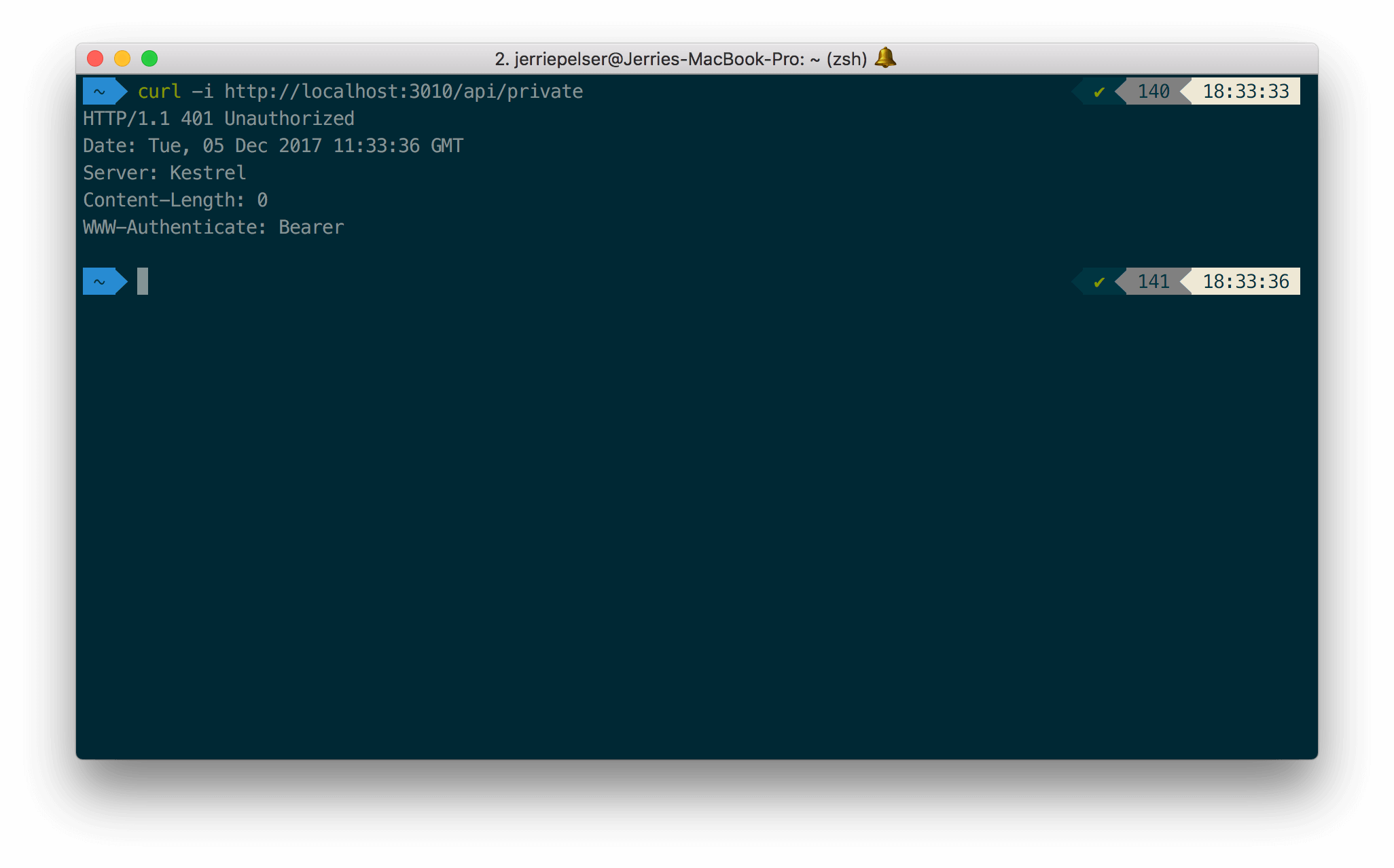
You can make a request to the `/api/private` endpoint without passing any Access Token:
```bash cURL lines theme={null}
curl --request GET \
--url http://localhost:3010/api/private
```
```cs C# lines theme={null}
var client = new RestClient("http://localhost:3010/api/private");
var request = new RestRequest(Method.GET);
IRestResponse response = client.Execute(request);
```
```go Go lines theme={null}
package main
import (
"fmt"
"net/http"
"io/ioutil"
)
func main() {
url := "http://localhost:3010/api/private"
req, _ := http.NewRequest("GET", url, nil)
res, _ := http.DefaultClient.Do(req)
defer res.Body.Close()
body, _ := ioutil.ReadAll(res.Body)
fmt.Println(res)
fmt.Println(string(body))
}
```
```java Java lines theme={null}
HttpResponse response = Unirest.get("http://localhost:3010/api/private")
.asString();
```
```javascript Node.JS lines theme={null}
var axios = require("axios").default;
var options = {method: 'GET', url: 'http://localhost:3010/api/private'};
axios.request(options).then(function (response) {
console.log(response.data);
}).catch(function (error) {
console.error(error);
});
```
```php PHP lines theme={null}
$curl = curl_init();
curl_setopt_array($curl, [
CURLOPT_PORT => "3010",
CURLOPT_URL => "http://localhost:3010/api/private",
CURLOPT_RETURNTRANSFER => true,
CURLOPT_ENCODING => "",
CURLOPT_MAXREDIRS => 10,
CURLOPT_TIMEOUT => 30,
CURLOPT_HTTP_VERSION => CURL_HTTP_VERSION_1_1,
CURLOPT_CUSTOMREQUEST => "GET",
]);
$response = curl_exec($curl);
$err = curl_error($curl);
curl_close($curl);
if ($err) {
echo "cURL Error #:" . $err;
} else {
echo $response;
}
```
```python Python lines theme={null}
import http.client
conn = http.client.HTTPConnection("localhost:3010")
conn.request("GET", "/api/private")
res = conn.getresponse()
data = res.read()
print(data.decode("utf-8"))
```
```ruby Ruby lines theme={null}
require 'uri'
require 'net/http'
url = URI("http://localhost:3010/api/private")
http = Net::HTTP.new(url.host, url.port)
request = Net::HTTP::Get.new(url)
response = http.request(request)
puts response.read_body
```
The API will return a 401 HTTP (Unauthorized) status code:
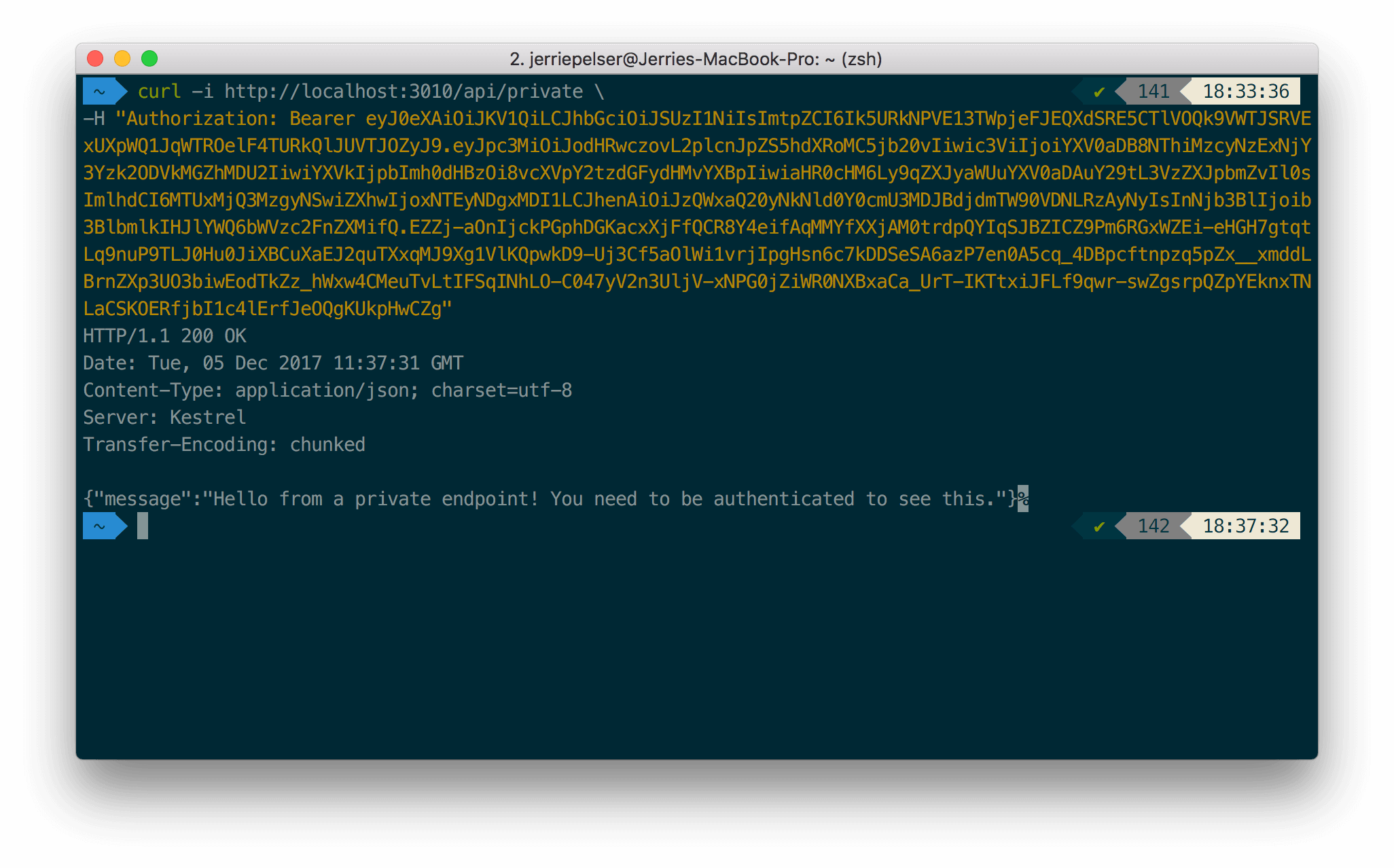
Once again, make the same request but this time pass along the Access Token as a Bearer token in the **Authorization** header of the request:
```bash lines theme={null}
curl --request GET \
--url http://localhost:3010/api/private \
--header 'authorization: Bearer YOUR_ACCESS_TOKEN'
```
```csharp C# lines theme={null}
var client = new RestClient("http://localhost:3010/api/private");
var request = new RestRequest(Method.GET);
request.AddHeader("authorization", "Bearer YOUR_ACCESS_TOKEN");
IRestResponse response = client.Execute(request);
```
```go Go lines theme={null}
package main
import (
"fmt"
"net/http"
"io/ioutil"
)
func main() {
url := "http://localhost:3010/api/private"
req, _ := http.NewRequest("GET", url, nil)
req.Header.Add("authorization", "Bearer YOUR_ACCESS_TOKEN")
res, _ := http.DefaultClient.Do(req)
defer res.Body.Close()
body, _ := ioutil.ReadAll(res.Body)
fmt.Println(res)
fmt.Println(string(body))
}
```
```java Java lines theme={null}
HttpResponse response = Unirest.get("http://localhost:3010/api/private")
.header("authorization", "Bearer YOUR_ACCESS_TOKEN")
.asString();
```
```javascript Node.JS lines theme={null}
var axios = require("axios").default;
var options = {
method: 'GET',
url: 'http://localhost:3010/api/private',
headers: {authorization: 'Bearer YOUR_ACCESS_TOKEN'}
};
axios.request(options).then(function (response) {
console.log(response.data);
}).catch(function (error) {
console.error(error);
});
```
```php PHP lines theme={null}
$curl = curl_init();
curl_setopt_array($curl, [
CURLOPT_PORT => "3010",
CURLOPT_URL => "http://localhost:3010/api/private",
CURLOPT_RETURNTRANSFER => true,
CURLOPT_ENCODING => "",
CURLOPT_MAXREDIRS => 10,
CURLOPT_TIMEOUT => 30,
CURLOPT_HTTP_VERSION => CURL_HTTP_VERSION_1_1,
CURLOPT_CUSTOMREQUEST => "GET",
CURLOPT_HTTPHEADER => [
"authorization: Bearer YOUR_ACCESS_TOKEN"
],
]);
$response = curl_exec($curl);
$err = curl_error($curl);
curl_close($curl);
if ($err) {
echo "cURL Error #:" . $err;
} else {
echo $response;
}
```
```python Python lines theme={null}
import http.client
conn = http.client.HTTPConnection("localhost:3010")
headers = { 'authorization': "Bearer YOUR_ACCESS_TOKEN" }
conn.request("GET", "/api/private", headers=headers)
res = conn.getresponse()
data = res.read()
print(data.decode("utf-8"))
```
```ruby Ruby lines theme={null}
require 'uri'
require 'net/http'
url = URI("http://localhost:3010/api/private")
http = Net::HTTP.new(url.host, url.port)
request = Net::HTTP::Get.new(url)
request["authorization"] = 'Bearer YOUR_ACCESS_TOKEN'
response = http.request(request)
puts response.read_body
```
This time the API will return a successful response:
**2. Testing the scoped endpoint**
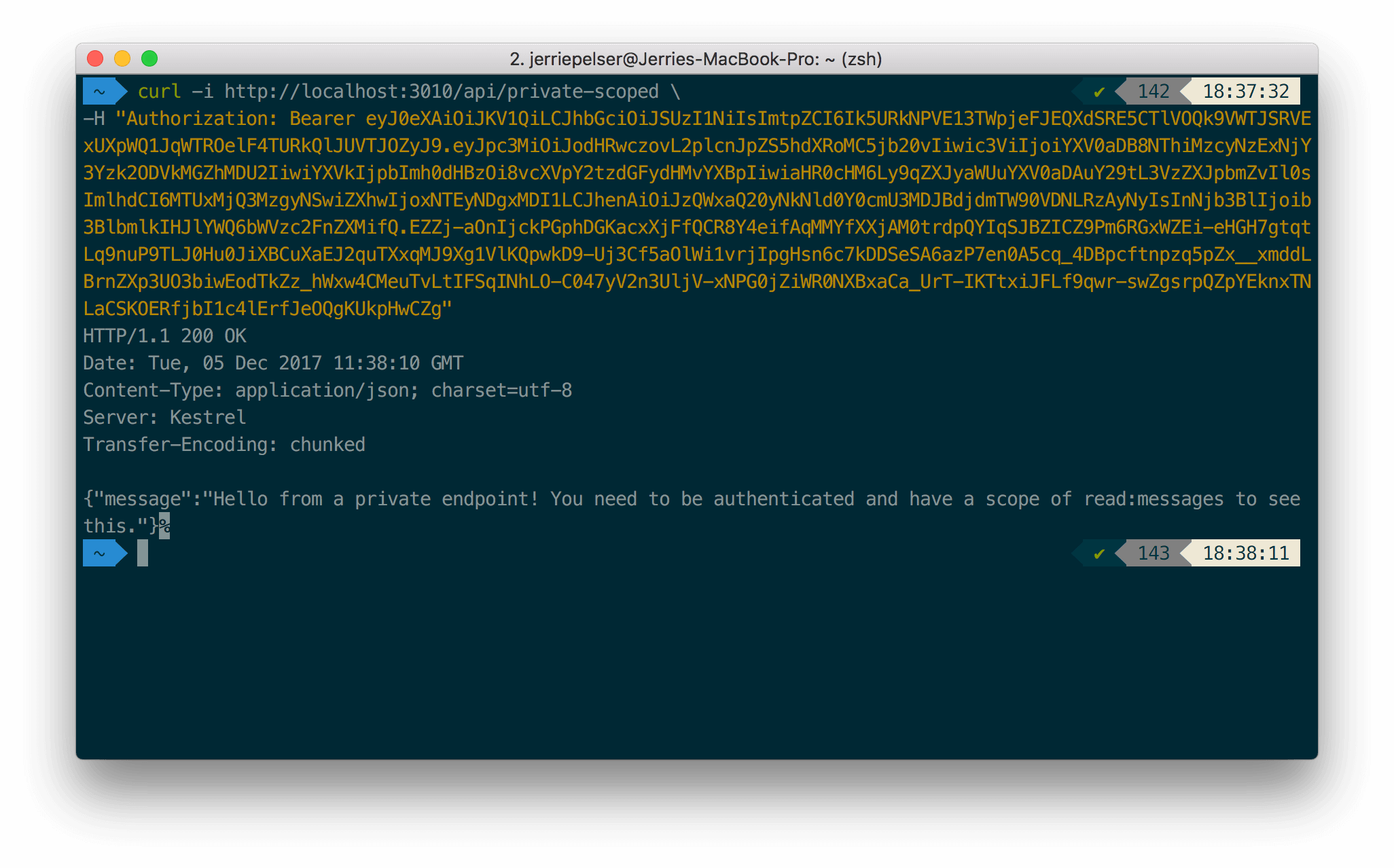
To test the endpoint that requires a scope, pass the Access Token containing the correct scope as a Bearer token in the Authorization header:
```bash cURL lines theme={null}
curl --request GET \
--url http://localhost:3010/api/private-scoped \
--header 'authorization: Bearer YOUR_ACCESS_TOKEN'
```
```cs C# lines theme={null}
var client = new RestClient("http://localhost:3010/api/private-scoped");
var request = new RestRequest(Method.GET);
request.AddHeader("authorization", "Bearer YOUR_ACCESS_TOKEN");
IRestResponse response = client.Execute(request);
```
```go Go lines theme={null}
package main
import (
"fmt"
"net/http"
"io/ioutil"
)
func main() {
url := "http://localhost:3010/api/private-scoped"
req, _ := http.NewRequest("GET", url, nil)
req.Header.Add("authorization", "Bearer YOUR_ACCESS_TOKEN")
res, _ := http.DefaultClient.Do(req)
defer res.Body.Close()
body, _ := ioutil.ReadAll(res.Body)
fmt.Println(res)
fmt.Println(string(body))
}
```
```java Java lines theme={null}
HttpResponse response = Unirest.get("http://localhost:3010/api/private-scoped")
.header("authorization", "Bearer YOUR_ACCESS_TOKEN")
.asString();
```
```javascript Node.JS lines theme={null}
var axios = require("axios").default;
var options = {
method: 'GET',
url: 'http://localhost:3010/api/private-scoped',
headers: {authorization: 'Bearer YOUR_ACCESS_TOKEN'}
};
axios.request(options).then(function (response) {
console.log(response.data);
}).catch(function (error) {
console.error(error);
});
```
```php PHP lines theme={null}
$curl = curl_init();
curl_setopt_array($curl, [
CURLOPT_PORT => "3010",
CURLOPT_URL => "http://localhost:3010/api/private-scoped",
CURLOPT_RETURNTRANSFER => true,
CURLOPT_ENCODING => "",
CURLOPT_MAXREDIRS => 10,
CURLOPT_TIMEOUT => 30,
CURLOPT_HTTP_VERSION => CURL_HTTP_VERSION_1_1,
CURLOPT_CUSTOMREQUEST => "GET",
CURLOPT_HTTPHEADER => [
"authorization: Bearer YOUR_ACCESS_TOKEN"
],
]);
$response = curl_exec($curl);
$err = curl_error($curl);
curl_close($curl);
if ($err) {
echo "cURL Error #:" . $err;
} else {
echo $response;
}
```
```python Python lines theme={null}
import http.client
conn = http.client.HTTPConnection("localhost:3010")
headers = { 'authorization': "Bearer YOUR_ACCESS_TOKEN" }
conn.request("GET", "/api/private-scoped", headers=headers)
res = conn.getresponse()
data = res.read()
print(data.decode("utf-8"))
```
```ruby Ruby lines theme={null}
require 'uri'
require 'net/http'
url = URI("http://localhost:3010/api/private-scoped")
http = Net::HTTP.new(url.host, url.port)
request = Net::HTTP::Get.new(url)
request["authorization"] = 'Bearer YOUR_ACCESS_TOKEN'
response = http.request(request)
puts response.read_body
```
If the required scope is present, the API call is successful:
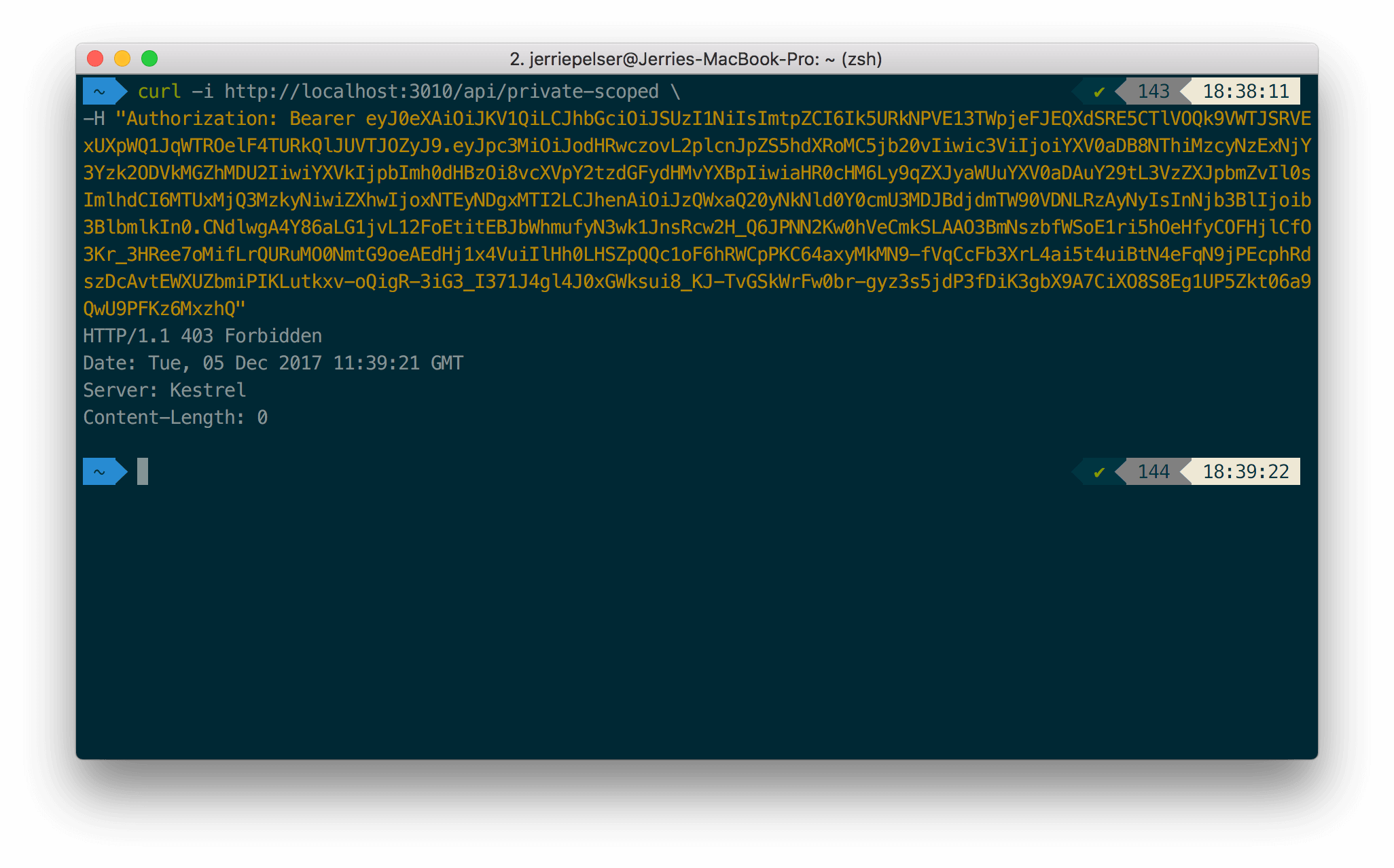
If the required scope is not present, the API returns a 403 HTTP Status (Forbidden):
[Edit on GitHub](https://github.com/auth0/docs/edit/master/articles/quickstart/backend/python/02-using.md)