> ## Documentation Index
> Fetch the complete documentation index at: https://auth0.com/llms.txt
> Use this file to discover all available pages before exploring further.
# Ruby On Rails API: Authorization
##### By Josh Cunningham
This tutorial demonstrates how to add authorization to a Ruby on Rails API.We recommend that you log in to follow this quickstart with examples configured for your account.
**New to Auth0?** Learn [how Auth0 works](/docs/get-started/auth0-overview) and read about [implementing API authentication and authorization](/docs/get-started/authentication-and-authorization-flow) using the OAuth 2.0 framework.
## Configure Auth0 APIs
### Create an API
In the [APIs](https://manage.auth0.com/#/apis) section of the Auth0 dashboard, click **Create API**. Provide a name and an identifier for your API, for example, `https://quickstarts/api`. You will use the identifier as an `audience` later, when you are configuring the Access Token verification. Leave the **Signing Algorithm** as **RS256**.
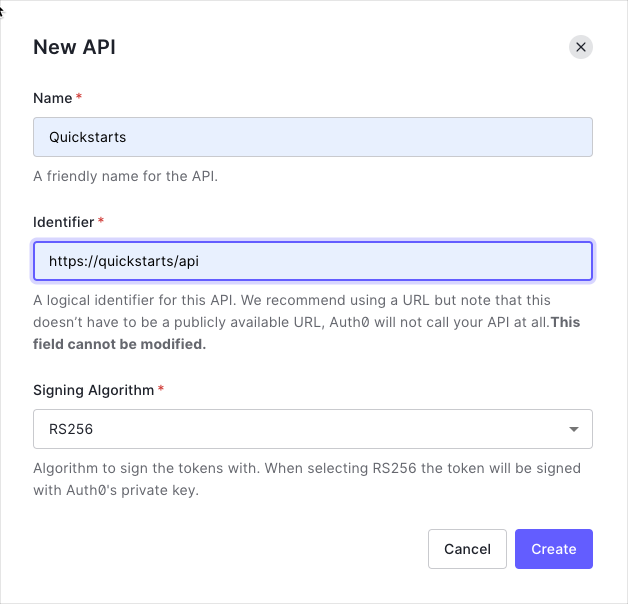
By default, your API uses RS256 as the algorithm for signing tokens. Since RS256 uses a private/public keypair, it verifies the tokens against the public key for your Auth0 account. The public key is in the [JSON Web Key Set (JWKS)](/docs/secure/tokens/json-web-tokens/json-web-key-sets) format, and can be accessed [here](https://\{yourDomain}/.well-known/jwks.json).
We recommend using the default RS256 [signing algorithm](/docs/get-started/applications/signing-algorithms) for your API. If you need to use the HS256 algorithm, see the [HS256 integration sample](https://github.com/auth0-samples/auth0-rubyonrails-api-samples/tree/OIDC/02-Authentication-HS256).
### Define permissions
Permissions let you define how resources can be accessed on behalf of the user with a given access token. For example, you might choose to grant read access to the `messages` resource if users have the manager access level, and a write access to that resource if they have the administrator access level.
You can define allowed permissions in the **Permissions** view of the Auth0 Dashboard's [APIs](https://manage.auth0.com/#/apis) section.
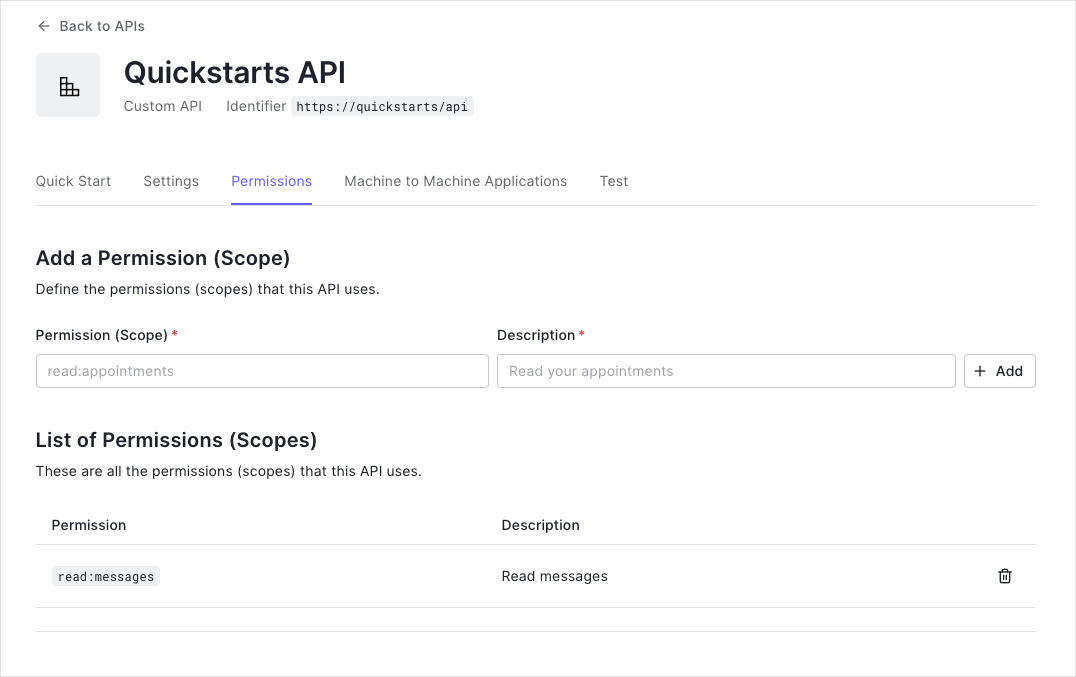
This example uses the `read:messages` scope.
This example demonstrates:
* How to check for a JSON Web Token (JWT) in the `Authorization` header of an incoming HTTP request.
* How to check if the token is valid, using the [JSON Web Key Set (JWKS)](/docs/secure/tokens/json-web-tokens/json-web-key-sets) for your Auth0 account. To learn more about validating Access Tokens, see [Validate Access Tokens](/docs/secure/tokens/access-tokens/validate-access-tokens).
## Validate Access Tokens
### Install dependencies
This tutorial performs access token validation using the [**jwt**](https://github.com/jwt/ruby-jwt) Gem within a custom `Auth0Client` class. A Concern called `Secured` is used to authorize endpoints which require authentication through an incoming access token.
Install the **jwt** Gem.
```bash lines theme={null}
gem 'jwt'
bundle install
```
### Create an Auth0Client class
Create a class called `Auth0Client` which decodes and verifies the incoming access token taken from the `Authorization` header of the request. The public key for your Auth0 tenant can be fetched to verify the token.
```rb lines theme={null}
# app/lib/auth0_client.rb
# frozen_string_literal: true
require 'jwt'
require 'net/http'
class Auth0Client
# Auth0 Client Objects
Error = Struct.new(:message, :status)
Response = Struct.new(:decoded_token, :error)
# Helper Functions
def self.domain_url
"https://#{Rails.configuration.auth0.domain}/"
end
def self.decode_token(token, jwks_hash)
JWT.decode(token, nil, true, {
algorithm: 'RS256',
iss: domain_url,
verify_iss: true,
aud: Rails.configuration.auth0.audience,
verify_aud: true,
jwks: { keys: jwks_hash[:keys] }
})
end
def self.get_jwks
jwks_uri = URI("#{domain_url}.well-known/jwks.json")
Net::HTTP.get_response jwks_uri
end
# Token Validation
def self.validate_token(token)
jwks_response = get_jwks
unless jwks_response.is_a? Net::HTTPSuccess
error = Error.new(message: 'Unable to verify credentials', status: :internal_server_error)
return Response.new(nil, error)
end
jwks_hash = JSON.parse(jwks_response.body).deep_symbolize_keys
decoded_token = decode_token(token, jwks_hash)
Response.new(decoded_token, nil)
rescue JWT::VerificationError, JWT::DecodeError => e
error = Error.new('Bad credentials', :unauthorized)
Response.new(nil, error)
end
end
```
### Define a Secured concern
Create a Concern called `Secured` which looks for the access token in the `Authorization` header of an incoming request. If the token is present, it should be passed to `Auth0Client.validate_token`.
```rb lines theme={null}
# app/controllers/concerns/secured.rb
# frozen_string_literal: true
module Secured
extend ActiveSupport::Concern
REQUIRES_AUTHENTICATION = { message: 'Requires authentication' }.freeze
BAD_CREDENTIALS = {
message: 'Bad credentials'
}.freeze
MALFORMED_AUTHORIZATION_HEADER = {
error: 'invalid_request',
error_description: 'Authorization header value must follow this format: Bearer access-token',
message: 'Bad credentials'
}.freeze
def authorize
token = token_from_request
return if performed?
validation_response = Auth0Client.validate_token(token)
return unless (error = validation_response.error)
render json: { message: error.message }, status: error.status
end
private
def token_from_request
authorization_header_elements = request.headers['Authorization']&.split
render json: REQUIRES_AUTHENTICATION, status: :unauthorized and return unless authorization_header_elements
unless authorization_header_elements.length == 2
render json: MALFORMED_AUTHORIZATION_HEADER, status: :unauthorized and return
end
scheme, token = authorization_header_elements
render json: BAD_CREDENTIALS, status: :unauthorized and return unless scheme.downcase == 'bearer'
token
end
end
```
### Validate scopes
The `Auth0Client.validate_token` method above verifies that the access token included in the request is valid; however, it doesn't yet include any mechanism for checking that the token has the sufficient **scope** to access the requested resources.
To look for a particular `scope` in an access token, create a new struct in your `Auth0Client` class called `Token` and define a new method inside, `validate_permissions`, that given an array of required scopes it will check if they are present in the payload of the token.
Go to the `Auth0Client` class. Add the new `Token` struct and update the return value of the `validate_token` method as follows:
```rb lines theme={null}
# app/lib/auth0_client.rb
# frozen_string_literal: true
require 'jwt'
require 'net/http'
class Auth0Client
# Auth0 Client Objects
Error = Struct.new(:message, :status)
Response = Struct.new(:decoded_token, :error)
Token = Struct.new(:token) do
def validate_permissions(permissions)
required_permissions = Set.new permissions
scopes = token[0]['scope']
token_permissions = scopes.present? ? Set.new(scopes.split(" ")) : Set.new
required_permissions <= token_permissions
end
end
# ...
# Token Validation
def self.validate_token(token)
jwks_response = get_jwks
unless jwks_response.is_a? Net::HTTPSuccess
error = Error.new(message: 'Unable to verify credentials', status: :internal_server_error)
return Response.new(nil, error)
end
jwks_hash = JSON.parse(jwks_response.body).deep_symbolize_keys
decoded_token = decode_token(token, jwks_hash)
Response.new(Token.new(decoded_token), nil)
rescue JWT::VerificationError, JWT::DecodeError => e
error = Error.new('Bad credentials', :unauthorized)
Response.new(nil, error)
end
end
```
Next, in the `Secured` concern, define a new error constant `INSUFFICIENT_PERMISSIONS` to return a proper error message in case there was a attempt to request a resource without the right permissions. Next, update the return value of the `Auth0Client.validate_token` call and finally create a new method `validate_permissions` where to check if the token has the right permissions, or return a `403 FORBIDDEN` status code with the `INSUFFICIENT_PERMISSIONS` error message otherwise.
Apply these changes in your `Secured` concern by adding the following code:
```rb lines theme={null}
# app/controllers/concerns/secured.rb
# frozen_string_literal: true
module Secured
extend ActiveSupport::Concern
# ...
INSUFFICIENT_PERMISSIONS = {
error: 'insufficient_permissions',
error_description: 'The access token does not contain the required permissions',
message: 'Permission denied'
}.freeze
def authorize
token = token_from_request
return if performed?
validation_response = Auth0Client.validate_token(token)
@decoded_token = validation_response.decoded_token # Add this line
return unless (error = validation_response.error)
render json: { message: error.message }, status: error.status
end
def validate_permissions(permissions)
raise 'validate_permissions needs to be called with a block' unless block_given?
return yield if @decoded_token.validate_permissions(permissions)
render json: INSUFFICIENT_PERMISSIONS, status: :forbidden
end
private
# ...
end
```
## Protect API Endpoints
The routes shown below are available for the following requests:
* `GET /api/public`: available for non-authenticated requests
* `GET /api/private`: available for authenticated requests containing an access token with no additional scopes
* `GET /api/private-scoped`: available for authenticated requests containing an access token with the `read:messages` scope granted
Add the `Secured` concern to the `ApplicationController`:
```rb lines theme={null}
class ApplicationController < ActionController::API
include Secured
end
```
You only ned to protect the `PrivateController` as follows:
```rb lines theme={null}
class PrivateController < ApplicationController
before_action :authorize
# ...
end
```
In order to check that your access token has the right permissions, call the `validate_permissions` method as follows in the `private-scoped` action:
```rb lines theme={null}
class PrivateController < ApplicationController
before_action :authorize
def private
render json: { message: 'Hello from a private endpoint! You need to be authenticated to see this.' }
end
def private_scoped
validate_permissions ['read:messages'] do
render json: { message: 'Hello from a private endpoint! You need to be authenticated and have a scope of read:messages to see this.' }
end
end
end
```
##### What can you do next?
| [Configure other identity providers](/docs/authenticate/identity-providers) | [Enable multifactor authentication](/docs/secure/multi-factor-authentication) |
| ------------------------------------------------------------------------------------------------------------------------------ | ----------------------------------------------------------------------------- |
| [Learn about attack protection](/docs/secure/attack-protection) | [Learn about rules](/docs/customize/rules) |
| [Edit on GitHub](https://github.com/auth0/docs/edit/master/articles/quickstart/backend/aspnet-core-webapi/01-authorization.md) | |
***