> ## Documentation Index
> Fetch the complete documentation index at: https://auth0.com/llms.txt
> Use this file to discover all available pages before exploring further.
# Ruby On Rails: Login
export const AuthCodeBlock = ({filename, icon, language, highlight, children}) => {
const [displayText, setDisplayText] = useState(children);
const [copyText, setCopyText] = useState(children);
const wrapperRef = React.useRef(null);
useEffect(() => {
let unsubscribe = null;
function init() {
if (!window.autorun || !window.rootStore) {
return;
}
unsubscribe = window.autorun(() => {
let processedChildrenForDisplay = children;
let processedChildrenForCopy = children;
for (const [key, value] of window.rootStore.variableStore.values.entries()) {
const escapedKey = key.replaceAll(/[.*+?^${}()|[\]\\]/g, (String.raw)`\$&`);
let displayValue = value;
if (key === "{yourClientSecret}" && value !== "{yourClientSecret}") {
displayValue = value.substring(0, 3) + "*****MASKED*****";
}
processedChildrenForDisplay = processedChildrenForDisplay.replaceAll(new RegExp(escapedKey, "g"), displayValue);
processedChildrenForCopy = processedChildrenForCopy.replaceAll(new RegExp(escapedKey, "g"), value);
}
setDisplayText(processedChildrenForDisplay);
setCopyText(processedChildrenForCopy);
});
}
if (window.rootStore) {
init();
} else {
window.addEventListener("adu:storeReady", init);
}
return () => {
window.removeEventListener("adu:storeReady", init);
unsubscribe?.();
};
}, [children]);
useEffect(() => {
if (!wrapperRef.current) return;
const originalWriteText = navigator.clipboard.writeText.bind(navigator.clipboard);
let isOverriding = false;
const handleClick = e => {
const button = e.target.closest('[data-testid="copy-code-button"]');
if (!button || !wrapperRef.current.contains(button)) return;
isOverriding = true;
navigator.clipboard.writeText = text => {
if (isOverriding) {
isOverriding = false;
navigator.clipboard.writeText = originalWriteText;
return originalWriteText(copyText);
}
return originalWriteText(text);
};
setTimeout(() => {
if (isOverriding) {
isOverriding = false;
navigator.clipboard.writeText = originalWriteText;
}
}, 100);
};
const wrapper = wrapperRef.current;
wrapper.addEventListener('click', handleClick, true);
return () => {
wrapper.removeEventListener('click', handleClick, true);
if (navigator.clipboard.writeText !== originalWriteText) {
navigator.clipboard.writeText = originalWriteText;
}
};
}, [copyText]);
return
{displayText}
;
};
##### By David Patrick
This tutorial demonstrates how to add user login to a Ruby on Rails application.We recommend that you log in to follow this quickstart with examples configured for your account.
**New to Auth?** Learn [How Auth0 works](/docs/get-started/auth0-overview), how it [integrates with Regular Web Applications](/docs/get-started/architecture-scenarios/sso-for-regular-web-apps) and which [protocol](/docs/get-started/authentication-and-authorization-flow) it uses.
## Configure Auth0
### Get Your Application Keys
When you signed up for Auth0, a new application was created for you, or you could have created a new one. You will need some details about that application to communicate with Auth0. You can get these details from the [Application Settings](https://manage.auth0.com/#/applications) section in the Auth0 dashboard.
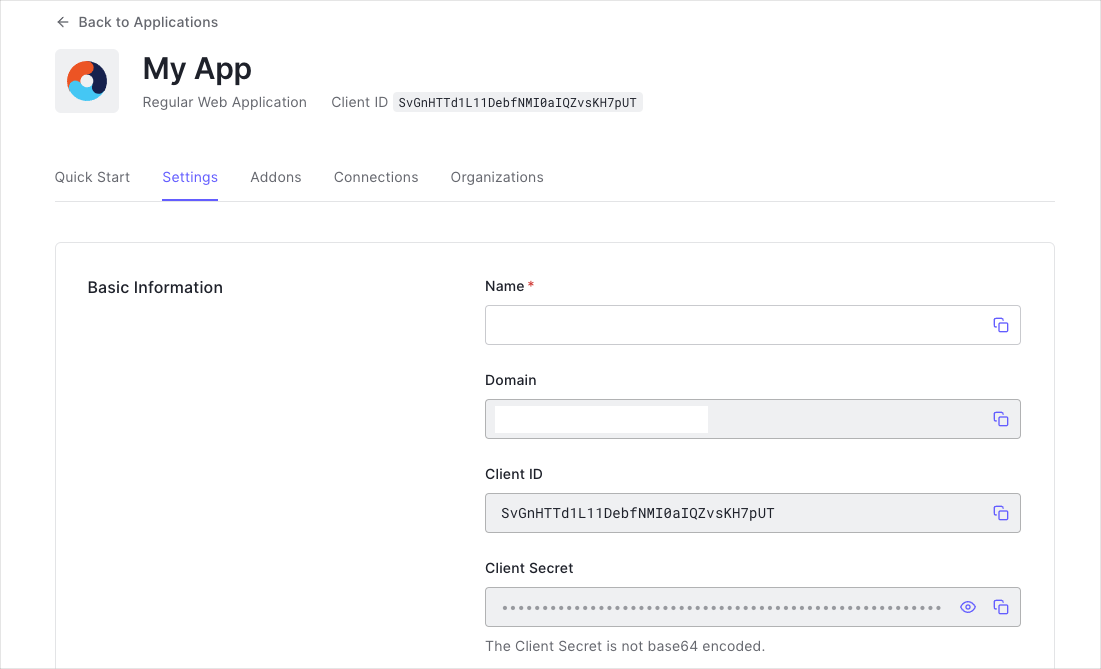
You need the following information:
* **Domain**
* **Client ID**
* **Client Secret**
If you download the sample from the top of this page, these details are filled out for you.
### Configure Callback URLs
A callback URL is a URL in your application where Auth0 redirects the user after they have authenticated. The callback URL for your app must be added to the **Allowed Callback URLs** field in your [Application Settings](https://manage.auth0.com/#/applications). If this field is not set, users will be unable to log in to the application and will get an error.
If you are following along with the sample project you downloaded from the top of this page, the callback URL you need to add to the **Allowed Callback URLs** field is `http://localhost:3000/auth/auth0/callback`.
### Configure Logout URLs
A logout URL is a URL in your application that Auth0 can return to after the user has been logged out of the authorization server. This is specified in the `returnTo` query parameter. The logout URL for your app must be added to the **Allowed Logout URLs** field in your [Application Settings](https://manage.auth0.com/#/applications). If this field is not set, users will be unable to log out from the application and will get an error.
If you are following along with the sample project you downloaded from the top of this page, the logout URL you need to add to the **Allowed Logout URLs** field is `http://localhost:3000`.
## Install the Auth0 SDK
### Install Dependencies
This tutorial uses `omniauth-auth0`, a custom [OmniAuth strategy](https://github.com/intridea/omniauth#omniauth-standardized-multi-provider-authentication), to handle the authentication flow. Add the following dependencies to your `Gemfile`:
```bash lines theme={null}
gem 'omniauth-auth0', '~> 3.0'
gem 'omniauth-rails_csrf_protection', '~> 1.0' # prevents forged authentication requests
```
Once your gems are added, install the gems with `bundle install`:
### Initialize Auth0 Configuration
Create an Auth0 config file `./config/auth0.yml`
export const codeExample = `# ./config/auth0.yml
development:
auth0_domain: {yourDomain}
auth0_client_id: {yourClientId}
auth0_client_secret: `;
Create the following initializer file `./config/initializers/auth0.rb` and [configure](https://github.com/auth0/omniauth-auth0/blob/master/EXAMPLES.md#send-additional-authentication-parameters) the **OmniAuth** middleware.
```rb lines theme={null}
# ./config/initializers/auth0.rb
AUTH0_CONFIG = Rails.application.config_for(:auth0)
Rails.application.config.middleware.use OmniAuth::Builder do
provider(
:auth0,
AUTH0_CONFIG['auth0_client_id'],
AUTH0_CONFIG['auth0_client_secret'],
AUTH0_CONFIG['auth0_domain'],
callback_path: '/auth/auth0/callback',
authorize_params: {
scope: 'openid profile'
}
)
end
```
### Add an Auth0 controller
Create an Auth0 controller for handling the authentication callback. Run the command `rails generate controller auth0 callback failure logout --skip-assets --skip-helper --skip-routes --skip-template-engine`.
Inside of the callback method assign the hash of user information, returned as `request.env['omniauth.auth']`, to the active session.
```rb lines theme={null}
# ./app/controllers/auth0_controller.rb
class Auth0Controller < ApplicationController
def callback
# OmniAuth stores the information returned from Auth0 and the IdP in request.env['omniauth.auth'].
# In this code, you will pull the raw_info supplied from the id_token and assign it to the session.
# Refer to https://github.com/auth0/omniauth-auth0/blob/master/EXAMPLES.md#example-of-the-resulting-authentication-hash for complete information on 'omniauth.auth' contents.
auth_info = request.env['omniauth.auth']
session[:userinfo] = auth_info['extra']['raw_info']
# Redirect to the URL you want after successful auth
redirect_to '/dashboard'
end
def failure
# Handles failed authentication -- Show a failure page (you can also handle with a redirect)
@error_msg = request.params['message']
end
def logout
# you will finish this in a later step
end
end
```
Add the following routes to your `./config/routes.rb` file:
```rb lines theme={null}
# ./config/routes.rb
Rails.application.routes.draw do
# ..
get '/auth/auth0/callback' => 'auth0#callback'
get '/auth/failure' => 'auth0#failure'
get '/auth/logout' => 'auth0#logout'
end
```
## Add Login to Your Application
A user can now log into your application by visiting the `/auth/auth0` endpoint.
To [prevent forged authentication requests](https://github.com/cookpad/omniauth-rails_csrf_protection), use the `link_to` or `button_to` helper methods with the `:post` method
```erb lines theme={null}
<%= button_to 'Login', '/auth/auth0', method: :post, data: { turbo: false } %>
```
## Add Logout to Your Application
Now that you can log in to your Rails application, you need [a way to log out](https://auth0.com/docs/logout/guides/logout-auth0). Revisit the Auth0Controller you created earlier, and finish up the logout method added there.
You will need to clear out your session and then redirect the user to the Auth0 logout endpoint.
To clear out all the objects stored within the session, call the `reset_session` method within the `auth0_controller/logout` method. [Learn more about reset\_session here](http://api.rubyonrails.org/classes/ActionController/Base.html#M000668). Add the following code to `./app/controllers/auth0_controller.rb`:
```rb lines theme={null}
# ./app/controllers/auth0_controller.rb
class Auth0Controller < ApplicationController
# ..
# ..Insert the code below
def logout
reset_session
redirect_to logout_url, allow_other_host: true
end
private
def logout_url
request_params = {
returnTo: root_url,
client_id: AUTH0_CONFIG['auth0_client_id']
}
URI::HTTPS.build(host: AUTH0_CONFIG['auth0_domain'], path: '/v2/logout', query: request_params.to_query).to_s
end
end
```
The final destination URL (the `returnTo` value) needs to be in the list of `Allowed Logout URLs` . See the [logout documentation](/docs/authenticate/login/logout/redirect-users-after-logout) for more.
The user will now be able to logout of your application by visiting the `/auth/logout` endpoint.
```erb lines theme={null}
<%= button_to 'Logout', 'auth/logout', method: :get, data: { turbo: false } %>
```
## Show User Profile Information
To display the user's profile, your application should provide a protected route. You can use a controller `concern` to control access to routes. Create the following file `./app/controllers/concerns/secured.rb`
```rb lines theme={null}
# ./app/controllers/concerns/secured.rb
module Secured
extend ActiveSupport::Concern
included do
before_action :logged_in_using_omniauth?
end
def logged_in_using_omniauth?
redirect_to '/' unless session[:userinfo].present?
end
end
```
After you have created the secured controller concern, include it in any controller that requires a logged in user. You can then access the user from the session `session[:userinfo]`.
```rb lines theme={null}
# ./app/controllers/dashboard_controller.rb
class DashboardController < ApplicationController
include Secured
def show
# session[:userinfo] was saved earlier on Auth0Controller#callback
@user = session[:userinfo]
end
end
```
Now that you have loaded the user from the session, you can use it to display information in your frontend.
```erb lines theme={null}
Normalized User Profile:<%= JSON.pretty_generate(@user[:info])%>
Full User Profile:<%= JSON.pretty_generate(@user[:extra][:raw_info])%>
```
##### What can you do next?
| [Configure other identity providers](/docs/authenticate/identity-providers) | [Enable multifactor authentication](/docs/secure/multi-factor-authentication) |
| ---------------------------------------------------------------------------------------------------------- | ----------------------------------------------------------------------------- |
| [Learn about attack protection](/docs/secure/attack-protection) | [Learn about rules](/docs/customize/rules) |
| [Edit on GitHub](https://github.com/auth0/docs/edit/master/articles/quickstart/native/flutter/01-login.md) | |