> ## Documentation Index
> Fetch the complete documentation index at: https://auth0.com/llms.txt
> Use this file to discover all available pages before exploring further.
> Learn how to set up the end-to-end test environment for the Resource App.
# Set up Auth0 XAA Environment
export const ReleaseStageNotice = ({feature, stage, plans, contact, terms}) => {
const stageTextMap = {
"beta": "Beta",
"ea": "Early Access"
};
const stageText = stageTextMap[stage] || "a product release stage";
const prsLink = "/docs/troubleshoot/product-lifecycle/product-release-stages";
const linkify = (text, url) => {
return {text};
};
const includeDetails = (plans, contact, terms) => {
const hasDetails = terms || plans || contact;
if (!hasDetails) return null;
return
{plans && <>This feature is available for {linkify(`${plans} plans`, "https://auth0.com/pricing")}. }
{contact && "To participate, contact " + contact + ". "}
{terms && <>By using this feature, you agree to the applicable Free Trial terms in Okta's {linkify("Master Subscription Agreement", "https://www.okta.com/legal")}.}
;
};
return
The {feature} feature is in {linkify(stageText, prsLink)}.
{includeDetails(plans, contact, terms)}
;
};
By configuring your Auth0 tenant as the Resource App Authorization Server, your SaaS application can start accepting incoming ID-JAG requests without requiring any code changes. This enables your SaaS API to generate access tokens in response to these requests, allowing AI agents and other applications to seamlessly consume your API.
To set up your end-to-end test environment in Auth0:
* Configure and register your API in Auth0. To learn more, read [Create the API in Auth0](#create-the-api-in-auth0)
* Configure and register your Resource App: This includes configuring your Auth0 tenant and registering your SaaS application as a Resource App with IdP (e.g. Okta). To learn more, read [Resource App setup](/docs/secure/call-apis-on-users-behalf/xaa/idp/okta-as-oidc-idp#register-the-resource-app-in-okta).
* Configure the Requesting App to test the end-to-end: This includes registering a test Requesting App in your Auth0 tenant and updating IdP (e.g. Okta) to link it with your Resource App. To learn more, read [Requesting App setup](#requesting-app-setup).
* Configure how your Auth0 tenant federates with your customer’s enterprise IdP: In our test environment, the enterprise IdP will be your Okta test tenant, representing one of your enterprise customers. To learn more, read [Configure an Okta Workforce Enterprise connection in Auth0](docs/secure/call-apis-on-users-behalf/xaa/idp/okta-as-oidc-idp#configure-an-okta-workforce-enterprise-connection-in-auth0).
## Create the API in Auth0
If you have already created a custom API in your Auth0 tenant, you can skip this section.
In the Auth0 Dashboard, [register a custom API](/docs/get-started/auth0-overview/set-up-apis) representing your SaaS API in your Auth0 tenant.
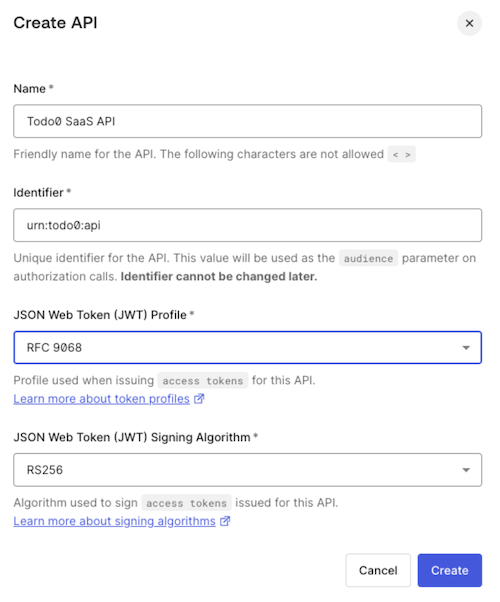 After you’ve created the API, you can optionally set its audience as the **Default Audience** for your Auth0 tenant under [Tenant Settings](/docs/get-started/tenant-settings).
You can also use [API Access Policies for Applications](/docs/get-started/apis/api-access-policies-for-applications) to granularly control which applications are granted access to your API for which scopes.
## Requesting App setup
In a production environment, you configure each Requesting App once to enable its connection with your Resource App.
To set up your Requesting App, you need to:
* [Create the Requesting App in Auth0](#create-the-requesting-app-in-auth0)
* [Register the Requesting App in Okta](/docs/secure/call-apis-on-users-behalf/xaa/idp/okta-as-oidc-idp#register-the-requesting-app-in-okta)
### Create the Requesting App in Auth0
To test the end-to-end environment, create and register an application that behaves as the Requesting App. The application should be a confidential client that can store client secrets, such as a web application.
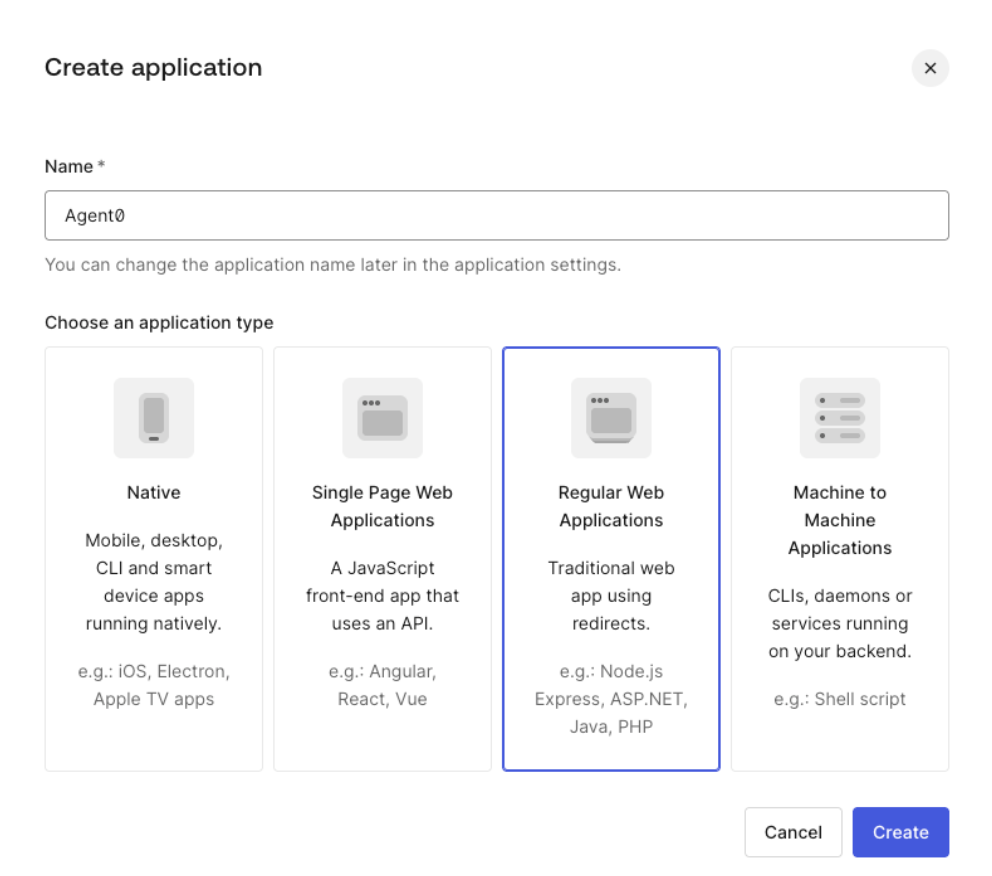
To [create an application](/docs/get-started/auth0-overview/create-applications) representing the Requesting App in your Auth0 tenant:
* Navigate to **Applications > Applications** and select **Create Application**.
* Enter a name and select **Regular Web Application**.
After you’ve created the API, you can optionally set its audience as the **Default Audience** for your Auth0 tenant under [Tenant Settings](/docs/get-started/tenant-settings).
You can also use [API Access Policies for Applications](/docs/get-started/apis/api-access-policies-for-applications) to granularly control which applications are granted access to your API for which scopes.
## Requesting App setup
In a production environment, you configure each Requesting App once to enable its connection with your Resource App.
To set up your Requesting App, you need to:
* [Create the Requesting App in Auth0](#create-the-requesting-app-in-auth0)
* [Register the Requesting App in Okta](/docs/secure/call-apis-on-users-behalf/xaa/idp/okta-as-oidc-idp#register-the-requesting-app-in-okta)
### Create the Requesting App in Auth0
To test the end-to-end environment, create and register an application that behaves as the Requesting App. The application should be a confidential client that can store client secrets, such as a web application.
To [create an application](/docs/get-started/auth0-overview/create-applications) representing the Requesting App in your Auth0 tenant:
* Navigate to **Applications > Applications** and select **Create Application**.
* Enter a name and select **Regular Web Application**.
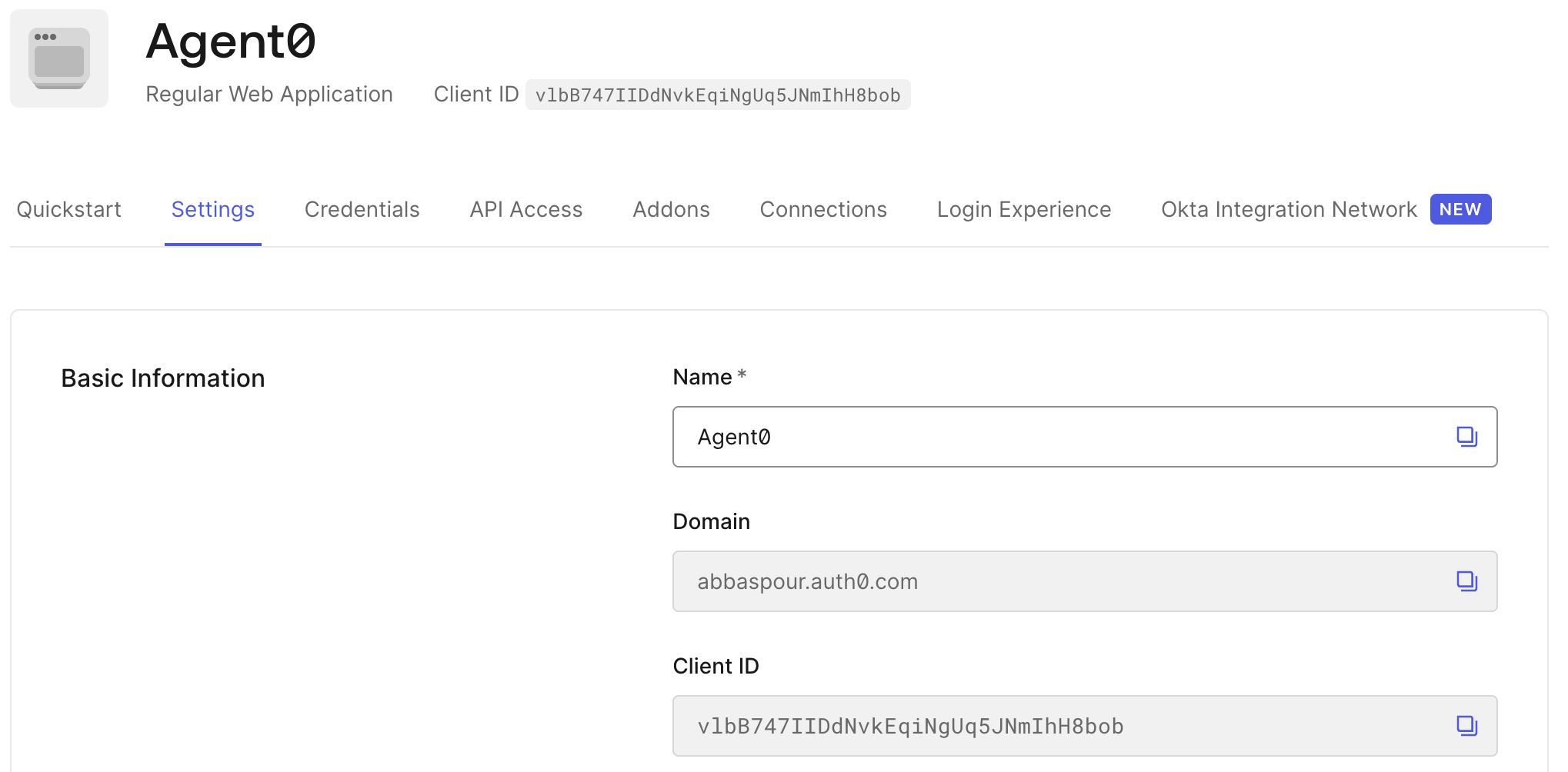
 * In the application details, note the **Client ID** of the application. This is required during [Register the Requesting App in Okta](/docs/secure/call-apis-on-users-behalf/xaa/idp/okta-as-oidc-idp#register-the-requesting-app-in-okta).
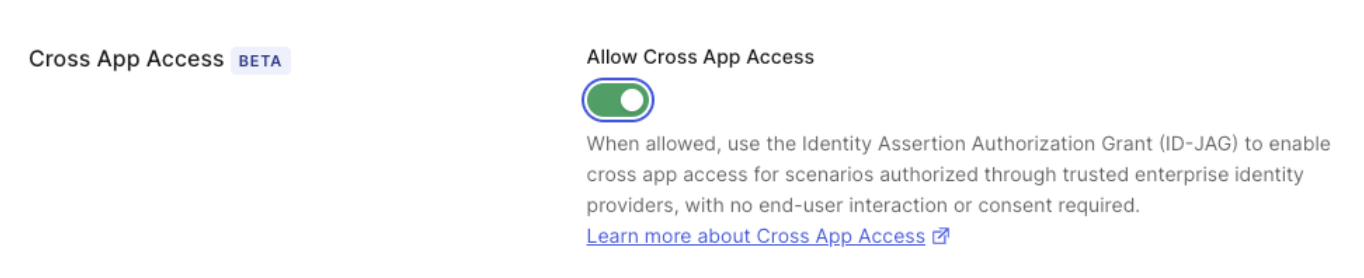
 * Once you’ve created the application, scroll to **Settings** and enable the **Cross App Access** toggle.
 Once you’ve created and configured your application, you must provide Okta with the application’s `client_id` and the issuer URL of your Auth0 tenant. This enables the connection between the Requesting App, identified by the `client_id`, and the Resource App, identified by the issuer URL. To learn more, read [Test the end-to-end XAA flow](/docs/secure/call-apis-on-users-behalf/xaa/end-to-end-testing).
For Okta-specific configuration, see [Register the Requesting App in Okta](/docs/secure/call-apis-on-users-behalf/xaa/idp/okta-as-oidc-idp#register-the-requesting-app-in-okta).
Once you’ve created and configured your application, you must provide Okta with the application’s `client_id` and the issuer URL of your Auth0 tenant. This enables the connection between the Requesting App, identified by the `client_id`, and the Resource App, identified by the issuer URL. To learn more, read [Test the end-to-end XAA flow](/docs/secure/call-apis-on-users-behalf/xaa/end-to-end-testing).
For Okta-specific configuration, see [Register the Requesting App in Okta](/docs/secure/call-apis-on-users-behalf/xaa/idp/okta-as-oidc-idp#register-the-requesting-app-in-okta).