> ## Documentation Index
> Fetch the complete documentation index at: https://auth0.com/llms.txt
> Use this file to discover all available pages before exploring further.
> Learn the differences between using the Auth0 data store and an external database to store user data.
# User Data Storage
export const AuthCodeGroup = ({children, dropdown}) => {
const [processedChildren, setProcessedChildren] = useState(children);
useEffect(() => {
let unsubscribe = null;
function init() {
unsubscribe = window.autorun(() => {
const processChildren = node => {
if (typeof node === "string") {
let processedNode = node;
for (const [key, value] of window.rootStore.variableStore.values.entries()) {
const escapedKey = key.replaceAll(/[.*+?^${}()|[\]\\]/g, (String.raw)`\$&`);
processedNode = processedNode.replaceAll(new RegExp(escapedKey, "g"), value);
}
return processedNode;
} else if (Array.isArray(node)) {
return node.map(processChildren);
} else if (node && node.props && node.props.children) {
return {
...node,
props: {
...node.props,
children: processChildren(node.props.children)
}
};
}
return node;
};
setProcessedChildren(processChildren(children));
});
}
if (window.rootStore) {
init();
} else {
window.addEventListener("adu:storeReady", init);
}
return () => {
window.removeEventListener("adu:storeReady", init);
unsubscribe?.();
};
}, [children]);
return {processedChildren};
};
export const AuthCodeBlock = ({filename, icon, language, highlight, children}) => {
const [displayText, setDisplayText] = useState(children);
const [copyText, setCopyText] = useState(children);
const wrapperRef = React.useRef(null);
useEffect(() => {
let unsubscribe = null;
function init() {
if (!window.autorun || !window.rootStore) {
return;
}
unsubscribe = window.autorun(() => {
let processedChildrenForDisplay = children;
let processedChildrenForCopy = children;
for (const [key, value] of window.rootStore.variableStore.values.entries()) {
const escapedKey = key.replaceAll(/[.*+?^${}()|[\]\\]/g, (String.raw)`\$&`);
let displayValue = value;
if (key === "{yourClientSecret}" && value !== "{yourClientSecret}") {
displayValue = value.substring(0, 3) + "*****MASKED*****";
}
processedChildrenForDisplay = processedChildrenForDisplay.replaceAll(new RegExp(escapedKey, "g"), displayValue);
processedChildrenForCopy = processedChildrenForCopy.replaceAll(new RegExp(escapedKey, "g"), value);
}
setDisplayText(processedChildrenForDisplay);
setCopyText(processedChildrenForCopy);
});
}
if (window.rootStore) {
init();
} else {
window.addEventListener("adu:storeReady", init);
}
return () => {
window.removeEventListener("adu:storeReady", init);
unsubscribe?.();
};
}, [children]);
useEffect(() => {
if (!wrapperRef.current) return;
const originalWriteText = navigator.clipboard.writeText.bind(navigator.clipboard);
let isOverriding = false;
const handleClick = e => {
const button = e.target.closest('[data-testid="copy-code-button"]');
if (!button || !wrapperRef.current.contains(button)) return;
isOverriding = true;
navigator.clipboard.writeText = text => {
if (isOverriding) {
isOverriding = false;
navigator.clipboard.writeText = originalWriteText;
return originalWriteText(copyText);
}
return originalWriteText(text);
};
setTimeout(() => {
if (isOverriding) {
isOverriding = false;
navigator.clipboard.writeText = originalWriteText;
}
}, 100);
};
const wrapper = wrapperRef.current;
wrapper.addEventListener('click', handleClick, true);
return () => {
wrapper.removeEventListener('click', handleClick, true);
if (navigator.clipboard.writeText !== originalWriteText) {
navigator.clipboard.writeText = originalWriteText;
}
};
}, [copyText]);
return
{displayText}
;
};
Auth0 stores user information for your tenant in a hosted cloud database, or you can choose to store user data in your own custom external database.
To store user data beyond the basic information Auth0 uses for authentication, you can use the Auth0 data store or a custom database. However, if you use the additional data for authentication purposes, we recommend that you use the Auth0 data store, as this allows you to manage your user data through the [Auth0 Management Dashboard](https://manage.auth0.com/#).
## External database vs. Auth0 data store
The Auth0 data store is customized for authentication data. Storing anything beyond the default user information should be done only in limited cases. Here's why:
* **Scalability**: The Auth0 data store is limited in scalability, and your Application's data may exceed the appropriate limits. By using an external database, you keep your Auth0 data store simple, while the more efficient external database contains the extra data;
* **Performance**: Your authentication data is likely accessed at lower frequencies than your other data. The Auth0 data store isn't optimized for high-frequency use, so you should store data that needs to be retrieved more often elsewhere;
* **Flexibility**: Because the Auth0 data store was built to accommodate only user profiles and their associated metadata, you are limited in terms of the actions you can perform on the database. By using separate databases for your other data, you can manage your data as appropriate and perform direct calls without use of Auth0's Management API.
When outsourcing user authentication, there is usually no need to maintain your own users/passwords table. Even so, you may still want to associate application data with authenticated users.
* For example, you could have a Users table that lists each user authenticated by Auth0. Every time a user logs in, you could search the table for that user. If the user does not exist, you would create a new record. If they do exist, you would update all fields, essentially keeping a local copy of all user data.
* Alternatively, you could store the user identifier in each table/collection that has user-associated data. This is a simpler implementation suited to smaller applications.
## User data storage example scenario
Auth0 provides a sample app, a mobile music application, that reflects the end-to-end user experience when using Auth0 with a custom external database. The sample app is an iOS app created using the [Auth0 iOS seed project](/docs/quickstart/native/ios-swift). The backend uses the [Node.js API](/docs/quickstart/backend/nodejs).
For a visualization of the application's overall structure, see the [Mobile + API architecture scenario](/docs/get-started/architecture-scenarios/mobile-api).
### Metadata
#### App metadata
The following data points from our mobile music application are appropriate to store in `app_metadata`:
* User's subscription plan
* User's right (or lack thereof) to edit featured playlists
These two data points should be stored in `app_metadata` instead of `user_metadata` because they should not be directly changeable by the user.
#### User metadata
The following data points from our mobile music application are appropriate to store in `user_metadata`:
* Application preferences
* Details chosen by the user to alter their experience of the app upon login.
Note that, unlike the data points for `app_metadata`, the user can easily and readily change those stored in `user_metadata`.
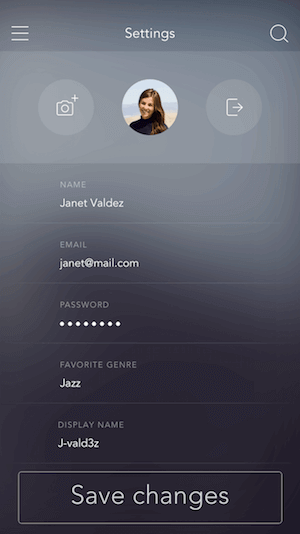
We can let the user change their `displayName`, which is the name the user sees upon logging in and is displayed to other users of the app.
To display the user's chosen identifier whenever they log in, we use a rule to get the `user.user_metadata` value.
```javascript lines theme={null}
function(user, context, callback){
user.user_metadata = user.user_metadata || {};
user.user_metadata.displayName = user.user_metadata.displayName || "user";
auth0.users.updateUserMetadata(user.user_id, user.user_metadata)
.then(function(){
callback(null, user, context);
})
.catch(function(err){
callback(err);
});
}
```
Here's a look at the screen the user would use to change their `displayName`:
 To save the changes to the database, the application makes a call to the [Get a User](https://auth0.com/docs/api/management/v2#!/Users/get_users_by_id) endpoint of the Management API to identify the appropriate user:
```bash cURL lines theme={null}
curl --request GET \
--url https://%7ByourAccount%7D.auth0.com/api/v2/users/user_id \
--header 'authorization: Bearer {yourIdToken}'
```
```csharp C# lines theme={null}
var client = new RestClient("https://%7ByourAccount%7D.auth0.com/api/v2/users/user_id");
var request = new RestRequest(Method.GET);
request.AddHeader("authorization", "Bearer {yourIdToken}");
IRestResponse response = client.Execute(request);
```
```go Go lines theme={null}
package main
import (
"fmt"
"net/http"
"io/ioutil"
)
func main() {
url := "https://%7ByourAccount%7D.auth0.com/api/v2/users/user_id"
req, _ := http.NewRequest("GET", url, nil)
req.Header.Add("authorization", "Bearer {yourIdToken}")
res, _ := http.DefaultClient.Do(req)
defer res.Body.Close()
body, _ := ioutil.ReadAll(res.Body)
fmt.Println(res)
fmt.Println(string(body))
}
```
```java Java lines theme={null}
HttpResponse response = Unirest.get("https://%7ByourAccount%7D.auth0.com/api/v2/users/user_id")
.header("authorization", "Bearer {yourIdToken}")
.asString();
```
```javascript Node.JS lines theme={null}
var axios = require("axios").default;
var options = {
method: 'GET',
url: 'https://%7ByourAccount%7D.auth0.com/api/v2/users/user_id',
headers: {authorization: 'Bearer {yourIdToken}'}
};
axios.request(options).then(function (response) {
console.log(response.data);
}).catch(function (error) {
console.error(error);
});
```
```php PHP lines theme={null}
$curl = curl_init();
curl_setopt_array($curl, [
CURLOPT_URL => "https://%7ByourAccount%7D.auth0.com/api/v2/users/user_id",
CURLOPT_RETURNTRANSFER => true,
CURLOPT_ENCODING => "",
CURLOPT_MAXREDIRS => 10,
CURLOPT_TIMEOUT => 30,
CURLOPT_HTTP_VERSION => CURL_HTTP_VERSION_1_1,
CURLOPT_CUSTOMREQUEST => "GET",
CURLOPT_HTTPHEADER => [
"authorization: Bearer {yourIdToken}"
],
]);
$response = curl_exec($curl);
$err = curl_error($curl);
curl_close($curl);
if ($err) {
echo "cURL Error #:" . $err;
} else {
echo $response;
}
```
```python Python lines theme={null}
import http.client
conn = http.client.HTTPSConnection("")
headers = { 'authorization': "Bearer {yourIdToken}" }
conn.request("GET", "%7ByourAccount%7D.auth0.com/api/v2/users/user_id", headers=headers)
res = conn.getresponse()
data = res.read()
print(data.decode("utf-8"))
```
```ruby Ruby lines theme={null}
require 'uri'
require 'net/http'
require 'openssl'
url = URI("https://%7ByourAccount%7D.auth0.com/api/v2/users/user_id")
http = Net::HTTP.new(url.host, url.port)
http.use_ssl = true
http.verify_mode = OpenSSL::SSL::VERIFY_NONE
request = Net::HTTP::Get.new(url)
request["authorization"] = 'Bearer {yourIdToken}'
response = http.request(request)
puts response.read_body
```
This is followed by a call to the [Update a User](https://auth0.com/docs/api/management/v2#!/Users/patch_users_by_id) endpoint to update the `user_metadata` field:
```bash cURL theme={null}
curl --request PATCH \
--url 'https://{yourDomain}/api/v2/users/user_id' \
--header 'authorization: Bearer {yourAccessToken}' \
--header 'content-type: application/json' \
--data '{"user_metadata": {"displayName": "J-vald3z"}'
```
```csharp C# theme={null}
var client = new RestClient("https://{yourDomain}/api/v2/users/user_id");
var request = new RestRequest(Method.PATCH);
request.AddHeader("authorization", "Bearer {yourAccessToken}");
request.AddHeader("content-type", "application/json");
request.AddParameter("application/json", "{"user_metadata": {"displayName": "J-vald3z"}", ParameterType.RequestBody);
IRestResponse response = client.Execute(request);
```
```go Go theme={null}
package main
import (
"fmt"
"strings"
"net/http"
"io/ioutil"
)
func main() {
url := "https://{yourDomain}/api/v2/users/user_id"
payload := strings.NewReader("{"user_metadata": {"displayName": "J-vald3z"}")
req, _ := http.NewRequest("PATCH", url, payload)
req.Header.Add("authorization", "Bearer {yourAccessToken}")
req.Header.Add("content-type", "application/json")
res, _ := http.DefaultClient.Do(req)
defer res.Body.Close()
body, _ := ioutil.ReadAll(res.Body)
fmt.Println(res)
fmt.Println(string(body))
}
```
```java Java theme={null}
HttpResponse response = Unirest.patch("https://{yourDomain}/api/v2/users/user_id")
.header("authorization", "Bearer {yourAccessToken}")
.header("content-type", "application/json")
.body("{"user_metadata": {"displayName": "J-vald3z"}")
.asString();
```
```javascript Node.JS theme={null}
var axios = require("axios").default;
var options = {
method: 'PATCH',
url: 'https://{yourDomain}/api/v2/users/user_id',
headers: {authorization: 'Bearer {yourAccessToken}', 'content-type': 'application/json'},
data: '{"user_metadata": {"displayName": "J-vald3z"}'
};
axios.request(options).then(function (response) {
console.log(response.data);
}).catch(function (error) {
console.error(error);
});
```
```php PHP theme={null}
$curl = curl_init();
curl_setopt_array($curl, [
CURLOPT_URL => "https://{yourDomain}/api/v2/users/user_id",
CURLOPT_RETURNTRANSFER => true,
CURLOPT_ENCODING => "",
CURLOPT_MAXREDIRS => 10,
CURLOPT_TIMEOUT => 30,
CURLOPT_HTTP_VERSION => CURL_HTTP_VERSION_1_1,
CURLOPT_CUSTOMREQUEST => "PATCH",
CURLOPT_POSTFIELDS => "{"user_metadata": {"displayName": "J-vald3z"}",
CURLOPT_HTTPHEADER => [
"authorization: Bearer {yourAccessToken}",
"content-type: application/json"
],
]);
$response = curl_exec($curl);
$err = curl_error($curl);
curl_close($curl);
if ($err) {
echo "cURL Error #:" . $err;
} else {
echo $response;
}
```
```python Python theme={null}
import http.client
conn = http.client.HTTPSConnection("")
payload = "{"user_metadata": {"displayName": "J-vald3z"}"
headers = {
'authorization': "Bearer {yourAccessToken}",
'content-type': "application/json"
}
conn.request("PATCH", "/{yourDomain}/api/v2/users/user_id", payload, headers)
res = conn.getresponse()
data = res.read()
print(data.decode("utf-8"))
```
```ruby Ruby theme={null}
require 'uri'
require 'net/http'
require 'openssl'
url = URI("https://{yourDomain}/api/v2/users/user_id")
http = Net::HTTP.new(url.host, url.port)
http.use_ssl = true
http.verify_mode = OpenSSL::SSL::VERIFY_NONE
request = Net::HTTP::Patch.new(url)
request["authorization"] = 'Bearer {yourAccessToken}'
request["content-type"] = 'application/json'
request.body = "{"user_metadata": {"displayName": "J-vald3z"}"
response = http.request(request)
puts response.read_body
```
You must replace `{yourAccessToken}` with a [Management API Access Token](https://auth0.com/docs/api/management/v2/concepts/tokens).
### User data permission rules
Use [rules](/docs/customize/rules) to implement permissions on whether a user can edit featured playlists or not.
#### Assign Playlist Editor role
The first rule sends a request to our Node API, which then queries the database connected to Heroku to check how many plays the user’s playlist has. If the number is 100 or greater, we assign `playlist_editor` as a value in the `roles` array in `app_metadata`.
```javascript lines expandable theme={null}
function (user, context, callback) {
var request = require('request');
user.app_metadata = user.app_metadata || {};
user.app_metadata.roles = user.roles || [];
var CLIENT_SECRET = configuration.AUTH0_CLIENT_SECRET;
var CLIENT_ID = configuration.AUTH0_CLIENT_ID;
var scope = {
user_id: user.user_id,
email: user.email,
name: user.name
};
var options = {
subject: user.user_id,
expiresInMinutes: 600,
audience: CLIENT_ID,
issuer: 'https://example.auth0.com'
};
var id_token = jwt.sign(scope, CLIENT_SECRET, options);
var auth = 'Bearer ' + id_token;
request.get({
url: 'https://example.com/playlists/getPlays',
headers: {
'Authorization': auth,
'Content-Type': 'text/html'
},
timeout: 15000
}, function(err, response, body){
if (err)
return callback(new Error(err));
var plays = parseInt(body, 10);
if (plays >= 100 && user.roles.indexOf('playlist_editor') < 0){
user.app_metadata.roles.push('playlist_editor');
auth0.users.updateAppMetadata(user.user_id, user.app_metadata)
.then(function(){
callback(null, user, context);
})
.catch(callback);
}
else if (plays < 100 && user.roles.indexOf('playlist_editor') >= 0){
user.app_metadata.roles = [];
auth0.users.updateAppMetadata(user.user_id, user.app_metadata)
.then(function(){
callback(null, user, context);
})
.catch(callback);
}
else{
callback(null, user, context);
}
});
}
```
#### Scope parameter specifies role
The second rule gets the `app_metadata` field and assigns the `roles` array to a field in the user object so it can be accessed without calling `app_metadata` on the application. The `scope` parameter can then specify `roles` upon the user logging in without including everything in `app_metadata` in the user object:
```javascript lines theme={null}
function(user, context, callback) {
if (user.app_metadata) {
user.roles = user.app_metadata.roles;
}
user.roles = user.roles || [];
callback(null, user, context);
}
```
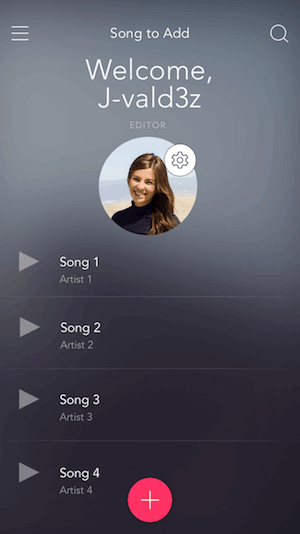
After we've implemented these two rules, the app recognizes whether the user is a playlist editor or not and changes the welcome screen accordingly. If `playlist_editor` is in the `roles` array stored in the user's `app_metadata`, the user will be welcomed as an **EDITOR** after signing in:
To save the changes to the database, the application makes a call to the [Get a User](https://auth0.com/docs/api/management/v2#!/Users/get_users_by_id) endpoint of the Management API to identify the appropriate user:
```bash cURL lines theme={null}
curl --request GET \
--url https://%7ByourAccount%7D.auth0.com/api/v2/users/user_id \
--header 'authorization: Bearer {yourIdToken}'
```
```csharp C# lines theme={null}
var client = new RestClient("https://%7ByourAccount%7D.auth0.com/api/v2/users/user_id");
var request = new RestRequest(Method.GET);
request.AddHeader("authorization", "Bearer {yourIdToken}");
IRestResponse response = client.Execute(request);
```
```go Go lines theme={null}
package main
import (
"fmt"
"net/http"
"io/ioutil"
)
func main() {
url := "https://%7ByourAccount%7D.auth0.com/api/v2/users/user_id"
req, _ := http.NewRequest("GET", url, nil)
req.Header.Add("authorization", "Bearer {yourIdToken}")
res, _ := http.DefaultClient.Do(req)
defer res.Body.Close()
body, _ := ioutil.ReadAll(res.Body)
fmt.Println(res)
fmt.Println(string(body))
}
```
```java Java lines theme={null}
HttpResponse response = Unirest.get("https://%7ByourAccount%7D.auth0.com/api/v2/users/user_id")
.header("authorization", "Bearer {yourIdToken}")
.asString();
```
```javascript Node.JS lines theme={null}
var axios = require("axios").default;
var options = {
method: 'GET',
url: 'https://%7ByourAccount%7D.auth0.com/api/v2/users/user_id',
headers: {authorization: 'Bearer {yourIdToken}'}
};
axios.request(options).then(function (response) {
console.log(response.data);
}).catch(function (error) {
console.error(error);
});
```
```php PHP lines theme={null}
$curl = curl_init();
curl_setopt_array($curl, [
CURLOPT_URL => "https://%7ByourAccount%7D.auth0.com/api/v2/users/user_id",
CURLOPT_RETURNTRANSFER => true,
CURLOPT_ENCODING => "",
CURLOPT_MAXREDIRS => 10,
CURLOPT_TIMEOUT => 30,
CURLOPT_HTTP_VERSION => CURL_HTTP_VERSION_1_1,
CURLOPT_CUSTOMREQUEST => "GET",
CURLOPT_HTTPHEADER => [
"authorization: Bearer {yourIdToken}"
],
]);
$response = curl_exec($curl);
$err = curl_error($curl);
curl_close($curl);
if ($err) {
echo "cURL Error #:" . $err;
} else {
echo $response;
}
```
```python Python lines theme={null}
import http.client
conn = http.client.HTTPSConnection("")
headers = { 'authorization': "Bearer {yourIdToken}" }
conn.request("GET", "%7ByourAccount%7D.auth0.com/api/v2/users/user_id", headers=headers)
res = conn.getresponse()
data = res.read()
print(data.decode("utf-8"))
```
```ruby Ruby lines theme={null}
require 'uri'
require 'net/http'
require 'openssl'
url = URI("https://%7ByourAccount%7D.auth0.com/api/v2/users/user_id")
http = Net::HTTP.new(url.host, url.port)
http.use_ssl = true
http.verify_mode = OpenSSL::SSL::VERIFY_NONE
request = Net::HTTP::Get.new(url)
request["authorization"] = 'Bearer {yourIdToken}'
response = http.request(request)
puts response.read_body
```
This is followed by a call to the [Update a User](https://auth0.com/docs/api/management/v2#!/Users/patch_users_by_id) endpoint to update the `user_metadata` field:
```bash cURL theme={null}
curl --request PATCH \
--url 'https://{yourDomain}/api/v2/users/user_id' \
--header 'authorization: Bearer {yourAccessToken}' \
--header 'content-type: application/json' \
--data '{"user_metadata": {"displayName": "J-vald3z"}'
```
```csharp C# theme={null}
var client = new RestClient("https://{yourDomain}/api/v2/users/user_id");
var request = new RestRequest(Method.PATCH);
request.AddHeader("authorization", "Bearer {yourAccessToken}");
request.AddHeader("content-type", "application/json");
request.AddParameter("application/json", "{"user_metadata": {"displayName": "J-vald3z"}", ParameterType.RequestBody);
IRestResponse response = client.Execute(request);
```
```go Go theme={null}
package main
import (
"fmt"
"strings"
"net/http"
"io/ioutil"
)
func main() {
url := "https://{yourDomain}/api/v2/users/user_id"
payload := strings.NewReader("{"user_metadata": {"displayName": "J-vald3z"}")
req, _ := http.NewRequest("PATCH", url, payload)
req.Header.Add("authorization", "Bearer {yourAccessToken}")
req.Header.Add("content-type", "application/json")
res, _ := http.DefaultClient.Do(req)
defer res.Body.Close()
body, _ := ioutil.ReadAll(res.Body)
fmt.Println(res)
fmt.Println(string(body))
}
```
```java Java theme={null}
HttpResponse response = Unirest.patch("https://{yourDomain}/api/v2/users/user_id")
.header("authorization", "Bearer {yourAccessToken}")
.header("content-type", "application/json")
.body("{"user_metadata": {"displayName": "J-vald3z"}")
.asString();
```
```javascript Node.JS theme={null}
var axios = require("axios").default;
var options = {
method: 'PATCH',
url: 'https://{yourDomain}/api/v2/users/user_id',
headers: {authorization: 'Bearer {yourAccessToken}', 'content-type': 'application/json'},
data: '{"user_metadata": {"displayName": "J-vald3z"}'
};
axios.request(options).then(function (response) {
console.log(response.data);
}).catch(function (error) {
console.error(error);
});
```
```php PHP theme={null}
$curl = curl_init();
curl_setopt_array($curl, [
CURLOPT_URL => "https://{yourDomain}/api/v2/users/user_id",
CURLOPT_RETURNTRANSFER => true,
CURLOPT_ENCODING => "",
CURLOPT_MAXREDIRS => 10,
CURLOPT_TIMEOUT => 30,
CURLOPT_HTTP_VERSION => CURL_HTTP_VERSION_1_1,
CURLOPT_CUSTOMREQUEST => "PATCH",
CURLOPT_POSTFIELDS => "{"user_metadata": {"displayName": "J-vald3z"}",
CURLOPT_HTTPHEADER => [
"authorization: Bearer {yourAccessToken}",
"content-type: application/json"
],
]);
$response = curl_exec($curl);
$err = curl_error($curl);
curl_close($curl);
if ($err) {
echo "cURL Error #:" . $err;
} else {
echo $response;
}
```
```python Python theme={null}
import http.client
conn = http.client.HTTPSConnection("")
payload = "{"user_metadata": {"displayName": "J-vald3z"}"
headers = {
'authorization': "Bearer {yourAccessToken}",
'content-type': "application/json"
}
conn.request("PATCH", "/{yourDomain}/api/v2/users/user_id", payload, headers)
res = conn.getresponse()
data = res.read()
print(data.decode("utf-8"))
```
```ruby Ruby theme={null}
require 'uri'
require 'net/http'
require 'openssl'
url = URI("https://{yourDomain}/api/v2/users/user_id")
http = Net::HTTP.new(url.host, url.port)
http.use_ssl = true
http.verify_mode = OpenSSL::SSL::VERIFY_NONE
request = Net::HTTP::Patch.new(url)
request["authorization"] = 'Bearer {yourAccessToken}'
request["content-type"] = 'application/json'
request.body = "{"user_metadata": {"displayName": "J-vald3z"}"
response = http.request(request)
puts response.read_body
```
You must replace `{yourAccessToken}` with a [Management API Access Token](https://auth0.com/docs/api/management/v2/concepts/tokens).
### User data permission rules
Use [rules](/docs/customize/rules) to implement permissions on whether a user can edit featured playlists or not.
#### Assign Playlist Editor role
The first rule sends a request to our Node API, which then queries the database connected to Heroku to check how many plays the user’s playlist has. If the number is 100 or greater, we assign `playlist_editor` as a value in the `roles` array in `app_metadata`.
```javascript lines expandable theme={null}
function (user, context, callback) {
var request = require('request');
user.app_metadata = user.app_metadata || {};
user.app_metadata.roles = user.roles || [];
var CLIENT_SECRET = configuration.AUTH0_CLIENT_SECRET;
var CLIENT_ID = configuration.AUTH0_CLIENT_ID;
var scope = {
user_id: user.user_id,
email: user.email,
name: user.name
};
var options = {
subject: user.user_id,
expiresInMinutes: 600,
audience: CLIENT_ID,
issuer: 'https://example.auth0.com'
};
var id_token = jwt.sign(scope, CLIENT_SECRET, options);
var auth = 'Bearer ' + id_token;
request.get({
url: 'https://example.com/playlists/getPlays',
headers: {
'Authorization': auth,
'Content-Type': 'text/html'
},
timeout: 15000
}, function(err, response, body){
if (err)
return callback(new Error(err));
var plays = parseInt(body, 10);
if (plays >= 100 && user.roles.indexOf('playlist_editor') < 0){
user.app_metadata.roles.push('playlist_editor');
auth0.users.updateAppMetadata(user.user_id, user.app_metadata)
.then(function(){
callback(null, user, context);
})
.catch(callback);
}
else if (plays < 100 && user.roles.indexOf('playlist_editor') >= 0){
user.app_metadata.roles = [];
auth0.users.updateAppMetadata(user.user_id, user.app_metadata)
.then(function(){
callback(null, user, context);
})
.catch(callback);
}
else{
callback(null, user, context);
}
});
}
```
#### Scope parameter specifies role
The second rule gets the `app_metadata` field and assigns the `roles` array to a field in the user object so it can be accessed without calling `app_metadata` on the application. The `scope` parameter can then specify `roles` upon the user logging in without including everything in `app_metadata` in the user object:
```javascript lines theme={null}
function(user, context, callback) {
if (user.app_metadata) {
user.roles = user.app_metadata.roles;
}
user.roles = user.roles || [];
callback(null, user, context);
}
```
After we've implemented these two rules, the app recognizes whether the user is a playlist editor or not and changes the welcome screen accordingly. If `playlist_editor` is in the `roles` array stored in the user's `app_metadata`, the user will be welcomed as an **EDITOR** after signing in:
 #### Associate a user's music with the user
We need to associate a user's music with that user, but this information is not required for authentication. Here's how to store this information in a separate database that is integrated with the backend of the application.
The user's unique identifier is the `user_id` and it's the sub-property of the `idTokenPayload` object in an `authResult`. Here is a sample row from the `songs` table in our database:
| song\_id | songname | user\_id |
| -------- | -------------- | ------------- |
| 1 | Number One Hit | google-oauth2 |
The Node.js backend authenticates requests to the URI associated with getting the user’s personal data from the database by validating a JSON Web Token.
[Learn about token-based authentication and how to implement JWT in your Applications.](/docs/secure/tokens/json-web-tokens)
Here is the code implementing JWT validation from the Node.js seed project:
```javascript lines theme={null}
var genres = require('./routes/genres');
var songs = require('./routes/songs');
var playlists = require('./routes/playlists');
var displayName = require('./routes/displayName');
var authenticate = jwt({
secret: process.env.AUTH0_CLIENT_SECRET,
audience: process.env.AUTH0_CLIENT_ID
});
app.use('/genres', authenticate, genres);
app.use('/songs', authenticate, songs);
app.use('/playlists', authenticate, playlists);
app.use('/displayName', authenticate, displayName);
```
We can add functionality to handle different data requests from our Application. For example, if we receive a `GET` request to `/secured/getFavGenre`, the API calls the `queryGenre()` function, which queries the database for and responds with the user’s favorite genre.
```swift lines theme={null}
@IBAction func getGenre(sender: AnyObject) {
let request = buildAPIRequest("/genres/getFav", type:"GET")
let task = NSURLSession.sharedSession().dataTaskWithRequest(request) {[unowned self](data, response, error) in
let genre = NSString(data: data!, encoding: NSUTF8StringEncoding)
dispatch_async(dispatch_get_main_queue(), {
self.favGenre.text = "Favorite Genre: \(genre!)"
})
}
task.resume()
}
```
The function `buildAPIRequest()` takes the path and HTTP method of the request as parameters and builds a request using the base URL of our Node.js API that's hosted on Heroku.
In the Application, the `getGenre()` function makes a request to the API and changes the app's interface to display the request response to `/genres/getFav`. The backend retrieves the required data for this action using the `queryGenre()` function and returns the results to the Application:
```javascript lines theme={null}
function queryGenre(user_id, res){
db.connect(process.env.DATABASE_URL, function(err, client) {
if (err) throw err;
client
.query('SELECT fav_genre as value FROM user_data WHERE user_id = $1', [user_id], function(err, result) {
if(err) {
return console.error('error running query', err);
}
res.send(result.rows[0].value);
});
});
};
```
## Learn more
* [Normalized User Profiles](/docs/manage-users/user-accounts/user-profiles/normalized-user-profiles)
* [Normalized User Profile Schema](/docs/manage-users/user-accounts/user-profiles/normalized-user-profile-schema)
* [Sample User Profiles](/docs/manage-users/user-accounts/user-profiles/sample-user-profiles)
#### Associate a user's music with the user
We need to associate a user's music with that user, but this information is not required for authentication. Here's how to store this information in a separate database that is integrated with the backend of the application.
The user's unique identifier is the `user_id` and it's the sub-property of the `idTokenPayload` object in an `authResult`. Here is a sample row from the `songs` table in our database:
| song\_id | songname | user\_id |
| -------- | -------------- | ------------- |
| 1 | Number One Hit | google-oauth2 |
The Node.js backend authenticates requests to the URI associated with getting the user’s personal data from the database by validating a JSON Web Token.
[Learn about token-based authentication and how to implement JWT in your Applications.](/docs/secure/tokens/json-web-tokens)
Here is the code implementing JWT validation from the Node.js seed project:
```javascript lines theme={null}
var genres = require('./routes/genres');
var songs = require('./routes/songs');
var playlists = require('./routes/playlists');
var displayName = require('./routes/displayName');
var authenticate = jwt({
secret: process.env.AUTH0_CLIENT_SECRET,
audience: process.env.AUTH0_CLIENT_ID
});
app.use('/genres', authenticate, genres);
app.use('/songs', authenticate, songs);
app.use('/playlists', authenticate, playlists);
app.use('/displayName', authenticate, displayName);
```
We can add functionality to handle different data requests from our Application. For example, if we receive a `GET` request to `/secured/getFavGenre`, the API calls the `queryGenre()` function, which queries the database for and responds with the user’s favorite genre.
```swift lines theme={null}
@IBAction func getGenre(sender: AnyObject) {
let request = buildAPIRequest("/genres/getFav", type:"GET")
let task = NSURLSession.sharedSession().dataTaskWithRequest(request) {[unowned self](data, response, error) in
let genre = NSString(data: data!, encoding: NSUTF8StringEncoding)
dispatch_async(dispatch_get_main_queue(), {
self.favGenre.text = "Favorite Genre: \(genre!)"
})
}
task.resume()
}
```
The function `buildAPIRequest()` takes the path and HTTP method of the request as parameters and builds a request using the base URL of our Node.js API that's hosted on Heroku.
In the Application, the `getGenre()` function makes a request to the API and changes the app's interface to display the request response to `/genres/getFav`. The backend retrieves the required data for this action using the `queryGenre()` function and returns the results to the Application:
```javascript lines theme={null}
function queryGenre(user_id, res){
db.connect(process.env.DATABASE_URL, function(err, client) {
if (err) throw err;
client
.query('SELECT fav_genre as value FROM user_data WHERE user_id = $1', [user_id], function(err, result) {
if(err) {
return console.error('error running query', err);
}
res.send(result.rows[0].value);
});
});
};
```
## Learn more
* [Normalized User Profiles](/docs/manage-users/user-accounts/user-profiles/normalized-user-profiles)
* [Normalized User Profile Schema](/docs/manage-users/user-accounts/user-profiles/normalized-user-profile-schema)
* [Sample User Profiles](/docs/manage-users/user-accounts/user-profiles/sample-user-profiles)