> ## Documentation Index
> Fetch the complete documentation index at: https://auth0.com/llms.txt
> Use this file to discover all available pages before exploring further.
> Overview of how to configure Sender Constraining for your Auth0 tenant.
# Configure Sender Constraining
[Sender constraining](/docs/secure/sender-constraining) is an OAuth 2.0 and OpenID Connect (OIDC) security mechanism that cryptographically binds access and refresh tokens to the specific client application that obtained them, preventing token theft and misuse.
Auth0 supports mTLS sender constraining and Demonstrating Proof-of-Possession (DPoP). If you enable sender constraining for a client application, then you must also enforce it for the resource server you’re making API calls to.
To configure sender constraining in Auth0, you must:
* [Configure sender constraining for a client application](#configure-sender-constraining-for-a-client-application)
* [Configure sender constraining for a resource server](#configure-sender-constraining-for-a-resource-server)
## How it works
Access tokens are sender constrained in Auth0 depending on how you configure sender constraining for your client application and resource server:
1. **Requested audience:** In a token request, whether the requested audience is `/userinfo` only, or only intended to be used with the [`/userinfo`](https://auth0.com/docs/api/authentication/user-profile/get-user-info) endpoint, or is a custom API that may include `/userinfo` when you also request the openid scope, affects whether access tokens are sender constrained.
2. **Client application:** Whether you set sender constraining as `required` by the client application.
3. **Resource server:** Whether you configure sender constraining for the resource server:
1. `none`: You have not configured sender constraining for the resource server.
2. `allowed`: You have configured sender constraining for the resource server by setting a sender constraining method.
3. `required`: You have configured sender constraining as required for the resource server, meaning that access tokens must be sender-constrained to an application. You can require sender constraining for all applications or for public applications only. Requires a sender constraining method.
When using mTLS as the sender constraining method, sender constraining is always required for all applications. Public applications are not supported with mTLS, so you cannot limit mTLS sender constraining to public clients only.
* **Proof-of-Possession:** Whether the client application sent a proof-of-possession assertion in the token request:
* mTLS sender constraining: The proof of possession is demonstrated through the client's successful presentation of a specific private key (associated with a client certificate) during the TLS handshake.
* DPoP: The proof of possession is achieved by the client creating a DPoP Proof JWT by cryptographically signing it with its private key and including the `DPoP` Proof JWT in the DPoP HTTP header of every request where the associated access token is used.
The following table describes how access tokens are issued and whether they are sender-constrained based on various client request parameters and Auth0 resource server configurations:
| Requested Audience Type | Client Requires PoP? | Proof-of-Possession (PoP) Sent by Client? | Auth0 Resource Server Policy: None | Auth0 Resource Server Policy: Allowed (Not Required) | Auth0 Resource Server Policy: Required |
| -------------------------------------- | -------------------- | ----------------------------------------- | ---------------------------------- | ---------------------------------------------------- | -------------------------------------- |
| Userinfo Only | No | No | Issued, Not Sender-Constrained | N/A | N/A |
| Userinfo Only | No | Yes | Issued, Sender-Constrained | N/A | N/A |
| Userinfo Only | Yes | No | Not Issued | N/A | N/A |
| Userinfo Only | Yes | Yes | Issued, Sender-Constrained | N/A | N/A |
| Custom Audience (may contain Userinfo) | No | No | Issued, Not Sender-Constrained | Issued, Not Sender-Constrained | Not Issued |
| Custom Audience (may contain Userinfo) | No | Yes | Issued, Not Sender-Constrained | Issued, Sender-Constrained | Issued, Sender-Constrained |
| Custom Audience (may contain Userinfo) | Yes | No | Not Issued | Not Issued | Not Issued |
| Custom Audience (may contain Userinfo) | Yes | Yes | Not Issued | Issued, Sender-Constrained | Issued, Sender-Constrained |
## Configure sender constraining for a client application
When you require sender constraining for a client application, access tokens are constrained to that application. Auth0 verifies requests to ensure that only the application that requested the token can use it to access the associated resource.
Once you configure a client application to require sender constraining, you can set the sender constraining method, either mTLS or DPoP, when configuring your resource server.
You can configure sender constraining for a client application with the Auth0 Dashboard or Management API.
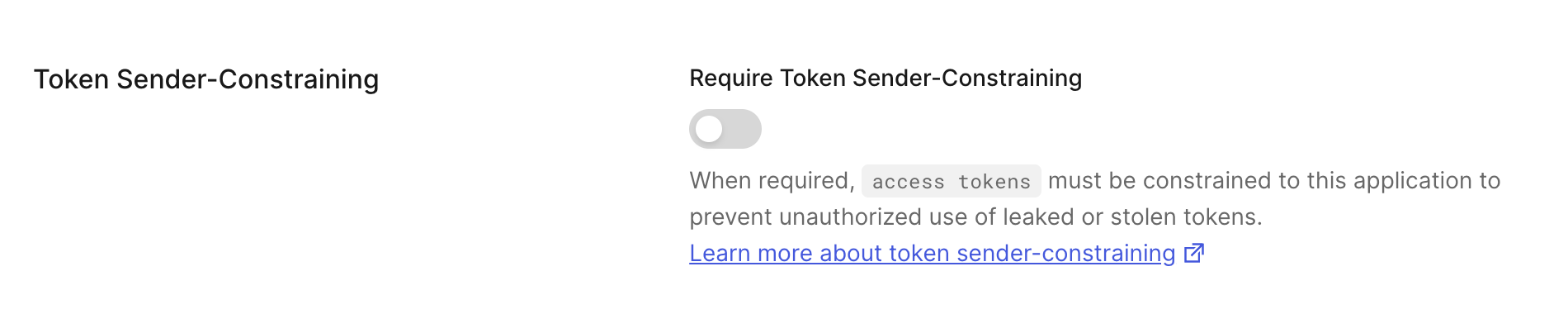
1. Go to [Dashboard > Applications > Applications](https://manage.auth0.com/#/applications). Select the application you want to configure.
2. Under **Settings**, scroll to **Token Sender-Constraining**.
3. Toggle on to **Require Sender Constraining**. Toggle off to remove the requirement for Sender Constraining for the application.
 To configure a client for Sender Constraining, use the [Management API](https://auth0.com/docs/api/management/v2).
To require Sender Constraining for a client, send a PATCH request to [update the client's settings](https://auth0.com/docs/api/management/v2/clients/patch-clients-by-id). Set the `require_proof_of_possession` parameter to `true`.
```bash lines theme={null}
curl -L -X PATCH 'https://{YOUR_DOMAIN}/api/v2/clients/{YOUR_CLIENT_ID}' \
-H 'Authorization: Bearer {YOUR_MANAGEMENT_API_TOKEN}' \
-H 'Content-Type: application/json' \
-d '{"require_proof_of_possession": true}'
```
To remove the requirement for Sender Constraining, set the `require_proof_of_possession` parameter to `false`.
```bash lines theme={null}
curl -L -X PATCH 'https://{YOUR_DOMAIN}/api/v2/clients/{YOUR_CLIENT_ID}' \
-H 'Authorization: Bearer {YOUR_MANAGEMENT_API_TOKEN}' \
-H 'Content-Type: application/json' \
-d '{"require_proof_of_possession": false}'
```
## Configure sender constraining for a resource server
Access tokens issued by Auth0 can be constrained to the sender (i.e. the client application) that needs to access APIs at a resource server.
You can configure sender constraining for a resource server with the Auth0 Dashboard or Management API.
To enable Token Binding or sender constraining, configure the **API Settings** of your API.
1. Navigate to [Auth0 Dashboard > Applications > APIs](https://manage.auth0.com/#/apis).
2. Select the API you want to configure.
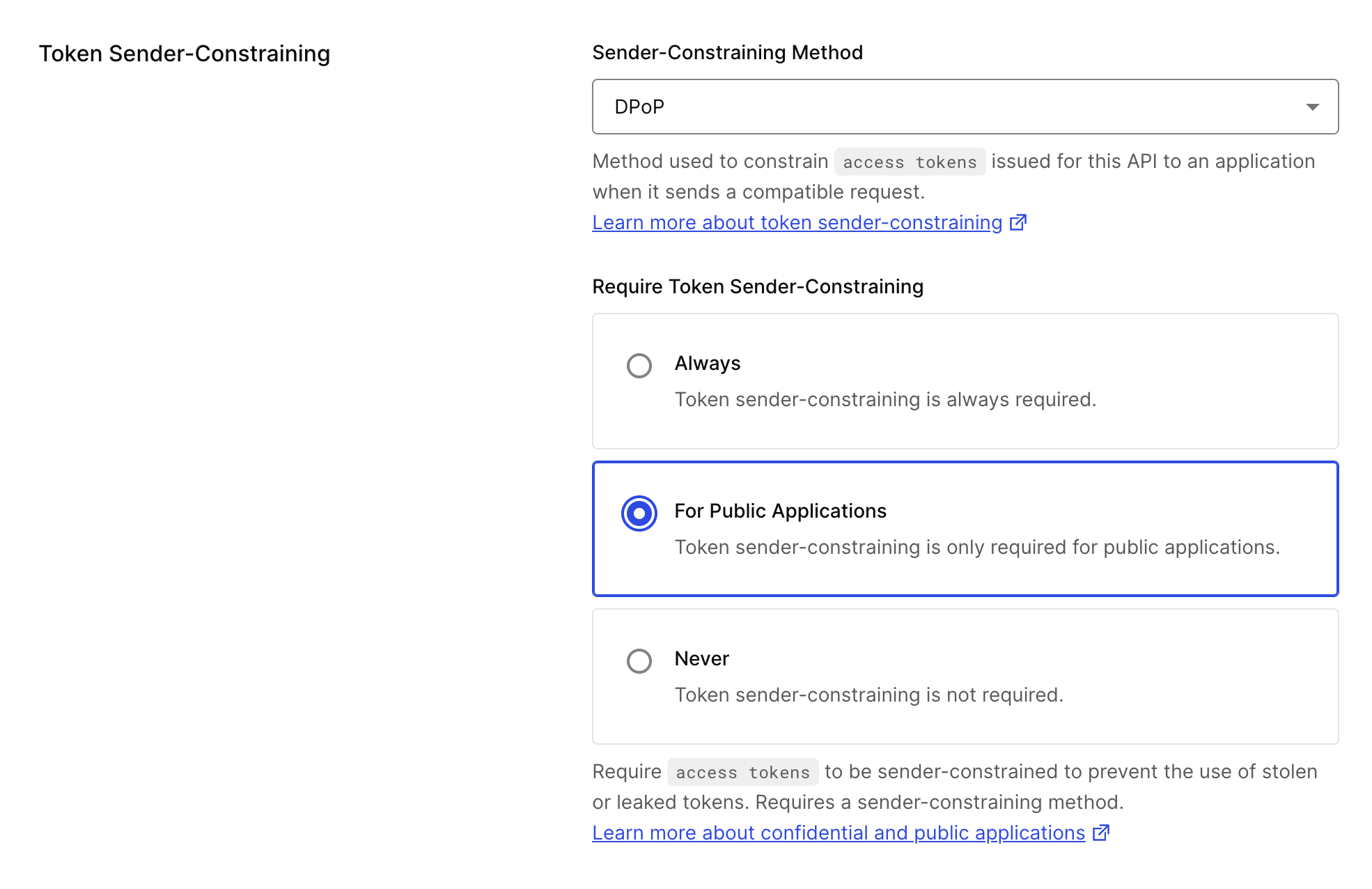
3. Under the **Settings** tab, find the **Token Sender-Constraining** section.
4. Configure the following:
1. Sender Constraining Method:
1. **None:** Don’t enable a sender constraining method for your resource server.
2. **mTLS**: Enable mTLS as the sender constraining method for your resource server.
3. **DPoP:** Enable DPoP as the sender constraining method for your resource server.
2. Require Token Sender Constraining: Select which sender constraining policy applies for this API:
1. **Always:** Require sender constraining for all applications. This is the only option available when using mTLS.
2. **For Public Applications:** Require sender constraining for public applications only. This option is not available when using mTLS.
3. **Never:** Sender constraining is not required.
To configure a client for Sender Constraining, use the [Management API](https://auth0.com/docs/api/management/v2).
To require Sender Constraining for a client, send a PATCH request to [update the client's settings](https://auth0.com/docs/api/management/v2/clients/patch-clients-by-id). Set the `require_proof_of_possession` parameter to `true`.
```bash lines theme={null}
curl -L -X PATCH 'https://{YOUR_DOMAIN}/api/v2/clients/{YOUR_CLIENT_ID}' \
-H 'Authorization: Bearer {YOUR_MANAGEMENT_API_TOKEN}' \
-H 'Content-Type: application/json' \
-d '{"require_proof_of_possession": true}'
```
To remove the requirement for Sender Constraining, set the `require_proof_of_possession` parameter to `false`.
```bash lines theme={null}
curl -L -X PATCH 'https://{YOUR_DOMAIN}/api/v2/clients/{YOUR_CLIENT_ID}' \
-H 'Authorization: Bearer {YOUR_MANAGEMENT_API_TOKEN}' \
-H 'Content-Type: application/json' \
-d '{"require_proof_of_possession": false}'
```
## Configure sender constraining for a resource server
Access tokens issued by Auth0 can be constrained to the sender (i.e. the client application) that needs to access APIs at a resource server.
You can configure sender constraining for a resource server with the Auth0 Dashboard or Management API.
To enable Token Binding or sender constraining, configure the **API Settings** of your API.
1. Navigate to [Auth0 Dashboard > Applications > APIs](https://manage.auth0.com/#/apis).
2. Select the API you want to configure.
3. Under the **Settings** tab, find the **Token Sender-Constraining** section.
4. Configure the following:
1. Sender Constraining Method:
1. **None:** Don’t enable a sender constraining method for your resource server.
2. **mTLS**: Enable mTLS as the sender constraining method for your resource server.
3. **DPoP:** Enable DPoP as the sender constraining method for your resource server.
2. Require Token Sender Constraining: Select which sender constraining policy applies for this API:
1. **Always:** Require sender constraining for all applications. This is the only option available when using mTLS.
2. **For Public Applications:** Require sender constraining for public applications only. This option is not available when using mTLS.
3. **Never:** Sender constraining is not required.
 To enable Sender Constraining with the Management API, send a PATCH request to [update the resource server](https://auth0.com/docs/api/management/v2/resource-servers/patch-resource-servers-by-id). Set the parameters of the `proof_of_possession` object to the following:
| Parameter | Description |
| -------------- | ----------------------------------------------------------------------------------------------------------------------------------------------------------------------------------------------------------------------------------------------------------------------- |
| `mechanism` | Sets the sender-constraining method: `none`, `mtls`, or `dpop`. |
| `required` | Required. When set to `true`, access tokens issued to an application for this API will be constrained to that application. Use `required_for` to specify which application types this requirement applies to. When set to `false`, sender constraining is not required. |
| `required_for` | Filters which application types require sender constraining when `required` is `true`: `all_clients` (all applications) or `public_clients` (public applications only). Defaults to `all_clients` if not specified. When using mTLS, only `all_clients` is valid. |
The following code sample is an example request body that configures a resource server for mTLS Sender Constraining. Because mTLS only supports `all_clients` for `required_for` (which is the default), it does not need to be specified:
```bash lines theme={null}
curl -L -X PATCH 'https://{YOUR_DOMAIN}/api/v2/resource-servers/{YOUR_RESOURCE_SERVER_ID}' \
-H 'Authorization: Bearer {YOUR_MANAGEMENT_API_TOKEN}' \
-H 'Content-Type: application/json' \
-H 'Accept: application/json' \
-d '{
"proof_of_possession": {
"mechanism": "mtls",
"required": true
}
}'
```
The following code sample is an example request body that configures a resource server for DPoP Sender Constraining, required for public applications only:
```bash lines theme={null}
curl -L -X PATCH 'https://{YOUR_DOMAIN}/api/v2/resource-servers/{YOUR_RESOURCE_SERVER_ID}' \
-H 'Authorization: Bearer {YOUR_MANAGEMENT_API_TOKEN}' \
-H 'Content-Type: application/json' \
-H 'Accept: application/json' \
-d '{
"proof_of_possession": {
"mechanism": "dpop",
"required": true,
"required_for": "public_clients"
}
}'
```
The following code sample configures DPoP Sender Constraining as required for all applications. Because `all_clients` is the default, `required_for` can be omitted:
```bash lines theme={null}
curl -L -X PATCH 'https://{YOUR_DOMAIN}/api/v2/resource-servers/{YOUR_RESOURCE_SERVER_ID}' \
-H 'Authorization: Bearer {YOUR_MANAGEMENT_API_TOKEN}' \
-H 'Content-Type: application/json' \
-H 'Accept: application/json' \
-d '{
"proof_of_possession": {
"mechanism": "dpop",
"required": true
}
}'
```
The following code sample disables sender constraining for a resource server (equivalent to selecting "Never" in the Dashboard):
```bash lines theme={null}
curl -L -X PATCH 'https://{YOUR_DOMAIN}/api/v2/resource-servers/{YOUR_RESOURCE_SERVER_ID}' \
-H 'Authorization: Bearer {YOUR_MANAGEMENT_API_TOKEN}' \
-H 'Content-Type: application/json' \
-H 'Accept: application/json' \
-d '{
"proof_of_possession": null
}'
```
To enable Sender Constraining with the Management API, send a PATCH request to [update the resource server](https://auth0.com/docs/api/management/v2/resource-servers/patch-resource-servers-by-id). Set the parameters of the `proof_of_possession` object to the following:
| Parameter | Description |
| -------------- | ----------------------------------------------------------------------------------------------------------------------------------------------------------------------------------------------------------------------------------------------------------------------- |
| `mechanism` | Sets the sender-constraining method: `none`, `mtls`, or `dpop`. |
| `required` | Required. When set to `true`, access tokens issued to an application for this API will be constrained to that application. Use `required_for` to specify which application types this requirement applies to. When set to `false`, sender constraining is not required. |
| `required_for` | Filters which application types require sender constraining when `required` is `true`: `all_clients` (all applications) or `public_clients` (public applications only). Defaults to `all_clients` if not specified. When using mTLS, only `all_clients` is valid. |
The following code sample is an example request body that configures a resource server for mTLS Sender Constraining. Because mTLS only supports `all_clients` for `required_for` (which is the default), it does not need to be specified:
```bash lines theme={null}
curl -L -X PATCH 'https://{YOUR_DOMAIN}/api/v2/resource-servers/{YOUR_RESOURCE_SERVER_ID}' \
-H 'Authorization: Bearer {YOUR_MANAGEMENT_API_TOKEN}' \
-H 'Content-Type: application/json' \
-H 'Accept: application/json' \
-d '{
"proof_of_possession": {
"mechanism": "mtls",
"required": true
}
}'
```
The following code sample is an example request body that configures a resource server for DPoP Sender Constraining, required for public applications only:
```bash lines theme={null}
curl -L -X PATCH 'https://{YOUR_DOMAIN}/api/v2/resource-servers/{YOUR_RESOURCE_SERVER_ID}' \
-H 'Authorization: Bearer {YOUR_MANAGEMENT_API_TOKEN}' \
-H 'Content-Type: application/json' \
-H 'Accept: application/json' \
-d '{
"proof_of_possession": {
"mechanism": "dpop",
"required": true,
"required_for": "public_clients"
}
}'
```
The following code sample configures DPoP Sender Constraining as required for all applications. Because `all_clients` is the default, `required_for` can be omitted:
```bash lines theme={null}
curl -L -X PATCH 'https://{YOUR_DOMAIN}/api/v2/resource-servers/{YOUR_RESOURCE_SERVER_ID}' \
-H 'Authorization: Bearer {YOUR_MANAGEMENT_API_TOKEN}' \
-H 'Content-Type: application/json' \
-H 'Accept: application/json' \
-d '{
"proof_of_possession": {
"mechanism": "dpop",
"required": true
}
}'
```
The following code sample disables sender constraining for a resource server (equivalent to selecting "Never" in the Dashboard):
```bash lines theme={null}
curl -L -X PATCH 'https://{YOUR_DOMAIN}/api/v2/resource-servers/{YOUR_RESOURCE_SERVER_ID}' \
-H 'Authorization: Bearer {YOUR_MANAGEMENT_API_TOKEN}' \
-H 'Content-Type: application/json' \
-H 'Accept: application/json' \
-d '{
"proof_of_possession": null
}'
```