> ## Documentation Index
> Fetch the complete documentation index at: https://auth0.com/llms.txt
> Use this file to discover all available pages before exploring further.
> Describes how the JSON web tokens with JSON web signatures (JWSs) are structured.
# JSON Web Token Structure
All Auth0-issued JWTs have [JSON Web Signatures (JWSs)](https://tools.ietf.org/html/rfc7515), meaning they are signed rather than encrypted. A JWS represents content secured with digital signatures or Message Authentication Codes (MACs) using JSON-based data structures.
A well-formed JWT consists of three concatenated Base64url-encoded strings, separated by dots (`.`):
* **JOSE Header**: contains metadata about the type of token and the cryptographic algorithms used to secure its contents.
* **JWS payload** (set of [claims](https://tools.ietf.org/html/rfc7519#section-4)): contains verifiable security statements, such as the identity of the user and the permissions they are allowed.
* **JWS signature**: used to validate that the token is trustworthy and has not been tampered with. When you use a JWT, you **must** [check its signature](/docs/secure/tokens/json-web-tokens/validate-json-web-tokens) before storing and using it.
A JWT typically looks like this:
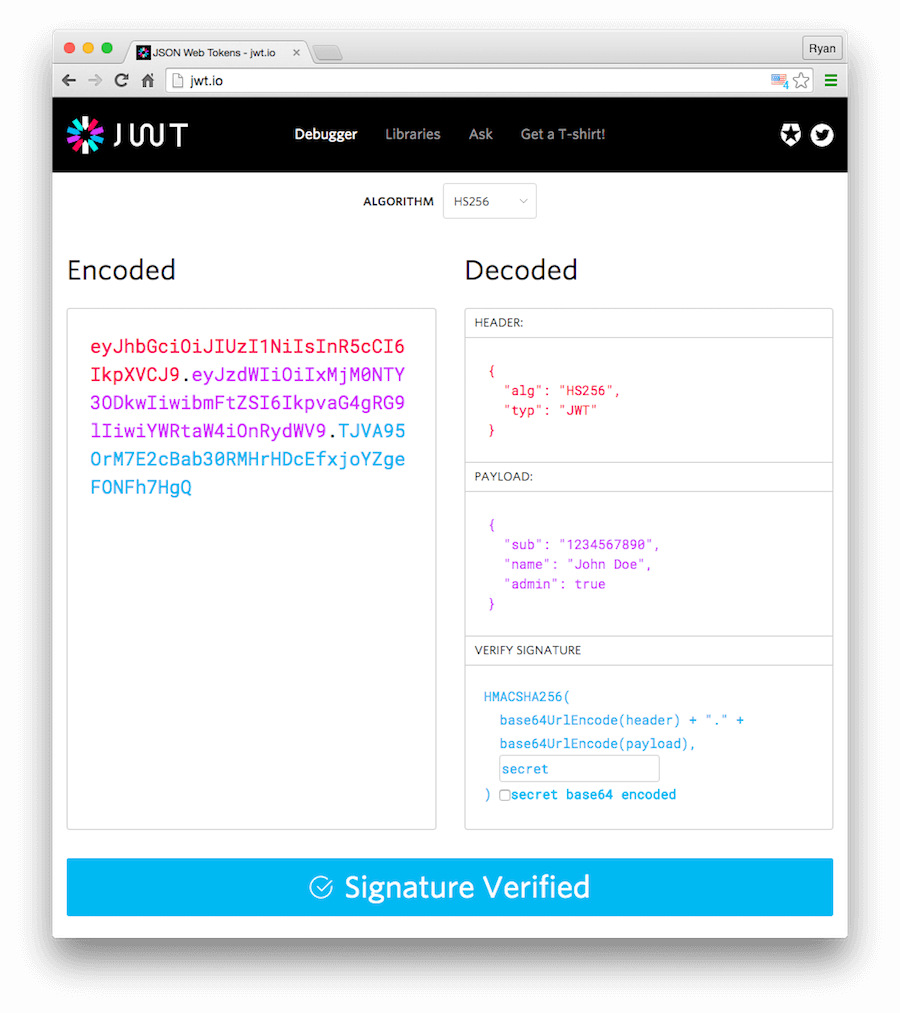
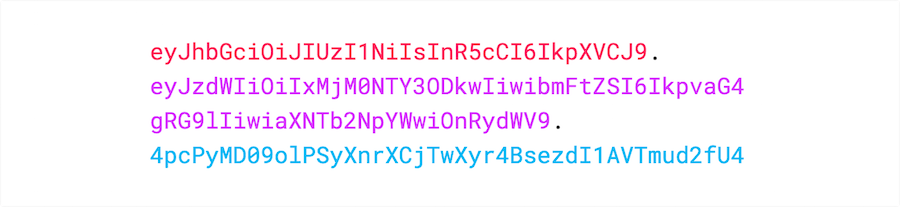 To see for yourself what is inside a JWT, use the [JWT.io Debugger](http://jwt.io). It allows you to quickly check that a JWT is well formed and to manually inspect the values of the various claims.
 ## JOSE header
JSON object containing the parameters describing the cryptographic operations and parameters employed. The JOSE (JSON Object Signing and Encryption) Header is comprised of a set of Header Parameters that typically consist of a name/value pair: the hashing algorithm being used (e.g., HMAC SHA256 or RSA) and the type of the JWT.
```json lines theme={null}
{
"alg": "HS256",
"typ": "JWT"
}
```
## JWS payload
The payload contains statements about the entity (typically, the user) and additional entity attributes, which are called claims. In this example, our entity is a user.
```json lines theme={null}
{
"sub": "1234567890",
"name": "John Doe",
"admin": true
}
```
When working with JWT claims, you should be aware of the different claim types and naming rules.
## JWS signature
The signature is used to verify that the sender of the JWT is who it says it is and to ensure that the message wasn't changed along the way.
To create the signature, the Base64-encoded header and payload are taken, along with a secret, and signed with the algorithm specified in the header.
For example, if you are creating a signature for a token using the HMAC SHA256 algorithm, you would do the following:
```js lines theme={null}
HMACSHA256(
base64UrlEncode(header) + "." +
base64UrlEncode(payload),
secret)
```
## Learn more
* [JSON Web Token Claims](/docs/secure/tokens/json-web-tokens/json-web-token-claims)
* [Validate JSON Web Tokens](/docs/secure/tokens/json-web-tokens/validate-json-web-tokens)
* [JSON Web Key Sets](/docs/secure/tokens/json-web-tokens/json-web-key-sets)
* [JSON Web Key Set Properties](/docs/secure/tokens/json-web-tokens/json-web-key-set-properties)
* [Locate JSON Web Key Sets](/docs/secure/tokens/json-web-tokens/locate-json-web-key-sets)
* [Get Access Tokens](/docs/secure/tokens/access-tokens/get-access-tokens)
## JOSE header
JSON object containing the parameters describing the cryptographic operations and parameters employed. The JOSE (JSON Object Signing and Encryption) Header is comprised of a set of Header Parameters that typically consist of a name/value pair: the hashing algorithm being used (e.g., HMAC SHA256 or RSA) and the type of the JWT.
```json lines theme={null}
{
"alg": "HS256",
"typ": "JWT"
}
```
## JWS payload
The payload contains statements about the entity (typically, the user) and additional entity attributes, which are called claims. In this example, our entity is a user.
```json lines theme={null}
{
"sub": "1234567890",
"name": "John Doe",
"admin": true
}
```
When working with JWT claims, you should be aware of the different claim types and naming rules.
## JWS signature
The signature is used to verify that the sender of the JWT is who it says it is and to ensure that the message wasn't changed along the way.
To create the signature, the Base64-encoded header and payload are taken, along with a secret, and signed with the algorithm specified in the header.
For example, if you are creating a signature for a token using the HMAC SHA256 algorithm, you would do the following:
```js lines theme={null}
HMACSHA256(
base64UrlEncode(header) + "." +
base64UrlEncode(payload),
secret)
```
## Learn more
* [JSON Web Token Claims](/docs/secure/tokens/json-web-tokens/json-web-token-claims)
* [Validate JSON Web Tokens](/docs/secure/tokens/json-web-tokens/validate-json-web-tokens)
* [JSON Web Key Sets](/docs/secure/tokens/json-web-tokens/json-web-key-sets)
* [JSON Web Key Set Properties](/docs/secure/tokens/json-web-tokens/json-web-key-set-properties)
* [Locate JSON Web Key Sets](/docs/secure/tokens/json-web-tokens/locate-json-web-key-sets)
* [Get Access Tokens](/docs/secure/tokens/access-tokens/get-access-tokens)