> ## Documentation Index
> Fetch the complete documentation index at: https://auth0.com/llms.txt
> Use this file to discover all available pages before exploring further.
# Manage your Auth0 Subscription Plan
> Learn how to upgrade, downgrade, or cancel your Auth0 subscription plan.
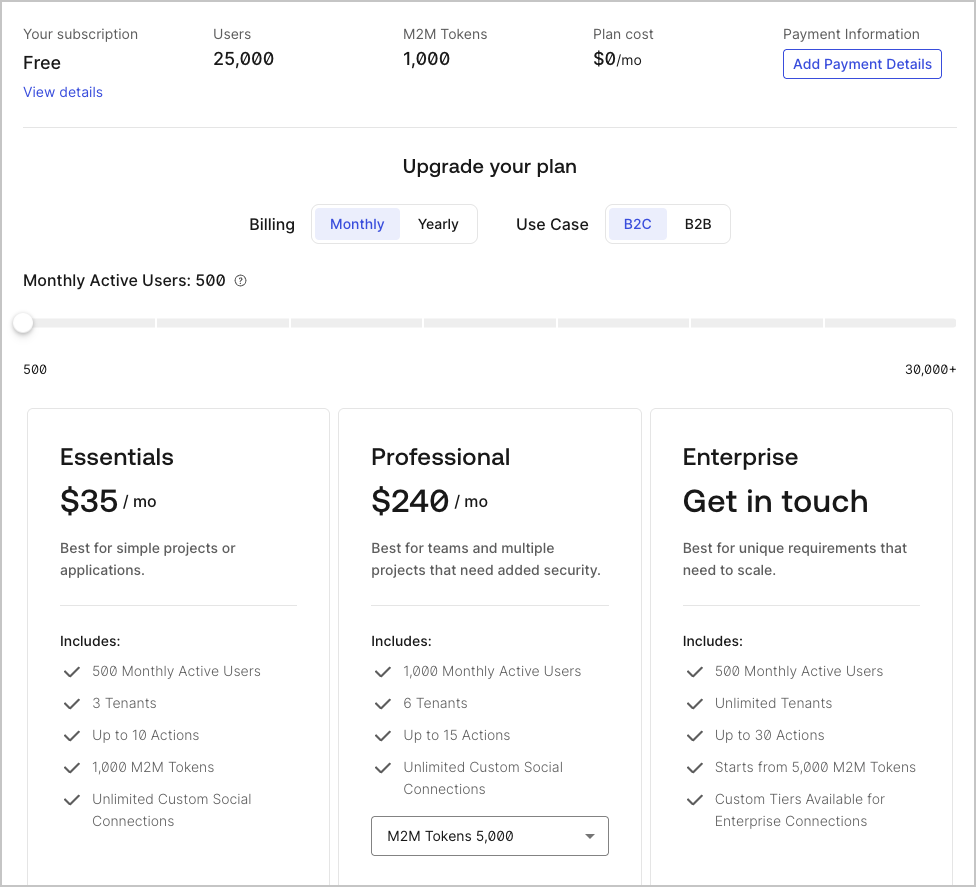
You can upgrade and downgrade between self-service (Free, Essentials, and Professional) plans at any time. If you have an Enterprise plan, refer to your Auth0 agreement for details.
## Upgrade or downgrade self-service plans
[Auth0 Teams](/docs/get-started/auth0-teams) are where you manage your plan and your tenants. If your plan supports multiple tenants, you can [link existing tenants to your team](/docs/get-started/auth0-teams/tenant-management).
To subscribe to a different plan:
1. Go to **[Teams Dashboard](https://accounts.auth0.com) > Settings > Subscription**.
2. Choose the plan you want to change to, and then select **Upgrade** or **Downgrade**. Choosing the **Free** plan cancels your paid subscription.
3. On the **Review and Purchase Plan** page, choose between **Monthly billing** and **Annual billing**. If you do not have your billing information stored with Auth0, you may need to provide it.
4. Select **Purchase And Start Plan** to confirm your plan change.
When you downgrade your Auth0 plan, you may be eligible for a credit on your next billing cycle or a refund. To learn more, read our [Billing Policy](/docs/troubleshoot/customer-support/operational-policies/billing-policy).
### Manage legacy tenant-based subscriptions
Starting 1 December 2023, any legacy Tenant-based subscription updates (except downgrades to Free) automatically convert to a Team-based subscription.
To subscribe to a different plan if you have a legacy tenant-based subscription:
1. Go to to [Dashboard > Settings](https://manage.auth0.com/#/tenant/general).
2. Select the **Subscription** tab.
3. Choose the plan you want to change to, and then select **Upgrade** or **Downgrade**. To cancel your subscription, choose the **Free** plan. If you do not have your billing information stored with Auth0, you may need to provide it.
4. Click **Subscribe Now** to confirm your subscription change.
 ## Manage Enterprise plans
To upgrade to an Enterprise plan, [contact Auth0 Sales](https://auth0.com/get-started?place=header\&type=button\&text=talk%20to%20sales).
If you are subscribed to an Enterprise plan, once your Enterprise Subscription Period ends, the system automatically downgrades your account to the Free Plan. For assistance during this transition, contact your account team or [open a ticket with Auth0 Support](/docs/troubleshoot/customer-support/open-and-manage-support-tickets).
## Learn more
* [Delete or Reset Tenants](/docs/troubleshoot/customer-support/manage-subscriptions/delete-or-reset-tenant)
* [Link Multiple Tenants to a Single Subscription](/docs/get-started/auth0-overview/create-tenants/child-tenants)
* [Remove Tenant Members](/docs/get-started/manage-dashboard-access/remove-dashboard-users)
* [Tenant Settings](/docs/get-started/tenant-settings)
* [Reset Account Passwords](/docs/troubleshoot/customer-support/reset-account-passwords)
## Manage Enterprise plans
To upgrade to an Enterprise plan, [contact Auth0 Sales](https://auth0.com/get-started?place=header\&type=button\&text=talk%20to%20sales).
If you are subscribed to an Enterprise plan, once your Enterprise Subscription Period ends, the system automatically downgrades your account to the Free Plan. For assistance during this transition, contact your account team or [open a ticket with Auth0 Support](/docs/troubleshoot/customer-support/open-and-manage-support-tickets).
## Learn more
* [Delete or Reset Tenants](/docs/troubleshoot/customer-support/manage-subscriptions/delete-or-reset-tenant)
* [Link Multiple Tenants to a Single Subscription](/docs/get-started/auth0-overview/create-tenants/child-tenants)
* [Remove Tenant Members](/docs/get-started/manage-dashboard-access/remove-dashboard-users)
* [Tenant Settings](/docs/get-started/tenant-settings)
* [Reset Account Passwords](/docs/troubleshoot/customer-support/reset-account-passwords)